
A field guide to the directory, organized by where files live and which one wins.
Open your .claude/ directory right now. Go ahead — I'll wait.
Most of it is probably empty. Maybe a stray CLAUDE.md you wrote once and forgot. Maybe nothing at all, because you've been running Claude Code straight out of the box, re-explaining the same context every session, and quietly assuming that's just how it works.
It isn't. You're using maybe a third of what .claude/ can do. There is a complete modern anatomy here: a handful of directories and config keys, each with a defined job and a defined loading order. The highest-leverage features are exactly the ones that don't show up unless you go looking. This post is the map of the whole surface — every directory, what lives in it, and the one rule that ties it all together: which file wins when two of them disagree.
Not build order. Not philosophy. Inventory and precedence. By the end you'll be able to look at any .claude/ tree and know what's there, what's missing, and why one rule overrides another.
There isn't one .claude/. There are two, and the distinction is the foundation for everything else.
The project tree lives at <repo-root>/.claude/. It's committed to git, shared with the team, scoped to this repository. Anything that should travel with the code — the conventions for this codebase, the skills this project needs — lives here.
The global tree lives at ~/.claude/ in your home directory. It's personal, machine-local, applies to every project you touch. Your own habits, your own slash commands, the rules you want everywhere regardless of which repo you opened — those live here.
Here's the project tree, annotated:
<repo-root>/
├── CLAUDE.md                  # project memory — conventions, ground truth
├── .mcp.json                  # team-shared MCP servers (committed)
└── .claude/
    ├── settings.json          # permissions, hooks, outputStyle (committed)
    ├── settings.local.json    # personal overrides (gitignored)
    ├── skills/
    │   └── <name>/SKILL.md     # auto-invoked capabilities
    ├── agents/
    │   └── <name>.md           # specialist subagents
    ├── commands/
    │   └── <name>.md           # custom slash commands
    └── rules/
        └── <name>.md           # path-scoped behavior rules
And the global tree, which mirrors it:
~/
├── .claude.json               # local + user MCP scopes, app state
└── .claude/
    ├── CLAUDE.md              # user memory — applies to every project
    ├── settings.json         # global permissions, hooks, defaults
    ├── skills/               # your personal skills, everywhere
    ├── agents/               # your personal specialists
    └── commands/             # your personal slash commands
The shapes are almost identical on purpose. Nearly everything that can exist at the project level can also exist at the global level. Which raises the obvious question: if you have a skill named code-review in both trees, or a permission rule in both settings.json files, which one runs?
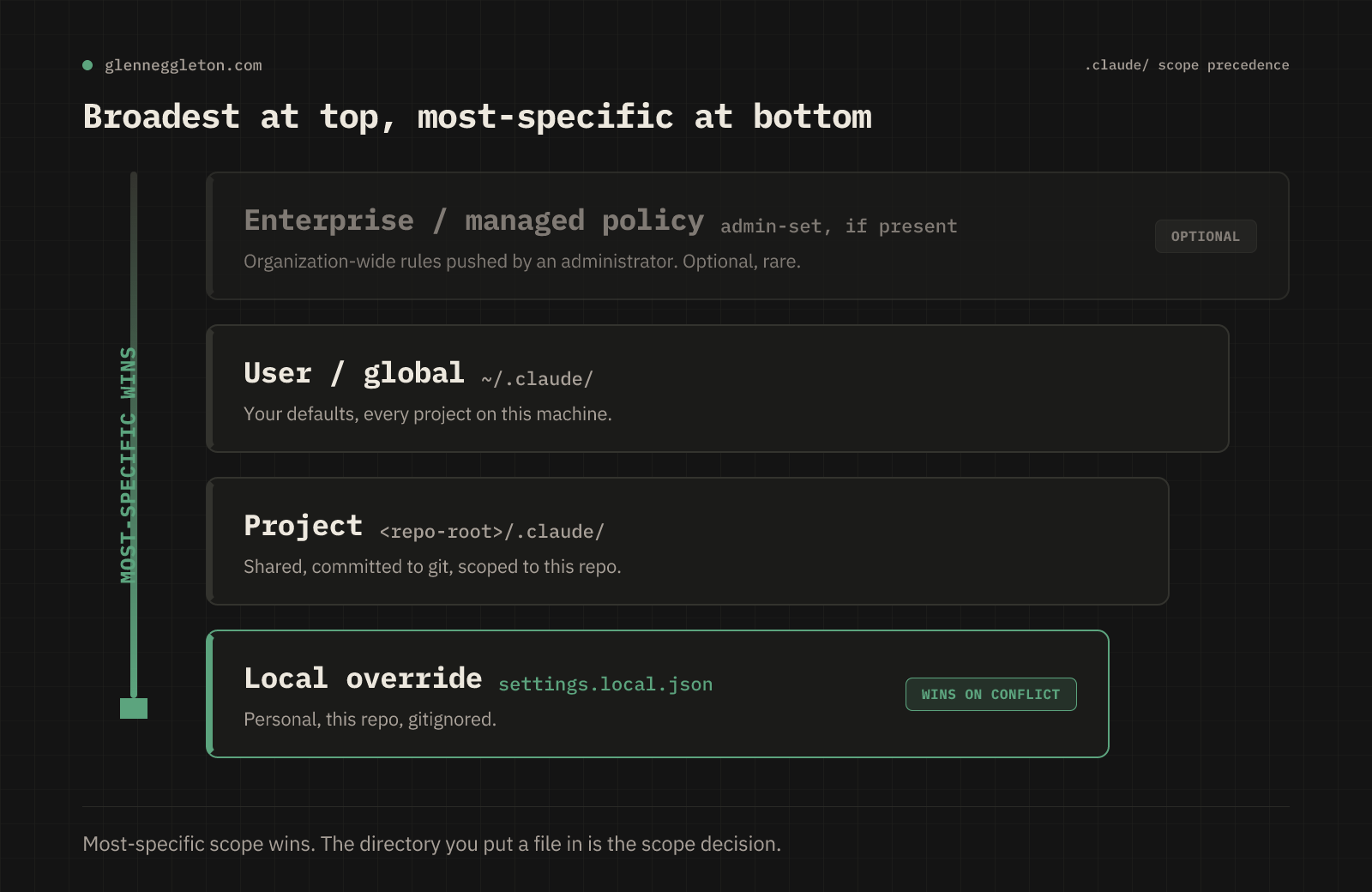
The mental model is a stack, from broadest to most specific:
Enterprise / managed policy (set by an admin, if present) — the outermost layer.
User / global (
~/.claude/) — your personal defaults, every project.Project (
<repo-root>/.claude/) — shared, committed, this repo.Local project override (
settings.local.json) — your personal tweaks for this repo, gitignored.
The principle is most-specific scope wins. A project setting overrides a global one. A local override beats the committed project setting. Your personal ~/.claude/CLAUDE.md sets the baseline; the repo's CLAUDE.md layers on top of it for that repo.
This is not a clever feature you opt into. It's the load order that's running right now, whether you've configured it or not. The reason most people's setup feels unpredictable is that they have rules in one tree, expectations from the other, and no model of which one the agent actually reads.
Once you internalize the stack, configuration stops being guesswork. Want a habit on every machine task you do? Global. Want a convention that travels with the codebase to every teammate? Project, committed. Want to bend the project's rules just for yourself without touching the shared file? settings.local.json. The directory you put the file in is the scope decision.
The seven-component conceptual model — and the build-in-order playbook for assembling all of this from scratch — is its own thing; I cover that in the free AgenticOS Map. This post is the physical anatomy. Same surface, different cut.
settings.json is the control panel. Three parts of it matter most, and almost nobody configures the second two.
Permissions. You can pre-authorize or block tool calls with allow and deny lists, so Claude stops prompting you for the same npm test every session — and can't run the commands you never want it to. An allow entry for the commands you trust removes a class of interruptions; a deny entry is a guardrail that survives across sessions.
Hooks. Hooks wire automated behavior to session events: PreToolUse, PostToolUse, Stop. The canonical one is a PostToolUse hook on Write that runs your linter the moment a file changes. The point is that the harness executes these, not the model. If you've ever asked Claude to "always run the formatter after editing" and watched it forget three turns later, that's because you put it in prose instead of in a hook. Prose is a suggestion; a hook is a guarantee. (The hooks philosophy — when automation earns its place — is its own deep dive in the paid series.)
outputStyle . This one corrects a common misconception. There is no .claude/output-styles/ directory. Output style is a single setting in settings.json:
{
  "outputStyle": "Explanatory"
}
It changes how Claude communicates — for example, an Explanatory style that narrates its reasoning as it works. You can also flip it interactively with /config. If you went looking for a directory, that's why you didn't find one. It's a key, not a folder.
CLAUDE.md is the highest-priority instruction file in the system — the project's ground truth, read at session start. There's a build-order argument about when to write it (short version: last, once the rest of the system exists; long version is in the paid series). Set that aside. Here are the mechanics.
The under-200-lines discipline. CLAUDE.md competes for the same context window as your actual code. A bloated constitution crowds out the thing you're trying to work on, and past a certain length the agent starts skimming it the way you skim a terms-of-service page. Keep it tight. If a rule is derivable from the repo, it doesn't belong here.
/init . Run it once in a new repo and Claude bootstraps a starter CLAUDE.md by reading the codebase — package manager, test command, structure. It's the fastest way from empty to useful.
/memory . Opens the memory files for direct editing so you can curate them deliberately instead of letting them accrete.
Path-scoped rules. This is the feature most people don't know exists, so it gets its own section.
.claude/rules/ is real, current, and badly underused. It solves the CLAUDE.md bloat problem directly.
Every rule you cram into CLAUDE.md loads on every session, whether or not it's relevant. A rule about your API error-handling convention is dead weight when you're editing CSS. Path-scoped rules fix that. A rule file is a markdown file under .claude/rules/ with optional YAML frontmatter, and the key field is paths::
---
paths: ["src/api/**/*.{ts,tsx}"]
---
# API conventions
- Every endpoint returns the standard `{ data, error }` envelope.
- Errors use the shared `AppError` class, never raw throws.
- Validate input at the boundary with the zod schemas in `src/api/schemas/`.
The paths: field accepts glob patterns, including brace expansion like {ts,tsx}. The behavior is the leverage: a rule with paths: loads only when Claude reads a file matching one of those globs. Edit something under src/api/, the API conventions load. Edit a stylesheet, they stay out of context entirely.
A rule file without a paths: field loads unconditionally — use that for genuinely global conventions. But the path-scoped variant is how you keep a large, opinionated codebase governed without paying the context cost on every unrelated edit. It's CLAUDE.md discipline, automated by relevance.
(Reference: the path-specific rules documentation at code.claude.com.)
Custom slash commands and skills both live as markdown files, and they overlap enough to confuse people. The distinction is how they fire.
A custom command lives at .claude/commands/<name>.md and you invoke it explicitly: /my-command. It's a saved prompt you trigger on demand.
A skill lives at .claude/skills/<name>/SKILL.md and is auto-invoked when the conversation context matches its description. You don't have to remember it exists; Claude reaches for it when the work calls for it. That auto-invocation is the whole point — a skill is behavior the system applies for you, a command is behavior you summon.
Both support dynamic content, and these two pieces of syntax are where a lot of power lives:
$ARGUMENTS for user input. All-caps. You can take everything the user passed ($ARGUMENTS), a positional slice ($1, $ARGUMENTS[2]), or a named field ($name). This is what turns a static prompt into a parameterized one — /review src/auth flows src/auth straight into the command body.
`** ! **shell command** ** for live shell output.** Backtick-wrapped, bang-prefixed. It runs the shell command as preprocessing — before Claude ever sees the prompt — and substitutes the output inline. So a command can open with ` !git diff --staged ` and Claude starts the turn already looking at your real, current diff. No copy-paste, no stale context.
Skill frontmatter is richer than most people realize. The fields you'll actually use:
nameanddescription— the latter drives auto-invocation, so write it for matching, not for marketing.allowed-tools— hyphenated, not camelCase. This trips people up constantly. Restrict a skill to exactly the tools it needs.disallowed-tools— the inverse, when a denylist is cleaner than an allowlist.disable-model-invocation— make a skill manual-only (no auto-invoke).user-invocable— control whether a user can trigger it directly.paths— scope a skill to relevant files, same idea as rules.arguments— declare the inputs the skill expects.context: fork— run the skill in a forked context so it doesn't pollute the main conversation.agent,model,effort— route the skill to a specific subagent, model, or effort level.hooks— wire skill-local event behavior.
You don't need all of these on day one. You do need to know they exist, because the difference between a skill that works and one that quietly grabs the wrong tool is usually one frontmatter line.
.claude/agents/ holds named subagents with declared scope and a declared tool allowlist. A code-reviewer that reviews but never writes. A security-reviewer that flags but never fixes. You dispatch them from an orchestrator, they do their narrow job, they report back.
The mechanic worth knowing here is the restriction: a subagent can be locked to a specific model and a specific set of tools, which is what makes fan-out safe. You can launch several at once over isolated worktrees without them stepping on each other or reaching for tools they shouldn't have. The why — separation of concerns at the agent level, the briefing discipline, the review gate — is the subject of the paid series' agents post. The where is .claude/agents/, and you manage the whole roster with /agents.
MCP (Model Context Protocol) is how Claude Code reaches systems outside the repo — a database, an issue tracker, a docs server. Where you put the config decides who gets it, and that maps cleanly onto the scope stack:
.mcp.jsonat the project root is team-shared. Commit it, and every teammate who clones the repo gets the same servers wired up. This is the one you want for project infrastructure.~/.claude.jsonholds your local scope (just the current project, just you) and your user scope (every project, just you).
You don't hand-edit these in practice. You run:
claude mcp add --scope project <name> <command...>
claude mcp add --scope user <name> <command...>
claude mcp add --scope local <name> <command...>
The --scope flag is the same precedence decision in command form. project writes to the committed .mcp.json; user and local write to ~/.claude.json. Pick the scope, and you've decided who inherits the server.
Here's the part of the inventory most people never reach — the built-in slash commands that ship with Claude Code and never announce themselves. These aren't files you write. They're already there.
Context and session management:
/compact— compress the conversation history when it gets long, keeping the thread alive without the bloat./clear— wipe the context and start fresh./context— show what's currently loaded into the context window. The single best way to see why the agent is behaving the way it is./effort— tune how much reasoning effort the model spends.
Working and recovering:
/plan— plan mode: the agent thinks through the approach before touching anything./rewind— roll back to an earlier checkpoint. Claude Code keeps checkpoints;/rewindis the undo you didn't know you had when a session goes sideways./loop— run a prompt or command on a repeating interval./copy— copy output to the clipboard.
The high-leverage ones worth featuring:
/agents— manage your subagents (the roster from theagents/section)./code-review— multi-axis review, with--fixto apply findings and--commentto post them inline./batch— make parallel changes across worktrees./diff— inspect changes directly./goal— set and track the session's objective.
If you take one action from this whole post, run /context in your next session and look at what's actually loaded. Then run /agents and /code-review once each. Most people discover in five minutes that the tool they've been using is a fraction of the tool that shipped.
The official docs at code.claude.com are the ground truth for every claim in this post — when something here disagrees with a folk pattern you read somewhere, trust the docs. Beyond them, the community has built a substantial catalog of skills, commands, and agent definitions worth borrowing from: awesome-claude-code. Read a few well-built skill files before you write your own; the frontmatter patterns alone will save you an afternoon.
You came in using maybe a third of .claude/. You now have the complete modern anatomy: two trees, project and global; the precedence stack that decides which file wins; settings.json for permissions, hooks, and the outputStyle key; CLAUDE.md mechanics and the under-200-line discipline; path-scoped rules/ that load only when relevant; commands versus auto-invoked skills with $ARGUMENTS and live shell substitution; specialist subagents in agents/; MCP wiring by scope; and the built-in slash commands hiding in plain sight.
The gap was never the tool. It was the inventory. You can't configure a directory you've never mapped.
Two paths from here, depending on what you want next:
If you want the mental model for building all of this in order — what to write first, what to write last, and why — start with the free AgenticOS Map. It's the build-in-order companion to this anatomy.
If you're an engineer ready to build now, the paid AgenticOS series walks the construction end to end, starting with P1: Skills — the atomic unit of agent behavior. That's where the anatomy becomes a system.
Both paths start the same way: subscribe, and the free AgenticOS Map lands in your inbox next.
Subscribe to AgenticOS on Substack
<details>
<summary>SEO meta</summary>
Title (≤60 chars): Modern Claude Code: The Complete .claude/ Anatomy
Meta description (≤155 chars): The complete modern .claude/ directory anatomy — every folder, scope precedence, and the Claude Code power-user features most people never configure.
URL slug: modern-claude-code-anatomy
Primary keyword: .claude directory
Secondary keywords: claude code features, claude code power user, claude code rules, claude code settings.json
Search intent: informational
</details>
No posts
Comments
Nothing yet. Say the first thing.
Sign in to join the conversation.