

You can play along at home: just download the browser extension Privacy Badger and start browsing the web. Built by the nonprofit Electronic Frontier Foundation (EFF), this extension monitors and blocks ‘third-party tracking’ on the internet: in other words, aside from you and the website you’re trying to visit, who else is watching what you’re doing on the internet?
Online shopping sites are particularly notorious for tracking, so I tried visiting Old Navy’s website, and was shocked to find 36 different trackers, including ones run by Amazon, Bing, Bluecore, Bttrack, Demdex. Doubleclick, Facebook, Fullstory, Kamyple, Micpn, NewRelic, Optimizely, Salesforce, Tiktok, Twitter, Yahoo, and Yimg. I don’t even know who some of those companies are… but they know me!
So many of the web’s founding figures are wide-eyed optimists preaching about unlimited freedom, or sometimes craven robber-barons looking to mine every bit of value out of the new digital frontier, but in modern interviews, Montulli presents more as a utilitarian: a man navigating the practical realities of the world and searching for the best available solution.
“It’s better the devil you know than the devil you don’t,” he often says, when he’s trying to defend his most notorious creation, because Lou Montulli invented the internet cookie.
It was 1993, still the dawn of the world wide web. Montulli was part of a team developing a new internet browser, which would become Netscape Navigator. At the time, the success of the open internet was by no means a sure thing: corporate-owned, walled-garden systems like AOL and MSN were already colonizing this new space. The Netscape team were looking for a competitive advantage.
Even though the Netscape team was planning to release their browser for free to the public, they spent a lot of time thinking about how people could make money on the internet. Says Montulli, “The thought was, if we enabled e-commerce, we would essentially create a revenue stream for the internet…. It’s all well and good to have a set of technologies that allows anyone to freely surf the internet, but if there weren’t companies to provide information and business on the internet, there would be no future funding.”
At the time, websites had no ‘memory.’ Each time you visited a website – in fact, each time you visited a new page on a website – it would be like you were a brand-new person. You couldn’t log in and stay logged in, you couldn’t change a setting and have that setting remain changed, and, for e-commerce, if you added an item to a shopping cart and then clicked away to keep shopping, the cart would be lost forever.
One proposed solution was to assign each user a permanent, unique ID that could be logged and tracked as they moved across the internet, but for Montulli and the Netscape team, “privacy should be a first principle. One should be able to anonymously surf the internet if desired, and you shouldn’t be able to be tracked across websites.” His solution was to allow websites to create a tiny file that would be stored on the user’s computer, where the website could note the user’s activity and refer back to it later. He called it a ‘cookie.’
Because the file sat on the user’s computer (and not on the website’s servers), the user had control: if they ever wanted the website to ‘forget’ them, with the click of a button they could delete everything the website knew about them. And because the cookie could only be accessed by the website that created it, and only while the user was visiting that website, the information was limited: companies couldn’t snoop on their users’ behaviour across the internet or build a global profile of them.
Netscape Navigator shipped for free, with cookies enabled.
Montulli had set up the cookies so that they could only be accessed by the website you’re currently visiting, but as it turns out, on the internet, that gets complicated. A single webpage might include an image file stored on Flickr’s severs, an embedded YouTube video running off YouTube’s servers, an analytics tool run by Google, a “Share to Facebook” button run by Facebook, and more. In effect, you’re visiting all of those companies at once, and all of them now have the right to create their own cookie and monitor your activity on that page.
Where this gets really thorny is advertising. Most banner ads on the web are run by a small handful of companies, who pay websites to rent space and place an ad box, which they run off their own server. Now, when a user visits that site, the ad company can install a cookie and track the user on that site, as well as every other webpage across the internet where they have an ad.1
The problem of these ‘third-party cookies’ soon got back to Montulli and the Netscape team, and they had to decide how to respond. They could have turned off cookies entirely, but instead they chose to let the user decide. They added icons into the browser to make it clear to the user when cookies were being created, and they added options in the Settings menu to give the user the power to control their cookie permissions or turn them off entirely. “Essentially what we were saying was, we want to support advertising on the web, because it’s the only revenue model and the web is an important resource that needs to survive, but we also want to make sure that users have the choice of having high-end privacy.”
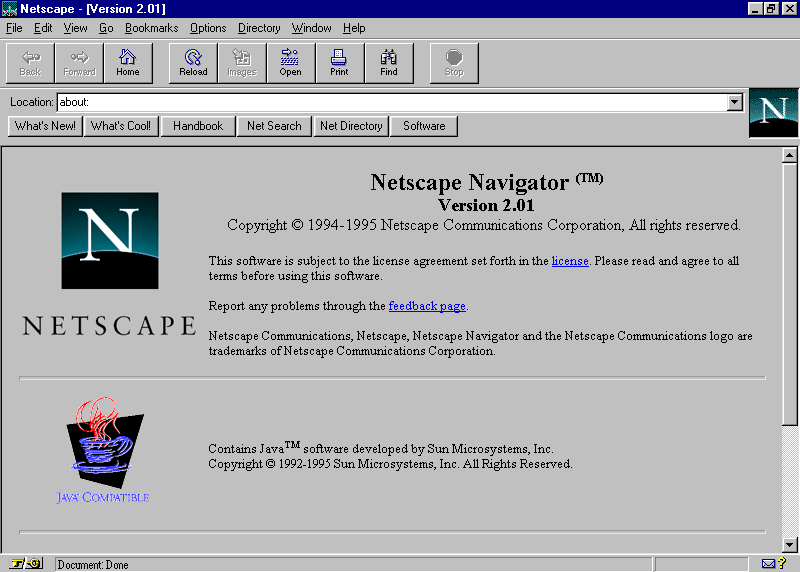
Indeed, the fact that cookies are so visible to the user has made them notorious. Even casual web users know about cookies and their problems, and more and more people now take advantage of those browser settings to disable them. Legislators have gotten involved too: the European Union passed the General Data Protection Regulation in 2018, which placed strict limits on any website that handled data about European citizens (i.e. most websites), including specific rules around cookies, which is why so many sites now have intrusive popups when you first log on, asking you whether you want to accept cookies.
Many websites still use cookies, but there are other, trickier methods too. Tracking can be embedded in JavaScript code or squirrelled away in local storage. Your IP address can serve as a unique marker to track you across the web, and it’s even possible to subvert the encryption keys that keeps you safe on the internet, to build a unique profile of you.
Logins and accounts enable tracking too, and when you click “I Accept” to the terms and conditions when you sign up, you agree to all of it. If you log into Gmail, and stay logged in while you do a Google Search, Google can now track your email communications and search history, and tie it all back to an account linked to your real name. While we’re talking Google, browser tracking is also now a thing, and Chrome has all those settings turned on by default.2
And then there’s fingerprinting. When you access a website, the website can request specific information about you from your browser. It may need to know if you’re browsing on desktop or mobile, for instance, so it knows which version of the site to show. It can ask which browser you’re using, which operating system, your default language, which fonts you have installed…. Discord might ask if you have your microphone turned on or not, Google Maps might ask if you have location services enabled, and Facebook might ask your local time zone, so it can properly display what time a message came in.
In total, there are at least 60 different bits of data a website can request about you. If you add up all those disparate pieces of information, you achieve what’s been termed a ‘browser fingerprint,’ a combination of data that may well be utterly unique in the world,
Go to the website amiunique.org and click “See my fingerprint.” It will show you all the little pieces of information it’s able to collect about you, and will give you a score for how unique they are. It turns out that, of the 4,343,012 records they have on file (at time of writing), I truly am a unique and special snowflake! (That’s bad.)
If third-party cookies are the devil we know, fingerprinting is the ultimate devil we don’t. It’s been termed the “cookieless monster” because, regardless of your privacy settings, regardless of what trackers you block, your fingerprint follows you around the internet and can be used to build a profile of you. Instead of a file on your computer, under your control, this new profile exists in the databases of anonymous ad tracking companies, who may use that data however they want and share it around with other companies, building an accurate, persistent profile of you.
There are some partial solutions: CanvasBlocker is a browser extension specifically designed to block fingerprinting requests. Privacy Badger, mentioned earlier, helps block some of the third parties that request fingerprint data, as will a good ad blocker, like uBlock Origin. Switching to a privacy-focused browser with a healthy privacy settings menu can help too. TOR, Brave, or even Firefox (which was created by many of the original Netscape team) all offer a higher level of control over what information you’re sending out into the world.
“With money, there will always be a way to subvert the best attempts of technologists to preserve privacy,” says Lou Montulli. “Cookies as the central point of control for ad tracking is a reasonable compromise, because users have a viable option for turning them off. And all the other options for tracking that we know of today are completely out of the control of the user. If the ad industry moves to other tracking technologies, the user will no longer have the option to opt out.”
Thanks for reading Over the Walled Garden! This newsletter is free, so spread the word by sharing it around.
Fun fact: Privacy Badger tells me there are at least three third parties involved in my Over the Walled Garden homepage on Substack. As far as I can tell, these aren’t ad tracking. One is being used for analytics (static.cloudflareinsights.com), one for search engine tagging (www.googletagmanager.com), and one is a font library (fonts.gstatic.com), but I’m honestly not sure what other info they’re collecting. A fun little reminder about existing on the corporate internet.
Also worth mentioning in the Google section is Privacy Sandbox, Google’s failed attempt to revolutionize tracking, by making it a monopoly. Instead of using cookies, Google Chrome would track your activity itself and use that to slot you into ‘Topics’ of interest, which advertisers could then access and use to serve you relevant ads. Google called it “the death of the third-party cookie” and “enhanced ad privacy,” which the EFF called “deceiving” and which the Department of Justice called anti-competitive, since it would give Google even greater control over the ad market and user data. Google dropped Privacy Sandbox in 2024, though there are still Topics-related privacy settings in Chrome.
Comments
Nothing yet. Say the first thing.
Sign in to join the conversation.