
Honestly, I’ve never been a fan of channel groupings. I never used them in Universal Analytics either, but at least in Universal, the source/medium report was a default report and easy to find… In Google Analytics 4? Not so much.
Here is the thing: saying that “Paid Social” is going well, but not being able to pinpoint which platform is performing leaves money on the table. Straight up.
Suppose we are spending on the following:
$5,000/mo on Meta Ads
$7,000/mo on LinkedIn
$2,000/mo on TikTok (as a test)
$5,000/mo on Reddit
And all we can say is, “it’s working 🙂”
What are we supposed to do with that information? Increase all budgets by $500? Or like.. “just keep it up!”?
What if Reddit was driving 60% of the conversions and TikTok was doing literally nothing... But all you knew was “Paid Social is up!” So you increased spend across all platforms, INCLUDING TIKTOK. Congrats, you just lit $2,500 on fire 🔥
That’s wild. That’s being complacent, and we all know how I feel about that 😏
There are 18 default channel groups in Google Analytics 4.
Direct
Cross-network
Paid Shopping
Paid Search
Paid Social
Paid Video
Paid Other
Display
Organic Shopping
Organic Social
Organic Video
Organic Search
Email
Affiliates
Referral
Audio
SMS
Mobile Push Notifications
Google creates VERY specific rules around what goes where. If you’ve never seen them, I highly recommend checking out the documentation.
A lot of the channel groupings are based on the auto-tagging done by Google’s products (Google Ads, Merchant Center, etc).
For everything else, they keep a massive excel sheet of traffic sources that categorizes traffic sources into a channel.
Looking into the actual sources of traffic under each of these channel groupings has sent me into a tizzy more than once.

These are just a few examples that really throw me:
wikihow.com is marked SOCIAL
Since when was WikiHow a social platform?!
wordpress.com, weebly and the like are marked SOCIAL
Uh… if you’re working on a website, make sure your CMS is maked as an unwanted referrer and filter out your IP address.
ALL of the payment processors and ecom CMSs are marked SHOPPING
Again, make sure they are unwanted referrers and you filter out your IP address. (Sound familiar? Yeah, this is the same attribution problem from my other post.)
yelp, trustpilot, and the like are marked SOCIAL
Are social teams really in charge of this? Or is this an SEO thing? I, personally, would rather it just be under "Referral” cause it’s usually, you know, people being referred to you.
twitter.com is marked as SOCIAL
This one is funny because all of their traffic comes from the source t.co (which is listed), and the site is now called X (not listed), but whatever.
rakuten is marked as SEARCH
Search teams… y’all working on Rakuten?
I mean, I could go on and on. There are so many of these classifications that I worry about for my clients.
Outside of the odd classification of sources, Google also uses naming conventions that are a bit misleading.
Do you know what that means? Me neither!
But if you run Google Ads, you might want to :)
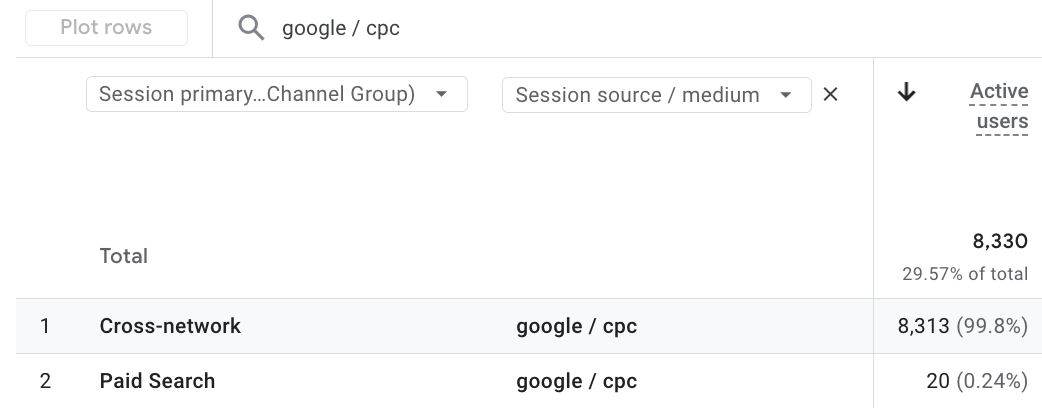
The definition for Cross-network is this….
Cross-network is the channel by which users arrive at your site/app via ads that appear on a variety of networks (e.g., Search and Display).
But how does it determine WHICH ads get put into this channel specifically?
Well, there are two different ways.
If Google identifies the traffic as Google Ads traffic by itself using source platform, ad network type, and campaign type, the rule is
Source platform is “Google Ads”
AND
Google Ads ad network type is one of (”Cross-network”, “Google owned channels”)
Cross-network includes Demand Gen, Performance Max and Smart Shopping.
OR
Google Ads campaign type is one of (”Performance Max”, “App”, “Smart”, “Demand Gen”, “Local”)
However, if your campaigns are manually tagged, the rule is:
Campaign Name contains “cross-network”
Cross-network includes Demand Gen, Performance Max and Smart Shopping.
I don’t think I know anyone who uses “cross-network” in their campaign names, but hey, I could be wrong.
& honestly, I’ve seen other Google Ad traffic fall into this category.
Now you might be thinking, “if Google has put so much thought into this, how the HECK do people still end up with ‘Unassigned’ traffic?!
Basically, if you don’t follow their instructions perfectly, it’s going to Unassigned, and you or your clients are going to freak out 😅
I see it allllll of the time.
Marketers try to do the “right thing” by tagging their traffic with UTM parameters, only to “lose it” altogether. But really, it’s just been lumped into the Unassigned traffic.
Don’t get me wrong, UTMs are a MUST in today’s world. I’m not faulting the marketers here… I’m faulting the use of channel groupings, remember? 😅
PS! If you use UTMS, GA4 Helper added a UTM builder to the site this week that keeps the UTM for you for future reference AND estimates what channel grouping GA4 will place the traffic in.
Let’s say you are sending a newsletter out every week via this lovely Substack app and in that newsletter you tag all of the links with utm_source=substack and utm_medium=newsletter.
All of that traffic is going to Unassigned.
Why? Because Google wants the word “email” (or some version of it) in either the source or medium. If it’s not there, to Unassigned it goes!
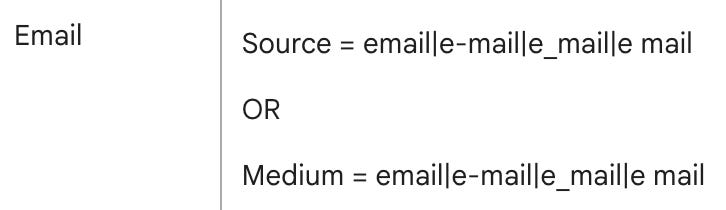
Another HUGE example of this right now is ChatGPT.
They are “trying to help marketers” by adding the parameter utm_source=chatpt.com to the end of some of their citations.
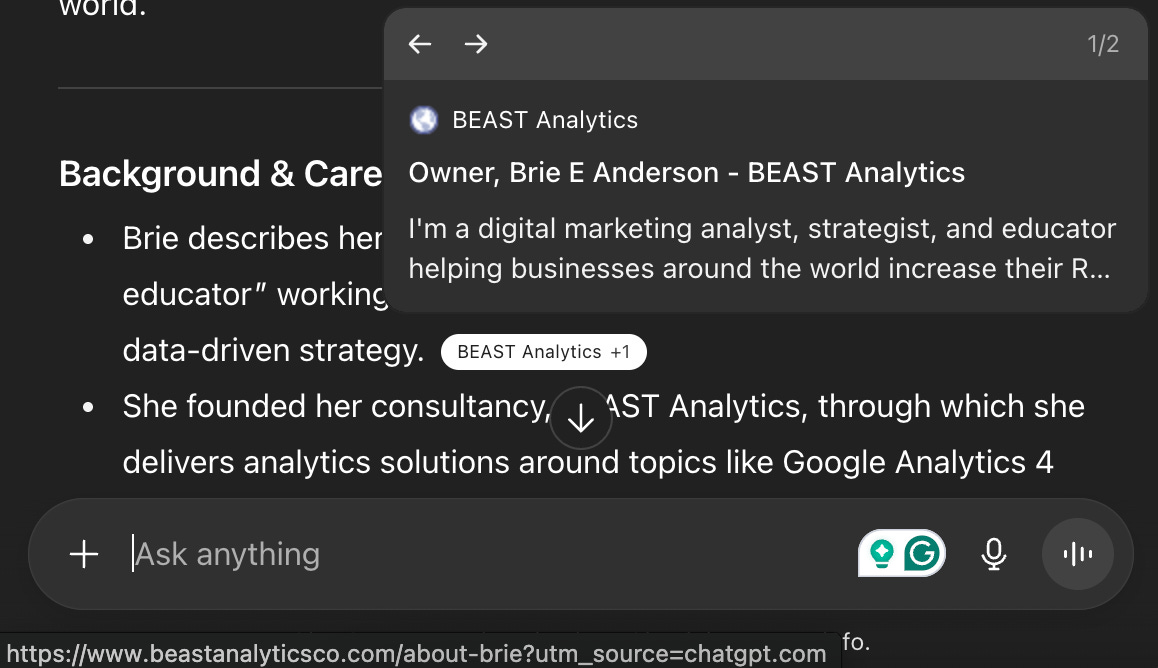
I think this is a little funny for a few reasons, mainly because the source is very clear in the URL and EXACTLY the same as what they put in the UTM. 😅
Still, I can appreciate the extra care taken to ensure marketers can tie it back to the platform when the source is lost. It’s kinda sweet ❤️
BUT this has actually caused a bit of an issue…
The recommendation around UTMs is always to use AT LEAST utm_source and utm_medium.
Because once a UTM is introduced, Google’s understanding of the source goes out the window, and the medium is set to (not set). So, the second you add a utm_source, Google relies on YOU to define everything.
And because Google doesn’t know the medium, into Unassigned it goes!

You’re literally losing visibility into what could be a massive new traffic source. Cool, cool, cool.
Remember! If you want to use channel groups and you use UTMS, GA4 Helper added a UTM builder to the site this week that estimates what channel grouping the UTM will fall into (& keeps the UTM for you for future reference).
I highly recommend relying on source/medium dimensions (First user source/medium, Session source/medium, and Source/medium) when analyzing traffic.
But if you ever want to run a quasi audit of where your Unassigned traffic is coming from, create this report in Explore:
Create a blank exploration
Add these dimensions: Page referrer, Session default channel group, Session source/medium, Landing page + query string
Add the Sessions metric
Add a filter where Session default channel group EXACTLY MATCHES Unassigned
Add the dimensions in order (Page referrer, Session default channel group, Session source/medium, Landing page + query string) in the Rows section
Add Sessions under metrics
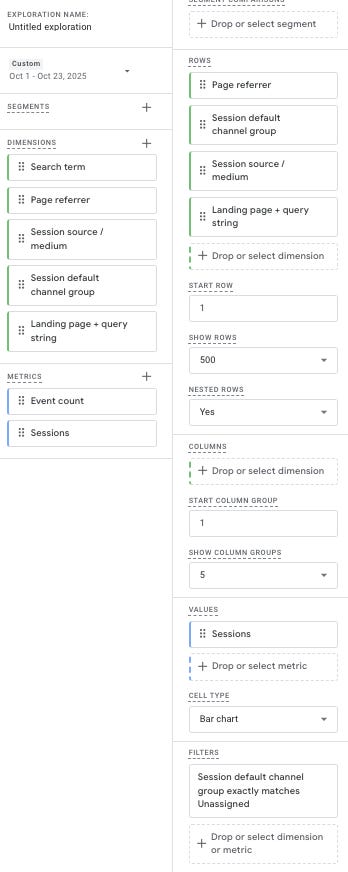
Now you can see exactly what traffic is being marked as Unassigned, either through the Page referrer, Session source/medium, or Landing page.
For reference: I did this for seojobs.com for the last 23 days, and of the 85 sessions under Unassigned, 77 of them could be traced back to ChatGpt or Perplexity 🙂
A lot of people swear by custom channel groupings, and they may be a good option, especially if you use UTM parameters well!
However, you will always run the risk of missing something by relying solely on Channel Groups.
You do not have proper visibility in channel groups; you just don’t!
A potential new partner or industry-specific AI could be living in your Referral traffic, and you would never know.
Why risk it?
And I recommend you do as well.
I understand it isn’t perfect… Facebook comes through as 17 different sources (m.facebook.com, l.facebook.com, facebook.com, etc), and creating a comprehensive UTM plan and getting everyone to stick to it is freaking hard!!!!
But looking through all of your source/medium combinations is the only way to get true insight into where your traffic is coming from.
I have customized most of my clients’ traffic acquisition reports in GA4 to use the default dimension Session source/medium and have done the equivalent to their User acquisition reports.
It’s an easy way to get more visibility into where traffic is coming from.
Channel groupings feel easier. They’re clean, organized, simple.
Source/medium takes more work to analyze, yeah. But would you rather do a little extra work or keep flying partially blind? 🤷♀️

No posts
Comments
Nothing yet. Say the first thing.
Sign in to join the conversation.