
In the last issue of May 10th (check it out if you forgot), you built and deployed a synchronous AI Task Agent.
You type a sentence. The agent breaks it into a structured action plan. You get output in under two seconds.
It works. It’s live on Render. And it’s already limited.
The moment a user submits a request that takes longer than a few seconds, report generation, multi-source data analysis, embedding indexing, your synchronous API call hits an HTTP timeout and dies.
That is the deployment wall most engineers hit and never recover from.
This issue removes it.
BEFORE YOU BUILD: CLAIM YOUR FREE $25 IN RENDER CREDITS
Everything in this issue runs on Render. If you have not claimed your credits yet, do it before you start.
Sign up for Render using the link below.
Go to your Render Dashboard and log in with your email.
Open a new tab and claim your code here: 👉 CODE LINK
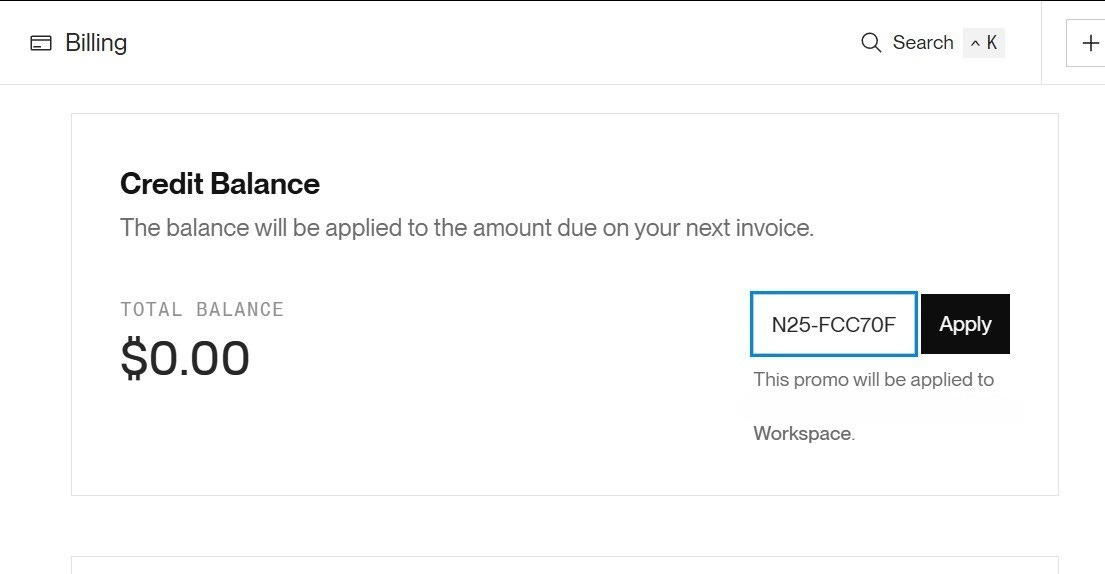
Back inside Render go to: Billing → Add Credits → Redeem Code
Paste your code exactly as shown. Credits appear automatically.
Takes less than two minutes. Credits valid until 2027.
👉 Claim your free $25 Render credits
Same agent. Completely different architecture underneath.
Version 1 was synchronous, one request, one response, one point of failure.
Version 2 runs on background workers. The HTTP request returns immediately. The work happens in the background. The result gets delivered when it is done, not when the connection permits it.
This is how production AI systems actually work.
Here is the failure pattern:
User submits request
→ HTTP connection opens
→ LLM call starts
→ LLM takes 8–12 seconds on a complex prompt
→ HTTP timeout fires at 10 seconds
→ Connection drops
→ User sees an error
→ You lose the result entirely
You can tune timeouts. You can add retry logic. You are still patching the wrong thing.
The real fix is decoupling the HTTP layer from the work layer. The request takes the job. A worker does the job. They never block each other.
Version 1 (synchronous):
HTTP Request → LLM Call → HTTP Response
Version 2 (async with Render Workflows):
HTTP Request → Job Queue → HTTP Response (immediate)
                    ↓
              Background Worker
                    ↓
              LLM Call (no timeout pressure)
                    ↓
              Result stored / delivered
Three layers. Each one independent. Each one replaceable without touching the others.
Render Workflows handles everything between the job queue and the result delivery. You define tasks as functions. Render handles scheduling, retries, logs, and execution tracking.
You do not manage servers. You do not write queue infrastructure. You write tasks.
import { task } from '@renderinc/sdk/workflows'
export const processTask = task(
  { name: 'process-ai-task' },
  async function processTask(input: { prompt: string; jobId: string }) {
    // This runs in the background — no HTTP timeout
    // No connection to maintain
    // No user waiting
    return await runLLMAnalysis(input.prompt)
  }
)
That function runs whenever Render fires it. It does not care about your web server. It does not share a process with your HTTP layer. It gets its own execution environment, its own logs, and its own retry policy.
When a user submits a request, you immediately return a job ID. The actual work gets queued.
// app/api/analyze/route.ts
import { NextRequest, NextResponse } from 'next/server'
import { queueJob } from '@/lib/queue'
import { nanoid } from 'nanoid'
export async function POST(req: NextRequest) {
  const { prompt } = await req.json()
  const jobId = nanoid()
  // Queue the work — do NOT await it
  await queueJob({ jobId, prompt })
  // Return immediately
  return NextResponse.json({ jobId, status: 'queued' })
}
The user gets a response in milliseconds. The work starts in the background.
// workflows/analyzeTask.ts
import { task } from '@renderinc/sdk/workflows'
import { updateJobStatus } from '@/lib/db'
export const analyzeTask = task(
  { name: 'analyze-task' },
  async function analyzeTask({ jobId, prompt }: { jobId: string; prompt: string }) {
    await updateJobStatus(jobId, 'processing')
    const result = await fetch('https://api.groq.com/openai/v1/chat/completions', {
      method: 'POST',
      headers: {
        'Authorization': `Bearer ${process.env.GROQ_API_KEY}`,
        'Content-Type': 'application/json',
      },
      body: JSON.stringify({
        model: 'llama-3.3-70b-versatile',
        messages: [
          {
            role: 'system',
            content: `You are a task planning assistant.
Break the user input into:
1. A one-sentence summary
2. Action items with priorities (High / Medium / Low)
3. Next steps
Return clean, structured output.`
          },
          { role: 'user', content: prompt }
        ]
      })
    }).then(r => r.json())
    const output = result.choices[0].message.content
    await updateJobStatus(jobId, 'complete', output)
    return { jobId, output }
  }
)
This task runs independently. If it fails, Render retries it automatically. If it succeeds, the result is in your database. The web server never knew either way.
The frontend polls this to check when the job is done.
// app/api/status/[jobId]/route.ts
import { NextRequest, NextResponse } from 'next/server'
import { getJobStatus } from '@/lib/db'
export async function GET(
  req: NextRequest,
  { params }: { params: { jobId: string } }
) {
  const job = await getJobStatus(params.jobId)
  if (!job) {
    return NextResponse.json({ error: 'Job not found' }, { status: 404 })
  }
  return NextResponse.json({
    jobId: job.id,
    status: job.status,
    output: job.output ?? null,
  })
}
This is the upgrade from the last issue. You are adding a background worker service alongside the web service.
services:
  - type: web
    name: ai-task-agent
    env: node
    plan: free
    region: oregon
    buildCommand: npm install && npm run build
    startCommand: npm start
    envVars:
      - key: GROQ_API_KEY
        sync: false
      - key: DATABASE_URL
        sync: false
      - key: NODE_VERSION
        value: 20
  - type: worker
    name: ai-task-worker
    env: node
    plan: free
    region: oregon
    buildCommand: npm install && npm run build
    startCommand: npm run worker
    envVars:
      - key: GROQ_API_KEY
        sync: false
      - key: DATABASE_URL
        sync: false
      - key: NODE_VERSION
        value: 20
One file. Two services. The web server handles HTTP. The worker handles everything else. Push to GitHub and Render picks up both automatically.
Your jobs need to live somewhere between the queue and the result. Render Postgres takes thirty seconds to spin up.
Add this to render.yaml:
databases:
  - name: ai-task-db
    plan: free
    region: oregon
And your db utility:
// lib/db.ts
import { Pool } from 'pg'
const pool = new Pool({ connectionString: process.env.DATABASE_URL })
export async function updateJobStatus(
  jobId: string,
  status: string,
  output?: string
) {
  await pool.query(
    `INSERT INTO jobs (id, status, output, updated_at)
     VALUES ($1, $2, $3, NOW())
     ON CONFLICT (id) DO UPDATE
     SET status = $2, output = $3, updated_at = NOW()`,
    [jobId, status, output ?? null]
  )
}
export async function getJobStatus(jobId: string) {
  const { rows } = await pool.query(
    'SELECT id, status, output FROM jobs WHERE id = $1',
    [jobId]
  )
  return rows[0] ?? null
}
Push to GitHub
→ Render detects render.yaml
→ Spins up web service
→ Spins up worker service
→ Provisions Postgres
→ Both services connect automatically via DATABASE_URL
No manual configuration. No environment setup outside the yaml. Everything tracked in Git.
Now use your imagination turn this into something amazing

Version 1 Version 2 Architecture Synchronous Async + background workers HTTP timeout risk High None Failure recovery Manual Automatic retries via Render Scalability Single process Worker scales independently Infrastructure One service Web + worker + Postgres Deploy config render.yaml (1 service) render.yaml (3 services)
Version 1 was a demo. Version 2 is a production system.
This is issue two of three.
This issue: Background workers, job queues, async execution, Render Workflows as the architecture backbone.
Next issue: Getting your first paying user. Who buys this, how to pitch it, and how to close the deal using a live demo instead of a deck.
The agent is now production-grade. The next step is getting paid for it.
Start the upgrade today. Share this with one engineer who is still building synchronous AI apps.

REMINDER: CLAIM YOUR RENDER CREDITS (Otherwise what’s the point ?)
If you have not claimed your free $25 yet, do it before you start the build. Takes two minutes and your entire deployment is covered.
Credits valid until 2027.
ONE THING WE NEED FROM YOU
We do not sell courses. We never want to.
What we want is for every engineer reading this to ship something real.
Something that runs on the internet. Solves a real problem. Someone will actually pay for.
The difference between issue 1 and issue 2 is the difference between a side project and a product. You now have the architecture for a product.
👉 Claim your $25 and start the upgrade
FINAL NOTE
This issue is sponsored by Render.
If you keep supporting us we will keep bringing more stuff for you
Check out previous issue where we shared 10+ AI Jobs & Internships📩 If this landed in Promotions, drag it to Primary.
No posts
Comments
Nothing yet. Say the first thing.
Sign in to join the conversation.