
Most engineers have three unfinished AI projects sitting in local folders right now.
Not because they lack the skills.
Because they got 80 percent of the way there and hit a deployment wall.
The gap between a working localhost demo and a real URL on the internet stops more builders than the actual AI part ever does.
This issue closes that gap.
By the time you finish reading, you will have a fully working AI agent live on the internet.
A real URL, deployed on real infrastructure, that you can open on your phone and share with anyone right now.
This entire build runs on Render. Before you write a single line of code, grab your free credits so everything is ready when you get to the deployment step.
Credits are valid until 2027 and take less than two minutes to claim.
Here is how:
Sign up for Render using the link below
Go to your Render Dashboard and log in with your email
Open a new tab and claim your code here: 👉 CODE LINK
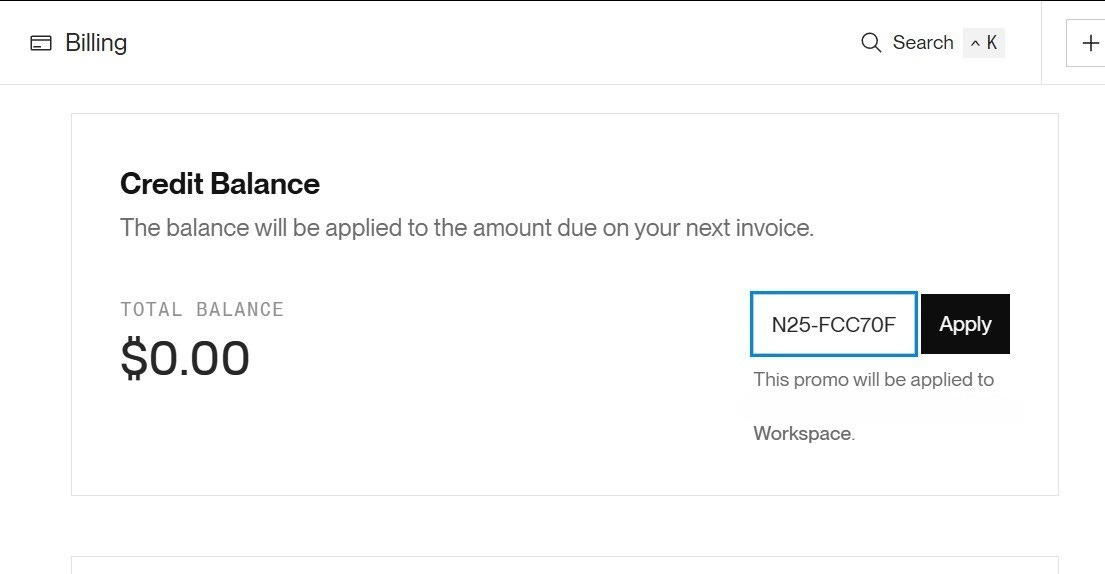
Back inside Render go to: Billing → Add Credits / Redeem Code
Paste your code exactly as shown in the screenshot below
Done. Credits appear in your account automatically
Simple setup. Takes less than two minutes.
👉 Claim your free $25 Render credits
You type one sentence.
A task, a meeting description, a problem you are trying to solve.
The agent breaks it down into a structured action plan with priorities and next steps in under two seconds.
“I have a sprint planning meeting tomorrow and the team is behind on three features”
Align the team on sprint priorities and create a realistic plan to close the backlog gap before the deadline.
Audit the three delayed features and identify root blockers (High)
Reprioritize the sprint backlog based on delivery risk (High)
Assign clear owners and deadlines for each remaining item (Medium)
Pull up the current sprint board before the meeting
Send a pre-read to the team with the three feature statuses
Block 30 minutes after the meeting to update tickets
Clean output.
Instantly actionable.
Running live on a free Render account.
Framework: Next.js 16 with TypeScript
Styling: Tailwind CSS
AI Model: LLaMA 3.3 70B via Groq API (free)
API Layer: Next.js API Routes
Deployment: Render via render.yaml
No proprietary tools.
No vendor lock-in.
Every piece of this is something you can put on a resume and actually mean it.
This first version of the agent is synchronous.
You send a request.
The LLM responds.
You get output.
Simple.
The agent is built on a workflow-based architecture from day one. The synchronous API call you see in this issue is step one of a multi-step Render Workflow. The rest of the pipeline is already designed and ready to activate.
Here is what the full workflow handles as we build it out:
Background workers that execute multi-step AI pipelines without HTTP timeouts
Async job queues for long-running tasks like report generation and embedding indexing
Cron-triggered data ingestion that pulls from external APIs on a schedule
Automated summarization that runs without anyone clicking anything
Distributed execution that keeps every background process reliable under real load
Zero downtime deploys so nothing breaks mid-pipeline when you push new code
None of that is possible on a static host or a basic web server.
That is exactly what Render Workflows was built for. You can read the full Render Workflows documentation here: Render Workflows

Your entire infrastructure lives in one file.
Push to GitHub and Render picks it up automatically.
No dashboards to configure.
No servers to touch.
services:
  - type: web
    name: ai-task-agent
    env: node
    plan: free
    region: oregon
    buildCommand: npm install && npm run build
    startCommand: npm start
    envVars:
      - key: GROQ_API_KEY
        sync: false
      - key: RENDER_WORKFLOW_URL
        sync: false
      - key: RENDER_WORKFLOW_SECRET
        sync: false
      - key: NODE_VERSION
        value: 20
This is infrastructure as code. Your entire deployment config lives in your repo, versioned alongside your application code.
The background workers, cron jobs, async pipelines, and scheduled data ingestion we wire in next issue slot directly into this same file. The architecture is already set up for distributed execution from day one.
One file. One repo. Everything tracked in Git.
This is infrastructure as code. It is how real engineering teams work.
This is a three-issue build series.
This issue: Environment setup, local build, and first deployment on Render.
Next issue: We go async. Background workers, scheduled pipelines, a database, cron jobs, and Render Workflows as the full architecture backbone. The agent stops waiting for user input and starts running on its own.
Issue three: Getting your first paying user. Who buys this, how to pitch it, and how to close the deal using a live demo instead of a slide deck.
The next version of this app gets smarter AI features built on top of what you just shipped today. But for that we need you building and sharing.
Start building today and share this with one engineer who should be shipping AI projects. The bigger this community gets, the better the resources, tools, and opportunities I can bring to every issue.
If you have not claimed your free $25 yet, do it before you hit Step 7. Takes two minutes and your entire deployment is covered.
Credits are valid until 2027.
I do not sell courses.
I never have.
What I want is for every engineer reading this to ship something real.
Something that:
runs on the internet
solves a real problem
someone will actually pay for
👉 Claim your $25 and join the challenge
This issue is sponsored by Render.
I only work with tools I actually use and would recommend to the 188,000 engineers reading this.
📩 If this landed in Promotions, drag it to Primary.
No posts
Comments
Nothing yet. Say the first thing.
Sign in to join the conversation.