
If you’ve been following me for a while, you know that I primarily focus on .NET. However, while .NET indeed does have some great frameworks for building AI agents, like Microsoft Agent Framework, most of the AI engineering work is done in Python.
Therefore, if your goal is primarily to be an AI engineer and not just a .NET developer who does some AI engineering, learning Python and Python-based frameworks will unlock many more options for you.
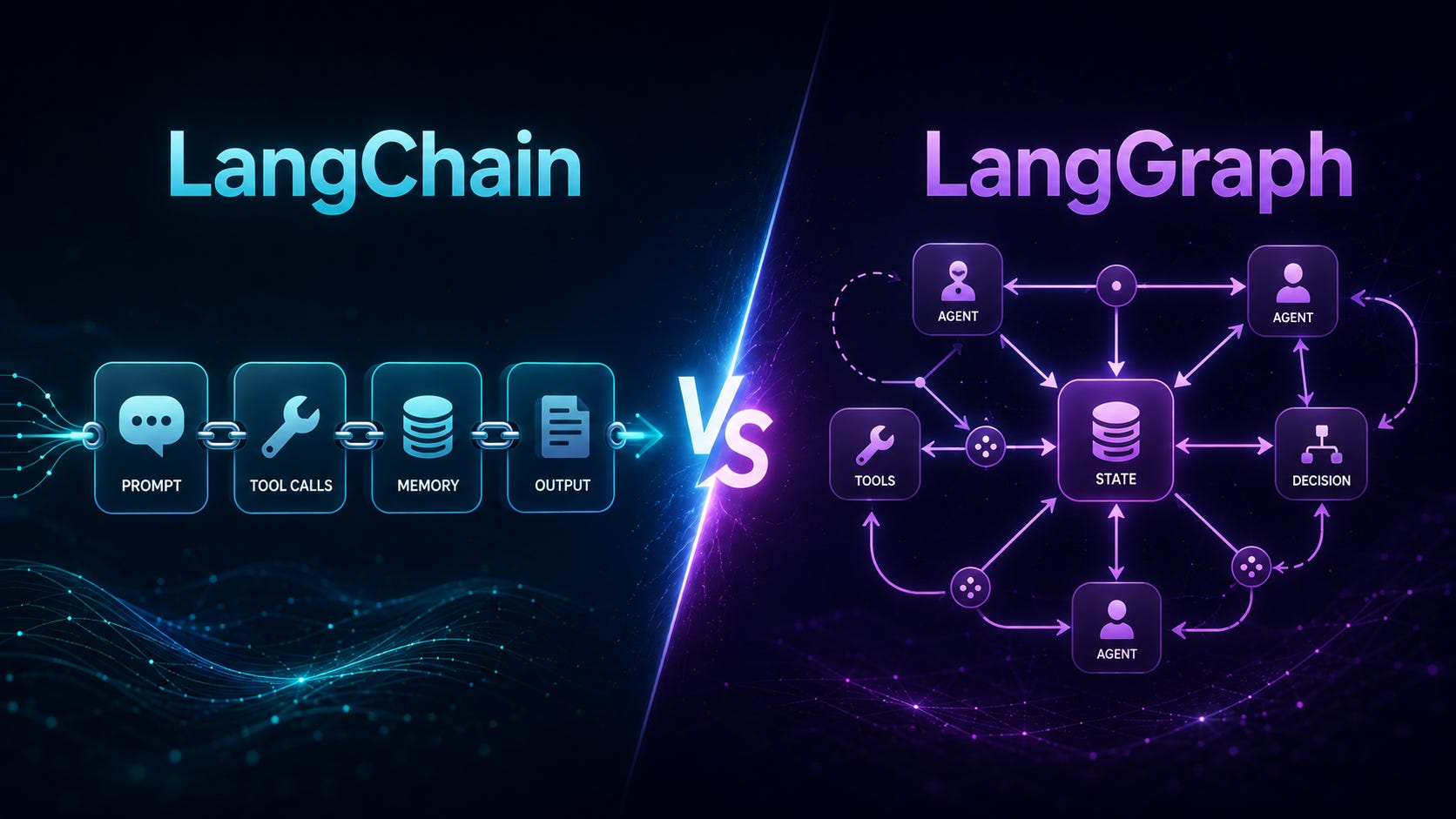
In the Python ecosystem, the most widely used frameworks for building AI agents happen to be LangChain and LangGraph. In this article, I will summarize the most important fundamentals of each of these frameworks and compare them against one another.
Before you begin, here’s an important prerequisite. While I am focusing on the most important fundamentals in both frameworks, there are still a lot of them. Therefore, this article assumes you are already familiar with the basic Python syntax. While I will be explaining the APIs of LangChain and LangGraph, I will not be explaining every Python expression.
So, let’s begin.
Before we go through the fundamentals, here is the summary of where each of these frameworks is used.
LangChain provides high-level abstractions for working with language models, messages, tools, agents, structured output, retrieval, memory, middleware, and model-provider integrations.
LangGraph provides lower-level orchestration for workflows that require explicit state, branching, loops, parallel execution, persistence, human approval, fault recovery, or long-running execution.
LangChain’s create_agent implementation runs on LangGraph internally. A practical rule is:
Start with LangChain when you need a conventional tool-calling agent.
Use LangGraph when you need to control exactly how the workflow progresses.
Combine them by placing a LangChain agent inside a LangGraph node or subgraph.
LangChain v1 introduced create_agent as its standard agent API. Older components such as LLMChain, ConversationChain, legacy retrievers, and some indexing APIs moved to the separate langchain-classic package.
The examples below use OpenAI, but LangChain exposes a mostly consistent interface across OpenAI, Azure OpenAI, Anthropic, Gemini, Bedrock, Hugging Face, Ollama, and other providers.
pip install -U "langchain[openai]" langgraph langchain-text-splittersSet the API key outside your source code:
export OPENAI_API_KEY="your-api-key"On Windows PowerShell:
$env:OPENAI_API_KEY = "your-api-key"Initialize a model:
from langchain.chat_models import init_chat_model
model = init_chat_model(
    "openai:gpt-5.5",
    temperature=0,
    timeout=60,
    max_retries=3,
)
You can switch providers without substantially changing the rest of the application:
openai_model = init_chat_model("openai:gpt-5.5")
anthropic_model = init_chat_model("anthropic:claude-sonnet-4-6")
google_model = init_chat_model("google_genai:gemini-3.5-flash")
The exact model names available to you depend on your provider account and deployment configuration.
LangChain standardises three especially important model operations:
invoke():Process one input and return the complete responsestream():Yield response chunks as they are generatedbatch():Process multiple independent inputs
These operations are exposed consistently across LangChain model integrations. Model responses are represented as messages rather than plain strings.
from langchain.chat_models import init_chat_model
model = init_chat_model("openai:gpt-5.5")
response = model.invoke("Explain dependency injection in three sentences.")
print(response.text)
print(response.usage_metadata)
Messages carry a role, content, and metadata. Standard message types let application code remain relatively independent of the underlying model provider. Messages can also contain multimodal content blocks, tool calls, reasoning blocks, citations, audio, images, or documents when supported by the selected provider.
from langchain.messages import HumanMessage, SystemMessage
messages = [
    SystemMessage(
        "You are a senior Python engineer. "
        "Explain concepts precisely and include one example."
    ),
    HumanMessage("What is a context manager?"),
]
response = model.invoke(messages)
print(response.text)
Streaming is done by outputting the answer from the model in chunks, as you see in chat agents, like ChatGPT:
for chunk in model.stream(
    "Explain how an event loop processes asynchronous work."
):
    print(chunk.text, end="", flush=True)
The chunks can be combined to reconstruct the final message:
full_response = None
for chunk in model.stream("Explain Python generators."):
    full_response = (
        chunk
        if full_response is None
        else full_response + chunk
    )
print(full_response.text)
questions = [
"What is a Python decorator?",
"What is a descriptor?",
"What is a metaclass?",
]
responses = model.batch(
questions,
config={"max_concurrency": 3},
)
for response in responses:
print(response.text)
print("---")Batching is suitable for independent requests. It does not automatically create a conversation between them.
A Runnable is LangChain’s common execution abstraction. Models, prompts, parsers, retrievers, and custom functions can all behave as runnables.
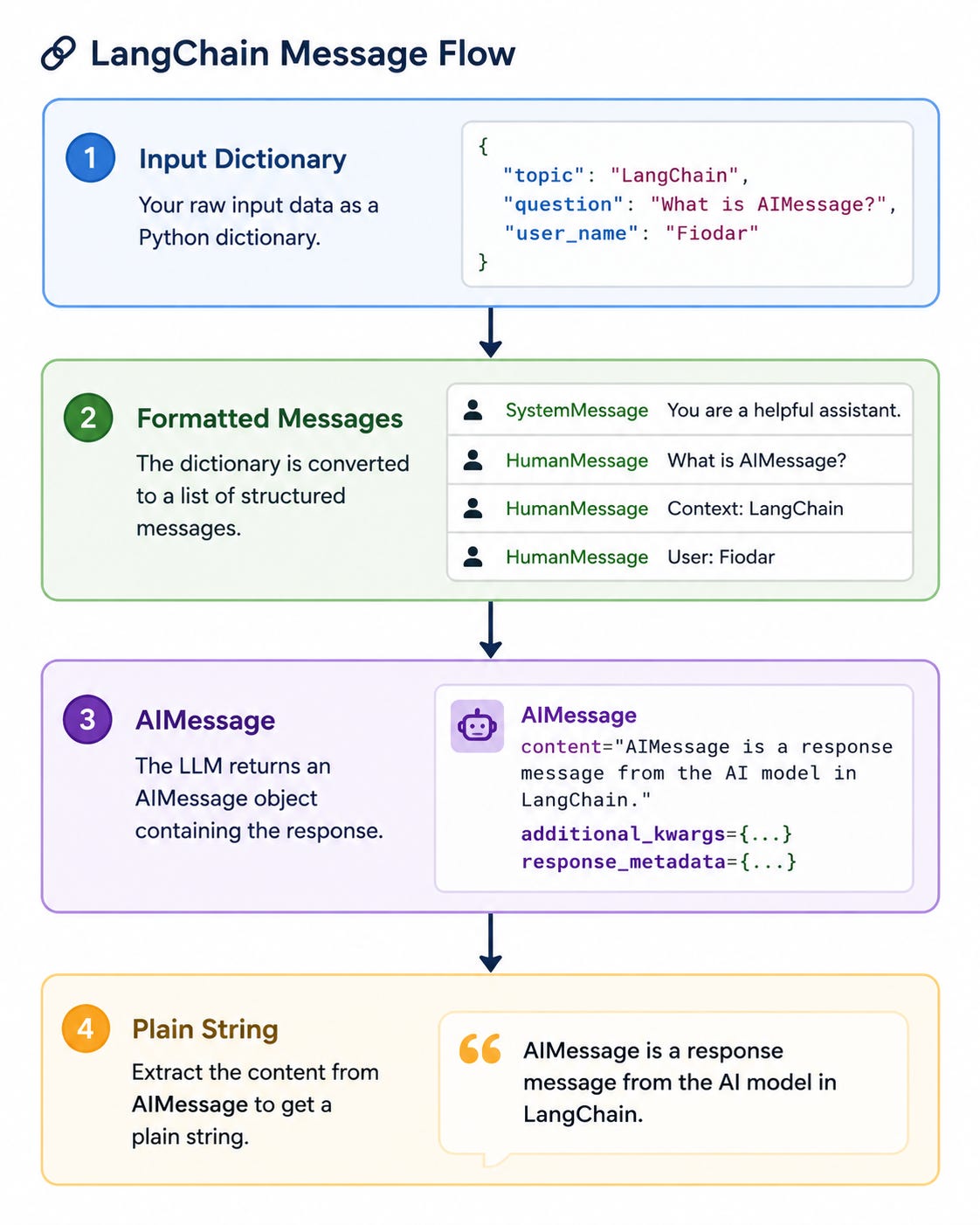
Runnables support invocation, asynchronous invocation, batching, streaming, retries, fallbacks, tracing metadata, and composition. LangChain Expression Language, or LCEL, uses the | operator to connect them.
from langchain_core.output_parsers import StrOutputParser
from langchain_core.prompts import ChatPromptTemplate
prompt = ChatPromptTemplate.from_messages(
    [
        (
            "system",
            "You are a technical instructor. "
            "Explain the concept for a {experience_level} developer.",
        ),
        ("user", "Explain {topic}."),
    ]
)
chain = prompt | model | StrOutputParser()
result = chain.invoke(
    {
        "experience_level": "junior",
        "topic": "Python's async context managers",
    }
)
print(result)
Each stage receives the output of the preceding stage:
RunnableParallel allows you to execute several actions in parallel, as shown in this example:
from langchain_core.runnables import RunnableLambda, RunnableParallel
normalise = RunnableLambda(lambda text: text.strip().lower())
analysis = RunnableParallel(
    word_count=RunnableLambda(lambda text: len(text.split())),
    character_count=RunnableLambda(len),
    uppercase=RunnableLambda(str.upper),
)
pipeline = normalise | analysis
result = pipeline.invoke("  LangChain makes components composable.  ")
print(result)
Example result:
{
    "word_count": 4,
    "character_count": 38,
    "uppercase": "LANGCHAIN MAKES COMPONENTS COMPOSABLE.",
}
LCEL is useful for predictable pipelines. For complex stateful control flow, LangGraph is normally more appropriate.
A tool is a function the model is allowed to request. A tool contains:
A name
A description
An input schema
Executable application logic
The model sees the schema and description and decides whether the tool is relevant. Tool docstrings are therefore operational instructions, not merely developer documentation.
Here’s an example of a tool definition for obtaining an order status:
from langchain.tools import tool
ORDERS = {
    "ORD-1001": {
        "status": "dispatched",
        "carrier": "ParcelPost",
    },
    "ORD-1002": {
        "status": "processing",
        "carrier": None,
    },
}
@tool
def get_order_status(order_id: str) -> dict:
    """Return the status and carrier for a customer order.
    Use this only when the user provides a specific order ID.
    """
    order = ORDERS.get(order_id.upper())
    if order is None:
        return {
            "found": False,
            "message": "Order not found",
        }
    return {
        "found": True,
        "order_id": order_id.upper(),
        **order,
    }
A tool can be bound directly to the model by invoking bind_tool():
model_with_tools = model.bind_tools([get_order_status])
response = model_with_tools.invoke(
    "Where is order ORD-1001?"
)
print(response.tool_calls)
This asks the model to produce a tool call, but it does not execute the tool automatically. When working directly with a bound model, your code must execute the requested function and return a ToolMessage.
In most applications, it is easier to use an agent.
An agent repeatedly:
Sends the current messages to the model.
Allows the model to request tools.
Executes the requested tools.
Adds tool results to the message history.
Calls the model again.
Stops when the model produces a final answer or a configured limit is reached.
The modern API is create_agent. It creates a production-oriented tool-calling loop backed by LangGraph.
from langchain.agents import create_agent
agent = create_agent(
    model=model,
    tools=[get_order_status],
    system_prompt=(
        "You are an order-support assistant. "
        "Use the order tool whenever an order ID is provided. "
        "Never invent shipment information."
    ),
)
result = agent.invoke(
    {
        "messages": [
            {
                "role": "user",
                "content": "Has ORD-1001 been dispatched?",
            }
        ]
    }
)
print(result["messages"][-1].text)
The returned state contains the complete message sequence, including:
The original user message
Model tool-call messages
Tool result messages
The final model response
An agent can be given more than one tool to work with, as this example shows:
@tool
def calculate_refund(order_total: float, percentage: float) -> float:
    """Calculate a potential refund amount.
    Percentage must be between 0 and 100.
    """
    if not 0 <= percentage <= 100:
        raise ValueError("percentage must be between 0 and 100")
    return round(order_total * percentage / 100, 2)
agent = create_agent(
    model=model,
    tools=[get_order_status, calculate_refund],
    system_prompt=(
        "Help customers understand their orders and potential refunds. "
        "Calculations must be performed with the provided tools."
    ),
)
An agent can make multiple sequential or parallel tool calls, choose tools dynamically, and use previous tool results to decide what to do next.
Structured output constrains a response to a known schema. This is preferable to parsing prose when downstream code needs dependable fields.
Schemas can be expressed using:
Pydantic models
Dataclasses
TypedDictJSON Schema
When a schema is supplied to create_agent, the validated result is returned in the structured_response state field. LangChain can use provider-native structured output where supported, or tool-based structured output otherwise.
from typing import Literal
from pydantic import BaseModel, Field
class SupportClassification(BaseModel):
    category: Literal[
        "order_status",
        "refund",
        "technical",
        "other",
    ]
    urgency: Literal["low", "normal", "high"]
    summary: str = Field(
        description="One-sentence summary of the request"
    )
    requires_human: bool
classifier = create_agent(
    model=model,
    tools=[],
    response_format=SupportClassification,
    system_prompt="Classify incoming customer-support requests.",
)
result = classifier.invoke(
    {
        "messages": [
            {
                "role": "user",
                "content": (
                    "I was charged twice and need the duplicate "
                    "payment returned today."
                ),
            }
        ]
    }
)
classification = result["structured_response"]
print(classification.category)
print(classification.urgency)
print(classification.requires_human)
This produces a Pydantic object rather than an unvalidated JSON-looking string.
For a single extraction or classification call, the model can be configured directly:
structured_model = model.with_structured_output(
    SupportClassification
)
classification = structured_model.invoke(
    "The application crashes whenever I upload a CSV file."
)
print(classification)
Use an agent when tools or iterative reasoning are required. Use direct structured output when one model call is sufficient.
Middleware intercepts different parts of the agent loop. It can modify or observe model calls, prompts, tool calls, tool results, and final output.
Common uses include:
Model and tool retries
Model fallbacks
Conversation summarisation
Tool-call limits
Model-call limits
PII detection
Human approval
Dynamic prompt creation
Tool filtering
Logging and guardrails
Middleware runs inside the LangGraph generated by create_agent, so an agent retains its middleware behaviour when inserted into a larger graph.
from langchain.agents.middleware import (
    ModelRetryMiddleware,
    ToolRetryMiddleware,
)
resilient_agent = create_agent(
    model=model,
    tools=[get_order_status],
    middleware=[
        ModelRetryMiddleware(max_retries=3),
        ToolRetryMiddleware(max_retries=2),
    ],
)
For long conversations, summarisation middleware can compress older messages while preserving recent context:
from langchain.agents.middleware import SummarizationMiddleware
long_running_agent = create_agent(
    model=model,
    tools=[get_order_status],
    middleware=[
        SummarizationMiddleware(
            model="openai:gpt-5.5",
            trigger=("tokens", 8_000),
            keep=("messages", 20),
        )
    ],
)
The precise threshold should be selected according to the model’s context window, application latency, and cost requirements.
Short-term memory is conversation-scoped. LangChain agents use a LangGraph checkpointer to persist the agent state associated with a thread_id.
Reusing the same thread_id continues the conversation. A different ID starts an independent conversation.
from langgraph.checkpoint.memory import InMemorySaver
memory_agent = create_agent(
    model=model,
    tools=[],
    checkpointer=InMemorySaver(),
)
config = {
    "configurable": {
        "thread_id": "customer-42-conversation-1"
    }
}
memory_agent.invoke(
    {
        "messages": [
            {
                "role": "user",
                "content": "My preferred programming language is Python.",
            }
        ]
    },
    config=config,
)
result = memory_agent.invoke(
    {
        "messages": [
            {
                "role": "user",
                "content": "Which programming language do I prefer?",
            }
        ]
    },
    config=config,
)
print(result["messages"][-1].text)
InMemorySaver is suitable for examples and tests. Production systems should use a durable backend such as PostgreSQL or another supported checkpointer.
Long conversations also require context management. Typical strategies include trimming messages, deleting stale messages, or summarising older history.
Long-term memory persists information across different threads and conversations. LangChain implements it using LangGraph stores.
The distinction is this:
Short-term: Covers one thread. Contains conversation messages and working state.
Long-term: Is used across threads. User preferences, known facts, application records.
Long-term memories are JSON documents organised by namespace and key. They can be read and written from tools or graph nodes.
Here is how they are represented conceptually:
namespace = ("users", "customer-42")
key = "preferences"
store.put(
    namespace,
    key,
    {
        "preferred_language": "Python",
        "response_style": "concise",
    },
)
memory = store.get(namespace, key)
A production application must define explicit rules for:
What may be remembered
Who owns the memory
How it can be updated
How it is deleted
Which agents may access it
Whether sensitive data may be stored
Retrieval-Augmented Generation retrieves external information at query time and supplies it to the model as context.
A typical LangChain retrieval pipeline consists of these steps:
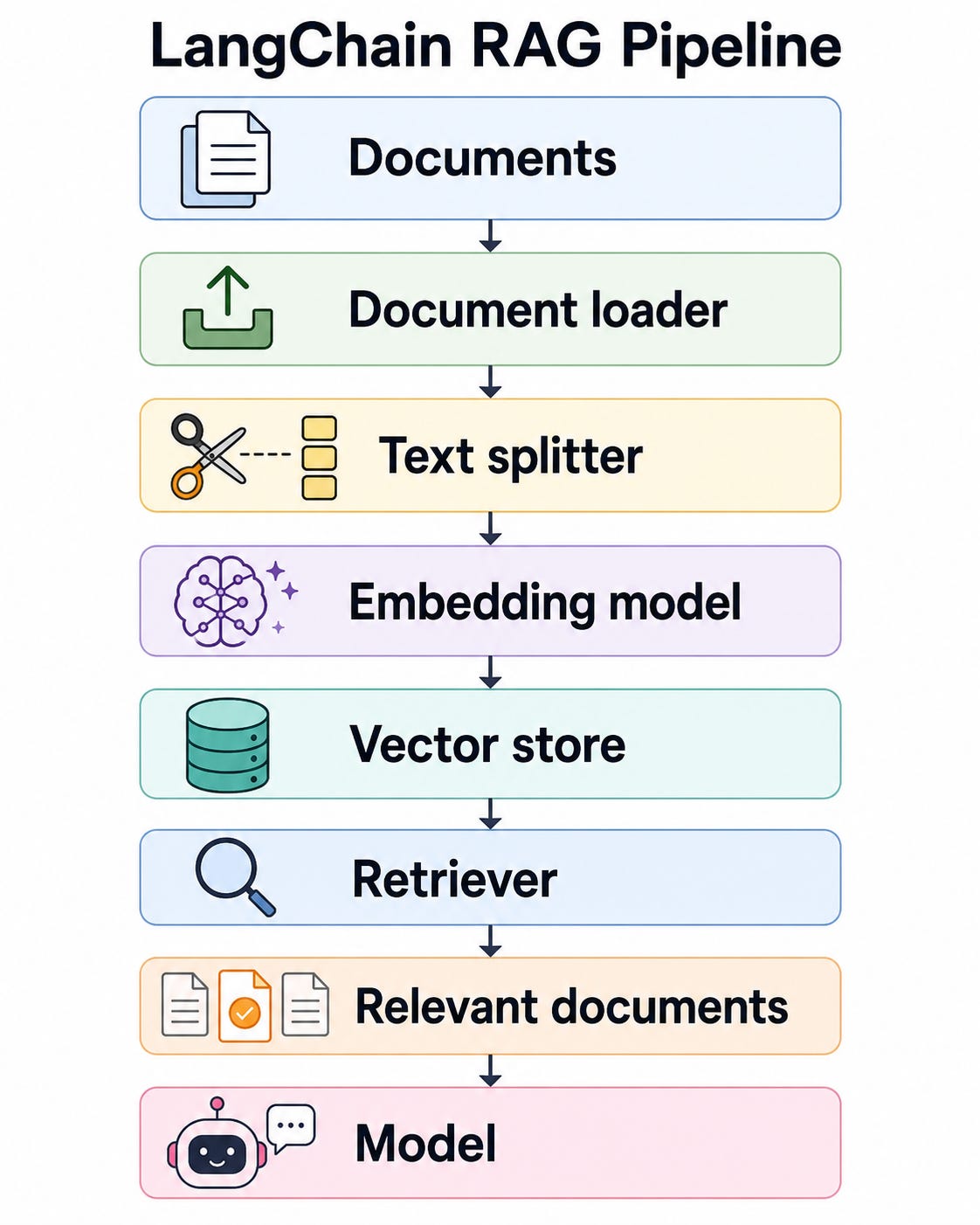
LangChain provides standard interfaces for document loaders, text splitters, embedding models, vector stores, and retrievers. It supports conventional two-step RAG, agentic RAG, and hybrid designs.
from langchain_core.documents import Document
from langchain_core.vectorstores import InMemoryVectorStore
from langchain_openai import OpenAIEmbeddings
documents = [
    Document(
        page_content=(
            "Alpine Gear orders can be cancelled before dispatch. "
            "Once dispatched, customers must use the returns process."
        ),
        metadata={"source": "cancellation-policy"},
    ),
    Document(
        page_content=(
            "Unused products can be returned within 30 days. "
            "Products must include their original packaging."
        ),
        metadata={"source": "returns-policy"},
    ),
    Document(
        page_content=(
            "Refunds are issued to the original payment method "
            "within five working days after inspection."
        ),
        metadata={"source": "refund-policy"},
    ),
]
embeddings = OpenAIEmbeddings(
    model="text-embedding-3-small"
)
vector_store = InMemoryVectorStore(embeddings)
vector_store.add_documents(documents)
Retrieve relevant documents:
query = "How long does a refund take?"
matches = vector_store.similarity_search(
    query,
    k=2,
)
for document in matches:
    print(document.metadata["source"])
    print(document.page_content)
Generate a grounded answer:
context = "\n\n".join(
    f"Source: {document.metadata['source']}\n"
    f"{document.page_content}"
    for document in matches
)
response = model.invoke(
    [
        {
            "role": "system",
            "content": (
                "Answer only from the supplied context. "
                "If the context does not contain the answer, say so."
            ),
        },
        {
            "role": "user",
            "content": (
                f"Context:\n{context}\n\n"
                f"Question: {query}"
            ),
        },
    ]
)
print(response.text)
Two-step RAG always retrieves first and then generates an answer. It is predictable and easy to evaluate.
Agentic RAG exposes retrieval as a tool. The agent decides whether to search, which query to use, and whether additional searches are required.
@tool
def search_policies(query: str) -> str:
    """Search company policies for information relevant to a question."""
    results = vector_store.similarity_search(query, k=3)
    return "\n\n".join(
        f"[{doc.metadata['source']}]\n{doc.page_content}"
        for doc in results
    )
rag_agent = create_agent(
    model=model,
    tools=[search_policies],
    system_prompt=(
        "Answer questions about company policies. "
        "Search the policy collection before making policy claims. "
        "Mention the source names used."
    ),
)
Agentic RAG is more flexible, but it is also less deterministic and usually requires stronger tracing and evaluation.
A LangGraph workflow is built from three fundamental concepts:
State: shared data representing the current workflow snapshot
Nodes: functions that read state and return updates
Edges: transitions that select which node runs next
A graph can contain fixed edges, conditional edges, cycles, parallel branches, and subgraphs.
from typing import Literal
from langgraph.graph import END, START, StateGraph
from typing_extensions import TypedDict
class SupportState(TypedDict):
    question: str
    category: Literal["billing", "technical", "general"]
    answer: str
def classify(state: SupportState) -> dict:
    question = state["question"].lower()
    if any(word in question for word in ("invoice", "charge", "refund")):
        category = "billing"
    elif any(word in question for word in ("error", "crash", "install")):
        category = "technical"
    else:
        category = "general"
    return {"category": category}
def answer_billing(state: SupportState) -> dict:
    return {
        "answer": (
            "Your request has been sent to the billing workflow."
        )
    }
def answer_technical(state: SupportState) -> dict:
    return {
        "answer": (
            "Your request has been sent to technical support."
        )
    }
def answer_general(state: SupportState) -> dict:
    return {
        "answer": (
            "Your request has been sent to customer services."
        )
    }
def route(
    state: SupportState,
) -> Literal["billing", "technical", "general"]:
    return state["category"]
builder = StateGraph(SupportState)
builder.add_node("classify", classify)
builder.add_node("billing", answer_billing)
builder.add_node("technical", answer_technical)
builder.add_node("general", answer_general)
builder.add_edge(START, "classify")
builder.add_conditional_edges(
    "classify",
    route,
    {
        "billing": "billing",
        "technical": "technical",
        "general": "general",
    },
)
builder.add_edge("billing", END)
builder.add_edge("technical", END)
builder.add_edge("general", END)
support_graph = builder.compile()
Invoke it:
result = support_graph.invoke(
    {
        "question": "The application crashes during installation.",
        "category": "general",
        "answer": "",
    }
)
print(result)
Unlike a normal agent, every permitted transition is explicitly represented in the graph.
Nodes return partial state updates. By default, a returned value replaces the existing value for that state key.
A reducer changes how updates are combined. For example, operator.add can append items from multiple nodes rather than allowing one node to overwrite another. LangGraph also supplies add_messages, a message-aware reducer that supports appending and updating conversation messages.
import operator
from typing import Annotated
from typing_extensions import TypedDict
class ProcessingState(TypedDict):
    input_text: str
    audit_log: Annotated[list[str], operator.add]
    output_text: str
def normalise(state: ProcessingState) -> dict:
    return {
        "output_text": state["input_text"].strip(),
        "audit_log": ["Normalised whitespace"],
    }
def lowercase(state: ProcessingState) -> dict:
    return {
        "output_text": state["output_text"].lower(),
        "audit_log": ["Converted text to lowercase"],
    }
After both nodes execute, the log contains both entries because the reducer concatenates the lists.
For conversational state:
from langchain.messages import AnyMessage
from langgraph.graph.message import add_messages
class ConversationState(TypedDict):
    messages: Annotated[list[AnyMessage], add_messages]
    customer_id: str
Graphs are not restricted to directed acyclic workflows. They may contain loops.
A common pattern is:
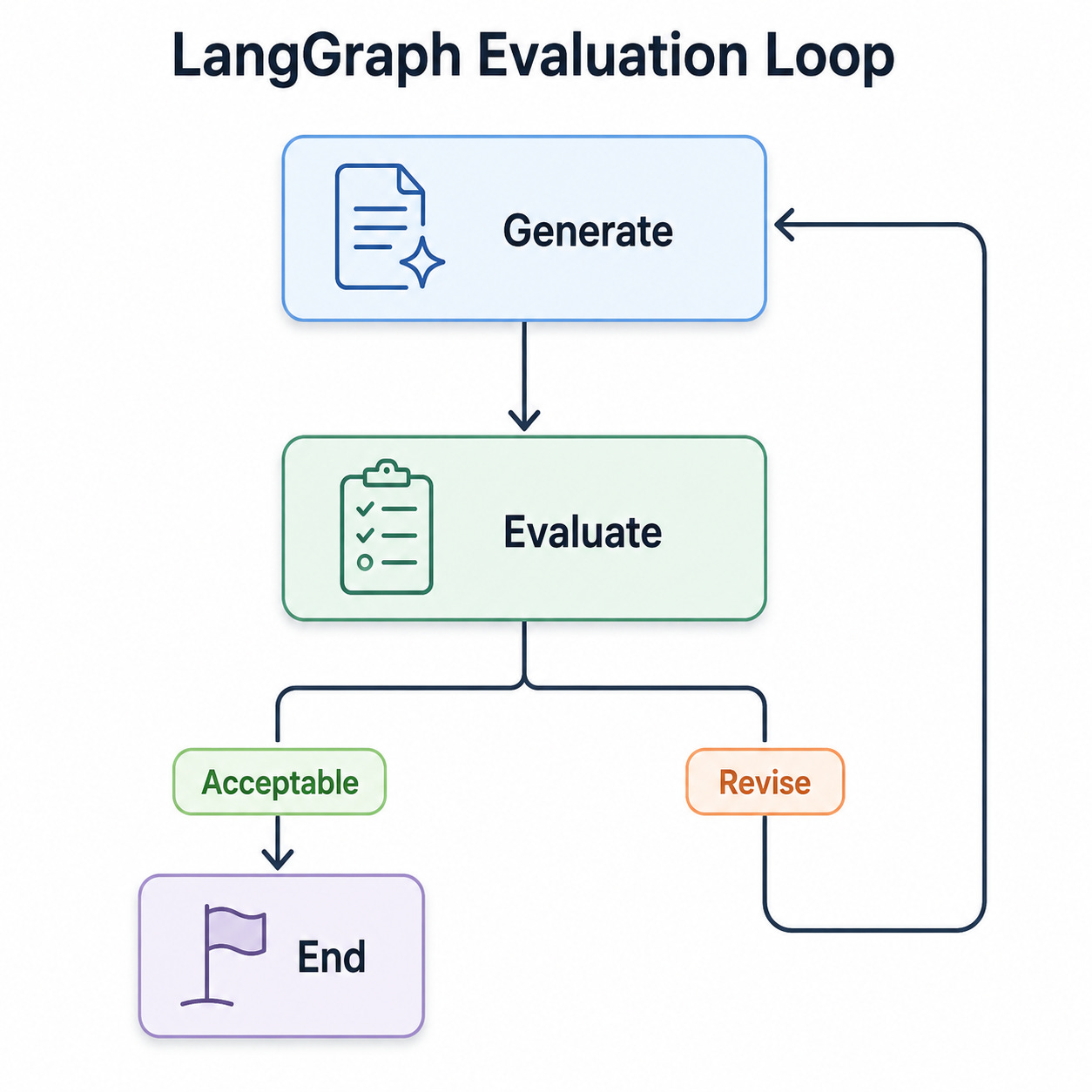
Which can be implemented like this:
from typing import Literal
from langgraph.graph import END, START, StateGraph
from typing_extensions import TypedDict
class DraftState(TypedDict):
    topic: str
    draft: str
    feedback: str
    attempts: int
    accepted: bool
def generate_draft(state: DraftState) -> dict:
    prompt = (
        f"Write a concise explanation of {state['topic']}."
    )
    if state["feedback"]:
        prompt += f"\nAddress this feedback: {state['feedback']}"
    response = model.invoke(prompt)
    return {
        "draft": response.text,
        "attempts": state["attempts"] + 1,
    }
def evaluate_draft(state: DraftState) -> dict:
    long_enough = len(state["draft"].split()) >= 60
    within_limit = state["attempts"] < 3
    if long_enough or not within_limit:
        return {
            "accepted": True,
            "feedback": "",
        }
    return {
        "accepted": False,
        "feedback": "Add more technical detail and one example.",
    }
def after_evaluation(
    state: DraftState,
) -> Literal["generate", "__end__"]:
    return END if state["accepted"] else "generate"
builder = StateGraph(DraftState)
builder.add_node("generate", generate_draft)
builder.add_node("evaluate", evaluate_draft)
builder.add_edge(START, "generate")
builder.add_edge("generate", "evaluate")
builder.add_conditional_edges("evaluate", after_evaluation)
draft_graph = builder.compile()
Invoke it with a recursion limit to protect against uncontrolled loops:
result = draft_graph.invoke(
    {
        "topic": "LangGraph checkpointing",
        "draft": "",
        "feedback": "",
        "attempts": 0,
        "accepted": False,
    },
    config={"recursion_limit": 10},
)
print(result["draft"])
Normally, a node returns state changes and an edge determines the next node.
Command allows one node to do both:
Update state
Select the next destination
This is useful when routing is inseparable from the node’s result.
from typing import Literal
from langgraph.types import Command
def decide_route(
    state: SupportState,
) -> Command[Literal["billing", "technical", "general"]]:
    question = state["question"].lower()
    if "refund" in question:
        category = "billing"
    elif "error" in question:
        category = "technical"
    else:
        category = "general"
    return Command(
        update={"category": category},
        goto=category,
    )
Use conditional edges when routing should remain visually and structurally separate. Use Command when state modification and navigation naturally belong together.
LangGraph can fan out into multiple branches and then merge their results. Parallel execution is useful when subtasks are independent, such as:
Analysing a document for security concerns and performance concerns simultaneously
Generating several candidate answers
Searching multiple sources
Running independent evaluators
Reducers determine how parallel state updates are merged. LangGraph also supports dynamically generated worker branches through the Send API, which enables map-reduce and orchestrator-worker patterns.
import operator
from typing import Annotated
from langgraph.graph import END, START, StateGraph
from typing_extensions import TypedDict
class ReviewState(TypedDict):
    code: str
    findings: Annotated[list[str], operator.add]
def security_review(state: ReviewState) -> dict:
    return {
        "findings": [
            "Security review completed."
        ]
    }
def performance_review(state: ReviewState) -> dict:
    return {
        "findings": [
            "Performance review completed."
        ]
    }
def combine_reviews(state: ReviewState) -> dict:
    return {
        "findings": [
            f"Combined {len(state['findings'])} review results."
        ]
    }
builder = StateGraph(ReviewState)
builder.add_node("security", security_review)
builder.add_node("performance", performance_review)
builder.add_node("combine", combine_reviews)
# Fan-out
builder.add_edge(START, "security")
builder.add_edge(START, "performance")
# Fan-in
builder.add_edge("security", "combine")
builder.add_edge("performance", "combine")
builder.add_edge("combine", END)
review_graph = builder.compile()
Both review nodes may run during the same graph superstep.
When compiled with a checkpointer, LangGraph stores state snapshots as checkpoints, grouped into threads.
Checkpointing enables:
Resuming a conversation
Human-in-the-loop pauses
Fault recovery
State inspection
Time-travel debugging
Replaying or forking earlier execution states
A thread_id identifies the state sequence that should be loaded or updated.
from langgraph.checkpoint.memory import InMemorySaver
checkpointer = InMemorySaver()
persistent_graph = builder.compile(
    checkpointer=checkpointer
)
config = {
    "configurable": {
        "thread_id": "review-thread-001"
    }
}
result = persistent_graph.invoke(
    {
        "code": "print('hello')",
        "findings": [],
    },
    config=config,
)
In-memory persistence disappears when the process stops. Production systems should use a durable checkpointer.
A major design implication is that graph nodes should be safe to retry. Database writes, payments, emails, and other side effects should be idempotent or protected by durable transaction identifiers.
An interrupt pauses graph execution, saves its state, and returns a JSON-serialisable payload to the caller.
The graph is later resumed using:
Command(resume=value)The same thread_id must be used during resumption. When resumed, the interrupted node starts again from its beginning, meaning code before the interrupt can execute more than once.
from langgraph.checkpoint.memory import InMemorySaver
from langgraph.graph import END, START, StateGraph
from langgraph.types import Command, interrupt
from typing_extensions import TypedDict
class RefundState(TypedDict):
    order_id: str
    amount: float
    approved: bool
    status: str
def prepare_refund(state: RefundState) -> dict:
    return {
        "status": (
            f"Refund of £{state['amount']:.2f} prepared "
            f"for {state['order_id']}."
        )
    }
def request_approval(state: RefundState) -> dict:
    decision = interrupt(
        {
            "type": "refund_approval",
            "order_id": state["order_id"],
            "amount": state["amount"],
            "question": "Approve this refund?",
        }
    )
    return {
        "approved": bool(decision),
    }
def apply_decision(state: RefundState) -> dict:
    if state["approved"]:
        return {"status": "Refund approved"}
    return {"status": "Refund rejected"}
builder = StateGraph(RefundState)
builder.add_node("prepare", prepare_refund)
builder.add_node("approval", request_approval)
builder.add_node("apply", apply_decision)
builder.add_edge(START, "prepare")
builder.add_edge("prepare", "approval")
builder.add_edge("approval", "apply")
builder.add_edge("apply", END)
refund_graph = builder.compile(
    checkpointer=InMemorySaver()
)
Start the graph:
config = {
    "configurable": {
        "thread_id": "refund-ORD-1001"
    }
}
paused_result = refund_graph.invoke(
    {
        "order_id": "ORD-1001",
        "amount": 79.99,
        "approved": False,
        "status": "",
    },
    config=config,
)
print(paused_result["__interrupt__"])
Resume after a person approves:
final_result = refund_graph.invoke(
    Command(resume=True),
    config=config,
)
print(final_result["status"])
Do not place a non-idempotent action, such as issuing the actual refund, before the interrupt. The node may restart when resumed.
LangGraph can stream different layers of execution:
updates:Partial state updates after nodes runvalues:Complete state snapshotsmessages:Model message or token eventscustomApplication-defined progress events
Streaming is useful for displaying tool activity, workflow progress, partial model output, and approval requests. LangChain agents expose compatible streaming capabilities because their execution is backed by LangGraph.
for update in support_graph.stream(
    {
        "question": "Why was I charged twice?",
        "category": "general",
        "answer": "",
    },
    stream_mode="updates",
):
    print(update)
An agent can stream execution steps:
for update in agent.stream(
    {
        "messages": [
            {
                "role": "user",
                "content": "Check order ORD-1001.",
            }
        ]
    },
    stream_mode="updates",
):
    print(update)
For a user interface, token-level model streaming and state-update streaming are often displayed separately.
A compiled graph can be inserted into another graph as a node. LangChain agents can also be used as graph nodes because create_agent returns a compiled LangGraph-compatible agent.
This supports architectures such as:
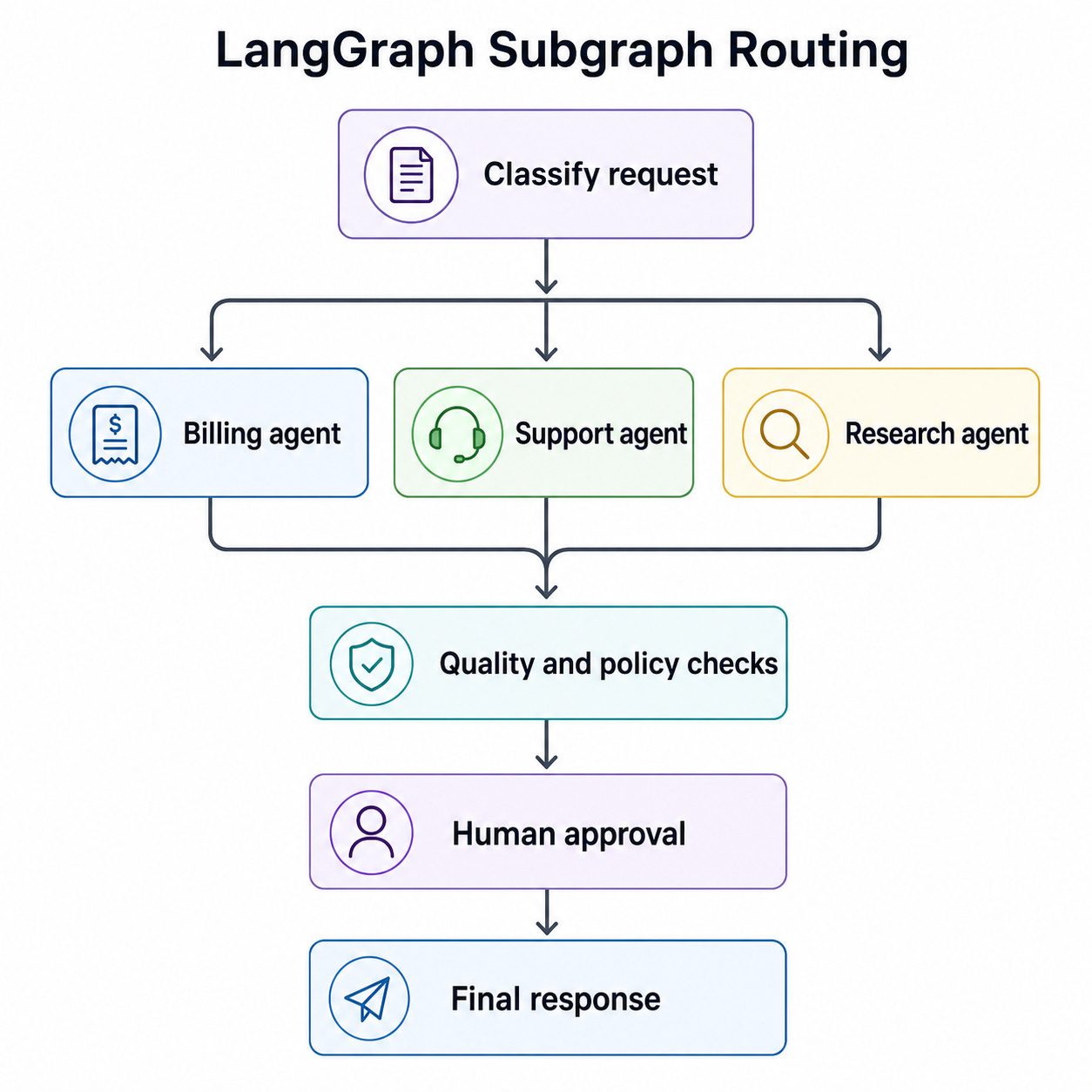
Subgraphs may be configured with different persistence behaviour:
Per-invocation state
Per-thread state
Stateless execution
They are useful for encapsulating specialist agents, separating team ownership, and reusing workflow components.
Example composition:
billing_agent = create_agent(
    model=model,
    tools=[get_order_status, calculate_refund],
    system_prompt="You are a billing specialist.",
)
technical_agent = create_agent(
    model=model,
    tools=[],
    system_prompt="You are a technical-support specialist.",
)
parent_builder = StateGraph(SupportState)
parent_builder.add_node("classify", classify)
parent_builder.add_node("billing_agent", billing_agent)
parent_builder.add_node("technical_agent", technical_agent)
In a real implementation, the parent and child state schemas must be made compatible, or adapter nodes should transform the state.
The Graph API explicitly declares state, nodes, and edges.
The Functional API adds persistence, tasks, retries, streaming, and interrupts to ordinary Python control flow. Its two main primitives are:
@task: a durable unit of work@entrypoint: the workflow’s entry function
Use the Graph API when workflow visualisation and shared state are important. Use the Functional API when you already have procedural Python and want to add LangGraph runtime capabilities without expressing the entire program as a graph.
from langgraph.checkpoint.memory import InMemorySaver
from langgraph.func import entrypoint, task
@task
def fetch_customer(customer_id: str) -> dict:
    return {
        "customer_id": customer_id,
        "tier": "premium",
    }
@task
def calculate_discount(customer: dict) -> float:
    return 0.15 if customer["tier"] == "premium" else 0.0
checkpointer = InMemorySaver()
@entrypoint(checkpointer=checkpointer)
def discount_workflow(customer_id: str) -> dict:
    customer = fetch_customer(customer_id).result()
    discount = calculate_discount(customer).result()
    return {
        "customer": customer,
        "discount": discount,
    }
config = {
    "configurable": {
        "thread_id": "discount-run-1"
    }
}
result = discount_workflow.invoke(
    "customer-42",
    config=config,
)
print(result)
Tasks can also be started concurrently:
@task
def analyse_document(document: str, criterion: str) -> str:
    response = model.invoke(
        f"Analyse this document for {criterion}:\n\n{document}"
    )
    return response.text
@entrypoint(checkpointer=checkpointer)
def parallel_review(document: str) -> list[str]:
    futures = [
        analyse_document(document, "security risks"),
        analyse_document(document, "performance risks"),
        analyse_document(document, "maintainability issues"),
    ]
    return [future.result() for future in futures]
As you can see, LangChain and LangGraph aren’t competing frameworks for building agents. Each has its own strengths and weaknesses. They can be used together, and they complement each other well.
Both are absolutely worth learning if you want to have a thriving and fulfilling career in AI engineering.
No posts
Comments
Nothing yet. Say the first thing.
Sign in to join the conversation.