
CaseStar is a simple Taskbar utility that adjusts the case of whatever is in your clipboard.

Its inspiration came from creating user accounts where the source data was rarely consistent. For example, a new users name might arrive to you as bob jones, or BOB JONES. With a single click on the Taskbar icon, you can have ‘Bob Jones’ ready to paste where you need it.

Operation is as simple as this. Select the original text, hit CTRL C. Click the Taskbar icon, and now paste it back.
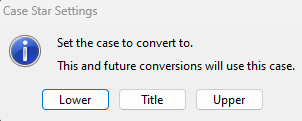
Configuration is just as easy. Hold down the CTRL key and click the CaseStar icon. You will then be prompted to choose from Uppercase, Lowercase, or Titlecase.
There is no installer. Download it, unzip it, put it in an out of the way folder. Then drag it to the Taskbar.
This is Freeware. No nags, no Ads.
For Windows:
No posts
Comments
Nothing yet. Say the first thing.
Sign in to join the conversation.