
The purchase event is the most critical interaction in any e-commerce or omnichannel business. But it’s also one of the most misunderstood.
Many teams treat it as a one-time confirmation triggered after checkout—a simple way to capture revenue. In reality, the purchase event should be seen as a multi-stage umbrella event, capturing the full lifecycle of a transaction—from completion to delivery, refund, and beyond.
It’s not just for online shops, either. Purchases can happen in physical stores, mobile apps, phone orders—even as part of recurring subscriptions. And every one of those deserves to be tracked, analyzed, and activated.
In this guide, we’ll break down WHEN, WHAT, WHERE, and WHY to track the purchase event—so your analytics reflect the real customer journey, your automations fire at the right moment, and your business decisions are backed by complete, reliable data.
👉 If you missed the previous parts of this series, check it out here:
The purchase event isn’t just a signal that someone clicked “Pay now.” It should be treated as a multi-stage event that tracks meaningful milestones in the purchase lifecycle—across online and offline channels.
Just like cart_update reflects multiple cart interactions (add, remove, update), purchase should cover key moments like purchase confirmation, delivery, and refund. This approach enables better automation, more accurate analytics, and a unified view of the customer journey.
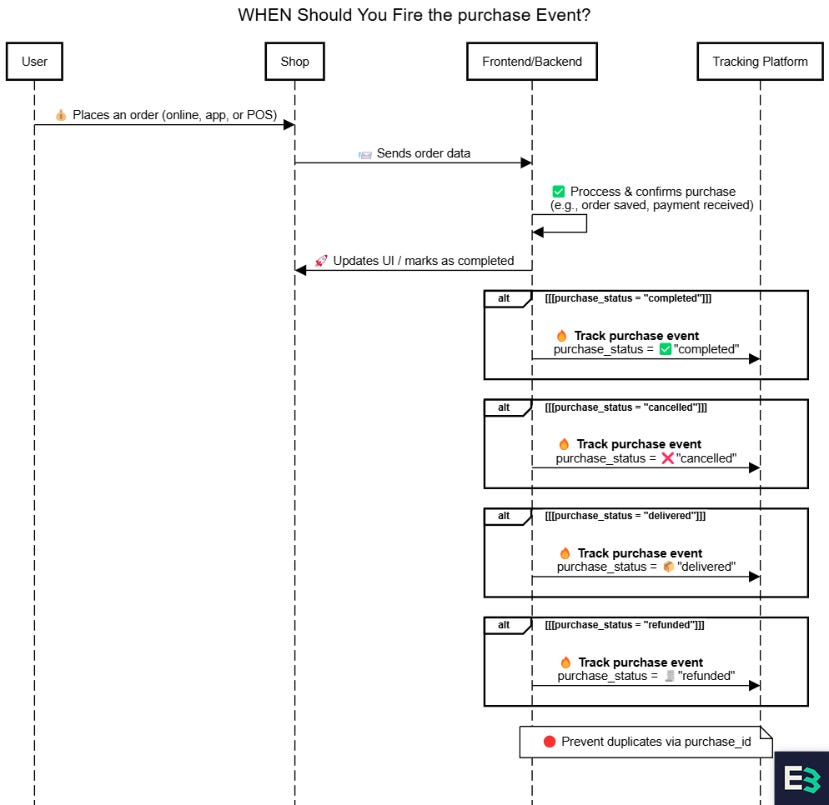
purchase event should fire based on different user interactions.While some platforms or data models may suggest splitting different purchase-related actions into separate events (e.g., purchase, purchase_delivered, purchase_refunded), Bloomreach recommends consolidating these under a single purchase event, using a purchase_status field in the event itself to distinguish between lifecycle stages.
This mirrors how cart_update uses an action field and offers a cleaner, more scalable event model for analytics and automation.
Trigger: The customer successfully completes the order (e.g., online checkout, in-store POS).
Example:
A customer places an online order.
A POS system logs an in-store order for pickup (product not yet delivered).
Use Case:
Attribution, conversion tracking, triggering operational workflows (e.g., fulfillment, shipping, notification), and post-purchase campaigns (e.g., reviews, upsell, loyalty).
💡 Suggested purchase_status: completed
⚠️ Important: Avoid Double-Counting:
If you use multiple tracking sources (e.g., client-side, server-side, batch), ensure that deduplication is configured and avoid re-firing the event on confirmation page reloads.
⏱️ Real-Time Consideration:
If backend confirmation is delayed (e.g., async job queues), consider firing the event in real time to trigger time-sensitive actions (like ad suppression or order confirmation).
Use client- or server-side—server preferred where possible.
💬 Note: Some businesses recognize revenue only upon delivery. But for marketing attribution,
purchase_status:completedis the key conversion milestone.
Trigger: The purchase was previously confirmed but has since been cancelled by the customer or the merchant—before fulfillment, delivery or usage.
Example:
A customer places an order online but cancels it before shipment.
A system automatically cancels the order due to stock issues or payment timeout.
Use Case:
Trigger cancellation confirmations, restock inventory, exclude cancelled orders from revenue reporting and fulfillment flows, and log cancellation reasons for churn analysis.
💡 Suggested purchase_status: cancelled
Trigger: The customer receives the item—either via shipping, pickup, or in-person handover.
Example:
A courier delivers an online order.
A customer picks up a BOPIS order in-store.
Use case: Triggering loyalty points, review requests, satisfaction surveys.
💡 Suggested purchase_status: delivered
Trigger: A full or partial refund is issued.
Example:
An online return is processed.
A refund is issued in-store via POS.
Use case: CLV recalculation, churn analysis, fraud detection, apology workflows.
💡 Suggested purchase_status: refunded
💬 Omnichannel Note:
These lifecycle stages apply across online and offline purchases. Whether the customer shops through your website, mobile app, call center, or physical store, you can use the same
purchaseevent structure with apurchase_statusto reflect their transaction state. This ensures unified data and better cross-channel insights.
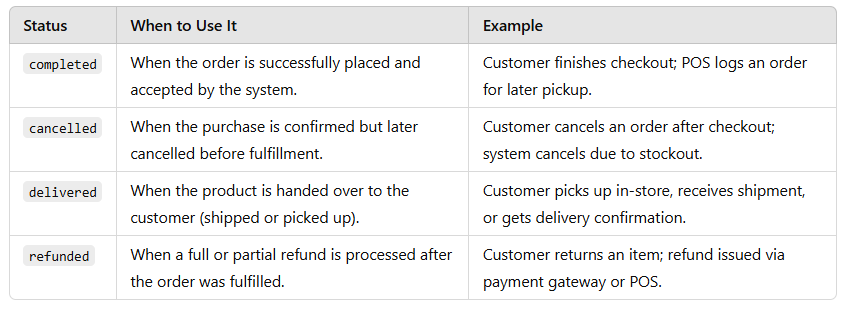
Tracking purchase_status enables better analytics and automation by separating payment confirmation from fulfillment and follow-up:
Delivery Rate – % of purchases that reach
deliveredstatusFulfillment Lag – Time between
completedanddeliveredRefund Ratio – % of purchases that transition to
refundedPickup Abandonment Rate – Orders that stay stuck in
completedbut are never fulfilledChurn Signals – Identify repeat refunders or delayed deliveries that correlate with customer loss
These metrics help optimize everything from marketing automation and product strategy to CX and operations.
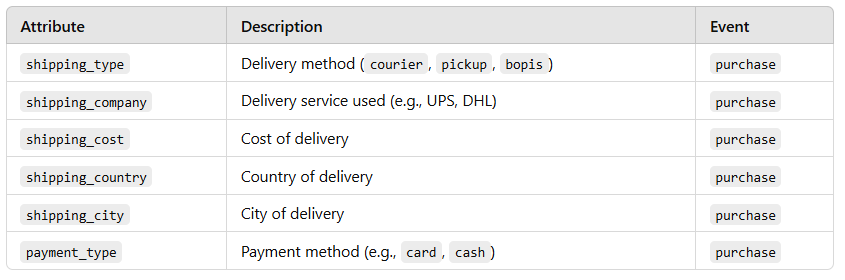
The purchase event should capture a complete, reliable snapshot of the transaction—who bought what, for how much, using which payment method, and how it’s being fulfilled.
To identify who, we recommend including a stable user_id—preferably a GUID/UUID. This enables clean identity stitching across sessions, devices, and platforms without exposing raw personal data.
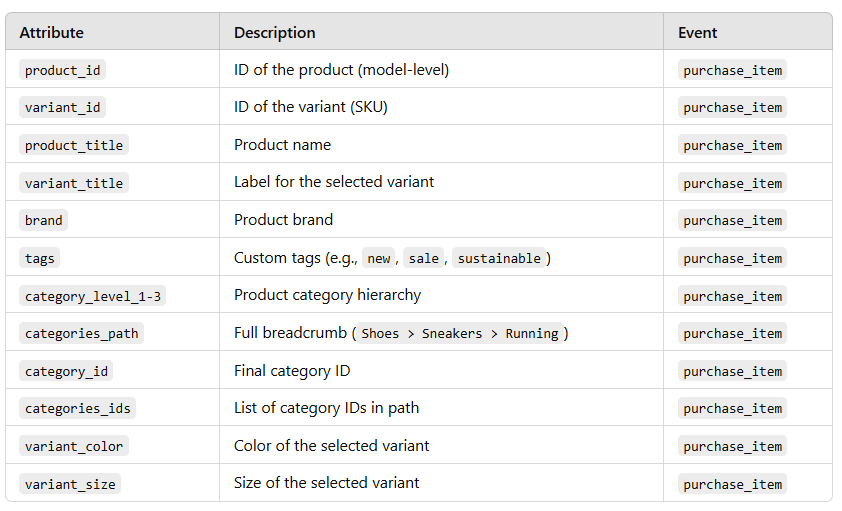
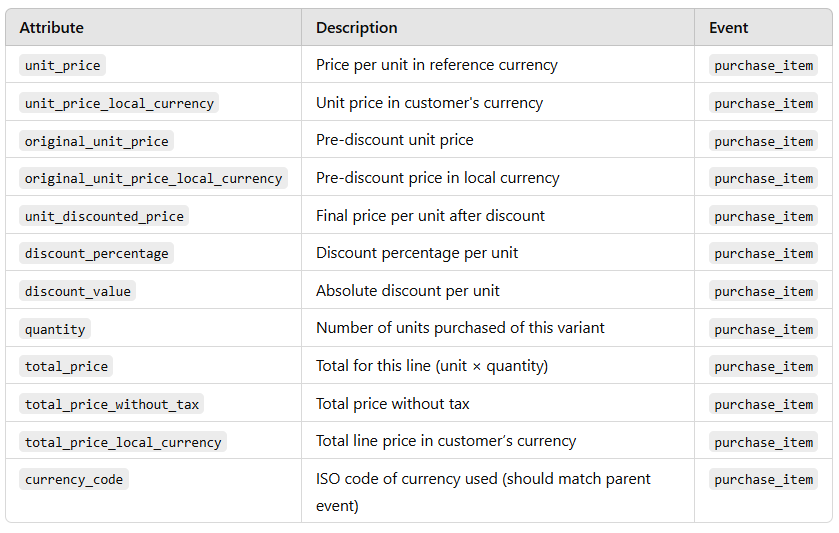
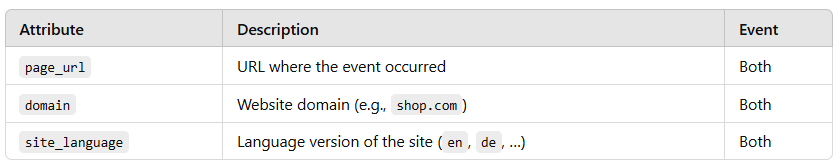
To support clean analytics, revenue reporting, campaign attribution, and post-purchase automation, we recommend tracking two related events:
purchase– the summary event, representing the transaction as a wholepurchase_item– the item-level breakdown, with one event per product variant purchased
This separation follows Bloomreach's recommended best practices and ensures compatibility with:
Campaign personalization logic
Product catalog and inventory integration
Revenue and order reporting
AI-based recommendations and segmentation
Together, these events provide a solid foundation for accurate, actionable purchase data—ready to power both business insights and personalized experiences.
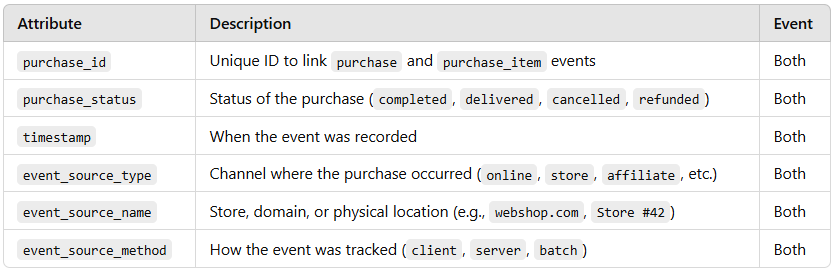
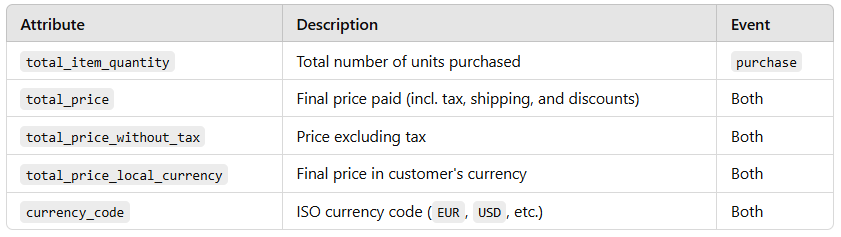

If you're tracking purchases server-side, you can enrich your purchase_item events with internal business data like the cost of goods sold (COGS) or margin.
This enables powerful downstream use cases such as:
Profit-based performance analysis
Margin-aware audience segmentation
True contribution-to-revenue modeling (not just gross revenue)
Since margin and cost data are sensitive, avoid exposing them on the client side. Server-side pipelines (e.g., via backend e-commerce systems or ETL flows) are the ideal place to include these fields securely.
💬 If you operate in multiple currencies or languages, it’s important to:
Always track both the company’s reporting currency (e.g., EUR) using fields like
unit_price(orunit_price_eur), and the customer’s local currency usingunit_price_local_currency,total_price_local_currency, andcurrency_code.
This ensures consistency in global reporting while maintaining accuracy for local transactions.Track unified product metadata across languages using normalized values for
brand,category,variant_color, andvariant_sizeto ensure consistency in analytics and segmentationUse
site_languageto reflect the context of the page where the event occurred—not the user’s browser setting
Link events: Every
purchase_itemmust include the samepurchase_idas its parent purchase event to maintain data integrity across sources.Match catalog fields: Ensure all
product_id,variant_id,category_id,brand, andtagsmatch your product feed and catalog. This enables reliable joins and clean reporting.Use unified currencies: Always track both the company’s global reporting currency (e.g., EUR) and the customer’s local currency (e.g., CZK). This is critical for accurate analytics in multi-country stores.
Normalize lifecycle statuses: Use
purchase_statusconsistently across both events (completed,cancelled,delivered,refunded, etc.) to support funnels, delivery rates, and finance integrations.Avoid metadata overlap: Keep the main
purchaseevent clean. Product-level metadata (e.g.,unit_price,category_id, variant details) should be captured only in thepurchase_itemevent.
To ensure full-funnel tracking, revenue reconciliation, and accurate marketing attribution, purchase should be fired across these platforms:
Google Analytics 4 (GA4): Key for conversion tracking, e-commerce reports, and funnel drop-offs.
✅ Best Practice: Fire server-side where possible to support enhanced conversions and leverage first-party data for more accurate attribution and reduced tracking loss.Data Warehouses (BigQuery, Snowflake, etc.): Store event-level purchase data to power CLV models, RFM segmentation, margin analysis, and cohort reporting.
✅ Best Practice: Send bothpurchaseandpurchase_itemevents server-side to ensure consistent, lossless tracking for detailed transactional modeling and product-level performance analysis.
Meta (Facebook) Ads / Google Ads / TikTok Ads: Crucial for return on ad spend (ROAS), campaign optimization, and lookalike audiences.
Offline Conversion Tracking: If firing server-side, use conversion APIs (Meta CAPI, Google Enhanced Conversions) to ensure attribution even with tracking restrictions.
Bloomreach Engagement – Combines the strengths of both a CDP and an activation engine. It handles real-time data ingestion, CLTV calculations, unifies customer profiles across channels, and powers post-purchase journeys, repurchase automation, and loyalty workflows—all within a single platform.
Segment, mParticle, Tealium – Focus on centralizing purchase data across touchpoints and syncing unified profiles to other execution tools.
Klaviyo, HubSpot, Braze, Salesforce CRM – Use purchase data to trigger welcome emails, post-purchase surveys, reorder nudges, loyalty sequences, and satisfaction flows.
Shopify, Magento, Salesforce Commerce Cloud, WooCommerce – Capture
purchaseand fulfillment data to sync with back-end systems, update order status, and trigger transactional events.
Tracking purchases isn’t just about counting money—it’s about activating your customer base, optimizing campaigns, and building a profitable lifecycle strategy.
Here’s what the purchase and purchase_item data enables:
Optimize paid media based on actual revenue—not vanity metrics like clicks or views.
Support channel- and campaign-level ROAS and POAS (profit on ad spend) analysis using enriched data like margin. Check out this case study for inspiration: How Goossens Used Automated Offline Conversions To Improve Google Ads Performance With Bloomreach
Bloomreach enables server-side offline conversion sync with Meta and Google Ads—including custom fields like margin.
Send real-time order confirmations, shipping updates, satisfaction surveys, and how-to content.
Trigger onboarding journeys and personalized cross-sell offers based on what was purchased.
Use Scenarios and Product Recommendations in Bloomreach to power these flows automatically.
Segment customers by order value, product category, or purchase frequency to forecast the next likely order.
Trigger reorder reminders based on average replenishment cycles or subscription logic.
Use Bloomreach Predictions to automate timing and targeting.
Identify high-LTV users and frequent buyers to invite into loyalty programs, early-access drops, or exclusive bundles.
Build tiered segments dynamically with Bloomreach’s real-time segmentation.
Analyze return and refund behavior by price, variant, or channel.
Identify refund-prone segments and proactively trigger product education, help center content, or human outreach.
Use
purchase_status=refundedto power churn prevention flows in Scenarios.
Build dynamic audiences for post-purchase upsell, refill, or back-in-stock campaigns.
Exclude recent buyers from prospecting audiences to prevent wasted spend.
Sync these audiences directly to ad platforms via Bloomreach Ads Retargeting.
The purchase and purchase_item events are more than just conversion signals—they’re the heartbeat of your e-commerce data.
When tracked properly, it unlocks accurate revenue reporting, dependable attribution, and powerful post-purchase automation.
When tracked poorly, it breaks your funnel, skews ROAS, and leaves your personalization and lifecycle campaigns in the dark.
Fire the event only after a confirmed transaction
Preferably server-side, or on the thank-you page with deduplication logic to avoid double counting.Use a unique
purchase_id
Ensure traceability across platforms and link everypurchase_itemevent to its parentpurchase.Include a stable user_id (e.g., GUID/UUID)
Enables identity stitching across devices, channels, and platforms without exposing PII.Track rich metadata
Usepurchasefor order-level info (revenue, shipping) andpurchase_itemfor detailed product-level data (variants, pricing, quantity, discounts).Map values to your catalogs and CRMs
Ensure consistent IDs and taxonomy across Bloomreach, Meta Ads, GA4, your product feed, and internal tools.Track across platforms
Firepurchaseevents into your analytics tools, ad platforms, CDPs, CRMs, and data warehouse—especially server-side where possible.Leverage post-purchase automation
Trigger onboarding journeys, loyalty workflows, product recommendations, and churn prevention flows—all based on real-timepurchaseandpurchase_itemsignals.
Tracking purchase and purchase_item isn’t just a technical task—it’s a strategic foundation for growth.
With the right setup, every order becomes a powerful signal that fuels smarter marketing, sharper insights, and stronger retention.
Let E3 help you turn conversion tracking into conversion activation.
📅 Book a free strategy call—and let’s make your purchase data work harder, smarter, and better across every channel.
Comments
Nothing yet. Say the first thing.
Sign in to join the conversation.