
Designing for AR really comes down to two early choices.
Where will it run? A hardware question, and it follows your audience. Are they on their phones, in a web browser, or wearing AR glasses? Build where your people already are.
What will you build it with? This comes down to two paths, below.
There are basically two kinds of AR tools:
Dedicated AR platforms. Made only for AR. Usually faster to start (many are no-code), and they publish to an existing home like a browser (webAR), hosted platform (like SnapChat), or a headset (like Vision Pro).
Engines that run inside an app. General game engines like Unity and Unreal, where AR is one feature of a full app you build and ship yourself. The most power and control, but heavier and more technical. Under the hood, these (and many dedicated platforms) sit on the device frameworks ARKit (Apple) and ARCore (Google).
Rule of thumb: start with a dedicated platform. Reach for an engine when you need a full custom app or something a platform cannot give you.
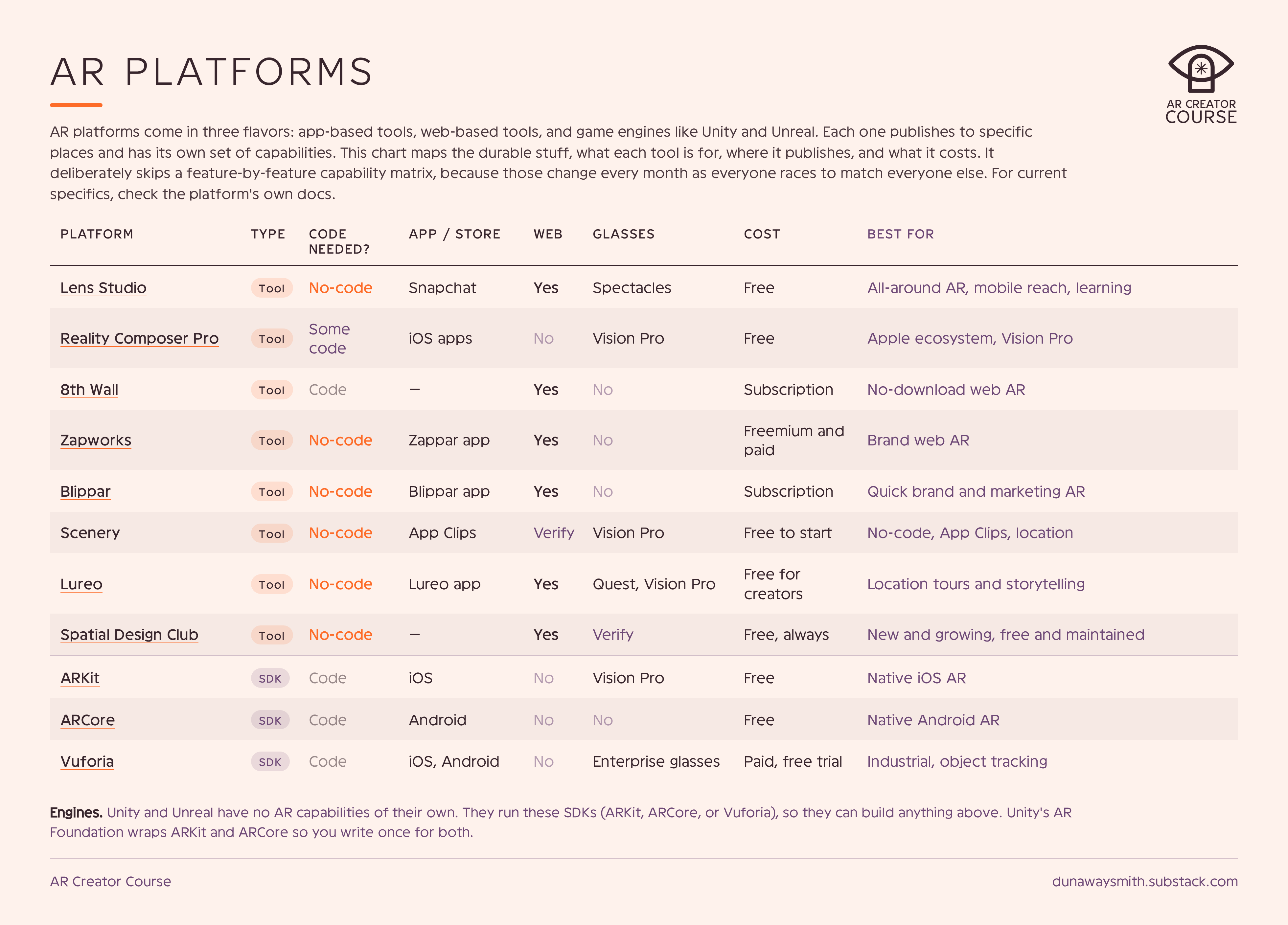
Embedding spreadsheets doesn’t work very well on Substack, so here is a downloadable PDF and live spreadsheet.
AR platforms come in three flavors: app-based tools, web-based tools, and game engines like Unity and Unreal. Each one publishes to specific places and has its own set of capabilities. This chart is not exhaustive or deeply technical. It maps the durable stuff, what each tool is for, where it publishes, and what it costs. It deliberately skips a feature-by-feature capability matrix, because those change every month as everyone races to match everyone else.
It also only names the top players in the space that I have used. There are lots of smaller web based and app based AR platforms out there. Realistically, too many to name, so I didn’t. :)
Want the widest reach right now? Mobile and web AR.
Want the hands-free frontier? AR glasses.
Building something tied to a real place? A location specialist.
Need a project that can run in multiple places? Consider something versatile like Lens Studio.
Phones & Tables: the biggest AR audience by far, already in everyone’s pockets.
Snap Specs: Snap’s AR glasses, with a new consumer model arriving in 2026.
Meta Quest: passthrough mixed reality with big reach.
Apple Vision Pro: premium spatial computing with excellent design guidance.
Location experiences (tours, games, public art) lean on a few extras:
Snap: Landmarkers, Custom Location AR, and City-Scale AR, all inside Lens Studio.
Niantic Lightship: mapping and VPS (visual positioning) tech behind a lot of location AR.
Google ARCore Geospatial API: world-scale anchors tied to real coordinates.
Scenery and Lureo (in the table above) are strong dedicated options for location work.
It depends on the project. But these days I mostly build in Lens Studio. THIS POST IS NOT SPONSORED, BTW! That said, I am a long time member of their developer community and was one of the first people invited to build for their AR glasses, the Specs. So, I know and like a lot of people on their team.
These are reasons I typically use LS:
Build once, publish three places. Web AR, Snapchat, and Spectacles from the same project. Most tools make you pick one and commit, which means a prototype gets stranded wherever you happened to start it.
Low floor, high ceiling. You can ship something real without writing code, then drop into scripting to build more ambitious experiences. Snap has been one of the most consistent innovators in the space, so the advanced capabilities (VFX, shaders, etc) are actually there when you need them.
They’re not going anywhere. Consumer Specs launch this year. The install base is about to exist rather than being promised, which is more than most platforms in this list can say.
Free. Nuf said.
Real community. They have a robust developer community that support one another and answer questions.
Two (and a half) big tools recently exited, the platform-risk lesson in action. Meta Spark shut down in January 2025, and Adobe Aero ended support in November 2025. Notably, 8th Wall “closed it’s doors” in early 2026, but now has become open source (partly.) So, the landscape is always changing.
Which means the thing worth learning is not a tool. It's the judgment underneath the tool: how to place content in space, how to make an interaction legible in the first three seconds, how to know when the core moment is working. That transfers. Menu locations do not. If you’re interested in learning these skills, check out my AR Creator Course.
No posts
Comments
Nothing yet. Say the first thing.
Sign in to join the conversation.