
My writing setup is hardly a perfect science (is anyone’s?), but after a lot of trial and error over the years, I’ve found what works for me. Things that make the journey from first draft to published book a little smoother.
I love experimenting and getting nerdy about new writing tools and resources, so I’m always on the hunt for things to try. I’ve compiled my current go-tos here.
Some affiliate links are included where applicable, which means I’ll make a small commission if you purchase something (at no extra cost to you), but these are all things I genuinely use and love.
P.S. Please share your favorite writing tools and resources in the comments!
P.P.S. You can now choose which content you’d like to receive from me: behind-the-scenes of my writing process (like this post), contemporary romance fiction, and/or fantasy/sci-fi fiction. If you’re already a subscriber, you can update your preferences by opening DREAMIST in your browser, clicking your profile photo in the top-right corner, and selecting “Manage Subscription.” Then, scroll down to “Notifications” and deselect what you don’t want to receive.
I’ve been a devoted Scrivener girlie for years, but I like to try new things because you never know when something will make a difference. Reedsy Studio kept popping up, so I finally decided to give it a try after seeing it had some features that Scrivener didn’t, and after a month of using it, I really like it, too.
If you don’t want to invest in Scrivener, Reedsy Studio is a great alternative because it offers a free version. Right now, I’m using both programs as I continue to feel it out.
Scrivener — Scrivener has been around for years (I’ve personally been using it for at least a decade) and is a very robust program. I’ve always loved how organized it is. It has different folders, templates, ways to label your documents, a split-screen function, composition mode (for no distractions), a notes panel you can toggle to the side for easy access, and many other features that help me streamline my process. It also has an app, so I can easily sync my projects between my laptop, phone, and tablet.
I’m currently drafting in Scrivener and using Reedsy Studio to back up my work, in addition to backing it up in Dropbox (you can never be too careful — multiple backups can save a life).
Reedsy Studio — The great thing about Reedsy Studio is that it has a completely free tier, and you can upgrade to unlock extra features. For the first 30 days, all the premium features are unlocked for free, so you can try them out.
It offers pretty much everything Scrivener does, with some limitations. For example, you have fewer options for labeling/organizing documents and folders, and it doesn’t have a dedicated app, though it is optimized for a mobile browser. However, it also offers features Scrivener doesn’t, such as Challenges, where you can join the Reedsy community to participate in writing challenges throughout the year (similar to NaNoWriMo, which I used to love before all of the controversy). You can share your documents with critique partners or beta readers, and they can leave comments right on your manuscript. It even has excellent formatting capabilities for ebooks and print.
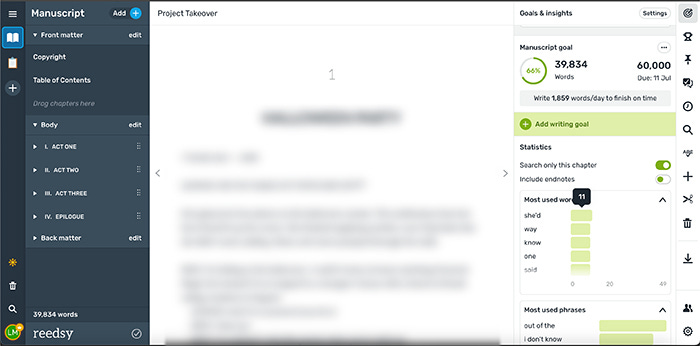
My favorite thing so far is the “Goals and Insights” panel. You can set multiple manuscript goals and track them (e.g., 50,000 words by a specific date) directly in the manuscript. It will calculate your targets (e.g., how many words per day) and adjust them as you write, and you can even set which days of the week you plan to write so it can give you accurate targets.
It also has “Statistics” under that panel that show your most used words and most used phrases, which you can toggle between an individual chapter and the whole manuscript. THIS is gold. It’s helped me be more cognizant of them early on so I’ll have fewer repetitive words to cull in the later editing stages.
Google Docs — I use Google Docs to share my manuscript with critique partners and beta readers for feedback. They’re able to leave comments and suggestions directly in the document, which makes everything easy to keep organized. I’m going to experiment with Reedsy Studio’s function for this on my next manuscript to see if I prefer it over Google Docs.
Word Hippo & One Look — These are my go-to thesauri when I’m struggling to find the right word. They’re a godsend.
Emotion Thesaurus — This is exactly what the title says: a thesaurus for different ways to describe emotions characters experience (through body language, physical sensations, and mental cues) so you don’t get caught in a loop of using the same descriptions. The whole Writers Helping Writers thesaurus series is a gold mine.
Pinterest, YouTube & Spotify — Pinterest is my go-to for inspiring images of characters, settings, and vibes for my projects for use in mood boards (personal use only — I use free stock images with commercial use licenses for anything I post publicly). YouTube is great for music I can’t find on Spotify, like slowed-down and reverb versions of songs, as well as for research, such as real-time walking or driving videos in cities I’ve never been to, or explainer videos for skills I don’t have. Spotify is where I compile my project playlists and discover new music to add to them, and they also have great playlists for work/focus.
Pomofocus — A free Pomodoro timer I use to help me focus during writing sprints. I find I’m able to get more done in less time when I have a 20- or 25-minute timer running and take 5-minute breaks in between.
MasterClass — I’ve had a subscription for years because I’ve found a lot of value in several of their classes. While some haven’t lived up to my expectations, there are enough that have that make the subscription well worth the investment (for me). Some of my favorite classes on writing are by Shonda Rhimes, Margaret Atwood, N.K. Jemisin, The Duffer Brothers, Issa Rae, Aaron Sorkin, and Mindy Kaling. I’ve also taken classes in other subjects to help with story research, such as John Legend’s on music production, which helped when I was writing my contemporary romance, Reality with You, about a female musician.
Reedsy Learning — I recently took How to Write Irresistible Romantasy, and I’ll be attending Layer by Layer: How to Edit Your Book later this month. They also offer an annual membership that gives you access to their entire catalog of courses and events for writers.
Save the Cat! Writes a Novel by Jessica Brody — I use the Save the Cat! story beat sheet religiously when I outline my books. It helps me work out a solid structure right from the beginning.
Story by Robert McKee — While this is technically a book on screenwriting, it focuses on how to tell a gripping story and the principles in it transcend any one medium. It’s one of the best I’ve ever read on storytelling. I read it years ago and I still refer back to it sometimes while working on my novels.
Story Genius by Lisa Cron — This is my favorite book on character development. Absolutely fantastic.
On Writing by Stephen King — Another classic I highly recommend for any writer to read, regardless of where you are in your journey.
Self-Editing for Fiction Writers by Renni Browne & Dave King — A great book on how to self-edit your work to make it as strong as possible, before you pass it off to a professional editor.
Canva — I use Canva for everything: social media, book covers, email and website visuals, and story mood boards. The templates are amazing, the asset libraries (fonts, elements, photos, and videos) are huge and constantly updated, and it’s super easy to use. I have a premium subscription, but there’s a lot you can do with the free version.
SiteGround — This is my website host for both of my websites. I like to use WordPress, which is free and hosted on SiteGround, because if I ever want to move to a different host, I can copy everything over; I’m not bound to the page builder on something like Squarespace or Wix, which would require me to rebuild my website from the ground up if I ever want to switch. It also offers a lot more room for customization and growth. I’ve been using WordPress and SiteGround for years with no issues. Their customer service is great, too.
Pexels, Unsplash, and Dupe — I get all my free stock images (which come with a commercial license, meaning they can be used for book promo and marketing) for social media from these websites.
𝒯𝒽𝒶𝓃𝓀 𝓎𝑜𝓊 𝒻𝑜𝓇 𝓇𝑒𝒶𝒹𝒾𝓃𝑔! If you enjoyed it and would like to show your support for my work, please:
Like and/or comment on this post (it helps it reach more people ♡)
Share this post with someone you think it’ll resonate with
𝓍𝓍 𝐿.𝐸.
Comments
Nothing yet. Say the first thing.
Sign in to join the conversation.