
If you came from LinkedIn you already know the maths. If you didn't, don't worry, I'll cover that too.
But the real thing I want to show you today is how I built my own calorie tracking app. Does 95% of what Cal AI does. Free. In minutes. Without writing a single line of code.
And I'm not exaggerating "minutes." You'll see the actual chat where I set it up. Its embarrassingly simple. Like I almost didn't want to make an episode out of this because the answer is too short.
I'm going to explain this like I'm explaining it to my 10th standard self. Because genuinely this is all you need to know.
Your body burns a certain number of calories just by existing. Just breathing and pumping blood. This is your BMR (Basal Metabolic Rate).
For men: (10 x weight in kg) + (6.25 x height in cm) - (5 x age) + 5 For women: same thing but - 161 at the end instead of + 5
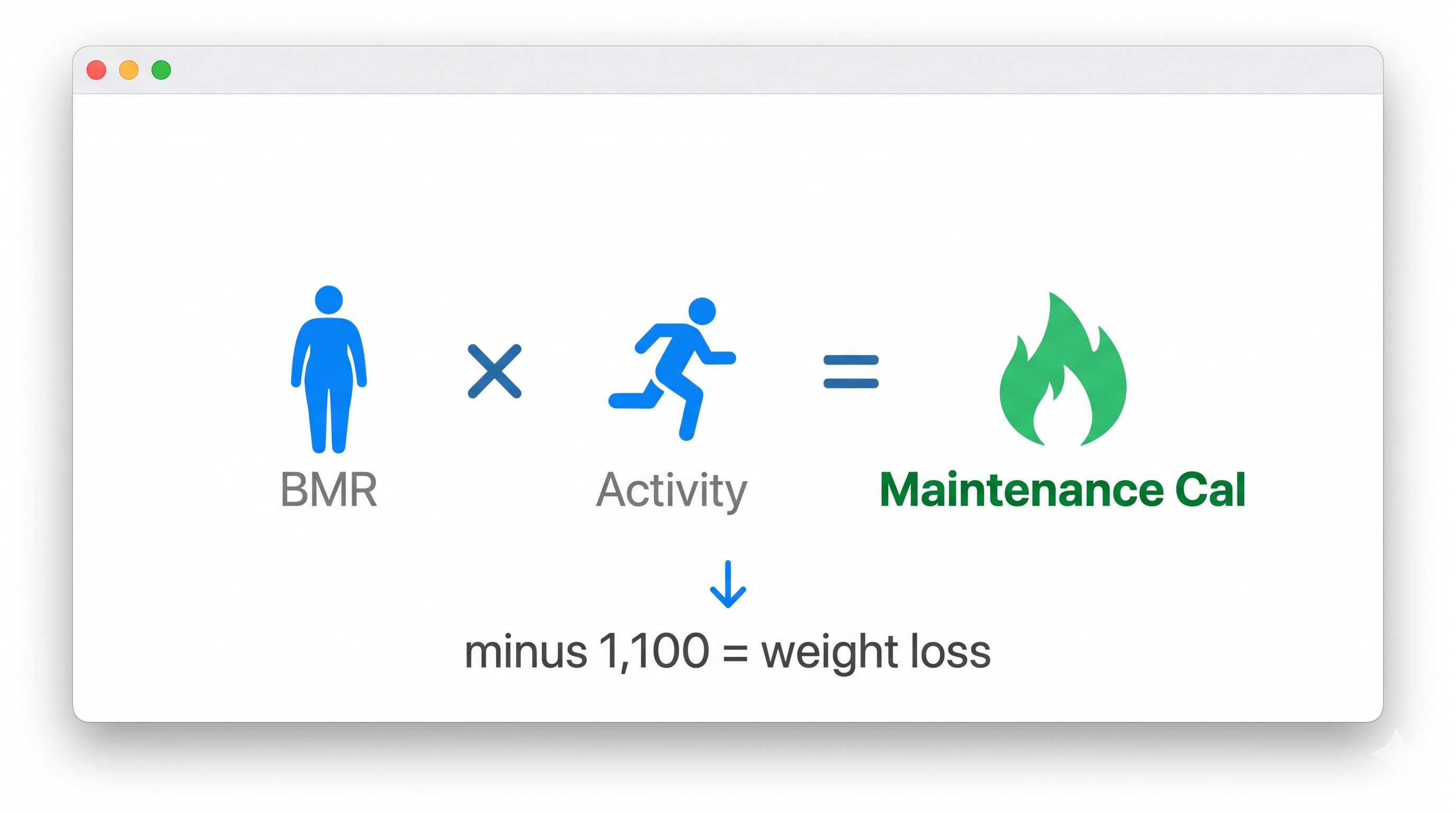
Now BMR alone isn't your full picture. You also move around, exercise, walk to the kitchen 14 times a day. So your actual daily calorie burn is:
Maintenance Calories = BMR x Activity Factor
Activity factor ranges from 1.2 (you sit all day, be honest) to 1.9 (you're basically an athlete). Most corporate folks are somewhere at 1.375.
Simple maths now. 1 kg of fat = 7,700 calories. I wanted to lose 5 kg in 5 weeks. Thats 1 kg per week. 7,700 divided by 7 = 1,100 calories per day deficit.
So I just needed to eat 1,100 fewer calories than my maintenance. Thats the entire secret. Every fitness influencer who charges 10K for a "personalized plan" is basically doing this calculation and adding a PDF.
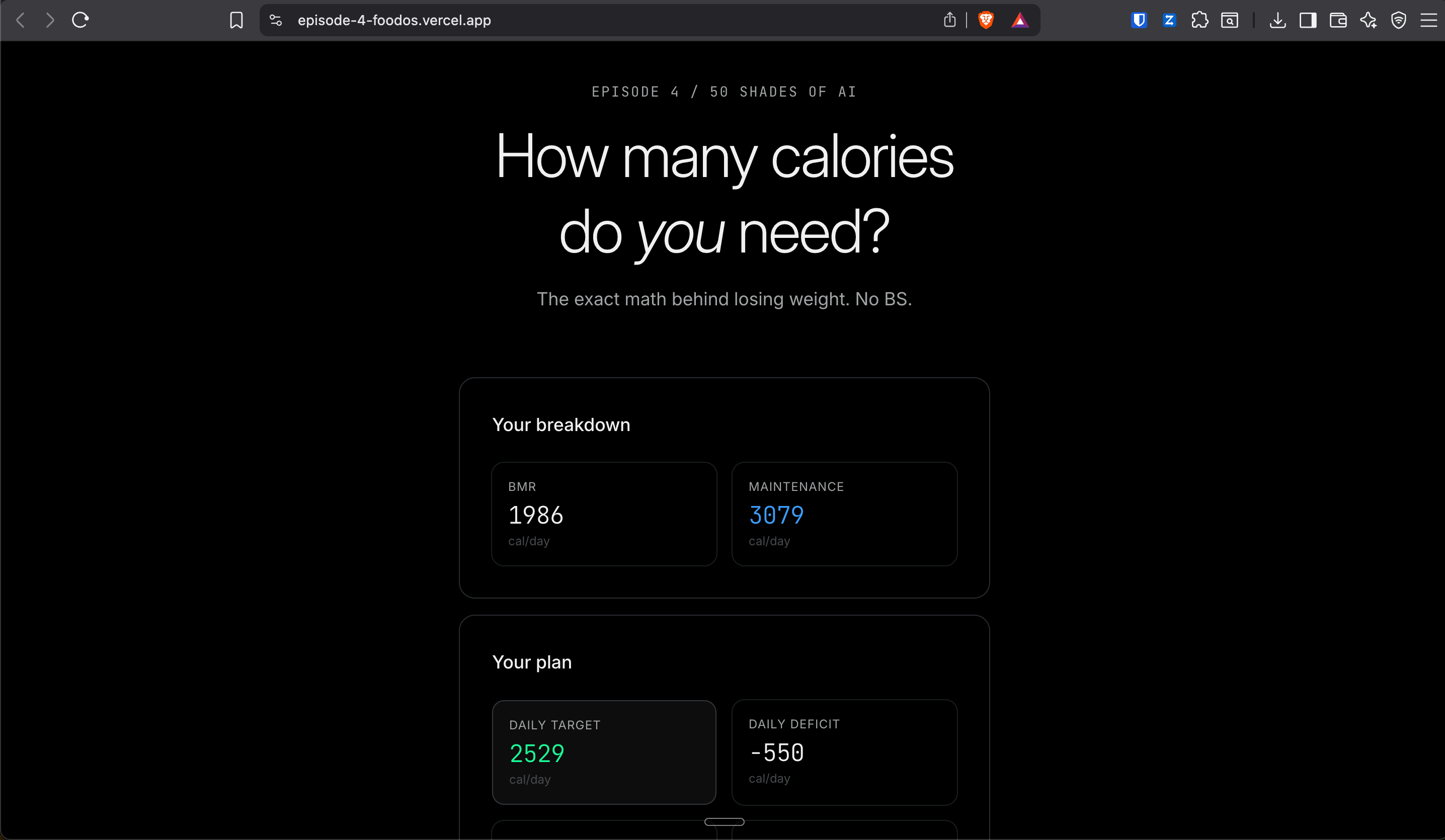
Don't want to do the math yourself? I built a free calculator for you. Plug in your numbers and it tells you exactly how many calories you need:
To make it even more easy I made a simple calorie tracker for you
The maths is easy. The hard part? Knowing what you're eating.
Like you eat rice and dal for lunch. Cool. But how many calories was that? Was it 400? 600? 800? Depends on how much ghee went in. Depends on the rice quantity. Depends on whether "just a little bit" means 1 tablespoon or 4.
And this is exactly where people fail. Not because they don't know they should eat less. But because they have no idea how much they're actually eating.
You could log manually. Open a spreadsheet, google "calories in 2 roti with sabzi", type it in. But lets be real. Nobody does that for more than 3 days. I tried. Failed. Multiple times.
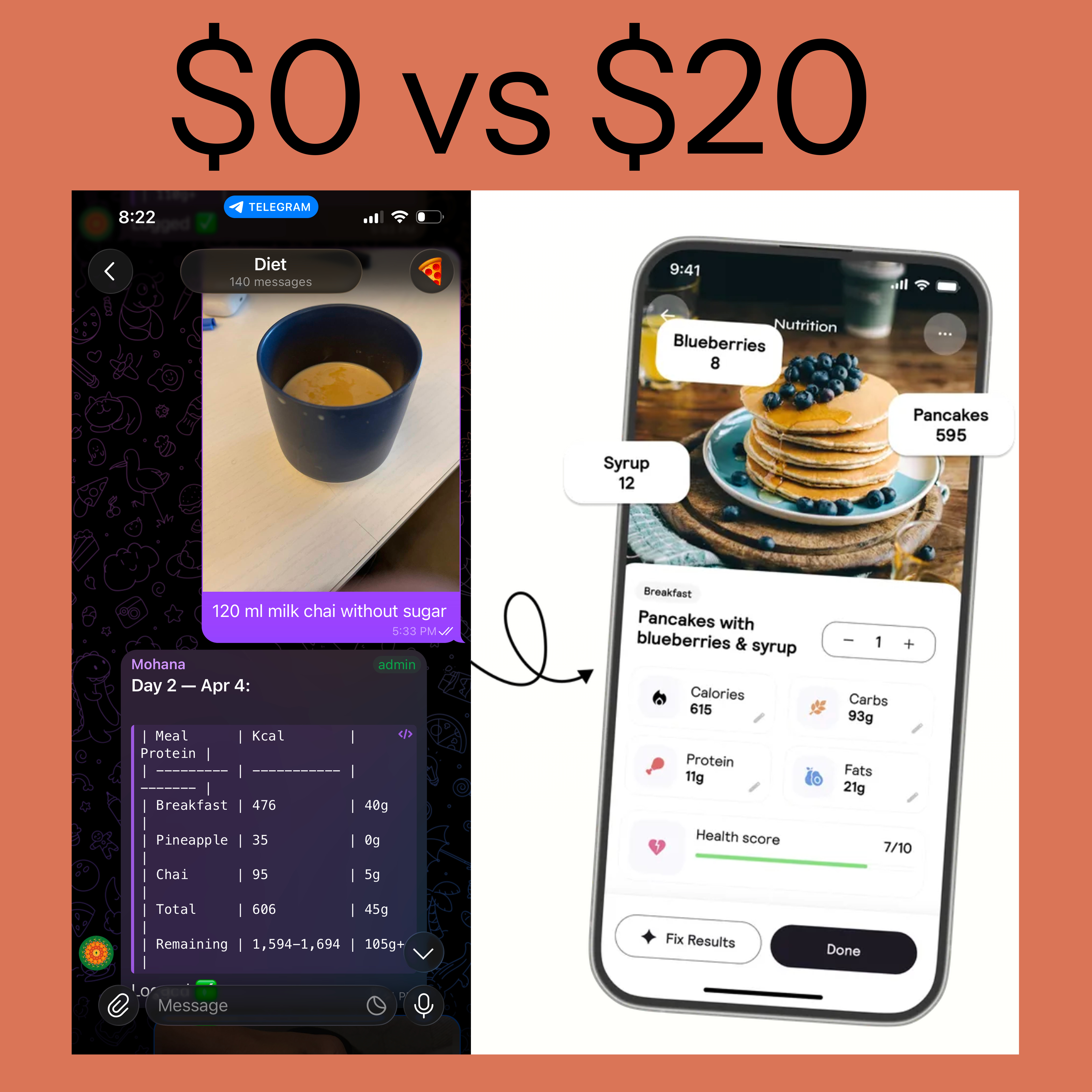
Cal AI solved this beautifully. Click a photo of your food, AI identifies it, gives you calories, protein, carbs. Beautiful app. 20 dollars a month. 150 million in revenue last year.
But the core thing it does? Photo to calories? I rebuilt that in minutes. On Telegram.
Ok quick detour. If you don't know what OpenClaw is, you need this context. If you do, skip ahead.
OpenClaw is basically AI that lives on a server and talks to you through Telegram or WhatsApp.
You know how you chat with ChatGPT on a website? Now imagine that same AI, but instead of living on a website, it lives on your Telegram. You message it like you'd message a friend. It responds like a friend. Except this friend has the brain of the smartest person you've ever met and never sleeps.
But here's what makes OpenClaw different from just "chatting with AI". This AI can actually DO things. It can read and write to your Notion. It can check your calendar. It can browse the internet. It can remember things about you across conversations. Its not just a chatbot. Its more like a full time employee who happens to live inside your phone.
My OpenClaw bot is called Mohana. And Mohana knows me. Knows my weight, my goals, my food preferences, my calorie targets. Because I told it once and it remembered.
And you can set yours up, but it required a little technical knowledge and 2 hours.
And I thought to go one step further and solved this too, that now you can literally set this up in 2 minutes at brewclaw.com, Zero technical understanding needed. No coding. No server setup. You just sign up, connect Telegram, and start talking.
Ok this is the good part.
This is the exact message I typed to Mohana. Copy paste level exact. No editing, no cleanup:
"From now on you will help me lose weight by recording all my calories which I can either give you as photo which you will identify what it is or I can give you in text and from the internet from multiple sources. Add them to the database, with date and what time it was, and how many calories and protein requirement done and what to eat. My body weight today is 94kg and height is 181cm. And desired weight is 75kg and I go to workout 3-4 days a week. And I wanted this process to be gradual."
Thats it. One message. Not even a well-formatted one. I also shared my Notion database link and a token so Mohana could write to it.
Within 2 minutes Mohana came back with:
My daily calorie target: 2,230 kcal Daily protein: 150-170g Weekly loss rate: 0.5 kg Timeline: ~9 months
or use the [FoodOS Calculator] to calculate it yourself.
And then it set up the entire Notion system. Food Log database. Meal Planner with weekly view. Recipe Library with 30+ Indian recipes pre-loaded with calorie counts. All connected. All automated.
I did not build any of this manually.
Now every meal is dead simple.
I eat something. I click a photo on Telegram. Send it to Mohana.
Mohana looks at the photo, identifies the food ("Egg sandwich, toasted whole wheat bread with scrambled egg, veggies, and ketchup"), calculates the calories and protein, and logs it straight to Notion. With the date, time, and a running total for the day.
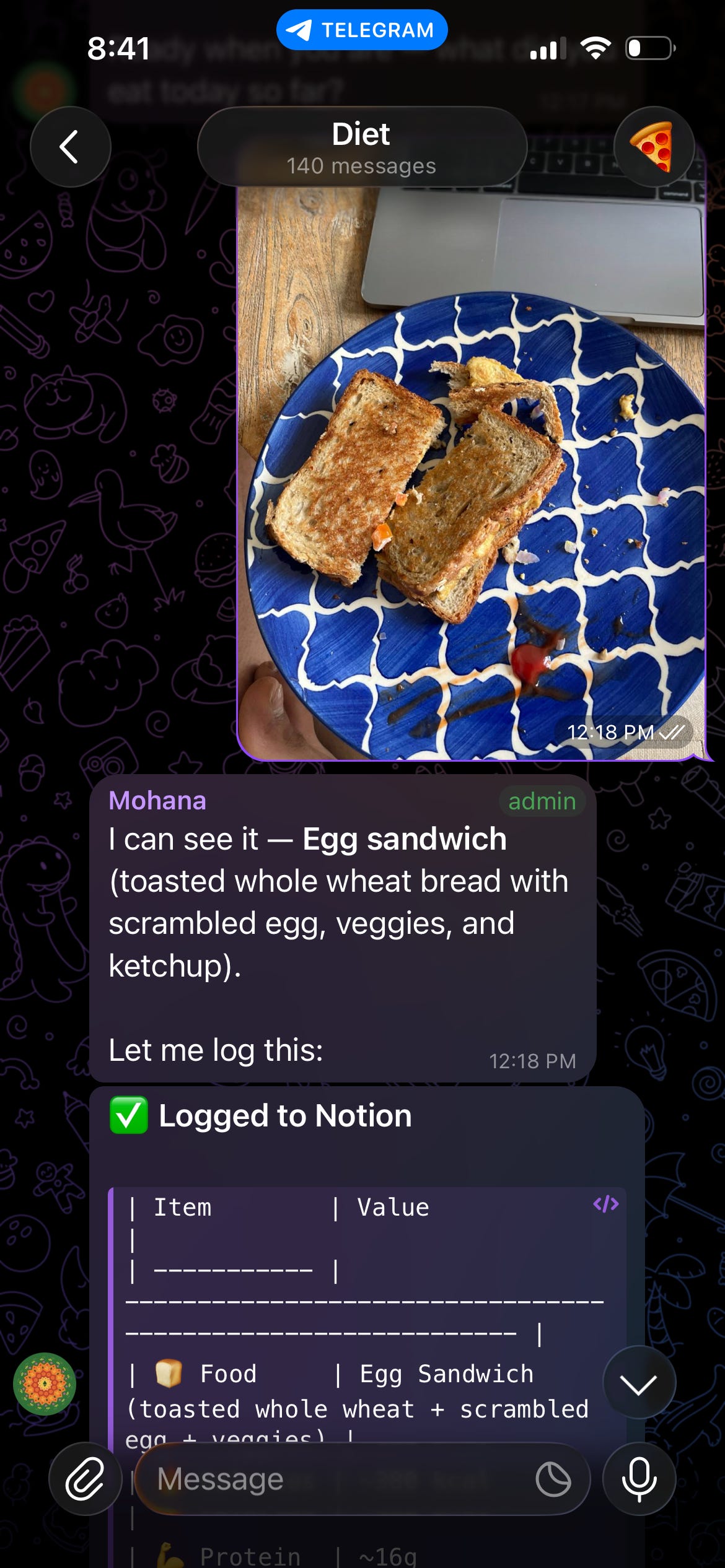
It even tells me how many calories I have remaining. "Remaining: 1,594-1,694 cal, 105g+ protein". So I know exactly what I can eat for dinner.
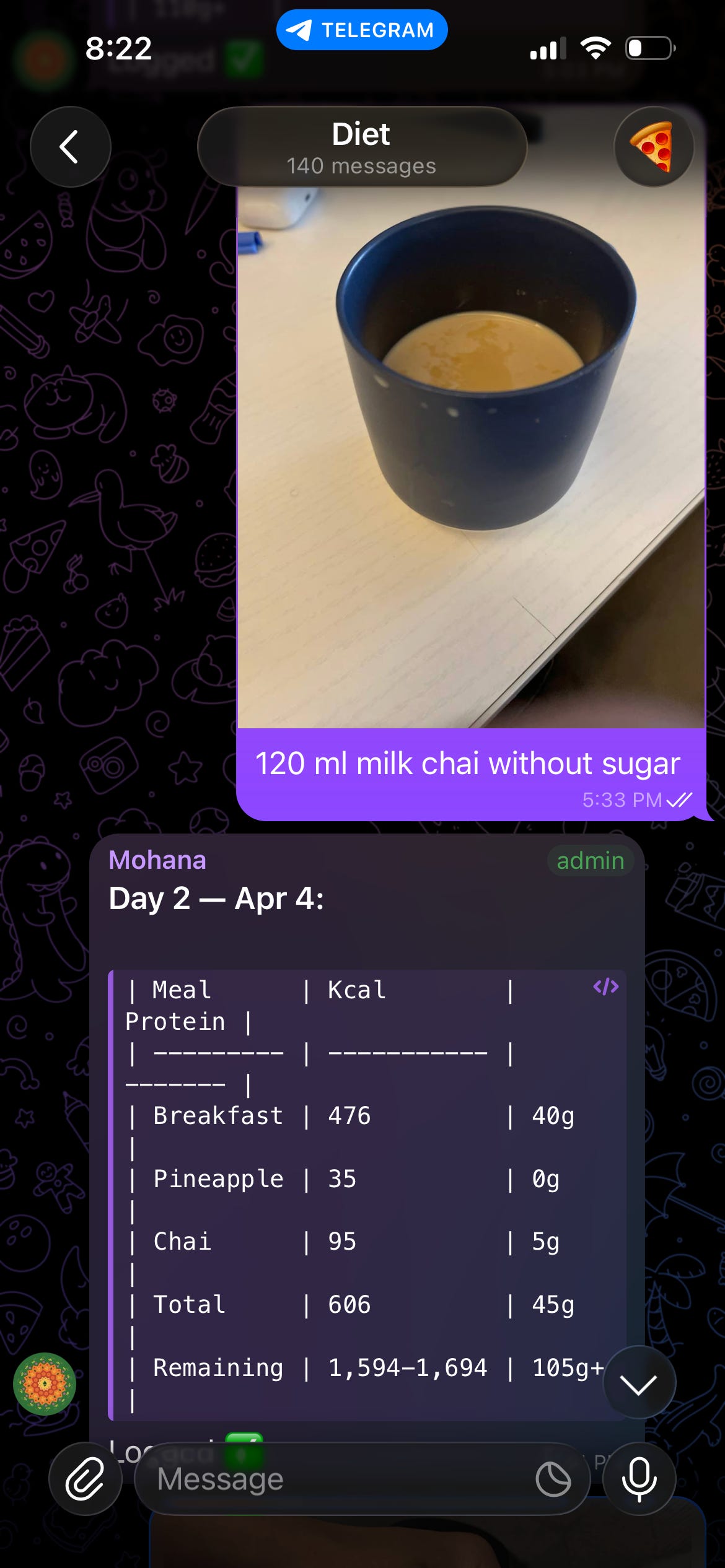
Sometimes I don't have a photo. I just type "120 ml milk chai without sugar" and it logs that too. 95 kcal, 5g protein. Done.
And sometimes I'm confused. Like yesterday I had a protein powder packet and didn't know the serving size. I just clicked a photo of the nutrition label and asked "how much milk and protein powder for a shake?" It read the label, calculated per scoop, and told me exactly what to do.
The Meal Planner in Notion now has my whole week laid out. Thursday through Sunday. Grilled fish with jeera rice, rajma with chicken seekh, paneer bhurji with roti. All with calorie counts. All suggested by Mohana based on my remaining targets.
FoodOS lives in 3 Notion databases that Mohana created:
Food Log is the daily tracker. Every meal goes here with timestamp, food name, calories, protein, carbs, fat. I can see my entire day at a glance and how close I am to my targets.
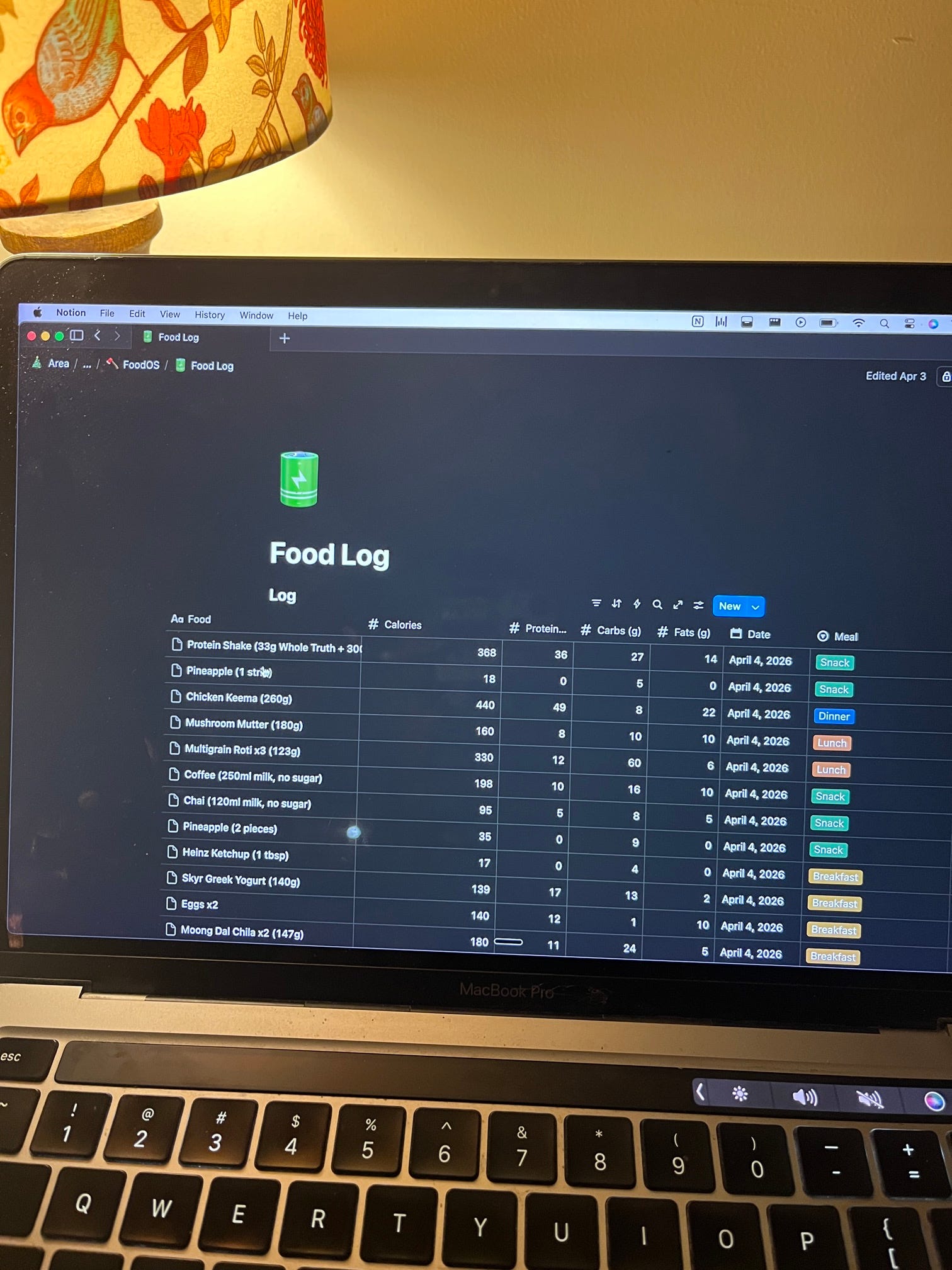
Recipe Library has all the recipes with calories pre-calculated. When I ask "what should I eat for dinner, I have 600 calories left", Mohana picks from this library and suggests something that fits.
Meal Planner is the weekly view. Kanban board style. Thursday column, Friday column, Saturday. Each card is a meal. I can drag things around or let Mohana plan the whole week.
Cal AI charges $20/month. Thats $240 a year.
My setup costs nothing. OpenClaw has a free tier. Notion is free. Telegram is free.
And honestly? My setup does MORE than Cal AI. Because Cal AI just tells you calories. Mohana plans my meals, manages my recipes, tracks my daily progress, logs everything to a database I own, and adjusts suggestions based on whats left in my daily budget.
AND MOST IMPORTANTLY, LEARNS FROM MY PAST CORRECTIONS contexually.
Cal AI is a calorie scanner. FoodOS is a full nutritionist that lives in my pocket. And its free.
5 kg in 5 weeks. 94 to 89.
Not by starving. Not by some insane workout regime. By knowing exactly what I'm eating, exactly how much room I have, and making decisions based on data instead of guilt.
The AI doesn't judge you for eating 2 parathas for breakfast. It just says "ok you have 1,400 calories left for the day, maybe go lighter for lunch." Thats it. No shame. Just math.
Before anything else, find out how many calories YOU need. I built a free calculator for this. No signup, no nonsense, just plug in your numbers:
[Calculate Your Maintenance Calories (Free)]
Enter your weight, height, age, activity level, and desired weight. It gives you your BMR, maintenance calories, daily target, and how many months to reach your goal. Same math I explained above, just done for you.
Thanks for reading Divy’s Substack! This post is public so feel free to share it.
Honestly its so simple it feels wrong to call it a "tutorial."
Step 1: Set up Notion (2 minutes)
Go to notion.so and create a free account if you don't have one. Create a new blank page. Call it "FoodOS" or whatever you want. Don't worry about setting up databases or properties. The AI will do all of that for you.
Now you need a Notion integration token so the AI can write to your database:
1. Go to notion.so/my-integrations
2. Click "New integration"
3. Give it a name like "FoodOS Bot"
4. Select your workspace
5. Click Submit
6. Copy the "Internal Integration Token" (starts with ntn_)
7. Go back to your FoodOS page in Notion, click the three dots (...) at top right, click "Connections", and add your new integration
Save that page URL and that token. You'll need both in the next step.
Step 2: Set up OpenClaw on Telegram (2 minutes)
1. Go to brewclaw.com and sign up
2. Connect your Telegram (takes 30 seconds, it walks you through it)
Step 3: Send the magic message
Copy paste this exact message to your new Telegram bot. Change the parts in brackets to your details:
"From now on help me lose weight by recording all my calories. I can give you photos of food which you will identify, or text and from the internet from multiple sources. Log everything to Notion with date, time, calories, and protein. My weight is [YOUR WEIGHT]kg, height [YOUR HEIGHT]cm, desired weight [YOUR DESIRED WEIGHT]kg, I workout [NUMBER] days a week. Make it gradual. Here is my Notion database link: [PASTE YOUR NOTION PAGE URL] and token: [PASTE YOUR ntn_ TOKEN]."
Step 4: Wait 2 minutes
Your bot will calculate your targets, create the Food Log database, Recipe Library, and Meal Planner all inside your Notion page. It'll tell you when its ready.
Step 5: Start sending food photos
Thats it. Click a photo of your next meal, send it on Telegram, watch the magic happen.
No coding. No app development. No $20/month subscription. Your own AI nutritionist in your Telegram, logging everything to a Notion dashboard you own.
I didn't write a single line of code for FoodOS. I just talked to an AI and told it what I wanted. That's it.
If you want help setting up OpenClaw for YOUR use case, drop a comment on the LinkedIn post. Calorie tracking, expense tracking, journaling, anything. The setup is the same. 2 minutes.
And if someone sent you this newsletter directly, the short punchy LinkedIn version is there too. I post every Tuesday.
See you next week.
No posts
Comments
Nothing yet. Say the first thing.
Sign in to join the conversation.