
The recent workshop on “How AI Changes the Designer Role & Process” provided a detailed overview of how designers are currently using AI in their workflows.
Instead of focusing on theoretical applications or future plans, the workshop showcased real examples of what designers did in their most recent projects.
This article summarizes the findings.
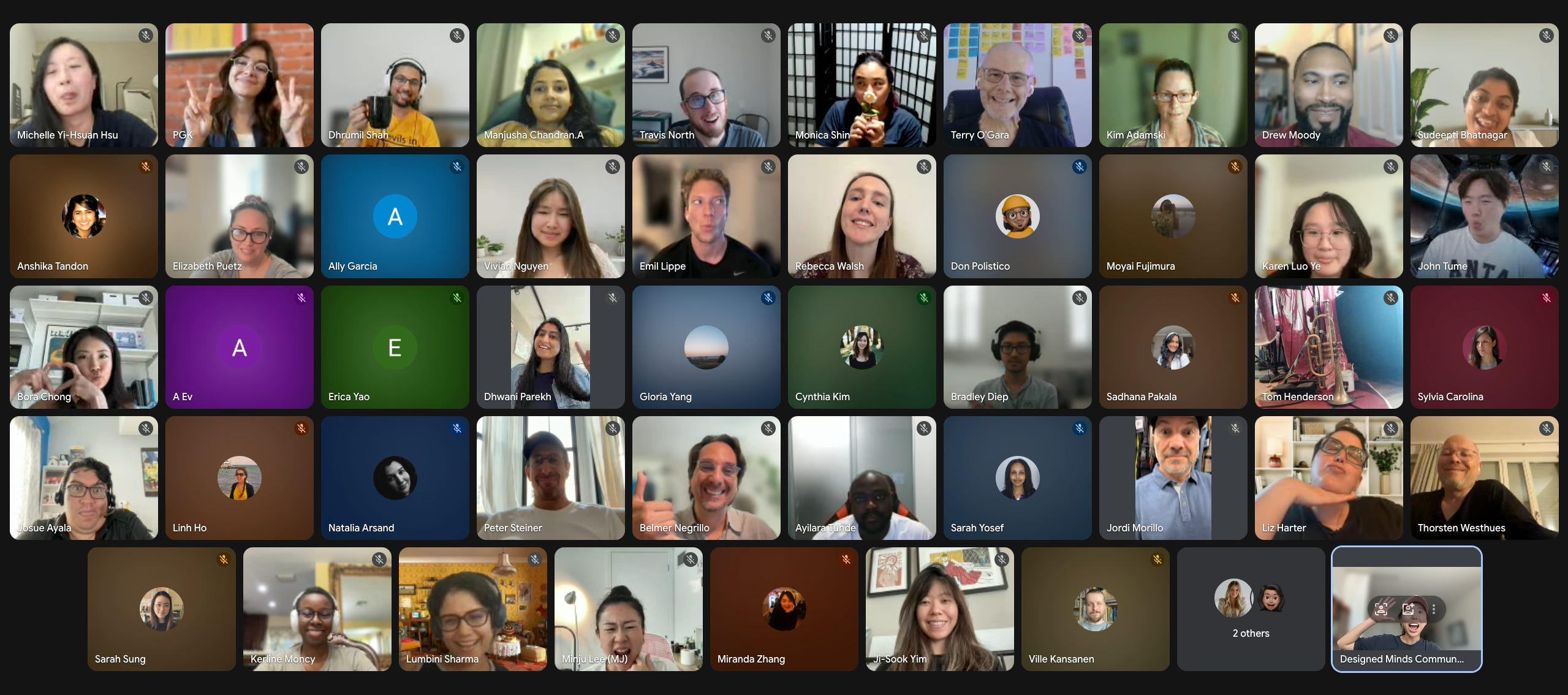
A total of 170 designers submitted the survey → 71 attended → 31 completed a detailed workflow exercise. During this exercise, they documented their most recent project step by step, indicated every step where they used AI, and noted its impact.
One significant finding from the pre-event survey is that 82% of attendees use Claude as a regular tool in their workflow, placing it on a par with their primary design software. In addition, 83% use Figma, while ChatGPT is used by 56% of respondents.
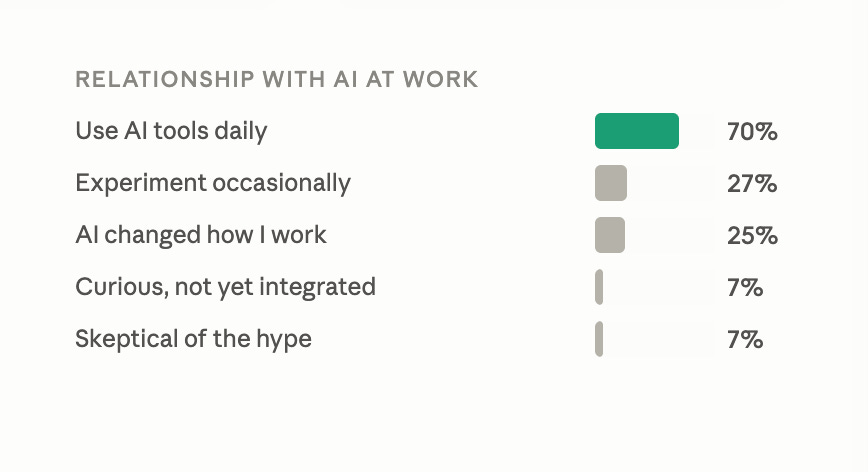
It's important to note that this is not a representative sample of all designers. 70% of attendees reported using AI daily. This group specifically sought out a workshop on AI and design on a Thursday evening, indicating that they have moved past the question of whether to use AI and are now focused on how to effectively integrate it into their work.
Before the event, one participant asked: “What is one part of the design workflow where AI is most useful?” So we asked the participants to share their workflow in their most recent project.
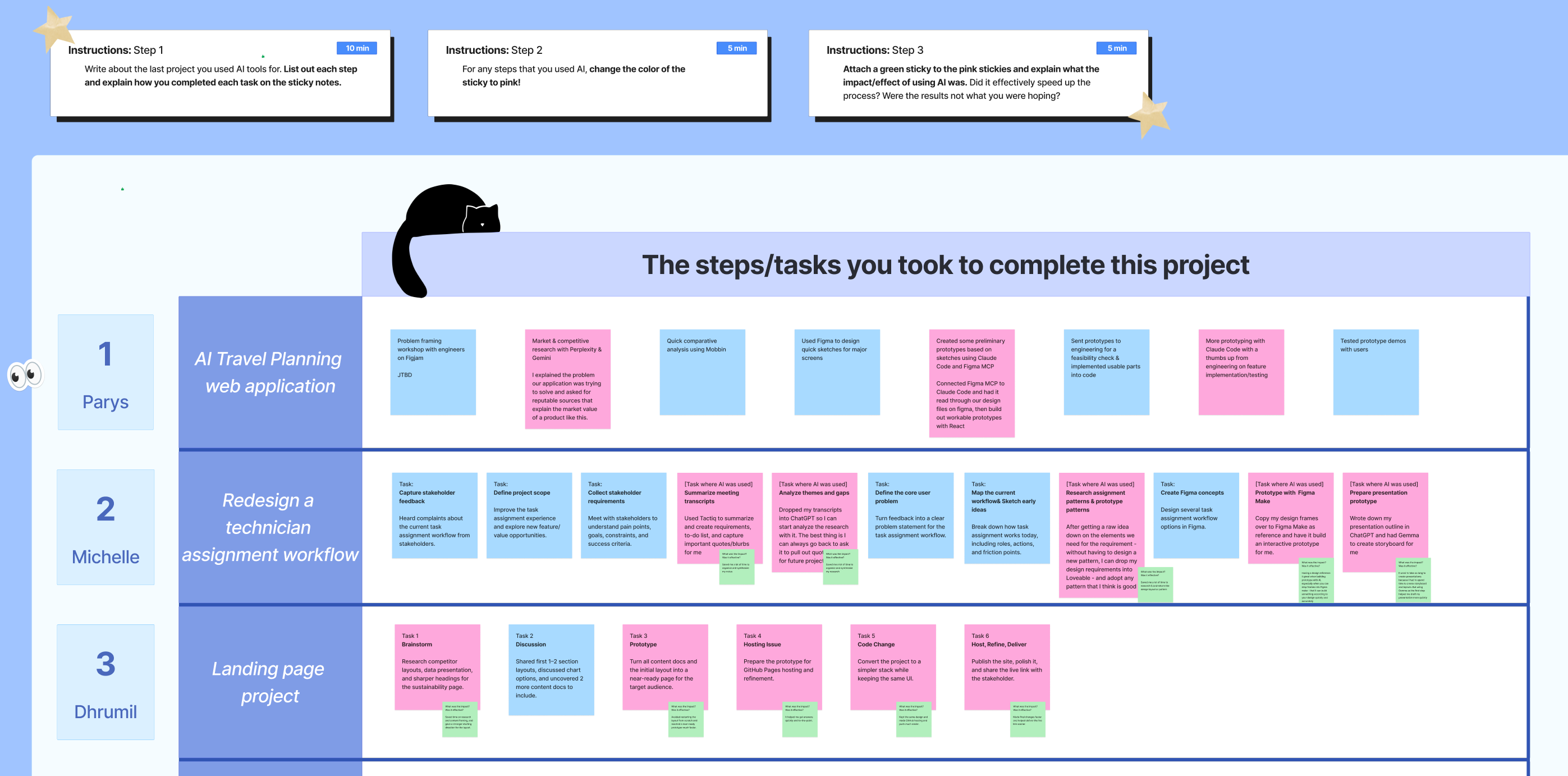
The 31 participants worked across a wide range, including enterprise internal tools, consumer apps, UX research projects, brand redesigns, and AI-native products. Despite this variety, their use of AI in the design process was strikingly similar.
Looking across all 31 rows, AI involvement clustered heavily at both ends of the process and dropped significantly in the middle. When visualized, the data resembles an hourglass shape.
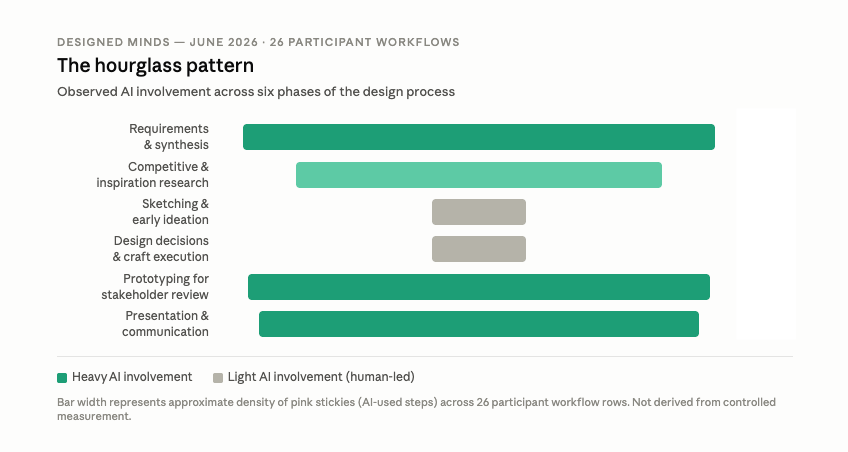
During requirements gathering and synthesis, there was nearly universal use of AI among the participants. Almost everyone utilized AI to process transcripts, synthesize meeting notes, extract requirements, or summarize research.
Additionally, competitive and inspiration research saw widespread AI application; participants were able to process large sets of reference materials and identify patterns more quickly than they could manually.
With sketching, early ideation, and core design decisions, AI involvement was at its lowest across all 31 responses. Even participants who relied heavily on AI in other areas tended to keep visual design and component-level work manual.
At the end of the process, during prototyping for stakeholder review and presentation creation, AI use again became nearly universal. Tools such as Figma Make, Lovable, and Cursor were used most frequently to generate interactive prototypes directly from wireframes. Claude and Gamma were used to draft communications for stakeholders and outline presentations.
The hourglass shape emerged organically from what participants documented themselves; it was not a result of the exercise design. One possible interpretation of this pattern is that AI is most confidently used where the quality of the output is easier to assess. A synthesis is either accurate or it is not, and a prototype either effectively communicates a concept or it does not. In contrast, the quality standards for visual design are more challenging to define, making errors more difficult to detect. Whether the reduced AI use in this area reflects a deliberate boundary in craft practices or a skill gap that still needs to be addressed is not clear from the data.
One of the workshop hosts, Michelle Yi Hsu, used the exercise to map a project she had recently completed: redesigning a technician assignment workflow for an internal platform. She then compared it to a workflow of similar projects before AI tools were available.

The project had seven steps either way. The steps themselves did not change. However, the time required for each step was significantly reduced with AI.
Gather requirements: Before AI, this involved multiple stakeholder interviews, manual web browsing for user context, and pulling customer success notes by hand, which would take two to three days. With AI, she conducted one stakeholder meeting, used Tactic to transcribe it automatically, and scheduled a follow-up two days later. The AI handled note synthesis between sessions.
Synthesize: This was the most significant shift. Two days spent manually combing through interview notes, affinity mapping themes, and writing a requirements document were reduced to mere minutes. She fed all transcripts and customer success notes into the tool, confirmed every requirement was captured, and moved forward.
Inspiration research: Half a day of manually browsing Mobbin, Behance, and Dribbble was streamlined to just one hour. She used Lovable to generate prototype patterns from the references she found instead of studying them by hand and translating them into components herself.
Prototype: What used to take one full day to build a clickable Figma prototype, wiring every interaction manually, now took only one hour. She dropped her wireframes directly into Figma Make and worked from what it produced.
Finalize and present: Creating a presentation deck from scratch was reduced to one hour thanks to Gamma, which generated the presentation outline based on her project requirements, allowing her to refine rather than start from scratch.
In total, a process that used to take one to two weeks was completed in approximately two to three days.
Two things are worth noting about this comparison.
First, the AI did not remove her judgment at any step; she reviewed every synthesis output, made all the design decisions, and refined every prototype. The work remained hers.
Second, because the workflows were completed earlier, her engineering team could begin planning backend work before any screens were built. This time compression created an opportunity for other team members to work in parallel earlier in the project.
This is just one project from one designer, but it closely mirrors patterns observed across all 31 workflows, indicating that this is not an outlier.
Another pre-workshop question was, “How do we keep internalizing learnings when the time is compressed?” This question highlights two contrasting perspectives evident in the workshop data.
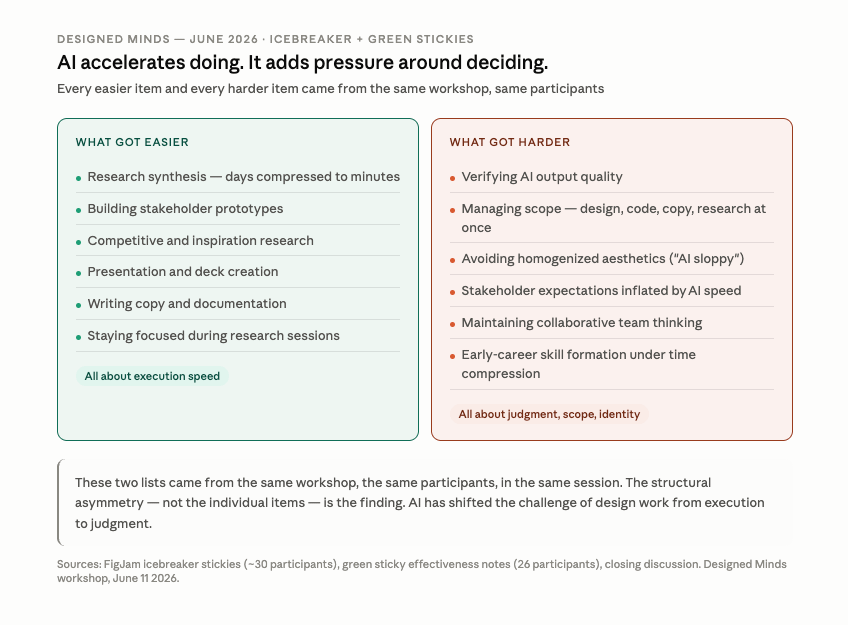
On the easier side, time compression was the dominant theme. Synthesis tasks that previously took days were done in minutes. Prototypes that required a full day were presented to stakeholders in just an hour. One participant noted, “I was focused on why the participant was talking rather than on taking notes during user interviews.” Another mentioned, “From days to minutes — no logs on my Figma file handling all the wires.”
Conversely, the participants identified challenges around judgment, quality control, and role scope, rather than execution itself. Issues included verifying the quality of AI-generated output, managing an expanded scope that now encompasses design, code, copywriting, and research simultaneously, and avoiding aesthetic homogenization. One participant even referred to “AI sloppy” as a failure mode they actively work to prevent. Stakeholder expectations have also risen due to AI’s perceived speed.
These two perspectives came from the same participants within the same session. AI has accelerated the execution side of design work; however, it hasn't alleviated the burden of judgment. And by compressing the time previously spent on slow, manual processing, such as reviewing transcripts, iterating through layouts, and building prototypes step by step, AI may be limiting the opportunity for the type of deliberate practice where design intuition develops.
One participant framed the gap between individual and collaborative AI use precisely: “Like Claude — velocity to options is staggering fast. But I don’t yet see it as a replacement for groupthink.” The individual productivity gains are well documented across the 31 workflows. However, the collaborative aspects, such as shared sense-making, group critique, and a team arriving at a decision together, are not something AI tools appear to be replacing yet.
The most frequently asked question was some variation of: “How can I stay employable as a UX designer?” Unfortunately, the workshop data does not provide an answer to this question, nor does this article.
What that data reveals is that 70% of a self-selected group of practicing designers are using AI daily, that their workflows follow a consistent pattern, and that the challenge of design work has shifted from execution to judgment.
The honest truth to the employability question is that no one can provide a definitive answer. The Designer Fund’s 2026 study found that the use of AI in design workflows nearly doubled year over year. That rate of change does not produce stable answers to stable career questions.
What the workshop showed is that designers are not navigating this landscape in isolation. They are showing each other their workflows, borrowing techniques from each other’s processes, and calibrating their practice against what they see others doing. It is within this exchange, at the level of specific tasks and tangible outcomes, that real learning is taking place right now.
I study how designers work and help organizations improve their AI design maturity. Here is what I take from this data.
If you are not using AI in your workflow yet, or are using it inconsistently and not seeing results, start with synthesis. Across all 31 workflows, every project type, and every level of AI adoption in this study, synthesis was the most consistently effective use of AI and the lowest-risk place to start. Take your next meeting notes or interview transcripts and ask an AI tool to synthesize them. See what it produces. Check it against what you heard. That single step, done repeatedly over a few weeks, will tell you more about how to extend AI into the rest of your process than any framework will.
The most useful next step is to get specific about where in your process AI is and is not helping you, and find other designers working on similar problems so you can compare notes at that level of detail. Knowing that someone uses Claude for synthesis is less useful than knowing exactly what they prompt, what they do with the output, and what they still handle manually. That kind of exchange only happens when you are looking at the actual work together.
The hourglass is what currently practicing designers arrived at through trial and error. It is not a prescription. Some may draw their conclusions differently next month, and the tools available next year will likely shift it again. But it provides real data points from actual workflows and is more grounded than most discussions about AI and design from an external perspective.
Keep experimenting. Document what works and what doesn’t, and connect with designers who are navigating similar questions.
The next Designed Minds workshop is on July 9th. It is open to anyone working through these questions. Reserve your spot here: https://luma.com/ynfsgloy.
If you want to follow this research as it develops, subscribe to this newsletter. Each workshop in this six-part series produces new data and insights, and findings go to subscribers first.
If you think this information would be useful to someone in your network—whether a designer developing their AI workflow or a design leader trying to understand their team’s challenges—please share it directly with them.
Based on research from the Designed Minds workshop, June 11, 2026: 170 completed surveys, 71 attendees, 31 completed workflow exercises. Workshop hosts: Parys G Khazaie, Michelle Yi Hsu, Dhrumil Shah. External benchmarks: Designer Fund AI + Design 2026 (900+ designers, 60 countries), Nielsen Norman Group 2026 research.
Comments
Nothing yet. Say the first thing.
Sign in to join the conversation.