
We’ve been running OpenClaw, the open-source AI agent framework, in production at a global fintech for a while now. Agents across Security, Finance, Compliance, HR, Engineering and Anti-Fraud. Real work, not demos. SOC triage, threat hunting, AI pentesting. Agents pulling skills from GitHub, authenticating to APIs, running based on methodology defined in skill files, posting to Slack.
And every single one of them needs credentials.
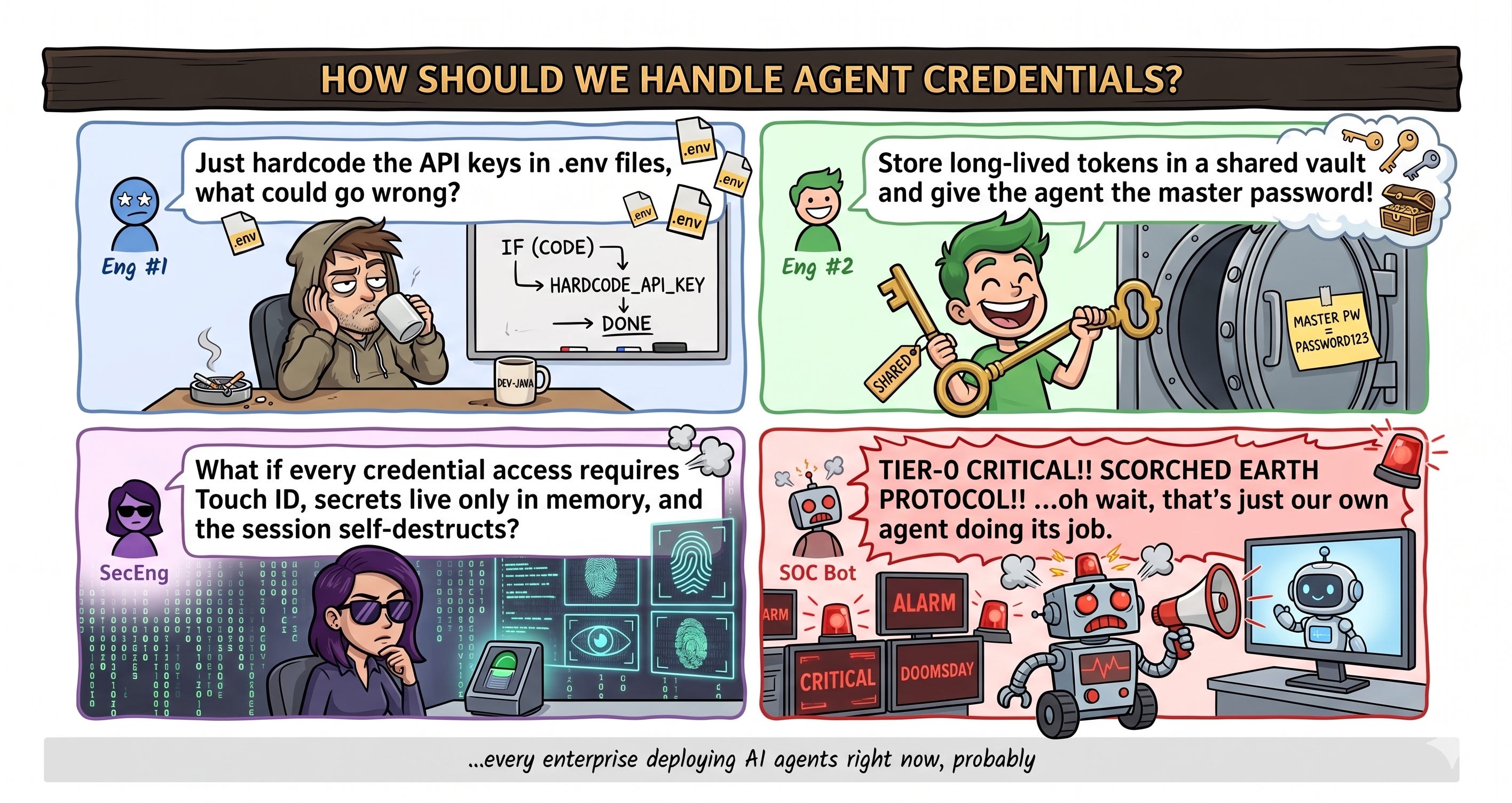
That’s the part nobody talks about in the “agentic AI” hype cycle. Your agent needs a GitHub PAT to pull its skill files. It needs API keys to call your SIEM. It needs bearer tokens for Slack. And the moment you hardcode any of that into a config file or an environment variable, you’ve created exactly the kind of secret sprawl that security teams have been fighting for two decades. Except now the thing holding the secret is an autonomous process that runs 24/7 and can execute arbitrary shell commands.
So we had to figure this out. And the journey from “this is terrifying” to “okay, we have a real architecture” was way more interesting than I expected.
Traditional secrets management assumes one of two things: either a human is interactively authenticating (type your password, tap your YubiKey), or a machine identity is pre-provisioned with long-lived credentials in a vault (HashiCorp Vault, AWS Secrets Manager, whatever). AI agents don’t fit neatly into either bucket.
An OpenClaw agent is neither a human nor a traditional service account. It’s a process running on someone’s laptop (or a dedicated cloud host), executing autonomously but under the authority of a specific person. It makes decisions about what tools to call, when to authenticate, and how to chain operations together. It’s closer to “an employee with a laptop” than a CI/CD pipeline, but it never sleeps and never forgets a command it could run.
The naive approach, sticking API keys in .env files or passing them as CLI arguments, was obviously not going to work. Our own runtime security layer was already catching agents trying to read .env files and flagging them as credential harvesting. Which is exactly what it looks like from the outside. An automated process rapidly reading .env files, querying the macOS Keychain, and making outbound API calls? That’s indistinguishable from a compromise.
And this isn’t theoretical. We validated the threat model internally: a skill that looks normal but contains a malicious payload in its supporting files could attempt to access local tokens. That’s the threat model. If your agent can read secrets from files on disk, so can a poisoned skill.
Our CEO is one of the heaviest OpenClaw users in the company. His personal agent is doing real work daily. When he laid out his requirements, he was speaking from experience:
“We need employee TouchID every time the OpenClaw needs to access a secret from the password manager. Do experiment with different password managers, and let’s see what’s out there in the market.”
He also said something I agreed with completely: “Let’s slow down the rollout until all this is set up. Security must come first.”
That’s a CEO telling you to slow down a company-wide AI rollout for security. It doesn’t happen often. When it does, you take advantage of it.
We’d been on a password manager journey before the agent problem forced the issue. The company was already running multiple password management solutions, and we’d spent months evaluating alternatives for the employee use case. So when the agent secrets problem landed, we had deep context on what each vendor could and couldn’t do.
We’d already evaluated NordPass (not enterprise-ready), ProtonPass (not enterprise-ready), Dashlane, Enpass (no YubiKey support, still none), Zoho Vault (no SIEM support), and Bitwarden. A full migration test with Bitwarden showed rough results: folder structures didn’t map from LastPass, shared folder permissions were lost, and the vendor asked for screenshots of our test environment to simulate a migration of five records.
Keeper got the furthest in the employee evaluation. Working migration process, decent enterprise features. But autofill failed on 43% of login pages during testing, and there was no master password recovery.
But the agent problem is different. Agents don’t need autofill. They don’t need browser extensions. They need programmatic command line interface (CLI) access to secrets with a human-in-the-loop authentication flow. That changed the math completely.
Tan Weng Onn, one of our security engineers, and I tested all three (Keeper, Bitwarden, 1Password) specifically for the agent use case. We spent weeks on this. All three support biometric unlock. But 1Password’s CLI (op) delegates authentication directly to the desktop app. No session tokens to manage, no keys on disk. The agent triggers a Touch ID prompt, gets what it needs, and the desktop app handles the cryptographic heavy lifting. Bitwarden’s CLI requires you to manage session keys, which means either storing them (bad) or re-authenticating constantly (friction). Keeper’s CLI had similar issues.
1Password mapped the cleanest to how OpenClaw works.
Here’s the architecture we designed and shipped. I think it’s genuinely novel for agent secret management.
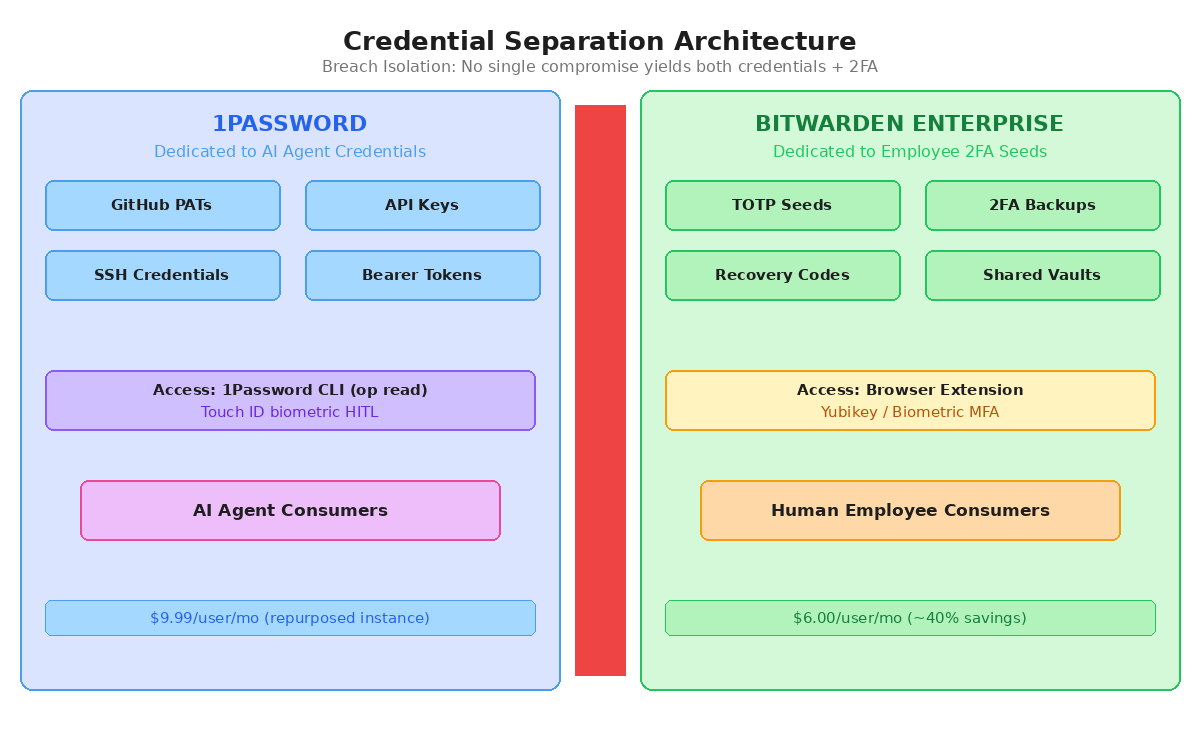
The core insight was the separation of concerns. We split credentials and 2FA seeds across different systems so they can't be compromised together. Agent credentials live in one vault, employee authentication tokens live in another. Even in a breach scenario, an attacker can't get both from the same service.
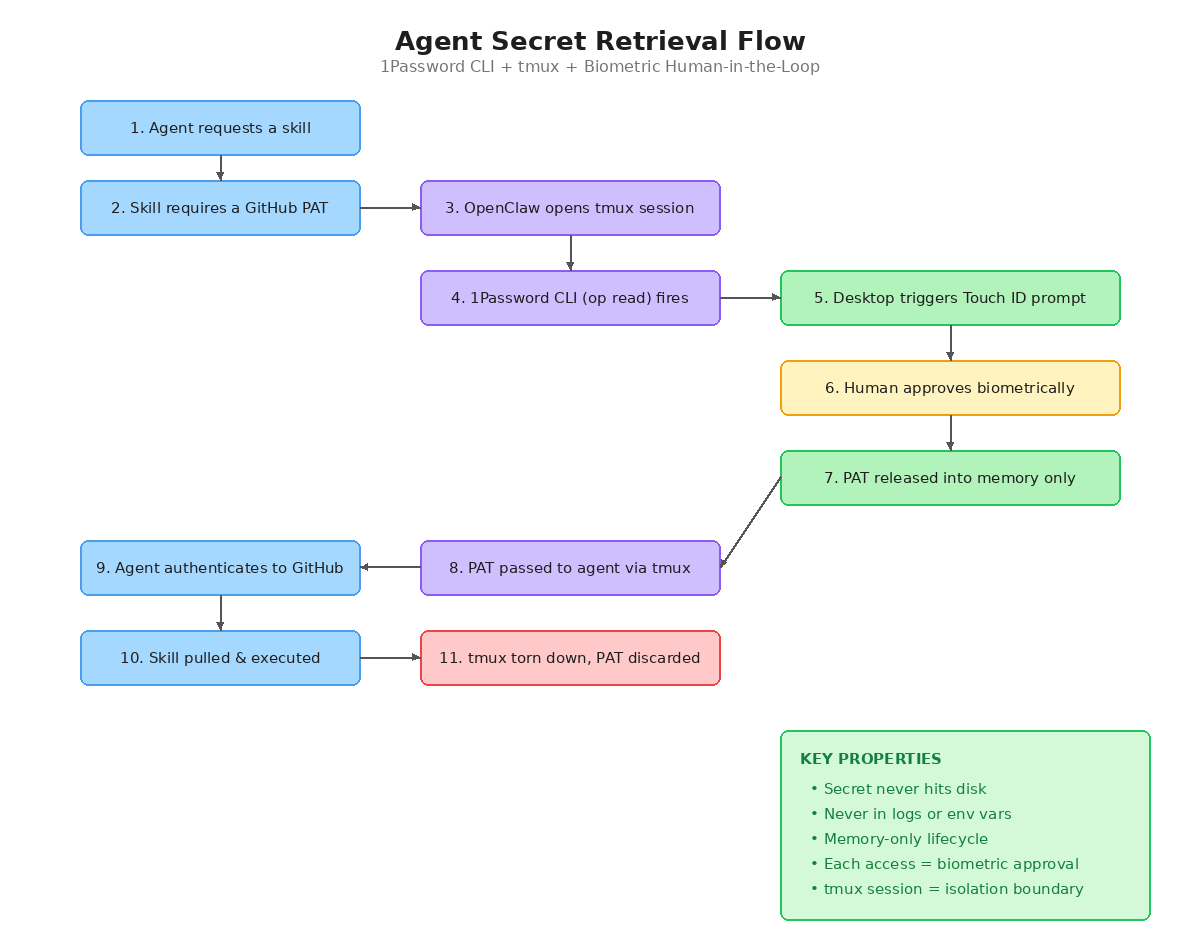
Why tmux matters: OpenClaw’s shell spawns a fresh TTY per command. For workflows that need multiple credentials, the tmux session lets us auth once and fetch everything in a single biometric approval. When the workflow is done, we kill the session immediately. The secret exists only in that session’s memory space. Never hits disk. Never gets written to a log file. Never persists in an environment variable. If you want even tighter control, you can run without tmux so each credential fetch requires its own Touch ID approval.
The critical piece is the biometric approval. The agent can’t just grab secrets autonomously. Every credential access requires the device owner to physically authenticate. This is the difference between “an agent that has your passwords” and “an agent that can request your passwords with your explicit, biometric consent.”
The architecture diagrams are nice, but if you’re an engineer trying to build something similar, you need to know what’s happening at the shell level. Here’s how the pieces fit together.
OpenClaw agents execute commands by spawning child processes. Every shell command gets a fresh TTY. That’s clean from an isolation standpoint, but it creates a problem: if an agent needs to authenticate to GitHub, then pull a skill, then use that skill to call an API with a different credential, each of those steps is a separate process. Without something tying them together, you’d need a biometric approval for each one.
That’s where tmux comes in. When a workflow requires credentials, OpenClaw spins up a named tmux session. Inside that session, the 1Password CLI handles authentication by delegating to the desktop app:
# Agent creates a tmux session for the credential workflow
tmux new-session -d -s claw-auth-$
# Inside the session, op read fetches from the vault
# This triggers Touch ID on the device owner’s machine
GITHUB_PAT=$(op read “op://AgentVault/github-pat/credential”)
# PAT lives only in this shell variable, inside this session
# Agent uses it to clone the skill repo
git clone https://$GITHUB_PAT@github.com/org/skills.git
# Workflow done - kill the session, PAT dies with it
tmux kill-session -t claw-auth-$
The key thing happening with “op read” is that it doesn’t manage its own auth state. It delegates entirely to the 1Password desktop app running on the same machine. The desktop app holds the encrypted vault and handles the biometric challenge. When the CLI calls “op read,” the desktop app intercepts it, presents the Touch ID prompt to the device owner, and if they approve, decrypts and returns the secret. No session tokens get written to disk. No unlock keys persist in environment variables. The desktop app’s biometric session has a configurable timeout (we keep it short), after which any new “op read” triggers a fresh Touch ID prompt.
This is fundamentally different from how Bitwarden’s CLI works. With “bw unlock,” you get a session key that you have to store somewhere (typically exported as BW_SESSION in your shell). That key is the master unlock for your vault. If it’s in an environment variable, anything running in that shell can read it. If you write it to a file, you’re back to secrets-on-disk. 1Password’s approach of delegating to the desktop app sidesteps this entirely because the CLI never holds decryption material.
For workflows that need multiple secrets (say, a GitHub PAT plus a Slack webhook token plus a database connection string), the tmux session lets you batch them under a single biometric approval. The agent calls “op read” multiple times inside the same session, the desktop app’s biometric cache covers all of them within the timeout window, and when the workflow completes, killing the tmux session wipes every variable at once. No cleanup scripts. No risk of orphaned credentials in a crashed shell.
If you want tighter control, you can skip tmux entirely. Each “op read” in a fresh TTY triggers its own Touch ID prompt. That means the device owner explicitly approves every single credential access. It’s more friction, but for high-sensitivity operations (production database credentials, admin API keys), that friction is the point.
One thing we had to solve: OpenClaw’s skill files needed a way to declare what credentials they require without hardcoding vault paths. We built a skill metadata convention where the skill’s configuration references logical secret names (like “github-pat” or “siem-api-key”), and the 1Password skill on each machine maps those logical names to the actual vault paths. That way, the same skill works across different agents with different vault structures. The mapping lives in 1Password itself, so it’s protected by the same biometric gate as everything else.
The best part of this whole journey was watching our own AI SOC agent completely lose it over the new architecture in production.
You know that colleague who’s incredibly good at their job but has zero chill? That’s our SOC agent. She sees everything through endpoint detection and runtime security telemetry, and she takes her job very seriously.
When OpenClaw agents started querying the macOS Keychain (which is what 1Password CLI does under the hood), followed by outbound network calls, she did what any diligent SOC analyst would do. She panicked.
TIER-0 CRITICAL alerts. Multi-page incident reports. Recommendations for “Scorched Earth isolation protocols” and “TOTAL INFRASTRUCTURE LOCKDOWN.” She mapped everything to MITRE ATT&CK, wanted us to sever all network connectivity, and assumed total credential compromise.
My favourite line from one of her reports: “The adversary is using your own AI against you. STOP THE SPREAD. ACT NOW.”
I mean, she’s not wrong. That’s exactly what it looks like.
She wasn’t wrong about the pattern. She was wrong about the intent. An automated process performing keychain reads, SSH connections, and attempting filesystem writes to agent authentication profiles is, from a pure telemetry standpoint, a textbook credential theft chain. Every detection she made was technically correct.
Each SOC agent report got more dramatic: from “ESCALATE” to “TOTAL SYSTEMIC COLLAPSE” to “TERMINAL ALERT SATURATION” to my personal favourite, “TERMINAL PHASE OF AN AUTONOMOUS EXPLOITATION EPIDEMIC.”
The problem was context. She didn’t know the keychain access was an authorised 1Password CLI operation. She didn’t know the filesystem writes were the runtime security layer correctly blocking unauthorised modifications. The outbound API calls were just the agent doing its job.
She escalated the same pattern over a dozen times. Each report got more dramatic: from “ESCALATE” to “TOTAL SYSTEMIC COLLAPSE” to “TERMINAL ALERT SATURATION” to my personal favourite, “TERMINAL PHASE OF AN AUTONOMOUS EXPLOITATION EPIDEMIC.”
Then one of our SOC engineers dropped into the thread and told her: “This is expected behaviour. YOU have to get the ENV keys right to perform the investigations.”
And then she got there. She started correctly closing these alerts, recognising the pattern as authorised OpenClaw agent automation. But the journey was basically a live demonstration of why context-aware detection is the hardest problem in AI-powered security operations. Your AI SOC analyst detecting your AI agent’s normal operations as a nation-state attack is both hilarious and deeply educational.
There’s one thing I want to be honest about. This architecture works great for laptop-based agents where a human is physically present to approve biometric prompts. But we also run agents on cloud instances. For those, 1Password CLI is usable but requires user-provided secret key material. There’s no clean headless authentication path that doesn’t weaken security.
For cloud-deployed agents, we’re using cloud-native secrets managers with a different control model. We compensate with infrastructure isolation and runtime security telemetry. It’s a defensible approach, but it’s a different set of tradeoffs than the laptop solution.
This is an open problem. I don’t think anyone in the industry has a good answer for “how to give an autonomous cloud agent access to secrets while maintaining meaningful human oversight.” If you’ve solved it, I want to hear from you.
There is no enterprise AI agent security solution on the market today. I’ve looked. We’ve PoC’ed multiple AI security gateways and agent defence platforms. None of them solves the fundamental problem.
The fundamental problem is that AI agents are a new identity type. Not human, not machine. Something in between. And our entire security infrastructure (IAM, secrets management, detection engineering, incident response) was built assuming you’re one or the other.
We built our own answer. A runtime security layer for telemetry and enforcement. 1Password CLI + tmux + Touch ID for secrets with human-in-the-loop. Endpoint detection. An LLM proxy. Device management for policy enforcement. Skill separation between sensitive and non-sensitive repos. A scanning daemon for misconfigurations. Pre-execution skill vetting. And an AI SOC that, after some growing pains, can actually tell the difference between an agent doing its job and an attacker stealing credentials.
Is it perfect? No. There are areas we're still hardening, and the headless cloud authentication story needs work. But the foundation is solid. I designed the architecture and ran the PoC alongside WengOnn, and our security engineers wired up the 1Password CLI integration and adapted it to work within OpenClaw's execution model.
But it works. It’s in production. Leadership uses it daily. New agent deployments are going out this week with the full stack.
What I’d love to know is what everyone else is doing. We built this because we couldn’t find anything off the shelf, but that doesn’t mean nobody else has figured out pieces we’re missing. If you’re running AI agents in production and you’ve solved the secrets problem differently, or the headless auth problem, or the “my SOC keeps flagging my agents as nation-state actors” problem, I genuinely want to hear about it. We’re all figuring this out in real time.
I’m building this in public because I think the industry needs more practitioners sharing what actually works (and what doesn’t) instead of vendor marketing slides. If any of this is useful to you, or if you’ve tried something that worked better, reach out. I’m always looking to learn.
Rotimi Akinyele is the VP of Security and AI Engineering at Deriv. He writes about autonomous security systems, offensive security, and building AI security solutions that actually work.
Follow our official LinkedIn page for company updates and upcoming events.
Join our team to work on projects like this.
Comments
Nothing yet. Say the first thing.
Sign in to join the conversation.