I recently moved my personal blog from WordPress to 11ty and also documented the entire process in a video. I like the current setup in 11ty, but there's an issue...
It takes me a lot of time to create a new blog post, as my blog posts are organized in content/blog/<new-post> folders, as you see in the below screenshot.
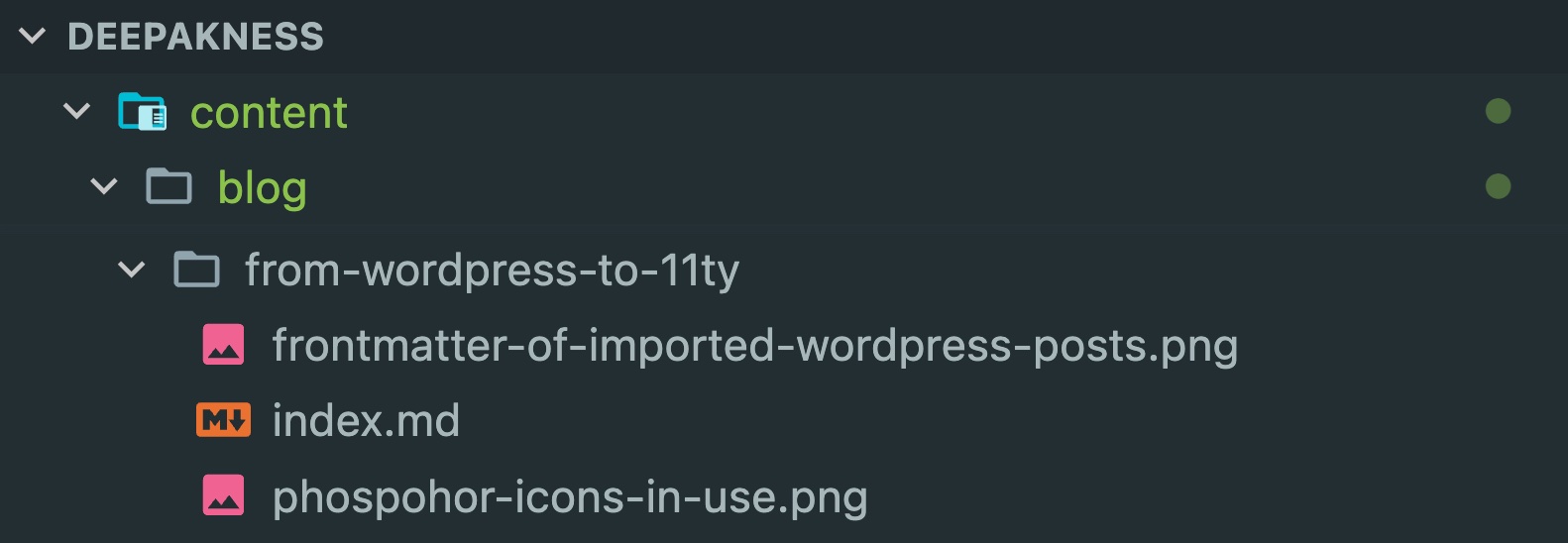
As of now, just to create a new blog post, I have to open multiple folders, create the markdown file, and then write all frontmatter properties. And it takes a lot of time.
So... I asked Cursor AI to create a Node.js script that can do all that with just a single command. If you prefer, you can watch this video or continue reading below to learn more.
I just asked Cursor composer to create a Node.js script where I can run something like node create.js new-post and it should automatically create a new file index.md in the specified sub-folder in the content/blog folder. And also asked it to auto-populate the frontmatter properties like title, description, date, and tags.
If you want, below was the exact prompt that you will also see in the above video:
Write a node.js script that creates new blog posts in content/blog folder.
node create.js rise-of-cursor
if i run a command like above, it should create a new folder in the content/blog folder and then create a index.md file and then populate title, description, tags, and date properties for the frontmatter.
When I ran the terminal command, it gave me an error which I just copied-pasted to Cursor and asked it to fix the issue. And then it provided me with the working script, which is below:
import fs from 'fs';
import path from 'path';
import { fileURLToPath } from 'url';
// Get the current directory using ES modules
const __filename = fileURLToPath(import.meta.url);
const __dirname = path.dirname(__filename);
// Get the slug from command line arguments
const slug = process.argv[2];
if (!slug) {
    console.error('Please provide a slug for the blog post');
    console.error('Example: node create.js my-new-post');
    process.exit(1);
}
// Create the blog post directory and content
const blogDir = path.join('content', 'blog', slug);
const indexFile = path.join(blogDir, 'index.md');
// Create directory if it doesn't exist
if (!fs.existsSync(blogDir)) {
    fs.mkdirSync(blogDir, { recursive: true });
}
// Generate the frontmatter content
const title = slug
    .split('-')
    .map(word => word.charAt(0).toUpperCase() + word.slice(1))
    .join(' ');
const now = new Date();
const date = now.toISOString().replace('T', ' ').slice(0, 19) + '+00:00';
const content = `---
date: ${date}
tags:
- blog
title: ${title}
description: Add your description here
---
Write your blog post content here...
`;
// Write the file
fs.writeFileSync(indexFile, content);
console.log(`✨ Blog post created successfully at: ${indexFile}`);
console.log('You can now edit the file to add your content!');
It auto-captures the current date-time as well for the date property, and fills in dummy data for other properties. Now, I can just edit the index.md file and publish a lot faster than earlier.
I think, there might already be a better way to do the same, but this solution is not unproductive either.
Update:
I further enhanced the script to make the workflow even faster. Earlier, once the file is created, I had to manually look through the folders to find the newly created file to start editing; but now, the script also opens the file for editing as soon as it gets created.
I have created a video for the same and have shown how the script works. If you want, below is the complete script:
import fs from 'fs';
import path from 'path';
import { fileURLToPath } from 'url';
import { spawn } from 'child_process';
// Get the current directory using ES modules
const __filename = fileURLToPath(import.meta.url);
const __dirname = path.dirname(__filename);
// Get the slug from command line arguments
const slug = process.argv[2];
if (!slug) {
    console.error('Please provide a slug for the blog post');
    console.error('Example: node create.js my-new-post');
    process.exit(1);
}
// Create the blog post directory and content
const blogDir = path.join('content', 'blog', slug);
const indexFile = path.join(blogDir, 'index.md');
// Create directory if it doesn't exist
if (!fs.existsSync(blogDir)) {
    fs.mkdirSync(blogDir, { recursive: true });
}
// Generate the frontmatter content
const title = slug
    .split('-')
    .map(word => word.charAt(0).toUpperCase() + word.slice(1))
    .join(' ');
const now = new Date();
const date = now.toISOString().replace('T', ' ').slice(0, 19) + '+05:30';
const content = `---
date: ${date}
tags:
- interesting
title: "${title}"
description: "Add your description here"
---
Write your blog post content here...
`;
// Write the file
fs.writeFileSync(indexFile, content);
console.log(`✨ Blog post created successfully at: ${indexFile}`);
console.log('You can now edit the file to add your content!');
// Open the file in VS Code
const absolutePath = path.resolve(indexFile);
spawn('code', ['--goto', absolutePath], {
    stdio: 'inherit',
    shell: process.platform === 'win32'
});
console.log('Opening the file...');
You can edit it as per your requirements and get it working. It will at least save you 30 seconds of your valuable time.
Comments
Nothing yet. Say the first thing.
Sign in to join the conversation.