
Every AI application that wraps an agent is a harness!
In LangChain’s Terminal-Bench experiment, changing only the harness (with the same model) moved a coding agent from ~30th place into the top 5: the harness, not the model, is what makes a coding agent good.
In the open-source course Building a Coding Agent From Scratch, you’ll build that harness from scratch in Python: Decode, a complete coding agent that grows lesson by lesson from a bare agent loop into a swarm of remote agents running in parallel in the cloud.
Why? You’ll be able to engineer custom harnesses for your own AI products (the skill behind that leaderboard jump), and you’ll understand what Claude Code and Codex actually do under the hood, turning you into a power user.
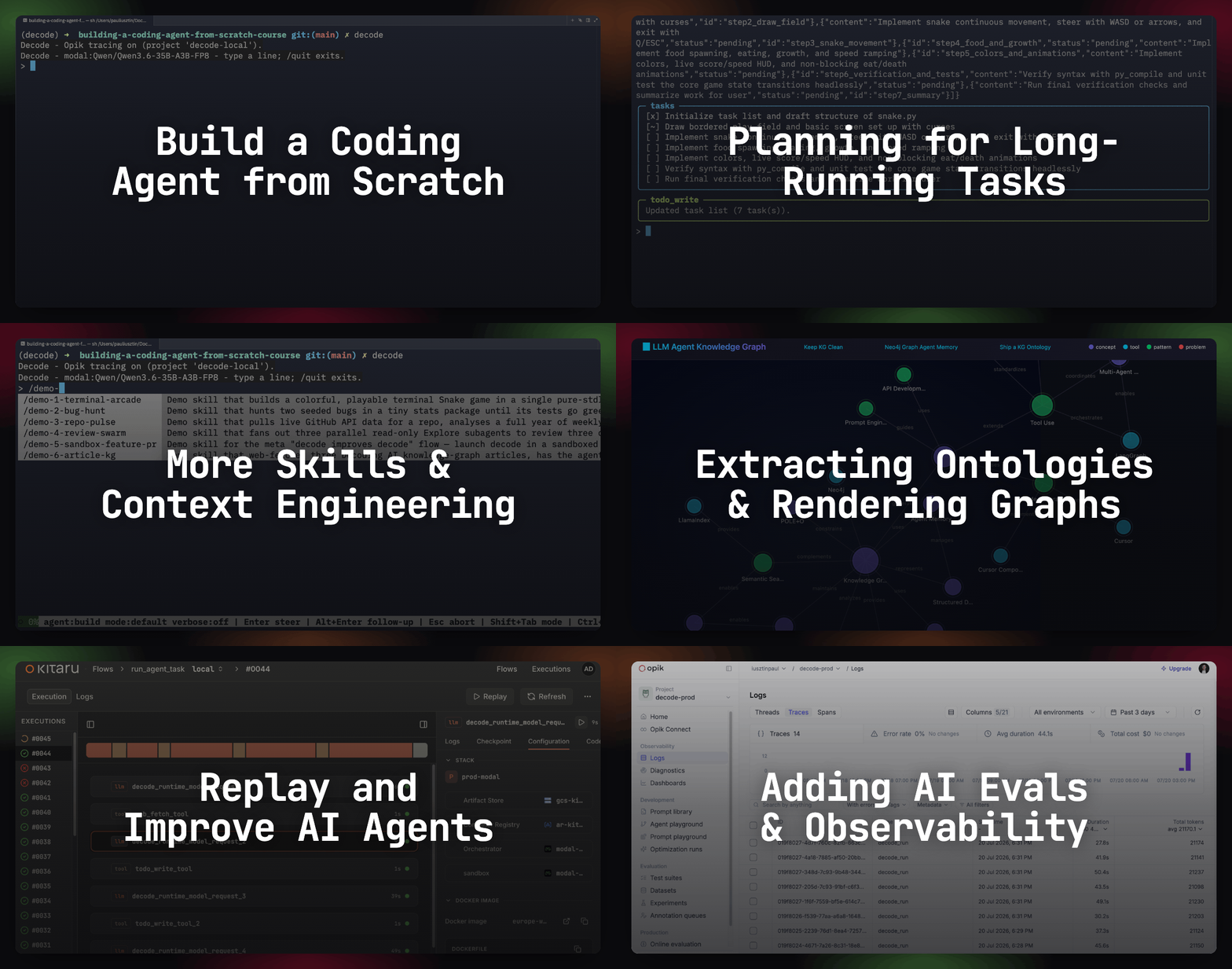
Lessons:
Context Engineering for Coding Agents ← You are here
Remote Headless Mode & Durability
AI Evals Foundations: Benchmarks, Regression and Online
AI Evals on Steroids via Replays

I got hooked on running Claude Code agents 24/7. Getting things done while answering emails, cooking, or watching a movie. Until my subscription maxed out mid-turn with the agent halfway through a feature. Sounds familiar?
Complaining to your employer, buying a bigger subscription, changing the model, or switching harnesses only treats the symptom. Doesn’t solve the root cause. You spend money while the window stays noisy, degrading output no matter whose model is behind it.
The actual solution is to better understand harnesses and the context engineering behind them. Improve planning, develop stronger skills and memory, and know when to drop your context.
So far in the course, we have focused on harness engineering and building a sandboxed agent loop. Now it’s finally time for some context engineering for coding agents: memory, skills, LSP servers and compaction.
The whole problem resolves to what to put into context, what not to put, how to trim it down, plus creating as many feedback loops as possible for the agent, as Anthropic frames it as finding the smallest possible set of high-signal tokens.
You will walk away understanding and building from scratch:
What the agent should carry between sessions.
How skills load nothing until needed.
The cheapest feedback loop in the system.
How the window gets trimmed before it rots.
To see how the 4 components cooperate, look at the demo-5-sandbox-feature-pr skill from the course repo (.decode/skills/demo-5-sandbox-feature-pr), where we encoded a demo where Decode writes a new feature into Decode by spinning up a background sandboxed session, where the host agent acts as the orchestrator and the sandboxed one as the feature executor. The final artifact from the demo will be a PR containing the new feature.
Go to repository, run decode, type /demo-5-sandbox-feature-pr, and enter. Let Decode do the rest of the work.
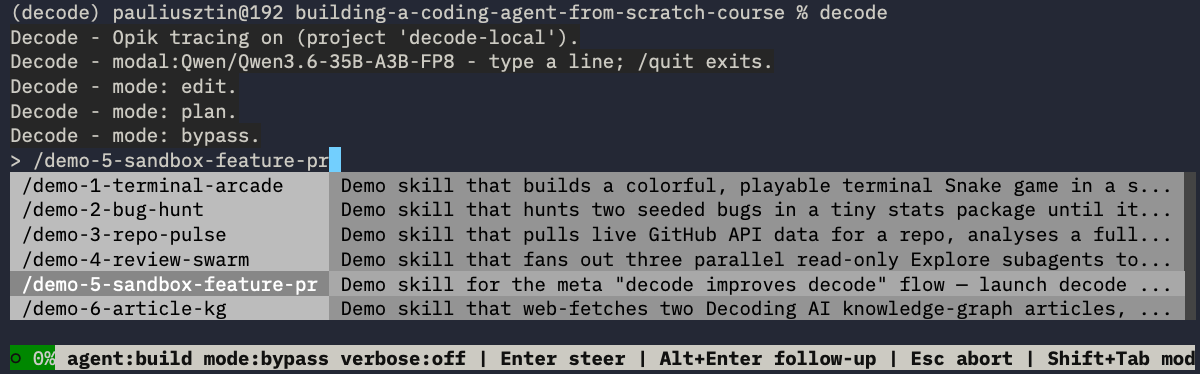
Here is a snapshot of the skill, where Decode spawns another Decode subagent:
...
## 1. Launch decode against a sandboxed clone of the course repo
Launch the local Docker run (Docker must be running):
"""
SANDBOX_MODE=docker decode --repo git@github.com:decodingai-magazine/building-a-coding-agent-from-scratch-course.git
"""
...
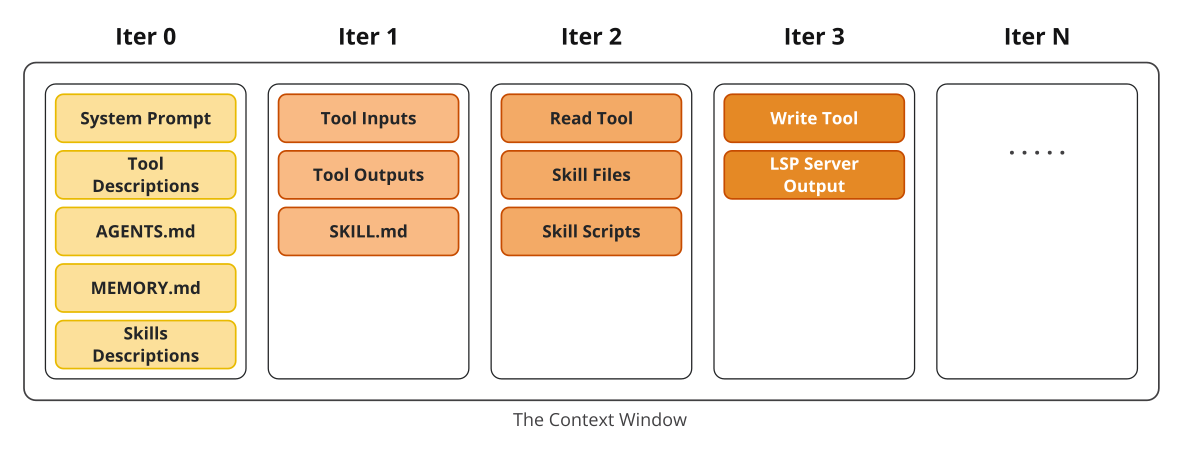
At session start, the system prompt is assembled from four parts: the base prompt, the active agent’s prompt, memory files (AGENTS.md + .decode/MEMORY.md), and the skills catalog (one line per skill). Pydantic AI adds each tool’s schema, paying off Lesson 2’s warning that every tool costs tokens. This assembled prompt enters context, shaping the probabilities of the model’s next steps.
The run fills the window. Invoking the skill loads its SKILL.md body (tier 2 of progressive disclosure). Plan mode dumps repo files as read outputs. During the build loop, each edit lands, the Diagnostics Enricher appends type errors for free, and bash runs tests until green output signals completion.
Now, from the context window point of view, what happens within the harness?
As in the image below, as soon as we open the agent, the context window is filled with its system prompt, tool and skill descriptions and memory files. After invoking the /demo-5-sandbox-feature-pr skill, it gets filled with tool inputs and outputs, plus the SKILL.md file containing the specific instructions.
Next, through progressive disclosure, the agent begins reading the relevant files and scripts associated with the skills. Ultimately, it starts writing new Python files or editing existing ones that are statically checked for syntax issues via our ty Language Server Protocol (LSP) server.
On Modal’s self-hosted Qwen3.6-35B, the window is 262,144 tokens. Usually, microcompaction fires at 60%, while full compaction is at 80%. After compaction, usage drops back to roughly 5–10%, so the session continues instead of crashing.
In the video below, you can see part of the 219 spans trace in Opik, clearly monitoring the LLM tool calls, token counts, and latency of the harness and LLM calls:
Every component in this lifecycle has specific mechanics: memory, skills, the LSP server, and compaction. Let’s explore each.
In my early agent runs, the agent kept writing naive datetime objects instead of timezone-aware ones and added type hints inconsistently, forcing me to retype the same corrections session after session. The fix was to write the preference down once into the AGENTS.md, where the agent reads it every turn.
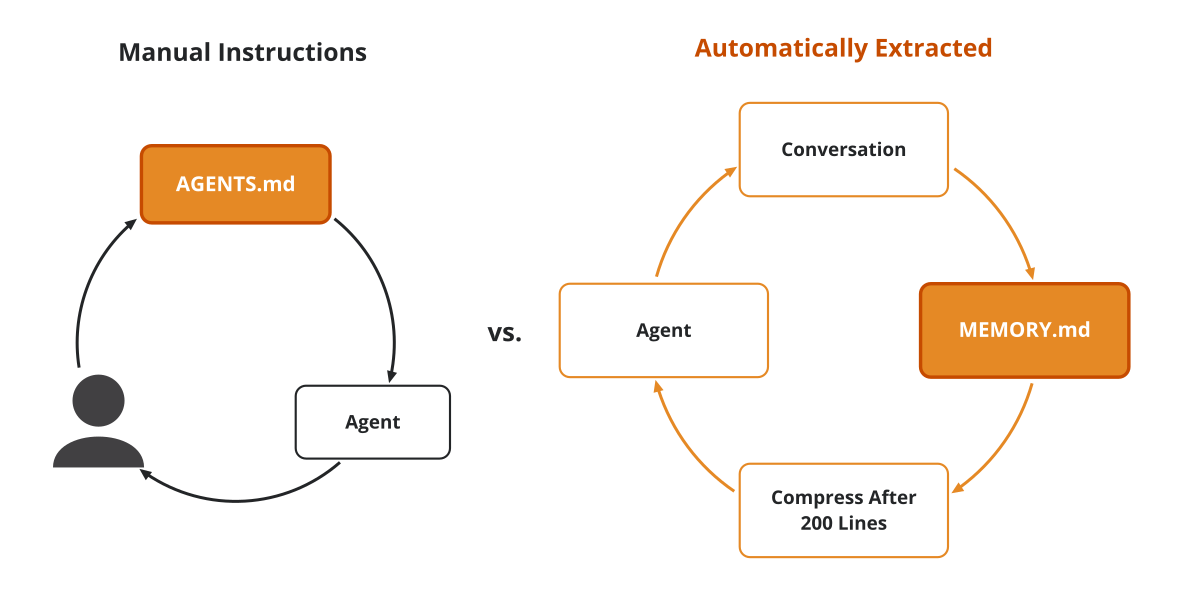
AGENTS.md (the one you write by hand) vs. .decode/MEMORY.md (the one the agent extracts from each session).AGENTS.md injects project context: business logic, why components exist, the tech stack, and the processes around it (docs, deploy, review, testing). The code is the source of truth, so avoid duplicating it. Add metadata and references the agent can discover without heavy reasoning.
Keep it under 300 lines, with a guardrail of around 600 lines. Write each line in response to an observed mistake so the agent avoids repeating it, following Mitchell Hashimoto’s rule.
Decode recursively looks within all the project directories for AGENTS.md files (root-most first, so the nearest file takes precedence), appends .decode/MEMORY.md last, stamps each with a # From <path> provenance header, and dumps the result into the system prompt.
If AGENTS.md is what you manually define, .decode/MEMORY.md is what the agent automatically extracts from your conversations, replicating Claude Code’s auto-memory
At the end of each session — on quit and on /clear — one cheap LLM call summarizes the session into a single plain sentence, appended as a dated bullet (- 2026-06-26: …), as an append-only log. As this can grow big fast, the file has a hard cap of 200 lines or 25,000 bytes, dropping the oldest lines first.
From src/decode/memory/extract.py:
summarize_session is the single LLM call that distills the conversation into one sentence (or None if it’s not worth saving). append_session_summary writes that sentence into .decode/MEMORY.md and enforces the hard cap.
compress_memory_file runs Memory Compression to rewrite the file in place, merging duplicate or superseded notes while preserving dated bullets.
My Python testing and PR conventions used to live directly in my memory file, bloating the context of every session. Moving them into skills left behind just a few lines, as references, that specify when to access each one.
Skills prevent context rot from 2 directions. On the tools side, upfront schemas burn budget: Mario Zechner measured that popular MCP servers consume 7–9% of the context window before any work begins. On the memory side, stuffing review guides and workflow templates into AGENTS.md pollutes every turn. Skills solve both: each phase-specific behavior lives in its own skill, referenced from a one-line catalog entry, and loads only when that workflow phase runs.
Skills follow the Agent Skills standard. In Decode, skills live in .decode/skills/, or you can open the TUI, type /, and pick one. A separate public registry lives at skills.sh (npx skills install <skill>):
my-skill/
├── SKILL.md          # Required: metadata + instructions
├── scripts/          # Optional: executable code
├── references/       # Optional: documentation
├── assets/           # Optional: templates, resources
└── ...               # Any additional files or directories
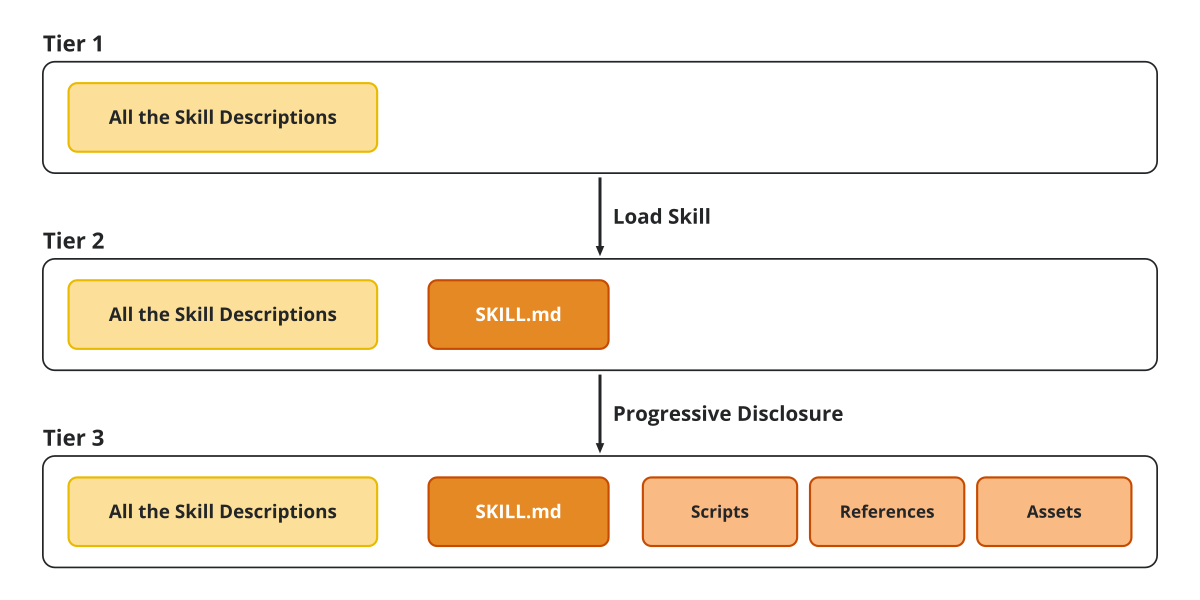
Progressive disclosure operates across 3 tiers. In tier 1, only the skills catalog stays in context: one name + description line per skill. As your library grows, an optional guard can cap the catalog at ~1% of the context window.
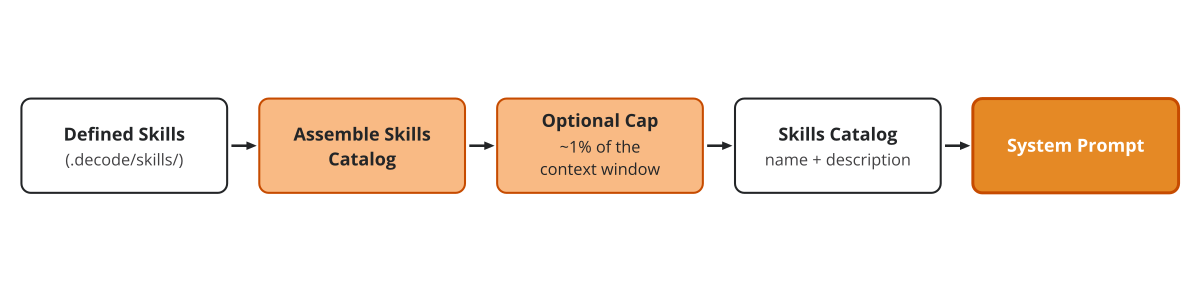
A common strategy Decode doesn’t have yet is user-invocable-only skills, where you flag a skill as callable only. This means you can remove its name and description from the catalog, leaving it with zero context until explicitly invoked by the user.
In tier 2, invoking a skill via the skill dispatcher tool or /<skill-name> loads only its SKILL.md body and any other files packed within the skill.
From src/decode/tools/skills.py:
In tier 3, because within format_skill_payload we properly format and expose all the available resources (files, scripts, docs, assets) from a skill to the agent, if it considers them necessary, it will load them via its read tool or execute the containing scripts via the bash tool.
This is the core idea of progressive disclosure. It’s mostly just exposing a manifest of bundled files with exact cwd-relative paths, making it super clear to the agent how to access them. The key here is that the LLM is properly trained for tool calling to make the right decisions about whether to call read or bash tools.
From src/decode/skills/payload.py:
Now let’s look at the cheapest feedback loop in the whole coding agent.
In my multi-agent setup, each turn between the engineer and tester agents re-ran the linter, type checker, formatter, and test suite. My Prefect orchestrator integration tests took 15 minutes on their own, so I split them to speed up the feedback loop.
The takeaway was clear: the most important part of your agentic flow is to always give as many feedback loops as possible. The LSP server is the fastest way to feed in code-related signal.
An LSP server is one of the most underrated components, particularly for coding harnesses. It maintains a live index of symbols across your codebase: variables, functions, classes, definitions, references, and type errors. Your IDE already runs one per language. You need one for each programming language. Decode uses ty by Astral, an extremely fast type checker and language server written in Rust, to support Python. Made by the same guys behind uv and ruff.
The server feeds the agent signal through 2 channels.
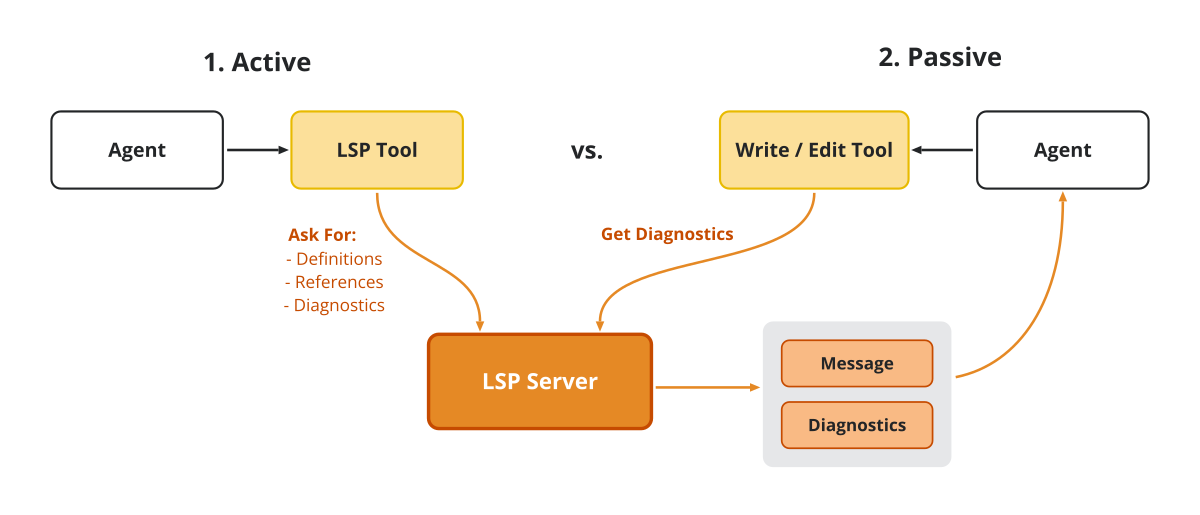
lsp tool on demand 2. Every Python edit/write passively pulls diagnostics.Channel 1 is the lsp tool, which handles active queries with 4 ops: definition, references, hover, and diagnostics. One call returns a precise file:line:column answer instead of 3 speculative file reads. It’s read-only, so the permission gate auto-allows it across all modes.
From src/decode/tools/lsp.py:
The server runs as a background process at each project root, communicating via JSON-RPC (a plain request/response protocol over standard input/output). Decode’s LspClient initializes the session, negotiates capabilities, and sends requests:
From src/decode/services/lsp/service.py:
In the demo-5 session, the agent resolves the entry point via lsp("definition", "src/decode/cli.py", <line>, <column>) over JSON-RPC textDocument/definition. On the next turn, the model targets its edit tool call at that exact location, rather than blindly exploring the codebase first.
Channel 2 is the Diagnostics Enricher, which runs passively on every successful .py write or edit to append an errors-only block to the tool result. It displays at most 10 errors, and stays silent on clean files or when the server is unavailable, matching the pattern in OpenCode.
_enrich wraps the return value of file modification tools without requiring extra turns or tools.
From src/decode/tools/files.py:
In the demo-5 session, when the agent updates src/decode/cli.py with an unimported reference, the file writes successfully, but the enricher appends LSP diagnostics (ty) — fix these: ... with the error details. The model sees this feedback immediately and fixes the import on the next edit before running any tests.
In the video below, you can clearly see in Opik how the LLM outputs LSP tool calls and how they are executed in the harness:
Memory, skills, and the LSP all shape what enters the window. Now let’s see how we can trim it down.
Back in Nov 2025, when building the writing agent for my agent engineering course, requests started degrading around 180,000 input tokens on Gemini Pro, taking>3 minutes per request or directly returning timeout errors and disconnections. Considering that on paper Gemini handles up to 1M input tokens.
A full window degrades model performance and reliability long before hitting the hard token ceiling, following the degradation curves documented by Anthropic. That’s why you need compaction to continually reduce your context window while minimizing context loss.
Compaction handles this in 3 ways. The simplest is /clear, which wipes the entire window after running the on-exit memory write-back so key learnings persist in .decode/MEMORY.md.
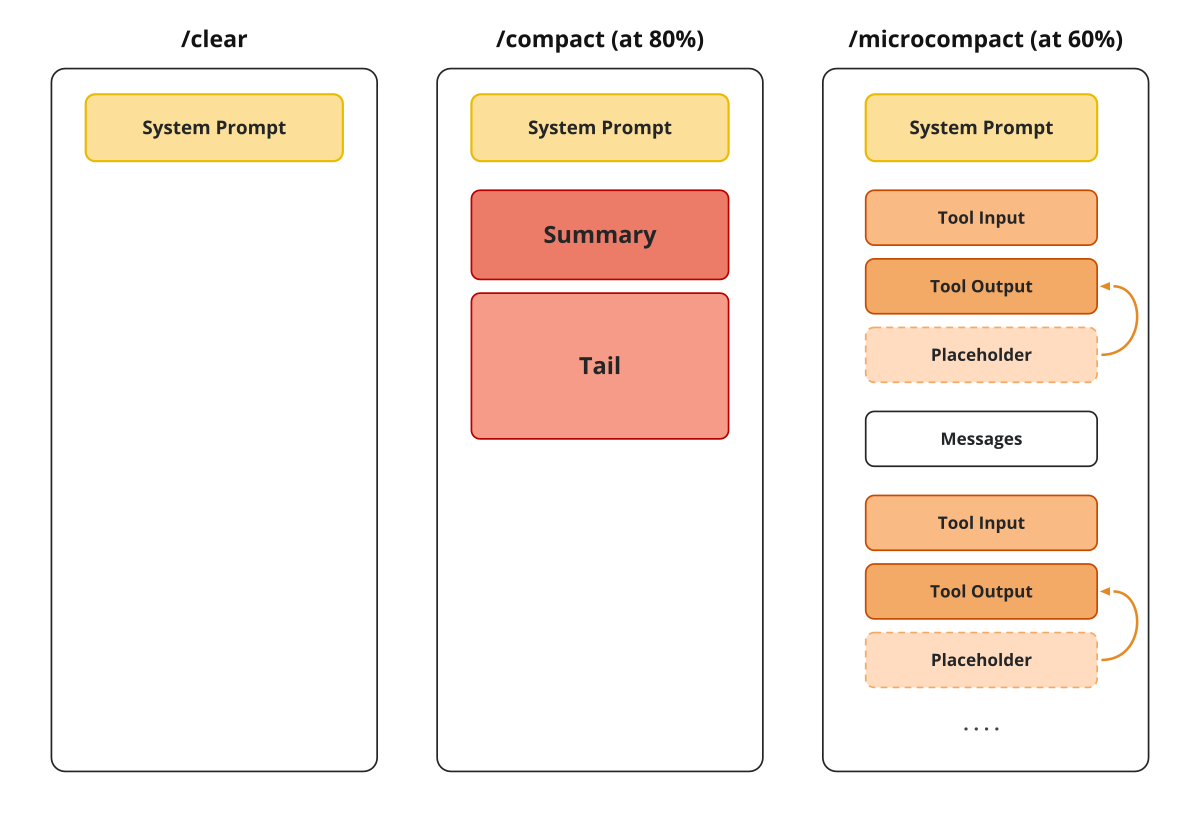
/clear keeps only the system prompt, /compaction rebuilds it as summary plus tail, and /microcompaction swaps old tool outputs for placeholders in place.The second option is full compaction, triggered automatically at 80% capacity or manually via /compact. An LLM summarizes the conversations into a six-part template (goal, constraints & preferences, progress, key decisions, next steps, critical context), and older messages are dropped. The window becomes [system prompt] + [summary] + [recent tail], where the tail retains ≈20,000 tokens of recent messages snapped cleanly to a Compaction Boundary so tool calls remain paired with their results, matching Pi’s implementation.
Both tiers evaluate should_compact using the provider’s reported token window against reserve thresholds (80% full compaction ->20% empty, 60% microcompaction -> 40% empty):
From src/decode/context/compaction.py:
Everything happens within the compact() method from AgentTurnHandler. split_tail walks backward through message history estimating token counts to locate the Compaction Boundary. summarize_for_compaction generates the summary, build_summary_message wraps it as a synthetic user message that is itself part of the history the next compaction summarizes (so successive compactions merge for free), and the handler sends [summary_message, *tail] on the next loop iteration. The harness owns the list it feeds the model, so replacing the list IS the compaction:
From src/decode/agent/loop.py:
The 3rd and last option is microcompaction, which runs without LLM calls at 60% capacity. It replaces tool outputs outside the recent tail with a placeholder string by inspecting each ToolReturnPart (the message part that holds a tool’s output). Because tool outputs are consumed each turn, conclusions live on in subsequent messages. Nothing is lost because the tool input remains available in the messages, allowing the agent to rerun the tool if necessary. That is why Anthropic calls tool-result clearing the safest, lightest touch of compaction.
After every completed turn, the handler checks the same number against both thresholds: full compaction first, then microcompact, replacing message_history through the same reassignment.
From src/decode/context/compaction.py:
When saving the session to JSONL files, there is no compaction. The file is a simple snapshot of the entire message history. To save a compacted session, you either have to run it before exiting the session or resume, run it and then exit.
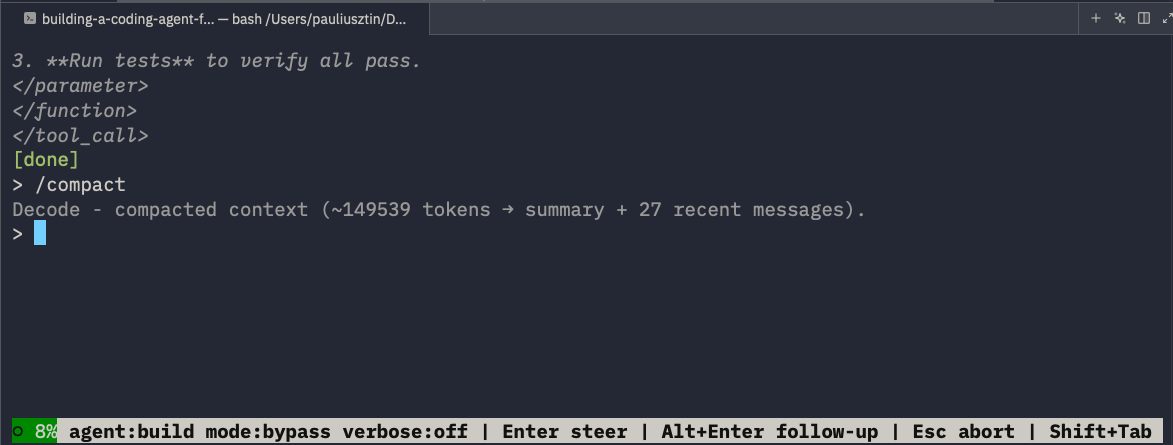
In the image below, you can see how the /compact command reduced the context window from ◑ 57% (~149539) to 8% of the context window.
There are other components we haven’t touched on in this article, such as an MCP client or an auto-mode permission layer. Still, these are the 4 harness components that are omnipresent in every coding harness you will use. Maybe Pi, with its minimalist design, is the only exception.
🧑💻 We encourage you to clone our course repo, open your terminal, type ”decode”, and test out the coding agent.
Within the next lesson, we will add the final harness piece to the puzzle: creating an agent’s catalog used to fan out subagents whose work never pollutes your window.
Here is the course roadmap, lesson by lesson (see all in GitHub):
Context Engineering for Coding Agents ← You are here
Remote Headless Mode & Durability
AI Evals Foundations: Benchmarks, Regression and Online
AI Evals on Steroids via Replays
But here is what I’m wondering:
When your coding agent’s window fills up mid-task, what do you actually do today:
/clearand lose the thread,/compactand hope the summary gets the job done, or just keep going until it degrades?
Click the button below and tell me. I read every response.
Enjoyed the article? The most sincere compliment is to restack this for your readers.
Special thanks to Modal, Opik (by Comet), and Kitaru (by ZenML) for sponsoring this open-source course and keeping it free!

Whenever you’re ready, here is how I can help you
Go from agent user to agent builder. Master the foundations of AI agents and turn fragile demo code into reliable, production-ready systems with my course, Agent Engineering: Building Multi-Agent Systems (made with Towards AI).
35 lessons. Pure foundations from scratch. 4 mini-projects. 2 production systems. A certificate and direct access to me & industry experts in our Discord.
Built for software and data professionals transitioning into AI engineering. Rated 5/5 with 300+ students. The first 7 lessons are free:
Not ready to commit? Start with our free Agent AI Engineering Guide, a 6-day email course on the mistakes that silently break AI agents in production.
If not otherwise stated, all images are created by the author.
Comments
Nothing yet. Say the first thing.
Sign in to join the conversation.