

Photo by Pavel Danilyuk: https://www.pexels.com/photo/a-man-sitting-on-the-bed-while-playing-with-the-robot-8294758/
If you’re a designer working on agentic AI right now, congratulations. You might have just gotten your first experience as a design manager.
Most AI projects can still be approached like traditional design work. Agentic AI is different. The main challenge isn’t the interface. It’s management.
What is an agent hired to do, what can it decide on its own, and when does it need to come find you?
Answering those three questions can make agentic AI design a whole lot easier.
That’s how Karen, a senior UX designer, described the project that became her first real agentic build:
“Customers wanted to upload a job description and get an appropriate salary range, including location and years of experience, from our database. They were going outside to ChatGPT to try to do it. They wanted to do it in our product, in just a few seconds.”
That’s how a lot of agentic AI work starts right now. Customers are already doing the thing somewhere, in ChatGPT, in Claude, in a tab next to your product. The job is to bring it inside, on terms that work for your users and your business.
The brief says “make it agentic.” The reality is more specific than that, and the designer in the middle is the one figuring out the difference.
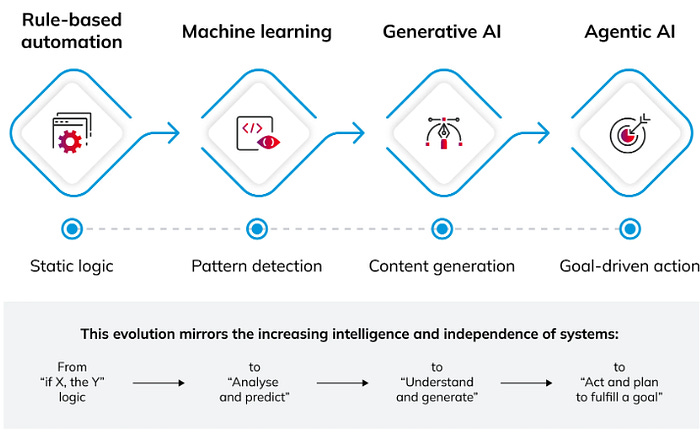
When people say agentic AI, they usually point to Claude, ChatGPT, or Figma Make. From the outside, it looks like a chatbot. You put in a prompt, and the agent responds.
The difference is that agents act. They book the flight. Send the email. Pull the report. Match a job description to a salary range and return the matching salary range.
https://www.logicgate.com/blog/what-is-agentic-ai-a-new-frontier-in-artificial-intelligence/
Anthropic, the company behind Claude, defines agents as LLMs autonomously using tools in a loop. The keyword is autonomously. The agent isn’t just answering. It’s deciding what to do next, taking the action, and going again.
Greg Nudelman, in AI in UX, frames it from the design side: workflows are sequences a person walks through. Agents are systems that walk through sequences for the person.
You’re not designing a tool where the user evaluates one suggestion at a time. You’re designing a worker who acts on the user’s behalf, even when they’re not watching.
Which is why the first thing to figure out is what the agent is actually for.
Agents tend to fall into two buckets: generalist or specialist.
A generalist handles many things shallowly, closer to a customer service replacement. Someone comes in with one of fifty different problems, and the agent’s job is to sort it, figure out what to do, and either resolve it or route it.
The line between a generalist agent and a regular chatbot is whether it acts. Kore.ai puts it bluntly: if it can’t issue a refund or change a flight without a handoff, it’s not an agent. It’s a fancy FAQ.
A specialist trades range for precision. Instead of fifty things, it handles one. Karen’s agent matches job descriptions to salary ranges.
It won’t draft the JD, pressure-test the market, or recommend a candidate. But it can find the exact range for a Software Engineer in Raleigh with five years of experience and React on the resume.
This isn’t a small distinction. It changes how much trust the user has to extend, how much error tolerance you can build in, and how the agent should behave when it hits the edge of what it knows.
A generalist who says, “I’m not sure, let me transfer you,” feels reassuring. A specialist who says the same thing feels broken.
Here’s where the brief gets blurry.
When a designer is told to “design something agentic,” they’re rarely being asked to define the agent itself. The technical capabilities and integrations are decided. The boundaries of autonomy are decided, or at least sketched.
What’s left is everything that happens between the user’s request and the agent’s result. That’s the product.
Take Karen’s spec: “match an uploaded job description to an appropriate salary range from our database in a few steps.” It describes an outcome, not a product.
How does a user upload a job description, and how complete does it need to be? What does the user see while it’s working? What range does the agent return when the match is uncertain, the role is unusual, or the data is thin? How does the user override it? How do they trust it next time?
None of that is in the spec. All of it is in the product.
So before you design anything, ask: what is this agent allowed to decide on its own, and what does it have to hand back to the user?
You have a direct report who is eager, willing, and works 24/7. The question isn’t whether they’ll do the work: they will. The question is which decisions you trust them to make alone, which ones need sign-off, and which ones they should never touch.
The temptation is to let the agent do as much as possible, because that’s where the magic feels biggest. It’s also where the support tickets live, and the customer headaches. The discipline of agent design is figuring out the handoff.
Write two columns on a piece of paper.
Column 1: What can the agent do without asking?
Column 2: What does the agent have to ask permission for?
Force every action the agent might take into one column or the other. No middle ground, no “it depends.” If you can’t decide, that’s something to figure out now, not later.
Every screen you design after this is downstream of the list. It’s uncomfortable because you’re committing to trust boundaries before you have any data. Do it anyway.
Then the harder follow-up. For everything in Column 1, ask: how does the user find out it happened? A notification. A summary email. An audit log they can review later. Or sometimes, just a small mention. Understanding how in the loop a user needs to be is key in making sure they still trust agents.
For everything in Column 2: what does the permission moment feel like? A modal that blocks. A toast they can confirm in passing. A pre-approved setting with a “change this anytime” link. The right answer depends on the stakes, but it’s the designer’s call, not the spec’s.
This is the work the spec doesn’t capture. It’s also where most agent products quietly fail.
Once you know the scope and the decision boundary, you can consider how the agent appears in the interface. There are two main patterns, and the choice comes down to who’s doing the work.
Full-screen. The agent is running the meeting. The chat log is front and center, history is preserved, and the conversation is the work. This is what you see in Claude or ChatGPT. The agent is the user’s interaction partner, and everything else is the supporting cast.
Side sheet. The agent is sitting in on the meeting. It rides alongside the work, suggesting next steps and handling the small stuff while the user stays in the main flow. This is the more common pattern in modern software, because most agentic AI isn’t replacing a workflow. It’s accelerating one. The agent is a tool, not the destination.
Both are legitimate. The mistake is bolting a chat interface onto a product that didn’t need one.
Volume is where a lot of agent UX gets uncomfortable. The default instinct is to show everything the agent is doing, in the name of transparency.
In practice that feels like working next to someone who narrates their own thoughts. Quiet, well-timed agents feel more trustworthy. Chatty ones feel exhausting.
How loud is the agent? Does it pop up unprompted, or wait to be asked? Does it interrupt with a modal, surface with a toast, or sit quietly until the user looks? Does it narrate every step, or only speak up when it’s done?
Get volume right, and people forget the agent is there until they need it.
What is the agent hired to do? What’s in the job description? Is the agent running the meeting or sitting in on it?
If you’re stuck on an agent project right now, don’t open Figma. Open a doc and write the two columns. When you realize that agentic AI is more about understanding boundaries and maintaining trust (like a good manager), designing agentic projects becomes much easier to work through.
Working on AI Agentic projects and need a thought partner? Book a free 30-minute fit call to talk through what you’re working on.
No posts
Comments
Nothing yet. Say the first thing.
Sign in to join the conversation.