
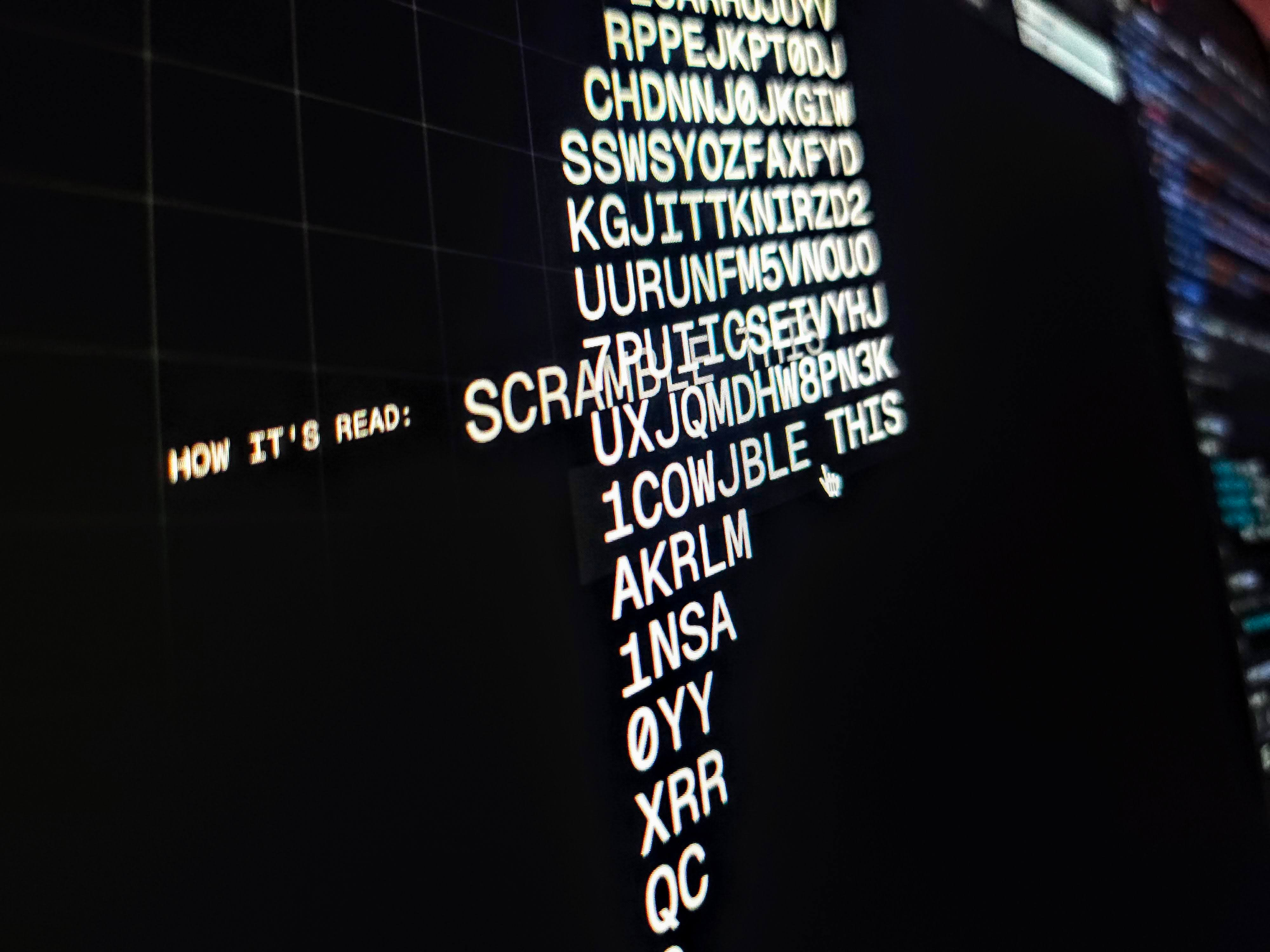
Let's revisit a classic effect in today's issue, text scrambling.
Text scrambling effects were doing the rounds a few weeks back. It reminded me of this scramble demo and a personal site put together in '20. (The deployed Storybook for that site still lives on and works.)
Figured they were worth revisiting and came away with some different approaches. The people over at GreenSock shared one of the results in their newsletter. So instead of another scroll animation, let's look at text scrambling this issue.
So how are you going to make this?
First, you need some markup. Now with any text effect like this, you need to be mindful of how it's presented to your users. Real-time text scrambling could sound like a nightmare to screen reader users. So before you do anything, make sure your content is accessible.
<a href="#" aria-label="Scramble Me">Scramble Me</a>Note that how you do this also differs based on the elements you're working with. For interactive elements, you can use aria-label. For non-interactive elements, use the "sr-only" trick. That’s where you hide the element but make it accessible to assistive tech.
.sr-only {
  position: absolute;
  width: 1px;
  height: 1px;
  padding: 0;
  margin: -1px;
  overflow: hidden;
  clip: rect(0, 0, 0, 0);
  white-space: nowrap;
  border-width: 0;
}
A JavaScript solution to this is pretty straightforward.
Given a string of text:
Scramble characters to random characters from a given set using some interval
Unscramble characters in a staggered effect revealing original characters
Here’s a quick rudimentary take on a function that could do this.
const scramble = (el) => {
  if (!el.matches('[aria-label]'))
    return console.error('set aria-label')
  const stagger = 25
  let duration
  let startTime
  return function scrambleText() {
    if (!startTime) {
      anchor.dataset.scrambling = true
      duration = el.innerText.length * 2
      startTime = Date.now()
    }
    const timeElapsed = Date.now() - startTime
    const actionTime = duration - el.innerText.length * stagger
    const index = Math.max(
      0, Math.floor((timeElapsed - actionTime) / stagger)
    )
    el.innerText = `${el
      .getAttribute('aria-label')
      .slice(0, index)}${randomString(el.innerText.length - index)}`
    if (Date.now() - startTime <= duration) {
      requestAnimationFrame(scrambleText)
    } else {
      startTime = undefined
      anchor.dataset.scrambling = false
    }
  }
}
You could adjust this to your liking, but let's break down what's happening there.
It's a function that returns a function given some element. You invoke the returned function to kick off the scramble. You could store this or adjust it as you like, put it in a hook, a class, etc.
scramble(element)()
The stagger is a hardcoded stagger for the reveals in milliseconds. The
durationandstartTimevariables become references for the animation loop.If the element doesn't have an
aria-labelset, return an error or a warning.if (!el.matches('[aria-label]')) return console.error('set aria-label')The
scrambleTextfunction is what you return. This will run in each requested animation frame withrequestAnimationFrame. You could store this for reuse.It starts by setting a
startTimeif there isn't one. It also calculates a duration to use and setsdata-scramblingon the element. The data attribute is a convenient way to check if the scramble is running.The scrambling part of the function first calculates the time elapsed. Then it calculates what we're calling
actionTime. This is how far into the window of unscrambling we are. Theindextells you how many characters should no longer scramble.const timeElapsed = Date.now() - startTime const actionTime = duration - el.innerText.length * stagger const index = Math.max( 0, Math.floor((timeElapsed - actionTime) / stagger) )Then update the text content of the element. This is a slice of the
aria-labelvalue using theindexand a string of random characters to fill the text.randomStringreturns a random character string of a given length.const defaultChars = 'ABCDEFGHIJKLMNOPQRSTUVWXYZ0123456789' const randomString = (length, chars = defaultChars) => { return [...Array(length)] .map(() => chars[Math.floor(Math.random() * chars.length)]) .join('') } // Setting the content el.innerText = `${el .getAttribute('aria-label') .slice(0, index)}${randomString(el.innerText.length - index)}`The last piece is to determine whether we need another frame or if we can tear things down
if (Date.now() - startTime <= duration) {
  requestAnimationFrame(scrambleText)
} else {
  startTime = undefined
  anchor.dataset.scrambling = false
}
That's a few lines of code to get the effect. You could take things further with easing functions for the stagger, etc.
To use this with our element, check for user preferences and attach to pointerenter and focus.
const scrambleText = scramble(element)
const handleScramble = () => {
  if (element.dataset.scrambling !== 'true') scrambleText()
}
if (window.matchMedia('(prefers-reduced-motion: no-preference)').matches) {
  anchor.addEventListener('pointerenter', handleScramble)
  anchor.addEventListener('focus', handleScramble)
}
And this gives you something like:
An alternative method could be to use GSAP and their ScrambleText plugin.
const defaultChars = 'ABCDEFGHIJKLMNOPQRSTUVWXYZ0123456789'
gsap.to(element, {
  duration: element.innerText.length * 0.05,
  ease: 'sine.inOut',
  scrambleText: {
    text: element.innerText,
    speed: 4,
    chars: defaultChars,
  }
)
Mindful that you're pulling a dependency in here but it's easier to play with easing changing the one line.
Now for some CSS solutions. These have some caveats.
Requires more markup preparation
Scrambling gets triggered by
:hover/:focus-visible. Quick hovering on and off cuts the effect off before it can finish. This may be fine based on timings, etc.Randomness. The JavaScript solutions yield random scrambles on every scramble.
The performance gain of using a CSS solution is almost negligible. CSS solutions do gain from fewer blocks of client-side script though.
Our first technique relies on animating the content of an ::after pseudo-element. Combine this with the trick of leveraging custom property scope in your @keyframes.
For your markup, the trick is to split the text into spans for each character. Then for each character:
Set a data attribute for the original character:
[data-char=””]Set a CSS custom property for the character index:
—-character-index: 0;Set CSS custom properties for the random characters to scramble through
It's up to you how you generate this markup. Today's demo leverages Splitting.js for quickness. It's a micro-library for splitting text up into elements. You can pass it some text and get back generated markup. The demo uses that and then loops over the characters to add the custom properties.
element.innerHTML = Splitting.html({
  content: config.text,
  whitespace: true,
})
const characters = element.querySelectorAll('[data-char]')
for (const character of characters) {
  character.style.setProperty(
    '--char-1',
    `"${defaultChars[Math.floor(Math.random() * defaultChars.length)]}"`
  )
  // other characters here...
}
Yielding something like this:
<a href="#" aria-label="Scramble Me">
  <span class="words chars splitting"
    style="--word-total: 2; --char-total: 11;">
    <span class="word" data-word="Scramble" style="--word-index: 0;">
      <span class="char" data-char="S"
        style="
          --char-index: 0;
          --char-1: 'E'
          --char-2: 'o';
          --char-3: '2';">
        S
      </span>
      <span class="char" data-char="c"
        style="
          --char-index: 1;
          --char-1: 'l';
          --char-2: 'g';
          --char-3: 'p';">
        c
      </span>
      <!-- other characters -->
    </span>
  </span>
</a>
Side note:: When we get CSS sibling-count() and sibling-index() you won’t need the inline custom properties for indexes and totals.
Now for the styles. For these types of effects, a monospace font is usually best so you avoid layout shifts. Our pseudo-element is the visual text so you can hide the main element content using color. Then style the pseudo-element to overlay as if it were the character's content.
[data-char] {
  position: relative;
  color: #0000;
}
[data-char]::after {
  color: canvasText;
  content: attr(data-char);
  position: absolute;
  left: 0;
  display: inline-block;
}
To scramble the text, use @keyframes that flip the pseudo-element content. Each character gets a different result based on its inline custom properties. To create the stagger, use the character's index with a stagger duration.
@media (prefers-reduced-motion: no-preference) {
  a:is(:hover, :focus-visible) [data-char]::after {
    animation: scramble 0.24s calc(var(--char-index, 0) * 0.05s);
  }
}
@keyframes scramble {
  0%, 20% { content: '_'; }
  40% { content: var(--char-1); }
  60% { content: var(--char-2); }
  80% { content: var(--char-3); }
}
And that gives you something like this.
This is the “performant” one (Remember, it’s negligible). The trick? Translate tracks of characters in the clipped window of the character element. This clip does a better job of putting it into words.
Adjust the markup so each character has an equal-length random set of characters. The only rule is that each set must start and end in the original character. For example, if you're scrambling "S". A string like "S0123ABCBS" will work.
<span class="char" data-char="S" style="--char-index: 0;">
  <span>SDCCQZ3JWNXS</span>
</span>
You're using a monospace font so set the character width and height. Then set the overflow to hidden.
[data-char] {
  width: 1ch;
  height: 1lh;
  overflow: hidden;
}
For the track, set word-break and white-space on the element to make it a vertical column. This makes it easier to debug and see what's happening. You could have things horizontal and translate on the x-axis and lose these lines.
[data-char] span {
  display: inline-block;
  white-space: break-spaces;
  word-break: break-word;
}
The last part is the transition. Yep, no @keyframes for this one. Translate the track along the y-axis with a steps timing. Calculate a nice delay using sin(). The --char-total and --steps properties are character total and characters per track.
[data-char] span {
  --duration: 0.24;
  --delay: calc(
    (
      sin((var(--char-index) / var(--char-total)) * 90deg) *
      (var(--duration) * 1)
    )
  );
}
a:is(:hover, :focus-visible) [data-char] span {
  transition: translate calc(var(--duration) * 1s)
    calc(0.1s + (var(--delay) * 1s)) steps(calc(var(--steps) + 1));
  translate: 0 calc(100% - 1lh);
}
Translate the track by calc(100% - 1lh) to produce the scramble effect. Note how you also only apply the transition when hovering or focussing. This is so it doesn't scramble back when you move away from the element. There’s also an intentional 0.1s added to the delay. This means we only trigger the scramble when :hover is intentional and not when passing over.
We mentioned performance above. And it's a negligible difference in how each solution performs. I profiled each solution for around 10 seconds triggering the scramble on repeat.

An interesting part though is a new addition to Chromium's DevTools profiling. It will now tell you if an animation doesn’t get composited.

Without going deep on this, you want to stick to composited animations where you can. These are those that only use compositor properties: the transform properties and opacity. They perform better. If you need to use others, test that things perform well and as expected.
Would it be an issue without referencing scroll-driven animation? 💀
You could take that last solution and bind it to scroll. That's pretty cool. That gives you a performant composited animation running off the main thread.
More scroll animation in the next issue?
That's been text scrambling effects. Like many things in web development, there's more than one way. But that means more tricks and techniques to add to your craft.
Demo link: codepen.io/jh3y
On X: x.com/jh3yy
On BlueSky: bsky.app/jhey.dev
Stay awesome! ┬┴┬┴┤•ᴥ•ʔ├┬┴┬┴
THIS WEEK’S SPONSOR
Is my wife, with her book “Design for Developers: Master the Basics”
Learn essential design skills to elevate your code! Design for Developers simplifies design fundamentals for devs. Create beautiful, user-friendly interfaces with confidence.
Last thing before you go. I'm trying to work out what direction to take the newsletter in. It's a plan to create a site that accompanies it at some point and a course (do we still want that?).
But, I'd like to put in place some sort of reason for paid contributions.
One idea is reducing the cost to say $2 a month. That gives paid subscribers all the posts. Free subscribers will then get at most one post a month (I'm writing 2 a month with plans to up this with more short posts, etc.).
Let me know what you think ʕ·ᴥ· ʔ
Comments
Nothing yet. Say the first thing.
Sign in to join the conversation.