
Earlier I covered the Microsoft Purview Anthrophic Claude data connector and argued that it’s 9 crosses ❌ describe the limits of one integration, not the limits of Purview. This articles dives into Purview control on Claude.
When we read “not supported“ in the Connector overview, we tend to read that as “Purview can see but not control these aspects within Claude“ and ultimately someone might think they need another product to close that gap. That line of thinking might be true for some organizations, but for a lot of them it’s wrong for one specific reason: the DSPM capability table describes a connector, and some people might treat it as though it described Purview. Most of the controls we’re going to discuss here have existed for years.
Here is an architecture type overview that we’ll explore.
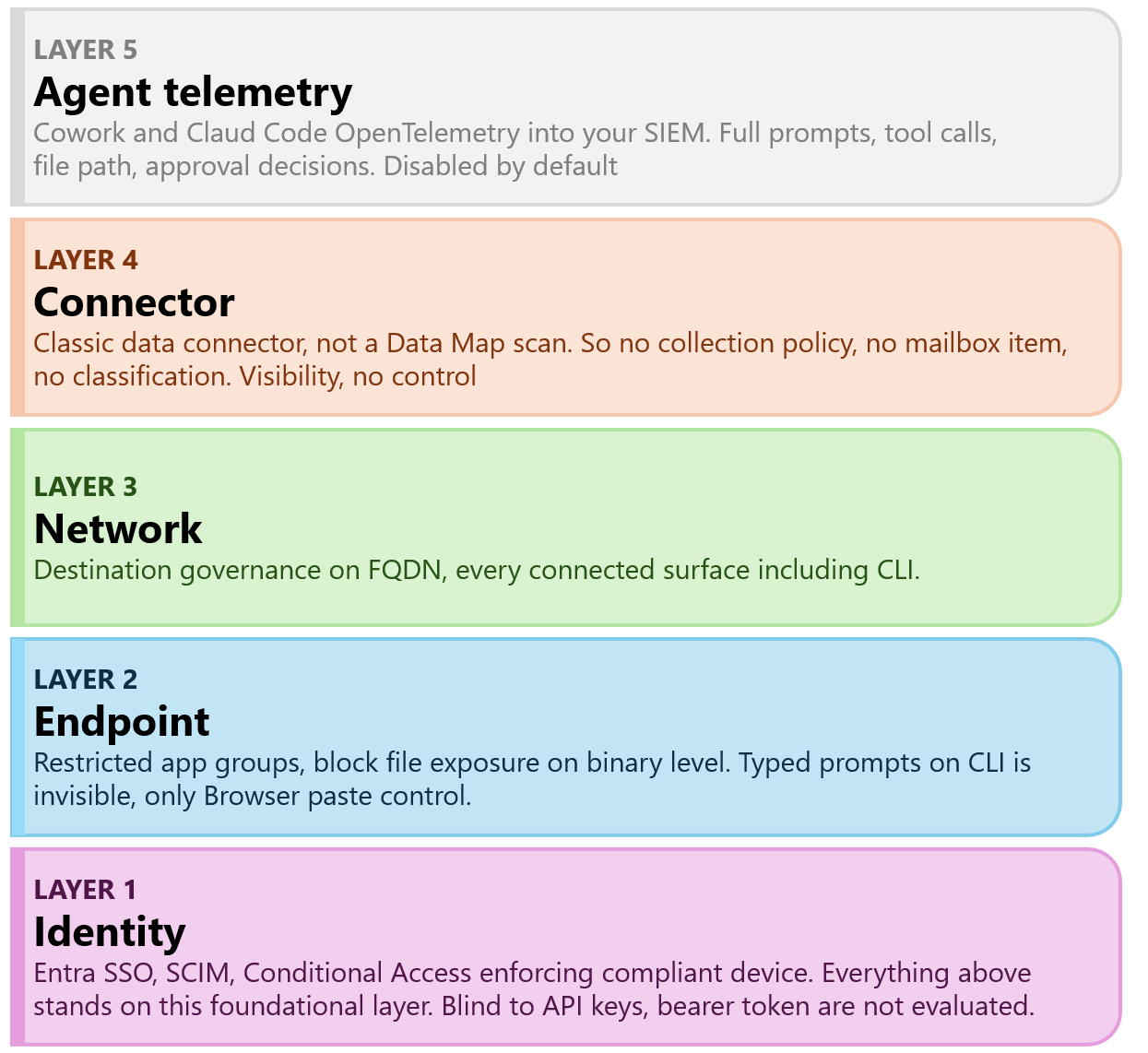
Let’s dive into what each layer does for Claude
Identity: Entra SSO, SCIM, Conditional Access requiring a compliant device
Endpoint: Endpoint DLP restricted app groups blocking Claude processes from opening sensitive files, and MDM-delivered managed settings
Network: SSE or SASE feeding Purview Network Data Security. Destination governance across every surface, including Claude CLI
Connector: Compliance API into DSPM for AI. Visibility only, as covered in my earlier article.
Agent telemetry: Cowork and Claude opentelemetry into your SIEM. Detaield, real time and off until enabled
The Connector layer (4) is the one that shipped in May, and the only one I wrote about in part 1. Layer 2 is the one that actually stops things from happening
Without a doubt the most important layer, as everything else stands on this. Identity is still the foundation of our control plane, , so it goes first even though it is the last thing anyone gets excited about. On E7 this layer is also the most complete part of your entire estate, because the Frontier Suite bundles the Entra Suite and Agent 365 natively, and those are exactly the pieces that turn identity from a human-only control into an agent-aware one.
Entra SSO into Claude Enterprise, SCIM for joiner-mover-leaver, and a Conditional Access policy requiring a compliant device. That combination guarantees your managed settings reach the machine, your endpoint telemetry flows, and every interactive Claude session starts from a device you own. Get it right and the rest of the architecture has somewhere to stand. Two holes in the human half, and they are the ones people miss:
API keys bypass Conditional Access entirely, because a bearer token carries no interactive sign-in for CA to evaluate. An engineer with a Console key runs Claude Code from a personal laptop and your identity layer never sees it. Close that in the Anthropic Console, not in Entra: restrict who can mint keys, and alert on key creation events, which the connector's Activity Feed already carries.
Conditional Access does not gate the consumer product. Domain verification stops a work account on your domain. It does not stop a personal Pro subscription on a Gmail address opened on a corporate laptop. That leak closes on the network plane, Layer 3.
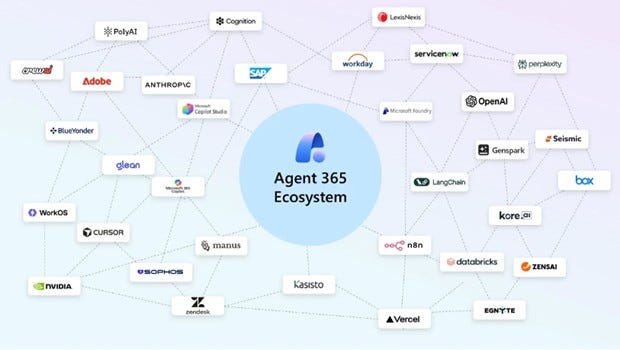
When an autonomous agent acts rather than a human, the question is whose identity it carries and what policy applies to it. Agent 365, included in ME7, is Microsoft’s answer, and it is a genuinely a decent one. It gives every agent a first-class Entra Agent ID built on service principal infrastructure, maintains a single registry of every agent in the tenant regardless of where it was built, and lets you apply Conditional Access for agents that evaluates each agent’s authorization request before it connects.
The AI Security Dashboard then correlates signals from Entra, Purview and Defender into one risk view, and Microsoft’s worked example is worth internalizing: a single DLP violation triggers Purview to block the data access and Agent 365 via Entra to block the agent’s invocation,with the dashboard reflecting the reduced risk score. Two enforcement points, one coordinated response. That is the control plane this whole architecture wants to report into.
Two honest limits on it, even at E7. Conditional Access for agents is deliberately narrow today: the only condition is agent risk level from Entra ID Protection and the only grant control is Block. It is a kill switch for risky agents, not the conditional policy suite you have for humans. And network controls for agents specifically require Entra Internet Access, with device compliance for agents applying only when the agent runs on a managed endpoint such as a Windows 365 Cloud PC for Agents. So Agent 365 orchestrates existing enforcement, it does not replace the endpoint and network layers below. Purview still stops the data. Agent 365 stops the agent.
For the moment, consuming AI solutions still require an endpoint; and as we’re talking about company-managed endpoints there’s a lot of controls we can implement. Let’s pick on just a few.
This the most substantial control available most organizations will have available today. Purview Endpoint DLP lets you identify a process by executable name, and then prevent that process from opening files that match a DLP condition. Not the browser, not a cloud service - the binary itself. It has nothing to do with the connector, not with DSPM for AI, and work regardless of you building the connector integration.
The configuration is two steps
Define the restricted app group. In the Purview portal, add the app with a friendly name and the executable name, which must match the process name. Consider both Windows and MacOS users.
Reference the group in a DLP rule. Create a “Devices“ DLP policy and set your condition: either a sensitivity label or Sensitive Information Type. Under actions, choose audit or restrict activities on devices, and within that configure the File activities for apps in restricted app groups. Depending on your desired control, set the action to Audit, Block with Override, or Block.
The result is that when the process attempts to open a file matching the condition, Endpoint DLP stops it and the event lands in the activity explorer.
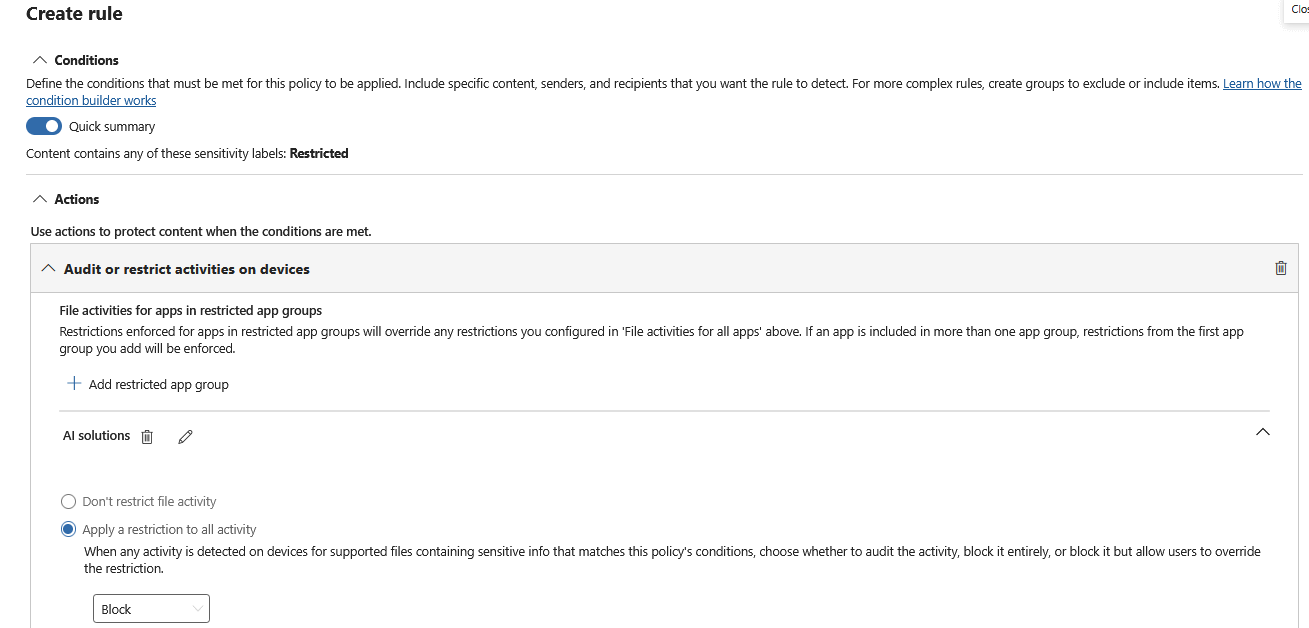
Restricted app groups govern file access. They sit between a process and the file system. They do not see what a developer types into Claude Code. They do not see what gets pasted into the desktop app. They do not inspect what the process transmits over the wire. Typed and programmatically transmitted content from a CLI is invisible to Endpoint DLP, and no configuration changes that.
Restricted app groups stop the agent autonomously reading protected files. Claude Code cannot open the salary spreadsheet, cannot read the labelled contract, cannot ingest the customer export sitting in the repo. That is a real and substantial control, and it addresses the agentic risk specifically: an autonomous process with broad file system access, hoovering up whatever is in its working directory.
What it does not stop is a human deciding to paste the contents of that spreadsheet into a prompt. That is a different threat, on a different plane, and it lands in the browser and network controls we’ll discuss a bit later.
My guidance: Start in Audit only with the group defined and no blocking. Two weeks of activity explorer data will teach you more about what Claude Code reads than any amount of policy design. Then move to Block with override on labelled content, then to Block. This is the same maturity path you would use for any restricted app group, and Claude does not warrant a different one.
Looking ahead, there are two developments to continue to track.
Restricted app groups became enforceable in Edge in April 2025, so the same group can now govern both a local process and a browser reaching a protected file. That convergence is the direction of travel: fewer separate control surfaces, more app-agnostic policy.
Advanced label-based protection on onboarded Windows devices keeps enforcing access control on labelled files even when they sit unencrypted on disk, and encrypts them on transfer off the device. For an agent that reads local files by design, that is the more durable control than any per-app blocklist, because it does not require you to enumerate every AI binary that will exist next year. If you are building for a three-year horizon rather than a three-month one, invest there.
Although we’re used to working with M365 Copilot within our Office productivity suite, Anthrophic also launched their own office add-ins. They’re a bit of an odd duck as apparently they fall outside of the Claude Enterprise audit logs, and Compliance API. Observerability is a real gap, but fortunately we can control the deployment.
The deployment control itself is straightforward. Within the M365 Admin center’s integrated apps, the Admin controls who is allowed to use what application. Next to that, you can also prevent users from acquiring add-ins from the Office Apps store. Deploy only what you have approved, and the Claude add-ins are not present on managed clients.
You still need monitoring, not for the deployment but to identify users trying to circumvent your controls. Blocking the add-in in the admin center governs your tenant's managed surface. It does not govern a user who sideloads the add-in.
Defender for Cloud Apps will surface the Anthropic API endpoints in app discovery. Insider Risk Management has a policy shape for exactly this, users circumventing security controls, and it is one of the few Purview solutions that works on Claude today because it operates on your endpoint signals rather than on the connector.
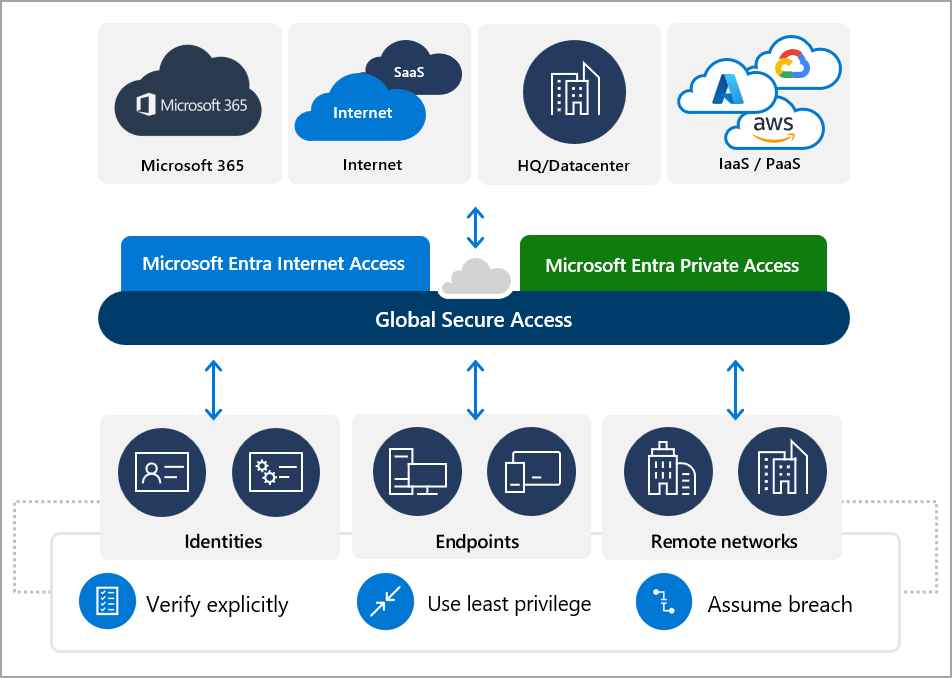
Purview Network Data Security works through a SASE or SSE integration and is the only route Microsoft documents as reaching AI interactions across browsers, applications, APIs and add-ins. Claude is explicitly mentioned.
Read applications carefully. The browser plane, meaning device onboarding plus the Purview extension, only observes a browser. The Claude desktop app is not a browser and neither is Claude Code. Where engineers are the heaviest Claude users, and they usually are, browser-based controls are watching an empty room.
Destination governance works everywhere. Allow, block or coach on the FQDN. Distinguish your Enterprise tenant from consumer claude.ai where the vendor supports tenant restriction headers. This works for the browser, the desktop app, the CLI and the add-ins alike, because it operates on where the traffic is going rather than what is inside it. Deploy this and you have discovery and destination control across every surface in the estate.
Content inspection degrades sharply. In a browser it is workable. On native clients it ranges from best-effort to infeasible, for three compounding reasons. Prompts are chunked and streamed rather than sent as a single inspectable body. The transports are server-sent events and websockets, not tidy request-response. And native clients increasingly pin certificates, which defeats the TLS interception your SSE depends on.
Claude Code and the desktop app both ride api.anthropic.com and claude.ai. Validate the pinning behaviour in your own SSE before you promise anyone inline content DLP on those surfaces. That is the difference between an architecture that survives its first pilot and one that gets quietly abandoned.
The network plane gives you discovery and destination governance for every surface including the CLI. Content-inspection DLP is workable in the browser and best-effort at most in native clients.
There is also a one-click policy here, which is worth knowing given the connector lane has none for Claude. DSPM for AI - Detect sensitive info shared with AI via network feeds network-observed detections into the same activity explorer view. It is vendor-agnostic, so it reaches Claude.
The network plane is also one of the few, if not only, things that catches an add-in you did not manage to block. The catch? It needs E5 and pay-as-you-go. Most Enterprise organizations have this deployed in some fashion, for good reason.
Cowork is not in the Compliance API. Anthropic states that plainly, so the Purview connector will never see it and no license tier changes that… However, Cowork is not dark. Anthropic’s Cowork monitoring documentation describes a first-party OpenTelemetry export, available on Team and Enterprise, configured centrally by an admin. An OTLP endpoint, a protocol, an auth header. Events flow immediately.
The logging is substantial: the full text of every prompt; every tool and MCP invocation with server name, tool name, parameters, success or failure and execution time; every file path Claude reads, modifies or touches, including files reached through MCP servers; which skills and plugins were invoked; whether each tool action was approved by the user, rejected, or fired automatically under existing permissions; and per-request model, token counts, estimated cost and duration. A shared prompt.id links every event back to the prompt that triggered it, so you can reconstruct what the agent did in response to a single instruction.
That is a more detailed forensic record than the Compliance API provides for claude.ai, where the activity feed carries no prompt content at all. Cowork’s problem is not absence. It is three other things.
It is off until an admin enables it. Anthropic is explicit that no data flows until an OTLP endpoint is configured. Not reduced data. None. An organization that never set that field has nothing and cannot obtain it retrospectively.
It goes to your SIEM, not Purview. Which places it outside DSPM, outside DLP, outside eDiscovery and outside any Purview retention policy. Your Claude evidence lives in two tools with two owners.
It is operational telemetry, not audit evidence. A real-time event stream is built for investigation, not for producing a tamper-evident record two years later. Hence the immutable archive in the build order.
Anthropic also documents the join you should be building: each Cowork OTel event carries a “shared user account identifier” that matches Compliance API records. Correlate on it and you get the control plane and the operational plane in one view. That is the intended architecture, and it is worth building.
Cowork’s telemetry being rich is precisely why it needs a conversation before it needs a collector. Anthropic lists all three of these under security considerations on the same page, and nobody reads security considerations before wiring up an endpoint.
Prompt content is included by default once export is on. Claude Code is the opposite and redacts prompts unless you opt in, so the mental model most admins carry, that telemetry means metadata, is wrong here.
Tool parameters may carry sensitive values, including file paths and command arguments.
User email addresses sit in the event attributes.
An admin who enables the OTLP endpoint for cost dashboards has also begun streaming, the full text of everything staff typed into Cowork. There’s a privacy aspect to this, that warrants a session with your Works Council and DPO before enabling.
Everything in Layers 2 and 5 involves configuring employee machines and collecting what people type. In the Netherlands that is not an IT decision. Enabling prompt logging might be seen as a personnel monitoring system.
Streaming your Claude Code prompts and related conversations is worth separating clearly from Purview, because it changes the legal analysis. Purview’s Endpoint DLP restricted app groups are a data protection control, not a monitoring control. They evaluate a file’s classification, not an employee’s behavior, and they act at the moment of access. That is a materially easier conversation with a works council than telemetry, and it is another reason to lead with Layer 2 rather than Layer 5.
My guidance: Run the DPIA before you build. Take a concrete proposal to the works council: what is collected, what is redacted, who can query it, how long it is retained, and the structural separation between security telemetry and anything HR can reach. Redact at the collector rather than after storage, because an undertaking not to look is not a control.
What people took from the May announcement was that Purview now supports Claude. Then they looked at the capability matrix and saw a contradiction: Purview can watch Claude, but seemingly cannot control it.
That conclusion misses the bigger picture.
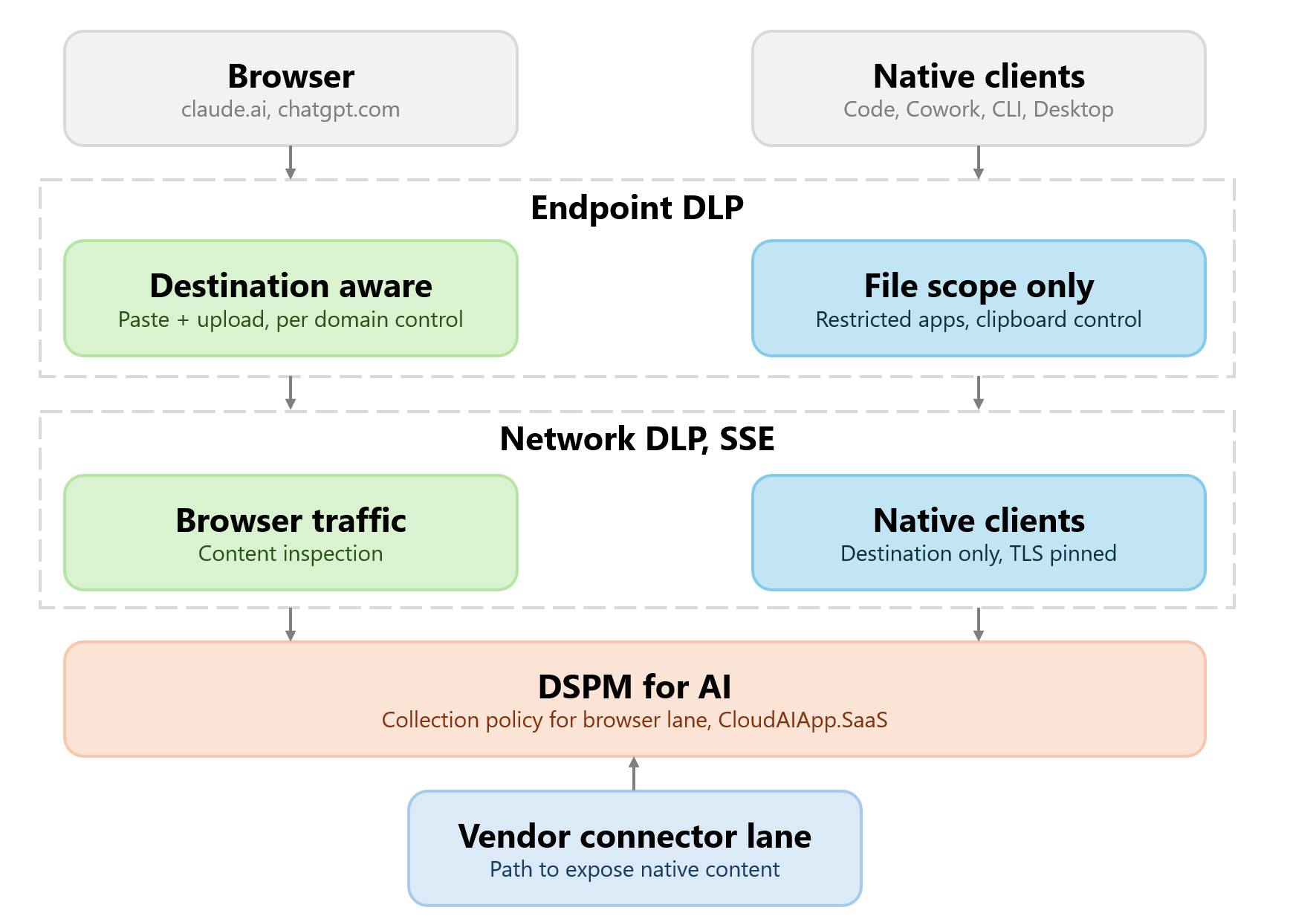
Purview can govern Claude, just not primarily through a dedicated connector. Endpoint DLP and restricted app groups can prevent the Claude desktop application from accessing labelled content. The M365 Admin Center controls whether Claude add-ins can be deployed. Network Data Security governs where prompts and responses can be sent. Insider Risk can identify users who attempt to work around those controls. None of those controls care whether the application is called Claude, Copilot, ChatGPT, or something that does not exist yet. Their indifference is the point. Controls tied to data, identity, devices, and networks survive changes in AI tooling.
It is also worth keeping the industry-wide perspective in mind. OpenAI’s Purview connector does not cover Codex CLI either. Codex operates through the API platform rather than the ChatGPT Enterprise workspace, placing it outside the scope of what the connector was designed to govern. The same pattern is emerging across the market. Most compliance integrations were built around enterprise chat experiences, while the newest generation of Agentic solutions increasingly operates beyond those boundaries.
This is not a Claude problem. It is not a Microsoft problem. It is a reflection of where governance integrations were originally built and where AI products are evolving. Claude simply makes the gap more visible because Anthropic has been aggressive in shipping agent experiences. As other vendors expand their own agent platforms, the same questions will surface elsewhere.
The connector’s nine crosses describe the limits of an integration. They do not describe the limits of your control environment. That’s an important distinction, because an organization’s ability to govern AI depends far more on data, identity, device, and network controls than on whether a specific vendor’s connector has a green tick in a particular column.
Comments
Nothing yet. Say the first thing.
Sign in to join the conversation.