
(references to article listed at the bottom)
Learning a service is easy, building judgment is harder.
You only ever see the systems you’ve worked on, so your blind spots are your team’s blind spots.
AWS re:Invent puts 60,000 engineers in one building: 2,200+ sessions (70% interactive), hands-on launch sessions the same day services are announced, and direct access to the engineers who build them.
Nov 30 - Dec 4, Las Vegas. Early bird ends Aug 25 and saves you $1,200.
Register for re:Invent : AWS reInvent Information
I do not like refactoring or keeping up security changes.
I know it is a critical part of being a software developer, but it is a part that drains my energy instead giving me energy.
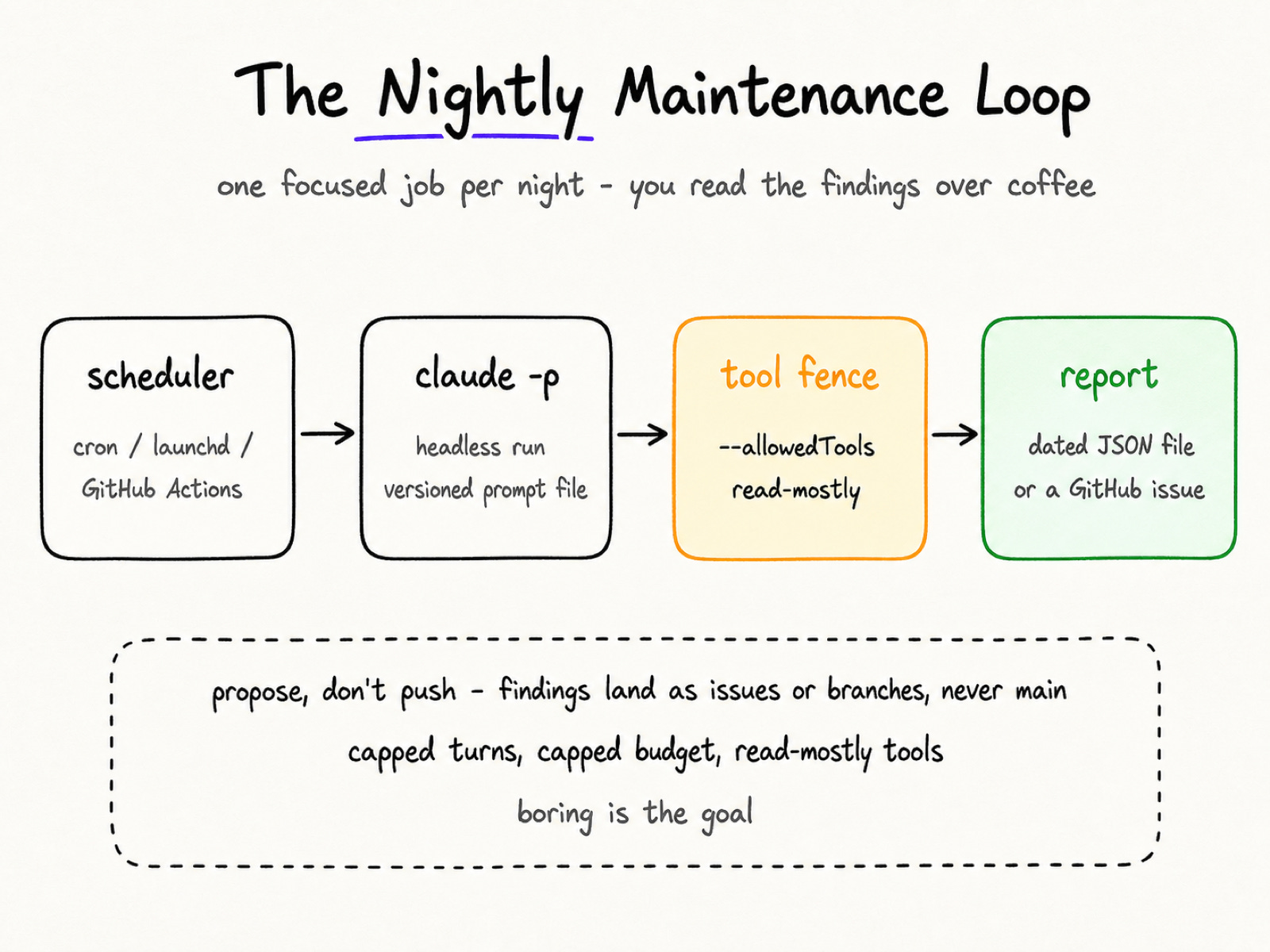
So here’s my fix: schedule Claude Code to run headless every night and do the rounds for me. I review the findings over coffee.
Let’s dive in.
Claude Code has a non-interactive mode. Add the -p flag (short for --print) to any claude command, and it takes your prompt, does the work, prints the result, and exits.
Nothing to babysit.
Here’s the recap for this command:
The -p option runs the same agent loop as your interactive session.
It acts like a Unix tool.
The --output-format json gives you structured output.
This includes the result, a session ID, and a total_cost_usd field for the run.
One more flag worth knowing: --bare. It stops the CLI from auto-loading your local setup. This includes CLAUDE.md, hooks, skills, plugins, MCP servers, and auto memory. This way, a scripted run works the same on every machine. Anthropic recommends it for scripts and CI, and it’s slated to become the default for -p.
Anthropic says that non-interactive mode lets you link Claude to CI pipelines, pre-commit hooks, and other automated workflows. A nightly maintenance job is exactly one of those workflows.
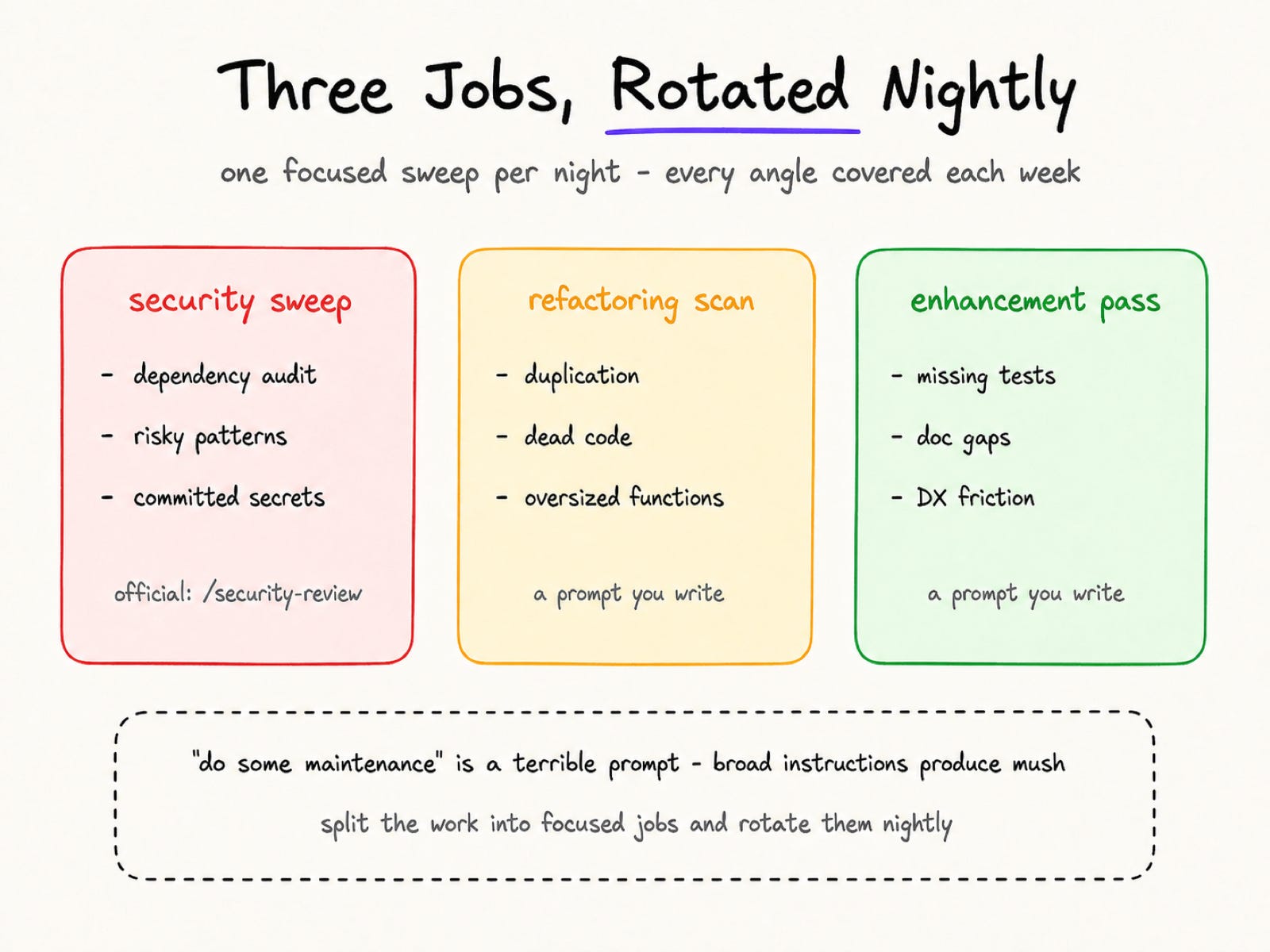
But here’s the thing: “do some maintenance” is a terrible prompt. Broad instructions produce broad mush.
I’d split the work into three focused jobs and rotate them, one per night:
Security sweep - dependency audit, risky patterns, secrets someone accidentally committed
Refactoring scan - duplication, dead code, functions grown too large
Enhancement pass - missing tests, doc gaps, developer-experience friction
The security job has official precedent. Anthropic launched a /security-review command and a special GitHub Action on August 6, 2025. It hunts injection flaws, hardcoded secrets, weak crypto, and more. But the broader sweep above is still a prompt you write yourself. There is no packaged “nightly maintenance” product.
The other two jobs are plain headless prompts. And Anthropic’s best-practices docs back the open-ended version: asking “what would you improve in this file?” tends to turn up problems you would never have thought to raise on your own.
Rotate the three jobs and you cover every angle each week. Or run them each night, completely up to you.
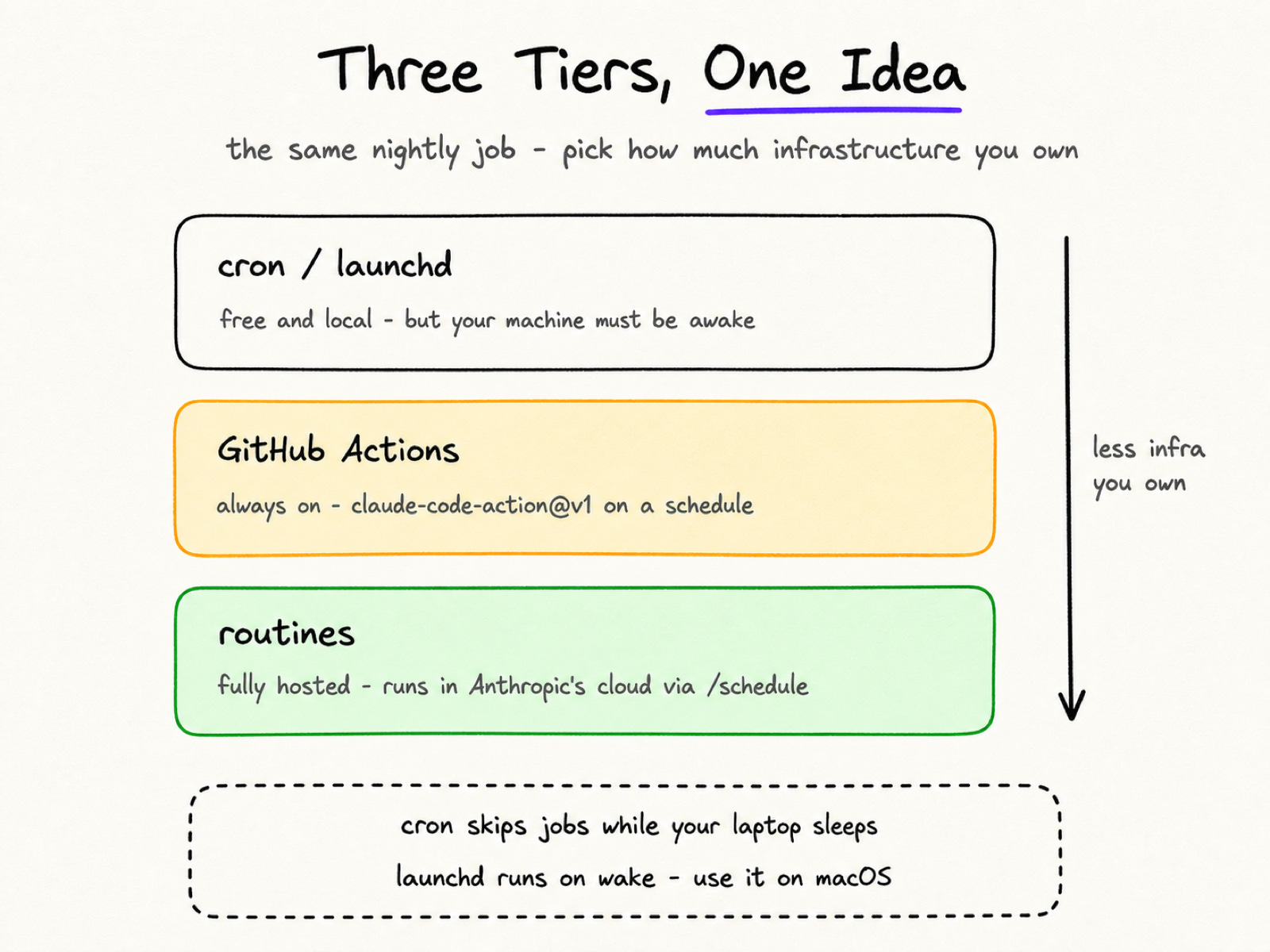
Do you need special infrastructure for this? No - a cron line and a prompt file cover version one.
Here’s the shape I’d start with. To be clear, this recipe is mine, not an official one:
# crontab: every night at 2:15am
15 2 * * * cd ~/code/my-repo && claude -p "$(cat prompts/security-sweep.md)" \
  --allowedTools "Read,Grep,Glob,Bash(npm audit *),Bash(git log *)" \
  --output-format json > reports/sweep-$(date +\%F).json
The prompt lives in a versioned file. The findings land in a dated report you can actually open.
Scheduler bonus: these runs die cleanly. Send a -p run SIGTERM and it aborts the turn, cleans up child processes, and exits with code 143. So you can wrap the whole command in a timeout.
One catch for laptop people: cron skips jobs while the machine sleeps. Apple has deprecated cron in favor of launchd, and a launchd job runs on wake if your Mac was asleep at trigger time. So use launchd on macOS.
Want it to run without your machine at all? Move the same idea into GitHub Actions with Anthropic’s official anthropics/claude-code-action:
on:
  schedule:
    - cron: "15 2 * * *"   # UTC - and skip the top of the hour
jobs:
  nightly-sweep:
    runs-on: ubuntu-latest
    steps:
      - uses: anthropics/claude-code-action@v1
        with:
          anthropic_api_key: ${{ secrets.ANTHROPIC_API_KEY }}
          prompt: "Run the maintenance sweep in prompts/security-sweep.md. If you find actionable issues, open a GitHub issue summarizing them."
          claude_args: "--max-turns 20"
GitHub runs schedules in UTC. And jobs queued at high-load minutes (like the top of every hour) can be delayed or even dropped, so pick an odd minute [10]. Plus, public repos auto-disable scheduled workflows after 60 days without repo activity.
One note on the issue-filing: you have to ask for it in the prompt, and the workflow needs the right GitHub permissions. By default, when Claude responds to mentions, it commits to a branch and hands you a link to open the pull request yourself. A human stays in the loop.
If you want to skip YAML, you can. Anthropic launched routines on April 14, 2026. Use the /schedule command to set up Claude Code agents. They run in Anthropic’s cloud, so no laptop needs to stay on. As of the research preview, plans carry daily limits - five routines on Pro, for example.
Cron is free but needs your machine awake, Actions is always on, routines are fully hosted.
An unattended agent needs a fence. Here are the four rules I’d treat as non-negotiable:
Propose, don’t push. Nightly jobs file issues or commit to branches. Anthropic’s docs say it plainly: review Claude’s suggestions before merging (code reviews may be changing soon though).
Lock the permissions. Run with --permission-mode dontAsk. It won’t wait for an approval prompt. Instead, it denies anything outside your allowed rules and has a built-in read-only command set. Keep --allowedTools minimal. Never use bypassPermissions outside an isolated container or VM.
Cap the spend. --max-turns limits agentic turns, and the bare CLI has no limit by default, so set one. --max-budget-usd hard-stops the run at a dollar amount, subagent spend included. Then log total_cost_usd from the JSON output to watch the trend.
Protect the key. Never hardcode your API key in workflow files; use GitHub Secrets [4].
One syntax trap in --allowedTools: the space before the wildcard matters. Bash(git diff *) lets you use any command that starts with git diff. But if you drop the space, Bash(git diff*) also includes commands like git diff-index.
Boring is the goal here.
Now my honest warning.
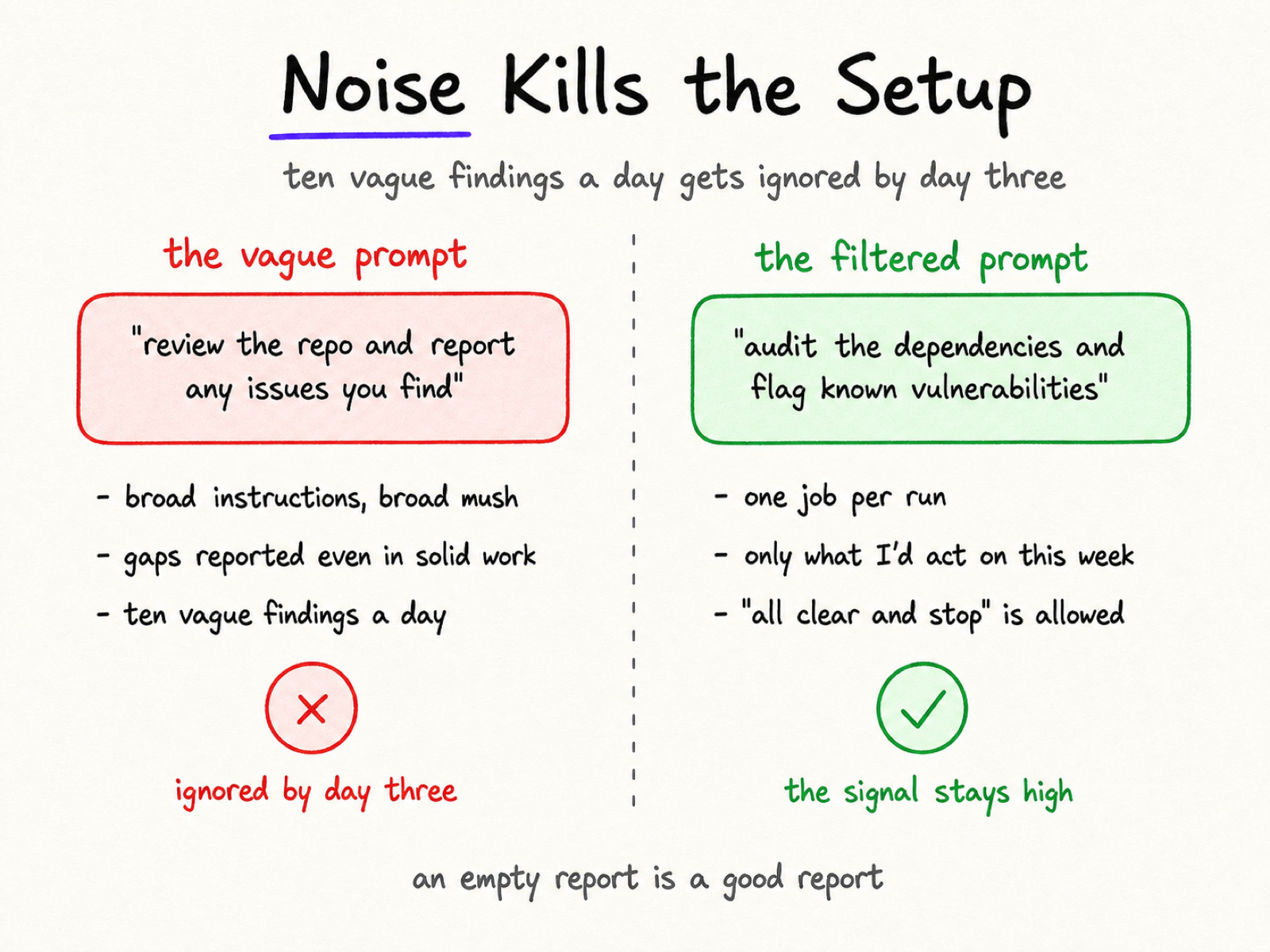
This one is my opinion, but Anthropic’s docs point the same way. Ask a reviewer to hunt for gaps and it will hand you gaps, even in solid work, because that was the assignment. They filter out low-impact findings that often give false positives. This helps them focus on high-impact vulnerabilities.
So build the filter into the prompt itself, one job per run.
Before: “Review the repo and report any issues you find.”
After: “Audit the dependencies and flag known vulnerabilities. Only report findings I’d act on this week. If nothing clears the bar, say all clear and stop.”
An empty report is a good report.
Maintenance is the work everyone agrees matters and nobody schedules. So stop relying on memory and guilt, and hand the job to an agent with a scheduler.
Start small: one job, read-only tools, a week of reports. If the findings earn your trust, widen the fence a little.
The agent does the rounds. You make the calls.
Cheers friends,

Find me online:
LinkedIn / YouTube / Threads
Run Claude Code programmatically (headless docs) - https://code.claude.com/docs/en/headless
Claude Code CLI reference - https://code.claude.com/docs/en/cli-reference
Claude Code permission modes - https://code.claude.com/docs/en/permission-modes
Claude Code GitHub Actions - https://code.claude.com/docs/en/github-actions
Claude Code best practices - https://code.claude.com/docs/en/best-practices
claude-code-action security docs - https://github.com/anthropics/claude-code-action/blob/main/docs/security.md
anthropics/claude-code-security-review - https://github.com/anthropics/claude-code-security-review
Anthropic: Automate security reviews with Claude Code - https://claude.com/blog/automate-security-reviews-with-claude-code
Anthropic: Introducing routines in Claude Code - https://claude.com/blog/introducing-routines-in-claude-code
GitHub docs: Events that trigger workflows (schedule) - https://docs.github.com/en/actions/reference/workflows-and-actions/events-that-trigger-workflows
Apple: Scheduling timed jobs (launchd) - https://developer.apple.com/library/archive/documentation/MacOSX/Conceptual/BPSystemStartup/Chapters/ScheduledJobs.html
No posts
Comments
Nothing yet. Say the first thing.
Sign in to join the conversation.