
This is a written version of a workshop presented on Maven (recording available here, along with my other workshops). After 25 years creating all sorts of entertainment and education content, I now explore the messy side (both good and bad) of creating with AI.
I’m also running a 5 week course to learn how to create quality videos for kids, starting in July. Use code FRIENDS for 35% off.
Google Flow is a dedicated animation tool powered by Google’s models. It allows you to generate both images and video with several model options available. For image generation, you can choose between Nano Banana Pro, standard Nano Banana, and Imagen.
On the video side, Flow utilizes the Veo model, which offers different speed tiers, like Veo 3.1 Fast, that consume varying token amounts. It also supports Omni, a newer, more capable model that carries a higher token cost. The platform gives you full control over aspect ratios (landscape or portrait), precise sizing, and generation volume. Additionally, it supports text-to-video, frames-to-video, and ingredients-to-video workflows, all of which we will explore.
While you can access some of these features through standard Gemini LLM chat prompts, those interfaces often limit you to roughly three video generations per day depending on your plan. Flow serves as the dedicated workspace for this production and is accessible across most Google subscription tiers.
Prompting for animation is fundamentally different from prompting an LLM. With models like Claude or Gemini, the standard advice is to build a structured, multi-sentence prompt: you establish a role (e.g., “you are a lyricist writing an educational alphabet song”), set constraints, and provide a guide.
Animation models also rely on a formula, but it is built entirely around the language of film. This holds true whether you are using Google, Runway, Kling, or another video platform. While there are subtle nuances between models, a core set of elements will serve you almost anywhere:
Shot Type: How is the scene framed? Is it a close-up, a wide shot, or a medium shot? Utilizing established film terminology here gives you much tighter control over the visual composition.
Subject: Who or what are we looking at? This requires a clear, descriptive breakdown, such as a fluffy golden retriever or a seven-year-old child wearing a green shirt. Repeating these descriptive details helps maintain character consistency across clips.
Action: What is happening in the scene? For example, a child bouncing a basketball or walking down a sidewalk.
Setting: Where is the action taking place? This can range from an expansive urban park to a specific, textured detail, like a close-up on a plaid couch in a living room.
Style: Is the visual approach 2D animation, watercolor, or CGI? You can get incredibly specific and even mix styles, which is highly recommended for experimentation. A lot of creators default to terms like “Pixar-style” or “Disney-style,” but that often results in generic, repetitive outputs. Experimenting with unique aesthetics is what will actually make your work stand out.
If the model you’re working with also generates audio, then include audio information, like sound effects, background music, or voiceover.
These examples use the Omni model and text to video (no image references or starting frames).
Close-up shot, stop-motion claymation style. A small green clay frog is trying to catch a fly with its tongue. The setting is a miniature lily pad in a shallow puddle. [Audio: soft squishing sounds and a cartoonish 'boing']
Wide drone shot, photorealistic, a lone hiker with a bright red backpack walking along a narrow snowy mountain ridge at sunrise.
Notice I did not include an audio prompt, yet it added footsteps and wind. Sometimes that works in your favor, sometimes it doesn’t. There’s a concept of negative prompting (”no dialogue, no sound effects, no music”), but it’s not 100%. sometimes it listens, sometimes it won’t. I’ve gotten very proficient at pulling out and isolating audio in editing as a result.
Medium shot, 2D hand-drawn animation style, pastel colors, a young girl with messy pigtails eagerly reaching up to pull a book from a tall wooden bookshelf.”
Even though I said medium shot, the generation has multiple angles. Use “static camera” or “locked camera” to avoid this. Though it’s not fool-proof.
Sometimes you don’t even need a full prompt.
Hamster gives a TED talk
Slow motion water balloon popping
I wasn’t sure if water holds shape like that in a slow motion video. So I watched a few real-world slow-motion videos. It does!
If you really want to push it, try a single word. Like
Boo
(Note that this is not a kid-friendly one. It’s not gross or super scary, but there is a bit of a jump scare.)
It generated a full creepy-hallway horror beat. You can get a sense for training data here (and with the TED talk hamster in a black turtleneck). These models have been trained on so much content that the tropes show through.
It’s the same reason “a doctor examines a patient” tends to return a white male doctor. The training data carries biases, and you see them everywhere, from the jump scare to the turtleneck. You can use that in your favor, but you have to know it’s there.
To take the “boo” clip a step further and turn it into a two-shot story where the zombie is then revealed to be a friend playing a prank, I need character and location consistency.
Flow allows for saving frames from videos (click on the video, scrub to the frame you want to save, hover over the video, and a small square button will appear that saves the current frame to the gallery).
I saved one of the zombie, one of the hallway. Then I used ingredients-to-video with a prompt creating the next beat of the scene. Ingredients to video prompts essentially tells the AI to put these elements into a this situation.
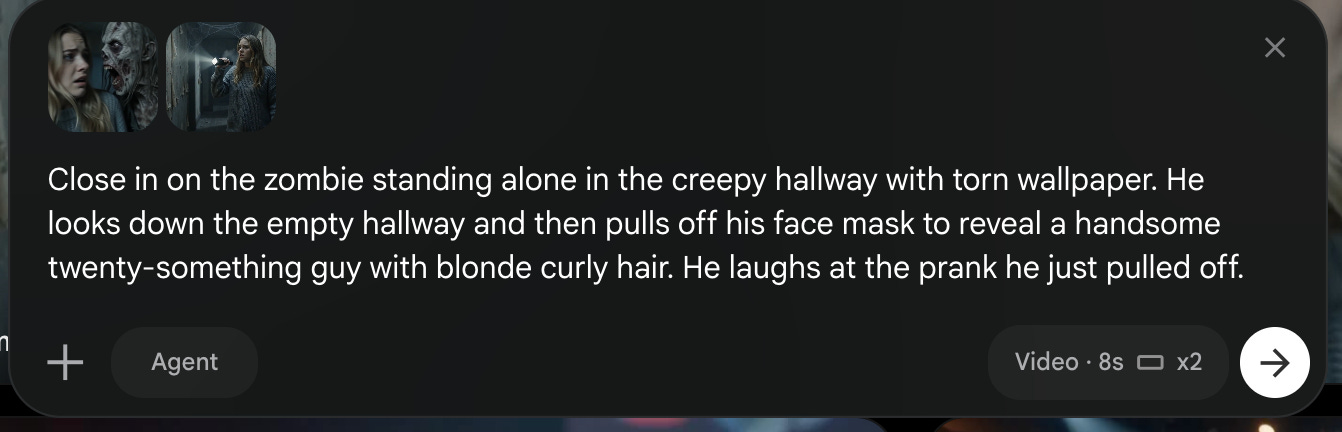
Ingredients to video can be hit or miss. The model doesn’t have context from the previous video. One of my reference images included the girl (even though I didn’t want her in the shot). So the first generations showed her running away again. But with a couple of prompt tweaks (specifying “stands alone in the creepy hallway with torn wallpaper”), I got what I wanted: the zombie reveal. Edit the two together and you have a simple little story, and you start to see character consistency come into play.
I love building tiny stories because they’re where you learn.
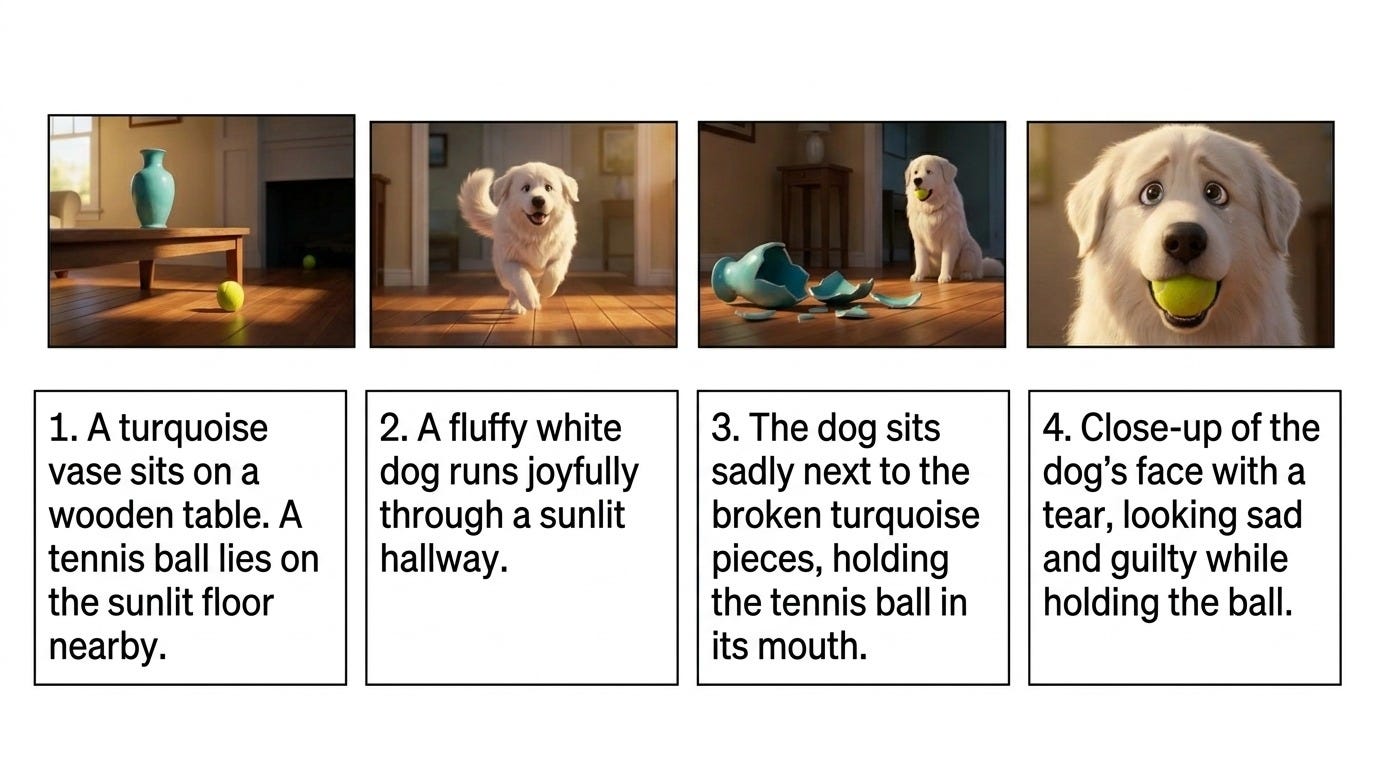
A tennis ball rolls under a table
A dog comes running
The vase broken on the floor
Sad dog
These little arcs force you to practice prompts, audio, pacing, and the shape of a story. It’s also how film school or learning to write a book works. You don’t jump straight into creating a feature; you work on shorts and build up.
Telling little stories also means a opoprtunity to start learning with storyboards. They’re a standard animation and filmmaking tool, and they keep you honest. Storyboards help you organize your thoughts and your prompts, let you check the flow of the story, and help you see how long the story is and what shots you need.
When I create songs, my storyboard pairs the lyrics (or the musical beat) with the prompt and a starting frame, because I usually find I need a starting frame.
I keep a separate character asset and reference sheet alongside it.
For a short story, the storyboard can be as simple as a row of starting images with short descriptions.
Flow now features an agent option that allows you to chat directly with a Gemini model to generate videos.
In practice, the experience can be hit-or-miss, and it consistently works best when broken down into manageable chunks.
For example, when working on the dog and tennis ball story, I provided the agent with four specific beats: a decorative vase, a tennis ball, a bouncy Great Pyrenees, and finally, the dog sitting contentedly with the ball.
The AI responded with its typical sycophantic enthusiasm (”Great job, Carla, you made a lovely story!”) before building out a structured storyboard covering characters, props, environment, and the four requested frames.
It even specified wardrobe details, though I am not entirely sure the dog needed a leather collar.
However, the agent option comes with strict limitations. It can only generate 10 seconds of video at a time, meaning any longer narrative requires creating individual segments to edit together later.
The agent also hallucinates. On multiple occasions, it informed me that it had saved a storyboard file for my review. In reality, the Gemini agent inside Flow has no connection to local documents or file-saving mechanisms. This led to literal arguments with the interface:
Me: There is no storyboard file.
Gemini: Yes, there is.
Me: I literally cannot find it anywhere.
Gemini: Let me recreate it for you.
Naturally, there was nothing there.
Editing can be just as unreliable. A core promise of the Omni model is the ability to use targeted text editing, such as asking it to “keep everything the same but remove the dust trail.” Sometimes this works perfectly. Other times, it helpfully removes the dust while completely transforming the Great Pyrenees into a golden retriever.
This unpredictability is exactly why bypassing the chat interface to build custom, node-based workflows and tailored automation frameworks becomes so powerful (workshop here!).
Instead of relying on a finicky out-of-the-box assistant, you can construct custom tools shaped directly to your specific production needs. I have built pipelines that systematically process a script into assets, translate those assets into a storyboard, and then output the final animation in a chunked format, complete with consistent visual references. While this structured approach requires a longer setup and lacks the tidy appeal of a single-prompt solution, it actually delivers predictable, high-quality results where one-shot prompts typically fail.
During the live workshop, we used the agent flow to create a simple story of a robot and a spider.
I want to create a very short, emotional, nonverbal, 3D CGI animated short based on this exact series of clips: 1. A small round cleaning robot rests in the corner of a quiet, tidy room. Nothing else is on the floor. 2. A tiny spider lowers itself on a thread from above in the same room, in gentle slow motion. 3. The robot's little light blinks as it turns to notice. 4. The robot sits still as the spider spins a tiny web near its antenna, the two side by side. The spider should not be on the robot's body. Keep them gently separated, but clearly show both the robot and the spider.
The agent expanded the idea into an asset list and storyboard concepts, created the storyboard, and then the video. In the first video generation, the AI hallucinated and suddenly spawned a second spider, so we asked for an edit. This is the outcome.
This experiment perfectly highlights the reality of professional AI video production. It is a process of fractured attention, constant evaluation, and deliberate troubleshooting. If a prompt fails once, my rule of thumb is to try it a second time to see if the random seed settles in your favor. If it fails twice, the prompt must be rewritten, or fixed reference images must be introduced. There is no magic “one-shot” button; high-quality results require human direction.
Melvin Kranzberg’s first law of technology states that “technology is neither good nor bad, nor is it neutral.” It is an amplifier of human intent. If your intent is to spam the platform for quick ad revenue, AI can generate endless low-quality content in minutes. If your intent is to create meaningful educational media, it can streamline production and elevate your craft.
We are currently navigating a massive influx of automated “slop” content, largely driven by a genre of creators promising that “faceless AI channels” and single prompts can net thousands of dollars a month. If these systems truly generated effortless wealth, those creators would be quietly banking the money rather than selling the secret. Instead, this ecosystem floods platforms with uncurated, algorithmic noise that fails basic developmental standards.
True slop is defined by a complete lack of human oversight, falling apart under any meaningful scrutiny. Examples from the current digital landscape illustrate the scale of this issue:
Cognitive Word Salad: An alphabet train video features nonsensical, jammed-together characters disguised as words on the side of a train car. This creates visual gibberish that actively wastes a child’s cognitive processing space.
Algorithmic Failure Modes: In an unmonitored “ABCs at Breakfast” video, a photorealistic baby bites into an apple, causing a disturbing, bloody red ooze to leak from its mouth.
Bizarre Intellectual Property Mashups: Strange, algorithmic cross-pollinations like “Jesus in My Little Pony” exploit popular search terms without creative logic or copyright clearance.
Dangerous Imitable Behaviors: A photorealistic video for the letter J depicts a child using her teeth to pull a banknote out of a bowl of gelatin that is visibly embedded with coins, modeling a serious choking hazard with terrifyingly realistic authority.
Industrial-Scale Spam: Channels utilizing pure automation have been documented posting a new video every 30 minutes, amassing thousands of uploads in a few months.
Slop is not the same as silly. Entertainment exists on a broad spectrum, from fast-food reality television to Michelin-star documentaries, and everything has its place (personal preferences aside). However, certain baseline standards are non-negotiable if content is positioned as educational or child-directed. No wrong information, no dangerous behaviors.
Designing high-quality media for children requires remembering the audience and actively managing the technical limitations of AI. This approach rests on five foundational principles:
Responsibility: You are the human filter. Every frame, lyric, and audio track must align. If the script says “three frogs,” there must be exactly three frogs on screen, an basic consistency rule that automated slop constantly breaks.
Restraint: Just because the technology permits publishing content every 30 minutes does not mean doing so serves your audience, your brand, or your long-term business goals.
Intent: Understand the boundaries of the model, establish age-appropriate sensory limits, and structure your workflows to bypass default biases. Text must be perfectly accurate or rendered as non-linguistic scribbles that avoid encoding incorrect information.
Transparency: Clearly disclose the use of AI tools. Providing families with open, honest context allows them to make informed choices about the media their children consume.
Privacy: Maintain absolute boundaries regarding user data. Never upload children’s names, photos, or personal rosters into public LLMs under the guise of personalization or organization, as it violates foundational data trust.
We are past the point of wondering whether AI will reshape children’s media; the floodgates are already open. The real question is who will control the narrative. Will the future of children’s programming be dictated by automated, revenue-driven channels churning out unrecognizable, six-legged cats, or will it be guided by creators who understand child development, storytelling, and human connection?
Technology simply amplifies our intent. If you choose to use these tools, you must also choose to accept absolute responsibility for every frame, every lyric, and every encoded lesson that reaches a child’s screen. The barriers to entry have fallen, but our standards cannot.
Yes and no. At this level, video generation tools have strict default limits; Flow offers options for 4, 6, 8, or 10 seconds per generation, and you choose your tier. To build a longer narrative, you have to think like a film editor: you break the script down into distinct shots, generate each angle as a separate short clip, and compile them in post-production. That is where script-based or node-based workflows become so valuable. You are generally working in short chunks, and you frequently need to think in individual camera shots because changing angles mid-generation usually requires two separate prompts.
The most critical skill is knowing what you don’t know. When I developed a potty training song, it had been quite a while since I navigated that stage with my own child, who is now a teenager. I couldn’t rely on assumptions; I had to deeply research current behavioral best practices and language to communicate the lesson responsibly. That baseline research matters enormously in educational design.
Storytelling is no different. There are proven narrative structures to children’s literature, episodic animation, and instructional design. You can absolutely break those structures, but you need to understand them first. Part of why the slop explosion is happening is because the barrier to entry dropped so low that creators feel like foundational knowledge doesn’t matter. It reminds me of the early mobile app boom, except back then, you still had to know how to code and pay a premium to deploy. Now, production costs are virtually zero, which puts us in a precarious cultural space.
Earlier this year, OpenAI completely dismantled Sora, shutting down the consumer app and sunsetting the API due to completely unsustainable economics. Reports indicated it was costing them upwards of millions of dollars a day in raw inference costs against minuscule revenue. Video generation is incredibly compute-heavy.
Those “make $900 a day” tutorial videos are highly misleading; if you actually run their recommended prompt sequences at scale, it costs roughly $80 to $85 in raw tokens just to produce a single, unedited video of slop. Moving forward, I suspect two things will happen simultaneously: companies will course-correct consumer pricing as venture capital stops subsidizing our experiments, and localized compute architecture will become more efficient over time. The market will likely settle at a higher price point than we see today, but it won’t become cost-prohibitive for serious creators. There is too much commercial studio interest for these tools to disappear entirely.
Yes and no. Standing up a basic custom persona or system prompt is incredibly easy, and there are plenty of guides to get you started. However, the real art and nuance lie in tuning that skill over time. That requires building structured knowledge bases, iterative feedback loops, and strict logic guards so the model consistently outputs what you actually need. Building a custom tool is easy; tuning it for professional production takes deliberate work.
Comments
Nothing yet. Say the first thing.
Sign in to join the conversation.