
This is a repost from my BowTiedSalesGuy guest post. I’m reposting this so my Substack serves as a knowledge base for all my articles.
You start your day by checking the dashboard:
- Sales activities
- Open rates
- Tasks for the day
- Replies
You scroll over to recent email activities and see that your most recent 200-person email blast got a 70% open rate! Yes! but only a .5% reply rate…
What happened? Who knows. Maybe it’s the body of your email. Maybe the subject line. Who knows?
Doesn’t matter because it’s just step 1 of your cadence. You still get to call them.
50 calls later and you connect with 3 people. You asked if they saw your email and they say no. So you go ahead and call 50 more people with no luck. Hmm, maybe it’s just a bad day.
Oh well. Time to find more prospects…
*pause*
What’s wrong with that picture?
Cold emailing & Cold calling isn’t effective in the above case.
This post will address the potential causes as to why they aren’t performing on a technical level.
There are 2 significant points of failure in many sales orgs.
Cold email deliverability
Cold calls getting marked as spam.
Having a single point of failure is like building a house on an earthquake fault line. Chances are you’ll be fine but in the event of an earthquake, the house will crumble.
In sales this means:
Emails not getting delivered
Calls getting marked as spam
You fix this by correctly configuring your systems.
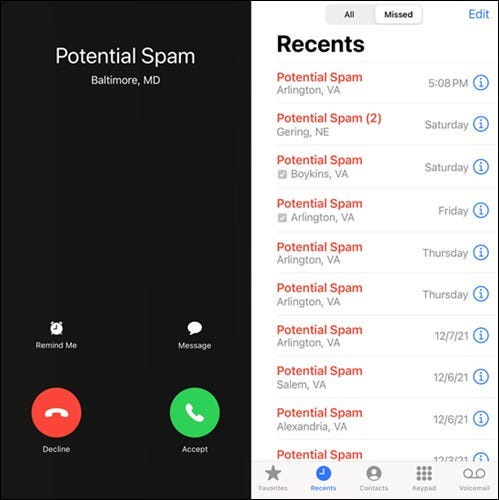
Do you ever wonder why some calls get marked as “Potential Spam” as caller ID?
Well, this is a fairly recent phenomenon. Cell phone carriers started to monitor calling habits and build systems to combat them in the 2010’s
This is why you'll occasionally get calls that are marked as "Potential Spam”
Now, are these all spam? Oftentimes, yes. But other times no.
It's the other times we’re going to focus on.
Call deliverability is similar to email deliverability.
Just as emails get marked as spam on an ISP (internet service provider) + spam filter level, so do calls.
When cold calling you have several filters you go through before the other person picks up. They are:
Phone carriers
Phone OS (operating system) spam filter
Anti-call spam apps
They monitor calls for spam-like behavior and then log the number to a phone # blacklist. Once you’re on the list you’ll show up as “Potential Spam”
That’s if you make it through. You won’t get past more advanced filters. Instead, you’ll get sent to a ghost dial. It will just keep ringing and ringing with no answer.
This impacts you as a rep because although you're not spamming customers your calls won’t get picked up.
• Calling the same number multiple times a day/in a row with no answer
• Calling more than 100 times a day
• Low connection rates
• Getting marked as spam by the person called
• Time of day (outside the normal 9-5 biz hours)
• Time between making calls
• Calling numbers that don't work
All the above increases the chances of your number getting blacklisted.
Now you can also get blacklisted for doing nothing wrong *if* you buy a number with a bad reputation/history.
Note: Numbers are constantly recycled and passed around. A cell phone # provider can sell you a blacklisted number. All phone numbers get recycled so there’s a chance the # you buy will be blacklisted. Each carrier, anti-spam app, or phone OS has different databases.
It’s impossible to filter for a number NOT blacklisted without testing it before purchasing. But chances are your new number will be fine so don’t worry about this being a problem. Numbers are $ cheap.
If your phone # is blacklisted your best option is to buy a new number. Otherwise, you’ll spend hours trying to get your number off a blacklist.
A better approach is to prevent this from happening by practicing excellent cold call hygiene.
Follow this checklist to stay off the blacklist
Cold call from multiple numbers ✅
This is the best way to stay off the blacklist. Don’t call more than 100 #s a day from 1 single number. Have 2-3 numbers you rotate when cold calling.Segment your lists so that 25% of your cold calls are verified numbers ✅
Verified number = Inbound leads OR numbers you know work (you get a voicemail for the person you’re targeting or have spoken in the past)Only call people with verified info ✅
Don’t call numbers from an uncleaned list. Uncleaned list = lower connection rates = high chances of getting blacklistedSegment your lists according to timezone ✅
Example: Don’t call PST at 9AM EST. Normal people don’t do this. Call within the normal 9-5 window in their timezoneDon’t call back to back nonstop ✅
This is the #1 indicator that your number is spam. Simply cold calling too much and too close together will cause your number to get flagged. Mix in cold calls with warm calls. And add a buffer of a 10-30 seconds between calls. Power dialers work around this.Register your numbers with - www.freecallerregistry.com & www.calltransparency.com ✅
When you register with these databases it reduces the chances of getting on the blacklist by whitelisting your number with major cold call spam databasesConfigure your Caller ID properly ✅
If it’s a system default caller ID you can sometimes get automatically flagged as spam. Put your name so you don’t get flagged.
If you can’t change your number your only option is to request your number get removed from spam blacklist databases
Follow this guide: Click Here
You can check the status of your number by turning off Caller ID and calling yourself or a friend from the number you want to test. Then see if it shows up as spam. Otherwise, your only option is an expensive call monitoring software built for call centers/large enterprises.
This is fairly straightforward to fix. I’ve addressed this very issue many times in the past. But if you’re new to my account/content, here’s a short summary of what causes emails to land in spam and what you can do to fix it.
DNS records not configured correctly
Blacklisted IP address
Poor domain reputation
High bounce rates
Sending too many emails (more than 125 PER domain)
Tracking open rates
Poor messaging
Anything but plain txt in the initial email (including signature)
Don’t send anything but simple text in the first email
It’s a long list but each play a very important role in getting your emails delivered.
DNS records
DNS records aren’t simple to solve. Follow my thread below to configure yours correctly:

BowTiedSystems | Sales System | Sales productivity@BowTiedSystems
PART 2 How to *guarantee* that your cold email gets delivered! + Everything you need to know about cold email deliverability In this Guide I'll cover: • How to buy domains • How to set up MX, SPF, DKIM, DMARC • How to warm domains & ⤵️

1:45 PM · Aug 29, 2022
15 Reposts · 50 Likes
Blacklisted IP address?
Check via this Talos Intelligence. Covers both IP + Domain HealthPoor domain health?
Use the above resource to test. If it’s in poor health you must start building it back up via a warming software like: WarmBox + change sending habits + plus have multiple domains as a backup (don’t let 1 rep ruin it for everyone else)High bounce rates?
Clean your data with Neverbounce OR find a better source like ZoomInfoSending too many emails?
Don’t send more than 125 emails per DOMAIN, not inbox. An inbox is not a domain. An inbox has a domain. But you can have hundreds of inboxes on 1 domain. What comes after the @xyz.com is what your domain isTracking open rates?
Turn it off or use a custom tracking pixel. Tracking of any kind will affect your deliverability. Better to turn it off.Poor messaging?
If you follow BowTiedSalesGuy you won’t have this problem. If you do and don’t implement his cold email frameworks then NGMI. If your manager forces you to run a bad campaign then just don’t sound like spam. Keep it short and relevant.Anything but plain text in the initial email (including signature)
Keep it simple. If you use anything that isn’t plain text, then you’re handicapping yourself. Cut the fancy email signature and the booking link in bio. No one clicks/cares about that anyways.Don’t send anything but plaintext in the first email
Keep it plain text for the first 2 emails. Then add whatever you want on the 3rd email.
If you follow the above guidelines you’ll have no problem landing in the main inbox or staying off the cold call blacklist
Best of luck - BTS
For more content like this follow my account @BowtiedSystems on Twitter
If you want help setting something like this up for your company, DM me on Twitter or reply to this email.
Also, check out my course if you want to learn how to use Linkedin sales navigator and save HOURS per week prospecting + learn how to find Prospects looking to spend their yearly budget within the first 90 days
Also If you use Zoominfo and want to learn how to become a Zoominfo MASTER I have a resource for that. It's over 2+ hours long & 30+ lessons.
No posts
Comments
Nothing yet. Say the first thing.
Sign in to join the conversation.