
I spent months perfecting prompts. Really perfecting them: testing, iterating, measuring drift, and building in constraints. My Credibility Profile Builder prompt was 2,000 words of tight instructions that delivered consistent, high-quality output every single time.
But I eventually discovered this: the perfect prompt is just an expensive conversation if it lives in a chat window.
If you’re familiar with prompt engineering, you know the drill:
You craft the perfect prompt.
You get amazing output.
Then you spend 20 minutes copying, pasting, creating folders, naming docs, updating statuses, and manually routing the result to whoever needs it next.
By the time you’re done with the “clicking tax,” the ROI of your prompt creation process has mostly diminished.
That’s because the real competitive advantage isn’t in the prompt but in the system you build around it.
BottBott is a reader-supported publication. To receive new posts about prompting and systems building, consider becoming a free or paid subscriber.
The Problem of Copy & Paste Purgatory
I’m going to paint a picture that’ll most likely feel annoyingly familiar. You’re managing content for multiple clients. Each blog post requires you to:
Create this month’s folder structure in Drive
Name the doc according to client conventions
Run your carefully crafted prompt in your favourite LLM
Copy the output into the properly formatted doc
Update the status in your project management tool
Notify the relevant people that it’s ready for review
Fourteen tabs open. Numerous administrative steps per post, so that your perfect prompt can actually deliver value and save time like it initially promised it would.
Why Prompts Alone Hit the Scaling Ceiling
Here’s the stark reality about prompt engineering: anyone can copy a prompt. You post your breakthrough template on LinkedIn or Substack, and within a week, seventeen people have “adapted it for their workflow.”
But try copying a Google Apps Script that automatically creates folder structures, calls the Claude API in three sequential stages, writes the output to a properly named document, and updates a CMS when it’s done.
Most people don’t even know where to start with that.
But the integration is where the competitive advantage of prompt engineering truly lives.
I’ve been testing this theory recently with three systems built for my own workflows. I’ll discuss two here:
a strategic development blog automation
a LinkedIn lead generation machine.
Both grew out of carefully crafted prompts.
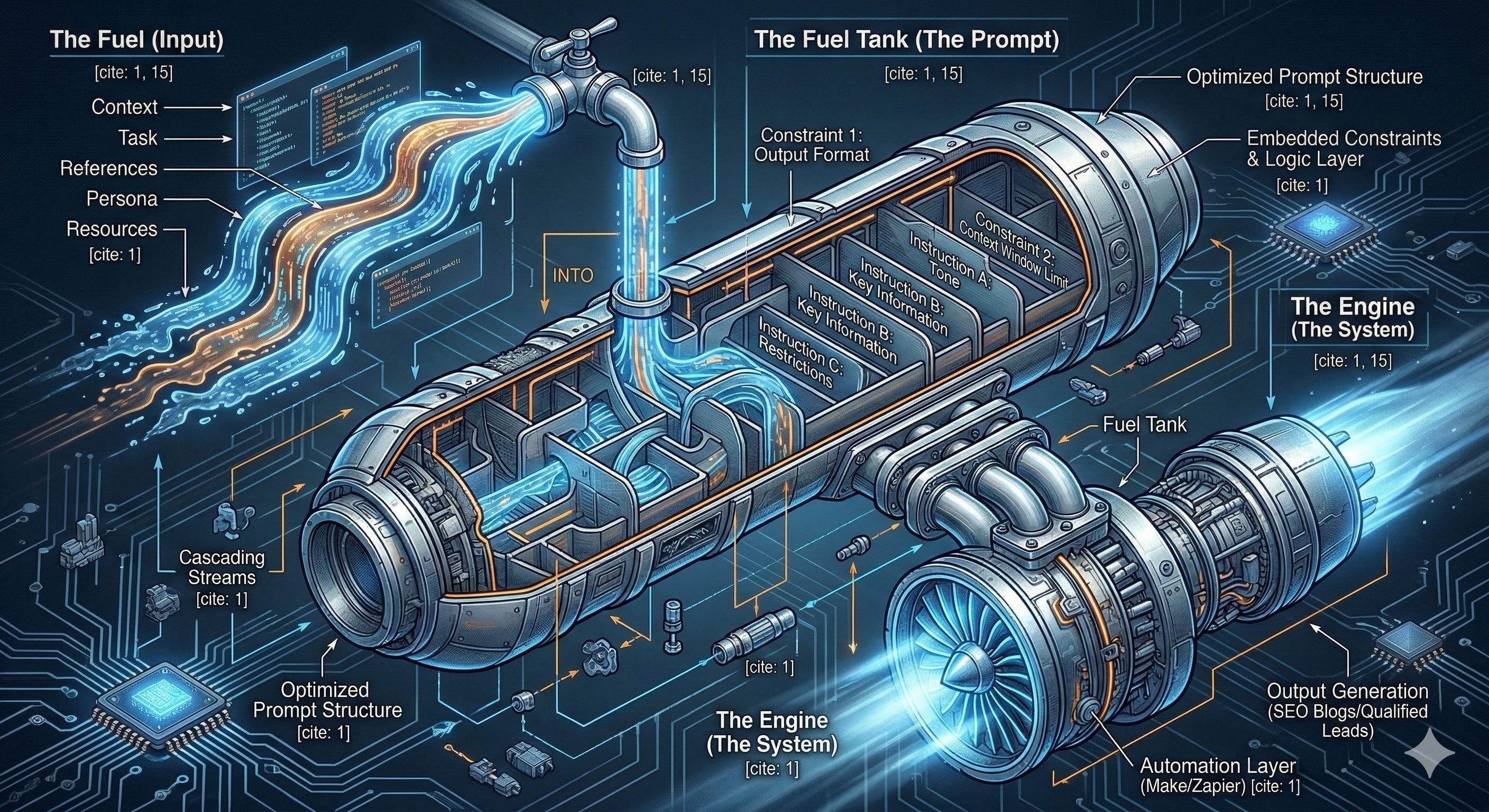
But I’ve come to realize that the prompts are just a fuel tank. The real value comes from building the engine. (FOOTNOTE: to complete this analogy, the input features like task, references, persona, and other context make up the fuel.)
Case Study #1: A Digital Marketing Blog System
From 20 Minutes to Two
Before I became a systems and operations director, I was a content writer. While I transition fully into my new line of work, I’m still managing content for a couple of my longtime clients. This means I’m regularly creating SEO blogs for five clients of one of my clients, producing about 8 posts per client, per month. My client has an established system that works well, but it’s riddled with low-value—albeit essential—manual tasks.
While the workflow is simple, the execution is time-consuming: I repeat their process 40+ times per month, and each rep involves a cumulative 20 minutes of admin per post (notwithstanding topic creation and content editing time, which equals ~40 minutes per post).
But 20 minutes x 40 posts = ~13 hours a month of click-copy-paste repetitive hell, lol. Even though my content-generating prompts work brilliantly, the manual workflow is draining.
So I automated all of it.
The old process looked like this:
I create topics, copy them into the clients’ ClickUp folder, and change the status
Routinely check ClickUp for topic approvals
Create the current month’s folder in Google Drive
Create the proper subfolders (blog posts, guest posts, images, etc.)
Create a new Google Doc with the client’s naming convention for each post in the designated folder
Run my post-generating prompt sequence.
Copy each output into the Doc
Review and edit
Add relevant links and royalty-free images
Add the Doc link to the ClickUp task
Update ClickUp status
Then there is a final step: once the blog is published, I add a backlink from the guest post to the original post, which involves several manual steps and numerous cumbersome window navigations.
But, it now looks like this!
I create topics, copy them into the clients’ ClickUp folders, and update their status (this remains the same).
ClickUp autofills the topic to my custom Google Sheet via webhook.
Now, when the PM approves a topic, another webhook triggers the system to create the month folder, a type subfolder, an Images folder, and a properly named Google Doc for each post.
A Claude API with my content-generation prompt embedded within writes the finished post directly into the doc.
I edit, add links and an image to the post
I change the status in my Sheet (which also changes the ClickUp status), and the system posts the doc link to ClickUp simultaneously.
When it’s time to add the link to the guest posts, I click a button in my Sheet, and an automation does the work for me.
Total manual work with this automation:
Topic creation, posting, and status change
Edit post and add links and an image
Select “push to review”
Click to add link
From 11 steps to four.
From 60 minutes to 40.
~ 13 hours saved every month.
And, my prompts are still there, just packaged into a system that handles all the administrative scaffolding and content generation on its own.
Case Study #2: The LinkedIn Lead Gen Machine
Auto-Scoring Saves Hours
The second system tackles a different problem: turning LinkedIn connections into qualified leads without drowning in manual analysis and outreach.
I export my LinkedIn connections as a CSV. The system imports them, scores each contact based on role, company size, industry fit, and relationship signals. Then it uses pattern matching to identify likely operational pain points each contact experiences and generates personalized outreach sequences.
I built this because I hate cold outreach: It can take hours to find, assess, and research a lead, determine a specific problem or painpoint and craft a custom outreach message, only to be ignored. So this system makes the process waaaayy less painful.
But what makes this a game-changer isn’t the scoring rubric or the message templates—though both contribute to its value—it’s the selective processing system. Instead of batch-processing everything, I built queue-based controls: a “Queue for Scoring” and a “Queue for Outreach” function. This lets me process small batches, review message quality, gather response data, and refine prompts before scaling. This allows me to control token usage costs, maintain quality, and build a feedback loop that makes the system smarter over time.
Now, I will admit, the messages the system produces are still a bit generic, so I’m currently working on an iteration that helps me deep-dive into a selected high-ranked connection so I can assess their business, identify potential problems they are facing, and develop legitimate business solutions for those problems. I’ve based this iteration on a manual workflow that recently landed me a one-on-one—so, I know it works. If I can nail this part of the automation, the ROI will be huge.
So far, I’ve processed over 400 connections with this automation and put 5 high-ranked connections through the outreach automation. While the internal prompts analyze each connection and generate the insights and outreach messages, the system also manages the workflow, tracks the results, and lets me focus on strategy instead of spending hours clicking between an LLM and my LinkedIn.
The Four Components Every AI Workflow Needs
After building these systems (and breaking them in every way possible), I’ve identified four components for functional AI workflows:
The Prompt (Your Fuel Tank)
This is where most people stop, but it’s actually where you should start. Your prompts need to be thoroughly tested, tightly constrained, and built for consistent output. Not because they’ll use them in an LLM forever, but because they’ll become embedded components in a larger system. Spend time here. Learn what breaks, what drifts, what works. But don’t stop here.
The Integration Layer (Your Engine)
This is where prompts become business assets. Google Apps Script, Zapier, Make.com, custom APIs, whatever connects your AI to your actual work tools. The integration layer handles the “clicking tax” so your prompts can run at scale.
You don’t need to become a senior developer for this either. You just need to understand the logic of handoffs: when X status changes, what exactly should happen next?
The Human Checkpoints (Quality Control)
Automation doesn’t mean autopilot. Both my systems use a trigger (dropdowns and checkboxes, respectively) that lets me run the GenAI layer at the right moment. I can review outputs, test variations, and maintain quality standards without manually handling the administrative work.
The human stays in the loop, but only where human judgment actually matters.
The Feedback Loop (Continuous Improvement)
AI systems need iteration: Prompts drift, API models change, and business requirements evolve. So, I build systems that allow prompt modification, workflow adjustments, and results tracking without starting over.
The best AI workflows get smarter over time by capturing data on what works.
Your Step-by-Step Action Plan
If you want to move from prompt engineer to workflow architect, here’s where to start:
Week 1: Audit Your Clicking Tax
Track how much time you spend on administrative tasks after getting AI output
Identify your highest-volume, most repetitive workflow
Calculate the actual cost in time and mental energy
Week 2: Build Your First Integration
Start simple: Google Sheets + Google Apps Script, or Zapier + your existing tools
Pick one part of the workflow, folder creation, status updates, or something mechanical
Automate that piece first
Week 3: Add the AI Layer
Embed your tested prompts into the integration using API calls
Test with small batches; expect things to break in weird ways
Build human checkpoints where quality matters
Week 4: Iterate and Scale
Measure the time savings and output quality
Identify what still requires manual intervention
Build feedback loops to make the system smarter
Just remember: Don’t try to automate everything at once. Build one solid workflow, learn what breaks, then expand.
Building Your Competitive Moat
Here’s why this matters more than perfecting your next prompt: systems thinking creates sustainable competitive advantage.
Anyone can copy a prompt and get 80% of your results. Very few people can build a post-generating system that handles 40+ blog posts per month across multiple clients with minimal human intervention. Even fewer will take the time to build feedback loops that improve performance over weeks and months.
The complexity is where the value lives.
I’ve been using LLMs daily since early 2023, have completed Google’s AI prompting courses, and have spent 12 months building and iterating custom systems in real-world environments. Not as a hobby, but as a Lead Content Specialist for a digital marketing agency where prompt reliability and workflow efficiency directly impact client deliverables.
Through it all, I’ve learned that the future belongs to people who not only understand these new tools but also the wiring that connects them altogether.
Always Iterating
Prompts are the fuel, and automations are the engine. The real breakthrough happens when you stop thinking like a prompt engineer and start thinking like a workflow architect.
Your perfect prompt is just a conversation until it’s embedded in a scalable system.
Build the machine, then build a better one. Repeat.
The clicking tax is optional. The competitive moat is not.
Happy automating!
BottBott
The AI era favours the systems thinker—but every architect needs a builder. If you’re tired of paying the “clicking tax” and want to turn expensive conversations into high-ROI engines, I’d love to help. I build custom AI systems that move beyond the chat window, applying automated logic to your core workflows and internal operations.
If you’re ready to move beyond prompt series to workflow automations, I can help you audit your “administrative scaffolding” and identify the highest-impact integrations for your business. DM me for info on how we can start building your competitive moat.
Comments
Nothing yet. Say the first thing.
Sign in to join the conversation.