

A colleague testing an early version of one of my prompts pointed out something that seemed obvious in hindsight:
The more user-friendly and less AI-looking the agent is, the better. The user shouldn’t need to know how to use AI to use the agent; they just answer the agent’s questions and get results. Large prompts could be much better in that form.
I found this useful. Really useful. So I started implementing it. But that’s when I discovered agent drift, and why the choice between building an AI agent versus using a structured LLM prompt isn’t so much about which one is “better” but about understanding what you’re trading away.
Before we get into the mess I created, let’s define terms. Because “agent” gets thrown around loosely, and most people use “prompt” to mean “the thing I type into ChatGPT.”
OpenAI defines an agent as an AI model configured with instructions, tools, guardrails, and handoffs. In practice, this means an agent can autonomously decide which tools to use, when to use them, and how to sequence actions toward a goal.
Agents are designed to operate with minimal user intervention. You give them a task, and they figure out the steps. The “instructions” live in a configuration layer (like a Custom GPT’s system prompt), and the agent pulls from knowledge documents, uses tools, and makes decisions on the fly.
An LLM prompt is a structured set of instructions sent directly to an LLM in a single interaction. Think of it as a detailed playbook: “Here’s the task, here’s the format, here’s what to do, what not to do, and the exact order of operations.”
When I say “large LLM prompt,” I mean something thoroughly developed and tested—often several hundred to a few thousand words—that governs every step of a process. You drop it into the LLM’s context window (or as a doc), and it executes exactly as written. No drift. No interpretation. No autonomy.
The key difference here is this:
The prompt is the structure | The agent consults the structure.
When I started converting my Credibility Profile Builder prompt into a Custom GPT agent called Career Pivot Labs, the feedback made sense: make it feel less like homework. Turn those big blocks of instructions into a friendly Q&A flow. Hide the complexity.
So I tried. And immediately hit a wall.
Custom GPTs have limited space in the instructions field; they don’t have the typical long context window of the standard chat. I couldn’t just paste the entire prompt there. So I uploaded the full prompt as a PDF to the agent’s knowledge documents, assuming the agent would treat it as the governing structure.
So wrong. It did NOT.
The agent treated the prompt as suggestions; something it could refer to for guidance, and not something it had to follow to a T. It shortened questions and skipped entire sections. The intake process, which I designed to extract deep, specific information from users, became surface-level and generic.
I’d built a tight structure in my original prompt specifically to avoid drift. But the moment I offloaded any agent function to a knowledge document, I was giving up a degree of control to chance.
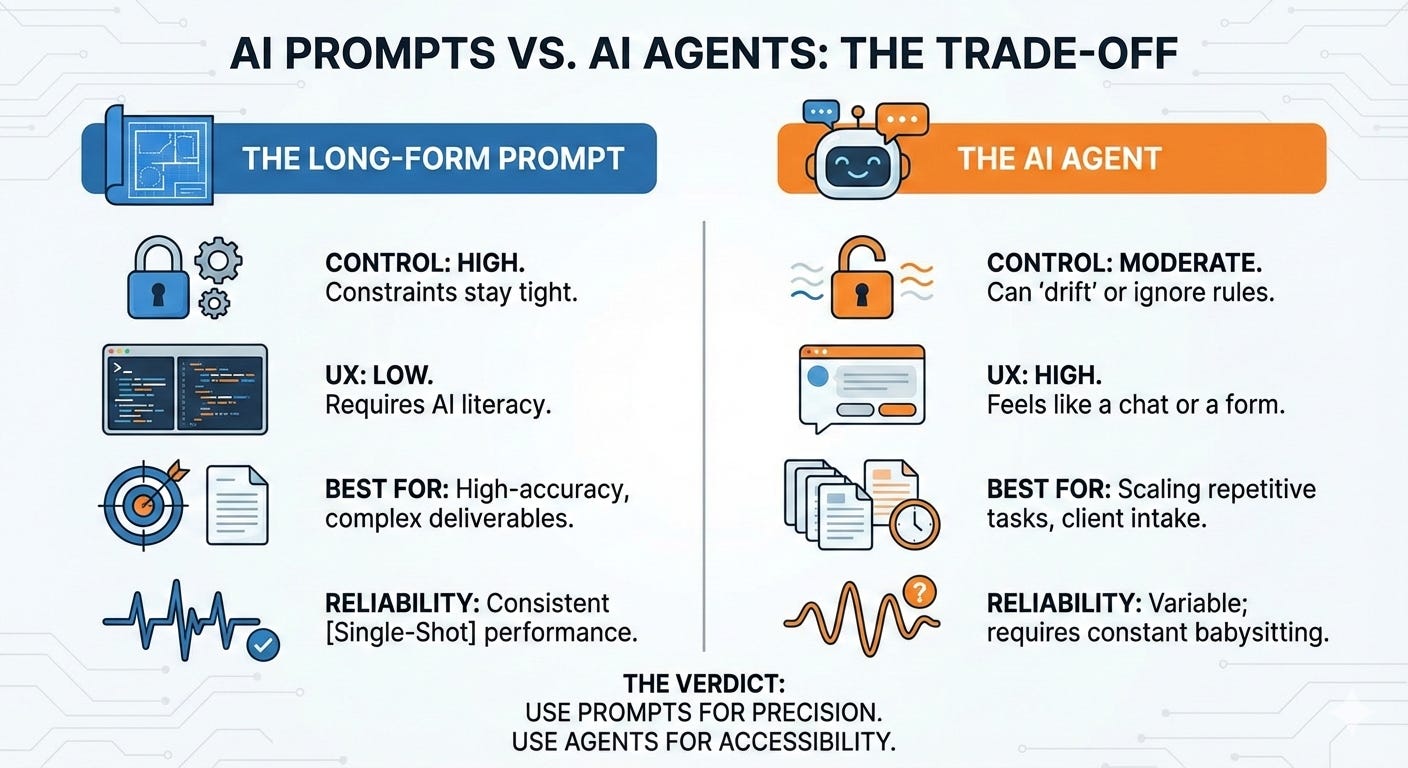
Recent research defines agent drift as “the progressive degradation of agent behavior, decision quality, and inter-agent coherence over extended interaction sequences”. In simpler terms, the longer an agent runs, the more it tends to improvise.
This happens because context drift in multi-turn LLM interactions has been formalized as “a bounded stochastic process.”
WTF does that mean?
Well, the agent’s behavior includes inherent randomness that compounds over time. The agent optimizes for what it thinks is helpful (i.e., brevity, friendliness, speed) rather than what you actually specified.
Prompts don’t drift because they’re single-shot. You send the instruction, the LLM executes it, and you get the output—no multi-turn context, or interpretation layer, and no “helpful” shortcuts.
As a result of this experience, I’ve changed how I design agents (especially ones based on a preexisting large-format prompt). I now create an instruction core that governs agent behavior and precisely points to knowledge documents for further detail, like when and how to act in a specific context within the governed behavioral framework. Still, that doesn’t eliminate stochastic tendencies.
It’s crucial to remember this: The moment you split governance (instructions) from detail (knowledge docs), you must expect and accept some degree of drift.
So which should you use? Well, that depends on what you’re optimizing for.
You need tight constraints and highly accurate output. If the task requires precision—legal documents, technical analysis, content that must match a specific style or structure—prompts win. There’s no room for the LLM to “interpret” your intent or optimize for user-friendliness.
You’re the only user (or users understand how prompts work). Large prompts look intimidating because they’re not designed for non-technical users. If you’re comfortable with LLMs and understand how to structure input, prompts give you tight control of the outputs.
Consistency matters more than convenience. Every time you run the same prompt with the same input, you get nearly identical output. Agents, by design, introduce variability.
You’re testing or iterating. Prompts are easier to debug. If something breaks, you know exactly where because the entire instruction set is visible and editable in one place.
You want autonomous work and output at scale. Agents can chain tasks, use tools, and operate across multiple interactions without constant hand-holding. If you need the LLM to pull data, format it, send it somewhere, and then loop back for more, agents handle that.
You want a bit of variety in the output. Sometimes you don’t want identical results every time. Agents introduce enough stochastic behavior that repeated runs feel less robotic.
You’re building a product for non-technical users. This is where agents shine. A well-designed agent feels like talking to a helpful assistant compared to filling out a form. Users don’t need to understand prompt engineering; they just answer questions and get results.
You can tolerate (and manage) some drift. If you’re okay with the agent occasionally skipping a step or rephrasing a question, and you’ve built in checkpoints to catch major errors, agents can save time.
Understanding the difference between agent development and a series of functional workflow prompts is essential, not because one is universally better, but because the wrong choice wastes time.
If you’re building internal workflows—content audits, research synthesis, data cleaning—where you control the inputs and need reliable outputs, start with prompts. They’re faster to build, easier to debug, and don’t require you to fight drift.
If you’re building client-facing tools—intake forms, lead qualification, onboarding questionnaires—where user experience matters and you can’t expect people to paste 2,000 words of instructions, agents make sense. Just know you’re trading governance for accessibility.
I use both now. My content workflows run on prompts. My Career Pivot Lab agent (the one I was converting) and its sister, Entrepreneurial Launch Lab (still under development), are agents because users shouldn’t have to know how they work under the hood. But when creating CPL, I had to rebuild the instruction core three times to get the intake process tight enough that drift didn’t destroy the output quality.
If you’re new to building with LLMs, here’s where to focus your time:
Start with prompts. Learn how to structure instructions, set constraints, and define output formats. You’ll build intuition for what LLMs can and can’t do reliably.
Think of prompts as bridges to agents: Prototype your agent with a fully developed prompt. Prompts force you to think through every step, every edge case, every failure mode. Once the logic is bulletproof, then break the prompt down into the agent’s instruction core and knowledge docs.
Experiment with agents once you understand the limits. Build something small, like a Q&A bot, a simple intake form, or a content idea generator. Watch where it drifts and learn how to tighten the instruction core.
Don’t chase perfection. Both prompts and agents will fail in weird ways. The goal isn’t to eliminate failure but to understand what breaks and why, so you can decide if the trade-off is worth it.
Test on real work. Build something you’ll actually use. Theory is useful, but you won’t internalize the difference between agents and prompts until you’ve debugged both at 11 PM because they’re doing something inexplicably dumb.
I love this phrase because it doesn’t just apply to LLM prompting but to life in general. Learning to create prompts and agents has stretched my systems thinking to new levels and pushed me to change how I do things, for the better.
Stop trying to make one tool do everything. Some tasks need tight constraints. Some need autonomy. Knowing which is which saves weeks of frustration.
Agents require more maintenance. Prompts are “set and forget.” Agents need monitoring, testing across different user inputs, and periodic tightening when drift creeps in.
We often hear that AI will replace us. While there is some truth in this, I think people who understand the “wiring” of these tools will stay relevant much longer than those who just want to push a button.
Complexity in systems is where the value lives. If you want high-quality results, you should get comfortable with the long-form prompt; at least until the agents learn to follow the instructions as if they were immutable.
Comments
Nothing yet. Say the first thing.
Sign in to join the conversation.