
There is no shortage of services and apps to help us manage the overload of e-mails that filter into our work and private e-mail accounts at all hours, seemingly requiring our attention. Over well over 30 years of receiving e-mails, I think I have tried everything and also taken a lot of interest in listening to podcasts and asking my friends and colleagues how they deal with incoming e-mails and not least how they filter and sort, if at all. Everyone is different but I wanted to share a fairly simple way of doing this that doesn’t need any additional software packages but which you can do with Gmail, Outlook, Thunderbird and pretty much any service out there.
I know that many people like to filter all their e-mail accounts through Gmail - this is something I really wouldn’t do. The upside is that it is a free service (unless you need to keep a very large number of big attachments) and that it does some sorting for you already - it is very good at detecting Spam because everything gets read and processed before it gets to you. If a hundred people already labelled an e-mail message as Spam then Gmail knows it and most likely you won’t see it at all. Right - this isn’t for me. I can’t be 100% sure that my e-mails (I use Outlook) don’t get read by others but with Gmail you can be assured there is no chance of privacy. Not part of the deal and fine of course when declared openly.
I think of myself as providing a service to those that e-mail me. This is hugely incorrect and probably makes my head grow bigger but it is a helpful frame of mind to start from.
But check out the last twenty e-mails in your inbox and tell me how many were in response to something you asked for. The e-mail from Amazon with your Kindle receipt, fine of course. The reply from your cousin regarding the family birthday, fine too. Now, my advice is to think of yourself as having customers that vary in their importance to your mission in life or if you like, your premium plus subscription members, your regular members and those deserving only your light service.
Now we are getting somewhere.
I’d go ahead and put this into practice and create some sub-folders or inboxes, call it what you will. The classic Outlook version is about folders. No matter, but folders is what you’ll be looking for if classic Outlook is what you are using. I know people who like to have folders/inboxes called Family, Travel, Planning, Meetings etc. (Maybe even Family Planning, assuming they do this through e-mails. Gmail would have a field day.)
This is all fine because it will help you find your flight tickets to Malaga but it may not be the fastest way of forcing your will on your e-mail flow.
What I have found works well is to go with these two new folders:
Premium Pro
Light
What determines what goes where is the sender - nothing else. When you have created these folders then start on going through your inbox and review the senders one by one. Who is this guy? Do we know each other and does he e-mail me often enough to bother deciding on a flow for him or will I simply deal with his two e-mails per year in the regular inbox? If he is a spammer then I deal with him with the built-in function to avoid hearing from him again until he changes his e-mail address on Friday. If he is a newsletter the you may be able to mass-allocate stuff by setting up a rule to send everything containing the word unsubscribe into a folder with newsletters - create such a folder if you’d like one.
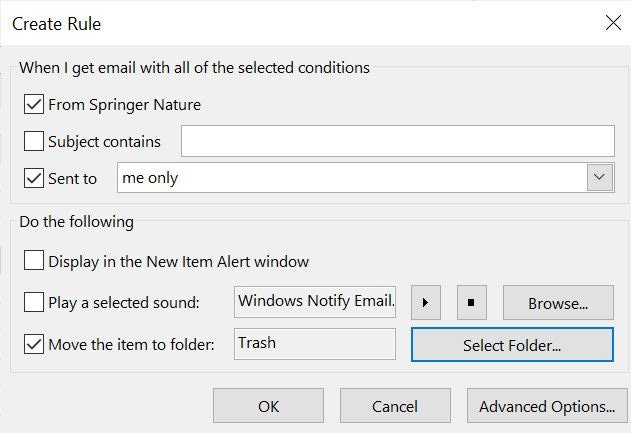
Right, here is an e-mail from Jim. He e-mails me once a week with fairly important stuff that I want to reply to in a timely manner and certainly not miss. I’ll right click his e-mail and set up a rule to send everything from Jim (including existing messages) into Premium Pro. I have actually read all his e-mails, he is a great guy, so the folder with Premium Pro doesn’t have any unread mails to address as Jim is my first friend to get into fast track. Also adding Jerome, Julia and Jane to the Premium Pro track while I’m add it. Stuff from Karen and Karl will be added when I next hear from them; their messages are important to me.
Conversely, Tim, Tom, Tonya and Tristan all e-mail me incessantly with things than can certainly wait and which may annoy me and keep me distracted from what I need to be focusing on. When I next get an e-mail from them I’ll create a rule to assign them to the long passport queue which I check with some regularity but far from daily. Of course, Tom may up his game and become a very valued source of fantastic e-mails so I might delete the rule for him and let him live in the ordinary inbox. There will always be an ordinary inbox for those I hear from for the first time, or not so frequently that they need a rule, or where they neither need cold storage nor priority attention.
You can easily give some senders high priority for a bit if you’d like to. If like me you are keen not to miss that response from slow Frank (I suspect I am in his cold storage box though I can’t begin to think why) after nagging him with daily reminders, give him a fast track rule until he has responded and then assign him to the Light box as retribution for tardiness.
I hope you will find this tiny hack useful - at least it makes you consider which of your e-mails come from people whose e-mails matter to you and have some urgency and which fall in the other category. I must confess that the idea of snoozing e-mails is something I have not really been using. Have you found it useful? Let me know. Please share your thoughts and ideas. How do you manage your e-mail flow? Do you control it or does it control you?
At all times please stay compliant with the e-mail and internet policies and procedures of your workplace.
No posts
Comments
Nothing yet. Say the first thing.
Sign in to join the conversation.