

Presented by Oracle
Most multi-agent systems hit a bottleneck when one agent gets overloaded. The usual fix is scaling the entire pipeline, which adds cost without solving the real problem. With the A2A protocol, agents can discover each other, declare capabilities, and dynamically share workload so you can scale only the bottleneck.
This guide walks you through building a scalable multi-agent RAG system.
You’ve used SSO dozens of times without thinking about it.
You click “Sign in with Google,” land on a familiar login page, and seconds later you’re inside an app that never asked for your password.
It felt instant and frictionless.
But behind that smooth experience is a precise sequence of redirects, tokens, and cryptographic checks played out in an instant.
SSO isn’t magic. It’s a trust protocol; and understanding it changes how you design authentication, debug login failures, and make decisions about identity infrastructure.
At its heart, SSO separates authentication from application logic.
Instead of every app verifying usernames and passwords, one central service does it. That service is called the Identity Provider (IdP). The applications you actually use are called Service Providers (SPs).
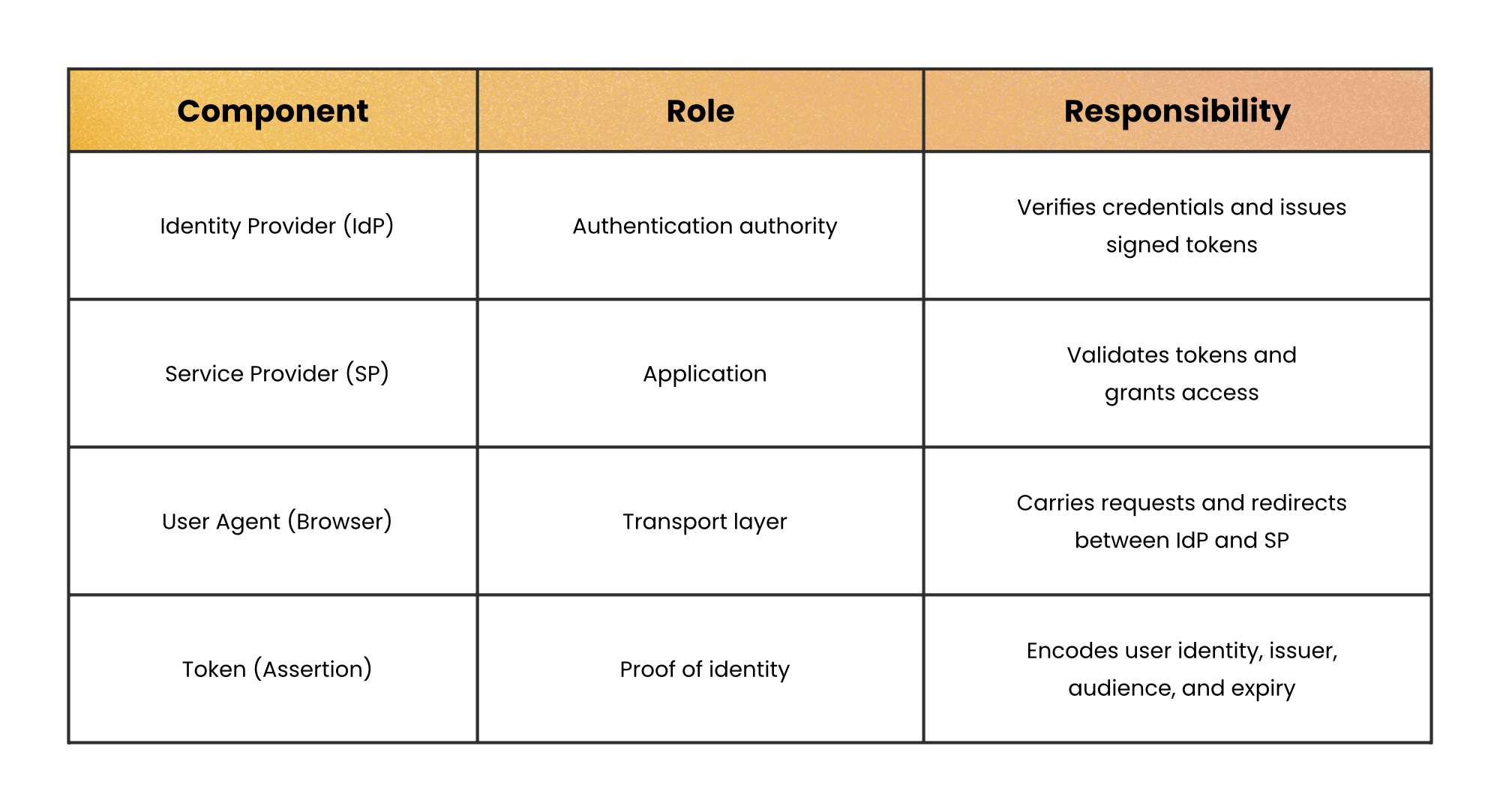
The key shift is this: SPs don’t authenticate you. They verify that the IdP authenticated you.
That distinction matters because it defines who owns credentials, who signs tokens, and who enforces trust.
Browsers enforce the same-origin policy. That means one website cannot read another website’s cookies.
So if app1.com and app2.com are separate domains, they cannot directly share login sessions.
SSO solves this by introducing a trusted third party: the IdP lives on its own domain (e.g. login.company.com). Each application redirects you there when authentication is required. The IdP becomes the only place where credentials are checked.
Instead of apps sharing cookies, they share trust.
Here’s what happens when you access an SSO-protected app for the first time:
You visit serviceprovider.com.
The SP checks for a valid session cookie, finds none, and knows it needs to authenticate you.
Instead of showing a login form, the SP issues a HTTP redirect to the IdP.
That redirect includes:
A request identifying the SP
A return URL
Possibly a signed authentication request
Your browser now talks to the IdP.
If you’re not already logged in at the IdP, it presents a login page.
You enter credentials. The IdP verifies them. It may also enforce:
Multi-factor authentication
Device checks
Risk-based policies
If successful, the IdP creates its own session cookie for you.
The IdP generates an authentication token. This token contains:
User identity
Issuer (the IdP)
Audience (the SP)
Expiration timestamp
Digital signature
The browser is redirected back to the SP with this token attached.
The SP verifies:
Signature → Was it signed by the trusted IdP?
Expiry → Is it still valid?
Audience → Was it intended for this app?
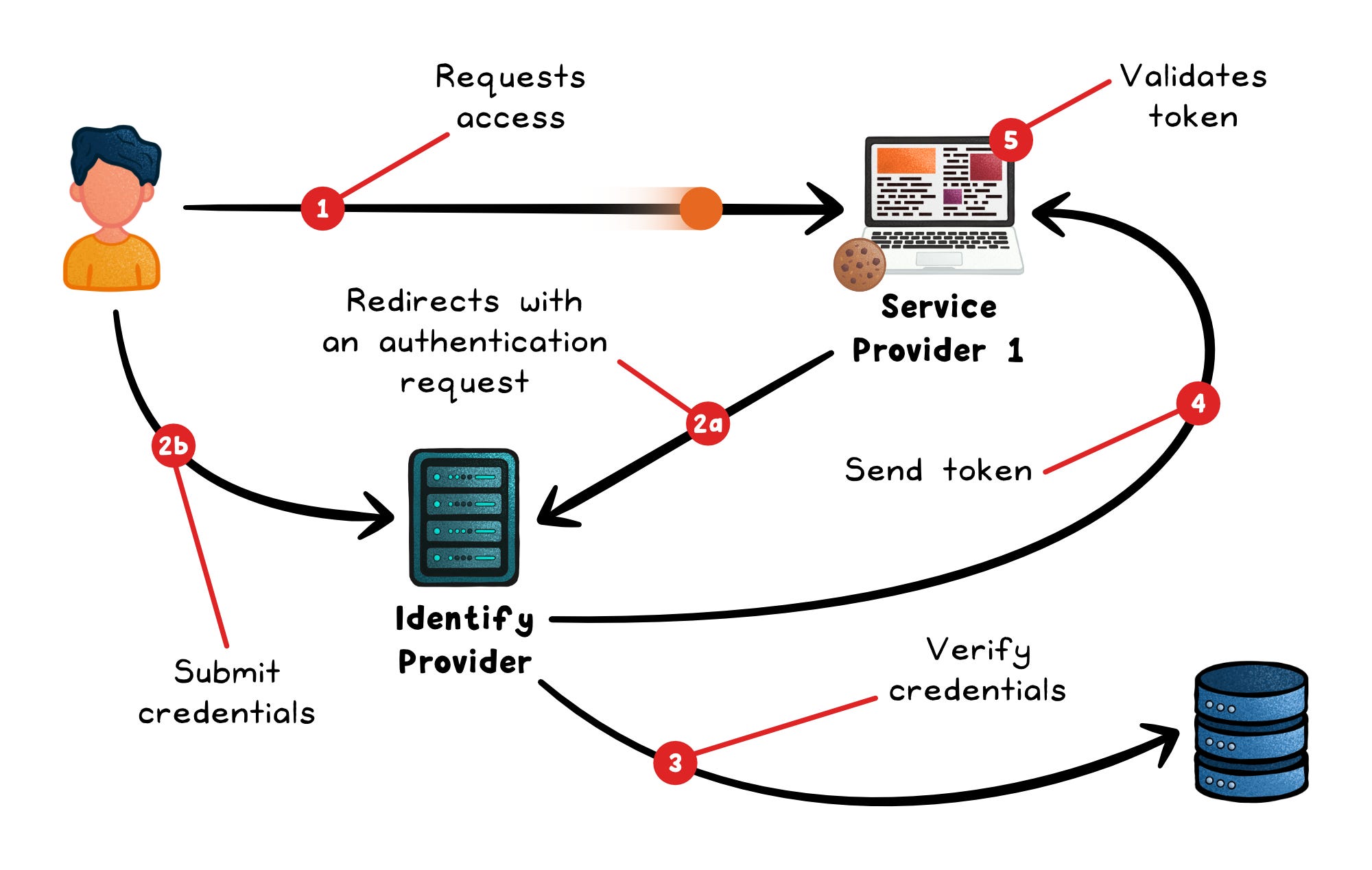
If everything checks out, the SP creates its own session and logs the user in.
At no point did the SP see the password.
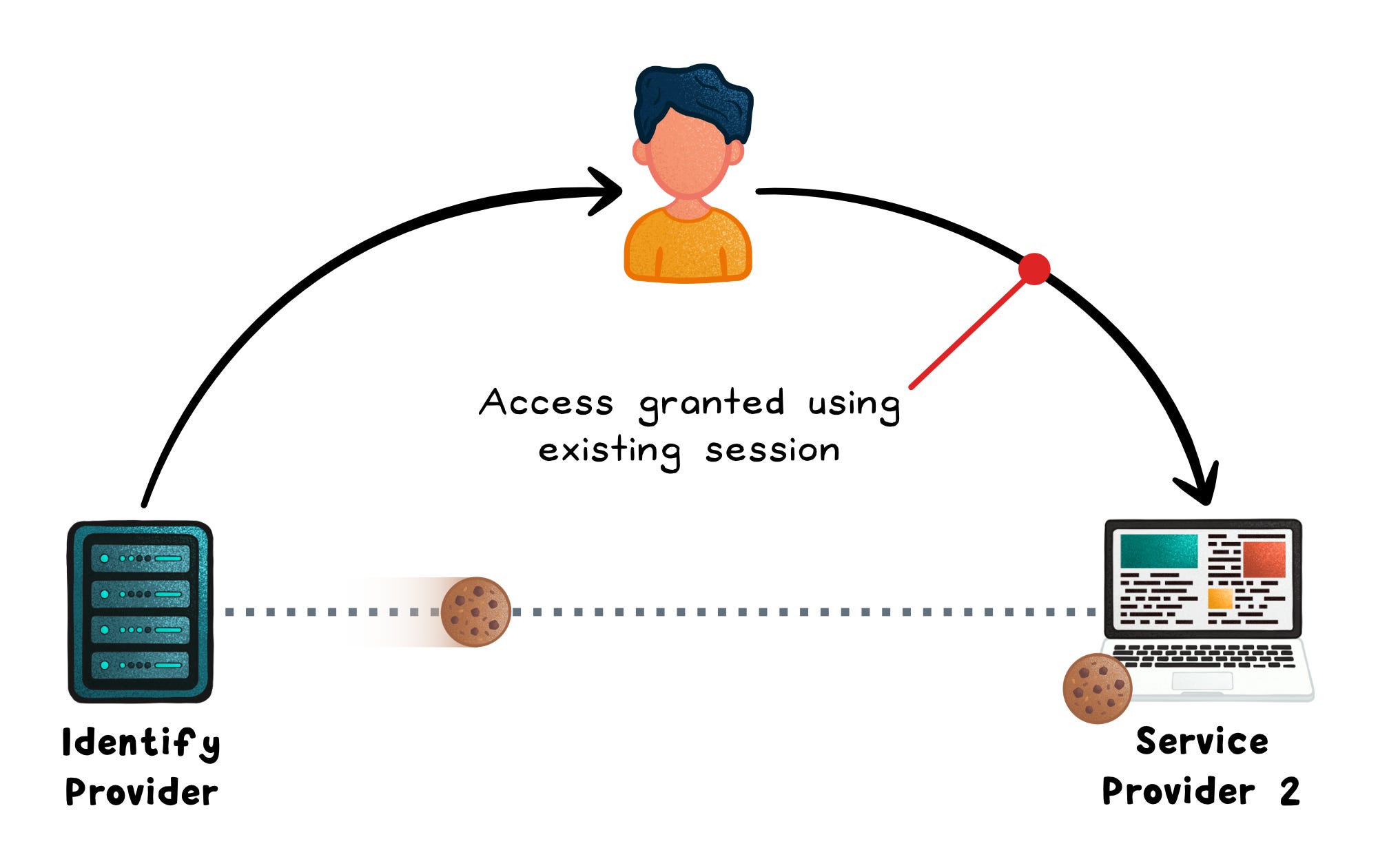
The magic appears when you visit a second application.
You go to anotherservice.com.
It redirects you to the same IdP.
But now the IdP sees its session cookie. You’re already authenticated.
So it immediately generates a new token for the second app without asking for credentials again.
From your perspective, no login screen appears.
Behind the scenes, the full protocol still runs. It just skips the credential step.
That’s single sign-on.
The authentication token is the core artifact. Its security rests on three properties:
Digital signature → The IdP signs the token with its private key. The SP verifies the signature with the IdP’s public key, proving the token wasn’t forged or altered in transit.
Bounded lifetime → Tokens include an expiry timestamp. A stolen token becomes useless after minutes, limiting the blast radius of interception.
Audience restriction → Tokens name the intended SP. A token issued for
app1.comis rejected byapp2.com, preventing token reuse across services.
The SP never sees the user’s password. It only sees the signed assertion.
SSO centralizes authentication. That’s powerful, but it concentrates risk.
If the IdP goes down → every SP login fails
If the IdP is compromised → every integrated app is exposed
SSO reduces password sprawl but increases dependency on identity infrastructure.
It works best when:
The app is used by teams or organizations, not just individuals
Customers expect centralized admin control (onboarding, offboarding, permissions)
The app handles sensitive data or privileged actions (finance, customer data, infra, admin tooling)
You’re selling into mid-market or enterprise, where SSO is often a requirement
Users are part of a broader ecosystem (Google Workspace, Entra, Okta) and need seamless access across tools
The product is part of a multi-app suite, and reducing login friction improves workflow
It may be overkill for:
Consumer apps with individual users and no org-level administration
Early-stage products where few (or no) customers are asking for SSO yet
Low-risk applications that don’t handle sensitive data or critical operations
Small internal tools used by a fixed group, especially behind VPN or other trust boundaries
Apps where identity is not central to the workflow and login happens infrequently
SSO removes the password from your app.
It doesn’t remove the responsibility.
Token validation, session expiry, single logout, and IdP availability all stay on your plate; and they matter more, not less, because authentication is now shared infrastructure.
The protocol handles the authentication. Everything that follows is still yours to design.
👋 If you liked this post → Like + Restack + Share to help others learn system design.
Subscribe to get high-signal, clear, and visual system design breakdowns straight to your inbox:
No posts
Comments
Nothing yet. Say the first thing.
Sign in to join the conversation.