

Presented by CodeCrafters
Want to become a better software engineer?
Trusted by engineers at Google, Anthropic, and Vercel, CodeCrafters helps you rebuild technologies like Kafka, Redis, Git, and Claude Code from scratch so you can deeply understand how real systems work.
We’ve partnered with CodeCrafters to give LUC readers an exclusive 40% lifetime discount.
💡 Many engineers expense platforms like this through their team’s learning budget.
Start Building & Unlock 40% Off
Docker and Kubernetes are often framed as competitors. That framing leads to the wrong decisions.
One is about packaging and running software. The other is about managing it at scale.
Treating them as rivals is what leads teams to swap one out for the other at exactly the wrong time; either staying on Docker long past the point where orchestration would help, or jumping to Kubernetes before the complexity is justified.
The gap between them is more specific than it first appears, and closing it starts with understanding what each tool is actually responsible for.
Docker is a container platform. It solves a very specific problem:
“How do I package and run my application reliably anywhere?”
It does this through a few core components:
Images → Immutable blueprints of your app
Containers → Running instances of those images
Daemon → The engine that manages everything
Docker Client → The command-line interface (CLI) tool that you use to interact with the Docker daemon
Compose → Defines multi-container apps on one machine
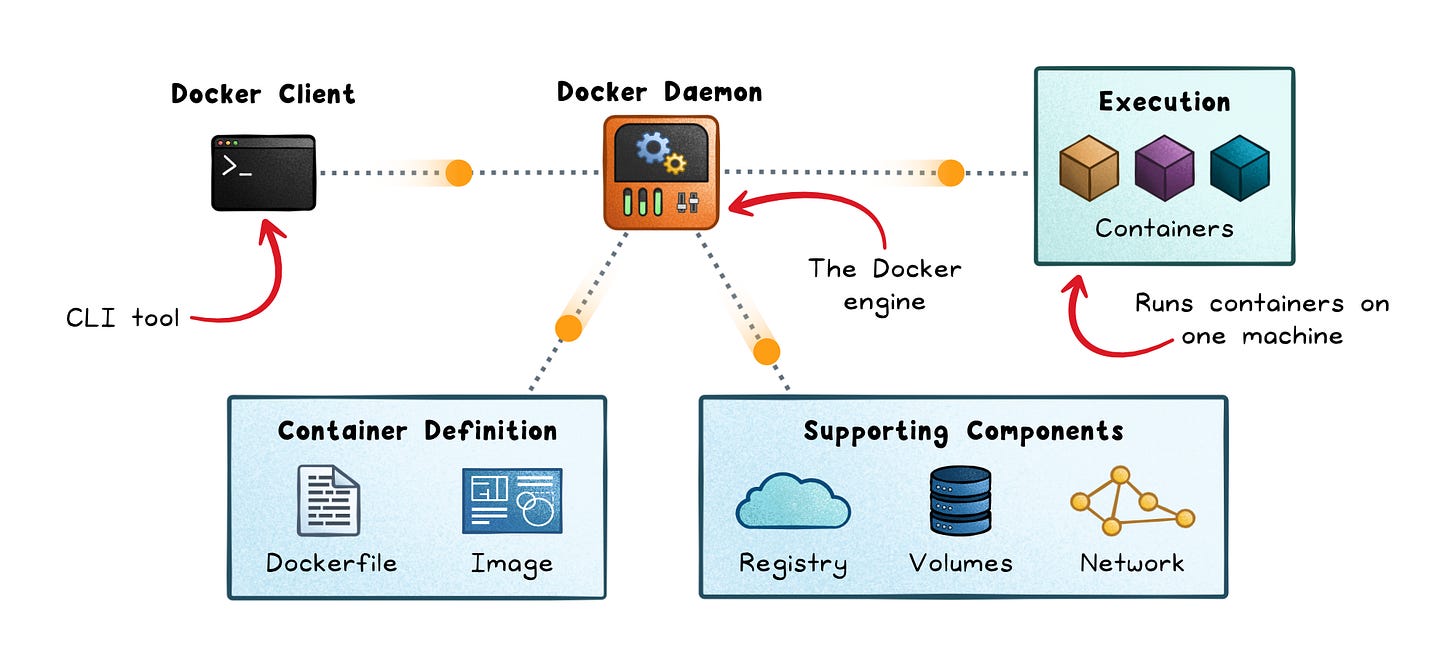
The Docker client sends instructions to the Docker daemon, which manages images, containers, networks, and volumes. Docker Compose sits one layer above, letting you define multi-container apps in a YAML file and start them with a single command.
Docker Swarm is Docker’s built-in clustering mode. Manager nodes maintain cluster state using a Raft consensus protocol; worker nodes execute containers.
Local development
CI pipelines
Small production deployments
Single-server applications
Fast setup → Run apps with one command
Predictability → Same container everywhere
Low operational overhead → Fewer moving parts
Multi-node scaling → Limited native orchestration compared to Kubernetes
Self-healing → Containers don’t restart intelligently across hosts
Complex deployments → Rolling updates and traffic routing are manual
Docker focuses on building images, running containers, and managing them on a host.
Kubernetes is an orchestration system. It answers a different question:
“How do I run thousands of containers reliably across many machines?”
It introduces a control loop: you declare what you want, and the system keeps correcting reality until it matches.
Here are the key components:
Pod → Smallest deployable unit
Control plane → API server, scheduler, controllers
Nodes → Machines that run workloads
Services → Stable endpoints for dynamic pods
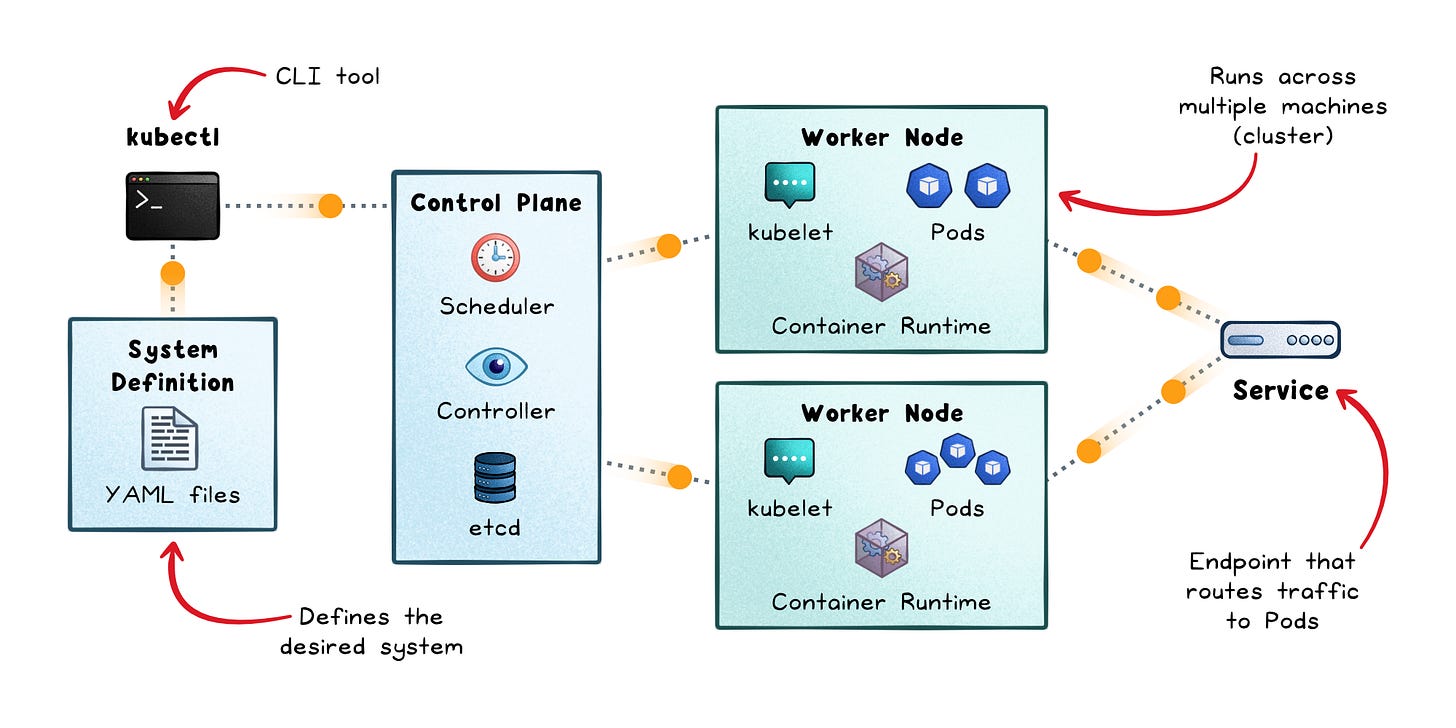
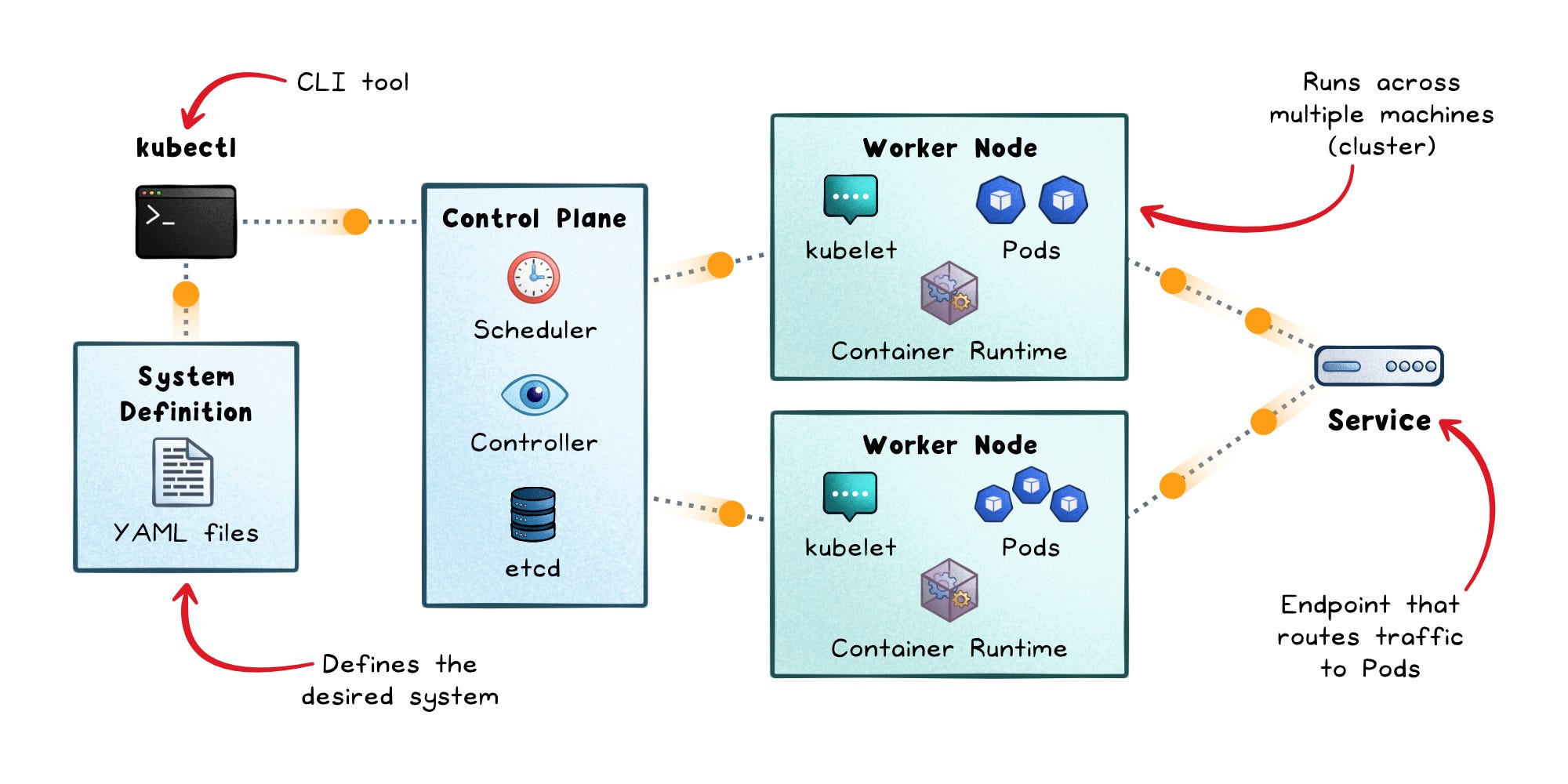
Kubernetes is architecturally richer. Its control plane includes an API server, a scheduler, a controller manager, and etcd (a distributed key-value store that holds all cluster state). Worker nodes run a kubelet (which ensures Pods stay running), kube-proxy (which handles network routing), and a container runtime like containerd.
Multi-service architectures
High-availability systems
Large-scale platforms
Teams needing standardized deployment workflows
Self-healing → Failed containers restart automatically
Autoscaling → Add/remove instances based on demand
Rolling updates → Deploy without downtime
Service discovery → Built-in networking abstractions
Operational complexity → Many components to manage
Learning curve → Concepts like Pods, Services, RBAC
Infrastructure overhead → Control plane + networking + storage
Kubernetes supports clusters with thousands of nodes, but that power comes with significant complexity.
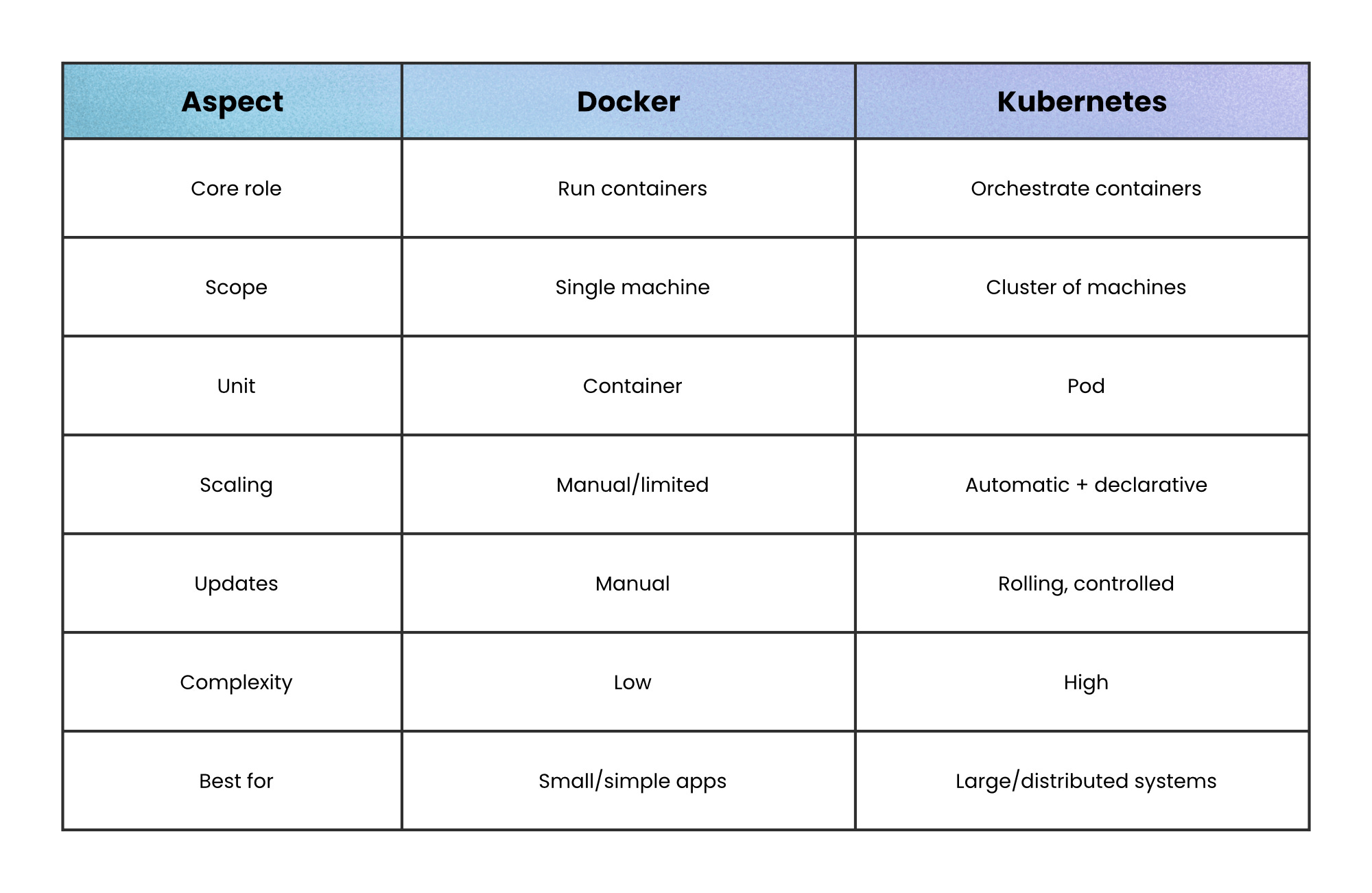
The real-world setup is not “Docker vs Kubernetes.” It’s:
Docker builds the image
A registry stores it
Kubernetes runs and manages it
This separation matters because it keeps concerns clean:
Build once (Docker)
Run anywhere (Kubernetes)
Even though Kubernetes removed direct Docker runtime support, it still runs Docker-built images through OCI-compatible runtimes.
You don’t need Kubernetes just because it exists.
Use Docker alone when:
You run on a single server
Your system has few services
Downtime during deploys is acceptable
Your team prefers simplicity over automation
Because every added abstraction has a cost. If you don’t need orchestration, Kubernetes becomes overhead, not value.
Kubernetes becomes the right choice when coordination starts hurting.
Use it when:
You deploy across multiple machines
You need zero-downtime deployments
Traffic fluctuates and needs autoscaling
You run many services with independent lifecycles
Because Kubernetes solves coordination problems, not just runtime problems.
Most mistakes come from using the right tool at the wrong stage.
1. Starting with Kubernetes too early
Adds complexity before it solves real problems
Slows development and onboarding
2. Scaling Docker beyond its limits
Manual scripts replace missing orchestration
Reliability becomes fragile
3. Treating them as interchangeable
Leads to poor architecture decisions
The ideal mindset is this: Use the simplest tool that solves your current problem.
Start simple. Stay simple as long as you can.
Then, when scaling turns into coordination problems, reach for Kubernetes.
Docker is where most systems should begin. Kubernetes is where many systems eventually need to go.
The transition is a response to real complexity.
👋 If you liked this post → Like + Restack + Share to help others learn system design.
No posts
Comments
Nothing yet. Say the first thing.
Sign in to join the conversation.