
part of  c6
c6
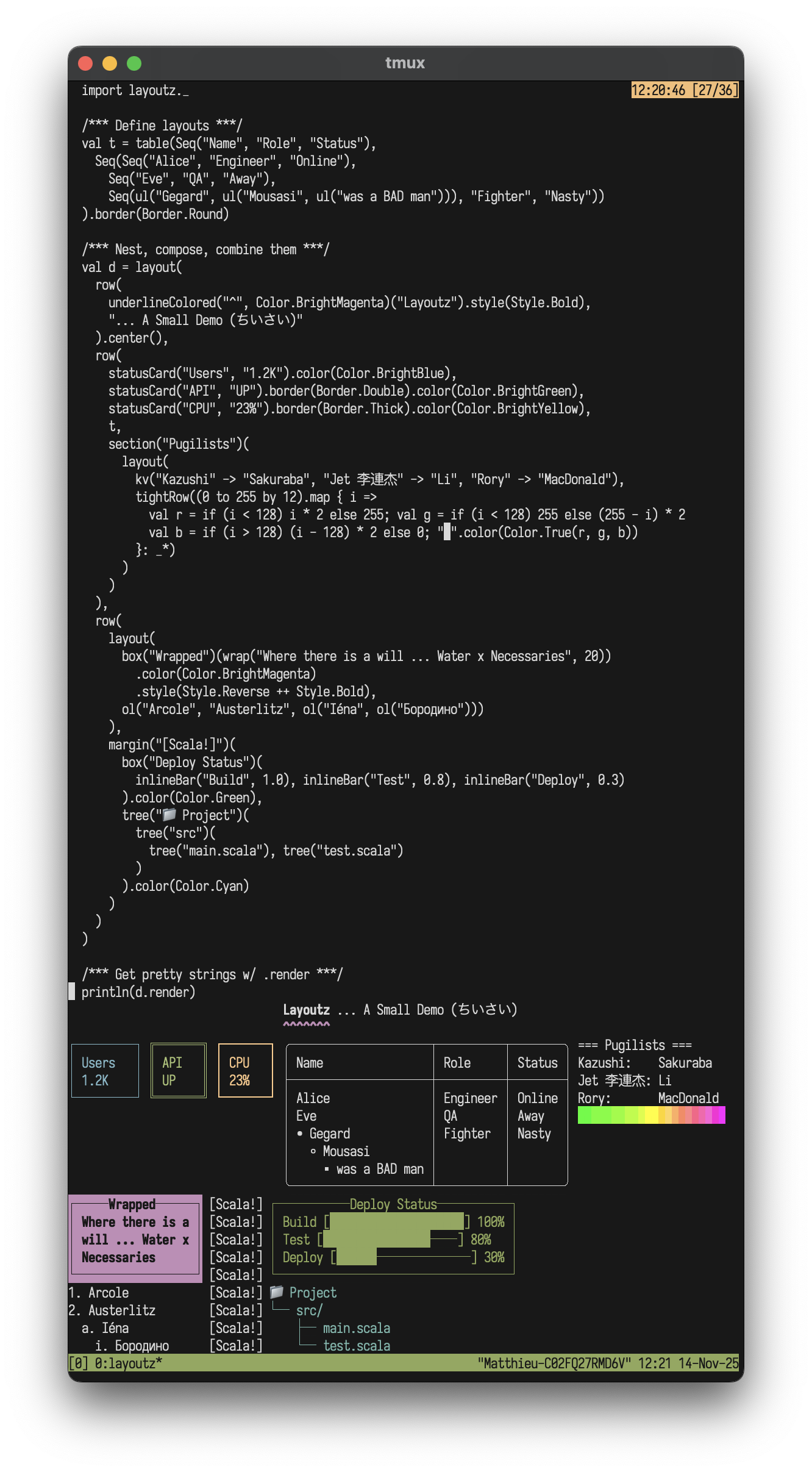
Simple, beautiful CLI output 🪶
A lightweight, zero-dep lib to build compositional ANSI strings, terminal plots, and interactive Elm-style TUI's in pure Scala.
Features
- Pure Scala, zero-dependencies (JVM, Native, JS)
- Elm-style TUIs
- Layout primitives, tables, trees, lists, CJK-aware
- Colors, ANSI styles, rich formatting
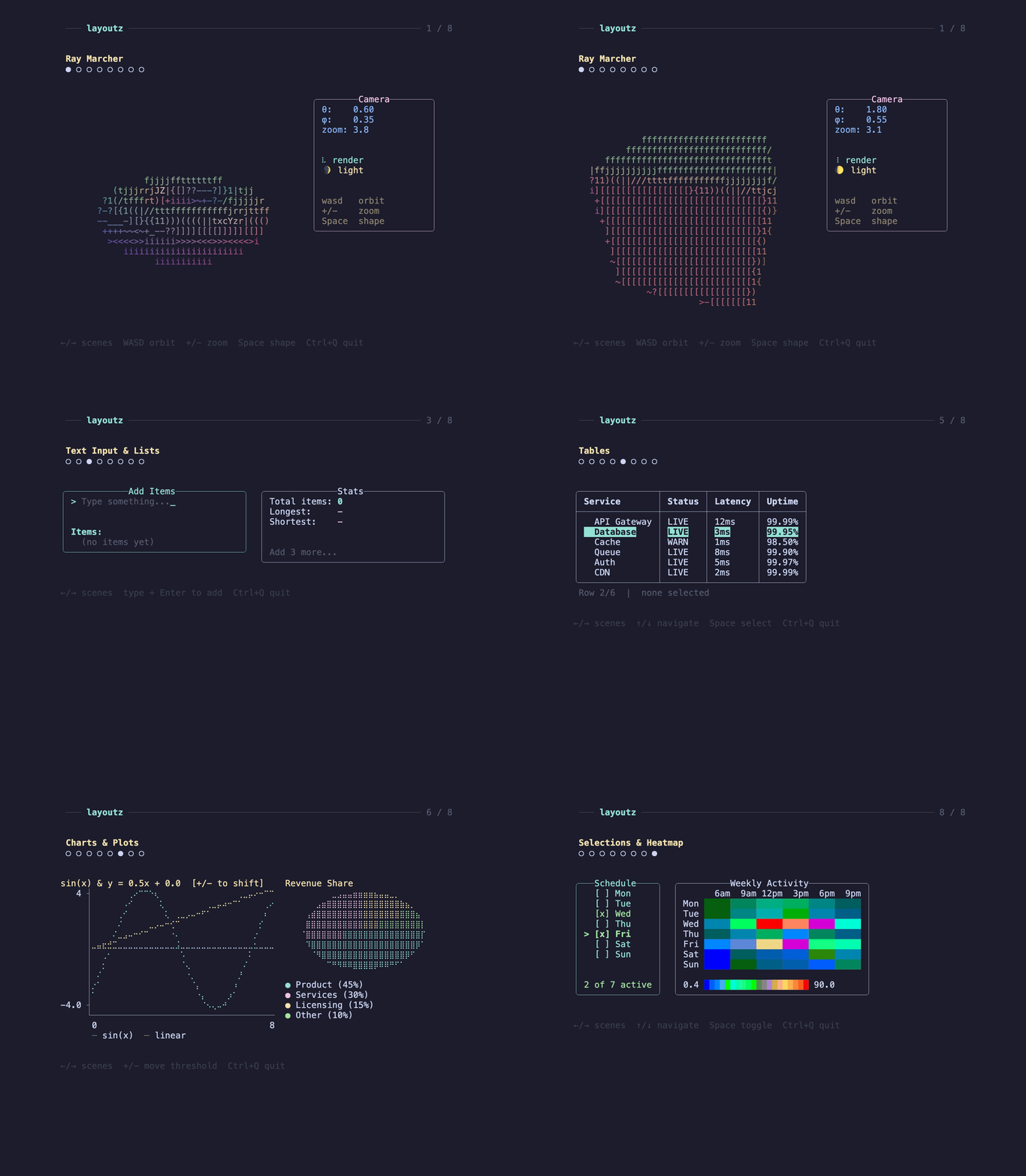
- Terminal charts and plots
- Widgets: text input, spinners, progress bars
- Kitty protocol support
- Extend
Elementand easily create new primitives- (No component library limitations)
- Built-in commands (file I/O, HTTP requests, clipboard handling)
Layoutz also lets you easily drop animations into build scripts or any processes that use Stdout:
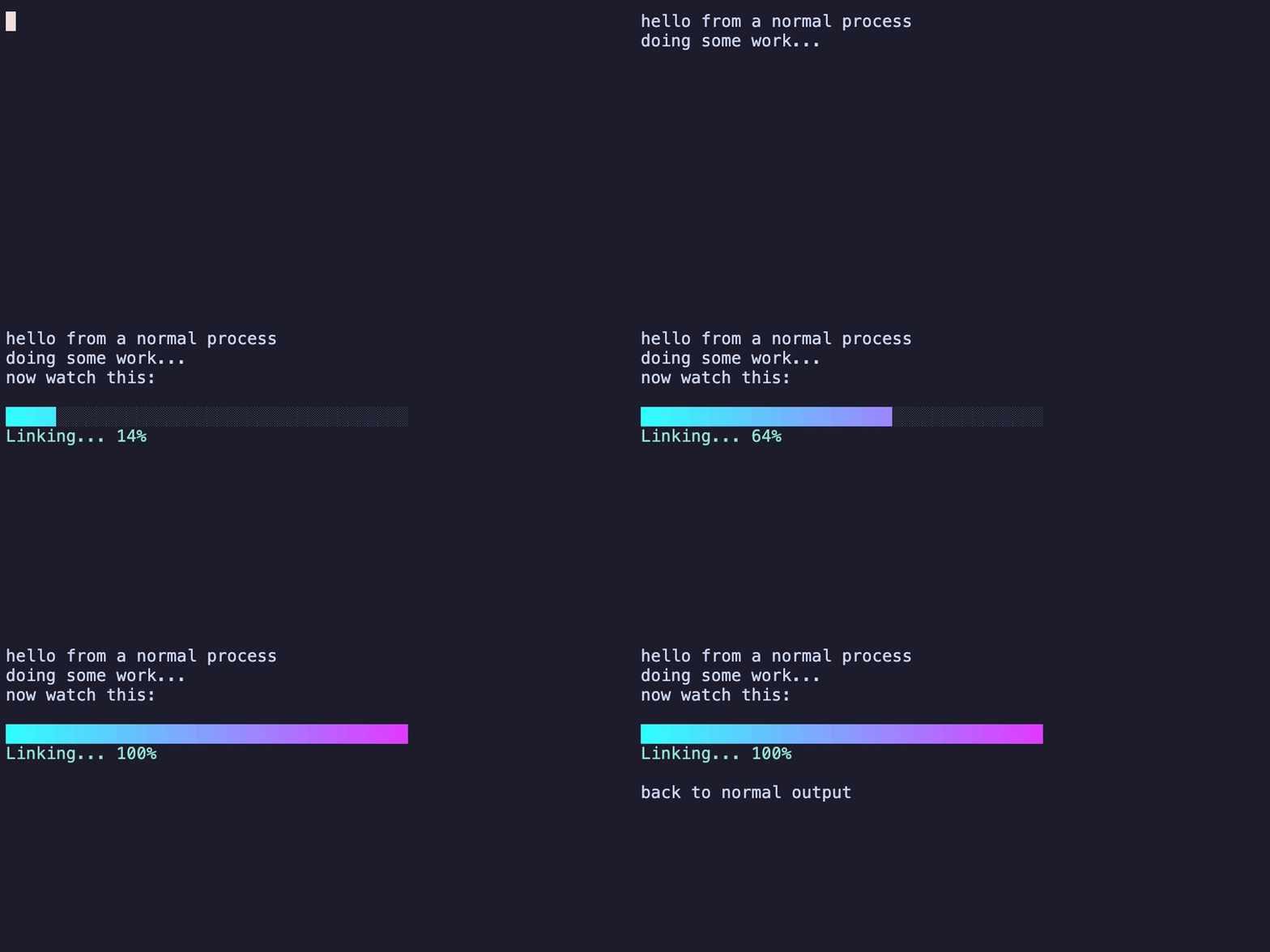
Table of Contents
- Installation
- Quick Start
- Why layoutz?
- Core Concepts
- Border Styles
- Elements
- Custom Elements
- Collections
- Colors & Styles
- Charts & Plots
- Interactive Apps
- Prompts (Ask)
- Progress (loader)
- Examples
- Contributing
- Inspiration
Installation
On MavenCentral, cross-built for Scala 2.12, 2.13, 3.x (JVM, JS and Native):
"xyz.matthieucourt" %% "layoutz" % "0.8.0"
scala-cli repl --scala 3 --dep xyz.matthieucourt:layoutz_3:0.8.0
import layoutz._
Quick Start
There are 3 usage paths with this little library:
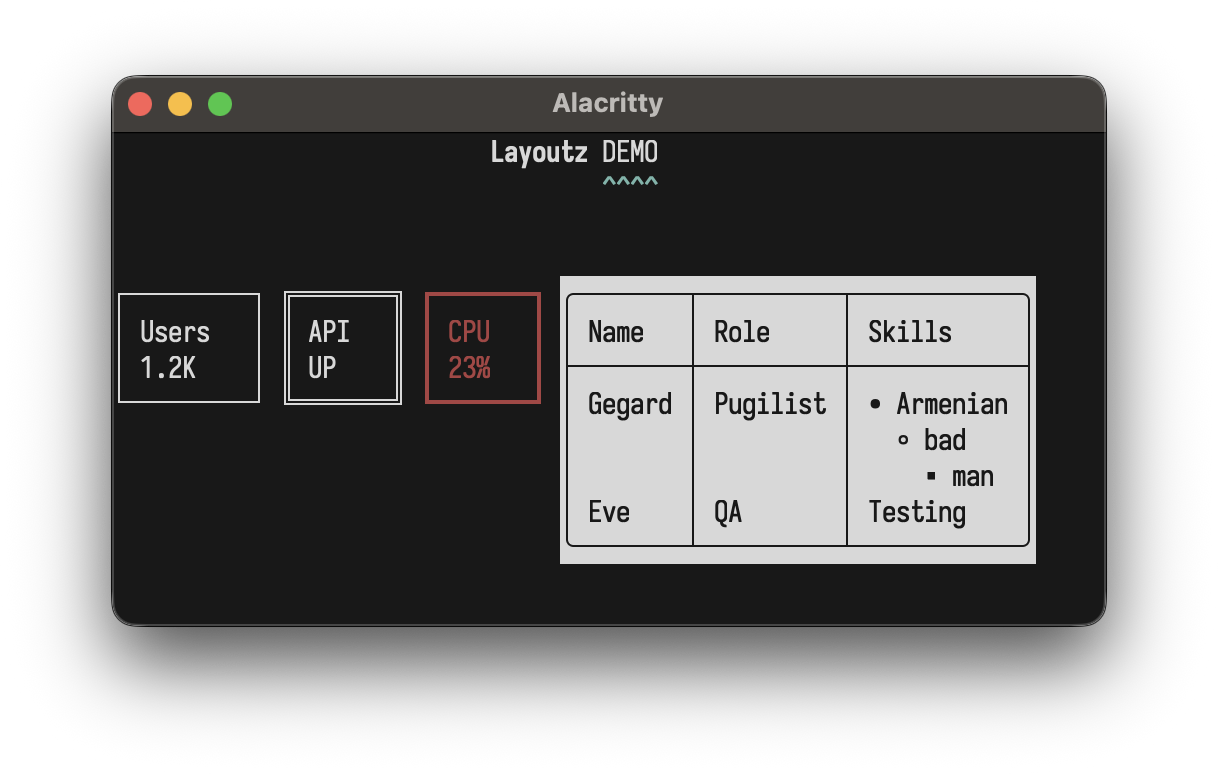
(1/3) Static rendering - Pretty, composable strings:
import layoutz._
val demo = layout(
  row(
    "Layoutz".style(Style.Bold),
    underline("^", Color.Cyan)("DEMO")
  ).center(),
  br,
  row(
    statusCard("Users", "1.2K"),
    statusCard("API", "UP").border(Border.Double),
    statusCard("CPU", "23%").border(Border.Thick).color(Color.Red),
    table(
      Seq("Name", "Role", "Skills"),
      Seq(
        Seq("Gegard", "Pugilist",
          ul("Armenian", ul("bad", ul("man")))),
        Seq("Eve", "QA", "Testing")
      )
    ).border(Border.Round).style(Style.Reverse)
  )
)
demo.putStrLn
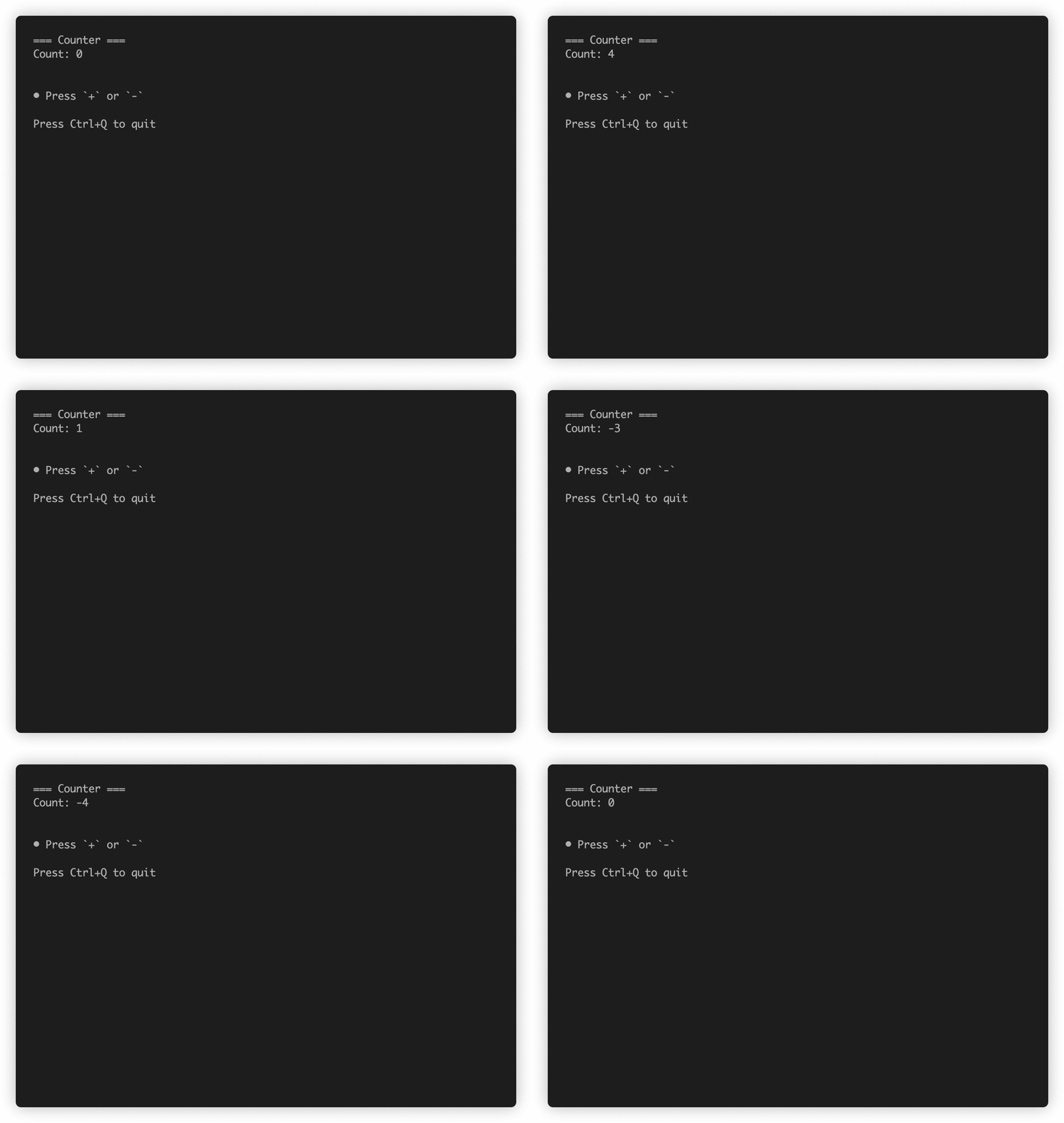
(2/3) Interactive apps - Build Elm-style TUI's:
import layoutz._
object CounterApp extends LayoutzApp[Int, String] {
  def init = 0
  def update(msg: String, count: Int) = msg match {
    case "inc" => count + 1
    case "dec" => count - 1
    case _     => count
  }
  def subscriptions(count: Int) =
    Sub.onKeyPress {
      case Key.Char('+') => Some("inc")
      case Key.Char('-') => Some("dec")
      case _             => None
    }
  def view(count: Int) = layout(
    section("Counter")(s"Count: $count"),
    br,
    ul("Press `+` or `-`")
  )
}
CounterApp.run
(3/3) Prompts (Ask)
You often want one-shot CLI prompts with pickers, file pickers, fuzzy-finders, pagers, etc ... without dropping
down into Elm-territory to make them. This is why layoutz has the Ask helpers
import layoutz._
val name   = Ask.input("Name › ", placeholder = "anonymous")
val ok     = Ask.confirm("Venture on the quest?", default = true)
val realm  = Ask.choose("Choose a realm", Seq("Shire", "Rivendell", "Mirkwood"))
val packs  = Ask.chooseMany("Provisions", Seq("lembas", "pipe-weed", "rope"), limit = 3)
val riddle = Ask.write("Pose a riddle", placeholder = "All things it devours…")
val member = Ask.filter("Search > ", Seq("Bilbo", "Balin", "Dwalin", "Thorin"))
val path   = Ask.file(start = ".")
Ask.pager(longString)
val answer = Ask.spin("Awaking Smaug…") { Thread.sleep(1500); 42 }
Why layoutz?
- We have
s"...", and full-blown TUI libraries - but there is a gap in-between. - With LLM's, boilerplate code that formats & "pretty-prints" is cheaper than ever...
- Thus, more than ever, "string formatting code" is spawning, and polluting domain logic.
- Ultimately, layoutz is just a tiny, declarative DSL to combat this.
- On the side, layoutz also has an Elm-style runtime to bring these arbitrary
Elements to life: much like a flipbook.- The runtime has some little niceties built-in like common cmd's for file I/O, HTTP-requests, and a key input handler.
- But at the end of the day, you can use layoutz merely to structure Strings (without any of the TUI stuff).
Core Concepts
Every piece of content is an Element. Elements are immutable and composable.
layout(elem1, elem2, elem3)   // vertical
row(elem1, elem2)             // horizontal
elem.render                   // gives a String
elem.putStrLn                 // prints to console
Implement Element to create custom components that compose with all built-ins.
Fluent API
Some typesetting elements work as both nouns ("an underline") and verbs ("to underline something"). For these, layoutz offers a fluent syntax with transformations available in infix position via dot-completion. Both styles produce the same case classes and render identically:
/* Nested style */
margin(">>")(underline()("Hello\nWorld!"))
/* Fluent style */
"Hello\nWorld!".underline.margin(">>")
// Both render:
// >> Hello
// >> World!
// >> ──────
Available methods:
.center()
.pad()
.wrap()
.truncate()
.underline()
.margin()
.color()
.colorBg()
Border Styles
Applied via .border() to any element with the HasBorder typeclass (box, statusCard, table):
box("Title")("content").border(Border.Round)
table(h, r).border(Border.Thick)
/* HasBorder typeclass for generic code */
def makeThick[T: HasBorder](element: T): T = element.border(Border.Thick)
Border.Single                              // ┌─┐ (default)
Border.Double                              // ╔═╗
Border.Thick                               // ┏━┓
Border.Round                               // ╭─╮
Border.Ascii                               // +-+
Border.Block                               // ███
Border.Dashed                              // ┌╌┐
Border.Dotted                              // ┌┈┐
Border.InnerHalfBlock                      // ▗▄▖
Border.OuterHalfBlock                      // ▛▀▜
Border.Markdown                            // |-|
Border.Custom(corner = "+", horizontal = "=", vertical = "|")
Border.None                                // no borders
Elements
Layout
Stacking & rows
layout("First", "Second", "Third")
// First
// Second
// Third
row("Left", "Middle", "Right")
// Left Middle Right
columns(layout("A", "B"), layout("C", "D"))
// A  C
// B  D
Spacing & rules
layout("Line 1", br, "Line 2")
hr                         // ──────────────...
hr.char("~")               // custom char
hr.width(10).char("=")     // ==========
vr(3)
space(10)
empty
Text transforms
"TITLE".center(20)     // │        TITLE       │
"Left".leftAlign(20)   // │Left                │
"Right".rightAlign(20) // │               Right│
"Spread this out".justify(30)
// │Spread         this        out│
"Long text here that should wrap".wrap(20)
// Long text here that
// should wrap
"Very long text that will be cut off".truncate(15)    // Very long te...
"Custom ellipsis example text here".truncate(20, "…") // Custom ellipsis exa…
"content".pad(2)
// │           │
// │           │
// │  content  │
// │           │
// │           │
"Title".underline()
// Title
// ─────
"Custom".underline("=")
// Custom
// ══════
layout(
  "Ooops!",
  row("val result: Int = ", underline("^")("getString()")),
  "Expected Int, found String"
).margin("[error]")
// [error] Ooops!
// [error] val result: Int =  getString()
// [error]                    ^^^^^^^^^^^
// [error] Expected Int, found String
Content
Basics
"Simple text"
section("Config")(kv("env" -> "prod"))
// === Config ===
// env: prod
kv("name" -> "Alice", "role" -> "admin")
// name: Alice
// role: admin
Boxes, cards & banners
box("Summary")(kv("total" -> "42"))
// ┌──Summary──┐
// │ total: 42 │
// └───────────┘
box("Fancy")("content").border(Border.Double)
// ╔══Fancy══╗
// ║ content ║
// ╚═════════╝
box("Smooth")("content").border(Border.Round)
// ╭──Smooth──╮
// │ content  │
// ╰──────────╯
row(statusCard("CPU", "45%"), statusCard("MEM", "2.1G"))
// ┌───────┐ ┌────────┐
// │ CPU   │ │ MEM    │
// │ 45%   │ │ 2.1G   │
// └───────┘ └────────┘
banner("System Dashboard").border(Border.Double)
// ╔══════════════════╗
// ║ System Dashboard ║
// ╚══════════════════╝
Lists & trees
ul("Backend", ul("API", ul("REST", "GraphQL"), "DB"), "Frontend")
// • Backend
//   ◦ API
//     ▪ REST
//     ▪ GraphQL
//   ◦ DB
// • Frontend
ol("Setup", ol("Install deps", ol("npm", "pip"), "Configure"), "Deploy")
// 1. Setup
//   a. Install deps
//     i. npm
//     ii. pip
//   b. Configure
// 2. Deploy
tree("Project")(
  tree("src")(
    tree("main")(tree("App.scala")),
    tree("test")(tree("AppTest.scala"))
  )
)
// Project
// └── src/
//     ├── main/
//     │   └── App.scala
//     └── test/
//         └── AppTest.scala
Table
table(
  headers = Seq("Name", "Age", "City"),
  rows = Seq(
    Seq("Alice", "30", "New York"),
    Seq("Bob", "25"),
    Seq("Charlie", "35", "London")
  )
)
// ┌─────────┬─────┬──────────┐
// │ Name    │ Age │ City     │
// ├─────────┼─────┼──────────┤
// │ Alice   │ 30  │ New York │
// │ Bob     │ 25  │          │
// │ Charlie │ 35  │ London   │
// └─────────┴─────┴──────────┘
Progress & spinners
inlineBar("Download", 0.75)
// Download [███████████████─────] 75%
spinner("Loading", frame, SpinnerStyle.Dots)   // ⠋ ⠙ ⠹ ⠸ ⠼ ⠴ ⠦ ⠧ ⠇ ⠏
spinner("Loading", frame, SpinnerStyle.Line)   // | / - \
spinner("Loading", frame, SpinnerStyle.Clock)  // 🕐 🕑 🕒 🕓 🕔 🕕 🕖 🕗 🕘 🕙 🕚 🕛
spinner("Loading", frame, SpinnerStyle.Bounce) // ⠁ ⠂ ⠄ ⠂
spinner("Loading", frame, SpinnerStyle.Earth)  // 🌍 🌎 🌏
spinner("Loading", frame, SpinnerStyle.Moon)   // 🌑 🌒 🌓 🌔 🌕 🌖 🌗 🌘
spinner("Loading", frame, SpinnerStyle.Grow)   // ▏ ▎ ▍ ▌ ▋ ▊ ▉ █ ▉ ▊ ▋ ▌ ▍ ▎
spinner("Loading", frame, SpinnerStyle.Arrow)  // ← ↖ ↑ ↗ → ↘ ↓ ↙
Inline Images
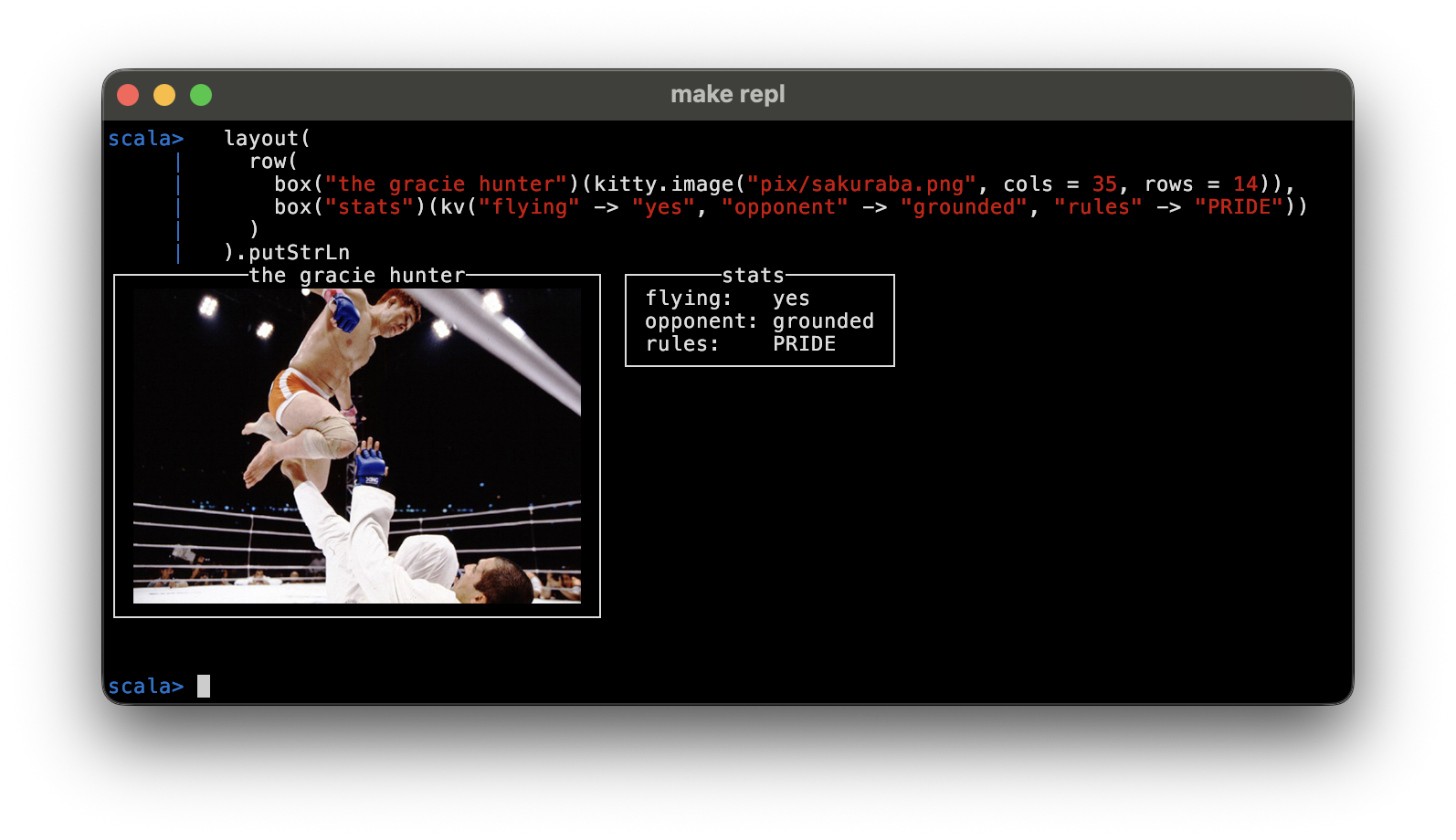
You can inline raster images via the kitty graphics protocol.
Layoutz KittyImage s compose with all the other built in elements so you can drop them into boxes, tables etc.
layout(
  row(
    box("the gracie hunter")(kitty.image("pix/sakuraba.png", cols = 35, rows = 14)),
    box("stats")(kv("flying" -> "yes", "opponent" -> "grounded", "rules" -> "PRIDE"))
  )
).putStrLn
You can also build an image straight from raw RGBA pixels with kittyRGBA:
val (w, h) = (96, 96)
val pixels = Array.tabulate(w * h * 4) { i =>
  val p = i / 4; val x = p % w; val y = p / w
  (i % 4 match {
    case 0 => x * 255 / w
    case 1 => y * 255 / h
    case 2 => 255 - (x * 255 / w)
    case _ => 255
  }).toByte
}
val pic = kittyRGBA(pixels, pxW = w, pxH = h, cols = 18, rows = 9)
box("gradient")(pic).putStrLn
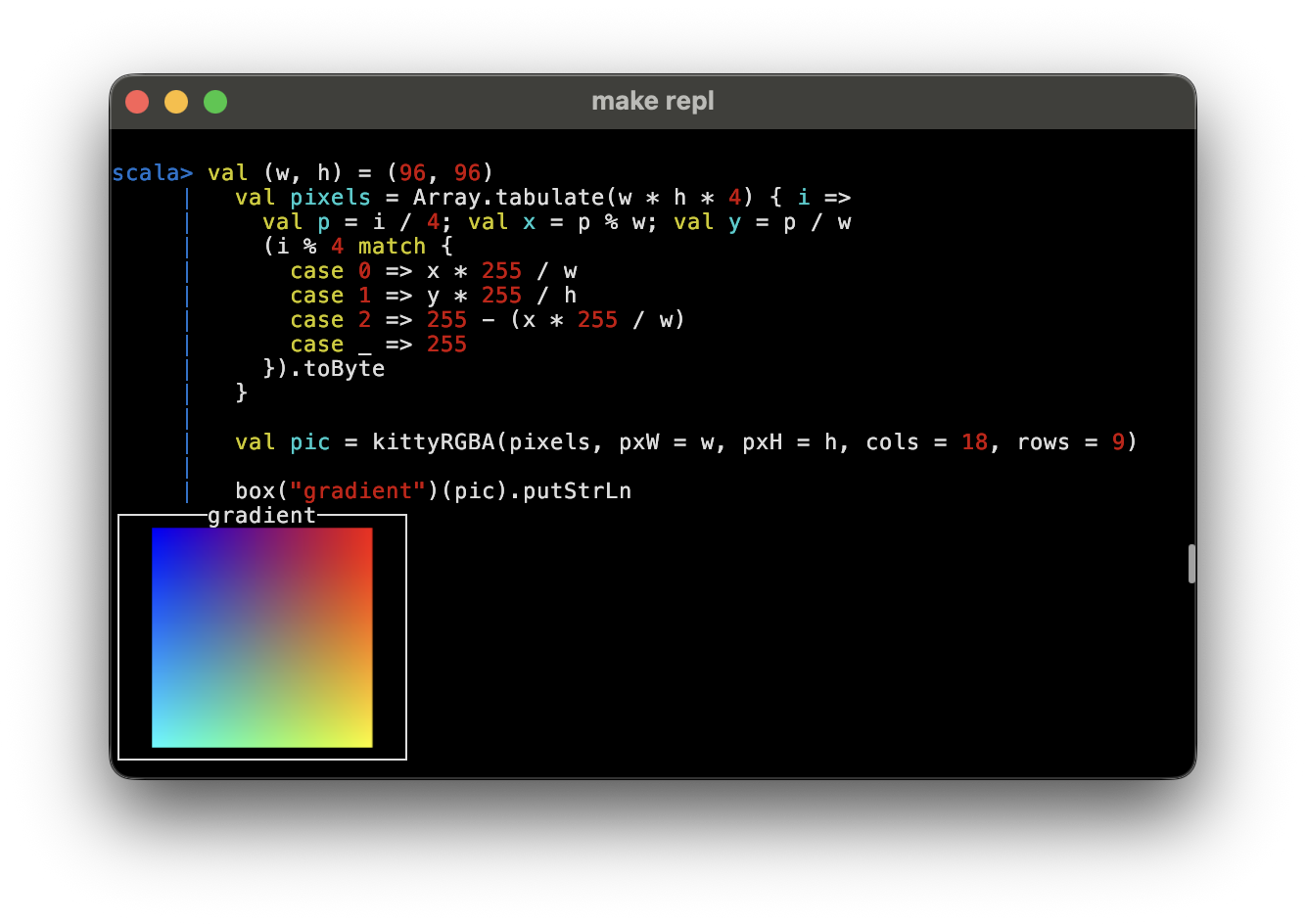
You needs a kitty-graphics-capable terminal (kitty, WezTerm, Ghostty)..
Widgets
Form Widgets
textInput("Username", "alice", "Enter name", active = true)
SingleChoice("Mood?", Seq("great", "okay", "meh"), selected = 0, active = true)
MultiChoice("Colors?", Seq("Red", "Blue"), selected = Set(0), cursor = 1, active = true)
// > Username: alice_
// > Mood?
//   ► ● great
//     ○ okay
//     ○ meh
Custom Elements
Implement Element to create reusable components:
case class Square(size: Int) extends Element {
  def render: String = {
    if (size < 2) return ""
    val width = size * 2 - 2
    val top = "┌" + ("─" * width) + "┐"
    val middle = (1 to size - 2).map(_ => "│" + (" " * width) + "│")
    val bottom = "└" + ("─" * width) + "┘"
    (top +: middle :+ bottom).mkString("\n")
  }
}
row(Square(2), Square(4), Square(6))
// ┌──┐ ┌──────┐ ┌──────────┐
// └──┘ │      │ │          │
//      │      │ │          │
//      └──────┘ │          │
//               │          │
//               └──────────┘
Collections
Fuly leverage Scala's functional collection to generate frags of Elements:
case class User(name: String, role: String)
val users = Seq(User("Alice", "Admin"), User("Bob", "User"), User("Tom", "User"))
section("Users by Role")(
  layout(
    users.groupBy(_.role).map { case (role, roleUsers) =>
      box(role)(ul(roleUsers.map(u => Text(u.name)): _*))
    }.toSeq: _*
  )
)
// === Users by Role ===
// ┌──Admin──┐
// │ • Alice │
// └─────────┘
// ┌──User──┐
// │ • Bob  │
// │ • Tom  │
// └────────┘
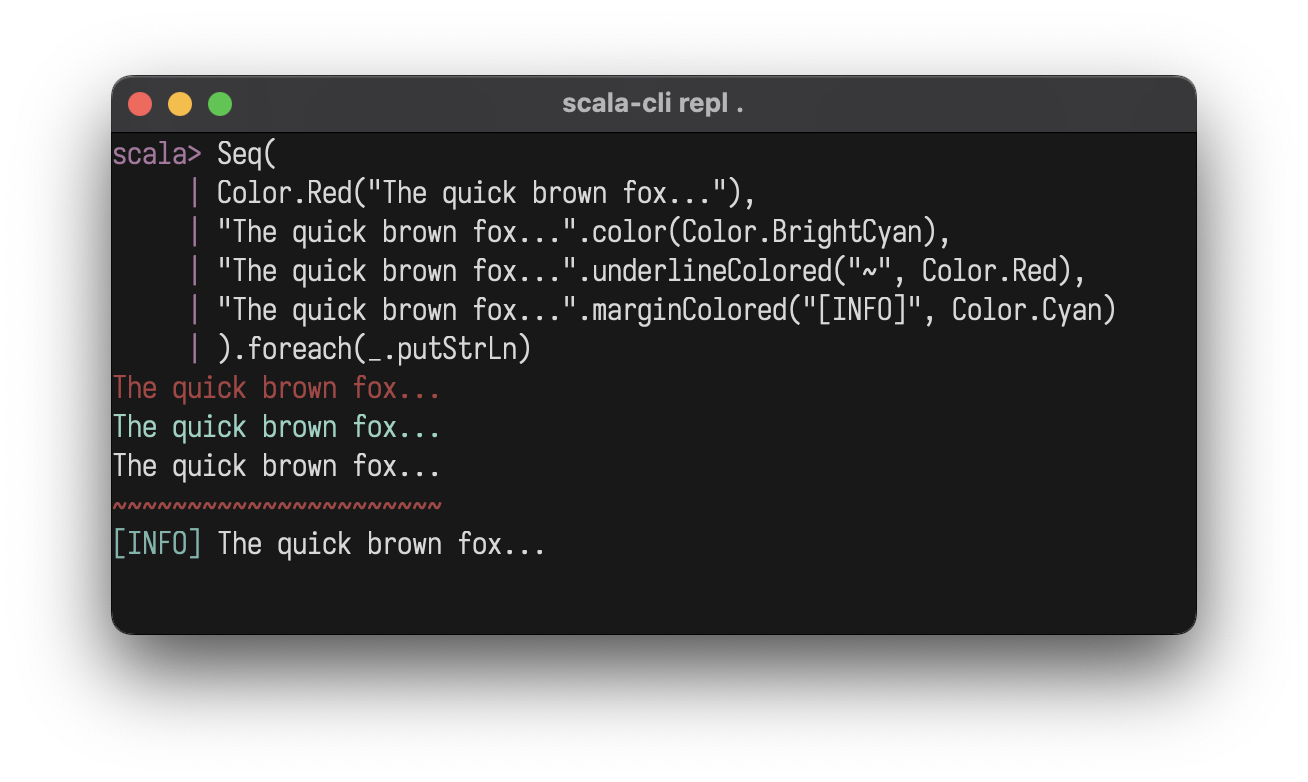
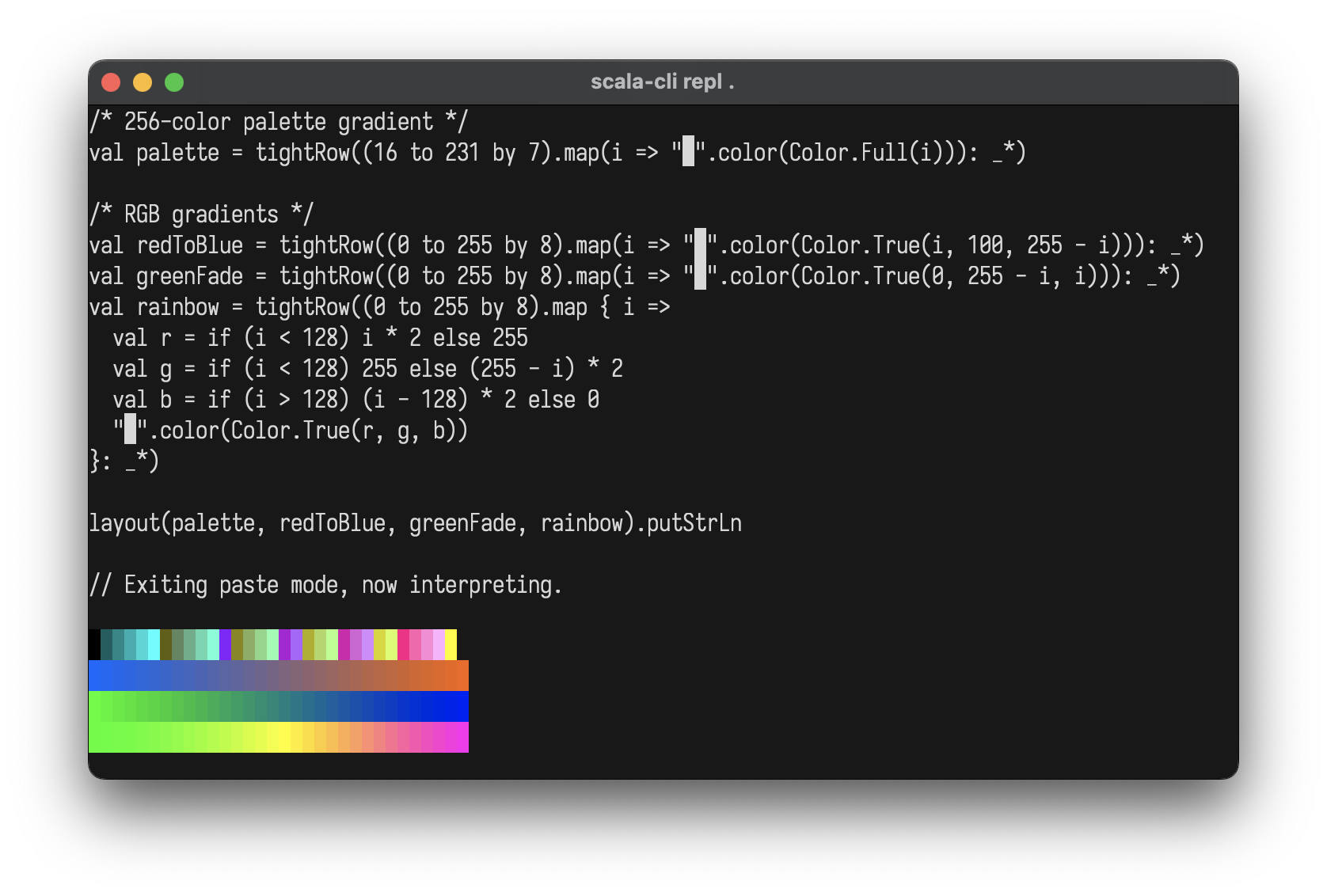
Colors
Foreground with .color, background with .bg:
Color.Red("Error!")
"text".color(Color.BrightCyan)
"Error!".bg(Color.Red)
Color.Red.bg("Error!")
"ALERT".bg(Color.Red).color(Color.White).style(Style.Bold)
box()("warning").bg(Color.Yellow)
Color.Black
Color.Red
Color.Green
Color.Yellow
Color.Blue
Color.Magenta
Color.Cyan
Color.White
Color.BrightBlack
Color.BrightRed
Color.BrightGreen
Color.BrightYellow
Color.BrightBlue
Color.BrightMagenta
Color.BrightCyan
Color.BrightWhite
Color.Full(196)               // 256-color palette (0-255)
Color.True(255, 128, 0)       // 24-bit RGB
Color.NoColor                 // Conditional no-op
import layoutz._
val palette = tightRow((16 to 231 by 7).map(i => "█".color(Color.Full(i))): _*)
val redToBlue = tightRow((0 to 255 by 8).map(i => "█".color(Color.True(i, 100, 255 - i))): _*)
val greenFade = tightRow((0 to 255 by 8).map(i => "█".color(Color.True(0, 255 - i, i))): _*)
val rainbow = tightRow((0 to 255 by 8).map { i =>
  val r = if (i < 128) i * 2 else 255
  val g = if (i < 128) 255 else (255 - i) * 2
  val b = if (i > 128) (i - 128) * 2 else 0
  "█".color(Color.True(r, g, b))
}: _*)
layout(palette, redToBlue, greenFade, rainbow)
Styles
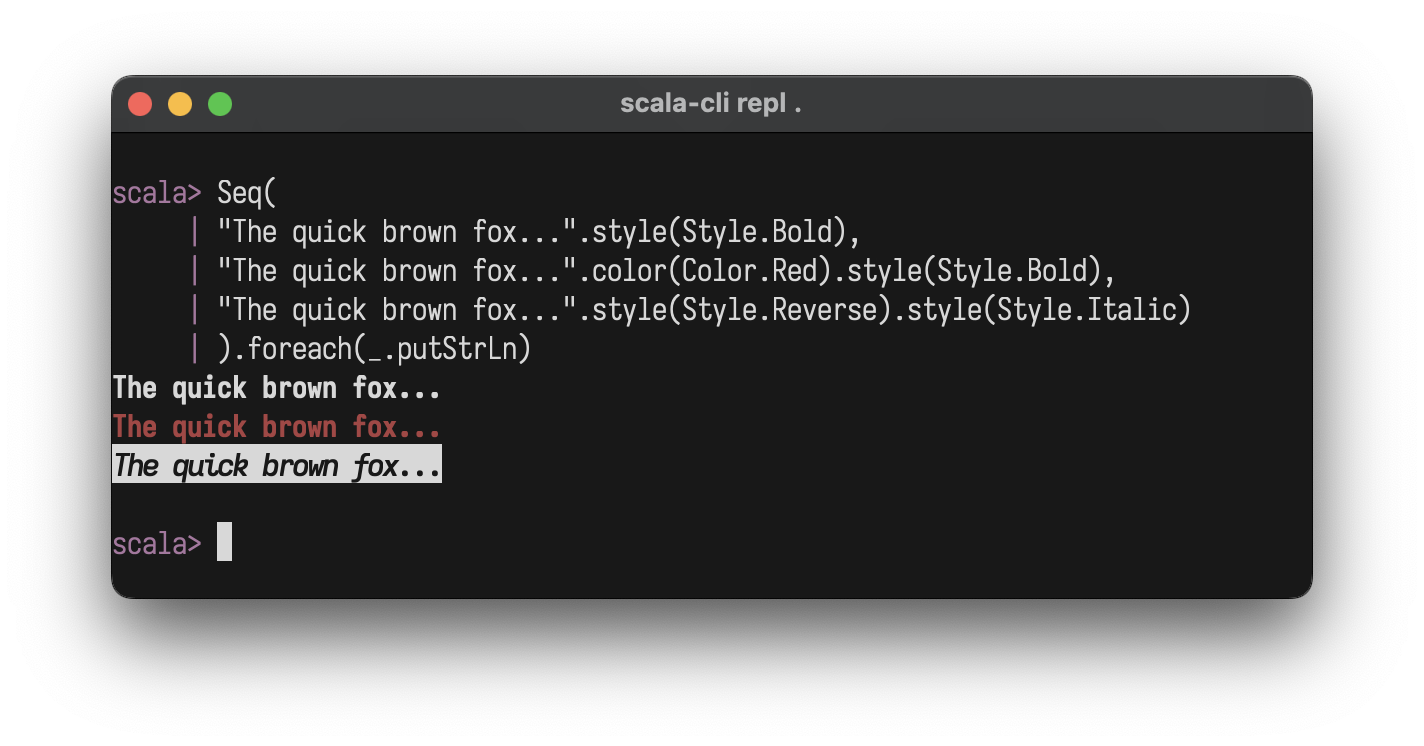
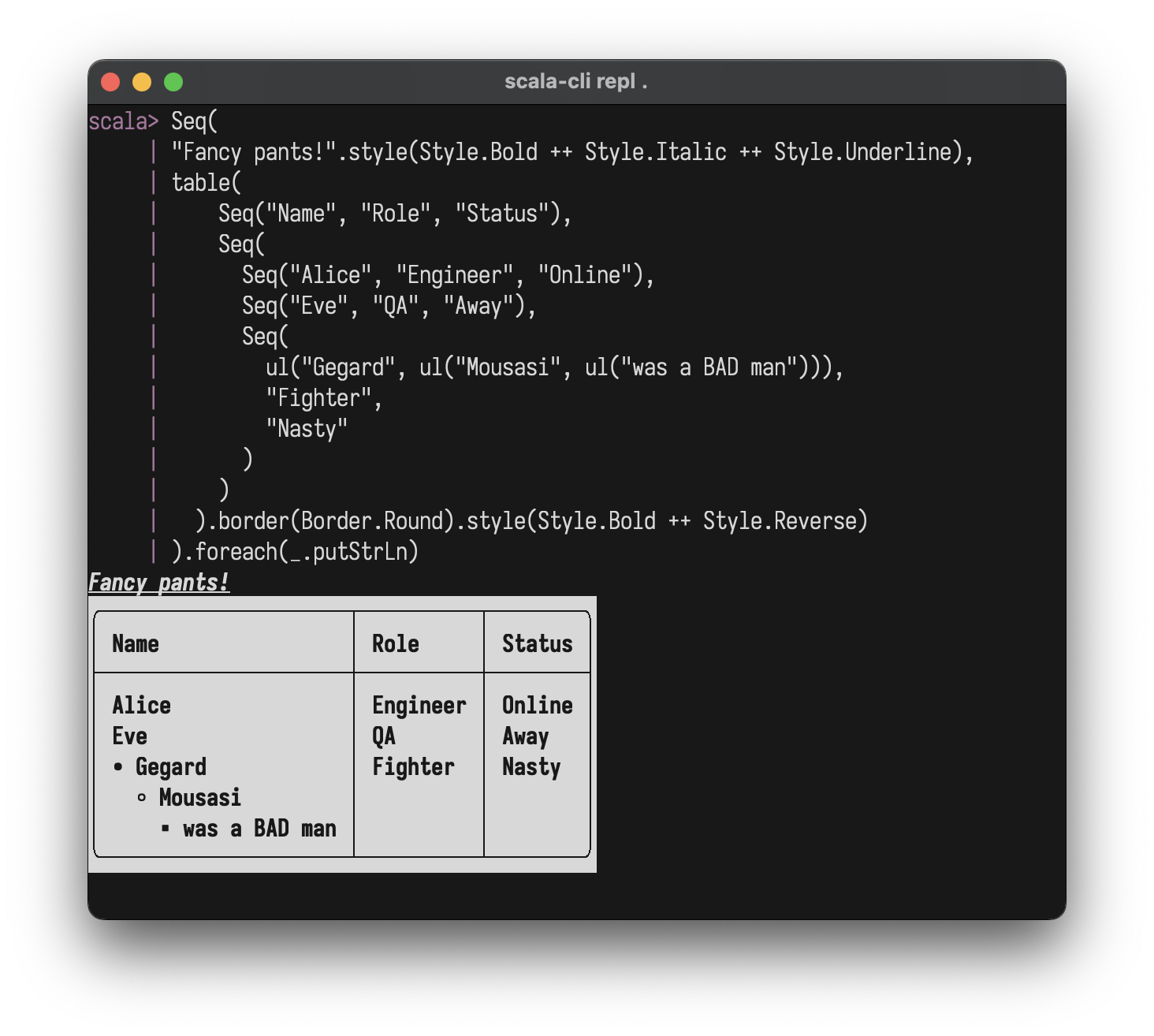
"text".style(Style.Bold)
"text".color(Color.Red).style(Style.Bold)
"text".style(Style.Bold ++ Style.Italic ++ Style.Underline)
Style.Bold
Style.Dim
Style.Italic
Style.Underline
Style.Blink
Style.Reverse
Style.Hidden
Style.Strikethrough
Style.NoStyle                 // conditional no-op
Style.Bold ++ Style.Italic    // combine with ++
Charts & Plots
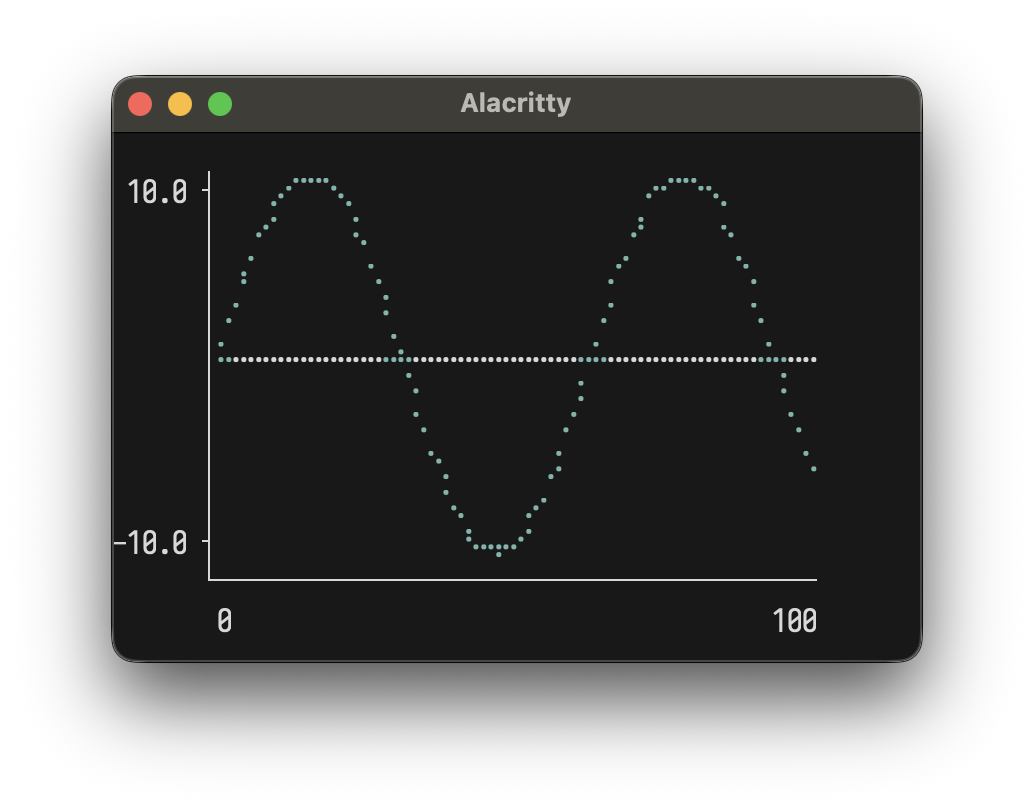
Line Plot
val sinePoints = (0 to 100).map(i => (i.toDouble, math.sin(i * 0.1) * 10))
plot(width = 40, height = 10)(
  Series(sinePoints, "sine").color(Color.Cyan)
)
Multiple series:
val sin = (0 to 50).map(i => (i.toDouble, math.sin(i * 0.15) * 5))
val cos = (0 to 50).map(i => (i.toDouble, math.cos(i * 0.15) * 5))
plot(width = 50, height = 12)(
  Series(sin, "sin(x)").color(Color.BrightCyan),
  Series(cos, "cos(x)").color(Color.BrightMagenta)
)
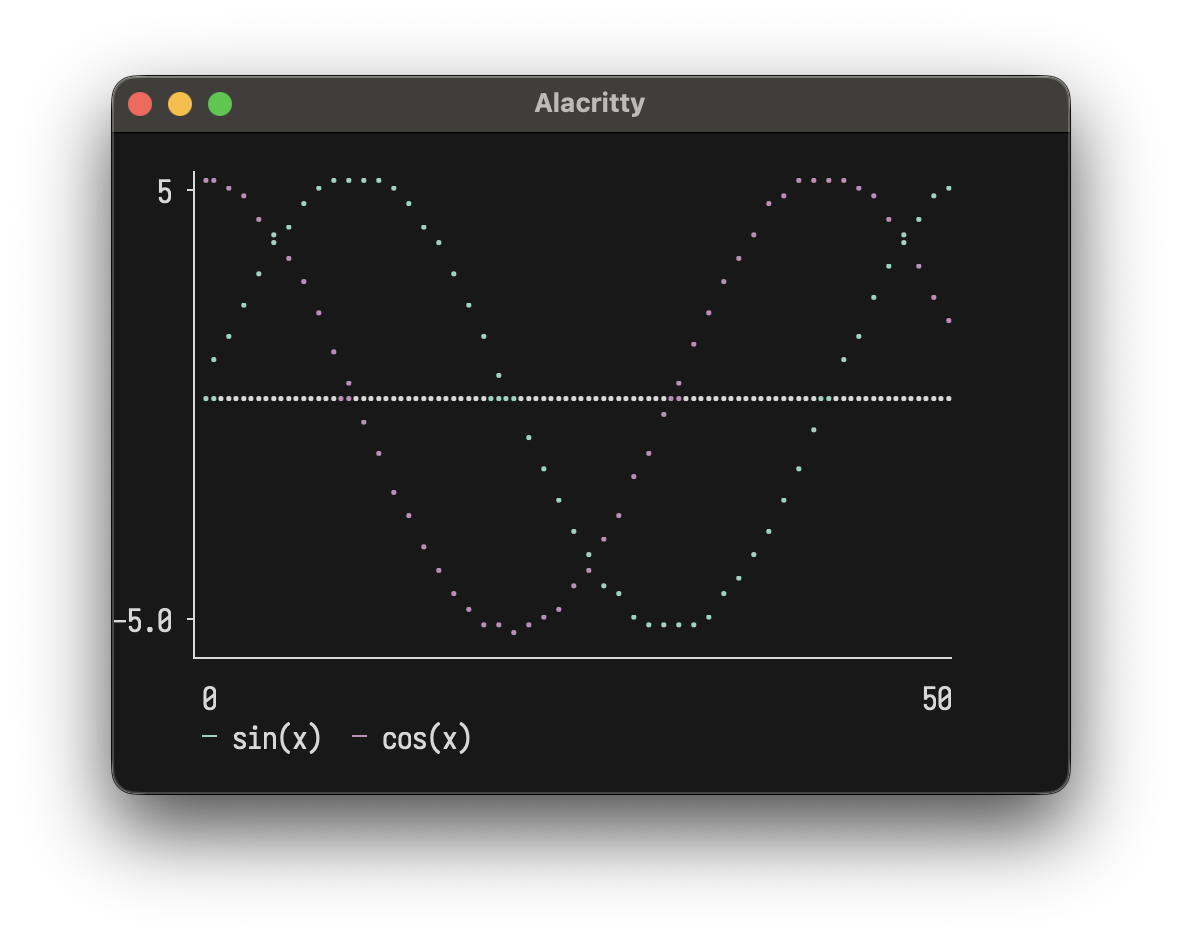
Options: width, height, showAxes, showOrigin
Horizontal Chart
chart("Web" -> 10, "Mobile" -> 20, "API" -> 15)
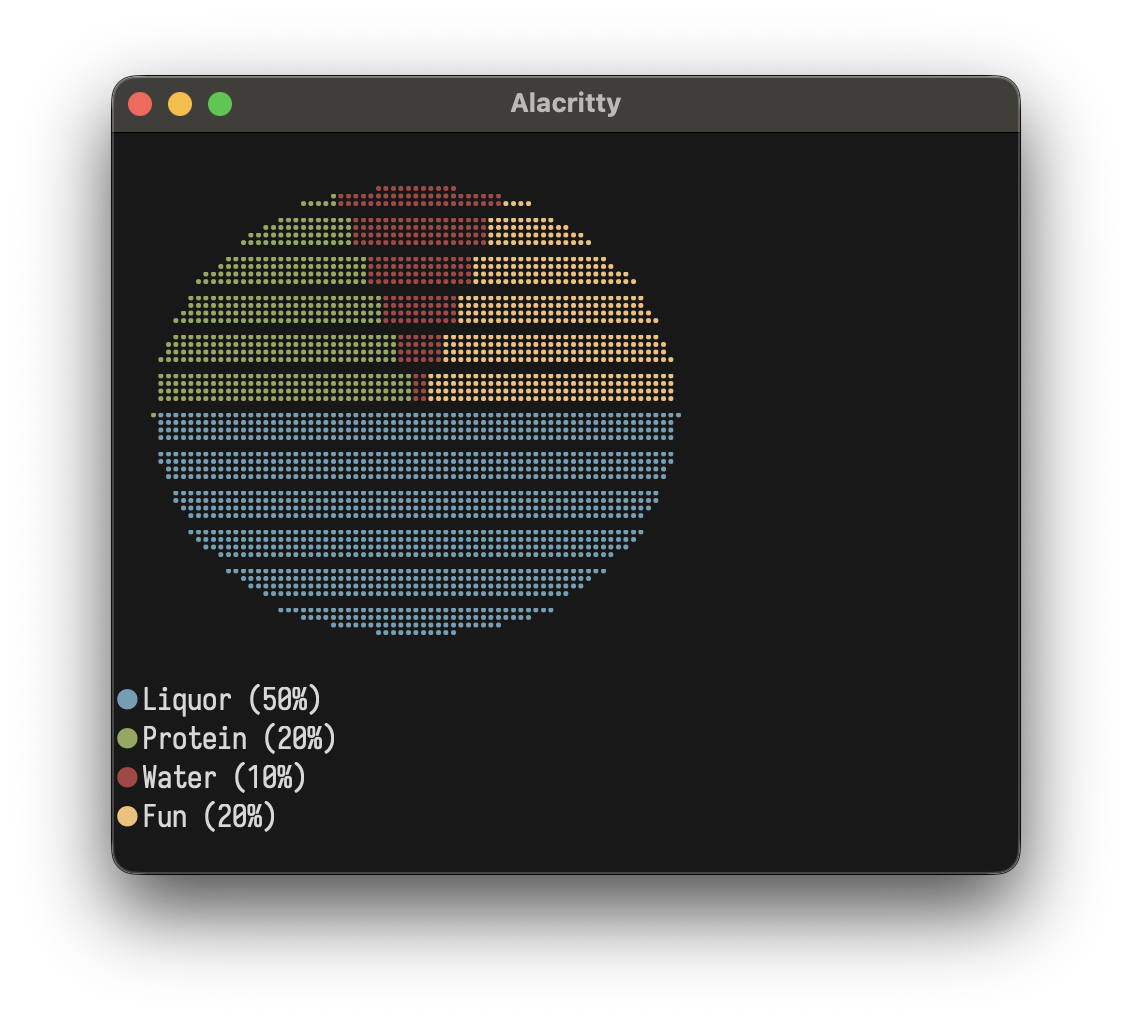
Pie Chart
pie()(
  Slice(50, "Liquor"),
  Slice(20, "Protein"),
  Slice(10, "Water"),
  Slice(20, "Fun")
)
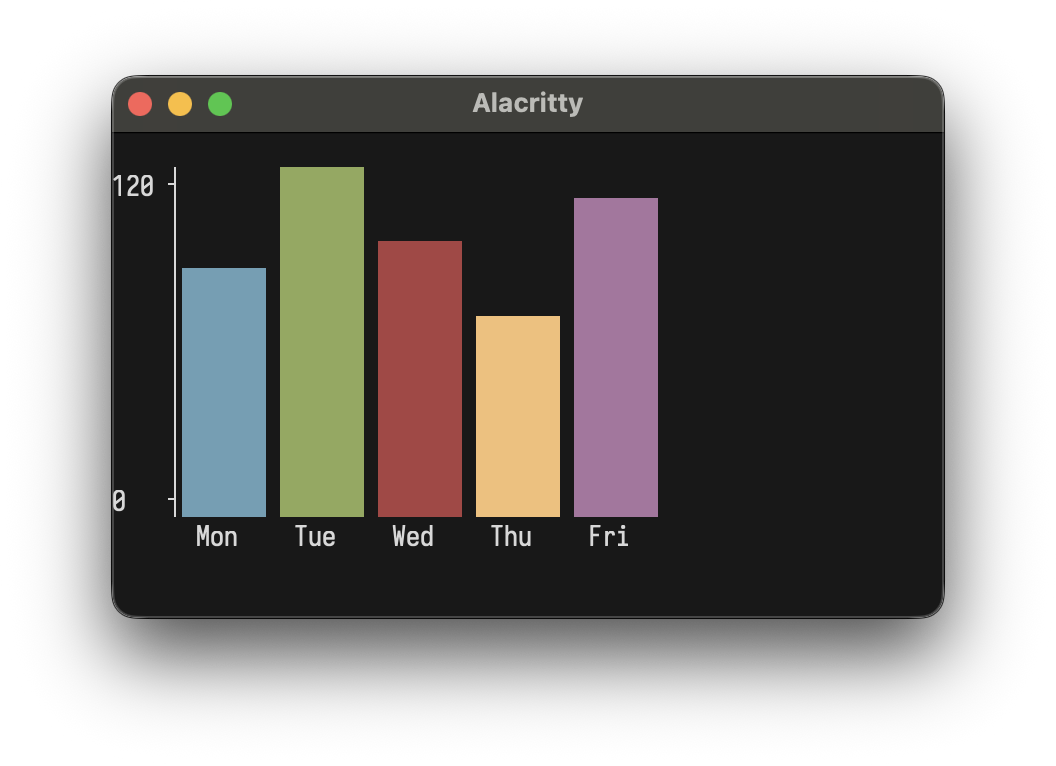
Bar Chart
bar(width = 40, height = 10)(
  Bar(100, "Mon"), Bar(120, "Tue"), Bar(110, "Wed"),
  Bar(85, "Thu"), Bar(115, "Fri")
)
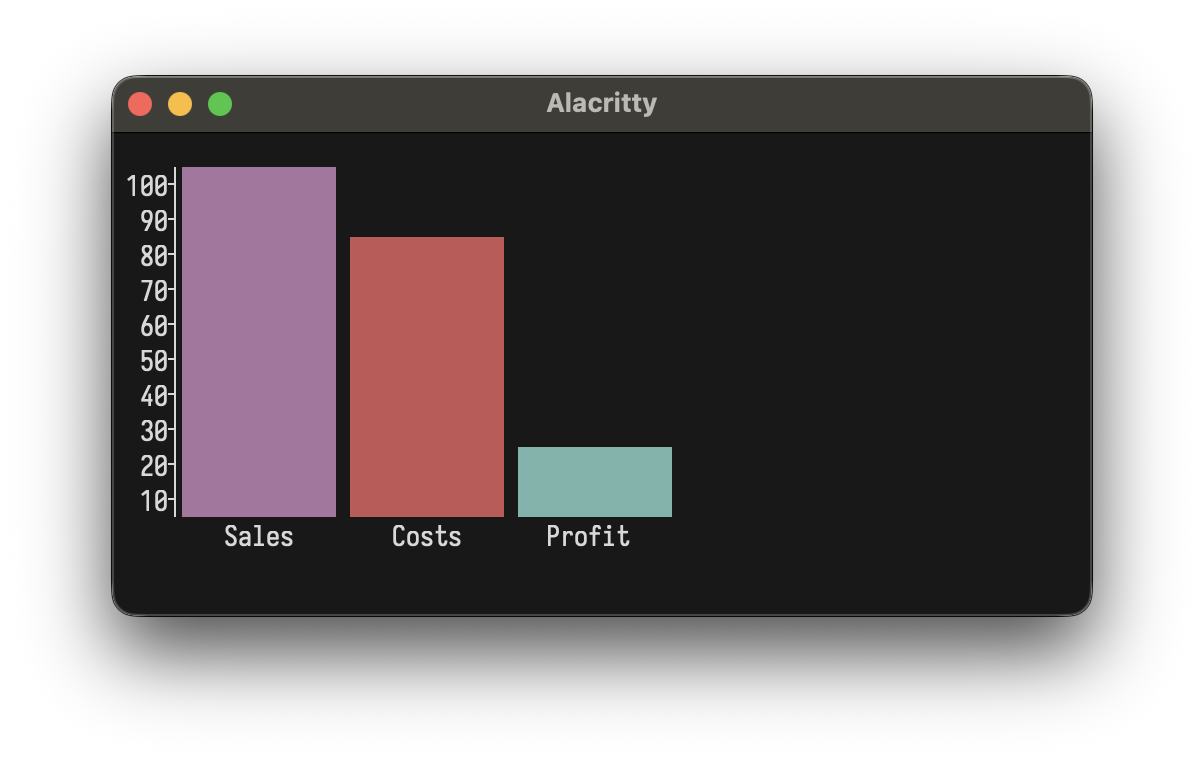
Custom colors:
bar()(
  Bar(100, "Sales").color(Color.Magenta),
  Bar(80, "Costs").color(Color.BrightRed),
  Bar(20, "Profit").color(Color.Cyan)
)
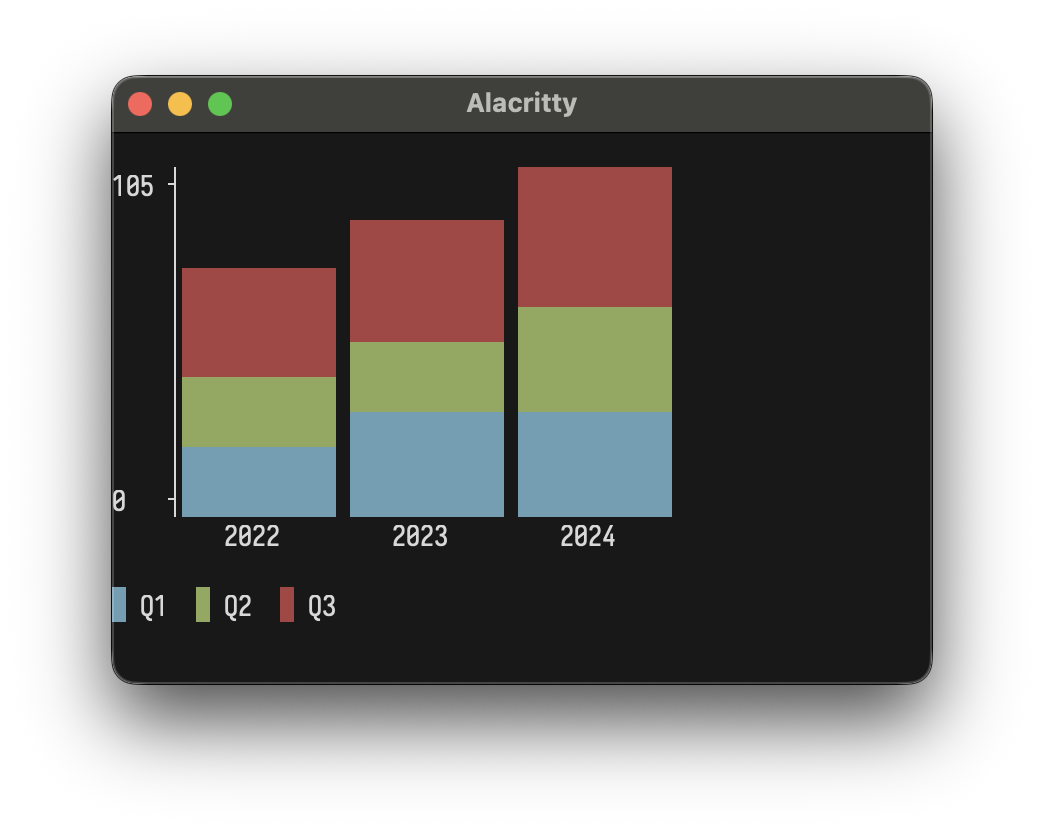
Stacked Bar Chart
stackedBar(width = 40, height = 10)(
  StackedBar(Seq(Bar(30, "Q1"), Bar(20, "Q2"), Bar(25, "Q3")), "2022"),
  StackedBar(Seq(Bar(35, "Q1"), Bar(25, "Q2"), Bar(30, "Q3")), "2023"),
  StackedBar(Seq(Bar(40, "Q1"), Bar(30, "Q2"), Bar(35, "Q3")), "2024")
)
Sparkline
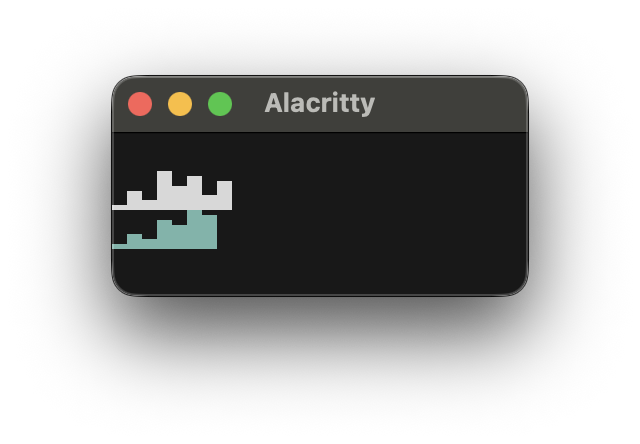
sparkline(Seq(1, 4, 2, 8, 5, 7, 3, 6))
sparkline(Seq(10, 20, 15, 30, 25, 40, 35)).color(Color.Cyan)
Box Plot
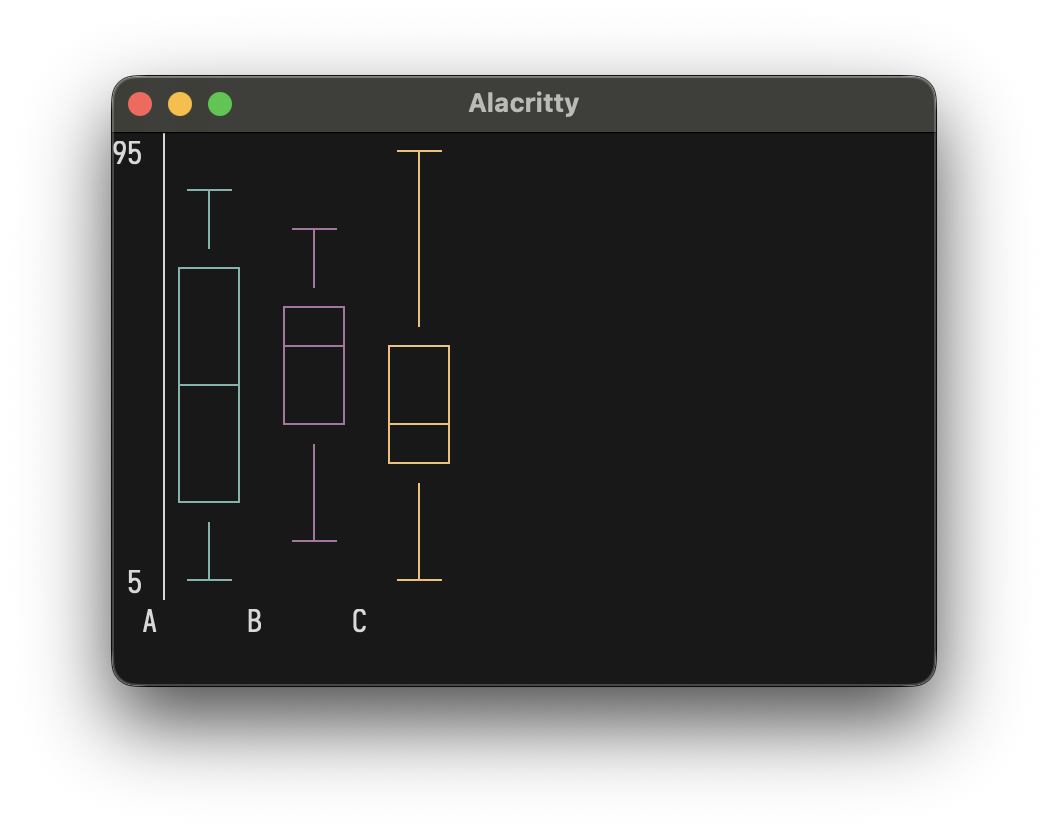
boxPlot(height = 12)(
  BoxData("A", min = 10, q1 = 25, median = 50, q3 = 75, max = 90).color(Color.Cyan),
  BoxData("B", min = 20, q1 = 40, median = 55, q3 = 70, max = 85).color(Color.Magenta),
  BoxData("C", min = 5, q1 = 30, median = 45, q3 = 60, max = 95).color(Color.Yellow)
)
Heatmap
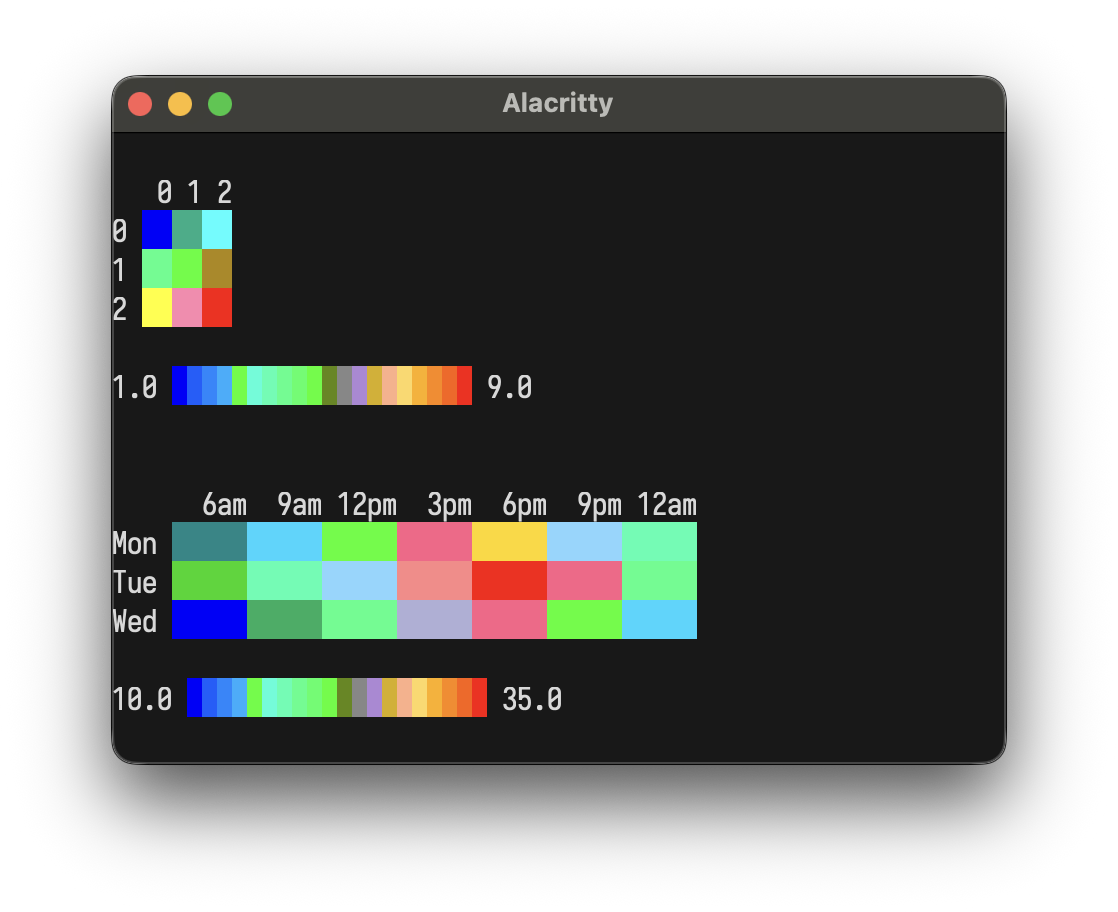
heatmap(Seq(
  Seq(1.0, 2.0, 3.0),
  Seq(4.0, 5.0, 6.0),
  Seq(7.0, 8.0, 9.0)
))
Heatmap(
  HeatmapData(
    rows = Seq(
      Seq(12.0, 15.0, 22.0, 28.0, 30.0, 25.0, 18.0),
      Seq(14.0, 18.0, 25.0, 32.0, 35.0, 28.0, 20.0),
      Seq(10.0, 13.0, 20.0, 26.0, 28.0, 22.0, 15.0)
    ),
    rowLabels = Seq("Mon", "Tue", "Wed"),
    colLabels = Seq("6am", "9am", "12pm", "3pm", "6pm", "9pm", "12am")
  ),
  cellWidth = 5
)
Interactive Apps
LayoutzApp uses the Elm Architecture where your
view is a layoutz.Element
Note
LayoutzApp is currently JVM + Native only
trait LayoutzApp[State, Message] {
  def init: (State, Cmd[Message])
  def update(msg: Message, state: State): (State, Cmd[Message])
  def subscriptions(state: State): Sub[Message]
  def view(state: State): Element
}
Three daemon threads coordinate rendering (~50ms), tick/timers, and input capture. State updates flow through update synchronously. Rendering uses incremental line-diffing: only changed lines are redrawn, eliminating flicker.
app.run(
  tickIntervalMs   = 100,              // Subscription polling rate
  renderIntervalMs = 50,               // Screen refresh rate
  clearOnStart     = true,             // Clear screen on launch
  clearOnExit      = true,             // Clear screen on quit
  showQuitMessage  = false,            // Display quit hint
  quitMessage      = "Ctrl+Q to quit", // Custom quit text
  quitKey          = Key.Ctrl('Q'),    // Quit on this key
  alignment        = Alignment.Left    // Left | Center | Right
)
Implicit conversion: return just state instead of (state, Cmd.none):
def update(msg: Msg, state: State) = msg match {
  case Increment => state.copy(count = state.count + 1)
  case LoadData  => (state.copy(loading = true), Cmd.file.read("data.txt", DataLoaded))
}
Key Types
/* Printable */
Key.Char(c: Char)
/* Editing */
Key.Enter
Key.Backspace
Key.Tab
Key.Escape
Key.Delete
/* Navigation */
Key.Up
Key.Down
Key.Left
Key.Right
Key.Home
Key.End
Key.PageUp
Key.PageDown
/* Modifiers */
Key.Ctrl(c: Char)        // Ctrl+A, Ctrl+S, etc.
Key.Unknown(code: Int)   // Unrecognized input
Subscriptions
Sub.none                                           // No subscriptions
Sub.onKeyPress { case Key.Char('q') => Some(Quit)  // Keyboard input
                 case _ => None }
Sub.time.everyMs(intervalMs, msg)                  // Periodic ticks
Sub.file.watch(path, onChange)                     // File changes
Sub.http.pollMs(url, intervalMs, onResponse)       // HTTP polling
Sub.batch(sub1, sub2, ...)                         // Combine multiple
def subscriptions(state: State) = Sub.batch(
  Sub.time.everyMs(100, Tick),
  Sub.file.watch("config.json", ConfigChanged),
  Sub.onKeyPress { case Key.Char('q') => Some(Quit); case _ => None }
)
Commands
Cmd.none                                         // No-op (default)
Cmd.exit                                         // Exit the application
Cmd.batch(cmd1, cmd2, ...)                       // Execute multiple commands
Cmd.task(expr)(toMsg)                            // Async task, result as Either
Cmd.fire(effect)                                 // Fire and forget
Cmd.afterMs(delayMs, msg)                        // One-shot delayed message
Cmd.showCursor                                   // Show terminal cursor
Cmd.hideCursor                                   // Hide terminal cursor
Cmd.setTitle(title)                              // Set terminal window title
Cmd.file.read(path, onResult)                    // Read file
Cmd.file.write(path, content, onResult)          // Write file
Cmd.file.ls(path, onResult)                      // List directory
Cmd.file.cwd(onResult)                           // Get working directory
Cmd.http.get(url, onResult, headers)             // HTTP GET
Cmd.http.post(url, body, onResult, headers)      // HTTP POST
Cmd.clipboard.read(onResult)                     // Read clipboard
Cmd.clipboard.write(content, onResult)           // Write clipboard
Prompts (Ask)
You often want to have one-shot CLI prompts, spinners, filters, file pickers etc in your Scala programs ... and dropping down into "Elm-territory" and thinking about things as a flipbook each time can get a bit tedious.
This is why layoutz offers one-shot CLI actions with Ask.*
import layoutz._
val name   = Ask.input("Name › ", placeholder = "anonymous")
val ok     = Ask.confirm("Venture on the quest?", default = true)
val realm  = Ask.choose("Choose a realm", Seq("Shire", "Rivendell", "Mirkwood"))
val packs  = Ask.chooseMany("Provisions", Seq("lembas", "pipe-weed", "rope"), limit = 3)
val riddle = Ask.write("Pose a riddle", placeholder = "All things it devours…")
val member = Ask.filter("Search > ", Seq("Bilbo", "Balin", "Dwalin", "Thorin"))
val path   = Ask.file(start = ".")
Ask.pager(longString)
val answer = Ask.spin("Awaking Smaug…") { Thread.sleep(1500); 42 }
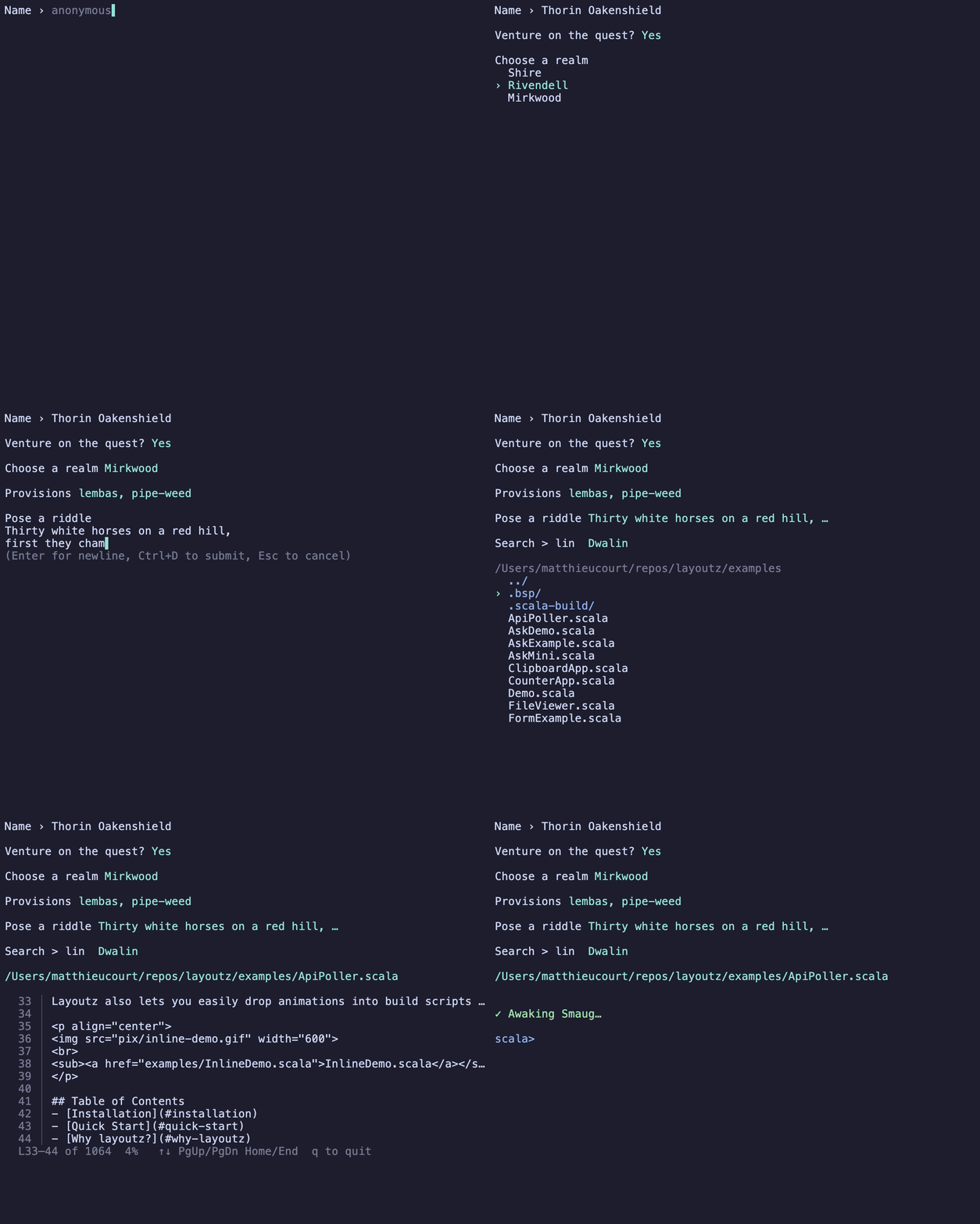
Each Ask.* returns its result directly:
Ask.input(prompt, placeholder, initial)  : Option[String]
Ask.confirm(q, default)                  : Boolean
Ask.choose(prompt, items)                : Option[A]
Ask.chooseMany(prompt, items, limit)     : Option[Seq[A]]
Ask.write(prompt, placeholder)           : Option[String]
Ask.filter(prompt, items)                : Option[A]
Ask.file(start, height)                  : Option[String]
Ask.pager(content, height, lineNumbers)  : Unit
Ask.spin(label) { task }                 : A
Progress (loader)
You often want to simply want to be able to wrap Ìterables and Iterator`s as you
are processing collections like below.
for (file <- loader("Resizing", imageFiles)) resize(file)
for (row  <- loader(rows)) insert(row)
for (line <- loader.stream("Tailing", logLines())) index(line)
Iterable gets a live bar, an unbounded Iterator gets a spinner with a running count.
Chain a style to change the look like so:
.blocks (default)
.bar
.ascii
.dots
.line
.pipe
.styled(...) (for custom bars)
for (id <- loader("Reindexing", docIds).ascii) reindex(id)
val crawling = loader("Crawling", urls)
  .styled(fill = '▰', empty = '▱', color = Color.BrightMagenta)
for (url <- crawling) fetch(url)
Every built-in style, then an unbounded stream:
import layoutz._
for (_ <- loader("Blocks ", 1 to 60).blocks) Thread.sleep(16)
for (_ <- loader("Dots   ", 1 to 60).dots)   Thread.sleep(16)
for (_ <- loader("Line   ", 1 to 60).line)   Thread.sleep(16)
for (_ <- loader("Pipes  ", 1 to 60).pipes)  Thread.sleep(16)
for (_ <- loader("Bar    ", 1 to 60).bar)    Thread.sleep(16)
for (_ <- loader("Ascii  ", 1 to 60).ascii)  Thread.sleep(16)
val it = Iterator.from(1).take(90)
for (_ <- loader.stream("Streaming", it)) Thread.sleep(45)

Examples
Interactive TUI apps using LayoutzApp with built-in Cmd and Sub.
Cmd.file.read, Sub.file.watch)
import layoutz._
case class FileState(content: String, error: Option[String])
sealed trait Msg
case class FileLoaded(result: Either[String, String]) extends Msg
object FileViewer extends LayoutzApp[FileState, Msg] {
  val filename = "README.md"
  def init = (FileState("Loading...", None), Cmd.file.read(filename, FileLoaded))
  def update(msg: Msg, state: FileState) = msg match {
    case FileLoaded(Right(content)) =>
      (state.copy(content = content.take(500), error = None), Cmd.none)
    case FileLoaded(Left(err)) =>
      (state.copy(error = Some(err)), Cmd.none)
  }
  def subscriptions(state: FileState) =
    Sub.file.watch(filename, FileLoaded)
  def view(state: FileState) = {
    val display = state.error match {
      case Some(err) => Color.BrightRed(s"Error: $err")
      case None      => wrap(state.content, 60)
    }
    layout(
      underlineColored("=", Color.BrightMagenta)("File Viewer").style(Style.Bold),
      kv("File" -> filename).color(Color.BrightBlue),
      box("Content")(display).border(Border.Round),
      "Auto-reloads on file change".color(Color.BrightBlack)
    )
  }
}
FileViewer.run
See FileViewer.scala.
Start/pause timer driven bySub.time.everyMs
import layoutz._
case class TimerState(seconds: Int, running: Boolean)
sealed trait Msg
case object Tick extends Msg
case object ToggleTimer extends Msg
case object ResetTimer extends Msg
object StopwatchApp extends LayoutzApp[TimerState, Msg] {
  def init = (TimerState(0, false), Cmd.none)
  def update(msg: Msg, state: TimerState) = msg match {
    case Tick =>
      (state.copy(seconds = state.seconds + 1), Cmd.none)
    case ToggleTimer =>
      (state.copy(running = !state.running), Cmd.none)
    case ResetTimer =>
      (TimerState(0, running = false), Cmd.none)
  }
  def subscriptions(state: TimerState) = Sub.batch(
    if (state.running) Sub.time.everyMs(1000, Tick) else Sub.none,
    Sub.onKeyPress {
      case Key.Char(' ') => Some(ToggleTimer)
      case Key.Char('r') => Some(ResetTimer)
      case _             => None
    }
  )
  def view(state: TimerState) = {
    val minutes = state.seconds / 60
    val secs = state.seconds % 60
    val timeDisplay = f"$minutes%02d:$secs%02d"
    val statusColor = if (state.running) Color.BrightGreen else Color.BrightYellow
    val statusText = if (state.running) "RUNNING" else "PAUSED"
    layout(
      underlineColored("=", Color.BrightCyan)("Stopwatch").style(Style.Bold),
      "",
      box("Time")(
        timeDisplay.style(Style.Bold).center(20)
      ).color(statusColor).border(Border.Double),
      "",
      kv(
        "Status" -> statusText,
        "Elapsed" -> s"${state.seconds}s"
      ).color(Color.BrightBlue),
      "",
      ul(
        "space: start/pause",
        "r: reset"
      ).color(Color.BrightBlack)
    )
  }
}
StopwatchApp.run
See StopwatchApp.scala.
Async work withCmd.task, fire-and-forget with Cmd.fire
import layoutz._
case class TaskState(status: String = "idle", count: Int = 0)
sealed trait Msg
case object RunTask extends Msg
case class TaskDone(result: Either[String, String]) extends Msg
object SideEffectApp extends LayoutzApp[TaskState, Msg] {
  def init = (TaskState(), Cmd.none)
  def update(msg: Msg, state: TaskState) = msg match {
    case RunTask =>
      (state.copy(status = "running..."),
       Cmd.task {
         Thread.sleep(500)
         if (scala.util.Random.nextDouble() < 0.3)
           throw new Exception("Launch failure")
         "completed"
       }(TaskDone))
    case TaskDone(Right(_)) =>
      state.copy(status = "success", count = state.count + 1)
    case TaskDone(Left(err)) =>
      state.copy(status = s"error: $err")
  }
  def subscriptions(state: TaskState) = Sub.onKeyPress {
    case Key.Char('r') => Some(RunTask)
    case _             => None
  }
  def view(state: TaskState) = layout(
    section("Side Effect Demo")(
      kv("Status" -> state.status, "Count" -> state.count.toString)
    ),
    "r: run task".color(Color.BrightBlack)
  )
}
SideEffectApp.run
Use Cmd.fire for fire-and-forget effects (logging, analytics, etc.):
Cmd.fire(println("User clicked button"))
See SideEffectApp.scala.
Poll an endpoint withSub.http.pollMs
import layoutz._
case class ApiState(response: String, lastUpdate: String, error: Option[String])
sealed trait Msg
case class ApiResponse(result: Either[String, String]) extends Msg
object ApiPoller extends LayoutzApp[ApiState, Msg] {
  val apiUrl = "https://api.github.com/zen"
  def init = (ApiState("Loading...", "Never", None), Cmd.none)
  def update(msg: Msg, state: ApiState) = msg match {
    case ApiResponse(Right(data)) =>
      val now = java.time.LocalTime.now().toString.take(8)
      (state.copy(response = data, lastUpdate = now, error = None), Cmd.none)
    case ApiResponse(Left(err)) =>
      (state.copy(error = Some(err)), Cmd.none)
  }
  def subscriptions(state: ApiState) =
    Sub.http.pollMs(apiUrl, 3000, ApiResponse)
  def view(state: ApiState) = {
    val display = state.error match {
      case Some(err) => Color.BrightRed(s"Error: $err")
      case None      => wrap(state.response, 60).color(Color.BrightGreen)
    }
    layout(
      underlineColored("~", Color.BrightCyan)("API Poller").style(Style.Bold),
      kv("Endpoint" -> apiUrl, "Last Update" -> state.lastUpdate).color(Color.BrightBlue),
      box("Response")(display).border(Border.Round),
      "Polls every 3s".color(Color.BrightBlack)
    )
  }
}
ApiPoller.run
See ApiPoller.scala.
Monitor several APIs at once withSub.batch
import layoutz._
case class MonitorState(
  github: String = "...",
  httpbin: String = "...",
  placeholder: String = "..."
)
sealed trait Msg
case class GithubResp(result: Either[String, String]) extends Msg
case class HttpbinResp(result: Either[String, String]) extends Msg
case class PlaceholderResp(result: Either[String, String]) extends Msg
object MultiMonitor extends LayoutzApp[MonitorState, Msg] {
  def init = (MonitorState(), Cmd.none)
  def update(msg: Msg, state: MonitorState) = msg match {
    case GithubResp(Right(data)) => (state.copy(github = data.take(20)), Cmd.none)
    case GithubResp(Left(e)) => (state.copy(github = s"ERROR: $e"), Cmd.none)
    case HttpbinResp(Right(_)) => (state.copy(httpbin = "UP"), Cmd.none)
    case HttpbinResp(Left(e)) => (state.copy(httpbin = s"ERROR: $e"), Cmd.none)
    case PlaceholderResp(Right(_)) => (state.copy(placeholder = "UP"), Cmd.none)
    case PlaceholderResp(Left(e)) => (state.copy(placeholder = s"ERROR: $e"), Cmd.none)
  }
  def subscriptions(state: MonitorState) = Sub.batch(
    Sub.http.pollMs("https://api.github.com/zen", 4000, GithubResp),
    Sub.http.pollMs("https://httpbin.org/get", 5000, HttpbinResp),
    Sub.http.pollMs("https://jsonplaceholder.typicode.com/posts/1", 6000, PlaceholderResp)
  )
  def view(state: MonitorState) = layout(
    underlineColored("~", Color.BrightGreen)("Multi-API Monitor").style(Style.Bold),
    br,
    table(
      Seq("Service", "Status"),
      Seq(
        Seq("GitHub", state.github),
        Seq("HTTPBin", state.httpbin),
        Seq("JSONPlaceholder", state.placeholder)
      )
    ).border(Border.Round),
    br,
    "Auto-polls all endpoints".color(Color.BrightBlack)
  )
}
MultiMonitor.run
See MultiMonitor.scala.
Fetch on demand withCmd.http.get
import layoutz._
case class FetchState(data: String, loading: Boolean, count: Int)
sealed trait Msg
case object Fetch extends Msg
case class Response(result: Either[String, String]) extends Msg
object HttpFetcher extends LayoutzApp[FetchState, Msg] {
  def init = (FetchState("Press 'f' to fetch", false, 0), Cmd.none)
  def update(msg: Msg, state: FetchState) = msg match {
    case Fetch =>
      (state.copy(loading = true, count = state.count + 1),
       Cmd.http.get("https://api.github.com/zen", Response))
    case Response(Right(data)) =>
      (state.copy(data = data, loading = false), Cmd.none)
    case Response(Left(err)) =>
      (state.copy(data = s"Error: $err", loading = false), Cmd.none)
  }
  def subscriptions(state: FetchState) = Sub.onKeyPress {
    case Key.Char('f') => Some(Fetch)
    case _             => None
  }
  def view(state: FetchState) = {
    val status: Element = if (state.loading) spinner("Fetching", state.count % 10)
                          else Text(s"Fetched ${state.count} times")
    layout(
      underlineColored("=", Color.BrightCyan)("HTTP Fetcher").style(Style.Bold),
      box("Zen Quote")(wrap(state.data, 50)).border(Border.Round).color(Color.BrightGreen),
      status,
      "f: fetch".color(Color.BrightBlack)
    )
  }
}
HttpFetcher.run
See HttpFetcher.scala.
Copy/paste withCmd.clipboard
import layoutz._
case class ClipState(content: String = "", status: String = "Press 'r' to read clipboard")
sealed trait Msg
case class ClipRead(result: Either[String, String]) extends Msg
case class ClipWritten(result: Either[String, Unit]) extends Msg
case object ReadClip extends Msg
case object WriteClip extends Msg
object ClipboardApp extends LayoutzApp[ClipState, Msg] {
  def init = (ClipState(), Cmd.none)
  def update(msg: Msg, state: ClipState) = msg match {
    case ReadClip =>
      (state.copy(status = "Reading..."), Cmd.clipboard.read(ClipRead))
    case ClipRead(Right(text)) =>
      (state.copy(content = text.take(200), status = "Read OK"), Cmd.none)
    case ClipRead(Left(err)) =>
      (state.copy(status = s"Error: $err"), Cmd.none)
    case WriteClip =>
      (state.copy(status = "Writing..."),
       Cmd.clipboard.write("Hello from layoutz!", ClipWritten))
    case ClipWritten(Right(_)) =>
      (state.copy(status = "Written to clipboard!"), Cmd.none)
    case ClipWritten(Left(err)) =>
      (state.copy(status = s"Error: $err"), Cmd.none)
  }
  def subscriptions(state: ClipState) = Sub.onKeyPress {
    case Key.Char('r') => Some(ReadClip)
    case Key.Char('w') => Some(WriteClip)
    case _             => None
  }
  def view(state: ClipState) = layout(
    section("Clipboard Demo")(
      kv("Status" -> state.status),
      box("Content")(wrap(state.content, 60)).border(Border.Round)
    ),
    ul("r: read clipboard", "w: write to clipboard").color(Color.BrightBlack)
  )
}
ClipboardApp.run
See ClipboardApp.scala.
Build interactive forms withtextInput, SingleChoice, MultiChoice
import layoutz._
case class FormState(
    name: String = "",
    mood: Int = 0,                          // index into moods list
    selectedLetters: Set[Int] = Set.empty,  // indices of selected letters
    letterCursor: Int = 0,                  // current cursor position in multi-choice
    activeField: Int = 0,                   // 0=name, 1=mood, 2=letters
    submitted: Boolean = false
)
sealed trait FormMsg
case class UpdateName(newValue: String) extends FormMsg
case object NextField extends FormMsg
case object PrevField extends FormMsg
case object FormMoveUp extends FormMsg
case object FormMoveDown extends FormMsg
case object ToggleSelection extends FormMsg
case object Submit extends FormMsg
object FormExample extends LayoutzApp[FormState, FormMsg] {
  private val moods = Seq("great", "okay", "meh", "not great")
  private val letters = ('A' to 'F').map(_.toString).toSeq
  def init = (FormState(), Cmd.none)
  def update(msg: FormMsg, state: FormState) = msg match {
    case UpdateName(newValue) =>
      (state.copy(name = newValue), Cmd.none)
    case NextField if state.activeField < 2 =>
      (state.copy(activeField = state.activeField + 1), Cmd.none)
    case PrevField if state.activeField > 0 =>
      (state.copy(activeField = state.activeField - 1), Cmd.none)
    // Single choice navigation
    case FormMoveUp if state.activeField == 1 =>
      val newMood = if (state.mood > 0) state.mood - 1 else moods.length - 1
      (state.copy(mood = newMood), Cmd.none)
    case FormMoveDown if state.activeField == 1 =>
      val newMood = if (state.mood < moods.length - 1) state.mood + 1 else 0
      (state.copy(mood = newMood), Cmd.none)
    // Multi choice navigation and toggle
    case FormMoveUp if state.activeField == 2 =>
      val newCursor =
        if (state.letterCursor > 0) state.letterCursor - 1
        else letters.length - 1
      (state.copy(letterCursor = newCursor), Cmd.none)
    case FormMoveDown if state.activeField == 2 =>
      val newCursor =
        if (state.letterCursor < letters.length - 1) state.letterCursor + 1
        else 0
      (state.copy(letterCursor = newCursor), Cmd.none)
    case ToggleSelection if state.activeField == 2 =>
      val newSelected =
        if (state.selectedLetters.contains(state.letterCursor)) {
          state.selectedLetters - state.letterCursor
        } else {
          state.selectedLetters + state.letterCursor
        }
      (state.copy(selectedLetters = newSelected), Cmd.none)
    case Submit =>
      (state.copy(submitted = true), Cmd.none)
    case _ => (state, Cmd.none)
  }
  def subscriptions(state: FormState) = Sub.onKeyPress { key =>
    // Space toggles in multi-choice - handle this first!
    (if (state.activeField == 2 && key == Key.Char(' ')) Some(ToggleSelection)
     else None)
      // Check if name field handled the key
      .orElse(
        input.handle(key, 0, state.activeField, state.name).map(UpdateName)
      )
      // Otherwise check other keys
      .orElse(key match {
        case Key.Tab                                 => Some(NextField)
        case Key.Char('n') if state.activeField != 0 => Some(NextField)
        case Key.Char('p') if state.activeField != 0 => Some(PrevField)
        case Key.Up | Key.Char('k')                  => Some(FormMoveUp)
        case Key.Down | Key.Char('j')                => Some(FormMoveDown)
        case Key.Enter                               => Some(Submit)
        case _                                       => None
      })
  }
  def view(state: FormState) =
    if (state.submitted) {
      layout(
        section("✓ Form Submitted")(
          layout(
            s"Name: ${state.name}",
            s"Mood: ${moods(state.mood)}",
            s"Letters: ${state.selectedLetters.toSeq.sorted.map(i => letters(i)).mkString(", ")}",
            br
          )
        )
      )
    } else {
      layout(
        section("📝 User Survey")(
          layout(
            textInput(
              "What's your name?",
              state.name,
              "Type here...",
              active = state.activeField == 0
            ),
            br,
            SingleChoice(
              label = "How was your day?",
              options = moods,
              selected = state.mood,
              active = state.activeField == 1
            ),
            br,
            MultiChoice(
              label = "Favorite letters?",
              options = letters,
              selected = state.selectedLetters,
              cursor = state.letterCursor,
              active = state.activeField == 2
            )
          )
        ),
        br,
        section("Controls")(
          ul(
            "Type to enter name",
            "↑↓ / k/j to navigate options",
            "Space to toggle multi-choice",
            "Tab / n to next field, p for previous",
            "Enter to submit"
          )
        )
      )
    }
}
FormExample.run
See FormExample.scala.
Navigation, progress tracking, and stateful emojis withSub.batch
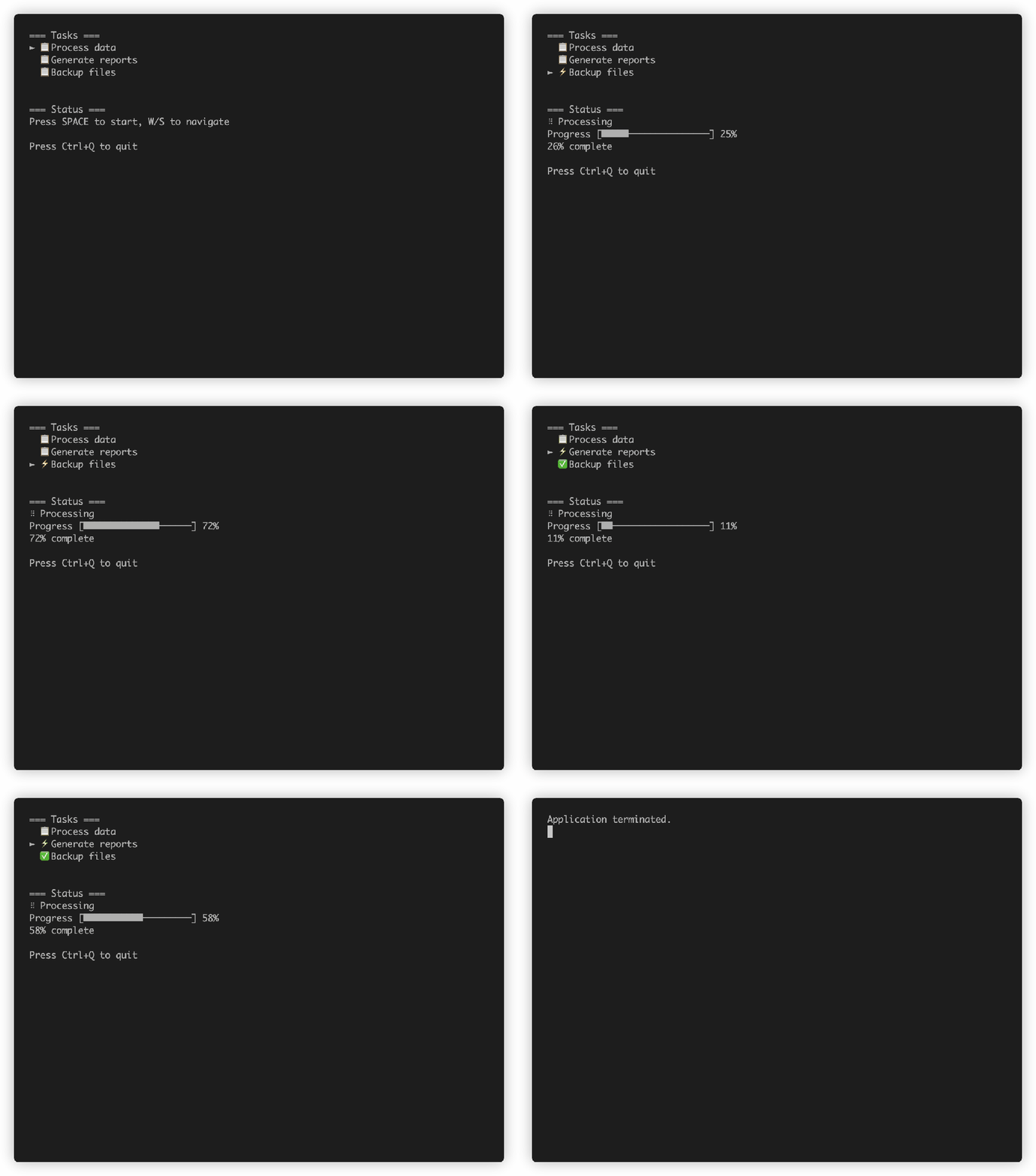
The full task navigator adds/removes tasks, tracks progress, and swaps emojis per state. See NavLoadApp.scala for the complete runnable file. The heart of it is the subscription wiring time ticks and keyboard input together:
def subscriptions(state: NavLoadState): Sub[NavLoadMessage] =
  Sub.batch(
    // Time updates drive progress bars and spinners
    Sub.time.everyMs(100, UpdateTick),
    // Keyboard input drives navigation and task editing
    Sub.onKeyPress {
      case Key.Escape    => Some(CancelNewTask)
      case Key.Tab       => Some(ConfirmNewTask)
      case Key.Backspace => Some(DeleteTaskChar)
      case Key.Up        => Some(MoveUp)
      case Key.Down      => Some(MoveDown)
      case Key.Enter     => Some(StartTask)
      case Key.Char(c)   => Some(HandleChar(c))
      case _             => None
    }
  )
LayoutzApp
A full snake game driven by Sub.time.everyMs for the game loop and Sub.onKeyPress for steering.
See SimpleGame.scala for the complete runnable file.
Contributing
You need Mill and a JDK (11+).
make test          # run all tests (JVM, JS, Native)
make compile       # compile all platforms
make repl          # Scala 3 REPL with layoutz loaded
Fork, make your change, make test, open a PR. Keep it zero-dep.
Comments
Nothing yet. Say the first thing.
Sign in to join the conversation.