
Hello,
Have you ever struggled with the creation of test data for apex unit tests?
Duplicated code was your nightmare? Test Data Builder wasn’t helpful?
Don’t worry. I have a solution.
Problem
Unit Tests – most of the developers think about it as an annoying duty. Salesforce requires at least 75% code coverage.
However, Unit Tests can be a great tool to keep our code error-free.
Written in a good manner, allows us to make code changes without worrying about breaking the whole product.
The most problematic part of test development is test data.
Poor database design, a lot of validation rules and we can stuck in your @testSetup.
And here I present you a solution => Test Data Factory.
Prepare classes responsible for data creation once and invoke them through TDF_TestDataCreator.
*TDF = Test Data Factory
It’s very simple. Let’s go further.
Architecture
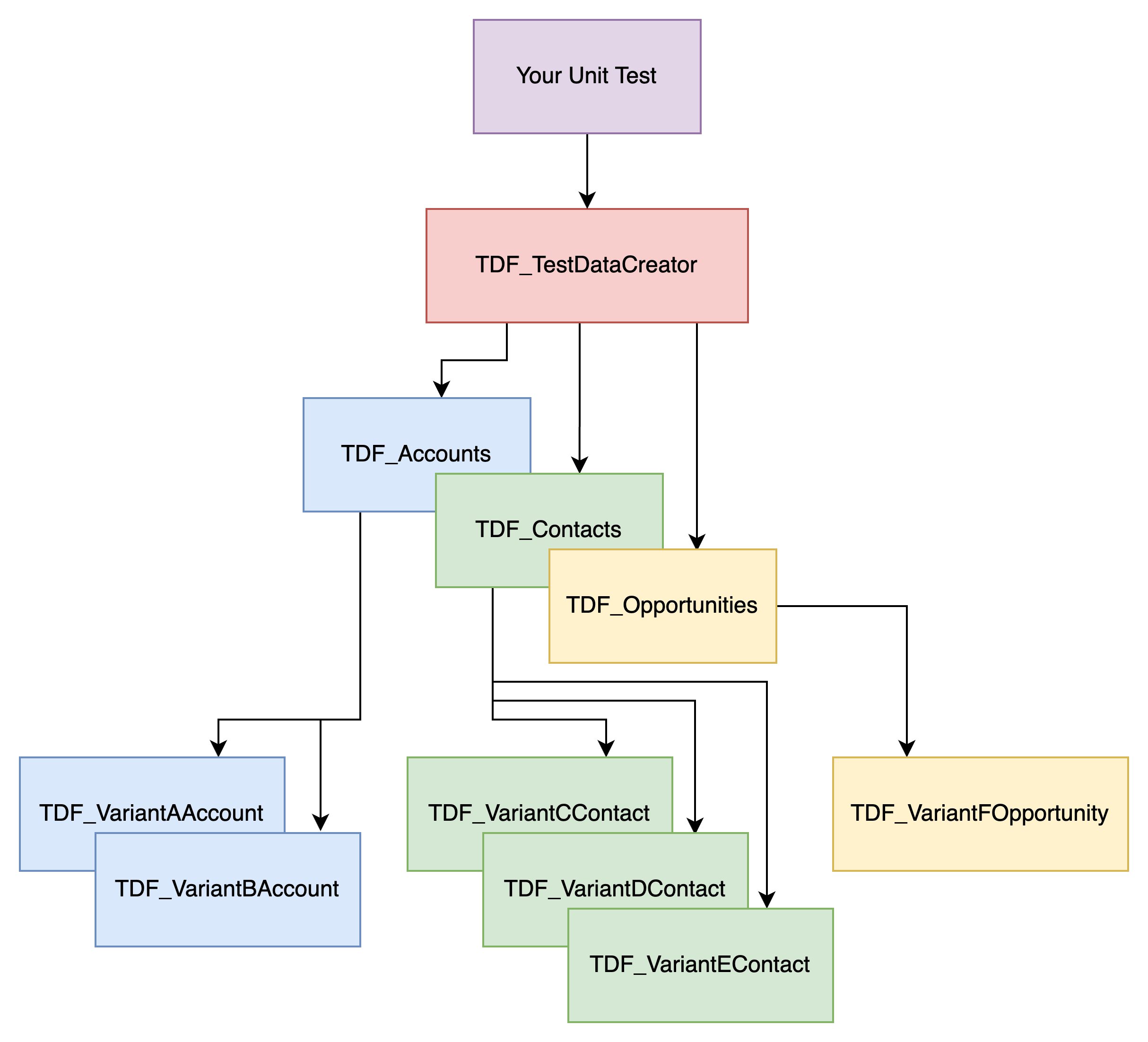
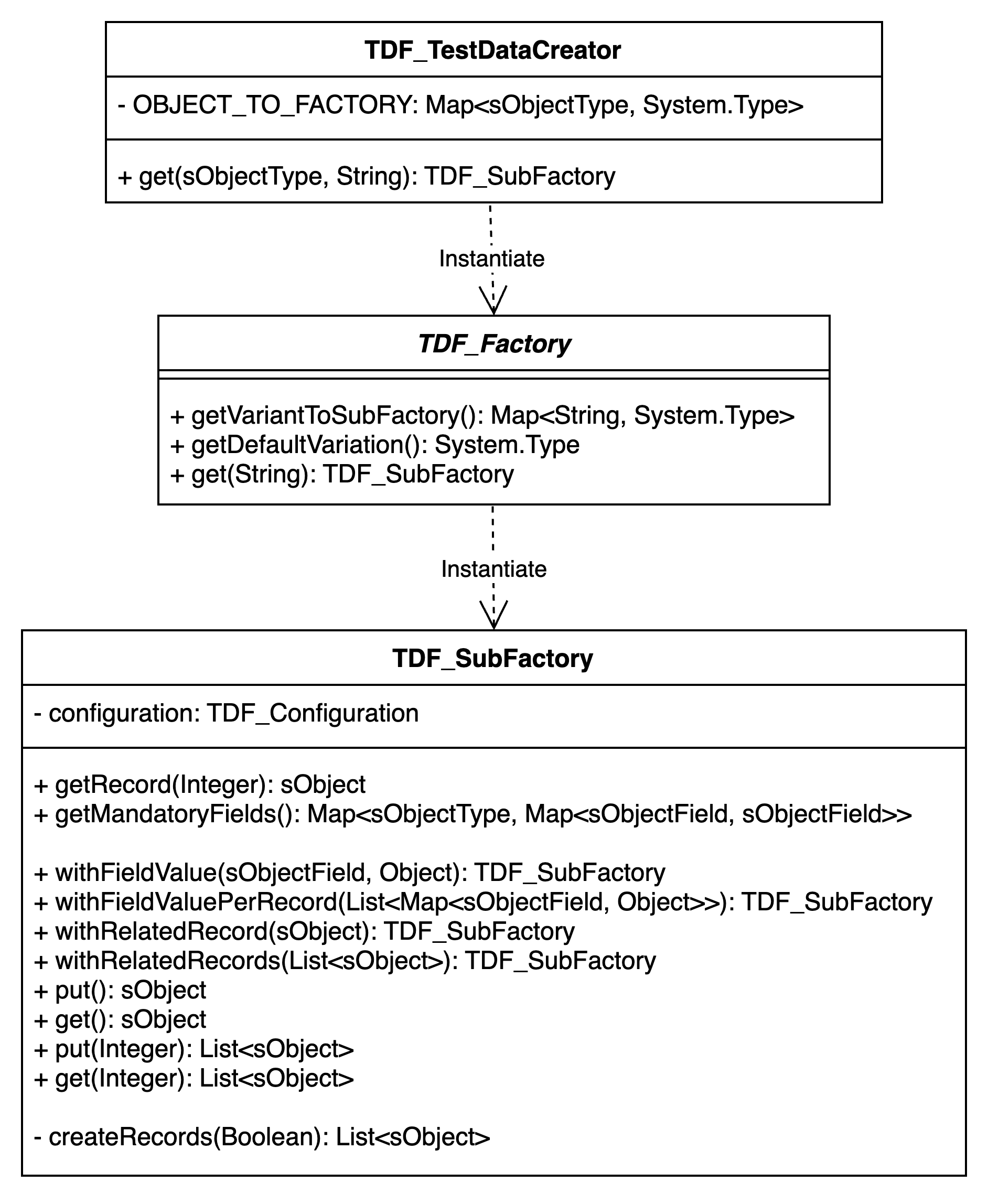
Code
The whole TDF’s code you can find here.
// TDF_TestDataCreator.cls
@isTest
public class TDF_TestDataCreator {
    private final static Map<sObjectType, System.Type> OBJECT_TO_FACTORY = new Map<sObjectType, System.Type>{
        Account.sObjectType => TDF_Accounts.class,
        Contact.sObjectType => TDF_Contacts.class
        // other factories here
    };
    public static TDF_SubFactory get(sObjectType objectType) {
        return (TDF_SubFactory) getObjectFactory(objectType).getDefaultVariation().newInstance();
    }
    public static TDF_SubFactory get(sObjectType objectType, String variant) {
        return (TDF_SubFactory) getObjectFactory(objectType).get(variant);
    }
    private static TDF_Factory getObjectFactory(sObjectType objectType) {
        return (TDF_Factory) OBJECT_TO_FACTORY.get(objectType).newInstance();
    }
}
// TDF_Accounts.cls
@isTest
public class TDF_Accounts extends TDF_Factory {
public override System.Type getDefaultVariation() {
return TDF_VariantAAccount.class;
}
public override Map<String, System.Type> getVariantToSubFactory() {
return new Map<String, System.Type>{
'VARIANT_A' => TDF_VariantAAccount.class,
'VARIANT_B' => TDF_VariantBAccount.class
//other variants here
};
}
}
// TDF_AccountVariantA.cls
@isTest
public with sharing class TDF_VariantAAccount extends TDF_SubFactory {
    public override sObject getRecord(Integer index) {
        return new Account(
            Name = 'Variant A' + index
            //other fields here
        );
    }
}
Usage
Account myTestAccount = (Account) TDF_TestDataCreator.get(Account.sObjectType, 'VARIANT_A').put();
Contact myTestContact = (Contact) TDF_TestDataCreator.get(Contact.sObjectType, 'VARIANT_C').withRelatedRecord(myTestAccount).put();
List<Account> accounts = (List<Account>) TDF_TestDataCreator.get(Account.sObjectType, 'VARIANT_A')
                                                            .withFieldValue(Account.Name, 'My New Account Name')
                                                            .put(5);
Configuration
All configuration options you can find in TDF_SubFactory.cls. TDF_SubFactory is kind of Builder Design Pattern.
Chain methods to get records valid for your test scenario.
All configuration options
.withFieldValue(sObjectField field, Object value);
List<Account> accounts = (List<Account>) TDF_TestDataCreator.get(Account.sObjectType, 'VARIANT_A')
                                                            .withFieldValue(Account.Name, 'My New Account Name')
.put(5);Result: All Accounts Name will be replaced with My New Account Name, no matter of factory configuration.
withFieldValuePerRecord(List<Map<sObjectField, Object>> customFieldsValues)
List<Account> accounts = (List<Account>) TDF_TestDataCreator.get(Account.sObjectType, 'VARIANT_A')
                                                            .withFieldValuePerRecord(new List<Map<sObjectField, Object>>{
                                                                new Map<sObjectField, Object>{
                                                                    Account.Name => 'My New Account Name 1'
                                                                },
                                                                new Map<sObjectField, Object>{
                                                                    Account.Name => 'My New Account Name 2'
                                                                }
                                                            })
.put(2);Result: Each account will have a different Name.
accounts[0].Name => ‘My New Account Name 1’, accounts[1].Name => ‘My New Account Name 2’
withRelatedRecord(sObject relatedRecord)
Account myTestAccount = (Account) TDF_TestDataCreator.get(Account.sObjectType, 'VARIANT_A').put();
Contact myTestContact = (Contact) TDF_TestDataCreator.get(Contact.sObjectType, 'VARIANT_A').withRelatedRecord(myTestAccount).put();Result: Contact.AccountId will be taken from Account.Id as it is done in SubFactory Mapping (getMandatoryFields)
put()andput(Integer amount)
Account account = (Account) TDF_TestDataCreator.get(Account.sObjectType, 'VARIANT_A').put();
List<Account> accounts = (List<Account>) TDF_TestDataCreator.get(Account.sObjectType, 'VARIANT_A').put(5);Result: Account will be inserted. 5 Accounts will be inserted.
get()andget(Integer amount)
Account account = (Account) TDF_TestDataCreator.get(Account.sObjectType, 'VARIANT_A').get();
List<Account> accounts = (List<Account>) TDF_TestDataCreator.get(Account.sObjectType, 'VARIANT_A').get(5);Result: Get an Account without the insert. Get 5 Accounts without the insert.
Benefits
- No class dependencies.
- Single Responsibility Principle – Each
TDF_FactoryandTDF_SubFactoryare responsible for creating a specific set of data. - Open/Close Principle – Easy to add new factories without changing existing code.
- Easy to understand and use.
- The developer doesn’t need to know concrete classes – invoke
TDF_TestDataCreator, pass type and variant, and get the record. - One place to fail – You need to fix test data creation only in a specific factory.
- TDF is lightweight – CPU Time and Heap Size are reduced.
Repository
If you have any questions feel free to ask in the comment section below. 🙂
Was it helpful? Check out our other great posts here.
Comments
Nothing yet. Say the first thing.
Sign in to join the conversation.