
Posted on June 25, 2021 by Ben Limmer

AWS Cloud Development Kit (CDK) makes it super-easy to deploy Node.js Lambda functions using the NodejsFunction construct.
However, one issue I’ve seen with this construct is that, by default, the aws-sdk version defined in your
package.json file is not bundled with the Lambda that the CDK publishes. For the TLDR, jump below.
Consider a NodejsFunction defined like this:
import * as cdk from "@aws-cdk/core";
import * as nodelambda from "@aws-cdk/aws-lambda-nodejs";
import { join } from "path";
export default class MyLambdaStack extends cdk.Stack {
constructor(scope: cdk.Construct) {
super(scope, "MyLambdaStack");
new nodelambda.NodejsFunction(this, "Lambda", {
entry: join(__dirname, "lambda", "index.ts"),
});
}
}
This lambda has a package.json file that looks like this:
{
"name": "lambda",
"version": "1.0.0",
"dependencies": {
"aws-sdk": "2.935.0"
}
}
It’s reasonable to assume that, at runtime, my Lambda function would use aws-sdk version 2.935.0, as I’ve defined.
However, by default, the NodejsFunction bundler considers aws-sdk to be an “external module” provided by the Lambda
runtime
(docs).
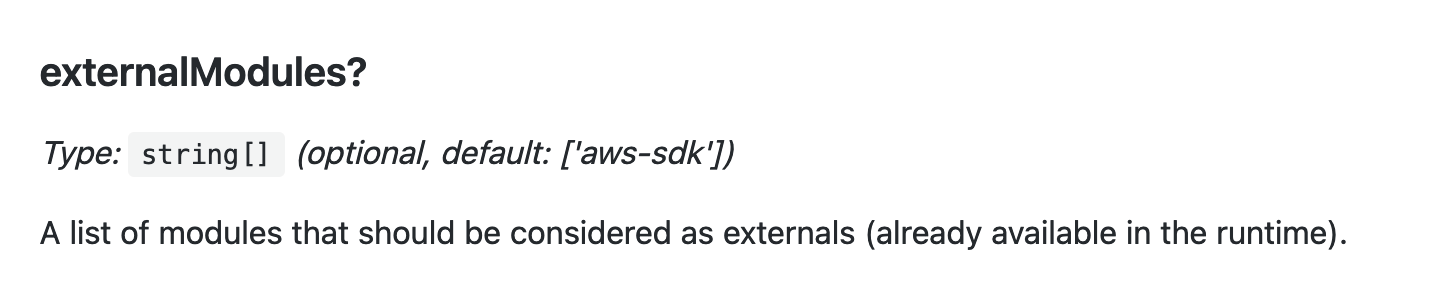
So, instead of the version you’ve defined in your package.json file, the version of aws-sdk included in the Lambda
runtime is used instead. At the time this blog post was written, it was 2.888.0. You can find the most up-to-date
information on the bundled aws-sdk version
in the Lambda Runtimes documentation.
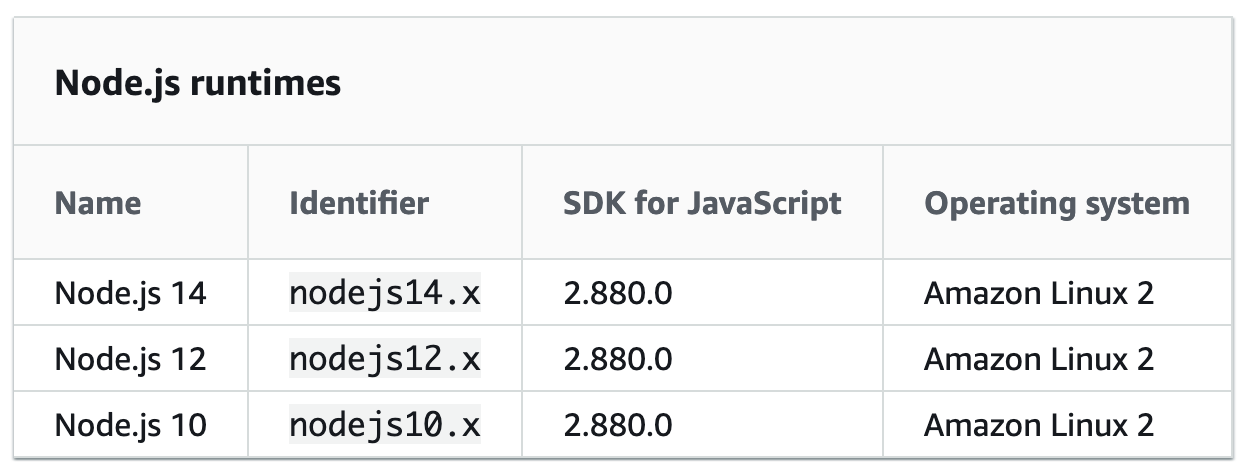
In most cases, this discrepancy doesn’t matter. However, if you need to use a feature of the aws-sdk that’s only
available in newer versions, or you need to pin to a specific version for some other reason, this default behavior can
be undesirable.
To work around this problem, override the externalModules setting in your NodejsFunction declaration. For example:
import * as cdk from "@aws-cdk/core";
import * as nodelambda from "@aws-cdk/aws-lambda-nodejs";
import { join } from "path";
export default class MyLambdaStack extends cdk.Stack {
constructor(scope: cdk.Construct) {
super(scope, "MyLambdaStack");
new nodelambda.NodejsFunction(this, "Lambda", {
entry: join(__dirname, "lambda", "index.ts"),
bundling: {
// This is the configuration you need to use to include the exact
// aws-sdk version from your `package.json` file.
externalModules: [],
},
});
}
}
Now, the bundling process will install the aws-sdk version defined in your package.json file. Note that your
resulting lambda will be larger in size since the aws-sdk is included in the final asset.
Summary / TLDR
If you need to include a version of the aws-sdk package that’s newer than the one included in the
Node.js Lambda Runtime you’re using, specify an
empty array for the externalModules bundling options property
(docs).
new NodejsFunction(this, "Lambda", {
// ... other config ...
bundling: {
externalModules: [],
},
});
This configuration ensures that the exact aws-sdk module defined in your package.json file is included in the
uploaded Lambda function.
Comments
Nothing yet. Say the first thing.
Sign in to join the conversation.