Gaussian Splatting has become a standard rendering primitive. In the last year it landed in glTF through KHR_gaussian_splatting and in USD, while Babylon.js, Apple's RealityKit, NVIDIA Omniverse, V-Ray, and Arnold shipped their own support.
Three.js still needed a native implementation. I also needed Gaussian Splat support in Land of Assets, where native Three.js integration would keep the application simpler than adding a separate renderer. I contributed the base renderer and loaders in PR #33950, then added view-dependent color through spherical harmonics in PR #34215.
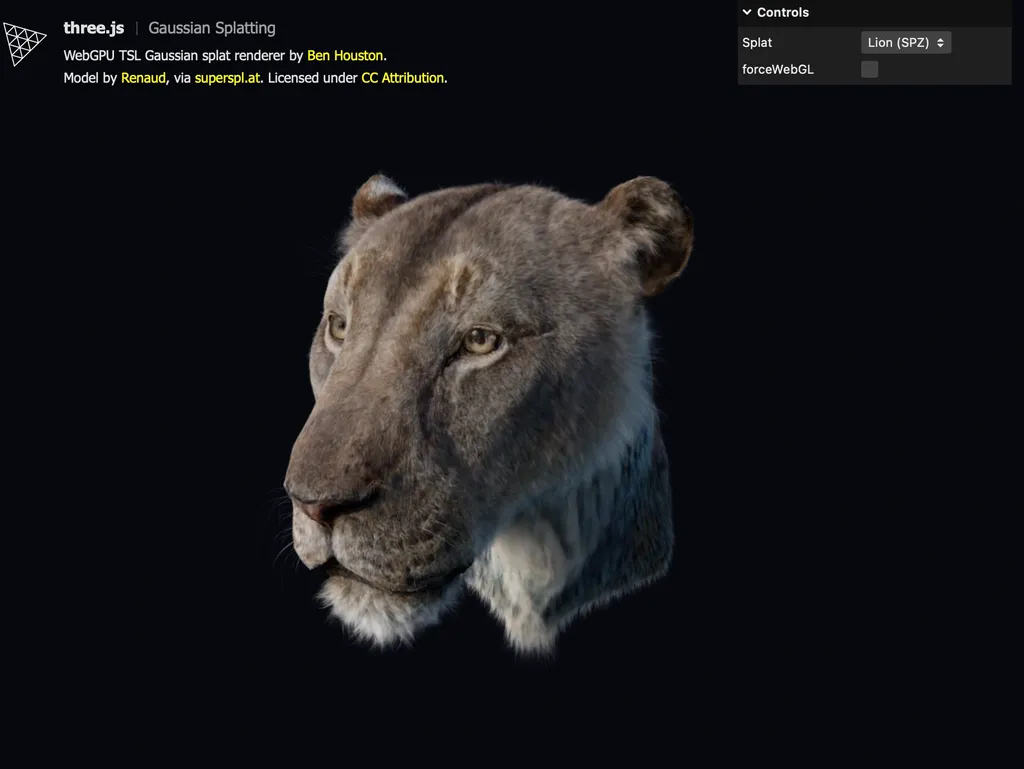
The resulting API stays small. Loading an .spz file and rendering it as a Gaussian Splat takes three lines:
const splatData = await new SPZLoader().loadAsync('lion.spz');
const splats = new GaussianSplatMesh(splatData);

scene.add(splats);
For new assets, use SPZ version 4 when you can. It produces the smallest files and loads fastest among the formats supported by this addon. SPZLoader supports both SPZ v3 and v4, while the other loaders cover older files and interoperability with existing pipelines.
Gaussian splats, briefly#
A Gaussian splat scene replaces the mesh with a cloud of oriented, colored 3D Gaussians, reconstructed from a set of photos or, increasingly, a video scan. Each Gaussian carries a center (its position), a covariance (an orientation and set of dimensions, so it can be a thin oriented disc, an elongated blob, or anything between), and a color with opacity.
To render one, you project its 3D covariance into a 2D screen-space ellipse, evaluate a Gaussian falloff across that ellipse, and alpha-blend it with everything behind it, back to front. Do that for a few hundred thousand to a few million Gaussians per frame and you get photographic renders of real captured scenes, without a single triangle.
The original implementation stored a flat color and opacity per splat, equivalent to degree-0 spherical harmonics (SH0). That's enough to get a splat looking right from any single angle, but colors don't shift with viewing direction the way real specular and view-dependent surfaces do. I later added SH1-SH3 support for view-dependent color, covered in its own section below.
Three architectural layers#
The PR splits into three layers, each with a narrow job:
- A plain
BufferGeometryserves as the data container:position, a 6-floatcovarianceattribute (the upper triangle of a symmetric 3×3 matrix), and an rgba8colorattribute. There's no bespoke "splat data" class, so it composes with everything else in Three.js that already knows how to work with geometries. - Loaders translate every supported source format into that same
BufferGeometryshape. GaussianSplatMesh, the renderer, is a WebGPU/TSLNodeMaterial.
O(N) approximate sorting#
Splats need back-to-front ordering for correct alpha blending, the same rule behind the painter's algorithm. An exact GPU sort would cost too much to run whenever the camera moves. A close approximation gives overlapping splats the order they need at a lower cost.
The sort leaves the splat data in place and reorders a separate array of indices into the center, covariance, and color buffers. GaussianSplatMesh moves one uint per splat instead of the full payload. It runs a fresh sort only after the camera position or view direction crosses a small movement threshold.
The algorithm is a counting sort: quantize each splat's depth into one of a few thousand bins, then run four compute passes (reset, histogram, prefix sum, scatter) to bucket every index by bin. It's the same building block behind a full radix sort, and with enough bins it's indistinguishable from an exact sort. There's also a CPU fallback running the same four steps in plain JavaScript for the WebGL backend of WebGPURenderer, where compute shaders aren't available.
The CountingSort class owns this work. GaussianSplatMesh gives it a function that maps each splat to a depth bin and receives an index array in return, without needing to know whether the GPU or CPU performed the sort. This separation also makes CountingSort reusable outside Gaussian Splat rendering.
The four passes are each a short TSL compute shader, dispatched in order from compute():
compute( renderer ) {

	renderer.compute( this._resetNode );     // clear the histogram and offset buffers
	renderer.compute( this._histogramNode ); // bin[i] = binNode(i); histogram[bin]++
	renderer.compute( this._prefixNode );    // offset[bin] = exclusive prefix sum of histogram
	renderer.compute( this._scatterNode );   // order[offset[bin[i]]++] = i

}
The histogram and scatter passes both use atomicAdd so that many GPU threads can safely increment the same bin's counter or claim the same bin's next write slot without colliding, and the prefix-sum pass is a single-invocation Loop over binCount bins that turns per-bin counts into per-bin starting offsets:
this._prefixNode = Fn(() => {
  const sum = uint(0).toVar('sum');

  Loop({ start: 0, end: binCount, type: 'uint', name: 'bin', condition: '<' }, ({ bin }) => {
    const binCountValue = atomicLoad(this.histogramAtomic.element(bin)).toVar('count');
    atomicStore(this.offsetAtomic.element(bin), sum);
    sum.addAssign(binCountValue);
  });
})()
  .compute(1)
  .setName('CountingSortPrefix');
Because binCount (4096 by default) is fixed and small relative to the splat count, that loop is cheap even running on a single thread, and it's what keeps the whole sort at four fixed passes regardless of how many splats there are.
Rendering#
With that sorted order in hand, GaussianSplatMesh's vertex node does the real work. For each splat it looks up its index in the sorted order, takes the 3D covariance, transforms it into view space, and projects it through the Jacobian of the perspective projection to get a 2D screen-space covariance. From there it computes eigenvalues and axes to get an ellipse, and expands an instanced quad to cover it. The fragment node evaluates the Gaussian density across that quad, discards anything outside a small radius, and alpha-blends the rest. All of this is written in TSL, so it runs unmodified on both the WebGPU and WebGL backends of WebGPURenderer.
The covariance-to-screen-space step is the mathematical core of the vertex node. It transforms the 3×3 covariance into view space, then applies the Jacobian of the perspective projection to linearize it into a 2×2 screen-space covariance, from which eigenvalues give the ellipse's axes and radii:
// c00, c01, c02, c11, c12, c22 are the view-space covariance, computed just above
// this by transforming the splat's 3x3 covariance matrix with the model-view matrix

const z = min(viewCenter.z, -0.01).toVar('z');
const invZ = float(1).div(z).toVar('invZ');
const invZ2 = invZ.mul(invZ).toVar('invZ2');
const focal = screenSize.mul(0.5).mul(vec2(cameraProjectionMatrix[0].x, cameraProjectionMatrix[1].y)).toVar('focal');

// Jacobian of the perspective projection, evaluated at the splat's view-space position
const j00 = focal.x.negate().mul(invZ).toVar('j00');
const j11 = focal.y.negate().mul(invZ).toVar('j11');
const j02 = focal.x.mul(viewCenter.x).mul(invZ2).toVar('j02');
const j12 = focal.y.mul(viewCenter.y).mul(invZ2).toVar('j12');

// 2D covariance = J * Cov3D_view * J^T, plus a small screen-space kernel for anti-aliasing
const aBase = j00.mul(j00).mul(c00).add(j00.mul(j02).mul(c02).mul(2)).add(j02.mul(j02).mul(c22)).toVar('cov2dABase');
const b = j00
  .mul(j11)
  .mul(c01)
  .add(j00.mul(j12).mul(c02))
  .add(j02.mul(j11).mul(c12))
  .add(j02.mul(j12).mul(c22))
  .toVar('cov2dB');
const cBase = j11.mul(j11).mul(c11).add(j11.mul(j12).mul(c12).mul(2)).add(j12.mul(j12).mul(c22)).toVar('cov2dCBase');
The renderer decomposes that 2×2 matrix (a, b, c) into eigenvalues and axes with a closed-form eigendecomposition (halfTrace/radius/atan). The result determines the size and orientation of the instanced quad.
The fragment node evaluates the 2D Gaussian falloff across the quad and discards anything past a small radius, so overlapping splat quads don't waste fragment work far from their center:
const fragmentNode = Fn(() => {
  const r2 = dot(splatUv, splatUv).toVar('r2');

  If(r2.greaterThan(4), () => {
    Discard();
  });

  return vec4(splatColor.rgb, exp(r2.mul(-0.5)).mul(splatColor.a));
})();
splatUv is a varying carrying the instanced quad's local [-2, 2] coordinates, and exp( r2 * -0.5 ) is the actual Gaussian falloff, multiplied by the splat's opacity (itself scaled earlier by alphaScale, which corrects for the anti-aliasing kernel added to the covariance). The whole vertex and fragment pair is plain TSL, no GLSL or WGSL string templates, so it compiles unmodified to both WebGPU's WGSL and, via WebGPURenderer's WebGL backend, to GLSL.
View-Dependent Color via Spherical Harmonics#
The base renderer handles position, covariance, color, opacity, sorting, and alpha blending, but it treats color as fixed from every camera angle. I later added spherical harmonics (SH) loading and rendering for view-dependent color in Three.js PR #34215, supporting SH0, SH1, SH2, and SH3.
The Lion splat shows the change. With flat color, the back side of the model stays dull as the camera moves. With SH2 enabled, a white rim and sheen-like fringe appears around the surface when you orbit into the right angle.
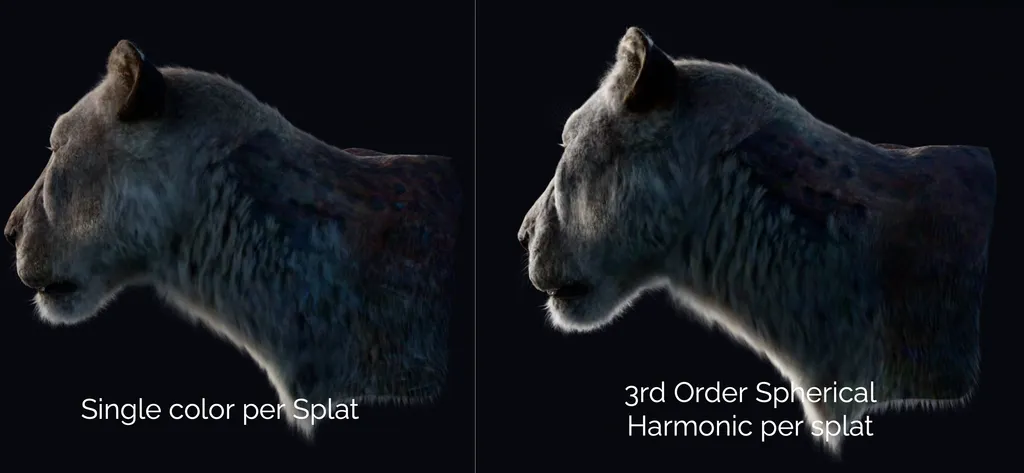
In the original 3DGS training pipeline, each Gaussian can store color that changes with view direction. A single RGB value loses that information.
You see view dependence around object silhouettes as Fresnel-like brightening or sheen. Specular highlights slide across glossy surfaces. Gemstone captures change as facets pick up different reflections. Even diffuse-looking captures often contain directional color shifts from the source photos.
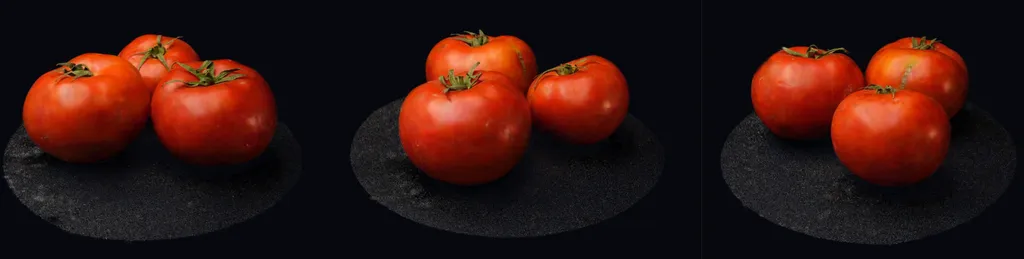
Flat color, equivalent to SH0, bakes all of that into one RGB value per splat. It can look right from one angle and wrong from another. Spherical harmonics give each splat a compact angular color function.
The renderer still uses captured appearance, not a physical reflection model. It takes the view direction from the camera to the splat, evaluates a small SH basis, multiplies those basis values by the captured RGB coefficients, and adds that contribution to the base color.
Three.js evaluates the view-dependent SH contribution once per splat in a compute pre-pass. The four vertices of the splat's quad then add the same result to the base color.
View Dependency Pre-Pass#
The Gaussian splat renderer draws each splat as an instanced quad with four vertices. Evaluating SH in the vertex node would repeat the same work four times because every vertex uses the same splat center, camera position, and coefficients. SH3 would make each splat unpack 13 Uint32 words and evaluate 45 scalar coefficients four times. Florian Hahlbohm suggested computing the per-splat color in a pre-pass, so each splat evaluates SH once instead of once per vertex.
Before drawing, Three.js dispatches one compute invocation per splat. Each invocation reads the splat center and packed SH coefficients, evaluates the view-dependent contribution for the current camera position, and writes one vec4 into a storage buffer. The vertex node adds its RGB value to the base color while expanding the four corners of the quad:
const colorComputeNode = Fn( () => {
  const splatIndex = instanceIndex;
  const center = buffers.centerRead.element( splatIndex ).xyz;
  const rgb = vec3( 0 ).toVar();

  applySphericalHarmonics( rgb, center, localCameraPosition, splatIndex, buffers );
  buffers.sphericalHarmonicsContributionWrite.element( splatIndex ).assign( vec4( rgb, 0 ) );
} )().compute( buffers.count );
The renderer runs the pre-pass when the camera or splat mesh transform changes. If both remain fixed, it reuses the previous colors. The pre-pass adds one vec4, or 16 bytes, per splat and one compute dispatch, in exchange for evaluating the SH function once instead of four times.
WebGPURenderer runs this as a native compute shader on WebGPU. Its WebGL fallback evaluates SH in the quad vertex shader instead. WebGL implements compute through transform feedback, which cannot perform the indexed reads needed to unpack a variable number of Uint32 words for each splat. The fallback repeats the SH work for all four vertices, but preserves the same output without adding a CPU pass or another data representation.
Spherical Harmonics Packing#
Spherical harmonics are basis functions over directions on a sphere. For Gaussian splats, they store how a splat's color changes as the camera moves around it.
The order controls how much directional detail the splat can store:
| Order | Coefficients in order | Total coefficients |
|---|---|---|
| SH0 | 1 | 1 |
| SH1 | 3 | 4 |
| SH2 | 5 | 9 |
| SH3 | 7 | 16 |
Each coefficient is an RGB vector. Three.js stores SH0 in the regular color attribute, then stores the higher-order SH1-SH3 coefficients in sphericalHarmonics1, sphericalHarmonics2, and sphericalHarmonics3.
This can add up to a lot of data. I chose a byte-aligned representation. Each higher-order scalar coefficient gets clamped into a byte, with decoding in the renderer using roughly:
coefficient = (byte - 128) / 128;
Four of those bytes get packed into one Uint32 word for upload to the GPU. The loaders write bytes into a Uint8ClampedArray view over the same buffer, then hand the Uint32Array to the geometry. The renderer unpacks each byte with shifts and masks.
Libraries such as the Spark Gaussian Splatting library use denser bit packing. Spark stores SH1 in 7-bit fields, SH2 in 8-bit fields, and SH3 in 6-bit fields. That saves memory, but the loader and shader both have to deal with narrower fields and values that can cross word boundaries.
The Three.js version spends a little more memory to keep loading and rendering dead simple:
| SH order | Spark total | Three.js total | Three.js vs Spark |
|---|---|---|---|
| 0 | 64 | 64 | +0% |
| 1 | 72 | 76 | +5.6% |
| 2 | 88 | 92 | +4.5% |
| 3 | 104 | 116 | +11.5% |
Supported formats#
For most projects, SPZ v4 should be the default asset format. It has the smallest file size and quickest load time of the formats below, and the loader supports both SPZ v3 and v4 well. Use the other formats when you need to open older assets or exchange data with a tool that does not support SPZ.
Every loader produces the same position / covariance / color BufferGeometry, so GaussianSplatMesh does not need format-specific rendering paths:
| Format | Extension | Class |
|---|---|---|
| Niantic SPZ v3/v4 (recommended) | .spz | SPZLoader |
| GraphDECO/INRIA 3DGS PLY | .ply | Existing PLYLoader, plus a createGaussianSplatGeometryFromPLYGeometry conversion helper (reads scale_*, rot_*, f_dc_*, opacity properties) |
| Early GS3D fixed-width format | .splat | SPLATLoader |
| GaussianSplat3D's compressed format | .ksplat | KSPLATLoader |
| glTF Gaussian Splatting extension | KHR_gaussian_splatting | GLTFGaussianSplatLoaderExtension |
For PLY files, I reused the existing PLYLoader, which already parses arbitrary vertex properties into a generic BufferGeometry, and added a small conversion helper. The helper turns each vertex's scale and quaternion rotation into a packed covariance matrix, then applies the sigmoid and SH0-to-linear conversions for opacity and color.
The glTF extension is opt-in rather than built into the core GLTFLoader. GaussianSplatMesh is WebGPU/TSL-only, and making GLTFLoader aware of it by default would have pulled a TSL dependency into every project that uses GLTFLoader, even ones that never touch splats. Registering GLTFGaussianSplatLoaderExtension by hand keeps that dependency opt-in.
Niantic provides an online SPZ converter that converts common Gaussian Splat formats to SPZ v4 in your browser. I found the Lion and Millipede source scans on PlayCanvas's SuperSplat site as PLY captures, then converted them while testing the loaders.

Bundle size#
I measured the current implementation on the working tree, assuming Rollup plus Terser and treating three, three/webgpu, and three/tsl as externals. In the realistic case where an app exports GaussianSplatMesh, SPZLoader, KSPLATLoader, and GLTFGaussianSplatLoaderExtension, the addon contribution is about 28.7 KB minified, 10.2 KB gzip, or 9.0 KB brotli.
| Target | Size |
|---|---|
| Raw source | 57,041 B |
| Minified | 28.7 KB |
| gzip | 10.2 KB |
| Brotli | 9.0 KB |
That count includes the renderer, CountingSort, shared splat utilities, the practical loader set, the tree-shaken fflate code needed by SPZLoader, and SH1-SH3 view-dependent color support. The size is a direct result of the shape of the implementation: BufferGeometry for the splat payload, TSL for the WebGPU/WebGL shader path, and loaders that only translate source formats into the same geometry contract. You get Gaussian splats inside an existing Three.js bundle instead of bringing a new scene graph, shader compiler, worker pipeline, or WASM module with it.
Comparing this to Spark and PlayCanvas#
Spark, built by World Labs, and PlayCanvas's pipeline behind SuperSplat both predate this work and are more feature-complete. The Three.js implementation stays narrower in scope: TSL-first and WebGPU-native rather than raw WebGL/GLSL, with no WASM, no web workers, and no large external dependencies beyond loaders, one mesh class, and one sort utility. That trade buys a small, readable implementation that lives naturally inside Three.js and is easy to extend, at the cost of some advanced capabilities other libraries already ship.
The clearest gap is streaming and level-of-detail, and Spark and PlayCanvas have both solved it:
- Spark 2.0 ships a real LoD/streaming system:
SplatMeshLoD trees, a virtual paging system, and a purpose-built.RADformat that organizes a scene into 64K-splat chunks. Those chunks are spatially partitioned, compressed per property, and randomly seekable over HTTP range requests, so a coarse version of a huge scene appears almost instantly and refines as the camera moves. - PlayCanvas's SOG format (Spatially Ordered Gaussians, the format behind SuperSplat) takes a similar approach from a different angle: a compressed, GPU-ready, Morton-ordered format, with a "Streamed SOG" variant that splits a scene into a spatial tree of chunks at multiple LOD levels for progressive streaming of very large scenes.
Neither capability exists in this implementation today. If streaming and LOD get added later, adopting or interoperating with an existing chunked, seekable format like .RAD or Streamed SOG is a more realistic path than retrofitting that structure onto .ply, .splat, .spz, or .ksplat.
Future work#
-
Compressed attributes / streaming metadata There's room to shrink the per-splat data footprint beyond what the current loaders do.
-
Incremental / progressive loading None of the formats supported so far (
.ply,.splat,.spz,.ksplat, or glTF'sKHR_gaussian_splatting) support loading a splat cloud coarse to fine for incremental refinement today. One exception: the.spzspec reserves an optional per-splat LOD field, but the current loader only parses far enough to skip past it. It isn't exposed or usable yet. -
Spatial partitioning for scene-scale streaming This is a distinct, bigger capability than refining one splat cloud's level of detail. Chunking a scene spatially (the way Spark's
.RADand PlayCanvas's Streamed SOG both do) lets a viewer walk a spatial tree, show a coarse whole-scene proxy almost instantly, and page in only the chunks and detail levels near the camera. That unlocks scenes larger than fit in memory or GPU budget at once, like city-scale captures or multi-room walkthroughs, rather than single-object splats like the Lion or Millipede demos above. If this gets tackled, interoperating with an existing chunked, seekable format is more realistic than inventing a new one from scratch.
Thanks to @Mugen87 and @WestLangley for their review and feedback throughout the PR process.
Comments
Nothing yet. Say the first thing.
Sign in to join the conversation.