
What I Built (and Why It Matters)
Engineering for AI is quickly becoming a core skill, and I wanted hands-on time with it that went beyond prompting. The result is a fully IaC-deployed Azure pipeline with three Logic App workflows: a scheduler that fires every 30 minutes, an HTTP-triggered on-demand button, and a worker that does the actual heavy lifting. The worker lists feeds, fetches RSS, parses XML, calls an LLM, writes summaries, emails subscribers, and marks items as seen.
Thanks for reading Basics Are Hard! Subscribe for free to receive new posts and support my work.
Config (feeds, prompts, subscribers, seen items) lives in Azure Tables so it can be tuned without a terraform apply. Everything deploys via GitHub Actions with OIDC federation and no long-lived secrets anywhere. DevOps discipline from start to finish.
One note on cloud choice: most of my production experience has been in AWS. Using Azure for this project was a deliberate decision to build fluency in the Azure ecosystem and get hands-on with its tooling. Logic Apps instead of Step Functions, Azure Tables instead of DynamoDB, ACS instead of SES. The skills transfer across clouds, but the surface area is different enough.
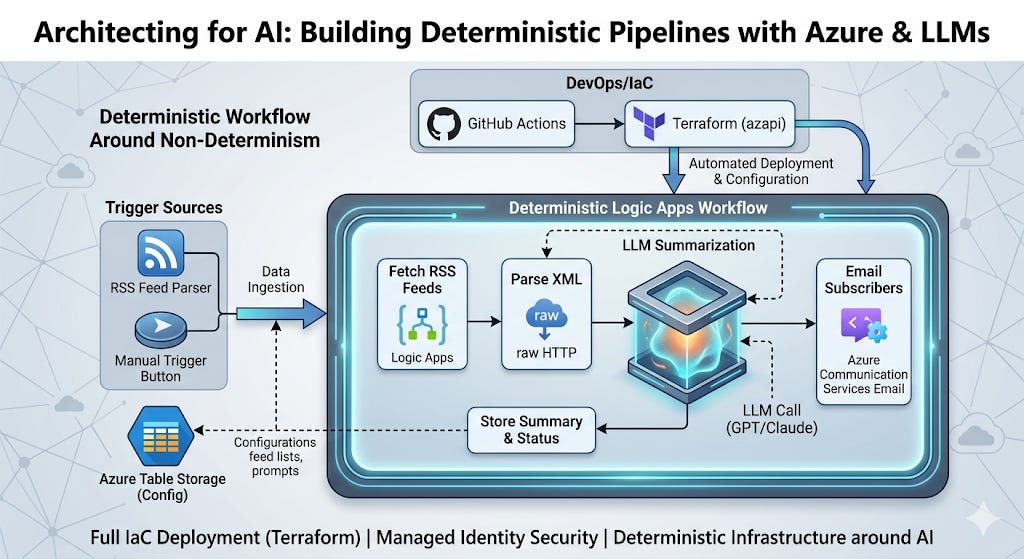
The Core Design Philosophy: Determinism Around Non-Determinism
Working with LLMs has reinforced one belief for me: their non-determinism is the thing you have to architect around, not ignore.
To define the terms: a deterministic system is one where the same inputs always produce the same outputs. A non-deterministic system doesn’t make that guarantee. LLMs are non-deterministic in two ways that matter for engineering. First, what they produce: you can send the same prompt twice and get meaningfully different responses. Second, how long they take: latency varies with load, model behavior, and response length. Neither is a flaw exactly, it’s just the nature of the tool.
The engineering problem is that most infrastructure we build either is deterministic or expects to be. Retry logic, idempotency, timeouts, cost controls all assume operations succeed or fail in predictable ways. An LLM call that takes 2 seconds sometimes and 45 seconds other times, or occasionally returns a response in the wrong format, breaks those assumptions if you haven’t planned for it.
The pattern that works: build deterministic workflow infrastructure to handle the plumbing, and let the LLM do what it’s genuinely good at, which is language. Azure Logic Apps and tools like n8n fit this role well. They give you reliable sequencing, retry logic, conditional branching, and state management without asking the LLM to be consistent about things it won’t be. The LLM’s slot in the workflow is explicit and bounded: here’s the context, produce a summary, move on.
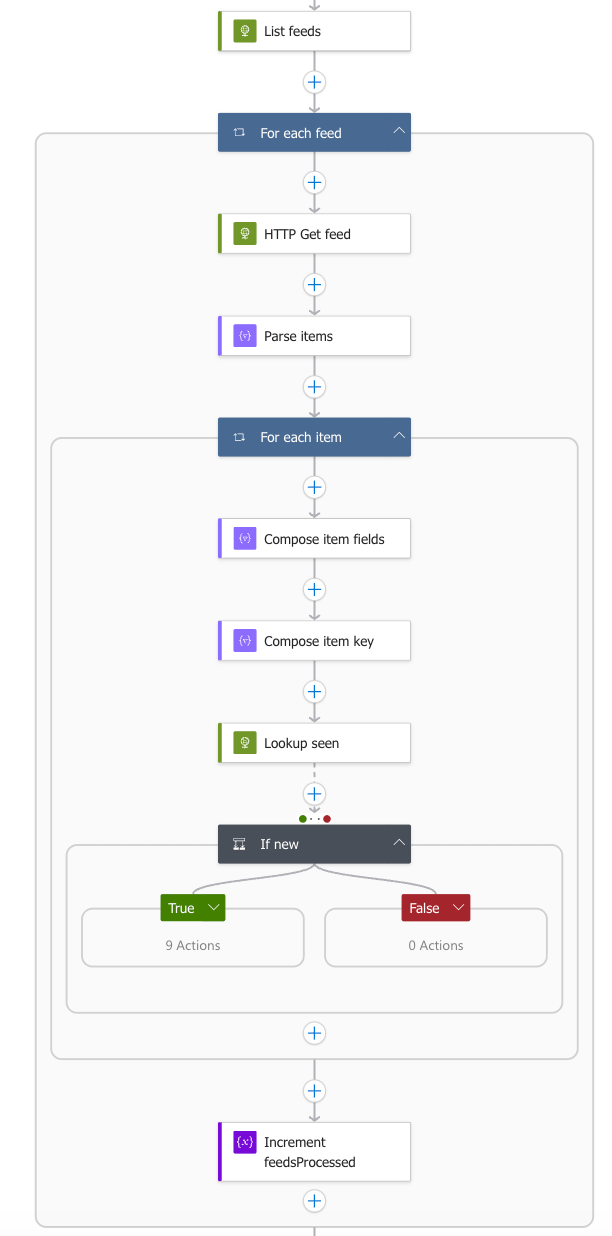
That said, the WYSIWYG workflow builders only take you so far. Once I got serious about repeatability, I stopped dragging and dropping and started treating workflow definitions as code. Everything is in Terraform via azapi_resource, shipping the full Logic App JSON in a single PUT. The alternative, azurerm_logic_app_workflow, is too coarse. It doesn’t cleanly expose Request triggers, XPath actions, bounded concurrency, or per-action retry policies. If you want repeatable outcomes, build it in code.
The Gotchas
Getting blocked on Azure OpenAI quota. I started targeting Azure OpenAI (gpt-4o-mini), hit a quota wall on the target subscription, and decided I wasn’t going to wait for an approval process to unblock a demo. I swapped to Anthropic (claude-haiku-4-5) via a direct HTTP action and kept the Azure OpenAI path behind a use_azure_openai Terraform variable so it can be re-enabled without a rewrite. Design your LLM call path to be provider-swappable. Quota issues are real and subscription-specific.
MSI credentials and managed connectors. This one cost me real time. The intuitive approach, using the azuretables and acsemail Logic Apps managed connectors configured for Managed Identity, wasn’t working. Both fail with InvalidApiConnectionAlternativeParameters because their classic connector definitions don’t expose the MSI authentication path. The fix was raw HTTP actions with the ManagedServiceIdentity authentication block and a scoped audience for ServiceMSI AudienceAzure Table Storage (https://storage.azure.com/) and ACS Email (https://communication.azure.com/).
Key Vault was the one managed connector that actually supports MSI (parameterValueType = "Alternative"), so it stayed. Everything else went raw HTTP. Not what the docs lead you to believe, but it works.
ACS Email’s Operation-Id must be a UUID, and that matters for traceability. This one came from a deliberate design goal rather than an unexpected failure. I wanted a traceable identifier in outbound emails so I could correlate a specific email back to a specific workflow run for troubleshooting. The Operation-Id header on ACS Email’s REST API seemed like the right fit. The problem is that ACS requires it to be a valid UUID for idempotency tracking, and an early version was passing the Logic App run name, a long alphanumeric string, instead. ACS silently rejected it. The fix is @{guid()} to generate a proper UUID per send. The diagnostic path was a good reminder that header-level API contracts aren’t always surfaced clearly in error responses. The Operation-Id now ties each email back to the run that generated it, which is exactly what I was after.
Logic App XPath returns base64-encoded nodes. When xpath(xml(body), '//*[local-name()="item"]') returns results, each element is a base64-wrapped XML fragment, not a plain string. Calling xpath(xml(item()), ...) on it directly produces silent empty strings. You have to decode first: xpath(xml(base64ToString(item()?['$content'])), ...). This is not documented anywhere obvious and will waste your afternoon.
Unencoded row keys in Azure Table Storage REST URIs. RSS GUIDs frequently contain URLs, and URLs contain characters that break OData key syntax. I was getting silent 400s on items whose GUIDs contained slashes or ampersands until I wrapped the composed key in encodeUriComponent(). Obvious in retrospect.
ACS domain linking is a two-apply process. Linking a custom sender domain to ACS requires the domain to already be DNS-verified. Attempting it in the same apply that creates the domain fails with DomainValidationError. I gate the link resource behind an acs_domain_verified boolean variable. First apply creates the domain and prints the DNS records, operator adds them at the registrar, second apply links it and emails start flowing.
A Few Other Things Worth Knowing
Cap your feed results. xpath(...) with no limit returns every item in a feed. take(xpath(...), 20) keeps a single run from queuing 500 LLM calls. Feeds grow over time and uncapped pipelines silently get expensive.
Sequential processing of feed items is slow by default. With repetitions: 5 on the For_each loop, 5 items run in parallel per feed, which is meaningfully faster without overloading anything downstream.
The bootstrap module pattern cleanly solves the problem of a service principal that can’t create its own scope. One local apply creates the storage account for Terraform remote state and the GitHub OIDC app registration. Everything after that is CI-driven with no stored secrets.
On Cost and Production-Readiness
This pipeline ran at roughly $2/week. Low enough to not hurt, but high enough to notice if you leave it running without a reason. There’s room to optimize: smarter scheduling to skip runs when feeds haven’t updated, more aggressive LLM call batching, and right-sizing the Logic App execution budget. For a personal project it was fine. For production at scale I’d want to profile the cost curve more carefully.
The non-cost production concerns were largely addressed by design: OIDC-based deploys, Managed Identity for service-to-service auth, least-privilege role scoping, and full IaC from day one. The operational hygiene was baked in; the cost efficiency wasn’t.
The natural alternative is running the workflow layer on n8n on your own infrastructure. If you’re already running a homelab or a small VPS, the marginal compute cost is effectively zero and the $2/week goes away. But you trade one problem for another. ACS Email and its Managed Identity auth story disappear, and you’re back to managing SMTP credentials or an API key for a transactional email provider like Resend or Postmark, or self-hosting something like Stalwart. None of those are hard problems, but they’re real ones. The clean no-long-lived-secrets story that OIDC and MSI gave me in Azure doesn’t have a direct equivalent when you’re self-hosting the workflow engine. You end up managing secrets again, just somewhere else.
Whether that tradeoff makes sense depends on what you’re optimizing for. Azure wins on security posture and operational cleanliness. Self-hosted wins on cost and control. If you’re already running homelab infrastructure, the economics probably favor n8n. If you’re starting from scratch and care about not managing secrets, Azure’s managed identity story is genuinely good once you get past the connector quirks.
Would I Keep Running It?
Probably not indefinitely. I built it to learn more than to operate, and the value was in the build: getting reps with deterministic workflow orchestration around LLM calls, IaC on Azure, and OAuth grants without long-lived secrets. Those patterns translate everywhere. At $2/week it becomes a conscious choice about what I’m still getting out of it.
The more durable takeaway is the pattern itself. Deterministic workflows as the scaffolding, LLMs for the language work, everything deployed as code with least-privilege auth from day one. That holds whether you’re on Azure, AWS, or running n8n on a box in your basement.
Thanks for reading Basics Are Hard! Subscribe for free to receive new posts and support my work.
Comments
Nothing yet. Say the first thing.
Sign in to join the conversation.