
I leverage AI to help with many aspects of software development and research. For some time, I faced a quality issue that I could not explain: the more I interacted with the agent, the worse the results were.
The agent seemed to forget the information I had provided a few minutes ago, or did not comply with my requests to perform a specific task as instructed.
I was aware of the notion of the context window, which tells us how many tokens the LLM has available to hold the information we want it to process, and I was surprised because I seemed not to be crossing that threshold, so why the poor results?
It turned out there were a few items that were conducive to this outcome:
How an IDE/AI-assisted tool crafts the prompt
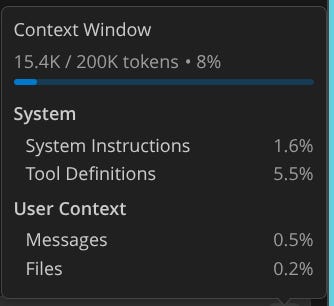
When you interact with an LLM through a tool, you may think only what you type is passed along as part of your prompt. In reality, each tool crafts the prompt as a combination of the user prompt (what you typed) + a system prompt, which in turn often contains additional instructions from custom files (AGENTS.md, .github/instruction files, etc) + additional context (recent/surrounding open files) + previous answers from the same chat session.
This can get big pretty fast, and you may not notice that, at least unless your tool tells you that. Visual Studio Code, for example, recently added support to show you how much of the context window is used and what goes on.
You can read more about how user prompts + system prompts work here.
Attention limitation
Before a current generation LLM generates a new token, the attention mechanism must compute how that token relates to every previous token in its context window. This means that an LLM consumes more and more computing power, per token, as its context window grows.
Ultimately, this means that the more context you accumulate, the more the model’s attention gets diluted across all those tokens, making it harder to focus on the truly important information from your earlier requests and instructions.
This is also known as context rot. As this article covers, all frontier models suffer from a quality drop as the prompt reaches 32K tokens for the “needle-in-a-haystack” problem.
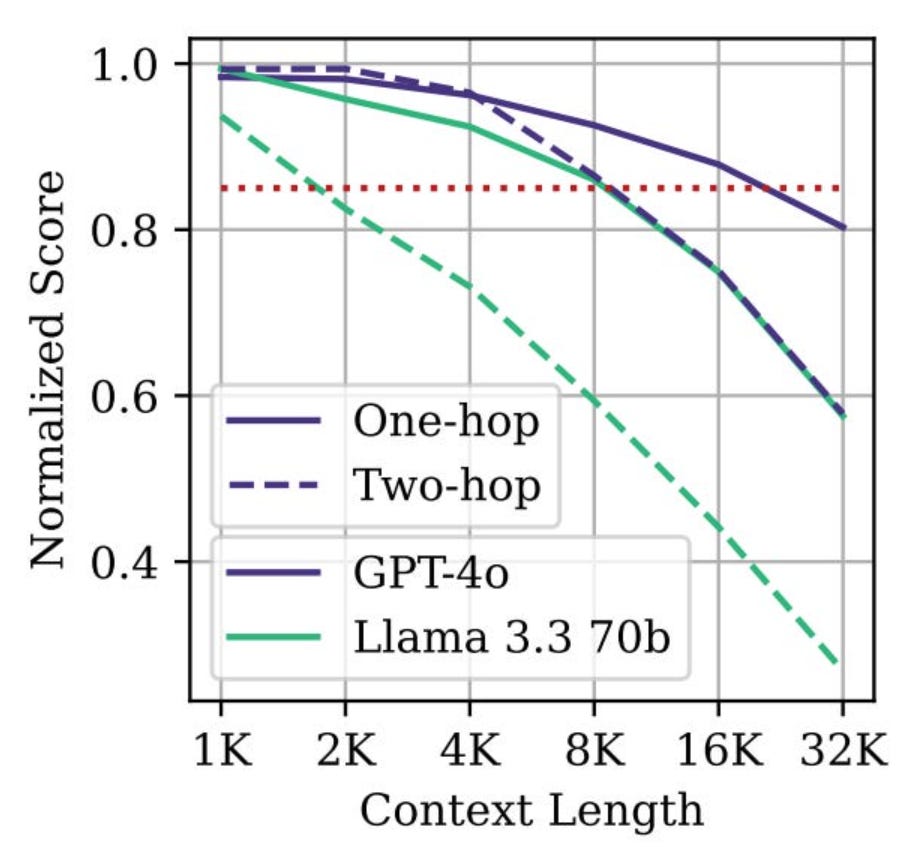
You can see that some models drop drastically, from 80+% to ~30%.
But not all is lost! Since the study mentioned in the article was released, some models appear to have improved, more notably the recent Claude Opus 4.6, which shows a 76% accuracy.
In the meantime, be mindful of your token usage and rely on strategies to keep it contained:
Have only the minimal necessary as system-wide custom instructions
Leverage sub-agents to “divide-and-conquer.”
Use rules and skills to segment additional instructions so they are loaded only when needed
Start new chat sessions + record relevant memory for different activities
Once we move from in-memory to a network-bound external service call, the first thing you notice is that the latter can fail immediately or due to a timeout. The time-out can happen in at least two places:
The origin - your client can establish a maximum time to receive the response
The destination - the application server severs the connection if the execution exceeds a certain limit
You establish the first as a way to avoid waiting indefinitely for a response that may never come. And what should you do if a timeout happens? Retry, right?
Congratulations, you are on your way to having your own Denial of Service (DoS) engine 🙂
The retry, if you are using some sort of backoff, is the right move as most failures are transient, so by retrying, you can get what you wanted before failing the entire request and bubbling that to the user.
The problem, however, is that if the downstream dependency is struggling, you may end up receiving a lot of time-outs that will only be made worse by sending additional requests. It becomes a self-fulfilling prophecy where you keep multiplying the requests until you give up.
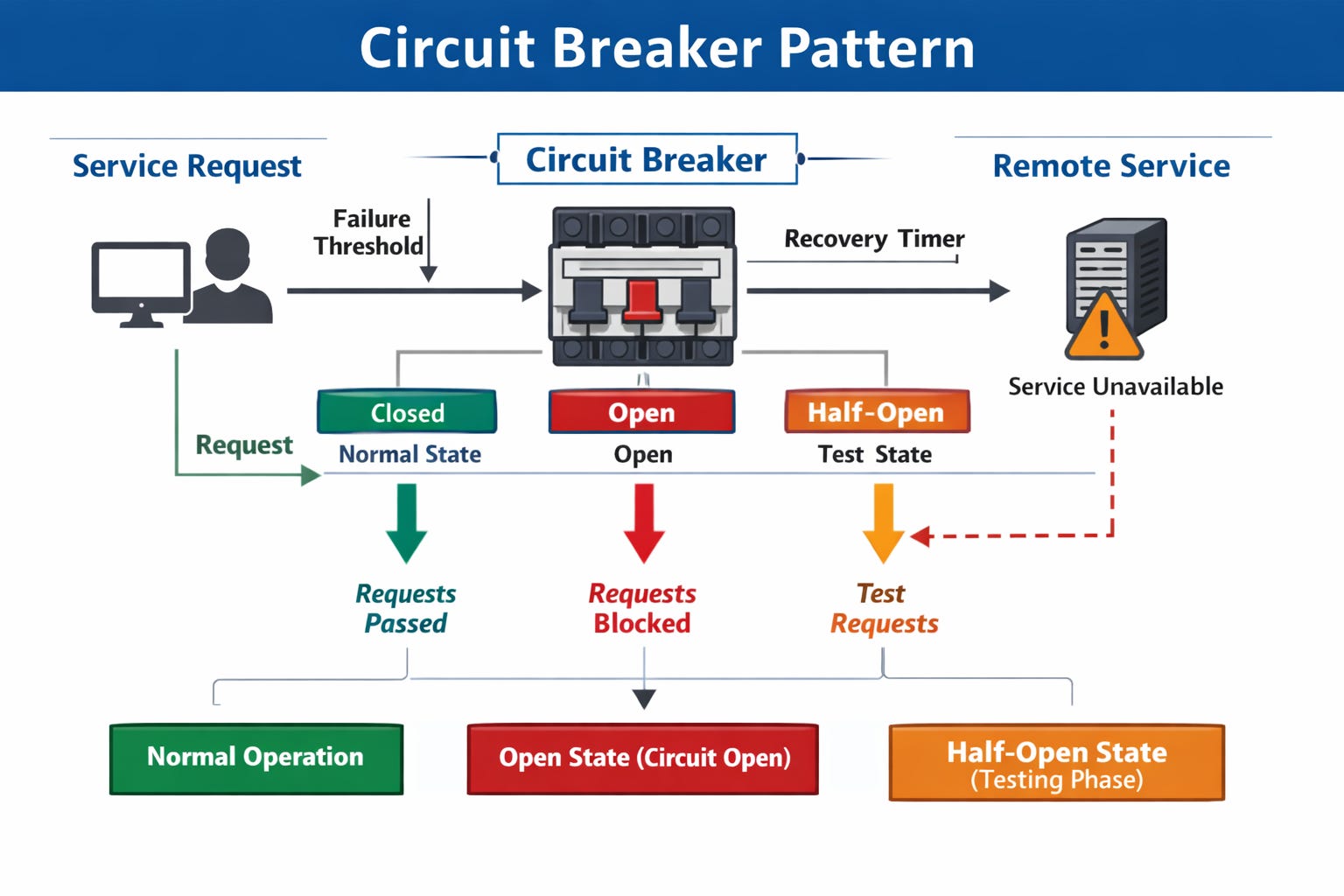
Circuit breakers help by establishing a way to prevent you from making additional requests if you receive too many failures. When it happens, the circuit “opens” and any attempt will immediately fail before even leaving your service.
Usual circuit breaker implementations should define:
A rolling window where the failed requests are considered
A percentage of failures to trigger the circuit to open
After a duration, the circuit will be “half-open.”
The first two help you not to open the circuit too prematurely if the failures disappear or are not so common as to indicate a systemic problem. The last one enables you to allow some requests to flow and either confirm there are still problems or close the circuit again if it thinks all is well (errors below the threshold).
You do not have to implement your circuit breaker library, as there are plenty out there. One suggestion, though, is to choose one that also allows you to specify a “default” answer for when the circuit fails. This will enable you to establish a graceful degradation strategy aligned with your circuit breakers.
Whenever you are exposing your service via APIs, you have to account for the surge in traffic that it can receive.
Maybe it is a legitimate need or a bug causing your service to be called in a loop from a customer. Ultimately, your resources have limits, and failing to protect can lead to a denial of service (DoS) or unfair usage, where some of your clients monopolize attention, leaving very little to the rest.
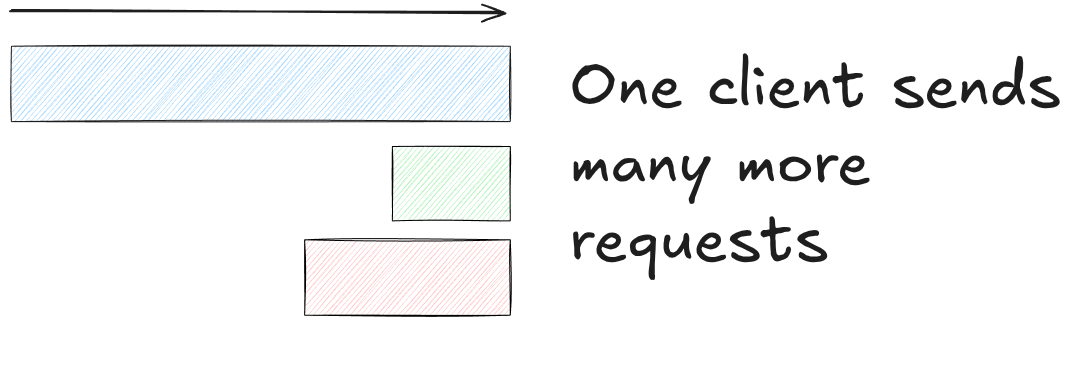
Any discussion of this problem will mention the “noisy neighbour” situation, and while a true solution is a combination of practices, the very first one will be rate limiting.
When you apply rate limiting, you are setting a ceiling to the number of requests a given customer can make for a given period of time. Once that number is breached, you will start rejecting these requests, usually with an HTTP code 429.
This will signal the customer to “slow down” the rate of requests. Once the window elapses, the client will be able to send additional requests.
GitHub, being a highly public service, implements rate limiting, and this article shares the journey they went on migrating from memcached to Redis and the not-so-obvious problems they discovered when rolling out the new solution.
From it, the highlights I found are:
Beware of non-atomic operations
Distributed persistence (main/replica) can lead to some inconsistencies closer to the expiration window
Progressive rollout via feature flags helps you to control the % of usage without the need to deploy again
You may want to count the request at the start and not at the end
The first 3 are pretty straightforward and likely relevant for anyone implementing rate limiting. The last one is likely only important if your application can take a long time to execute each request.
Traditionally, many will only increment the request counter at the end of the execution. That means that between the first check and the execution, there is a chance of an overflow.
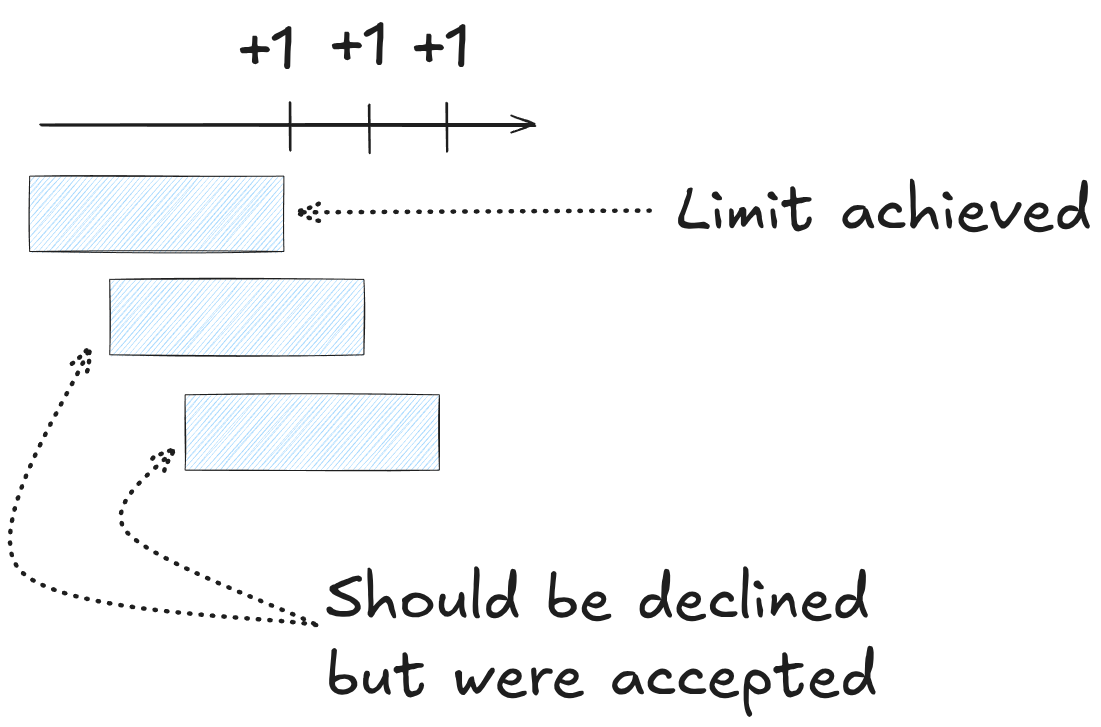
If your execution is somewhat long, then the number of potential requests you would still accept could add up substantially. In the case of GitHub, they also had a policy of not counting requests that result in a 304 Not Modified, so they suggested incrementing at the beginning and “refunding” the request at the end if it results in a 304.
Software architecture remains a topic of much discussion and confusion. From my conversations with developers and recruiters across various companies, I’ve observed that many either lack clarity on what it actually entails or dismiss it as unnecessary. It is often framed as “we need developers who write code, not draw diagrams”.
“Architecture is about the important stuff. Whatever that is.”
The above quote sums up the tricky situation. We know that having an architecture, and therefore someone responsible for it, is important, but we have a hard time defining what is important “enough” to fit the criteria.
As this article explains, the important stuff can be related to technical decisions (frameworks, languages) that, once made, can be difficult and costly to change. The job of the architect is to ensure that those consequential decisions are made strategically!
This means being able to take a step back, see the bigger picture on both technical and product landscape, separating lasting decisions vs fads.
The software architect must be knowledgeable in the aspects that they will discuss, and that invariably means knowing how to code, “communicating with lead developers as a coder among coders.”
To the aspiring architects, trust but verify should be your new motto. Not to be taken as some sort of micromanaging, this acknowledges the fact that it is common for developers to apply architectural patterns without fully understanding them.
By staying closer to the teams, you can catch any occurrence of this anti-pattern and help them to correct the behavior.
In the past, the best way I have found was to perform code reviews (PRs) in a non-blocking mode. It helped me to know more about how the patterns and decisions made their way into code and keep myself relevant, connected to the code it was produced in.
By doing so in a non-blocking mode, you do not become a bottleneck, keep the team empowered, and leverage the PRs for their knowledge-sharing attribute.
Now that a lot of the code is (or can be) AI-generated, this becomes more challenging and loses some of the learning aspect, as the code was not actually created by the developer who submitted the PR.
Fun times :)
If you want even more in-depth articles on software architecture, check out my blog.
No posts
Comments
Nothing yet. Say the first thing.
Sign in to join the conversation.