The HTML DOM
HTML Document Object Model
The HTML DOM (HTML Document Object Model) is an Object Model for HTML Documents.
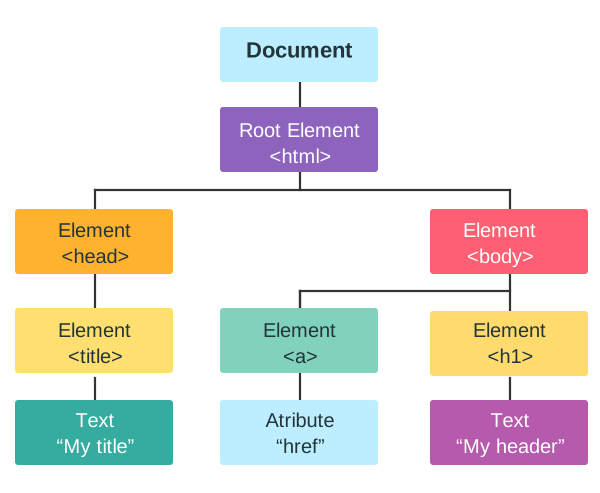
The HTML DOM is a tree of Nodes that represents an HTML Page.
The DOM Tree
When a web page loads, the browser creates a tree-like representation of the HTML document.
Each part of the document are nodes in the tree:
| Node | Description |
|---|---|
| Document | Owner of all nodes in the document |
| <html> | Element Node |
| <head> | Element Node |
| <body> | Element Node |
| <a> | Element Node |
| href | Attribute Node |
| <h1> | Element Node |
| My Header | Text Node |
Accessing HTML Elements
The HTML DOM can be used to access HTML elements.
The most common way to access an HTML element is to use the id of the
element:
Example
<html>
<body>
<p id="demo"></p>
<script>
// Access a paragraph Element
const myPara = document.getElementById("demo");
// Change the content of the Element
myPara.innerHTML = "Hello World!";
</script>
</body>
</html>
In the example above, the getElementById
method used id="demo" to find the
element.
id="demo"is an HTML propertygetElementById()is a DOM MethodinnerHTMLis a DOM Property
What You Will Learn
In the next chapters of this tutorial you will learn:
- How to change the content of HTML elements
- How to change the style (CSS) of HTML elements
- How to add and delete HTML elements
- How to react to events in from HTML elements
The World Wide Web Consortium
The DOM is a W3C Standard (World Wide Web Consortium):
"The W3C Document Object Model (DOM) is a platform and language-neutral interface that allows programs and scripts to dynamically access and update the content, structure, and style of a document."
The W3C DOM standard is separated into 3 different parts:
- Core DOM - standard model for all document types
- XML DOM - standard model for XML documents
- HTML DOM - standard model for HTML documents
The HTML DOM is a language independent standard developed by the W3C and WHATWG.