1. Introduction
This specification adds support of `composition` layers to the WebXR spec. The benefits of layers are as follows:
-
Performance and judder: Composition layers are presented at the frame rate of the compositor (i.e. native refresh rate of HMD) rather than at the application frame rate. Even when the application is not updating the layer’s rendering at the native refresh rate of the compositor, the compositor might be able to re-project the existing rendering to the proper pose. This results in smoother rendering and less judder. Another feature of layers is that each of them can have different resolution. This allows the application to scale down the main eye buffer resolution on low performance systems, but keeping essential information, such as text or a map, in its own layer at a higher resolution.
-
Legibility/visual fidelity: In regular WebXR, the resolution for eye-buffers might be reduced to relatively low values especially on low performance systems. This makes it harder to render high fidelity content, such as text. With Composition Layers, a static cylinder or quad layer can be drawn once at high resolution and is resampled only once by the compositor. This contrasts with the traditional approach with rendering an
XRWebGLLayerwhere content is produced at the device’s refresh rate and resampled at least twice: once when rendering into WebGL eye-buffer (which can lose details due to lower eye-buffer resolution) and the second time by the compositor. -
Power consumption / battery life: Due to the reduced rendering pipeline, the lack of double sampling and no need to update the layer’s rendering each frame, the power consumption is expected to be improved.
-
Latency: Pose sampling for composition layers may occur at the very end of the frame and then certain reprojection techniques could be used to update the layer’s pose to match it with the most recent HMD pose. This may significantly reduce the effective latency for the layers' rendering and as a result improve overall experience.
-
Support for more color types: WebXR only supports RGB values. Composition layer will have broader support for color types so authors can use compressed formats or sRGB.
1.1. Terminology
1.2. Application flow
If an author wants to use GL layers, they have to go through these steps:
-
For any layer type other than
XRProjectionLayerrequest support throughrequiredFeaturesoroptionalFeaturesinrequestSession(). -
Create an
XRWebGLBindingorXRMediaBinding. -
Create layers with these objects.
-
Add the layers to
XRRenderStateInitand callupdateRenderState(). -
During
requestAnimationFrame()for webgl layers, draw content each WebGL layer.
2. Initialization
If an application wants to create layers other than of type XRProjectionLayer during a session,
the session MUST be requested with an appropriate feature descriptor. The string " layers " is introduced
by this module as a new valid feature descriptor for the WebXR Layers feature.
Layers of type XRProjectionLayer MUST always be supported, regardless if the feature descriptor was requested.
The following code requests layers as an optional feature.
navigator . xr . requestSession (  'immersive-vr'  ,   {
    optionalFeatures :   [  'layers'  ]
   }
Layers are only supported for XRSessions created with XRSessionMode of "immersive-vr"
or "immersive-ar". "inline" sessions MUST NOT support layers.
The "layers" feature descriptor has a feature requirement that it cannot be enabled when there is an active immersive session.
NOTE: This means that executing the request(permissionDesc) API with "layers" will
not enable layers support for the current active session.
3. Layer types
3.1. Mono and stereo layers
A stereo layer MUST supply anXRSubImage to render to for each view.
A mono layer MUST supply a single XRSubImage which is shown to each view.
The XR Compositor MUST ensure that layers are presented correctly in stereo to the observer.
3.2. XRLayerLayout
TheXRLayerLayout enum defines the layout of the layer.
 enum    XRLayerLayout   {
   "default" ,
   "mono" ,
   "stereo" ,
   "stereo-left-right" ,
   "stereo-top-bottom"
};
-
A layout of
defaultindicates that the layer can accomodate all the views of session’s list of views. -
A layout of
monoindicates that the layer is mono. -
A layout of
stereoindicates that the layer is stereo. -
A layout of
stereo-left-rightindicates that the layer is stereo and divided left to right. -
A layout of
stereo-top-bottomindicates that the layer is stereo and divided top to bottom.
NOTE: If an XRCompositionLayer is created with a "default" or "stereo" XRLayerLayout, it is highly recommended
that it is allocated with an "texture-array" texture type.
Note: The "stereo-left-right" and "stereo-top-bottom" layouts are designed to minimize draw
calls for content that is already in stereo (for example stereo videos or images). Experiences that don’t require such assets types
should use the "default" or "stereo" layout.
3.3. XRLayerQuality
TheXRLayerQuality enum defines the display quality of the layer.
 enum    XRLayerQuality   {
   "default" ,
   "text-optimized" ,
   "graphics-optimized"
};
-
A layout of
defaultindicates that the layer is displayed with regular settings. -
A layout of
text-optimizedindicates that XR Compositor will try to render the layer so it’s most readable. -
A layout of
graphics-optimizedindicates that XR Compositor will try to render the layer with additional sharpness.
NOTE: the text-optimized and graphics-optimized flags MAY result in additional processing by the XR Compositor which may affect performance.
3.4. XRCompositionLayer
XRCompositionLayer defines a set of common attributes and behaviors across certain layer types.[ Exposed = Window ] interfaceXRCompositionLayer: XRLayer { readonly attribute XRLayerLayout layout ; attribute boolean blendTextureSourceAlpha ; attribute boolean forceMonoPresentation ; attribute float opacity ; readonly attribute unsigned long mipLevels ; attribute XRLayerQuality quality ; readonly attribute boolean needsRedraw ; undefineddestroy(); };
The layout attribute returns the layout of the layer.
The blendTextureSourceAlpha attribute enables the layer’s texture alpha channel.
The forceMonoPresentation attribute forces the right eye to use the same layer configuration
as the left eye. This MUST send a signal to the XR Compositor to remove the stereo effect of this XRCompositionLayer. Setting this to true on a mono layer has no effect.
NOTE: this attribute has no other side effects on other information that is returned by the XRSession. Only the operation of the XR Compositor is affected by this setting and experiences SHOULD continue to draw to both eyes.
The opacity attribute sets the opacity that is applied to the pixels of the layer. The XR Compositor MUST multiply each pixel (in premultiplied space) by this value.
opacity is 1.0 by default. Setting opacity to a value less than 0 will set it to 0 and setting it to a value higher than 1.0 will set it to 1.0.
The needsRedraw attribute signals that the XRCompositionLayer should be
rerendered in the next XR animation frame. It MAY be set when the underlying resources of a layer are lost or
when the XR Compositor can no longer reproject the layer. Failing to redraw the content in the next XR animation frame
might cause flickering or other side effects.
The mipLevels attribute returns the depth of the mip chain. This MUST be equal
or smaller than the value requested in mipLevels.
NOTE: some platforms don’t support mip levels. Authors should query mipLevels to determine if they can
target a certain mip level and not rely on the value they passed in mipLevels.
The quality attribute sets and returns the quality of the XRCompositionLayer. default is the initial value.
When the underlying resources of a layer are lost for an XRCompositionLayer layer,
the user agent MUST run the following steps:
-
Set layer’s
needsRedrawtotrue. -
If layer is not an
XRProjectionLayer, queue a task to fire an event namedredrawusingXRLayerEventon layer.
Each XRCompositionLayer has an associated destroyed boolean, initially false.
destroy() immediately marks the layer as destroyed and makes its graphics resources unavailable for future rendering.
Calling destroy() on a layer that is already destroyed does nothing.
A destroyed layer MUST NOT be presented by the XR Compositor, even if the layer is still present in the layers array while a pending render state update is applied.
If a method is invoked to obtain an XRSubImage for a destroyed layer, the method MUST throw an InvalidStateError.
Previously returned XRSubImage objects are not themselves destroyed when their layer is destroyed. Their attributes continue to return the same objects and values, but any graphics resources exposed by those objects MUST be invalidated for future rendering operations. GPU work queued before the resources were invalidated MAY complete.
To destroy the resources for a layer with an XRCompositionLayer layer, the user agent MUST run the following steps:
-
For each opaque texture in any of layer’s colorTextures, depthStencilTextures, or motionVectorTextures arrays that exist, mark the texture for deletion as though
deleteTexturehad been called with the texture on layer’s context. This is an internal user-agent operation and MUST NOT generate anINVALID_OPERATIONerror. -
If layer is an
XRProjectionLayer:-
If layer’s colorTextures for secondary views is not
null, for each opaque texture in that array, mark the texture for deletion in the same manner. -
If layer’s depthStencilTextures for secondary views is not
null, for each opaque texture in that array, mark the texture for deletion in the same manner.
-
-
If layer has a colorTextures array, set it to an empty array.
-
If layer has a depthStencilTextures array, set it to an empty array.
-
If layer has a motionVectorTextures array, set it to an empty array.
-
If layer is an
XRProjectionLayer, set its colorTextures for secondary views and depthStencilTextures for secondary views to empty arrays. -
For each of layer’s underlying resources, once all GPU work queued before the resource was invalidated has completed and the XR Compositor no longer accesses the resource, the user agent MAY physically release it.
When calling destroy() on an XRCompositionLayer layer, the user agent MUST run the following steps:
-
If layer’s destroyed is
true, return. -
Set layer’s destroyed to
true. -
Run destroy the resources for a layer with layer.
-
Let session be layer’s session.
-
If session’s pending render state is
null:-
If session’s active render state’s
layersdoes not contain layer, return. -
Set session’s pending render state to a copy of session’s active render state.
-
-
Let state be session’s pending render state.
-
If state’s
layersisnullor does not contain layer, return. -
Set state’s
layersto a new frozen array containing, in order, each entry in state’slayersother than layer.
Each XRCompositionLayer has a context object which is an instance
of either null or a WebGLRenderingContext or a WebGL2RenderingContext and a media
object which is an instance of null or a HTMLVideoElement.
Each XRCompositionLayer has an associated session , which is the
XRSession it was created with.
When setting the space on a layer with XRSpace space and XRCompositionLayer layer, the user agent MUST run the following steps to validate if the space is valid:
XRCompositionLayer has an internal boolean isStatic that indicates that the author can only draw
to this layer when needsRedraw is true.
NOTE: if isStatic is true the author can only draw into the layer once after creation or once after
a redraw event. This allows the UA to only allocate a single GPU buffer.
When a writeable attribute is set on an XRCompositionLayer or any of its derived classes,
reading that attribute MUST return that value.
At the end of the requestAnimationFrame() callback, the value MUST be sent to
the underlying XR Compositor. The XR Compositor MUST apply the value next time it presents
the XRFrame that was passed to the requestAnimationFrame() callback.
NOTE: this means that the values must be applied when the XR Compositor redraws the scene using
the new XRFrame, even if there was no change in the colorTexture associated
with the XRCompositionLayer or the videoframe associated with a media layer. If the
XR Compositor redraws the scene with the previous XRFrame’s state, it must not use the new
values.
3.5. XRProjectionLayer
AnXRProjectionLayer is a layer that fills the entire view of the observer.
Projection layers should be refreshed close to the device’s native frame rate.
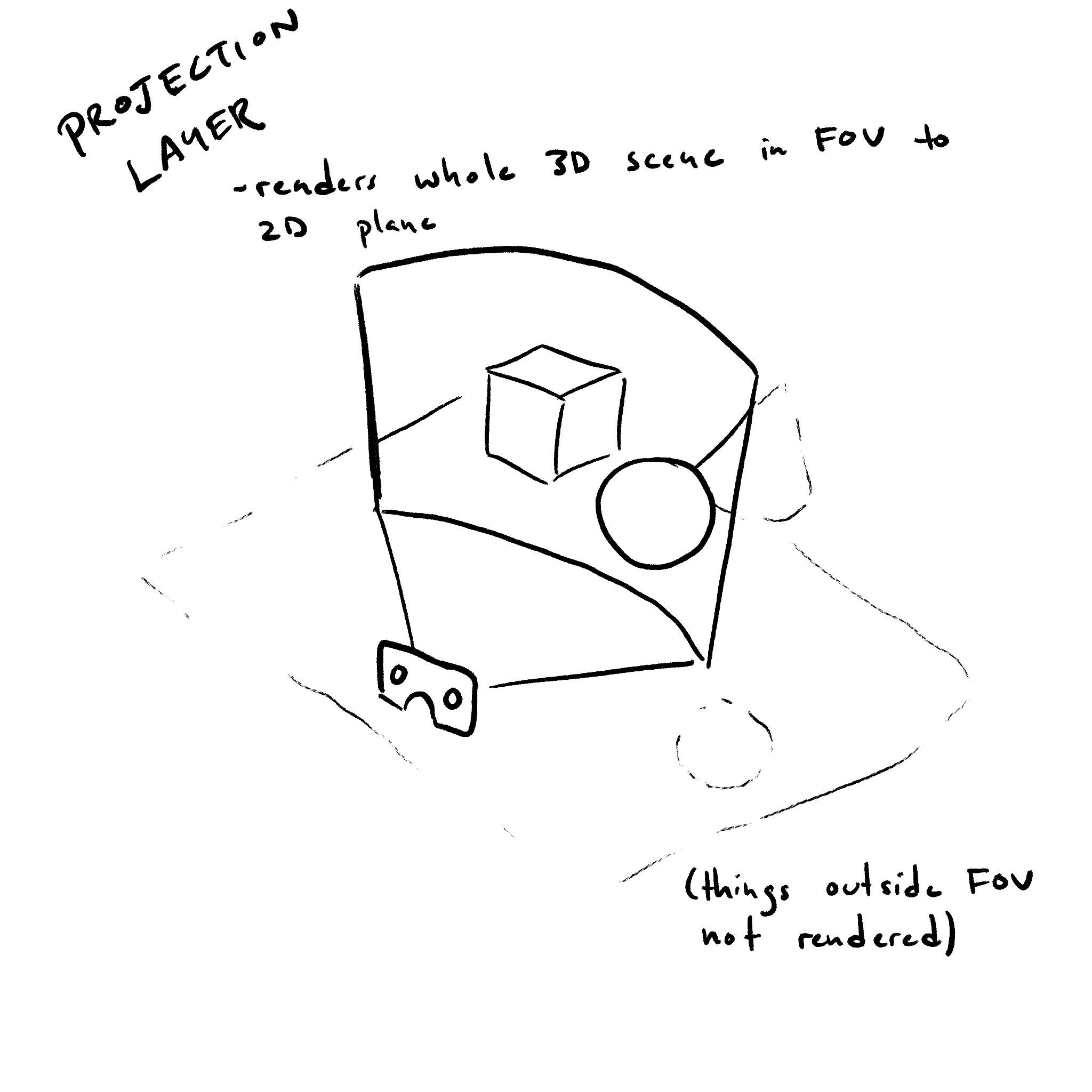
[ Exposed = Window ]  interface    XRProjectionLayer   :  XRCompositionLayer  {
   readonly   attribute   unsigned   long   textureWidth ;
   readonly   attribute   unsigned   long   textureHeight ;
   readonly   attribute   unsigned   long   textureArrayLength ;
   readonly   attribute   boolean   ignoreDepthValues ;
   attribute   float ?  fixedFoveation ;
   attribute   XRRigidTransform ?  deltaPose ;
};
The textureWidth attribute returns the width in pixels of
the colorTextures textures of this layer.
The textureHeight attribute returns the height in pixels of
the colorTextures textures of this layer.
The textureArrayLength attribute returns the number of layers of
the colorTextures textures of this layer if the XRProjectionLayer was initialized with a
textureType of "texture-array". Otherwise it will return 1.
The fixedFoveation attribute controls the amount of foveation used by the
XR Compositor. If the user agent or device does not support this attribute, they
should return null on getting, and setting should be a no-op.
Setting fixedFoveation to a value less than 0 will set it to 0 and setting it to
a value higher than 1 will set it to 1. 0 sets the minimum amount of foveation while
1 set the maximum. It is up to the user agent how the XR Compositor interprets these values.
If the fixedFoveation level was changed, it will take effect at the next XRFrame.
The ignoreDepthValues attribute, if true, indicates that the
XR Compositor MUST NOT make use of values in the depth buffer attachment when rendering. When the attribute
is false it indicates that the content of the depth buffer attachment will be used by the
XR Compositor and is expected to be representative of the scene rendered into the layer.
The deltaPose attribute describes the incremental application-applied transform, if any, since the previous frame that affects the view.
If the user agent or device does not support this attribute or the "space-warp" feature descriptor was not requested, the user agent should return null on getting, and setting should be a no-op.
A null value indicates that no application-applied transform is being supplied.
The value of deltaPose persists until the author changes it; the user agent does not reset it at the end of an requestAnimationFrame() callback.
When artificial locomotion transforms the world from one application pose to another between frames, setting deltaPose to the difference between those poses helps the XR Compositor synthesize missing frames.
Authors should update deltaPose when that transform changes and set it to null or an identity transform for frames where no application-applied transform occurred.
3.6. XRQuadLayer
AnXRQuadLayer renders a layer that takes up a flat rectangular space in the virtual environment.
Only the front of the layer MUST be visible; the back face MUST NOT be drawn by the XR Compositor.
A XRQuadLayer has no thicknes. It is a two-dimensional object positioned and oriented in 3D space. The position of a quad refers to the center of the quad.
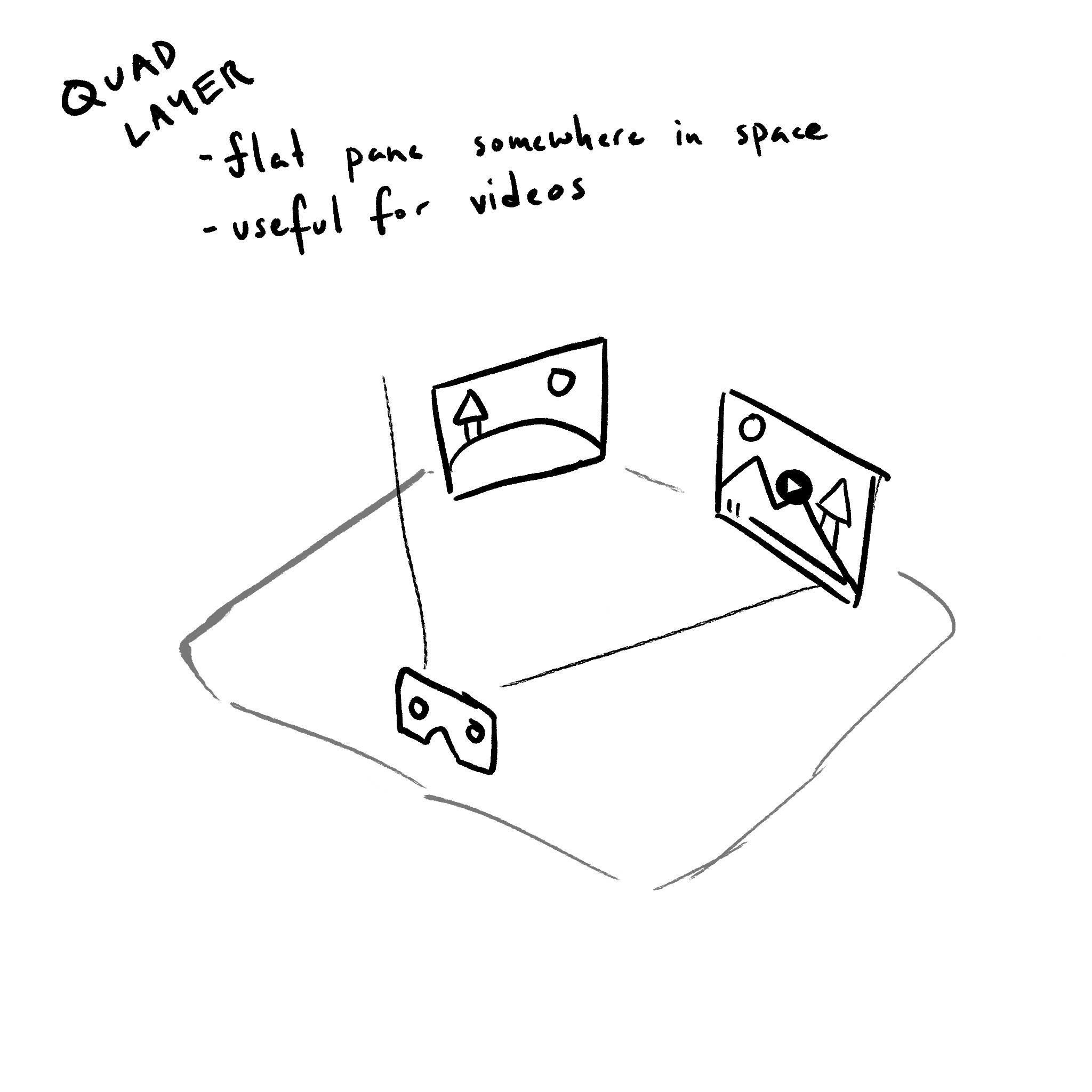
[ Exposed = Window ]  interface    XRQuadLayer   :  XRCompositionLayer  {
   attribute   XRSpace   space ;
   attribute   XRRigidTransform   transform ;
   attribute   float   width ;
   attribute   float   height ;
  // Events
   attribute   EventHandler   onredraw ;
};
The transform attributes sets and returns the offset and orientation relative to the
space attribute. The transform and space attributes
establish the spatial relationship of the layer within the user’s physical environment.
When setting the space, first run the steps for setting the space on a layer.
The width and height attributes
set and return the width and height of the layer in meters.
When initializing an XRQuadLayer layer with an XRQuadLayerInit init , the user agent MUST run the following steps:
-
Initialize layer’s
transformas follows:- If init’s
transformis set - Let layer’s
transformbe a newXRRigidTransformin the relevant realm of layer initialized withpositionandorientationof init’stransform. - Otherwise
- Let layer’s
transformbe a newXRRigidTransformin the relevant realm of layer initialized with aDOMPointInitposition of{ x: 0.0, y: 0.0, z: 0.0, w: 1.0 }.
- If init’s
The onredraw attribute is an Event handler IDL attribute for the redraw event type.
3.7. XRCylinderLayer
AnXRCylinderLayer renders a layer that takes up a curved rectangular space in the virtual environment.
Only the front of the layer MUST be visible; the back face MUST NOT be drawn by the XR Compositor.
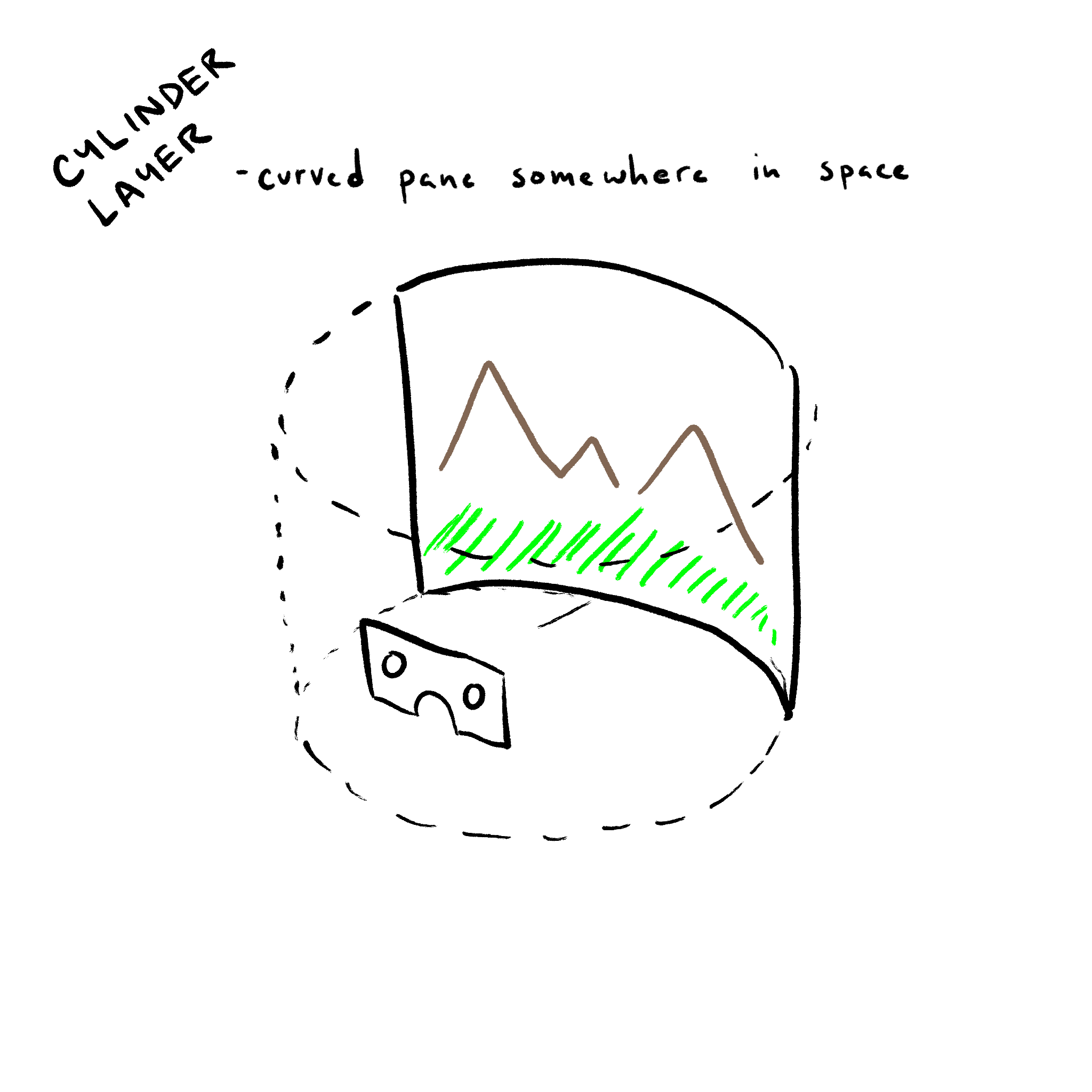
A XRCylinderLayer has no thicknes. It is a two-dimensional object positioned and oriented in 3D space. The position of the cylinder refers to the center of the quad.
[ Exposed = Window ]  interface    XRCylinderLayer   :  XRCompositionLayer  {
   attribute   XRSpace   space ;
   attribute   XRRigidTransform   transform ;
   attribute   float   radius ;
   attribute   float   centralAngle ;
   attribute   float   aspectRatio ;
  // Events
   attribute   EventHandler   onredraw ;
};
The transform attribute sets and returns the offset and orientation relative to the
space attribute. The transform and space attributes
establish the spatial relationship of the layer within the user’s physical environment.
When setting the space, first run the steps for setting the space on a layer.
The radius attribute controls the radius in meters of the cylinder.
The centralAngle attribute controls the angle in radians of the visible section of the cylinder.
It grows symmetrically around the 0 angle.
The aspectRatio attribute controls the ratio of the visible cylinder section. It is the ratio of the width of the visible section of the cylinder divided by its height. The width is calculated by multiplying the radius with the centralAngle.
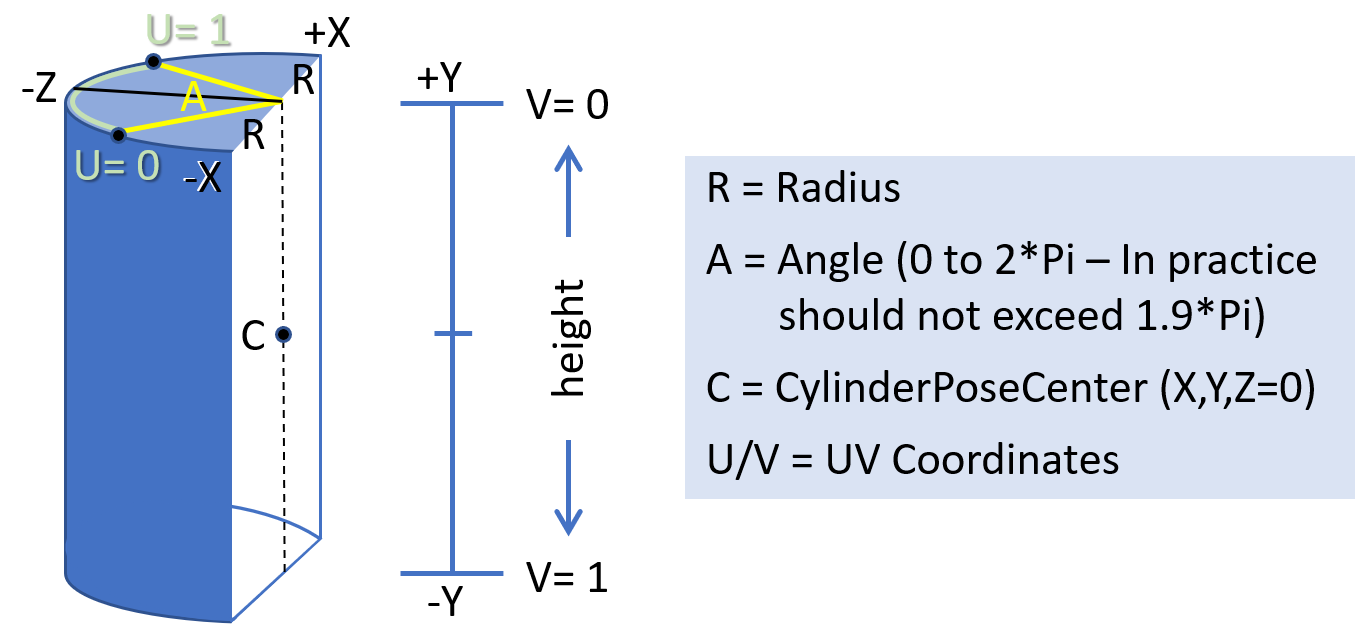
When initializing an XRCylinderLayer layer with an XRCylinderLayerInit init , the user agent MUST run the following steps:
-
Initialize layer’s
centralAngleto init’scentralAngle. -
Initialize layer’s
aspectRatioto init’saspectRatio. -
Initialize layer’s
transformas follows:- If init’s
transformis set - Let layer’s
transformbe a newXRRigidTransformin the relevant realm of layer initialized withpositionandorientationof init’stransform. - Otherwise
- Let layer’s
transformbe a newXRRigidTransformin the relevant realm of layer initialized with aDOMPointInitposition of{ x: 0.0, y: 0.0, z: 0.0, w: 1.0 }.
- If init’s
The onredraw attribute is an Event handler IDL attribute for the redraw event type.
3.8. XREquirectLayer
AnXREquirectLayer renders a layer where the XR Compositor MUST map an equirectangular coded data onto the inside of a sphere.
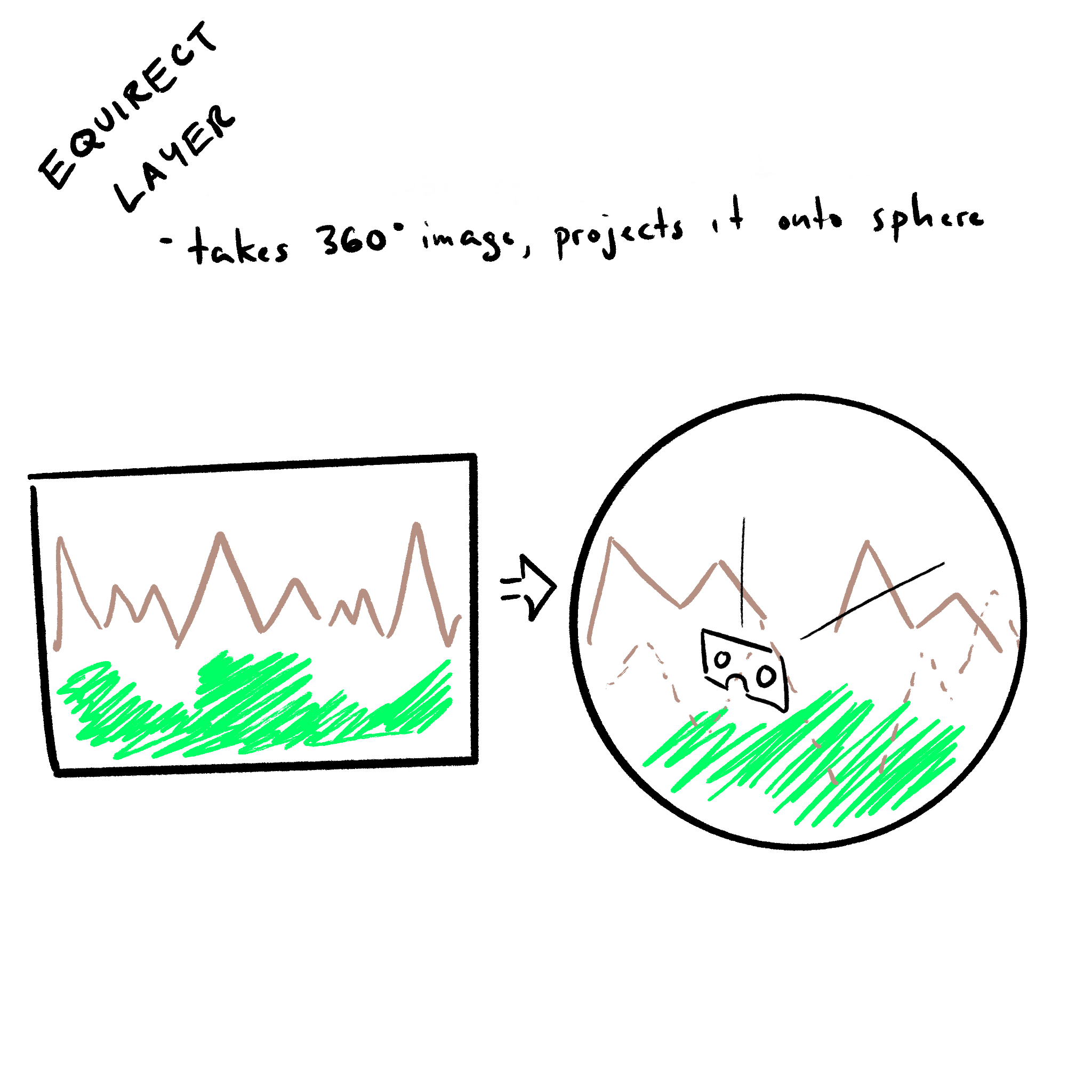
this section needs clarification
[ Exposed = Window ] interfaceXREquirectLayer: XRCompositionLayer { attribute XRSpacespace; attribute XRRigidTransform transform ; attribute float radius ; attribute float centralHorizontalAngle ; attribute float upperVerticalAngle ; attribute float lowerVerticalAngle ; // Events attribute EventHandler onredraw ; };
The transform attribute sets and returns the offset and orientation relative to
space. The transform attribute and the space
establish the spatial relationship of the layer within the user’s physical environment.
The radius attribute is the non-negative radius in meters of the sphere. Values of zero or infinity are treated as an infinite sphere.
Setting radius to a value less than 0 will set it to 0.
The centralHorizontalAngle , upperVerticalAngle
and lowerVerticalAngle attributes set and return how the texture is mapped to the sphere.
Setting centralHorizontalAngle to a value less than 0 will set it to 0 and setting it to
a value higher than 2π will set it to 2π.
Setting upperVerticalAngle or lowerVerticalAngle to a value less than -π/2 will set it
to -π/2 and setting it to a value higher than π/2 will set it to π/2.
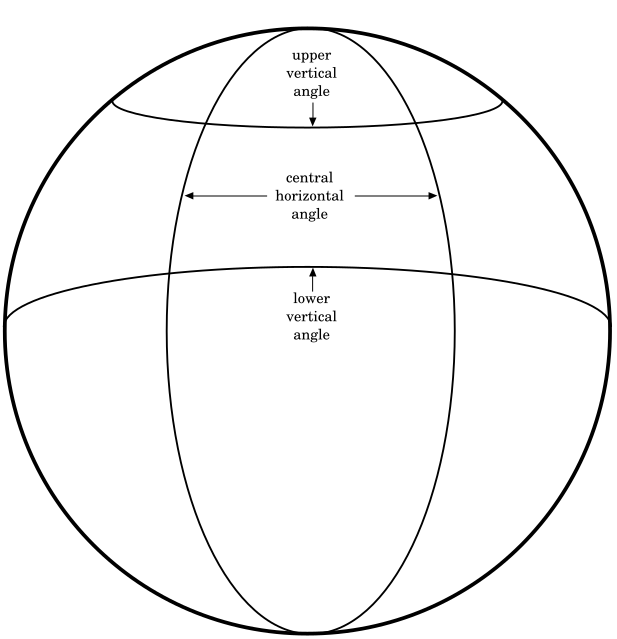
When assigning an XRSpace to the space attribute, first run the following steps.
When setting the space on an equirect layer with XRSpace space and XREquirectLayer layer, the user agent MUST run the following steps to validate if the space is valid:
-
If init’s
spaceis not an instance of typeXRReferenceSpace, throwTypeErrorand abort these steps. -
If init’s
spacehas a type of"viewer", throwTypeErrorand abort these steps. -
Run setting the space on a layer with space and layer.
The onredraw attribute is an Event handler IDL attribute for the redraw event type.
3.9. XRCubeLayer
AXRCubeLayer renders a layer where the XR Compositor renders directly from a cubemap.
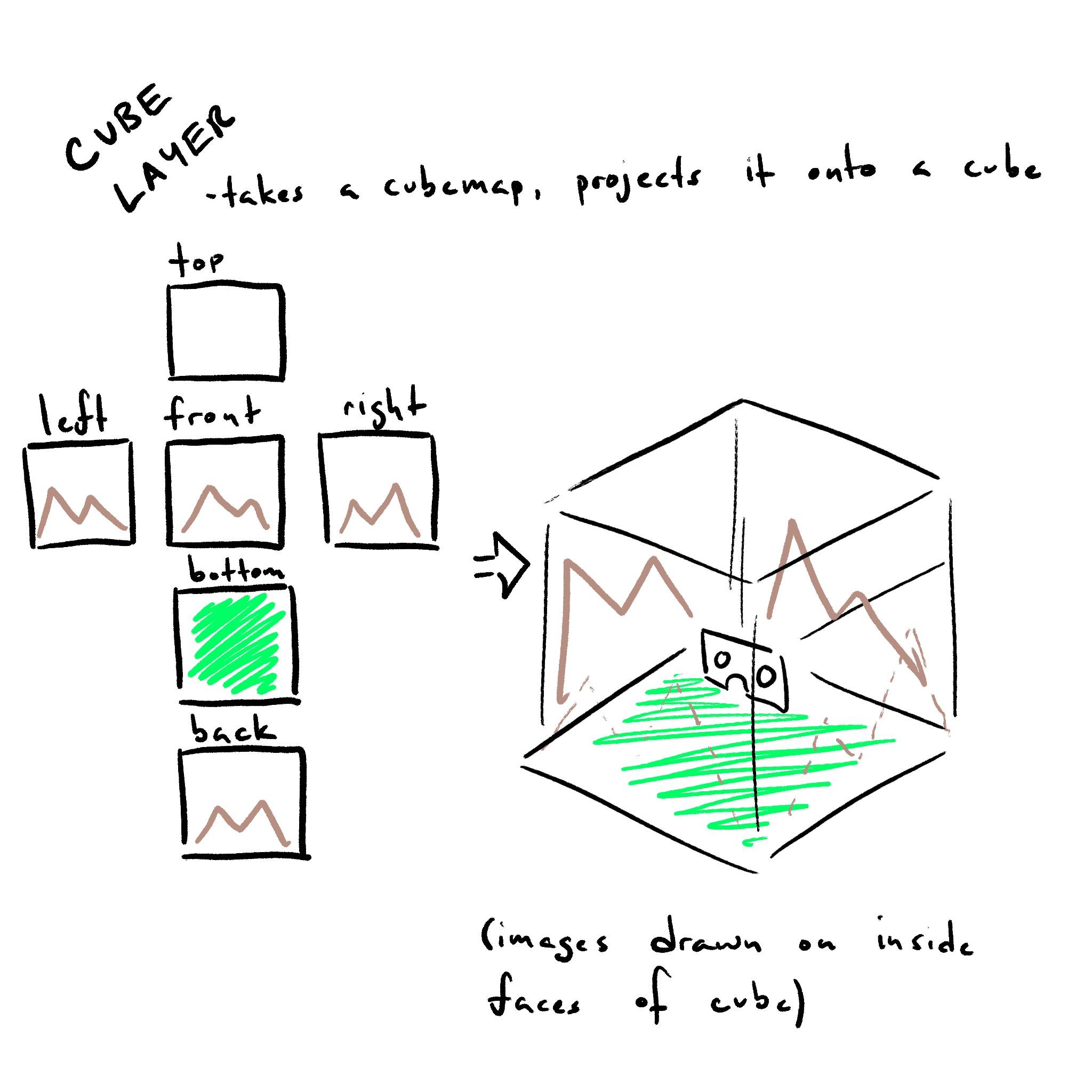
this section needs clarification
[ Exposed = Window ]  interface    XRCubeLayer   :  XRCompositionLayer  {
   attribute   XRSpace   space ;
   attribute   DOMPointReadOnly   orientation ;
  // Events
   attribute   EventHandler   onredraw ;
};
The orientation attribute sets and returns the orientation relative to the
space attribute. The orientation and space attributes
establish the spatial relationship of the layer within the user’s physical environment.
When placing the XRCubeLayer only the orientation of the space is considered. The cube layer will always be rendered
with the view point at the center.
When assigning an XRSpace to the space attribute, first run the following steps.
When setting the space on an cube layer with XRSpace space and XRCubeLayer layer, the user agent MUST run the following steps to validate if the space is valid:
-
If init’s
spaceis not an instance of typeXRReferenceSpace, throwTypeErrorand abort these steps. -
If init’s
spacehas a type of"viewer", throwTypeErrorand abort these steps. -
Run setting the space on a layer with space and layer.
The onredraw attribute is an Event handler IDL attribute for the redraw event type.
4. Spaces
XRProjectionLayer and XRWebGLLayer don’t have associated an XRSpace because they render to the full frame.
XRCubeLayer and XREquirectLayer MUST only support XRReferenceSpaces that are not of type "viewer".
XRQuadLayer and XRCylinderLayer MUST support all XRSpace types.
Generally, developers should not use of "viewer" space to stabilize layers, as this will almost always defeat positional or
rotational reprojection and result in a loss in stability of the rendered content relative to the world. The exception being small UI elements
like a gaze cursor or targeting reticle.
Following are some best practices of spaces to use with a layer type:
-
XRQuadLayerwith"viewer"space: Head-locked constant-size reticle in center of screen. -
XRQuadLayerorXRCylinderLayerin"local","unbounded"space: springy body-locked UI. -
XRQuadLayerorXRCylinderLayerin"local","local-floor","unbounded","bounded-floor"or anchor space: world-locked video, placed by the user. -
XREquirectLayerorXRCubeLayerin"local"space: 360-degree video or skybox.
5. Rendering
5.1. XRSubImage
TheXRSubImage object represents what viewport of the color GPU texture to use.
[ Exposed = Window ]  interface    XRSubImage   {
  [ SameObject ]  readonly   attribute   XRViewport   viewport ;
};
NOTE: this class is designed to accomodate future extensions
The viewport attribute returns the XRViewport to use when rendering the sub image’s color attachment.
5.2. XRWebGLSubImage
TheXRWebGLSubImage object is used during rendering of the layer.
[ Exposed = Window ]  interface    XRWebGLSubImage   :  XRSubImage  {
  [ SameObject ]  readonly   attribute   WebGLTexture   colorTexture ;
  [ SameObject ]  readonly   attribute   WebGLTexture ?  depthStencilTexture ;
  [ SameObject ]  readonly   attribute   WebGLTexture ?  motionVectorTexture ;
   readonly   attribute   unsigned   long ?  imageIndex ;
   readonly   attribute   unsigned   long   colorTextureWidth ;
   readonly   attribute   unsigned   long   colorTextureHeight ;
   readonly   attribute   unsigned   long ?  depthStencilTextureWidth ;
   readonly   attribute   unsigned   long ?  depthStencilTextureHeight ;
};
The colorTexture attribute returns the color opaque texture for the XRCompositionLayer.
The viewport describes the region of the colorTexture that corresponds to the requested view. It does not describe the region of the depthStencilTexture or motionVectorTexture.
The depthStencilTexture attribute returns the depth/stencil opaque texture for the XRCompositionLayer.
If the layer was created without depth/stencil, this attribute returns null.
The motionVectorTexture attribute returns the motion opaque texture for the XRProjectionLayer.
If the XRSession was created without the space-warp feature descriptor or the layer is not a XRProjectionLayer, this attribute MUST return null.
The imageIndex attribute returns the offset into the texture array. Valid only for layers
that were requested with texture-array.
The colorTextureWidth and colorTextureHeight attributes
return the width and height in pixels of the GL color attachments.
The depthStencilTextureWidth and depthStencilTextureHeight attributes
return the width and height in pixels of the GL depth/stencil attachments. If the layer was created without depth/stencil, these attributes return null.
5.3. XRTextureType
TheXRTextureType enum defines what type of texture is allocated.
 enum    XRTextureType   {
   "texture" ,
   "texture-array"
};
-
A texture type of
textureindicates that the textures ofXRWebGLSubImageMUST be of typeTEXTURE_2D -
A texture type of
texture-arrayindicates that the textures ofXRWebGLSubImageMUST be of typeTEXTURE_2D_ARRAY
6. GPU layer and view creation
6.1. Overview
When a layer is created it is backed by a GPU resource, typically a texture, provided by one of the Web platform’s graphics APIs. In order to
specify which API is providing the layer’s GPU resources an XRWebGLBinding for the API in question must be created.
Each graphics API may have unique requirements that must be satisfied before a context can be used in the creation of a layer. For example,
a WebGLRenderingContext must have its xrCompatible flag set prior to being passed to the constructor of the XRWebGLBinding instance.
Any interaction between the XRSession the graphics API, such as allocating or retrieving textures, will go through this XRWebGLBinding instance, and the exact mechanics
of the interaction will typically be API specific. This allows the rest of the WebXR API to be
graphics API agnostic and more easily adapt to future advances in rendering techniques.
Once an XRWebGLBinding instance has been acquired, it can be used to create a variety of XRCompositionLayer. Any layers created by that instance will then be able
to query the associated GPU resources each frame, generally expected to be the native API’s texture interface.
The various layer types are created with the create____Layer series of methods on the XRWebGLBinding instance. Information about the graphics resources required,
such as whether or not to allocate a depth buffer or alpha channel, are passed in at layer creation time and will be immutable for the lifetime of the layer.
The method will return the associated XRCompositionLayer type.
If an XRSession was created with the "layers" feature descriptor, it MUST support all layer types.
If a layer type isn’t supported its creation method MUST throw an exception. XRProjectionLayer MUST be supported by all XRSessions, whether it was created with the "layers" feature descriptor or not.
6.2. Opaque textures
When using WebXR GPU layers, theXRWebGLBinding object will return instances of an opaque texture for the color and depth/stencil attachments.
An opaque texture functions identically to a standard WebGLTexture with the following changes:
-
An opaque texture is considered invalid outside of a
requestAnimationFrame()callback for its session. -
An opaque texture is invalid until it is returned by the
getSubImage()orgetViewSubImage()calls. -
The XR Compositor MUST assume that the opaque texture for the color attachment contains colors with premultiplied alpha.
-
At the end of the
requestAnimationFrame()callback the texture MUST be unbounded and detached from allWebGLShaderobjects. -
An opaque texture MUST behave as though it was allocated with texStorage2D or texStorage3D, as appropriate, even when using a WebGL 1.0 context.
-
A call to
deleteTexturewith an opaque texture MUST generate anINVALID_OPERATIONerror.
The buffers attached to an opaque texture MUST be cleared to the values in the table below during the processing of the first call to getViewSubImage() or getSubImage() in each XR animation frame when clearOnAccess is true.
If clearOnAccess is false, the buffers attached to an opaque texture MUST be cleared the first time that they are accessed. Subsequent accesses in later frames MAY NOT clear the buffers.
| Buffer | Clear Value |
|---|---|
| Color | (0, 0, 0, 0) |
| Depth | 1.0 |
| Stencil | 0 |
If the opaque texture was created with 2 or more mipLevels,
the author SHOULD populate all the mip levels. The user agent MUST NOT assume that it should create the mip levels.
NOTE: the opaque textures are allocated when the layer is contructed using the
allocate color textures and allocate depth textures algoritms. The side effect of this pre-allocation is that calling
getSubImage() and getViewSubImage() with the same parameters will always return the same texture objects.
NOTE: Changes to the dimensions or format of the opaque textures are not allowed. GL commands may only alter the texel values and texture parameters. Using any of the following commands with the WebGLTexture will result in an INVALID_OPERATION error being generated, even if it does not affect the dimensions or format: TexImage*, CompressedTexImage*, CopyTexImage* and TexStorage*. The "Immutable-Format Texture Images" section in the OpenGL ES 3.0 spec defines these limitations in more detail.
Allocation of the resources for layers (such as memory) MUST be done through the same mechanism as WebGL.
If an XRLayer is allocated with the RGBA or RGB colorFormat, its colorTextures MUST be exposed as RGBA or RGB to the WebGLRenderingContext context.
However, the XR Compositor MUST treat the colorTextures’s pixels as if they were in the SRGB8_ALPHA8 or SRGB8 colorFormat.
NOTE: this means that the XR Compositor MUST NOT do any gamma conversion from linear RGBA or RGB when it processes the colorTextures. Otherwise, the pixels in the final rendering will appear too bright which will not match the rendering on a regular 2D WebGLRenderingContext context.
6.3. XRProjectionLayerInit
TheXRProjectionLayerInit dictionary represents a set of configurable values that describe how an XRProjectionLayer
is initialized.
 dictionary    XRProjectionLayerInit   {
   XRTextureType   textureType  = "texture";
   GLenum   colorFormat  = 0x1908; // RGBA
   GLenum   depthFormat  = 0x1902; // DEPTH_COMPONENT
   double   scaleFactor  = 1.0;
   boolean   clearOnAccess  =  true ;
};
The textureType attribute defines the type of texture that the layer will have.
The colorFormat attribute defines the data type of the color texture data.
This is the list of color formats for projection layers that the XR Compositor MUST support:
-
SRGB_ALPHA_EXTfor contexts with the 'EXT_sRGB' extension enabled
For WebGL2 contexts these additional formats are supported:
The depthFormat attribute defines the data type of the depth texture data.
If depthFormat is 0 the layer will not provide a depth/stencil texture.
This is the list of depth formats for projection layers that the XR Compositor MUST support:
For WebGLRenderingContext contexts with the 'WEBGL_depth_texture' extension enabled or WebGL2 contexts:
If the extension was not enabled, the request for a depth texture is ignored.
NOTE: this could be confusing to authors because they might expect a depth texture. If possible, provide a warning with the reason why the texture was not created.
For WebGL2RenderingContext contexts these additional formats are supported:
The scaleFactor attribute defines the value that the session’s
recommended WebGL framebuffer resolution MUST be multiplied by determining the resolution of the layer’s attachments.
The clearOnAccess attribute defines if the texture associated with this layer should be cleared in the initial frame or on every frame.
NOTE: the XRProjectionLayerInit dictionary does not have support to configure mipLevels like
XRLayerInit. If a user agent wants to support mipmapping on projection layers, it is free to allocate the texture with mips.
In that case the user agent (and not the author) is responsible for generating all the mip levels.
6.4. XRLayerInit
TheXRLayerInit dictionary represents a set of common configurable values for XRQuadLayer, XRCylinderLayer,
XREquirectLayer and XRCubeLayer .
dictionaryXRLayerInit{ required XRSpace space ; XRTextureType textureType = "texture"; GLenum colorFormat = 0x1908; // RGBA GLenum ? depthFormat ; unsigned long mipLevels = 1; required unsigned long viewPixelWidth ; required unsigned long viewPixelHeight ; XRLayerLayout layout = "mono"; booleanisStatic= false ; boolean clearOnAccess = true ; };
The space attribute defines the spatial relationship with the user’s physical environment.
The textureType attribute defines the type the layer’s textures. The XR Compositor MUST support:
For WebGL2RenderingContext these additional types are supported:
The colorFormat attribute defines the data type of the color texture data.
This is the list of color formats for non-projection layers that the XR Compositor MUST support:
-
SRGB_ALPHA_EXTfor contexts with the 'EXT_sRGB' extension enabled
For WebGL2 contexts these additional formats are supported:
For contexts with the 'WEBGL_compressed_texture_etc' extension enabled these additional formats are supported:
For contexts with the 'WEBGL_compressed_texture_astc' extension enabled all the formats of that extension are supported.
The depthFormat attribute defines the data type of the depth texture data.
If depthFormat is not supplied, the layer will not provide a depth/stencil texture.
This is the list of depth formats for non-projection layers that the XR Compositor MUST support:
For WebGLRenderingContext contexts with the 'WEBGL_depth_texture' extension enabled or WebGL2 contexts:
For WebGL2RenderingContext contexts these additional formats are supported:
The mipLevels attribute defines the desired number of mip levels in the color and texture data.
If the user agent can’t create the requested number, it can create less. Authors MUST query mipLevels to determine
the actual number of mip levels.
The viewPixelWidth and viewPixelHeight attributes define
the rectangular dimensions of the XRCompositionLayer.
The layout attribute defines the layout of the layer.
The clearOnAccess attribute defines if the texture associated with this layer should be cleared in the initial frame or on every frame.
6.5. XRQuadLayerInit
The XRQuadLayerInit dictionary represents a set of configurable values that describe how an XRQuadLayer is initialized.
dictionaryXRQuadLayerInit: XRLayerInit { XRRigidTransform ?transform; floatwidth= 1.0; floatheight= 1.0; };
6.6. XRCylinderLayerInit
The XRCylinderLayerInit dictionary represents a set of configurable values that describe how an XRCylinderLayer is initialized.
dictionaryXRCylinderLayerInit: XRLayerInit { XRRigidTransform ?transform; floatradius= 2.0; floatcentralAngle= 0.78539; floataspectRatio= 2.0; };
The default value of centralAngle is π / 4.
6.7. XREquirectLayerInit
The XREquirectLayerInit dictionary represents a set of configurable values that describe how an XREquirectLayer is initialized.
dictionaryXREquirectLayerInit: XRLayerInit { XRRigidTransform ?transform; floatradius= 0; floatcentralHorizontalAngle= 6.28318; floatupperVerticalAngle= 1.570795; floatlowerVerticalAngle= -1.570795; };
The default value of centralHorizontalAngle is 2π.
The default value of upperVerticalAngle is π/2.
The default value of lowerVerticalAngle is -π/2.
6.8. XRCubeLayerInit
The XRCubeLayerInit dictionary represents a set of configurable values that describe how an XRCubeLayer is initialized.
dictionaryXRCubeLayerInit: XRLayerInit { DOMPointReadOnly ?orientation; };
6.9. XRWebGLBinding
TheXRWebGLBinding object is used to create layers that have a GPU backend.
[ Exposed = Window ] interfaceXRWebGLBinding{ constructor ( XRSessionsession, XRWebGLRenderingContextcontext); readonly attribute double nativeProjectionScaleFactor ; readonly attribute boolean usesDepthValues ; XRProjectionLayer createProjectionLayer ( optional XRProjectionLayerInitinit= {}); XRQuadLayer createQuadLayer ( optional XRQuadLayerInitinit= {}); XRCylinderLayer createCylinderLayer ( optional XRCylinderLayerInitinit= {}); XREquirectLayer createEquirectLayer ( optional XREquirectLayerInitinit= {}); XRCubeLayer createCubeLayer ( optional XRCubeLayerInitinit= {}); XRWebGLSubImage getSubImage ( XRCompositionLayerlayer, XRFrameframe, optional XREyeeye= "none"); XRWebGLSubImage getViewSubImage ( XRProjectionLayerlayer, XRViewview); undefined foveateBoundTexture ( GLenumtarget, floatfixed_foveation); };
the init dictionaries shouldn’t be optional. This is bikeshed issue 1566.
Each XRWebGLBinding has a context object of type XRWebGLRenderingContext which is an instance
of either a WebGLRenderingContext or a WebGL2RenderingContext.
Each XRWebGLBinding has an associated session , which is the
XRSession it was created with.
Each XRWebGLBinding has an internal WeakSet foveatedTextures that holds weak references to the textures that were bound to the specified target when calling foveateBoundTexture.
NOTE: It is possible to create more than one XRWebGLBinding. Any layer created with an instance of XRWebGLBinding can
be used with another instance of XRWebGLBinding as long as both were created with the same session and the same
context. The lifetime of layers or instances of XRWebGLSubImage is not tied to the lifetime of the XRWebGLBinding that created them.
Each XRCompositionLayer created through XRWebGLBinding has an internal colorTextures array which is an array of WebGLTextures for color textures,
an internal depthStencilTextures which is an array of opaque textures for depth/stencil textures and
an internal motionVectorTextures which is an array of opaque textures for motion textures.
Each XRProjectionLayer created through XRWebGLBinding has an internal colorTextures for secondary views
array which is an array of opaque textures for color textures and an internal depthStencilTextures for secondary views
array which is an array of opaque textures for depth/stencil textures that are used to render the secondary views.
The nativeProjectionScaleFactor function returns the value that the session’s recommended WebGL framebuffer resolution
MUST be multiplied by to yield the session’s native WebGL framebuffer resolution.
special case UA behavior if the size causes the layout to change (ie if the requested width exceeds a limit with "stereo-left-right")
The usesDepthValues attribute, if false, indicates that the
XR Compositor MUST NOT make use of values if there is a depth buffer attachment. When the attribute
is true it indicates that the content of the depth buffer attachment will be used by the
XR Compositor and is expected to be representative of the scene rendered into the layer.
To determine the layout attribute using an XRTextureType textureType, an XRWebGLRenderingContext context and an XRLayerLayout layout, the user agent MUST run the following steps:
-
If context is not an
WebGL2RenderingContextand textureType is"texture-array", throwTypeErrorand abort these steps. -
If textureType is
"texture-array"and not all of the session’s views in the list of views have the same recommended WebGL color texture resolution, throw aNotSupportedErrorand abort these steps. -
If layout is
"mono", return layout and abort these steps. -
If layout is
"default", run the following steps:-
If the size of list of views is
1, return"mono"and abort these steps. -
If textureType is
"texture-array", return layout and abort these steps.
-
-
If layout is
"default"or"stereo"and textureType is"texture", run the following steps:-
If the user agent prefers
"stereo-left-right"layout, return"stereo-left-right"and abort these steps. -
If the user agent prefers
"stereo-top-bottom"layout, return"stereo-top-bottom"and abort these steps.
-
-
return layout.
To determine the maximum scalefactor using an XRSession session, an XRWebGLRenderingContext context and an XRLayerLayout layout, the user agent MUST run the following steps:
-
Let largest width be the largest width of the recommended WebGL color texture resolution from the session’s list of views excluding the secondary views.
-
Let largest height be the largest height of the recommended WebGL color texture resolution from the session’s list of views excluding the secondary views.
-
If layout is
"stereo-left-right"layout, multiply largest width by2. -
If layout is
"stereo-top-bottom"layout, multiply largest height by2. -
Let largest view dimension be the largest of largest width or largest height.
-
Let largest texture dimension be the largest dimension of a
WebGLTexturecreated by context. -
return largest texture dimension divided by largest view dimension.
To allocate color textures for projection layers using an XRProjectionLayer layer, an XRTextureType textureType, a GLenum textureFormat and a float scaleFactor, the user agent MUST run the following steps:
-
Let array be a new array in the relevant realm of context.
-
Let context be layer’s context.
-
Let session be layer’s session.
-
Let numViews be the number of the session’s list of views excluding the secondary views.
-
Let view be the first entry in the session’s list of views that is not a secondary views.
-
Let width be the width of view’s recommended WebGL color texture resolution multiplied by scaleFactor.
-
Let height be the height of view’s recommended WebGL color texture resolution multiplied by scaleFactor.
-
If textureFormat is not in the list of color formats for projection layers, throw a
NotSupportedErrorand abort these steps. -
If layer’s
layoutis"mono"or"default":- If textureType is
"texture-array": - If the session’s views in the list of views don’t all have the same recommended WebGL color texture resolution excluding the secondary views, throw a
NotSupportedErrorand abort these steps. - Initialize array with 1 new instance of an opaque texture in the relevant realm of context created as a
TEXTURE_2D_ARRAYtexture with numViews layers using context, textureFormat, width and height. - If the opaque texture was unable to be created for any reason, throw an
OperationErrorand abort these steps. - Return array and abort these steps.
- Otherwise
-
For each view in the session’s list of views:
-
If view is a secondary view, continue.
-
Let width be the width of view’s recommended WebGL color texture resolution multiplied by scaleFactor.
-
Let height be the height of view’s recommended WebGL color texture resolution multiplied by scaleFactor.
-
let texture be a new instance of an opaque texture in the relevant realm of context created as a
TEXTURE_2Dtexture with context, textureFormat, width and height. -
If the texture was unable to be created for any reason, throw an
OperationErrorand abort these steps. -
Append texture to array.
-
- Return array and abort these steps.
- If textureType is
-
If the session’s views in the list of views don’t all have the same recommended WebGL color texture resolution excluding the secondary views, throw a
NotSupportedErrorand abort these steps. -
If layer’s
layoutisstereo-left-right, initialize array with 1 new instance of opaque texture in the relevant realm of context created as a textureType texture using context , textureFormat, numViews multiplied by width and height. -
If layer’s
layoutisstereo-top-bottom, initialize array with 1 new instance of opaque texture in the relevant realm of context created as a textureType texture using context , textureFormat, width and numViews multiplied by height. -
If the opaque texture was unable to be created for any reason, throw an
OperationErrorand abort these steps. -
return array.
To allocate depth textures for projection layers using an XRProjectionLayer layer, an XRTextureType textureType, a GLenum textureFormat and a float scaleFactor, the user agent MUST run the following steps:
-
Let context be layer’s context.
-
Let array be a new array in the relevant realm of context.
-
Let session be layer’s session.
-
If textureFormat is
0, return array and abort these steps. -
If context is a
WebGLRenderingContextand theWEBGL_depth_textureextension is not enabled in context, return array and abort these steps. -
If textureFormat is not in the list of depth formats for projection layers, throw a
NotSupportedErrorand abort these steps. -
let numViews be the number of the session’s list of views excluding the secondary views.
-
Let view be the first entry in the session’s list of views that is not a secondary view.
-
Let recommendedDepthResolution be view’s recommended WebGL depth texture resolution.
-
If session was created with the "space-warp" feature descriptor, set recommendedDepthResolution to view’s recommended motion vector texture resolution.
-
Let width be the width of recommendedDepthResolution multiplied by scaleFactor.
-
Let height be the height of recommendedDepthResolution multiplied by scaleFactor.
-
If layer’s
layoutis"mono"or"default":- If textureType is
"texture-array": - Initialize array with 1 new instance of an opaque texture in the relevant realm of context created as a
TEXTURE_2D_ARRAYtexture with numViews layers using context, textureFormat, stencil, width and height. - If the opaque texture was unable to be created for any reason, throw an
OperationErrorand abort these steps. - Return array and abort these steps.
- Otherwise
-
For each view in the session’s list of views:
-
If view is a secondary view, continue.
-
Let recommendedDepthResolution be view’s recommended WebGL depth texture resolution.
-
If session was created with the "space-warp" feature descriptor, set recommendedDepthResolution to view’s recommended motion vector texture resolution.
-
Let width be the width of recommendedDepthResolution multiplied by scaleFactor.
-
Let height be the height of recommendedDepthResolution multiplied by scaleFactor.
-
let texture be a new instance of an opaque texture in the relevant realm of context created as a
TEXTURE_2Dtexture with context, textureFormat, stencil, width and height. -
If the texture was unable to be created for any reason, throw an
OperationErrorand abort these steps. -
Append texture to array.
-
- Return array and abort these steps.
- If textureType is
-
If session was created with the "space-warp" feature descriptor and the session’s views in the list of views don’t all have the same recommended motion vector texture resolution excluding the secondary views, throw a
NotSupportedErrorand abort these steps. -
If session was not created with the "space-warp" feature descriptor and the session’s views in the list of views don’t all have the same recommended WebGL depth texture resolution excluding the secondary views, throw a
NotSupportedErrorand abort these steps. -
If layer’s
layoutisstereo-left-right, initialize array with 1 new instance of an opaque texture in the relevant realm of context created as a textureType texture using context, textureFormat, stencil, numViews multiplied by width and height. -
If layer’s
layoutisstereo-top-bottom, initialize array with 1 new instance of an opaque texture in the relevant realm of context created as a textureType texture using context, textureFormat, stencil, width and numViews multiplied by height. -
If the opaque texture was unable to be created for any reason, throw an
OperationErrorand abort these steps. -
return array.
To allocate motion vector textures for projection layers using an XRProjectionLayer layer, an XRTextureType textureType and a float scaleFactor, the user agent MUST run the following steps:
-
Let context be layer’s context.
-
Let array be a new array in the relevant realm of context.
-
Let session be layer’s session.
-
If session was not created with the "space-warp" feature descriptor, return array and abort these steps.
-
If context is a
WebGLRenderingContextand theWEBGL_depth_textureextension is not enabled in context, return array and abort these steps. -
let numViews be the number of the session’s list of views excluding the secondary views.
-
Let view be the first entry in the session’s list of views that is not a secondary view.
-
Let width be the width of view’s recommended motion vector texture resolution multiplied by scaleFactor.
-
Let height be the height of view’s recommended motion vector texture resolution multiplied by scaleFactor.
-
If layer’s
layoutis"mono"or"default":- If textureType is
"texture-array": - Initialize array with 1 new instance of an opaque texture in the relevant realm of context created as a
TEXTURE_2D_ARRAYtexture with numViews layers using context,RGBA16F, width and height. - If the opaque texture was unable to be created for any reason, throw an
OperationErrorand abort these steps. - Return array and abort these steps.
- Otherwise
-
For each view in the session’s list of views:
-
If view is a secondary view, continue.
-
Let width be the width of view’s recommended motion vector texture resolution multiplied by scaleFactor.
-
Let height be the height of view’s recommended motion vector texture resolution multiplied by scaleFactor.
-
let texture be a new instance of an opaque texture in the relevant realm of context created as a
TEXTURE_2Dtexture with context,RGBA16F, width and height. -
If the texture was unable to be created for any reason, throw an
OperationErrorand abort these steps. -
Append texture to array.
-
- Return array and abort these steps.
- If textureType is
-
If the session’s views in the list of views don’t all have the same recommended motion vector texture resolution excluding the secondary views, throw a
NotSupportedErrorand abort these steps. -
If layer’s
layoutisstereo-left-right, initialize array with 1 new instance of an opaque texture in the relevant realm of context created as a textureType texture using context,RGBA16F, numViews multiplied by width and height. -
If layer’s
layoutisstereo-top-bottom, initialize array with 1 new instance of an opaque texture in the relevant realm of context created as a textureType texture using context,RGBA16F, width and numViews multiplied by height. -
If the opaque texture was unable to be created for any reason, throw an
OperationErrorand abort these steps. -
return array.
To allocate the color textures for the secondary views using an XRProjectionLayer layer, an XRTextureType textureType, a GLenum textureFormat and a float scaleFactor, the user agent MUST run the following steps:
-
Let context be layer’s context.
-
Let session be layer’s session.
-
Let array be a new array in the relevant realm of context.
-
If textureFormat is not in the list of color formats for projection layers, throw a
NotSupportedErrorand abort these steps. -
For each view in the session’s list of views:
-
If view is not a secondary view, continue.
-
Let width be the width of view’s recommended WebGL color texture resolution multiplied by scaleFactor.
-
Let height be the height of view’s recommended WebGL color texture resolution multiplied by scaleFactor.
-
Initialize texture as follows:
- If textureType is
"texture-array": - Let texture be a new instance of an opaque texture in the relevant realm of context created as a
TEXTURE_2D_ARRAYtexture with context, textureFormat, width and height. - Otherwise
- Let texture be a new instance of an opaque texture in the relevant realm of context created as a
TEXTURE_2Dtexture with context, textureFormat, width and height.
- If textureType is
-
If the texture was unable to be created for any reason, throw an
OperationErrorand abort these steps. -
Append texture to array.
-
-
Return array and abort these steps.
To allocate the depth textures for the secondary views using an XRProjectionLayer layer, an XRTextureType textureType, a GLenum textureFormat and a float scaleFactor, the user agent MUST run the following steps:
-
Let context be layer’s context.
-
Let session be layer’s session.
-
If textureFormat is
0, return array and abort these steps. -
If context is a
WebGLRenderingContextand theWEBGL_depth_textureextension is not enabled in context, return array and abort these steps. -
If textureFormat is not in the list of depth formats for projection layers, throw a
NotSupportedErrorand abort these steps. -
Let array be a new array in the relevant realm of context.
-
For each view in the session’s list of views:
-
If view is not a secondary view, continue.
-
Let width be the width of view’s recommended WebGL depth texture resolution multiplied by scaleFactor.
-
Let height be the height of view’s recommended WebGL depth texture resolution multiplied by scaleFactor.
-
Initialize texture as follows:
- If textureType is
"texture-array": - Let texture be a new instance of an opaque texture in the relevant realm of context created as a
TEXTURE_2D_ARRAYtexture with context, textureFormat, stencil, width and height. - Otherwise
- Let texture be a new instance of an opaque texture in the relevant realm of context created as a
TEXTURE_2Dtexture with context, textureFormat, stencil, width and height.
- If textureType is
-
Append texture to array.
-
-
Return array and abort these steps.
the scaleFactor needs to be recalculated for the secondary views.
To allocate color textures using an XRCompositionLayer layer, an XRTextureType textureType and an XRLayerInit init, the user agent MUST run the following steps:
-
let array be a new array in the relevant realm of context.
-
let context be layer’s context.
-
If init’s
colorFormatis not in the list of color formats for non-projection layers, throw aNotSupportedErrorand abort these steps. -
If init’s
mipLevelsis smaller than1, throw aInvalidStateErrorand abort these steps. -
If init’s
mipLevelsis larger than1andviewPixelWidthandviewPixelHeightare not powers of2, throw aInvalidStateErrorand abort these steps -
- If textureType is
"texture-array": - Initialize array with 1 new instance of an opaque texture in the relevant realm of this context created as a
TEXTURE_2D_ARRAYtexture with 1 internal texture using context and init’scolorFormat,mipLevels,viewPixelWidthandviewPixelHeightvalues. - Otherwise
- Initialize array with 1 new instance of an opaque texture in the relevant realm of context created as a
TEXTURE_2Dtexture with context and init’scolorFormat,mipLevels,viewPixelWidthandviewPixelHeightvalues.
- If textureType is
-
If layer’s
layoutis"stereo":- If textureType is
"texture-array": - Initialize array with 1 new instance of an opaque texture in the relevant realm of context created as a
TEXTURE_2D_ARRAYtexture with 2 layers using context and init’scolorFormat,mipLevels,viewPixelWidthandviewPixelHeightvalues. - Return array and abort these steps.
- Otherwise
- Initialize array with 2 new instances of an opaque texture in the relevant realm of context created as a
TEXTURE_2Dtexture with context and init’scolorFormat,mipLevels,viewPixelWidthandviewPixelHeightvalues. - Return array and abort these steps.
- If textureType is
-
If layer’s
layoutisstereo-left-right, initialize array with 1 new instance of an opaque texture in the relevant realm of context created as a textureType texture using context and init’scolorFormat,mipLevels, double ofviewPixelWidthandviewPixelHeightvalues. -
If layer’s
layoutisstereo-top-bottom, initialize array with 1 new instance of an opaque texture in the relevant realm of context created as a textureType texture using context and init’scolorFormat,mipLevels,viewPixelWidthand double ofviewPixelHeightvalues. -
return array.
To allocate depth textures using an XRCompositionLayer layer, an XRTextureType textureType and an XRLayerInit init, the user agent MUST run the following steps:
-
let array be a new array in the relevant realm of context.
-
let context be layer’s context.
-
If init’s
depthFormatis not set, return array and abort these steps. -
If init’s
depthFormatis not in the list of depth formats for non-projection layers, throw aNotSupportedErrorand abort these steps. -
If init’s
mipLevelsis smaller than1, throw aInvalidStateErrorand abort these steps. -
If init’s
mipLevelsis larger than1andviewPixelWidthandviewPixelHeightare not powers of2, throw aInvalidStateErrorand abort these steps. -
- If textureType is
"texture-array": - Initialize array with 1 new instance of an opaque texture in the relevant realm of context created as a
TEXTURE_2D_ARRAYtexture with 1 internal texture using context and init’sdepthFormat,mipLevels,viewPixelWidthandviewPixelHeightvalues. - Otherwise
- Initialize array with 1 new instance of an opaque texture in the relevant realm of context created as a
TEXTURE_2Dtexture with context and init’sdepthFormat,mipLevels,viewPixelWidthandviewPixelHeightvalues.
- If textureType is
-
If layer’s
layoutis"stereo":- If textureType is
"texture-array": - Initialize array with 1 new instance of an opaque texture in the relevant realm of context created as a
TEXTURE_2D_ARRAYtexture with 2 layers using context and init’sdepthFormat,mipLevels,viewPixelWidthandviewPixelHeightvalues. - Return array and abort these steps.
- Otherwise
- Initialize array with 2 new instances of an opaque texture in the relevant realm of context created as a
TEXTURE_2Dtexture with context and init’sdepthFormat,mipLevels,viewPixelWidthandviewPixelHeightvalues. - Return array and abort these steps.
- If textureType is
-
If layer’s
layoutisstereo-left-right, initialize array with 1 new instance of an opaque texture in the relevant realm of context created as a textureType texture using context and init’sdepthFormat,mipLevels, double ofviewPixelWidthandviewPixelHeightvalues. -
If layer’s
layoutisstereo-top-bottom, initialize array with 1 new instance of an opaque texture in the relevant realm of context created as a textureType texture using context and init’sdepthFormat,mipLevels,viewPixelWidthand double ofviewPixelHeightvalues. -
return array.
The createProjectionLayer(optional XRProjectionLayerInit init) method creates a new XRProjectionLayer layer.
When this method is invoked, the user agent MUST run the following steps:
-
Let layer be a new
XRProjectionLayerin the relevant realm of this. -
If session’s
endedvalue istrue, throwInvalidStateErrorand abort these steps. -
If context is lost, throw
InvalidStateErrorand abort these steps. -
Run initialize a composition layer on layer with session and context.
-
Initialize layer’s isStatic to
false. -
Initialize layer’s
ignoreDepthValuesas follows:- If session was created with the "space-warp" feature descriptor
- Initialize layer’s
ignoreDepthValuestofalse - If init’s
depthFormatisfalseand the XR Compositor will make use of depth values - Initialize layer’s
ignoreDepthValuestofalse - Otherwise
- Initialize layer’s
ignoreDepthValuestotrue
-
Initialize layer’s
fixedFoveationto0. -
let layout be the result of determining the layout attribute with init’s
textureType, context and"default". -
Let maximum scalefactor be the result of determining the maximum scalefactor with session, context and layout.
-
If
scaleFactoris larger than maximum scalefactor, setscaleFactorto maximum scalefactor. -
Initialize layer’s
layoutto layout. -
Initialize layer’s
needsRedrawtotrue. -
let layer’s colorTextures be the result of allocating color textures for projection layers with layer, init’s
textureType, init’scolorFormatand init’sscaleFactor. -
let layer’s depthStencilTextures be the result of allocating depth textures for projection layers with layer, init’s
textureType, init’sdepthFormatand init’sscaleFactor. -
let layer’s motionVectorTextures be the result of allocating motion vector textures for projection layers with layer, init’s
textureTypeand init’sscaleFactor. -
Initialize the colortextures for secondary views as follows:
- If the session was created with "secondary-views" enabled
- Let colortextures for secondary views be the result of allocate the color textures for the secondary views with layer, init’s
textureType, init’scolorFormatand init’sscaleFactor. - Otherwise
- Let colortextures for secondary views be
null.
-
Initialize the depthstenciltextures for secondary views as follows:
- If the session was created with "secondary-views" enabled
- Let depthstenciltextures for secondary views be the result of allocate the depth textures for the secondary views with layer, init’s
textureType, init’sdepthFormatand init’sscaleFactor. - Otherwise
- Let depthstenciltextures for secondary views be
null.
-
If the XR Compositor knows that it will be unable to create the resources for the layer for any reason, throw an
OperationErrorand abort these steps. -
Return layer.
The createQuadLayer(XRQuadLayerInit init) method creates a new XRQuadLayer layer.
When this method is invoked, the user agent MUST run the following steps:
-
If session was not created with "layers" enabled, throw a
NotSupportedErrorand abort these steps. -
If session’s
endedvalue istrue, throwInvalidStateErrorand abort these steps. -
If context is lost, throw
InvalidStateErrorand abort these steps. -
If layout is
"default", throwTypeErrorand abort these steps. -
Let layer be a new
XRQuadLayerin the relevant realm of this. -
Run initialize a composition layer on layer with session and context.
-
Run initialize a quad layer with layer and init.
-
let layout be the result of determining the layout attribute with init’s
textureType, context and init’slayout. -
Initialize layer’s
layoutto layout. -
Initialize layer’s
needsRedrawtotrue. -
let layer’s colorTextures be the result of allocating color textures with layer, init’s
textureTypeand init. -
let layer’s depthStencilTextures be the result of allocating depth textures with layer, init’s
textureTypeand init. -
Let layer’s motionVectorTextures be a new array in the relevant realm of context.
-
If the XR Compositor knows that it will be unable to create the resources for the layer for any reason, throw an
OperationErrorand abort these steps. -
return layer.
The createCylinderLayer(XRCylinderLayerInit init) method creates a new XRCylinderLayer layer.
When this method is invoked, the user agent MUST run the following steps:
-
If session was not created with "layers" enabled, throw a
NotSupportedErrorand abort these steps. -
If session’s
endedvalue istrue, throwInvalidStateErrorand abort these steps. -
If context is lost, throw
InvalidStateErrorand abort these steps. -
If layout is
"default", throwTypeErrorand abort these steps. -
Let layer be a new
XRCylinderLayerin the relevant realm of this. -
Run initialize a composition layer on layer with session and context.
-
Run initialize a cylinder layer with layer and init.
-
let layout be the result of determining the layout attribute with init’s
textureType, context and init’slayout. -
Initialize layer’s
layoutto layout. -
Initialize layer’s
needsRedrawtotrue. -
let layer’s colorTextures be the result of allocating color textures with layer, init’s
textureTypeand init. -
let layer’s depthStencilTextures be the result of allocating depth textures with layer, init’s
textureTypeand init. -
Let layer’s motionVectorTextures be a new array in the relevant realm of context.
-
If the XR Compositor knows that it will be unable to create the resources for the layer for any reason, throw an
OperationErrorand abort these steps. -
return layer.
The createEquirectLayer(XREquirectLayerLayerInit init) method creates a new XREquirectLayer layer.
When this method is invoked, the user agent MUST run the following steps:
-
If session was not created with "layers" enabled, throw a
NotSupportedErrorand abort these steps. -
If session’s
endedvalue istrue, throwInvalidStateErrorand abort these steps. -
If context is lost, throw
InvalidStateErrorand abort these steps. -
If layout is
"default", throwTypeErrorand abort these steps. -
If init’s
spaceis not an instance of typeXRReferenceSpace, throwTypeErrorand abort these steps. -
If init’s
spacehas a type of"viewer", throwTypeErrorand abort these steps. -
Let layer be a new
XREquirectLayerin the relevant realm of this. -
Run initialize a composition layer on layer with session and context.
-
Run initialize a equirect layer with layer and init.
-
let layout be the result of determining the layout attribute with init’s
textureType, context and init’slayout. -
Initialize layer’s
layoutto layout. -
Initialize layer’s
needsRedrawtotrue. -
let layer’s colorTextures be the result of allocating color textures with layer, init’s
textureTypeand init. -
let layer’s depthStencilTextures be the result of allocating depth textures with layer, init’s
textureTypeand init. -
Let layer’s motionVectorTextures be a new array in the relevant realm of context.
-
If the XR Compositor knows that it will be unable to create the resources for the layer for any reason, throw an
OperationErrorand abort these steps. -
return layer.
The createCubeLayer(XRCubeLayerInit init) method creates a new XRCubeLayer layer.
When this method is invoked, the user agent MUST run the following steps:
-
If session was not created with "layers" enabled, throw a
NotSupportedErrorand abort these steps. -
If session’s
endedvalue istrue, throwInvalidStateErrorand abort these steps. -
If context is not a
WebGL2RenderingContextcontext, throwInvalidStateErrorand abort these steps. -
If context is lost, throw
InvalidStateErrorand abort these steps. -
If init’s
spaceis not an instance of typeXRReferenceSpace, throwTypeErrorand abort these steps. -
If init’s
spacehas a type of"viewer", throwTypeErrorand abort these steps. -
Let layer be a new
XRCubeLayerin the relevant realm of this. -
Run initialize a composition layer on layer with session and context.
-
Initialize layer’s
orientationas follows:- If init’s
orientationis set - Let layer’s
orientationbe the result of runningfromPointwith init’sorientation. - Otherwise
- Let layer’s
orientationbe a newDOMPointReadOnlyin the relevant realm of this.
- If init’s
-
Let layout be init’s
layout. -
Let textureType be init’s
textureType. -
Initialize layer’s
needsRedrawtotrue. -
If layout is
"default"or"stereo-left-right"or"stereo-top-bottom", throwTypeErrorand abort these steps. -
Let layer’s colorTextures be a new array in the relevant realm of this
XRCubeLayer. -
Initialize layer’s colorTextures as follows, based on the value of layout:
-
- If textureType is
"texture-array": - Initialize colorTextures with 1 new instance of an opaque texture in the relevant realm of this
XRCubeLayercreated as aTEXTURE_2D_ARRAYtexture with 6 layers using context and init’scolorFormat,mipLevels,viewPixelWidthandviewPixelHeightvalues. - Otherwise
- Initialize colorTextures with 1 new instance of an opaque texture in the relevant realm of this
XRCubeLayercreated as aTEXTURE_CUBE_MAPtexture with context and init’scolorFormat,viewPixelWidthandviewPixelHeightvalues.
- If textureType is
-
Otherwise, if layer’s
layoutis"stereo":- If textureType is
"texture-array": - Initialize colorTextures with 1 new instances of an opaque texture in the relevant realm of this
XRCubeLayercreated as aTEXTURE_2D_ARRAYtexture with 12 layers using context and init’scolorFormat,mipLevels,viewPixelWidthandviewPixelHeightvalues. - Otherwise
- Initialize colorTextures with 2 new instances of an opaque texture in the relevant realm of this
XRCubeLayercreated as aTEXTURE_CUBE_MAPtexture with context and init’scolorFormat,viewPixelWidthandviewPixelHeightvalues.
- If textureType is
-
-
Let layer’s depthStencilTextures be a new array in the relevant realm of this
XRCubeLayer. -
Let layer’s motionVectorTextures be a new array in the relevant realm of this
XRCubeLayer. -
If init’s
depthFormatis set, initialize layer’s depthStencilTextures as follows:-
If context is not a
WebGL2RenderingContextand theWEBGL_depth_textureextension is not enabled in context throwTypeErrorand abort these steps. -
- If textureType is
"texture-array": - Initialize depthStencilTextures with 1 new instance of an opaque texture in the relevant realm of this
XRCubeLayercreated as aTEXTURE_2D_ARRAYtexture with 6 layers using context and init’sdepthFormat,mipLevels,viewPixelWidthandviewPixelHeightvalues. - Otherwise
- Initialize depthStencilTextures with 1 new instance of an opaque texture in the relevant realm of this
XRCubeLayercreated as aTEXTURE_CUBE_MAPtexture with context and init’sdepthFormat,viewPixelWidthandviewPixelHeightvalues.
- If textureType is
-
Otherwise, if layer’s
layoutis"stereo":- If textureType is
"texture-array": - Initialize depthStencilTextures with 1 new instance of an opaque texture in the relevant realm of this
XRCubeLayercreated as aTEXTURE_2D_ARRAYtexture with 12 layers using context and init’sdepthFormat,mipLevels,viewPixelWidthandviewPixelHeightvalues. - Otherwise
- Initialize depthStencilTextures with 2 new instances of an opaque texture in the relevant realm of this
XRCubeLayercreated as aTEXTURE_CUBE_MAPtexture with context and init’sdepthFormat,viewPixelWidthandviewPixelHeightvalues.
- If textureType is
-
-
If the XR Compositor knows that it will be unable to create the resources for the layer for any reason, throw an
OperationErrorand abort these steps. -
return layer.
When using a textureType of "texture-array", XRCubeLayers MUST use 6 texture layers to store the faces of the cube map in the following order: [TEXTURE_CUBE_MAP_POSITIVE_X, TEXTURE_CUBE_MAP_NEGATIVE_X, TEXTURE_CUBE_MAP_POSITIVE_Y, TEXTURE_CUBE_MAP_NEGATIVE_Y, TEXTURE_CUBE_MAP_POSITIVE_Z, TEXTURE_CUBE_MAP_NEGATIVE_Z]
When using a textureType of "texture-array" and a layout of "stereo", the left eye’s content MUST be stored starting at layer index 0 and the right eye’s content MUST be stored starting at layer index 6.
Define how cubemap sizes are determined.
How should space be handled. Can you walk to the edge of a cubemap?
determine the initial state of orientation.
To validate the state of the XRWebGLSubImage creation function of an XRWebGLBinding binding with parameters of XRCompositionLayer layer and XRFrame frame, the user agent MUST run the following steps:
-
If frame’s
sessionis not equal to layer’s session, returnfalseand abort these steps. -
If frame’s active boolean is
false, returnfalseand abort these steps. -
If frame’s animationFrame boolean is
false, returnfalseand abort these steps. -
If binding’s session is not equal to layer’s session, return
falseand abort these steps. -
If binding’s context is not equal to layer’s context, return
falseand abort these steps. -
If the layer’s colorTextures array is empty or missing, return
falseand abort these steps. -
If the layer’s isStatic is
trueand layer’sneedsRedrawisfalse, returnfalseand abort these steps. -
return
true.
To initialize the viewport of an XRViewport viewport with a opaque texture texture, a XRLayerLayout
layout, an integer offset and a integer num, the user agent MUST run the following steps:
-
Set viewport’s
xto0. -
Set viewport’s
yto0. -
Set viewport’s
widthto the pixel width of texture. -
Set viewport’s
heightto the pixelh eight of texture. -
Update viewport as follows:
- If layout is
"stereo-left-right" - Set viewport’s
xto the pixel width of texture multiplied by offset and divided by num. - Set viewport’s
widthto the pixel width of subimage’s texture divided by num. - Else if layout is
"stereo-top-bottom" - Set viewport’s
yto the pixel height of texture multiplied by offset and divided by num. - Set viewport’s
heightto the pixel height of subimage’s texture divided by num.
- If layout is
The getSubImage(XRCompositionLayer layer, XRFrame frame, optional XREye eye = method creates a new "none")XRWebGLSubImage.
When this method is invoked on an XRWebGLBinding binding, it MUST run the following steps:
-
Initialize subimage as follows:
- If
getSubImage()was called previously with the same binding, layer and eye, the user agent MAY - Let subimage be the same
XRWebGLSubImageobject as returned by an earlier call with the same arguments. - Otherwise
- Let subimage be a new
XRWebGLSubImagein the relevant realm of this. - Let subimage’s
viewportbe a newXRViewportin the relevant realm of this.
- If
-
If layer’s destroyed is
true, throw anInvalidStateErrorand abort these steps. -
If layer is not in the session’s
layersarray, throw aTypeErrorand abort these steps. -
If layer’s type is
XRProjectionLayer, throw aTypeErrorand abort these steps. -
If layer’s
layoutattribute is"default", throw aTypeErrorand abort these steps. -
Let index be
0. -
If layer’s
layoutattribute is"stereo":-
If eye is
"right":- If layer is of type
XRCubeLayer - Set index to
6 - Otherwise
- Set index to
1
- If layer is of type
-
If validate the state of the XRWebGLSubImage creation function with layer and frame is
false, throw anInvalidStateErrorand abort these steps. -
Initialize subimage’s
imageIndexas follows:- If the layer was created with a textureType of
"texture-array" - Initialize subimage’s
imageIndexwith index. - Otherwise
- Initialize subimage’s
imageIndexwith0.
- If the layer was created with a textureType of
-
Initialize subimage’s
colorTextureas follows:- If the layer was created with a textureType of
"texture" - Initialize subimage’s
colorTexturewith the element at offset index of the layer’s colorTextures array. - Otherwise
- Initialize subimage’s
colorTexturewith the first element of the layer’s colorTextures array.
- If the layer was created with a textureType of
-
Initialize subimage’s
depthStencilTextureas follows:- If the layer’s depthStencilTextures is an empty array
- Initialize subimage’s
depthStencilTexturewithnull. - Else the layer was created with a textureType of
"texture" - Initialize subimage’s
depthStencilTexturewith the element at offset index of the layer’s depthStencilTextures array. - Otherwise
- Initialize subimage’s
depthStencilTexturewith the first element of layer’s depthStencilTextures array.
-
Initialize subimage’s
depthStencilTextureWidth,depthStencilTextureHeight, andmotionVectorTexturewithnull. -
Set subimage’s
colorTextureWidthto the pixel width of subimage’scolorTexture. -
Set subimage’s
colorTextureHeightto the pixel height of subimage’scolorTexture. -
If subimage’s
depthStencilTextureis notnull, set subimage’sdepthStencilTextureWidthto the pixel width of the first texture in thedepthStencilTexturearray. -
If subimage’s
depthStencilTextureis notnull, set subimage’sdepthStencilTextureHeightto the pixel height of the first texture in thedepthStencilTexturearray. -
Let viewsPerTexture be
1. -
If layer’s
layoutattribute is"stereo-left-right"or"stereo-top-bottom", set viewsPerTexture to2. -
Run initialize the viewport on subimage’s
viewportwith subimage’scolorTexture, layer’slayout, index and viewsPerTexture. -
Queue a task to set
needsRedrawtofalse. -
return subimage.
The getViewSubImage(XRProjectionLayer layer, XRView view) method creates a new XRWebGLSubImage.
When this method is invoked on an XRWebGLBinding binding, it MUST run the following steps:
-
Initialize subimage as follows:
- If
getViewSubImage()was called previously with the same binding, layer and view, the user agent MAY - Let subimage be the same
XRWebGLSubImageobject as returned by an earlier call with the same arguments. - Otherwise
- Let subimage be a new
XRWebGLSubImagein the relevant realm of this. - Let subimage’s
viewportbe a newXRViewportin the relevant realm of this.
- If
-
Let frame be view’s
frame. -
If layer’s destroyed is
true, throw anInvalidStateErrorand abort these steps. -
If validate the state of the XRWebGLSubImage creation function with layer and frame is
false, throw anInvalidStateErrorand abort these steps. -
If layer is not in the session’s
layersarray, throw aTypeErrorand abort these steps. -
If view’s active flag is
false, throw anInvalidStateErrorand abort these steps. -
Initialize index as follows:
- If view is a secondary view from session’s list of views
- Let index be the offset of view’s view in session’s list of views excluding the primary views.
- Otherwise
- Let index be the offset of view’s view in session’s list of views excluding the secondary views.
-
Initialize subimage’s
imageIndexas follows:- If the layer was created with a textureType of
"texture-array": - Initialize subimage’s
imageIndexwith index. - Otherwise
- Initialize subimage’s
imageIndexto0.
- If the layer was created with a textureType of
-
Initialize subimage’s
colorTextureas follows:- If view is a secondary view from session’s list of views
- Initialize subimage’s
colorTexturewith the element at offset index of the layer’s colorTextures for secondary views. - Else if the layer’s
layoutis"default"and the layer was created with a textureType of"texture" - Initialize subimage’s
colorTexturewith the element at offset index of the layer’s colorTextures array. - Otherwise
- Initialize subimage’s
colorTexturewith the first element of the layer’s colorTextures array.
-
Initialize subimage’s
depthStencilTextureas follows:- If the layer’s depthStencilTextures is an empty array
- Initialize subimage’s
depthStencilTexturewithnull. - Else if view is a secondary view from session’s list of views
- Initialize subimage’s
colorTexturewith the element at offset index of the layer’s depthStencilTextures for secondary views. - Else if the layer’s
layoutis"default"and the layer was created with a textureType of"texture" - Initialize subimage’s
depthStencilTexturewith the element at offset index of the layer’s depthStencilTextures array. - Otherwise
- Initialize subimage’s
depthStencilTexturewith the first element of layer’s depthStencilTextures array.
-
Initialize subimage’s
motionVectorTextureas follows:- If the layer’s motionVectorTextures is an empty array or view is a secondary view from session’s list of views
- Initialize subimage’s
motionVectorTexturewithnull. - Else the layer was created with a textureType of
"texture" - Initialize subimage’s
motionVectorTexturewith the element at offset index of the layer’s motionVectorTextures array. - Otherwise
- Initialize subimage’s
motionVectorTexturewith the first element of layer’s motionVectorTextures array.
-
Set subimage’s
colorTextureWidthto the pixel width of subimage’scolorTexture. -
Set subimage’s
colorTextureHeightto the pixel height of subimage’scolorTexture. -
Initialize subimage’s
depthStencilTextureWidthanddepthStencilTextureHeightwithnull. -
If subimage’s
depthStencilTextureis notnull, set subimage’sdepthStencilTextureWidthto the pixel width of the first texture in thedepthStencilTexturearray. -
If subimage’s
depthStencilTextureis notnull, set subimage’sdepthStencilTextureHeightto the pixel height of the first texture in thedepthStencilTexturearray. -
Run initialize the viewport on subimage’s
viewportwith subimage’scolorTexture, layer’slayout, index and the number of the session’s list of views. -
Set
needsRedrawtofalse. -
return subimage
NOTE: The session should try to defer calls to getSubImage() and getViewSubImage() to the time that the experience starts drawing using WebGL.
Typically that would be after the game logic runs. On certain user agents having distinct stages for CPU and GPU dependent code allows them to dynamically optimize system resources.
The foveateBoundTexture(GLenum target, float fixed_foveation) applies foveation to the current bound texture or texture array.
When this method is invoked on an XRWebGLBinding binding, it MUST run the following steps:
-
If target is not of type
TEXTURE_2DorTEXTURE_2D_ARRAY, throw anInvalidStateErrorand abort these steps. -
If the user agent or device does not support foveation, abort these steps.
-
If fixed_foveation is less than
0, set it to0. -
If fixed_foveation is more than
1, set it to1. -
If no texture is bound to target in binding’s context, throw an
InvalidStateErrorand abort these steps. -
Apply fixed_foveation to target using binding’s context using the same algortihm as
fixedFoveation. -
Add the texture bound to target using binding’s context to foveatedTextures.
NOTE: the effect of foveation will take effect immediately.
When an XRLayer is a member of the layers array, it MUST be presented to the immersive XR device immediately after
an XR animation frame completes, but only if at least one of the following has occurred since the previous XR animation frame:
-
The
XRLayerwas added tolayerssince the previous XR animation frame. -
XRLayeris anXRWebGLLayerandclear,drawArrays,drawElements, or any other rendering operation which similarly affects the framebuffer’s color values has been called while the opaque framebuffer is the currently bound framebuffer of theWebGLRenderingContextassociated with theXRWebGLLayer. -
XRLayeris anXRCompositionLayerandgetSubImage()orgetViewSubImage()was called and any rendering operation has been called that affects the color value of thecolorTexturetexture.
Before the opaque framebuffer or colorTexture texture are presented to the immersive XR device the user agent MUST ensure that all rendering operations have been flushed.
7. Video layer creation
7.1. XRMediaLayerInit
TheXRMediaLayerInit dictionary represents a set of configurable values that describe how an XRCompositionLayer containing a video
is initialized.
 dictionary    XRMediaLayerInit   {
   required   XRSpace   space ;
   XRLayerLayout   layout  = "mono";
   boolean   invertStereo  =  false ;
};
The space attribute defines the spatial relationship with the user’s physical environment.
The layout attribute defines the layout of the video in the XRCompositionLayer.
The invertStereo attribute defines if the natural location of each view in the video
should be inverted.
7.2. XRMediaQuadLayerInit
TheXRMediaQuadLayerInit dictionary represents a set of configurable values that describe how an XRQuadLayer containing a video
is initialized.
dictionaryXRMediaQuadLayerInit: XRMediaLayerInit { XRRigidTransform ?transform; float ?width; float ?height; };
7.3. XRMediaCylinderLayerInit
TheXRMediaCylinderLayerInit dictionary represents a set of configurable values that describe how an XRCylinderLayer containing a video
is initialized.
dictionaryXRMediaCylinderLayerInit: XRMediaLayerInit { XRRigidTransform ?transform; floatradius= 2.0; floatcentralAngle= 0.78539; float ?aspectRatio; };
7.4. XRMediaEquirectLayerInit
TheXRMediaEquirectLayerInit dictionary represents a set of configurable values that describe how an XREquirectLayer containing a video
is initialized.
dictionaryXRMediaEquirectLayerInit: XRMediaLayerInit { XRRigidTransform ?transform; floatradius= 0.0; floatcentralHorizontalAngle= 6.28318; floatupperVerticalAngle= 1.570795; floatlowerVerticalAngle= -1.570795; };
7.5. XRMediaBinding
TheXRMediaBinding object is used to create layers that display the content of an HTMLVideoElement.
[ Exposed = Window ] interfaceXRMediaBinding{ constructor ( XRSessionsession); XRQuadLayer createQuadLayer ("https://html.spec.whatwg.org/multipage/me