1. Introduction
This section is non-normative
Web Animations defines a model for supporting animation and synchronization on the Web platform. It is intended that other specifications will build on this model and expose its features through declarative means. In addition, this specification also defines a programming interface to the model that may be implemented by user agents that provide support for scripting.
1.1. Use cases
The Web Animations model is intended to provide the features necessary for expressing CSS Transitions [CSS-TRANSITIONS-1], CSS Animations [CSS-ANIMATIONS-1], and SVG [SVG11]. As such, the use cases of Web Animations model is the union of use cases for those three specifications.
The use cases for the programming interface include the following:
- Inspecting running animations
-
Often Web applications must wait for certain animated effects to complete before updating some state. The programming interface in this specification allows such applications to wait for all currently running animation to complete, regardless of whether they are defined by CSS Transitions, CSS Animations, SVG animations, or created directly using the programming interface.
 // Wait until all animations have finished before removing the element
Promise . all (
  elem . getAnimations (). map ( animation  =>  animation . finished )
 ). then (()   =>  elem . remove ());
Alternatively, applications may wish to query the playback state of animations without waiting.
 const  isAnimating  =  elem . getAnimations (). some (
  animation  =>  animation . playState  ===   'running'
 );
- Controlling running animations
-
It is sometimes useful to perform playback control on animations so that they can respond to external inputs. For example, it may be necessary to pause all existing animations before displaying a modal dialog so that they do not distract the user’s attention.
// Pause all existing animations in the document for ( const animation of document . getAnimations ()) { animation . pause () } - Creating animations from script
-
While it is possible to use ECMAScript to perform animation using
requestAnimationFrame[HTML], such animations behave differently to declarative animation in terms of how they are represented in the CSS cascade and the performance optimizations that are possible such as performing the animation on a separate thread. Using the Web Animations programming interface, it is possible to create animations from script that have the same behavior and performance characteristics as declarative animations.// Fade out quickly elem . animate ({ transform : 'scale(0)' , opacity : 0 }, 300 ); - Animation debugging
-
In a complex application, it may be difficult to determine how an element arrived in its present state. The Web Animations programming interface may be used to inspect running animations to answer questions such as, "Why is the opacity of this element changing?"
 // Print the id of any opacity animations on elem
 for   (  const  animation  of  elem . getAnimations ())   {
   if   (
    animation . effect  instanceof  KeyframeEffect  &&
    animation . effect
       . getKeyframes ()
       . some ( frame  =>  frame . hasOwnProperty (  'opacity'  ))
   )   {
    console . log ( animation . id );
   }
 }
Likewise, in order to fine tune animations, it is often necessary to reduce their playback rate and replay them.
// Slow down and replay any transform animations const transformAnimations = elem . getAnimations (). filter ( animation => animation . effect instanceof KeyframeEffect && animation . effect . getKeyframes (). some ( frame => frame . hasOwnProperty ( 'transform' ) ) ); for ( const animation of transformAnimations ) { animation . currentTime = 0 ; animation . updatePlaybackRate ( 0.5 ); } - Testing animations
-
In order to test applications that make use of animations it is often impractical to wait for such animations to run to completion. Rather, it is desirable to seek the animations to specific times.
 // Seek to the half-way point of an animation and check that the opacity is 50%
 for   (  const  animation  of  elem . getAnimations ())   {
   const   {  delay ,  activeDuration  }   =  animation . effect . getComputedTiming ();
  animation . currentTime  =  delay  +  activeDuration  /   2  ;
 }
assert . strictEqual ( getComputedStyle ( elem ). opacity ,   '0.5'  );
 // Check that the loading screen is hidden after the animations finish
 for   (  const  animation  of  elem . getAnimations ())   {
  animation . finish ();
 }
 // Wait one frame so that event handlers have a chance to run
requestAnimationFrame (()   =>   {
  assert . strictEqual (
    getComputedStyle ( document . querySelector (  '#loading'  )). display ,   'none'  );
 });
1.2. Relationship to other specifications
CSS Transitions [CSS-TRANSITIONS-1], CSS Animations [CSS-ANIMATIONS-1], and SVG [SVG11] all provide mechanisms that generate animated content on a Web page. Although the three specifications provide many similar features, they are described in different terms. This specification proposes an abstract animation model that encompasses the common features of all three specifications. This model is backwards-compatible with the current behavior of these specifications such that they can be defined in terms of this model without any observable change.
The animation features in SVG 1.1 are defined in terms of SMIL Animation [SMIL-ANIMATION]. It is intended that by defining SVG’s animation features in terms of the Web Animations model, the dependency between SVG and SMIL Animation can be removed.
As with animation frame callbacks (commonly referred to as "requestAnimationFrame") [HTML], the programming interface component of this specification allows animations to be created from script. The animations created using the interface defined in this specification, however, once created, are executed entirely by the user agent meaning they share the same performance characteristics as animations defined by markup. Using this interface it is possible to create animations from script in a simpler and more performant manner.
The time values used within the programming interface correspond with those used in animation frame callbacks [HTML] and their execution order is defined such that the two interfaces can be used simultaneously without conflict.
The programming interface component of this specification makes some additions to interfaces defined in HTML [HTML].
1.3. Overview of this specification
This specification begins by defining an abstract model for animation. This is followed by a programming interface defined in terms of the abstract model. The programming interface is defined in terms of the abstract model and is only relevant to user agents that provide scripting support.
2. Specification conventions
This specification begins by describing abstract concepts such as animations and animation effects and properties that belong to them such as their playback rate or iteration duration. In addition to these properties, there are often specific procedures for updating these properties such as the procedure to set the playback rate or the procedure to set the start time of an animation.
Where this specification does not specifically link to a procedure, text that requires the user agent to update a property such as, "make animation’s start time unresolved", should be understood to refer to updating the property directly without invoking any related procedure.
Further documentation conventions that are not specific to this specification are described in Document conventions.
3. Web Animations model overview
This section is non-normative
At a glance, the Web Animations model consists of two largely independent pieces, a timing model and an animation model. The role of these pieces is as follows:
- Timing model
-
Takes a moment in time and converts it to a proportional distance within a single iteration of an animation called the iteration progress. The iteration index is also recorded since some animations vary each time they repeat.
- Animation model
-
Takes the iteration progress values and iteration indices produced by the timing model and converts them into a series of values to apply to the target properties.
Graphically, this flow can be represented as follows:

The current time is input to the timing model which produces an iteration progress value and an iteration index.
These parameters are used as input to the animation model which produces the values to apply.
For example, consider an animation that:
-
starts after 3 seconds
-
runs twice,
-
takes 2 seconds every time, and
-
changes the width of a rectangle from 50 pixels to 100 pixels.
The first three points apply to the timing model. At a time of 6 seconds, it will calculate that the animation should be half-way through its second iteration and produces the result 0.5. The animation model then uses that information to calculate a width.
This specification begins with the timing model and then proceeds to the animation model.
4. Timing model
This section describes and defines the behavior of the Web Animations timing model.
4.1. Timing model overview
This section is non-normative
Two features characterize the Web Animations timing model: it is stateless and it is hierarchical.
4.1.1. Stateless
The Web Animations timing model operates by taking an input time and producing an output iteration progress. Since the output is based solely on the input time and is independent of previous inputs, the model may be described as stateless. This gives the model the following properties:
- Frame-rate independent
-
Since the output is independent of previous inputs, the rate at which the model is updated will not affect its progress. Provided the input times are proportional to the progress of real-world time, animations will progress at an identical rate regardless of the capabilities of the device running them.
- Direction-agnostic
-
Since the sequence of inputs is insignificant, the model is directionless. This means that the model can be updated to an arbitrary moment without requiring any specialized handling.
- Constant-time seeking
-
Since each input is independent of the previous input, the processing required to perform a seek operation, even far into the future, is at least potentially constant.
There are a few exceptions to the stateless behavior of the timing model.
Firstly, a number of methods defined in the programming interface to the model provide play control such as pausing an animation. These methods are defined in terms of the time at which they are called and are therefore stative. These methods are provided primarily for convenience and are not part of the core timing model but are layered on top.
Similarly, the finishing behavior of animations means that dynamic changes to the end time of the media (associated effect) of an animation may produce a different result depending on when the change occurs. This behavior is somewhat unfortunate but has been deemed intuitive and consistent with HTML. As a result, the model can only truly be described as stateless in the absence of dynamic changes to its timing properties.
Finally, each time the model is updated, it can be considered to establish a temporary state. While this temporary state affects the values returned from the programming interface, it has no influence on the subsequent updates and hence does not conflict with the stateless qualities described above.
4.1.2. Hierarchical
The other characteristic feature of the timing model is that time is inherited. Time begins at a timeline and cascades down a number of steps to each animation effect. At each step, time may be shifted backwards and forwards, scaled, reversed, paused, and repeated.
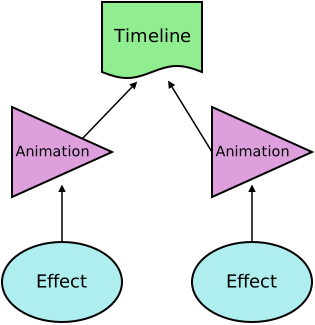
In this level of the specification the hierarchy is shallow. A subsequent level of this specification will introduce the concept of group effects which allows for deeper timing hierarchies.
4.2. Time values
Timing is based on a hierarchy of time relationships between timing nodes. Parent nodes provide timing information to their child nodes in the form of time values.
A time value is a real number which nominally represents a number of milliseconds from some moment. The connection between time values and wall-clock milliseconds may be obscured by any number of transformations applied to the value as it passes through the time hierarchy.
In the future there may be timelines that are based on scroll position or UI gestures in which case the connection between time values and milliseconds will be weakened even further.
A time value may also be unresolved if, for example, a timing node is not in a state to produce a time value.
4.3. Timelines
A timeline provides a source of time values for the purpose of synchronization.
At any given moment, a timeline has a single current time value known simply as the timeline’s current time .
A timeline may not always be able to return a meaningful time value, but only an unresolved time value. For example, it may be defined relative to a moment that has yet to occur, such as the firing of a document’s load event. A timeline is considered to be inactive when its time value is unresolved.
A timeline is monotonically increasing if its reported current time is always greater than or equal than its previously reported current time.
Specific types of timelines may define a procedure to convert a timeline time to an origin-relative time for time value time, so that the time values produced by wallclock-based timelines can be compared.
A timeline may be associated with a document .
When asked to update animations and send events for
a Document doc at timestamp now, run these steps:
-
Update the current time of all timelines associated with doc passing now as the timestamp.
Due to the hierarchical nature of the timing model, updating the current time of a timeline also involves:
-
Updating the current time of any animations associated with the timeline.
-
Running the update an animation’s finished state procedure for any animations whose current time has been updated.
-
Queueing animation events for any such animations.
-
-
Remove replaced animations for doc.
-
Perform a microtask checkpoint.
Note: This is to ensure that any microtasks queued up as a result of resolving or rejecting Promise objects as part of updating timelines in the previous step, run their callbacks prior to dispatching animation events.
-
Let events to dispatch be a copy of doc’s pending animation event queue.
-
Clear doc’s pending animation event queue.
-
Perform a stable sort of the animation events in events to dispatch as follows:
-
Sort the events by their scheduled event time such that events that were scheduled to occur earlier, sort before events scheduled to occur later and events whose scheduled event time is unresolved sort before events with a resolved scheduled event time.
-
Within events with equal scheduled event times, sort by their composite order.
Note: The purpose of sorting events is to ensure that, as best possible, even on devices with differing capabilities and hence different frame rates, events are dispatched in a consistent order.
Note: The requirement for the sort to be a stable sort is because sometimes events may be queued with the same scheduled event time. For example, a CSS animation with a duration of zero, may dispatch both an
animationstartand ananimationendevent and the order of these events should be preserved. -
-
Dispatch each of the events in events to dispatch at their corresponding target using the order established in the previous step.
It is often convenient to describe each time this procedure is invoked as establishing a new animation frame . Changes to the timing properties of animations or animation effects, or the addition and removal of the objects may cause the output of the timing or animation model to change, but these operations in themselves do not create a new animation frame, rather they merely update the current animation frame.
4.3.1. Document timelines
A document timeline is a type of timeline that is associated with a document and whose current time is calculated as a fixed offset from the now timestamp provided each time the update animations and send events procedure is run. This fixed offset is referred to as the document timeline’s origin time .
There must be a better term than "origin time"— it’s too similar to "time origin". [Issue #2079]
Prior to establishing the time origin for its associated document, a document timeline is inactive.
After a document timeline becomes active, it is monotonically increasing.
A document timeline that is associated with a Document which is not
an active document is also considered to be inactive.
To convert a timeline time, timeline time, to an origin-relative time for a document timeline, timeline, return the sum of the timeline time and timeline’s origin time. If timeline is inactive, return an unresolved time value.
4.3.2. The default document timeline
Each Document has a document timeline called the default document timeline .
The default document timeline is unique to each document and persists for
the lifetime of the document including calls to document.open() [HTML].
The default document timeline has an origin time of zero.
This section is non-normative
Since no scaling is applied to the now timestamp values provided to document timelines, the time values it produces will be proportional to wall-clock milliseconds.
Furthermore, since the time values of the default document
timeline have a zero offset from the time origin, document.timeline.currentTime will roughly correspond to Performance.now() [HR-TIME] with the exception that document.timeline.currentTime does not change in between calls
to the update animations and send events procedure.
4.4. Animations
This section is non-normative
The children of a timeline are called animations. An animation takes an animation effect which is a static description of some timed behavior and binds it to a timeline so that it runs. An animation also allows run-time control of the connection between the animation effect and its timeline by providing pausing, seeking, and speed control. The relationship between an animation and an animation effect is analogous to that of a DVD player and a DVD.
An animation connects a single animation effect, called its associated effect , to a timeline and provides playback control. Both of these associations are optional and configurable such that an animation may have no associated effect or timeline at a given moment.
An animation’s document for timing is the Document with which
its timeline is associated.
If an animation is not associated with a timeline, or its timeline is not
associated with a document, then it has no document for timing.
An animation’s start time is the time value of its timeline when its associated effect is scheduled to begin playback. An animation’s start time is initially unresolved.
An animation also maintains a hold time time value which is used to fix the animation’s output time value, called its current time, in circumstances such as pausing. The hold time is initially unresolved.
In order to establish the relative ordering of conflicting animations, animations are appended to a global animation list in the order in which they are created. Certain classes of animations, however, may provide alternative means of ordering animations (see § 5.4.1 Animation classes).
4.4.1. Setting the timeline of an animation
The procedure to set the timeline of an animation , animation, to new timeline which may be null, is as follows:
-
Let old timeline be the current timeline of animation, if any.
-
If new timeline is the same object as old timeline, abort this procedure.
-
Let the timeline of animation be new timeline.
-
If the start time of animation is resolved, make animation’s hold time unresolved.
Note: This step ensures that the finished play state of animation is not "sticky" but is re-evaluated based on its updated current time.
-
Run the procedure to update an animation’s finished state for animation with the did seek flag set to false, and the synchronously notify flag set to false.
4.4.2. Setting the associated effect of an animation
The procedure to set the associated effect of an animation , animation, to new effect which may be null, is as follows:
-
Let old effect be the current associated effect of animation, if any.
-
If new effect is the same object as old effect, abort this procedure.
-
If animation has a pending pause task, reschedule that task to run as soon as animation is ready.
-
If animation has a pending play task, reschedule that task to run as soon as animation is ready to play new effect.
-
If new effect is not
nulland if new effect is the associated effect of another animation, previous animation, run the procedure to set the associated effect of an animation (this procedure) on previous animation passing null as new effect. -
Let the associated effect of animation be new effect.
-
Run the procedure to update an animation’s finished state for animation with the did seek flag set to false, and the synchronously notify flag set to false.
4.4.3. The current time of an animation
Animations provide a time value to their associated effect called the animation’s current time .
The current time is calculated from the first matching condition from below:
- If the animation’s hold time is resolved,
-
The current time is the animation’s hold time.
-
If any of the following are true:
-
the animation has no associated timeline, or
-
the animation’s start time is unresolved.
-
-
The current time is an unresolved time value.
- Otherwise,
-
current time =
    (timeline time - start time)
    × playback rate
Where timeline time is the current time value of the associated timeline. The playback rate value is defined in § 4.4.15 Speed control.
4.4.4. Setting the current time of an animation
The current time of an animation can be set to a new value to seek the animation. The procedure for setting the current time is defined in two parts.
The procedure to silently set the current time of an animation, animation, to seek time is as follows:
-
If seek time is an unresolved time value, then perform the following steps.
-
If the current time is resolved, then throw a TypeError.
-
Abort these steps.
-
-
Update either animation’s hold time or start time as follows:
-
If any of the following conditions are true:
-
animation’s start time is unresolved, or
-
animation has no associated timeline or the associated timeline is inactive, or
-
animation’s playback rate is 0,
-
Set animation’s hold time to seek time.
- Otherwise,
-
Set animation’s start time to the result of evaluating
timeline time - (seek time / playback rate)where timeline time is the current time value of timeline associated with animation.
-
-
If animation has no associated timeline or the associated timeline is inactive, make animation’s start time unresolved.
This preserves the invariant that when we don’t have an active timeline it is only possible to set either the start time or the animation’s current time.
-
Make animation’s previous current time unresolved.
The procedure to set the current time of an animation, animation, to seek time is as follows:
-
Run the steps to silently set the current time of animation to seek time.
-
If animation has a pending pause task, synchronously complete the pause operation by performing the following steps:
-
Set animation’s hold time to seek time.
-
Apply any pending playback rate to animation.
-
Make animation’s start time unresolved.
-
Cancel the pending pause task.
-
Resolve animation’s current ready promise with animation.
-
-
Run the procedure to update an animation’s finished state for animation with the did seek flag set to true, and the synchronously notify flag set to false.
4.4.5. Setting the start time of an animation
The procedure to set the start time of animation, animation, to new start time, is as follows:
-
Let timeline time be the current time value of the timeline that animation is associated with. If there is no timeline associated with animation or the associated timeline is inactive, let the timeline time be unresolved.
-
If timeline time is unresolved and new start time is resolved, make animation’s hold time unresolved.
This preserves the invariant that when we don’t have an active timeline it is only possible to set either the start time or the animation’s current time.
-
Let previous current time be animation’s current time.
Note: This is the current time after applying the changes from the previous step which may cause the current time to become unresolved.
-
Apply any pending playback rate on animation.
-
Set animation’s start time to new start time.
-
Update animation’s hold time based on the first matching condition from the following,
- If new start time is resolved,
-
If animation’s playback rate is not zero, make animation’s hold time unresolved.
- Otherwise (new start time is unresolved),
-
Set animation’s hold time to previous current time even if previous current time is unresolved.
-
If animation has a pending play task or a pending pause task, cancel that task and resolve animation’s current ready promise with animation.
-
Run the procedure to update an animation’s finished state for animation with the did seek flag set to true, and the synchronously notify flag set to false.
4.4.6. Waiting for the associated effect
This section is non-normative
Some operations performed by an animation may not occur instantaneously. For example, some user agents may delegate the playback of an animation to a separate process or to specialized graphics hardware each of which may incur some setup overhead.
If such an animation is timed from the moment when the animation was triggered there may be a significant jump between the first and second frames of the animation corresponding to the setup time involved.
To avoid this problem, Web Animations typically begins timing animations from the moment when the first frame of the animation is complete. This is represented by an unresolved start time on the animation which becomes resolved when the animation is ready. Content may opt out of this behavior by setting the start time to a resolved time value.
An animation is ready at the first moment where both of the following conditions are true:
-
the user agent has completed any setup required to begin the playback of the animation’s associated effect including rendering the first frame of any keyframe effect.
-
the animation is associated with a timeline that is not inactive.
4.4.7. The current ready promise
Each animation has a current ready promise . The current ready promise is initially a resolved Promise created using the procedure to create a new resolved Promise with the animation itself as its value and created in the relevant Realm of the animation.
The object is replaced with a new Promise object every time the animation queues a pending play task or a pending pause task when it previously did not have a pending task, or when the animation is canceled (see § 4.4.14 Canceling an animation).
Note that since the same object is used for both pending play and pending pause requests, authors are advised to check the state of the animation when the Promise object is resolved.
For example, in the following code fragment, the state of the animation
will be running when the current ready promise is resolved.
This is because the play operation occurs while a pending
play task is still queued and hence the current ready promise is re-used.
animation . pause ();
animation . ready . then (  function  ()   {
   // Displays 'running'
  alert ( animation . playState );
 });
animation . play ();
4.4.8. Playing an animation
The procedure to play an animation , animation, given a flag auto-rewind, is as follows:
-
Let aborted pause be a boolean flag that is true if animation has a pending pause task, and false otherwise.
-
Let has pending ready promise be a boolean flag that is initially false.
-
Let seek time be a time value that is initially unresolved.
-
If the auto-rewind flag is true, perform the steps corresponding to the first matching condition from the following, if any:
-
If animation’s effective playback rate ≥ 0, and animation’s current time is either:
-
unresolved, or
-
less than zero, or
-
greater than or equal to associated effect end,
-
-
Set seek time to zero.
-
If animation’s effective playback rate < 0, and animation’s current time is either:
-
unresolved, or
-
less than or equal to zero, or
-
greater than associated effect end,
-
-
-
If the following three conditions are all satisfied:
-
seek time is unresolved, and
-
animation’s start time is unresolved, and
-
animation’s current time is unresolved,
set seek time to zero.
Note: The above step ensures that this procedure will play an idle animation regardless of the setting of the auto-rewind flag.
-
-
Let has finite timeline be true if animation has an associated timeline that is not monotonically increasing.
-
If seek time is resolved,
- If has finite timeline is true,
-
-
Set animation’s start time to seek time.
-
Let animation’s hold time be unresolved.
-
Apply any pending playback rate on animation.
-
- Otherwise,
-
Set animation’s hold time to seek time.
-
If animation’s hold time is resolved, let its start time be unresolved.
-
If animation has a pending play task or a pending pause task,
-
Cancel that task.
-
Set has pending ready promise to true.
-
-
If the following four conditions are all satisfied:
-
animation’s hold time is unresolved, and
-
seek time is unresolved, and
-
aborted pause is false, and
-
animation does not have a pending playback rate,
abort this procedure.
-
-
If has pending ready promise is false, let animation’s current ready promise be a new promise in the relevant Realm of animation.
-
Schedule a task to run as soon as animation is ready. The task shall perform the following steps:
-
Assert that at least one of animation’s start time or hold time is resolved.
-
Let ready time be the time value of the timeline associated with animation at the moment when animation became ready.
-
Perform the steps corresponding to the first matching condition below, if any:
- If animation’s hold time is resolved,
-
-
Apply any pending playback rate on animation.
-
Let new start time be the result of evaluating
ready time - hold time / playback ratefor animation. If the playback rate is zero, let new start time be simply ready time. -
Set the start time of animation to new start time.
-
If animation’s playback rate is not 0, make animation’s hold time unresolved.
-
- If animation’s start time is resolved and animation has a pending playback rate,
-
-
Let current time to match be the result of evaluating
(ready time - start time) × playback ratefor animation. -
Apply any pending playback rate on animation.
-
If animation’s playback rate is zero, let animation’s hold time be current time to match.
-
Let new start time be the result of evaluating
ready time - current time to match / playback ratefor animation. If the playback rate is zero, let new start time be simply ready time. -
Set the start time of animation to new start time.
-
-
Resolve animation’s current ready promise with animation.
-
Run the procedure to update an animation’s finished state for animation with the did seek flag set to false, and the synchronously notify flag set to false.
Note that the order of the above two steps is important since it means that an animation with zero-length associated effect will resolve its current ready promise before its current finished promise.
So long as the above task is scheduled but has yet to run, animation is described as having a pending play task . While the task is running, however, animation does not have a pending play task.
If a user agent determines that animation is immediately ready, it may schedule the above task as a microtask such that it runs at the next microtask checkpoint, but it must not perform the task synchronously.
The above requirement to run the pending play task asynchronously ensures that code such as the following behaves consistently between implementations:
animation . play ();
animation . ready . then (
   ()   =>   {  console . log (  'Playback commenced'  );   },
   ()   =>   {  console . log (  'Playback was canceled'  );   }
 );
 // Suppose some condition requires playback to be canceled...
animation . cancel ();
 // "Playback was canceled" will be printed to the console.
In the above code, were the pending play task run synchronously, the current ready promise would not be rejected.
-
-
Run the procedure to update an animation’s finished state for animation with the did seek flag set to false, and the synchronously notify flag set to false.
4.4.9. Pausing an animation
Whenever an animation has an unresolved start time, its current time will be suspended.
As with playing an animation, pausing may not happen instantaneously (see § 4.4.6 Waiting for the associated effect). For example, if animation is performed by a separate process, it may be necessary to synchronize the current time to ensure that it reflects the state drawn by the animation process.
The procedure to pause an animation , animation, is as follows:
-
If animation has a pending pause task, abort these steps.
-
If the play state of animation is paused, abort these steps.
-
Let seek time be a time value that is initially unresolved.
-
Let has finite timeline be true if animation has an associated timeline that is not monotonically increasing.
-
If the animation’s current time is unresolved, perform the steps according to the first matching condition from below:
- If animation’s playback rate is ≥ 0,
-
Set seek time to zero.
- Otherwise,
-
If seek time is resolved,
- If has finite timeline is true,
-
Set animation’s start time to seek time.
- Otherwise,
-
Set animation’s hold time to seek time.
-
Let has pending ready promise be a boolean flag that is initially false.
-
If animation has a pending play task, cancel that task and let has pending ready promise be true.
-
If has pending ready promise is false, set animation’s current ready promise to a new promise in the relevant Realm of animation.
-
Schedule a task to be executed at the first possible moment where both of the following conditions are true:
-
the user agent has performed any processing necessary to suspend the playback of animation’s associated effect, if any.
-
the animation is associated with a timeline that is not inactive.
The task shall perform the following steps:
-
Let ready time be the time value of the timeline associated with animation at the moment when the user agent completed processing necessary to suspend playback of animation’s associated effect.
-
If animation’s start time is resolved and its hold time is not resolved, let animation’s hold time be the result of evaluating
(ready time - start time) × playback rate.Note: The hold time might be already set if the animation is finished, or if the animation has a pending play task. In either case we want to preserve the hold time as we enter the paused state.
-
Apply any pending playback rate on animation.
-
Make animation’s start time unresolved.
-
Resolve animation’s current ready promise with animation.
-
Run the procedure to update an animation’s finished state for animation with the did seek flag set to false, and the synchronously notify flag set to false.
So long as the above task is scheduled but has yet to run, animation is described as having a pending pause task . While the task is running, however, animation does not have a pending pause task.
As with the pending play task, the user agent must run the pending pause task asynchronously, although that may be as soon as the next microtask checkpoint.
-
-
Run the procedure to update an animation’s finished state for animation with the did seek flag set to false, and the synchronously notify flag set to false.
4.4.10. Reaching the end
This section is non-normative
DVD players or cassette players typically continue playing until they reach the end of their media at which point they stop. If such players are able to play in reverse, they typically stop playing when they reach the beginning of their media. In order to emulate this behavior and to provide consistency with HTML’s media elements [HTML], the current time of Web Animations' animations do not play forwards beyond the end time of their associated effect or play backwards past time zero.
An animation that has reached the natural boundary of its playback range is said to have finished.
Graphically, the effect of limiting the current time is shown below.
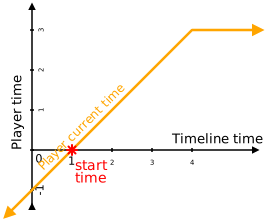
It is possible, however, to seek the current time of an animation to a time past the end of the associated effect. When doing so, the current time will not progress but the animation will act as if it had been paused at the seeked time.
This allows, for example, seeking the current time of an animation with no associated effect to 5s. If associated effect with an end time later than 5s is later associated with the animation, playback will begin from the 5s mark.
Similar behavior to the above scenario may arise when the length of an animation’s associated effect changes.
Similarly, when the playback rate is negative, the current time does not progress past time zero.
4.4.11. The current finished promise
Each animation has a current finished promise . The current finished promise is initially a pending Promise object.
The object is replaced with a new promise every time the animation leaves the finished play state.
4.4.12. Updating the finished state
For an animation with a positive playback rate, the current time continues to increase until it reaches the associated effect end.
The associated effect end of an animation is equal to the end time of the animation’s associated effect. If the animation has no associated effect, the associated effect end is zero.
For an animation with a negative playback rate, the current time continues to decrease until it reaches zero.
A running animation that has reached this boundary (or overshot it) and has a resolved start time is said to be finished.
The crossing of this boundary is checked on each modification to the animation object using the procedure to update an animation’s finished state defined below. This procedure is also run as part of the update animations and send events procedure. In both cases the did seek flag, defined below, is set to false.
For each animation, the user agent maintains a previous current time time value that is originally unresolved.
Whilst during normal playback the current time of an animation is limited to the boundaries described above, it is possible to seek the current time of an animation to times outside those boundaries using the procedure to set the current time of an animation.
The procedure to update an animation’s finished state for animation, given a flag did seek (to indicate if the update is being performed after setting the current time), and a flag synchronously notify (to indicate the update was called in a context where we expect finished event queueing and finished promise resolution to happen immediately, if at all) is as follows:
-
Let the unconstrained current time be the result of calculating the current time substituting an unresolved time value for the hold time if did seek is false. If did seek is true, the unconstrained current time is equal to the current time.
Note: This is required to accommodate timelines that may change direction. Without this definition, a once-finished animation would remain finished even when its timeline progresses in the opposite direction.
-
If all three of the following conditions are true,
-
the unconstrained current time is resolved, and
-
animation’s start time is resolved, and
-
animation does not have a pending play task or a pending pause task,
then update animation’s hold time based on the first matching condition for animation from below, if any:
- If playback rate > 0 and unconstrained current time is greater than or equal to associated effect end,
-
If did seek is true, let the hold time be the value of unconstrained current time.
If did seek is false, let the hold time be the maximum value of previous current time and associated effect end. If the previous current time is unresolved, let the hold time be associated effect end.
- If playback rate < 0 and unconstrained current time is less than or equal to 0,
-
If did seek is true, let the hold time be the value of unconstrained current time.
If did seek is false, let the hold time be the minimum value of previous current time and zero. If the previous current time is unresolved, let the hold time be zero.
- If playback rate ≠ 0, and animation is associated with an active timeline,
-
Perform the following steps:
-
If did seek is true and the hold time is resolved, let animation’s start time be equal to the result of evaluating
timeline time - (hold time / playback rate)where timeline time is the current time value of timeline associated with animation. -
Let the hold time be unresolved.
-
-
-
Set the previous current time of animation be the result of calculating its current time.
-
Let current finished state be true if the play state of animation is finished. Otherwise, let it be false.
-
If current finished state is true and the current finished promise is not yet resolved, perform the following steps:
-
Let finish notification steps refer to the following procedure:
-
If animation’s play state is not equal to finished, abort these steps.
-
Resolve animation’s current finished promise object with animation.
-
Create an
AnimationPlaybackEvent, finishEvent. -
Set finishEvent’s
currentTimeattribute to the current time of animation. -
Set finishEvent’s
timelineTimeattribute to the current time of the timeline with which animation is associated. If animation is not associated with a timeline, or the timeline is inactive, lettimelineTimebenull. -
If animation has a document for timing, then append finishEvent to its document for timing's pending animation event queue along with its target, animation. For the scheduled event time, use the result of converting animation’s associated effect end to an origin-relative time.
Otherwise, queue a task to dispatch finishEvent at animation. The task source for this task is the DOM manipulation task source.
-
-
If synchronously notify is true, cancel any queued microtask to run the finish notification steps for this animation, and run the finish notification steps immediately.
Otherwise, if synchronously notify is false, queue a microtask to run finish notification steps for animation unless there is already a microtask queued to run those steps for animation.
-
-
If current finished state is false and animation’s current finished promise is already resolved, set animation’s current finished promise to a new promise in the relevant Realm of animation.
Typically, notification about the finished state of an animation is performed asynchronously. This allows for the animation to temporarily enter the finished play state without triggering events to be fired or promises to be resolved.
For example, in the following code fragment, animation temporarily
enters the finished state. If notification of the finished state occurred
synchronously this code would cause the finish event to be queued
and the current finished promise to be resolved. However, if we
reverse the order of the two statements such that the iterations is updated first, this would not happen.
To avoid this surprising behavior, notification about the finished state of
an animation is typically performed asynchronously.
 var  animation  =  elem . animate ({  left :   '100px'   },   2000  );
animation . playbackRate  =   2  ;
animation . currentTime  =   1000  ;   // animation is now finished
animation . effect . updateTiming ({  iterations :   2   });   // animation is no longer finished
The one exception to this asynchronous behavior is when the finish an
animation procedure is performed (typically by calling the finish() method). In this case the author’s intention to finish
the animation is clear so the notification about the finished state of the
animation occurs synchronously as demonstrated below.
 var  animation  =  elem . animate ({  left :   '100px'   },   1000  );
animation . finish ();   // finish event is queued immediately and finished promise
                     // is resolved despite the fact that the following statement
                     // causes the animation to leave the finished state
animation . currentTime  =   0  ;
Note that like the procedure to finish an animation, the procedure to cancel an animation similarly queues the cancel event and rejects the current finished promise and current ready promise in a synchronous manner.
4.4.13. Finishing an animation
An animation can be advanced to the natural end of its current playback direction by using the procedure to finish an animation for animation defined below:
-
If animation’s effective playback rate is zero, or if animation’s effective playback rate > 0 and associated effect end is infinity, throw an "
InvalidStateError"DOMExceptionand abort these steps. -
Apply any pending playback rate to animation.
-
Set limit as follows:
- If playback rate > 0,
-
Let limit be associated effect end.
- Otherwise,
-
Let limit be zero.
-
Silently set the current time to limit.
-
If animation’s start time is unresolved and animation has an associated active timeline, let the start time be the result of evaluating
timeline time -
(limit / playback rate)
where timeline time is the current time value of the associated timeline. -
If there is a pending pause task and start time is resolved,
-
Let the hold time be unresolved.
Typically the hold time will already be unresolved except in the case when the animation was previously idle.
-
Cancel the pending pause task.
-
Resolve the current ready promise of animation with animation.
-
-
If there is a pending play task and start time is resolved, cancel that task and resolve the current ready promise of animation with animation.
-
Run the procedure to update an animation’s finished state for animation with the did seek flag set to true, and the synchronously notify flag set to true.
4.4.14. Canceling an animation
An animation can be canceled which causes the current time to become unresolved hence removing any effects caused by the associated effect.
The procedure to cancel an animation for animation is as follows:
-
If animation’s play state is not idle, perform the following steps:
-
Run the procedure to reset an animation’s pending tasks on animation.
-
Reject the current finished promise with a DOMException named "AbortError".
-
Set the [[PromiseIsHandled]] internal slot of the current finished promise to true.
-
Let current finished promise be a new promise in the relevant Realm of animation.
-
Create an
AnimationPlaybackEvent, cancelEvent. -
Set cancelEvent’s
currentTimetonull. -
Let timeline time be the current time of the timeline with which animation is associated. If animation is not associated with an active timeline, let timeline time be n unresolved time value.
-
Set cancelEvent’s
timelineTimeto timeline time. If timeline time is unresolved, set it tonull. -
If animation has a document for timing, then append cancelEvent to its document for timing's pending animation event queue along with its target, animation. If animation is associated with an active timeline that defines a procedure to convert timeline times to origin-relative time, let the scheduled event time be the result of applying that procedure to timeline time. Otherwise, the scheduled event time is an unresolved time value.
Otherwise, queue a task to dispatch cancelEvent at animation. The task source for this task is the DOM manipulation task source.
-
-
Make animation’s hold time unresolved.
-
Make animation’s start time unresolved.
The procedure to reset an animation’s pending tasks for animation is as follows:
-
If animation does not have a pending play task or a pending pause task, abort this procedure.
-
If animation has a pending play task, cancel that task.
-
If animation has a pending pause task, cancel that task.
-
Apply any pending playback rate on animation.
-
Reject animation’s current ready promise with a DOMException named "AbortError".
-
Set the [[PromiseIsHandled]] internal slot of animation’s current ready promise to true.
-
Let animation’s current ready promise be the result of creating a new resolved Promise object with value animation in the relevant Realm of animation.
4.4.15. Speed control
The rate of play of an animation can be controlled by setting its playback rate. For example, setting a playback rate of 2 will cause the animation’s current time to increase at twice the rate of its timeline. Similarly, a playback rate of -1 will cause the animation’s current time to decrease at the same rate as the time values from its timeline increase.
Animations have a playback rate that provides a scaling factor from the rate of change of the associated timeline’s time values to the animation’s current time. The playback rate is initially 1.
Setting an animation’s playback rate to zero effectively pauses the animation (however, the play state does not necessarily become paused).
4.4.15.1. Setting the playback rate of an animation
The procedure to set the playback rate of an animation, animation to new playback rate is as follows:
-
Clear any pending playback rate on animation.
-
Let previous time be the value of the current time of animation before changing the playback rate.
-
Let previous playback rate be the current effective playback rate of animation.
-
Set the playback rate to new playback rate.
-
Perform the steps corresponding to the first matching condition from the following, if any:
- If animation is associated with a monotonically increasing timeline and the previous time is resolved,
-
set the current time of animation to previous time.
-
If animation is associated with a non-null timeline that is not monotonically increasing, the start time of animation is resolved, associated effect end is not infinity, and either:
-
the previous playback rate < 0 and the new playback rate ≥ 0, or
-
the previous playback rate ≥ 0 and the new playback rate < 0,
-
-
Set animation’s start time to the result of evaluating
associated effect end - start timefor animation.Note: This effectively flips the animation start/end times on non-monotonic timelines preserving the relative offset of the start time from the other direction.
4.4.15.2. Seamlessly updating the playback rate of an animation
For an in-flight animation that is running on another process or thread, the procedure to set the playback rate may cause the animation to jump if the process or thread running the animation is not currently synchronized with the process or thread performing the update.
In order to produce seamless changes to the playback rate of an animation, animation’s may have a pending playback rate that defines a playback rate to be applied after any necessary synchronization has taken place (for the case of animations running in a different thread or process).
Initially the pending playback rate of an animation is unset.
The effective playback rate of an animation is its pending playback rate, if set, otherwise it is the animation’s playback rate.
When an animation, animation, is to apply any pending playback rate the following steps are performed:
-
If animation does not have a pending playback rate, abort these steps.
-
Set animation’s playback rate to its pending playback rate.
-
Clear animation’s pending playback rate.
The procedure to seamlessly update the playback rate an animation, animation, to new playback rate preserving its current time is as follows:
-
Let previous play state be animation’s play state.
Note: It is necessary to record the play state before updating animation’s effective playback rate since, in the following logic, we want to immediately apply the pending playback rate of animation if it is currently finished regardless of whether or not it will still be finished after we apply the pending playback rate.
-
Let animation’s pending playback rate be new playback rate.
-
Perform the steps corresponding to the first matching condition from below:
- If animation has a pending play task or a pending pause task,
-
Abort these steps.
Note: The different types of pending tasks will apply the pending playback rate when they run so there is no further action required in this case.
- If previous play state is idle or paused, or animation’s current time is unresolved,
-
Apply any pending playback rate on animation.
Note: the second condition above is required so that if we have a running animation with an unresolved current time and no pending play task, we do not attempt to play it below.
- If previous play state is finished,
-
-
Let the unconstrained current time be the result of calculating the current time of animation substituting an unresolved time value for the hold time.
-
Let animation’s start time be the result of evaluating the following expression:
timeline time - (unconstrained current time / pending playback rate)Where timeline time is the current time value of the timeline associated with animation.
If pending playback rate is zero, let animation’s start time be timeline time.
-
Apply any pending playback rate on animation.
-
Run the procedure to update an animation’s finished state for animation with the did seek flag set to false, and the synchronously notify flag set to false.
-
- Otherwise,
-
Run the procedure to play an animation for animation with the auto-rewind flag set to false.
4.4.16. Reversing an animation
The procedure to reverse an animation of animation animation is as follows:
-
If there is no timeline associated with animation, or the associated timeline is inactive throw an "
InvalidStateError"DOMExceptionand abort these steps. -
Let original pending playback rate be animation’s pending playback rate.
-
Let animation’s pending playback rate be the additive inverse of its effective playback rate (i.e.
-effective playback rate). -
Run the steps to play an animation for animation with the auto-rewind flag set to true.
If the steps to play an animation throw an exception, set animation’s pending playback rate to original pending playback rate and propagate the exception.
4.4.17. Play states
An animation may be described as being in one of the following play states for each of which, a non-normative description is also provided:
- idle
-
The current time of the animation is unresolved and the start time of the animation is unresolved and there are no pending tasks. In this state the animation has no effect.
- running
-
The animation has a resolved current time that changes on each animation frame (provided the playback rate is not zero and the timeline is active and monotonically increasing).
- paused
-
The animation has been suspended and the current time is no longer changing.
- finished
-
The animation has reached the natural boundary of its playback range and the current time is no longer updating.
The play state of animation, animation, at a given moment is the state corresponding to the first matching condition from the following:
-
All of the following conditions are true:
-
The current time of animation is unresolved, and
-
the start time of animation is unresolved, and
-
animation does not have either a pending play task or a pending pause task,
-
-
→ idle
-
Either of the following conditions are true:
-
animation has a pending pause task, or
-
both the start time of animation is unresolved and it does not have a pending play task,
-
-
→ paused
-
For animation, current time is resolved and either of the following conditions are true:
-
animation’s effective playback rate > 0 and current time ≥ associated effect end; or
-
animation’s effective playback rate < 0 and current time ≤ 0,
-
-
→ finished
- Otherwise,
-
→ running
Note that the paused play state effectively "wins" over the finished play state.
However, an animation that is paused outside of its natural playback range can be converted from a paused animation into a finished animation without restarting by setting the start time such as below:
animation . effect . updateTiming ({  duration :   5000   });
animation . currentTime  =   4000  ;
animation . pause ();
animation . ready . then (  function  ()   {
  animation . effect . updateTiming ({  duration :   3000   });
  alert ( animation . playState );   // Displays 'paused'
  animation . startTime  =
    document . timeline . currentTime  -  animation . currentTime  *  animation . playbackRate ;
  alert ( animation . playState );   // Displays 'finished'
 });
4.4.18. Animation events
Animation events include the animation playback events defined in this specification as well as the events from CSS transitions [CSS-TRANSITIONS-1] and events from CSS animations [CSS-ANIMATIONS-1]. Future specifications may extend this set with further types of animation events.
Each Document maintains a pending animation event queue that stores animation events along with their corresponding event targets
and scheduled event time .
The scheduled event time is a time value relative to the time origin representing when the event would ideally have been dispatched were animations
updated at an infinitely high frequency.
It is used by the procedure to update animations and send events to sort
queued animation events chronologically.
Note that this value may be unresolved if, for example, the animation's timeline produces values that are unrelated to the time origin (e.g.
a timeline that tracks scroll-position) or if the timeline is inactive.
4.4.18.1. Sorting animation events
The following definitions are provided to assist with sorting queued events.
To convert an animation time to timeline time a time value, time, that is relative to the start time of an animation, animation, perform the following steps:
-
If time is unresolved, return time.
-
If time is infinity, return an unresolved time value.
-
If animation’s playback rate is zero, return an unresolved time value.
-
If animation’s start time is unresolved, return an unresolved time value.
-
Return the result of calculating:
time × (1 / playback rate) + start time(where playback rate and start time are the playback rate and start time of animation, respectively).
To convert a timeline time to an origin-relative time a time value, time, that is expressed in the same scale as the time values of a timeline, timeline, perform the following steps:
-
Let timeline time be the result of converting time from an animation time to a timeline time.
-
If timeline time is unresolved, return time.
-
If animation is not associated with a timeline, return an unresolved time value.
-
If animation is associated with an inactive timeline, return an unresolved time value.
-
If there is no procedure to convert a timeline time to an origin-relative time for the timeline associated with animation, return an unresolved time value.
-
Return the result of converting timeline time to an origin-relative time using the procedure defined for the timeline associated with animation.
4.4.18.2. Animation playback events
As animations play, they report changes to their status through animation playback events .
Animation playback events are a property of the timing model. As a result they are dispatched even when the associated effect of the animation is absent or has no observable result.
4.4.18.3. Types of animation playback events
- finish
-
Queued whenever an animation enters the finished play state.
- cancel
-
Queued whenever an animation enters the idle play state from another state. Creating a new animation that is initially idle does not generate a new cancel event.
- remove
-
Queued whenever an animation is automatically removed. See § 5.5 Replacing animations.
4.5. Animation effects
An animation effect is an abstract term referring to an item in the timing hierarchy.
4.5.1. Relationship between animation effects and animations
The associated effect of an animation, if set, is a type of animation effect. The associated effect of an animation is said to be associated with that animation. At a given moment, an animation effect can be associated with at most one animation.
An animation effect, effect, is associated with a timeline , timeline, if effect is associated with an animation which, in turn, is associated with timeline.
4.5.2. Types of animation effects
This specification defines a single type of animation effect: keyframe effects. Subsequent levels of this specification will define further types of animation effects.
All types of animation effects define a number of common properties which are described in the following sections.
4.5.3. The active interval
The period that an animation effect is scheduled to run is called its active interval. Each animation effect has only one such interval.
The lower bound of the active interval typically corresponds to the start time of the animation associated with this animation effect but may be shifted by a start delay on the animation effect.
The upper bound of the interval is determined by the active duration.
The relationship between the start time, start delay, and active duration is illustrated below.
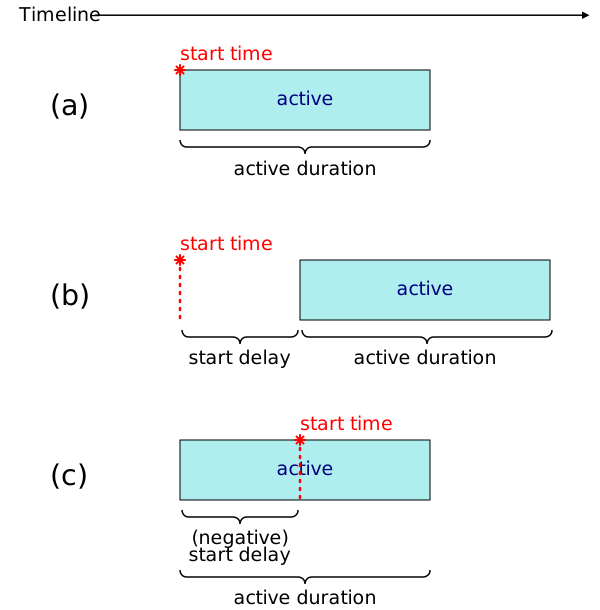
(a) An animation effect with no delay; the start time and beginning of the active interval are coincident.
(b) An animation effect with a positive delay; the beginning of the active interval is deferred by the delay.
(c) An animation effect with a negative delay; the beginning of the active interval is brought forward by the delay.
An end delay may also be specified but is primarily only of use when sequencing animations.
Animation effects define an active interval which is the period of time during which the effect is scheduled to produce its effect with the exception of fill modes which apply outside the active interval.
The lower bound of the active interval is defined by the start delay.
The start delay of an animation effect is a signed offset from the start time of the animation with which the animation effect is associated.
The length of the active interval is called the active duration, the calculation of which is defined in § 4.8.2 Calculating the active duration.
Similar to the start delay, an animation effect also has
an end delay which is primarily of use when sequencing animations
based on the end time of another animation effect.
Although this is typically only useful in combination with sequence effects
which are introduced in a subsequent level of this specification, it is included
here for the purpose of representing the min attribute in SVG ([SVG11], Chapter 19).
The end time of an animation effect is
the result of evaluating max(start delay + active
duration + end delay, 0).
4.5.4. Local time
The local time of an animation effect at a given moment is based on the first matching condition from the following:
- If the animation effect is associated with an animation,
-
the local time is the current time of the animation.
- Otherwise,
-
the local time is unresolved.
4.5.5. Animation effect phases and states
This section is non-normative
At a given moment, an animation effect may be in one of three possible phases. If an animation effect has an unresolved local time it will not be in any phase.
The different phases are illustrated below.
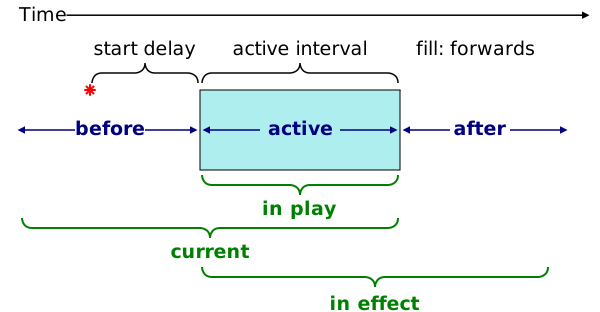
The phases are as follows:
- before phase
-
The animation effect’s local time falls before the effect’s active interval and end time, or occurs during the range when a negative start delay is in effect.
- active phase
-
The animation effect’s local time falls inside the effect’s active interval and outside the range of any negative start delay or negative end delay.
- after phase
-
The animation effect’s local time falls after the effect’s active interval or after the end time if that comes first (due to a negative end delay), but not during the range when a negative start delay is in effect.
In addition to these phases, an animation effect may also be described as being in one of several overlapping states. These states are only established for the duration of a single animation frame and are primarily a convenience for describing stative parts of the model.
These states and their usage within the model are summarized as follows:
- in play
-
Corresponds to an animation effect whose active time is changing on each frame.
- current
-
Corresponds to an animation effect that is either in play or may become in play in the future based on its animation's current playback rate.
- in effect
-
Corresponds to an animation effect that has a resolved active time. This occurs when either the animation effect is in its active phase or outside the active phase but at a time where the effect’s fill mode (see § 4.6 Fill behavior) causes its active time to be resolved. Only in effect animation effects apply a result to their target.
The normative definition of each of these states follows.
Determining the phase of an animation effect requires the following definitions:
- animation direction
-
"backwards" if the effect is associated with an animation and the associated animation’s playback rate is less than zero; in all other cases, the animation direction is "forwards".
- before-active boundary time
-
max(min(start delay, end time), 0) - active-after boundary time
-
max(min(start delay + active duration, end time), 0)
An animation effect is in the before phase if the animation effect’s local time is not unresolved and either of the following conditions are met:
-
the local time is less than the before-active boundary time, or
-
the animation direction is "backwards" and the local time is equal to the before-active boundary time.
An animation effect is in the after phase if the animation effect’s local time is not unresolved and either of the following conditions are met:
-
the local time is greater than the active-after boundary time, or
-
the animation direction is "forwards" and the local time is equal to the active-after boundary time.
An animation effect is in the active phase if the animation effect’s local time is not unresolved and it is not in either the before phase nor the after phase.
Furthermore, it is often convenient to refer to the case when an animation effect is in none of the above phases as being in the idle phase .
An animation effect is in play if all of the following conditions are met:
-
the animation effect is in the active phase, and
-
the animation effect is associated with an animation that is not finished.
An animation effect is current if any of the following conditions are true:
-
the animation effect is in play, or
-
the animation effect is associated with an animation with a playback rate > 0 and the animation effect is in the before phase, or
-
the animation effect is associated with an animation with a playback rate < 0 and the animation effect is in the after phase, or
-
the animation effect is associated with an animation not in the idle play state with a non-null associated timeline that is not monotonically increasing.
An animation effect is in effect if its active time, as calculated according to the procedure in § 4.8.3.1 Calculating the active time, is not unresolved.
4.5.6. Relevant animations
We may define an animation as being relevant based on the animation effect associated with it.
An animation is relevant if:
-
Its associated effect is current or in effect, and
-
Its replace state is not removed.
The relevant animations for an element or pseudo-element, target, is the set of all animations that contain at least one animation effect whose effect target is target.
The relevant animations for a subtree of an element, pseudo-element, document, or shadow root—target—is the set of all animations that contain at least one animation effect whose effect target is an inclusive descendant (or descendant if target is a document or shadow root) of target or a pseudo-element of such a descendant.
4.6. Fill behavior
The effect of an animation effect when it is not in play is determined by its fill mode .
The possible fill modes are:
-
none,
-
forwards,
-
backwards, and
-
both.
The normative definition of these modes is incorporated in the calculation of the active time in § 4.8.3.1 Calculating the active time.
Authors are discouraged from using fill modes to produce animations whose effect is applied indefinitely. Fill modes were introduced in order to represent the animation-fill-mode property defined by CSS animations [CSS-ANIMATIONS-1]. However, they produce situations where animation state would be accumulated indefinitely necessitating the automatic removal of animations defined in § 5.5 Replacing animations. Furthermore, indefinitely filling animations can cause changes to specified style to be ineffective long after all animations have completed since the animation style takes precedence in the CSS cascade [css-cascade-3].
Where possible, authors should prefer to set the final state of the animation directly in specified style. This can be achieved by waiting for the animation to finish and then updating the style as illustrated below:
 // In the first frame after the following animation finishes, the callback for
 // the `finished` promise will run BEFORE style is updated and hence will NOT
 // flicker.
elem . animate ({  transform :   'translateY(100px)'   },   200  ). finished . then (()   =>   {
  elem . style . transform  =   'translateY(100px)'  ;
 });
Alternatively, the author may set the specified style at the start of the animation and then animate from the original value as illustrated below:
elem . style . transform  =   'translateY(100px)'  ;
elem . animate ({  transform :   'none'  ,  offset :   0   },   200  );
Complex effects involving layering many animations on top of one another may require temporary use of forwards fill modes to capture the final value of an animation before canceling it. For example:
elem . addEventListener (  'click'  ,   async  evt  =>   {
   const  animation  =  elem . animate (
     {  transform :   `translate(  ${ evt . clientX }  px,   ${ evt . clientY }  px)`   },
     {  duration :   800  ,  fill :   'forwards'   }
   );
   await  animation . finished ;
   // commitStyles will record the style up to and including `animation` and
   // update elem’s specified style with the result.
  animation . commitStyles ();
  animation . cancel ();
 });
4.6.1. Fill modes
This section is non-normative
The effect of each fill mode is as follows:
- none
-
The animation effect has no effect when it is not in play.
- forwards
-
When the animation effect is in the after phase, the animation effect will produce the same iteration progress value as the last moment it is scheduled to be in play.
For all other times that the animation effect is not in play, it will have no effect.
- backwards
-
When the animation effect is in the before phase, the animation effect will produce the same iteration progress value as the earliest moment that it is scheduled to be in play.
For all other times that the animation effect is not in play, it will have no effect.
- both
-
When the animation effect is in its before phase, backwards fill behavior is used.
When the animation effect is in its after phase, forwards fill behavior is used.
Some examples of the these fill modes are illustrated below.
(a) fill mode "none". The animation effect has no effect outside its active phase.
(b) fill mode "forwards". After the active phase has finished, the iteration progress value continues to maintain a fill value.
(c) fill mode "backwards". The animation effect produces a fill value until the start of the active phase.
(d) fill mode "both". Both before and after the active phase the animation effect produces a fill value.
Note: setting a fill mode has no bearing on the endpoints of the active interval or the boundaries between phases. However, the fill mode does have an effect on various other properties of the timing model since the active time of an animation effect is only defined (that is, not unresolved) inside the active phase or when a fill is applied.
4.7. Repeating
4.7.1. Iteration intervals
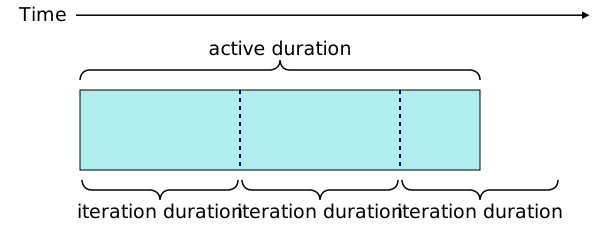
It is possible to specify that an animation effect should repeat a fixed number of times or indefinitely. This repetition occurs within the active interval. The span of time during which a single repetition takes place is called an iteration interval .
Unlike the active interval, an animation effect can have multiple iteration intervals although typically only the interval corresponding to the current iteration is of interest.
The length of a single iteration is called the iteration duration . The initial iteration duration of an animation effect is zero.
This section is non-normative
Comparing the iteration duration and the active duration we have:
- Iteration duration
-
The time taken for a single iteration of the animation effect to complete.
- Active duration
-
The time taken for the entire animation effect to complete, including repetitions. This may be longer or shorter than the iteration duration.
The relationship between the iteration duration and active duration is illustrated below.
4.7.2. Controlling iteration
The number of times an animation effect repeats is called its iteration count . The iteration count is a real number greater than or equal to zero. The iteration count may also be positive infinity to represent that the animation effect repeats indefinitely.
In addition to the iteration count, animation effects also have an iteration start property which specifies an offset into the series of iterations at which the animation effect should begin. The iteration start is a finite real number greater than or equal to zero.
The behavior of these parameters is defined in the calculations in § 4.8 Core animation effect calculations.
This section is non-normative
The effect of the iteration count and iteration start parameters is illustrated below.
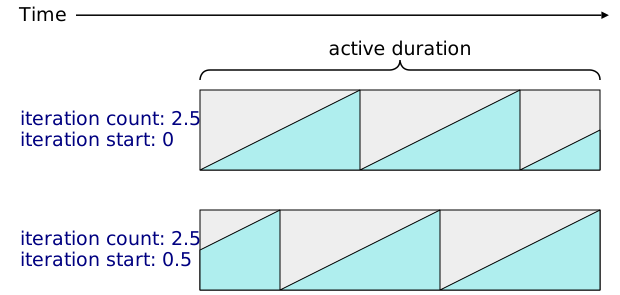
In the first case the iteration count is 2.5 resulting in the third iteration being cut-off half way through its iteration interval.
The second case is the same but with an iteration start of 0.5. This causes the animation effect to begin half way through the first iteration.
Unlike the iteration count parameter, the iteration start parameter does not effect the length of the active duration.
Note that values of iteration start greater than or equal to one are generally not useful unless used in combination with an animation effect that has an iteration composite operation of accumulate.
4.7.3. Iteration time space
This section is non-normative
In Web Animations all times are relative to some point of reference. These different points of reference produce different time spaces.
This can be compared to coordinate spaces as used in computer graphics. The zero time of a time space is analogous to the origin of a coordinate space.
We can describe animations that repeat as establishing a new time space each time the animation repeats: the iteration time space.
Iteration time space is a time space whose zero time is the beginning of an animation effect’s current iteration.
Within the Web Animations model we also refer to active time which is a time relative to the beginning of the active interval. This time space, however, is internal to the model and not exposed in the programming interface or in markup.
These time spaces are illustrated below.
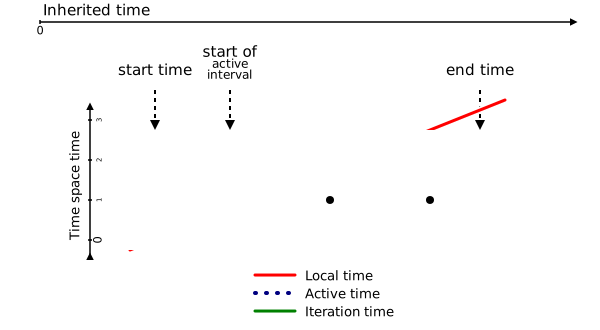
Note: While the time spaces themselves are not bounded, Web Animations defines active time and the iteration progress such that they are clamped to a set range as shown in the diagram. For example, whilst a time of -1 second is a valid time in active time space, the procedure for calculating the active time defined in § 4.8.3.1 Calculating the active time will never return a negative value.
In addition to these time spaces we can also refer to the document time space which is time space of the time
values of the default document timeline of the Document of the current global object.
4.7.4. Interval timing
This section is non-normative
When an animation effect repeats we must define the behavior at the
iteration boundaries.
For this, and indeed for all interval timing, Web Animations uses an
endpoint-exclusive timing model.
This means that whilst the begin time of an interval
is included in the interval, the end time is not.
In interval notation this can written [begin, end).
This model provides sensible behavior when intervals are repeated and
sequenced since there is no overlap between the intervals.
In the examples below, for the repeated effect, at local time 1s, the iteration time is 0. For the sequenced animations, at timeline time 1s, only animation B’s associated effect will be in play; there is no overlap.
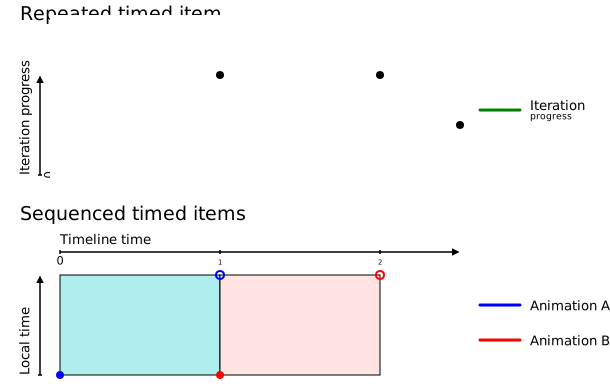
An exception to this behavior is that when performing a fill, if the fill begins at an interval endpoint, the endpoint is used. This behavior falls out of the algorithm given in § 4.8.3.3 Calculating the simple iteration progress and is illustrated below.
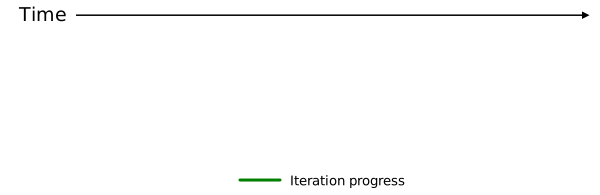
4.8. Core animation effect calculations
4.8.1. Overview
This section is non-normative
At the core of the Web Animations timing model is the process that takes a local time value and converts it to an iteration progress.
The first step in this process is to calculate the bounds of the active interval which is determined by the active duration.
This process is illustrated below.
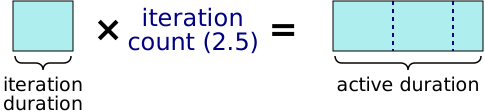
The process for calculating the active duration is normatively defined in § 4.8.2 Calculating the active duration.
Having established the active duration, the process for transforming an animation effect’s local time into its transformed progress (iteration progress) is illustrated below.
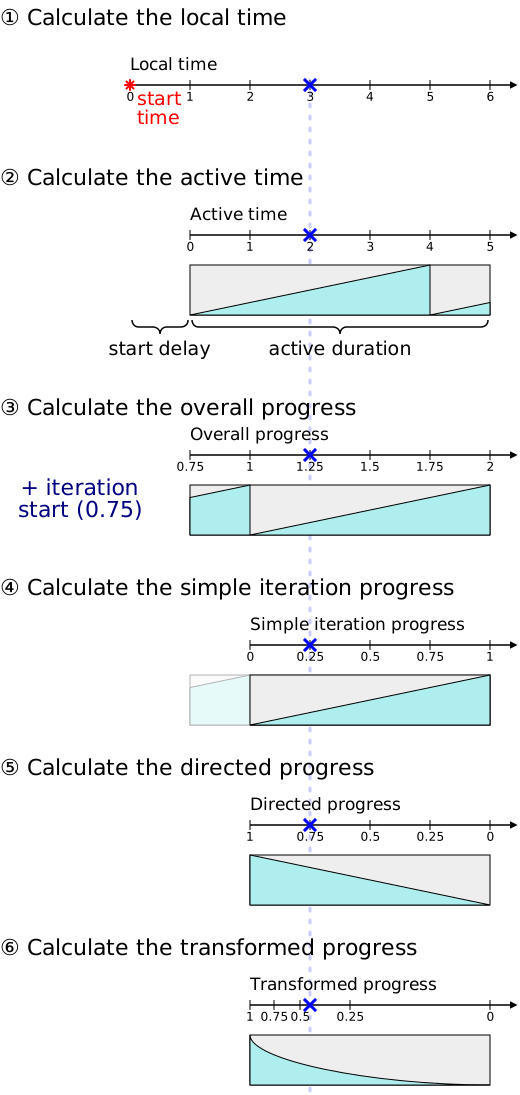
(1) The local time is determined from the associated animation.
(2) The local time is converted into an active time by incorporating the start delay.
(3) The active time is divided by the iteration duration incorporating also the iteration start property to produce the overall progress.
(4) The overall progress time is then converted to an offset within a single iteration: the simple iteration progress.
(5) The simple iteration progress is converted into a directed progress by incorporating the playback direction.
(6) Finally, a timing function is applied to the directed progress to produce the transformed progress.
The first step, calculating the local time is described in § 4.5.4 Local time. Steps 2 to 4 in the diagram are described in the following sections. Steps 5 and 6 are described in § 4.9.1 Calculating the directed progress and § 4.10.1 Calculating the transformed progress respectively.
4.8.2. Calculating the active duration
The active duration is calculated as follows:
active duration =iteration duration × iteration countIf either the iteration duration or iteration count are zero, the active duration is zero.
This clarification is needed since the result of infinity multiplied by zero is undefined according to IEEE 754-2008.
4.8.3. Transforming the local time
4.8.3.1. Calculating the active time
The active time is based on the local time and start delay. However, it is only defined when the animation effect should produce an output and hence depends on its fill mode and phase as follows,
- If the animation effect is in the before phase,
-
The result depends on the first matching condition from the following,
- If the fill mode is backwards or both,
-
Return the result of evaluating
max(local time - start delay, 0). - Otherwise,
-
Return an unresolved time value.
- If the animation effect is in the active phase,
-
Return the result of evaluating
local time - start delay. - If the animation effect is in the after phase,
-
The result depends on the first matching condition from the following,
- If the fill mode is forwards or both,
-
Return the result of evaluating
max(min(local time - start delay, active duration),
          0)
. - Otherwise,
-
Return an unresolved time value.
- Otherwise (the local time is unresolved),
-
Return an unresolved time value.
4.8.3.2. Calculating the overall progress
The overall progress describes the number of iterations that have completed (including partial iterations) and is defined as follows:
-
If the active time is unresolved, return unresolved.
-
Calculate an initial value for overall progress based on the first matching condition from below,
- If the iteration duration is zero,
-
If the animation effect is in the before phase, let overall progress be zero, otherwise, let it be equal to the iteration count.
- Otherwise,
-
Let overall progress be the result of calculating
active time / iteration duration.
-
Return the result of calculating
overall
progress + iteration start
.
4.8.3.3. Calculating the simple iteration progress
The simple iteration progress is a fraction of the progress through the current iteration that ignores transformations to the time introduced by the playback direction or timing functions applied to the effect, and is calculated as follows:
-
If the overall progress is unresolved, return unresolved.
-
If overall progress is infinity, let the simple iteration progress be
iteration start % 1.0, otherwise, let the simple iteration progress beoverall progress % 1.0. -
If all of the following conditions are true,
-
the simple iteration progress calculated above is zero, and
-
the animation effect is in the active phase or the after phase, and
-
the active time is equal to the active duration, and
-
the iteration count is not equal to zero.
let the simple iteration progress be 1.0.
The above step implements the behavior that when an animation’s active interval ends precisely at the end of an iteration, it fills by holding the endpoint of the final iteration rather than the start of the next iteration.
The final condition prevents this from applying when we never played any iterations of the animation to begin with because the iteration count was zero.
-
-
Return simple iteration progress.
4.8.4. Calculating the current iteration
The current iteration can be calculated using the following steps:
-
If the active time is unresolved, return unresolved.
-
If the animation effect is in the after phase and the iteration count is infinity, return infinity.
-
If the simple iteration progress is 1.0, return
floor(overall progress) - 1. -
Otherwise, return
floor(overall progress).
4.9. Direction control
Animation effects may also be configured to run iterations in alternative directions using direction control. For this purpose, animation effects have a playback direction parameter which takes one of the following values:
-
normal,
-
reverse,
-
alternate, or
-
alternate-reverse.
The semantics of these values are incorporated into the calculation of the directed progress which follows.
This section is non-normative
A non-normative definition of these values is as follows:
- normal
-
All iterations are played as specified.
- reverse
-
All iterations are played in the reverse direction from the way they are specified.
- alternate
-
Even iterations are played as specified, odd iterations are played in the reverse direction from the way they are specified.
- alternate-reverse
-
Even iterations are played in the reverse direction from the way they are specified, odd iterations are played as specified.
4.9.1. Calculating the directed progress
The directed progress is calculated from the simple iteration progress using the following steps:
-
If the simple iteration progress is unresolved, return unresolved.
-
Calculate the current direction using the first matching condition from the following list:
- If playback direction is
normal, -
Let the current direction be forwards.
- If playback direction is
reverse, -
Let the current direction be reverse.
- Otherwise,
-
-
Let d be the current iteration.
-
If playback direction is
alternate-reverseincrement d by 1. -
If
d % 2 == 0, let the current direction be forwards, otherwise let the current direction be reverse. If d is infinity, let the current direction be forwards.
-
- If playback direction is
-
If the current direction is forwards then return the simple iteration progress.
Otherwise, return
1.0 - simple iteration progress.
4.10. Time transformations
It is often desirable to control the rate at which an animation effect progresses. For example, easing the rate of animation can create a sense of momentum and produce a more natural effect. The CSS Easing Functions Module [CSS-EASING-1] defines timing functions for this purpose.
Animation effects have one timing function associated with them. The default timing function is the linear timing function.
4.10.1. Calculating the transformed progress
The transformed progress is calculated from the directed progress using the following steps:
-
If the directed progress is unresolved, return unresolved.
-
Calculate the value of the before flag as follows:
-
Determine the current direction using the procedure defined in § 4.9.1 Calculating the directed progress.
-
If the current direction is forwards, let going forwards be true, otherwise it is false.
-
The before flag is set if the animation effect is in the before phase and going forwards is true; or if the animation effect is in the after phase and going forwards is false.
-
-
Return the result of evaluating the animation effect’s timing function passing directed progress as the input progress value and before flag as the before flag.
4.11. The iteration progress
The iteration progress of an animation effect is simply its transformed progress.
5. Animation model
This section is non-normative
For some kinds of animation effects, the Web Animations animation model takes the iteration progress and current iteration values produced by the timing model and uses them to calculate a corresponding output.
The output of each such animation effect is then combined with that of others using an effect stack before being applied to the target properties (see § 5.4 Combining effects).
5.1. Introduction
An animation effect has zero or more associated properties that it affects in response to changes to its timing output. These properties are referred to as the effect’s target properties .
Given an iteration progress, a current iteration, and an underlying value, an animation effect produces an effect value for each animatable target property by applying the procedures from the animation type appropriate to the property.
5.2. Animating properties
Unless otherwise specified, all CSS properties are animatable . How property values combine is defined by the Animation type line in each property’s property definition table:
- not animatable
-
The property is not animatable.
It is not processed when listed in an animation keyframe,
and is not affected by transitions.
Note: Properties are typically excluded from animation because animating them would create excessive complications. For example, properties defining animation parameters are not animatable since doing so would create complex recursive behavior.
Note: An animation effect that targets only properties that are not animatable will still exhibit the usual behavior for an animation effect such as firing events and delaying the fulfillment of the animation’s current finished promise.
- discrete
-
The property’s values cannot be meaningfully combined,
thus it is not additive and interpolation swaps
from Va to Vb at 50% (p=0.5),
i.e.
- by computed value
- Corresponding individual components of the computed values are combined (interpolated, added, or accumulated) using the indicated procedure for that value type (see CSS Values 4 § 3 Combining Values: Interpolation, Addition, and Accumulation). If the number of components or the types of corresponding components do not match, or if any component value uses discrete animation and the two corresponding values do not match, then the property values combine as discrete.
- repeatable list
-
Same as by computed value except that if the two lists have differing numbers of items,
they are first repeated to the least common multiple number of items.
Each item is then combined by computed value.
If a pair of values cannot be combined
or if any component value uses discrete animation,
then the property values combine as discrete.
Note: The repeatable list concept ensures that a list that is conceptually repeated to a certain length (as background-origin is repeated to the length of the background-image list) or repeated infinitely will smoothly transition between any values, and so that the computed value will properly represent the result (and potentially be inherited correctly).
- (See prose)
- Some properties have specific interpolation behavior not covered by the above cases; in this case the animation behavior will be specified explicitly for that property.
The animation type of properties that do not yet include an Animation type line in their property definition, is defined in Appendix A: Animation types of existing properties.
5.2.1. Custom Properties
For custom properties registered
using the registerProperty() method for the current global object,
the animation type is by computed value,
derived from the type used in the property’s syntax definition.
Where there is no computed value type that corresponds
to the property’s specified syntax
(e.g. when the syntax is the universal syntax definition)
or when the custom property is not registered,
the animation type is discrete.
5.3. Keyframe effects
Keyframe effects are a kind of animation effect that use the output of the timing model
to update CSS properties of an element
or pseudo-element (such as ::before or ::after [select])
referred to as the effect target .
The effect target is comprised of
an Element known as the target element and a pseudo-element selector known as the target pseudo-selector .
If the effect target is an Element,
the target element is that element
and the target pseudo-selector is null.
If the effect target is a pseudo-element,
the target element is its originating element and the target pseudo-selector is as required
to specify that particular pseudo-element.
Note that not all effect targets specified in this manner (such as ::part() pseudo-elements and unsupported pseudo-elements) have computed property values defined.
5.3.1. Keyframes
The effect values for a keyframe effect are calculated by interpolating between a series of property values positioned at fractional offsets. Each set of property values indexed by an offset is called a keyframe .
The offset of a keyframe is a value in the range [0, 1] or the special value null. The list of keyframes for a keyframe effect must be loosely sorted by offset which means that for each keyframe in the list that has a keyframe offset that is not null, the offset is greater than or equal to the offset of the previous keyframe in the list with a keyframe offset that is not null, if any.
The behavior when keyframes overlap or have unsupported values is defined in § 5.3.4 The effect value of a keyframe effect.
Each keyframe also has a timing function associated with it that is applied to the period of time between the keyframe on which it is specified and the next keyframe in the list. The timing function specified on the last keyframe in the list is never applied.
Each keyframe may have a keyframe-specific composite operation that, if set, is applied to all values specified in that keyframe. The possible operations and their meanings are identical to those defined for the composite operation associated with the keyframe effect as a whole in § 5.4.4 Effect composition. If the keyframe-specific composite operation for a keyframe is not set, the composite operation specified for the keyframe effect as a whole is used for values specified in that keyframe.
5.3.2. Computing property values
To compute a property value given a property property,
a value value, and an Element element:
resolve value according to the "Computed Value" line of the property’s definition table, using the computed values of element as the context for resolving dependencies, and return the
result.
Note: The computed values on element are not affected by this algorithm.
This algorithm implies that property values specified in keyframes can establish order dependencies. When computing a property value, the computed values of dependencies held by value must be calculated first.
 var  animation  =  elem . animate ([{  fontSize :   '10px'  ,  width :   '10em'   },
                               {  fontSize :   '20px'  ,  width :   '20em'   }],   1000  );
animation . currentTime  =   500  ;
console . log ( getComputedStyle ( elem ). fontSize );   // Should be 15px
console . log ( getComputedStyle ( elem ). width );   // Should be 225px
In this example, in order to compute a property value for 10em, we must know the computed value of font-size on the target element, which in turn is determined
by the effect value for font-size, which in turn requires that we
compute property values for font-size.
Hence, computing property values are subject to ordering constraints.
5.3.3. Calculating computed keyframes
Before calculating the effect value of a keyframe effect, the property values on its keyframes are computed, and the offset to use for any keyframes with a null keyframe offset is computed. The result of resolving these values is a set of computed keyframes .
The calculated keyframe offsets of a set of keyframe that includes suitable values for each null keyframe offset are referred to as the computed keyframe offsets.
To produce computed keyframe offsets, we define a procedure to compute missing keyframe offsets that takes a sequence of keyframes, keyframes, and has the following steps:
-
For each keyframe, in keyframes, let the computed keyframe offset of the keyframe be equal to its keyframe offset value.
-
If keyframes contains more than one keyframe and the computed keyframe offset of the first keyframe in keyframes is null, set the computed keyframe offset of the first keyframe to 0.
-
If the computed keyframe offset of the last keyframe in keyframes is null, set its computed keyframe offset to 1.
-
For each pair of keyframes A and B where:
-
A appears before B in keyframes, and
-
A and B have a computed keyframe offset that is not null, and
-
all keyframes between A and B have a null computed keyframe offset,
calculate the computed keyframe offset of each keyframe between A and B as follows:
-
Let offsetk be the computed keyframe offset of a keyframe k.
-
Let n be the number of keyframes between and including A and B minus 1.
-
Let index refer to the position of keyframe in the sequence of keyframes between A and B such that the first keyframe after A has an index of 1.
-
Set the computed keyframe offset of keyframe to offsetA + (offsetB − offsetA) × index / n.
-
Computed keyframes are produced using the following procedure. Note that this procedure is only performed on a keyframe effect having an effect target for which computed property values can be calculated.
-
Let computed keyframes be an empty list of keyframes.
-
For each keyframe in the list of keyframes specified on this keyframe effect, perform the following steps:
-
Add a new empty keyframe, computed keyframe, to computed keyframes.
-
For each property specified in keyframe:
-
Compute a property value using the value specified on keyframe as the value, and the target element as the element; then add the property and resulting value to computed keyframe.
-
For shorthand properties, add the equivalent longhand properties.
-
For logical properties [CSS-LOGICAL-1], add the equivalent physical properties [CSS-WRITING-MODES-4] based on the computed value of writing-mode and/or direction for the effect target.
For example, if keyframe has a value of "12pt" for the border-width property, the user agent may compute a property value of "16px" for each of the longhand properties: border-bottom-width, border-left-width, border-right-width, and border-top-width. As a result, computed keyframe would not have a value for the border-width property, but would instead include each of the longhand properties, and each with the value "16px".
If conflicts arise when expanding shorthand properties or replacing logical properties with physical properties, apply the following rules in order until the conflict is resolved:
-
Longhand properties override shorthand properties (e.g. border-top-color overrides border-top).
-
Shorthand properties with fewer longhand components override those with more longhand components (e.g. border-top overrides border-color).
-
Physical properties override logical properties.
-
For shorthand properties with an equal number of longhand components, properties whose IDL name (see the CSS property to IDL attribute algorithm [CSSOM]) appears earlier when sorted in ascending order by the Unicode codepoints that make up each IDL name, override those who appear later.
-
-
-
Apply the procedure to compute missing keyframe offsets to computed keyframes.
-
Return computed keyframes.
5.3.4. The effect value of a keyframe effect
The effect value of a single property referenced by a keyframe effect as one of its target properties, for a given iteration progress, current iteration and underlying value is calculated as follows.
-
If iteration progress is unresolved abort this procedure.
-
Let target property be the longhand property for which the effect value is to be calculated.
-
If animation type of the target property is not animatable abort this procedure since the effect cannot be applied.
-
If the keyframe effect does not have an effect target, or if the effect target cannot have computed property values calculated, abort this procedure.
-
Define the neutral value for composition as a value which, when combined with an underlying value using the add composite operation, produces the underlying value.
-
Let property-specific keyframes be the result of getting the set of computed keyframes for this keyframe effect.
-
Remove any keyframes from property-specific keyframes that do not have a property value for target property.
-
If property-specific keyframes is empty, return underlying value.
-
If there is no keyframe in property-specific keyframes with a computed keyframe offset of 0, create a new keyframe with a computed keyframe offset of 0, a property value set to the neutral value for composition, and a composite operation of add, and prepend it to the beginning of property-specific keyframes.
-
Similarly, if there is no keyframe in property-specific keyframes with a computed keyframe offset of 1, create a new keyframe with a computed keyframe offset of 1, a property value set to the neutral value for composition, and a composite operation of add, and append it to the end of property-specific keyframes.
-
Let interval endpoints be an empty sequence of keyframes.
-
Populate interval endpoints by following the steps from the first matching condition from below:
- If iteration progress < 0 and there is more than one keyframe in property-specific keyframes with a computed keyframe offset of 0,
-
Add the first keyframe in property-specific keyframes to interval endpoints.
- If iteration progress ≥ 1 and there is more than one keyframe in property-specific keyframes with a computed keyframe offset of 1,
-
Add the last keyframe in property-specific keyframes to interval endpoints.
- Otherwise,
-
-
Append to interval endpoints the last keyframe in property-specific keyframes whose computed keyframe offset is less than or equal to iteration progress and less than 1. If there is no such keyframe (because, for example, the iteration progress is negative), add the last keyframe whose computed keyframe offset is 0.
-
Append to interval endpoints the next keyframe in property-specific keyframes after the one added in the previous step.
-
-
For each keyframe in interval endpoints:
-
If keyframe has a composite operation that is not replace, or keyframe has no composite operation and the composite operation of this keyframe effect is not replace, then perform the following steps:
-
Let composite operation to use be the composite operation of keyframe, or if it has none, the composite operation of this keyframe effect.
-
Let value to combine be the property value of target property specified on keyframe.
-
Replace the property value of target property on keyframe with the result of combining underlying value (Va) and value to combine (Vb) using the procedure for the composite operation to use corresponding to the target property’s animation type.
-
-
-
If there is only one keyframe in interval endpoints return the property value of target property on that keyframe.
-
Let start offset be the computed keyframe offset of the first keyframe in interval endpoints.
-
Let end offset be the computed keyframe offset of last keyframe in interval endpoints.
-
Let interval distance be the result of evaluating
(iteration progress - start offset) /
(end offset - start offset)
. -
Let transformed distance be the result of evaluating the timing function associated with the first keyframe in interval endpoints passing interval distance as the input progress.
-
Return the result of applying the interpolation procedure defined by the animation type of the target property, to the values of the target property specified on the two keyframes in interval endpoints taking the first such value as Vstart and the second as Vend and using transformed distance as the interpolation parameter p.
Note that this procedure assumes the following about the list of keyframes specified on the effect:
-
Each keyframe has a specified computed keyframe offset in the range [0, 1].
-
The list of keyframes is sorted in ascending order by computed keyframe offset.
-
For a given property, there is at most one specified property value on each keyframe.
It is the responsibility of the user of the model (for example, a declarative markup or programming interface) to ensure these conditions are met.
For example, for the programming interface defined by this specification, these conditions are met by the procedure to produce the computed keyframes that become the input to this procedure.
Note: this procedure permits overlapping keyframes. The behavior is that at the point of overlap the output value jumps to the value of the last defined keyframe at that offset. For overlapping keyframes at 0 or 1, the output value for iteration progress values less than 0 or greater than or equal to 1 is the value of the first keyframe or the last keyframe in keyframes respectively.
Note that computed keyframes are "live": user-agents must behave as if they are recreated every time the effect value is calculated.
For example, if there is an ongoing transition on the font-size property
from 10px to 20px, a property value specified as 1em in a keyframe would during keyframe computation resolve against the computed value in the range
[10px, 20px] produced by the transition on font-size.
In the presence of certain timing functions, the input iteration progress to an animation effect is not limited to the range [0, 1]. Currently, however, keyframe offsets are limited to the range [0, 1] and property values are simply extrapolated for input iteration progress values outside this range.
We have considered removing this restriction since some cases exist where it is useful to be able to specify non-linear changes in property values at iteration progress values outside the range [0, 1]. One example is an animation that interpolates from green to yellow but has an overshoot timing function that makes it temporarily interpolate "beyond" yellow to red before settling back to yellow.
While this effect could be achieved by modification of the keyframes and timing function, this approach seems to break the model’s separation of timing concerns from animation effects.
It is not clear how this effect should be achieved but we note that allowing keyframe offsets outside [0, 1] may make the currently specified behavior where keyframes at offset 0 and 1 are synthesized as necessary, inconsistent.
See section 4 (Keyframe offsets outside [0, 1]) of minuted discussion from Tokyo 2013 F2F.
5.4. Combining effects
This section is non-normative
After calculating the effect values for a keyframe effect, they are applied to the animation effect’s target properties.
Since it is possible for multiple in effect keyframe effects to target the same property it is often necessary to combine the results of several keyframe effects together. This process is called compositing and is based on establishing an effect stack for each property targeted by an in effect animation effect.
After compositing the results of keyframe effects together, the composited result is combined with other values specified for the target property.
The arrangement is illustrated below:
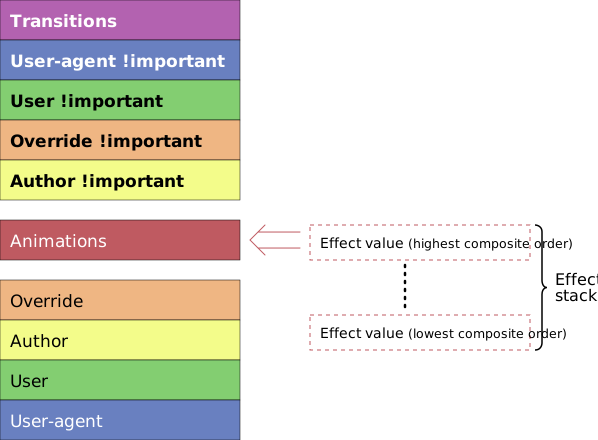
The results of keyframe effects targeting the same property are composited together using an effect stack.
The result of this composition is then inserted into the CSS cascade at an appropriate point.
For the first part of this operation—combining effect values that target the same property— it is necessary to determine both how keyframe effects are combined with one another, as well as the order in which they are applied, that is, their relative composite order.
The matter of how effect values are combined is governed by the composite operation of the corresponding keyframe effects.
The relative composite order of effect values is determined by an effect stack established for each animated property.
5.4.1. Animation classes
This specification provides a common animation model intended to be used by other specifications that define markup or programming interfaces on top of this model. The particular markup or programming interface that generated an animation defines its animation class .
Further specifications may define specialized behavior for composite ordering between different classes of animations or within a particular class.
This section is non-normative
For example, animations whose class is "CSS animation" are defined as having a higher composite order than animations whose class is "CSS transition" but lower than other animations without a specific class.
Within the set of "CSS animation" objects, specialized composite ordering is defined based on the animation-name property amongst other factors.
5.4.2. The effect stack
An effect stack is associated with each property targeted by one or more keyframe effects. The effect stack establishes the relative composite order of keyframe effects.
The relative composite order of any two keyframe effects, A and B, within an effect stack is established by comparing their properties as follows:
-
Let the associated animation of an animation effect be the animation associated with the animation effect.
-
Sort A and B by applying the following conditions in turn until the order is resolved,
-
If A and B’s associated animations differ by class, sort by any inter-class composite order defined for the corresponding classes.
-
If A and B are still not sorted, sort by any class-specific composite order defined by the common class of A and B’s associated animations.
-
If A and B are still not sorted, sort by the position of their associated animations in the global animation list.
-
Animation effects that sort earlier have lower composite order.
5.4.3. Calculating the result of an effect stack
In order to calculate the final value of an effect stack, the effect values of each keyframe effect in the stack are combined in composite order.
Each step in the process of evaluating an effect stack takes an underlying value as input.
For each keyframe effect in the stack, the appropriate effect value from the keyframe effect is combined with the underlying value to produce a new value. This resulting value becomes the underlying value for combining the next keyframe effect in the stack.
The final value of an effect stack, called the composited value , is simply the result of combining the effect value of the final (highest composite order) keyframe effect in the stack with the underlying value at that point.
5.4.4. Effect composition
The specific operation used to combine an effect value with an underlying value is determined by the composite operation of the keyframe effect that produced the effect value.
This specification defines three composite operations as follows:
- replace
-
The result of compositing the effect value with the underlying value is simply the effect value.
- add
-
The effect value is added to the underlying value. For animation types where the addition operation is defined such that it is not commutative, the order of the operands is
underlying value + effect value. - accumulate
-
The effect value is accumulated onto the underlying value. For animation types where the accumulation operation is defined such that it is not commutative, the order of the operands is underlying value followed by effect value.
5.4.5. Applying the composited result
Applying a composited value to a target property is achieved by adding a specified value to the CSS cascade.
The level of the cascade to which this specified value is added depends on the class of the animation associated with the effect with the highest composite order in the effect stack for a given property. By default, the specified value is added to the "Animation declarations" level of the cascade ([css-cascade-3]).
This section is non-normative
For example, if the effect with the highest composite order is associated with a "CSS transition"-class animation, the composited value will be added to "Transition declarations" level of the cascade.
The composited value calculated for a CSS target property is applied using the following process.
-
Calculate the base value of the property as the value generated for that property by computing the computed value for that property in the absence of animations.
-
Establish the effect stack for the property (see § 5.4.2 The effect stack).
-
Calculate the composited value of the effect stack passing in the base value of the property as the initial underlying value (see § 5.4.3 Calculating the result of an effect stack).
-
Insert the composited value into the CSS cascade at the level defined for the class of the animation associated with the effect at the top of the effect stack established for the target property.
5.5. Replacing animations
This section is non-normative
Using the programming interface defined in this specification, it is possible to repeatedly trigger new animations that contribute to an element’s animated style indefinitely.
For example, consider the following code:
elem . addEventListener (  'mousemove'  ,  evt  =>   {
  circle . animate (
     {  transform :   `translate(  ${ evt . clientX }  px,   ${ evt . clientY }  px)`   },
     {  duration :   500  ,  fill :   'forwards'   }
   );
 });
This will generate a new forwards-filling animation each time the mouse is moved, quickly producing hundreds, even thousands of forwards-filling animations.
If the user agent is required to retain all such animations, the list of animations would grow in an unbounded fashion, producing a memory leak.
This section defines a mechanism that causes overridden animations to be automatically removed unless the author explicitly requests they be retained.
5.5.1. Replace state
An animation maintains a replace state that may be one of the following values:
-
active
-
removed
-
persisted
The initial value of an animation's replace state is active.
The animation effects of an animation whose replace state is removed are not included in the effect stacks of their target properties.
5.5.2. Removing replaced animations
An animation is replaceable if all of the following conditions are true:
-
The existence of the animation is not prescribed by markup. That is, it is not a CSS animation with an owning element, nor a CSS transition with an owning element.
-
The animation's play state is finished.
-
The animation's replace state is not removed.
-
The animation is associated with a monotonically increasing timeline.
-
The animation has an associated effect.
-
The animation's associated effect is in effect.
-
The animation's associated effect has an effect target.
When asked to remove replaced animations for a Document, doc,
then for every animation, animation, that:
-
has an associated animation effect whose effect target is a descendant of doc, and
-
is replaceable, and
-
has a replace state of active, and
-
for which there exists for each target property of every animation effect associated with animation, an animation effect associated with a replaceable animation with a higher composite order than animation that includes the same target property
perform the following steps:
-
Set animation’s replace state to removed.
-
Create an
AnimationPlaybackEvent, removeEvent. -
Set removeEvent’s
currentTimeattribute to the current time of animation. -
Set removeEvent’s
timelineTimeattribute to the current time of the timeline with which animation is associated. -
If animation has a document for timing, then append removeEvent to its document for timing's pending animation event queue along with its target, animation. For the scheduled event time, use the result of applying the procedure to convert timeline time to origin-relative time to the current time of the timeline with which animation is associated.
Otherwise, queue a task to dispatch removeEvent at animation. The task source for this task is the DOM manipulation task source.
5.6. Side effects of animation
For every property targeted by at least one animation effect that is current or in effect, and which is associated with an animation whose replace state is not removed, the user agent must act as if the will-change property ([css-will-change-1]) on the effect target includes the property.
This section is non-normative
As a result of the above requirement, if an animation targets, for example, the transform property of an element, a stacking context will be created for the effect target so long as the animation is in the before phase, the active phase or, if it has a fill mode of "forwards" or "both", the after phase.
6. Programming interface
This section is non-normative
In addition to the abstract model described above, Web Animations also defines a programming interface to the model. This interface can be used to inspect and extend animations produced by declarative means or for directly producing animations when a procedural approach is more suitable.
6.1. Time values in the programming interface
Time values are represented in the programming interface with
the type double. Unresolved time values are
represented by the value null.
6.2. The AnimationTimeline interface
Timelines are represented in the Web Animations API by the AnimationTimeline interface.
[ Exposed = Window ]
 interface    AnimationTimeline   {
     readonly   attribute   double ?  currentTime ;
};
-
currentTime, of type double, readonly, nullable -
Returns the current time for this timeline or
nullif this timeline is inactive.
6.3. The DocumentTimeline interface
Document timelines, including the default document
timeline, are represented in the Web Animations API by the DocumentTimeline interface.
dictionaryDocumentTimelineOptions{ DOMHighResTimeStamp originTime = 0; }; [ Exposed = Window ] interfaceDocumentTimeline: AnimationTimeline { constructor ( optional DocumentTimelineOptions options = {}); };
-
DocumentTimeline (options) -
Creates a new
DocumentTimeline. TheDocumentwith which the timeline is associated is theDocumentassociated with theWindowthat is the current global object.-
options -
Configuration parameters for the newly-created timeline. This specification defines only the
originTimemember but other specifications may extend this set.
-
6.4. The Animation interface
Animations are represented in the Web Animations
API by the Animation interface.
[ Exposed = Window ]
 interface    Animation   :  EventTarget  {
     constructor ( optional   AnimationEffect ?  effect  =  null ,
                 optional   AnimationTimeline ?  timeline );
              attribute   DOMString                  id ;
              attribute   AnimationEffect ?          effect ;
              attribute   AnimationTimeline ?        timeline ;
              attribute   double ?                   startTime ;
              attribute   double ?                   currentTime ;
              attribute   double                     playbackRate ;
     readonly   attribute   AnimationPlayState         playState ;
     readonly   attribute   AnimationReplaceState      replaceState ;
     readonly   attribute   boolean                    pending ;
     readonly   attribute   Promise < Animation >        ready ;
     readonly   attribute   Promise < Animation >        finished ;
              attribute   EventHandler               onfinish ;
              attribute   EventHandler               oncancel ;
              attribute   EventHandler               onremove ;
     undefined   cancel ();
     undefined   finish ();
     undefined   play ();
     undefined   pause ();
     undefined   updatePlaybackRate ( double   playbackRate );
     undefined   reverse ();
     undefined   persist ();
    [ CEReactions ]
     undefined   commitStyles ();
};
-
Animation (effect, timeline) -
Creates a new
Animationobject using the following procedure.-
Let animation be a new
Animationobject. -
Run the procedure to set the timeline of an animation on animation passing timeline as the new timeline or, if a timeline argument is missing, passing the default document timeline of the
Documentassociated with theWindowthat is the current global object. -
Run the procedure to set the associated effect of an animation on animation passing source as the new effect.
-
effect
-