1. Introduction
The Orientation Sensor API extends the Generic Sensor API [GENERIC-SENSOR] to provide generic information describing the device’s physical orientation in relation to a three dimensional Cartesian coordinate system.
The AbsoluteOrientationSensor class inherits from the OrientationSensor interface and
describes the device’s physical orientation in relation to the Earth’s reference coordinate system.
Other subclasses describe the orientation in relation to other stationary directions, such as true north, or non stationary directions, like in relation to a devices own z-position, drifting towards its latest most stable z-position.
The data provided by the OrientationSensor subclasses are similar to data from
DeviceOrientationEvent, but the Orientation Sensor API has the following significant differences:
-
The Orientation Sensor API represents orientation data in WebGL-compatible formats (quaternion, rotation matrix).
-
The Orientation Sensor API satisfies stricter latency requirements.
-
Unlike
DeviceOrientationEvent, theOrientationSensorsubclasses explicitly define which low-level motion sensors are used to obtain the orientation data, thus obviating possible interoperability issues. -
Instances of
OrientationSensorsubclasses are configurable viaSensorOptionsconstructor parameter.
2. Use Cases and Requirements
The use cases and requirements are discussed in the Motion Sensors Explainer document.
3. Examples
 const  sensor  =   new  AbsoluteOrientationSensor ();
 const  mat4  =   new  Float32Array (  16  );
sensor . start ();
sensor . onerror  =  event  =>  console . log ( event . error . name ,  event . error . message );
sensor . onreading  =   ()   =>   {
  sensor . populateMatrix ( mat4 );
 };
 const  sensor  =   new  AbsoluteOrientationSensor ({  frequency :   60   });
 const  mat4  =   new  Float32Array (  16  );
sensor . start ();
sensor . onerror  =  event  =>  console . log ( event . error . name ,  event . error . message );
 function  draw ( timestamp )   {
  window . requestAnimationFrame ( draw );
   try   {
    sensor . populateMatrix ( mat4 );
   }   catch  ( e )   {
     // mat4 has not been updated.
   }
   // Drawing...
 }
window . requestAnimationFrame ( draw );
4. Security and Privacy Considerations
There are no specific security and privacy considerations beyond those described in the Generic Sensor API [GENERIC-SENSOR].
5. Model
The OrientationSensor class extends the Sensor class and provides generic interface
representing device orientation data.
To access the Orientation Sensor sensor type’s latest reading, the user agent must invoke request sensor access abstract operation for each of the low-level sensors used by the concrete orientation sensor. The table below describes mapping between concrete orientation sensors and permission tokens defined by low-level sensors.
| OrientationSensor subclass | Permission tokens |
|---|---|
AbsoluteOrientationSensor
| "accelerometer", "gyroscope", "magnetometer"
|
RelativeOrientationSensor
| "accelerometer", "gyroscope"
|
The AbsoluteOrientationSensor is a policy-controlled feature identified by strings "accelerometer", "gyroscope" and "magnetometer" . Its default allowlist is 'self'.
The RelativeOrientationSensor is a policy-controlled feature identified by strings "accelerometer" and "gyroscope". Its default allowlist is 'self'.
A latest reading for a Sensor of Orientation Sensor sensor type includes an entry
whose key is "quaternion" and whose value contains a four element list.
The elements of the list are equal to components of a unit quaternion [QUATERNIONS]
[Vx * sin(θ/2), Vy * sin(θ/2), Vz * sin(θ/2), cos(θ/2)] where V is
the unit vector (whose elements are Vx, Vy, and Vz) representing the axis of rotation, and θ is the rotation angle about the axis defined by the unit vector V.
Note: The quaternion components are arranged in the list as [q1, q2, q3, q0] [QUATERNIONS], i.e. the components representing the vector part of the quaternion go first and the scalar part component which is equal to cos(θ/2) goes after. This order is used for better compatibility with the most of the existing WebGL frameworks, however other libraries could use a different order when exposing quaternion as an array, e.g. [q0, q1, q2, q3].
The concrete OrientationSensor subclasses that are created through sensor-fusion of the
low-level motion sensors are presented in the table below:
| OrientationSensor subclass | Low-level motion sensors |
|---|---|
AbsoluteOrientationSensor
| Accelerometer, Gyroscope, Magnetometer
|
RelativeOrientationSensor
| Accelerometer, Gyroscope
|
Note: Accelerometer, Gyroscope and Magnetometer low-level sensors are defined in
[ACCELEROMETER], [GYROSCOPE], and [MAGNETOMETER] specifications respectively. The
sensor fusion is platform specific and can happen in software or hardware, i.e.
on a sensor hub.
This example code explicitly queries permissions for AbsoluteOrientationSensor before
calling start().
 const  sensor  =   new  AbsoluteOrientationSensor ();
Promise . all ([ navigator . permissions . query ({  name :   "accelerometer"   }),
             navigator . permissions . query ({  name :   "magnetometer"   }),
             navigator . permissions . query ({  name :   "gyroscope"   })])
        . then ( results  =>   {
              if   ( results . every ( result  =>  result . state  ===   "granted"  ))   {
               sensor . start ();
                ...
              }   else   {
               console . log (  "No permissions to use AbsoluteOrientationSensor."  );
              }
        });
Another approach is to simply call start() and subscribe to
onerror event handler.
 const  sensor  =   new  AbsoluteOrientationSensor ();
sensor . onerror  =  event  =>   {
   if   ( event . error . name  ===   'NotAllowedError'  )
    console . log (  "No permissions to use AbsoluteOrientationSensor."  );
 };
sensor . start ();
5.1. The AbsoluteOrientationSensor Model
The Absolute Orientation Sensor sensor type represents the sensor described in Motion Sensors Explainer § absolute-orientation. Its associated extension sensor interface is AbsoluteOrientationSensor, a subclass of OrientationSensor. Its associated virtual sensor type is
"absolute-orientation".
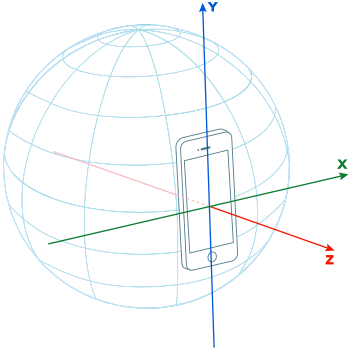
For the absolute orientation sensor the value of latest reading["quaternion"] represents the rotation of a device’s local coordinate system in relation to the Earth’s reference coordinate system defined as a three dimensional Cartesian coordinate system (x, y, z), where:
-
x-axis is a vector product of y.z that is tangential to the ground and points east,
-
y-axis is tangential to the ground and points towards magnetic north, and
-
z-axis points towards the sky and is perpendicular to the plane made up of x and y axes.
The device’s local coordinate system is the same as defined for the low-level motion sensors. It can be either the device coordinate system or the screen coordinate system.
Note: Figure below represents the case where device’s local coordinate system and the Earth’s reference coordinate system are aligned, therefore, orientation sensor’s latest reading would represent 0 (rad) [SI] rotation about each axis.
5.2. The RelativeOrientationSensor Model
The Relative Orientation Sensor sensor type represents the sensor described in Motion Sensors Explainer § relative-orientation. Its associated extension sensor interface is RelativeOrientationSensor, a subclass of OrientationSensor. Its associated virtual sensor type is
"relative-orientation".
For the relative orientation sensor the value of latest reading["quaternion"] represents the rotation of a device’s local coordinate system in relation to a stationary reference coordinate system. The stationary reference coordinate system may drift due to the bias introduced by the gyroscope sensor, thus, the rotation value provided by the sensor, may drift over time.
The stationary reference coordinate system is defined as an inertial three dimensional Cartesian coordinate system that remains stationary as the device hosting the sensor moves through the environment.
The device’s local coordinate system is the same as defined for the low-level motion sensors. It can be either the device coordinate system or the screen coordinate system.
Note: The relative orientation sensor data could be more accurate than the one provided by absolute orientation sensor, as the sensor is not affected by magnetic fields.
6. API
6.1. The OrientationSensor Interface
typedef ( Float32Array or Float64Array or DOMMatrix )RotationMatrixType; [ SecureContext , Exposed = Window ] interfaceOrientationSensor: Sensor { readonly attribute FrozenArray < double >?quaternion; undefinedpopulateMatrix( RotationMatrixTypetargetMatrix); }; enumOrientationSensorLocalCoordinateSystem{"device","screen"}; dictionaryOrientationSensorOptions: SensorOptions { OrientationSensorLocalCoordinateSystemreferenceFrame= "device"; };
6.1.1. OrientationSensor.quaternion
Returns a four-element FrozenArray whose elements contain the components
of the unit quaternion representing the device orientation.
In other words, this attribute returns the result of invoking
get value from latest reading with this
and "quaternion" as arguments.
6.1.2. OrientationSensor.populateMatrix()
The populateMatrix(targetMatrix) method steps are:
-
If targetMatrix is of type
Float32ArrayorFloat64Arraywith a size less than sixteen, throw a "TypeError" exception and abort these steps. -
Let quaternion be the result of invoking get value from latest reading with this and "quaternion" as arguments.
-
If quaternion is
null, throw a "NotReadableError"DOMExceptionand abort these steps. -
Let rotationMatrix be the result of converting a quaternion to rotation matrix with quaternion[0], quaternion[1], quaternion[2], and quaternion[3].
-
If targetMatrix is of
Float32ArrayorFloat64Arraytype, run these sub-steps:-
Set targetMatrix[0] = rotationMatrix[0]
-
Set targetMatrix[1] = rotationMatrix[1]
-
Set targetMatrix[2] = rotationMatrix[2]
-
Set targetMatrix[3] = rotationMatrix[3]
-
Set targetMatrix[4] = rotationMatrix[4]
-
Set targetMatrix[5] = rotationMatrix[5]
-
Set targetMatrix[6] = rotationMatrix[6]
-
Set targetMatrix[7] = rotationMatrix[7]
-
Set targetMatrix[8] = rotationMatrix[8]
-
Set targetMatrix[9] = rotationMatrix[9]
-
Set targetMatrix[10] = rotationMatrix[10]
-
Set targetMatrix[11] = rotationMatrix[11]
-
Set targetMatrix[12] = rotationMatrix[12]
-
Set targetMatrix[13] = rotationMatrix[13]
-
Set targetMatrix[14] = rotationMatrix[14]
-
Set targetMatrix[15] = rotationMatrix[15]
-
-
If targetMatrix is of
DOMMatrixtype, run these sub-steps:-
Set targetMatrix.m11 = rotationMatrix[0]
-
Set targetMatrix.m12 = rotationMatrix[1]
-
Set targetMatrix.m13 = rotationMatrix[2]
-
Set targetMatrix.m14 = rotationMatrix[3]
-
Set targetMatrix.m21 = rotationMatrix[4]
-
Set targetMatrix.m22 = rotationMatrix[5]
-
Set targetMatrix.m23 = rotationMatrix[6]
-
Set targetMatrix.m24 = rotationMatrix[7]
-
Set targetMatrix.m31 = rotationMatrix[8]
-
Set targetMatrix.m32 = rotationMatrix[9]
-
Set targetMatrix.m33 = rotationMatrix[10]
-
Set targetMatrix.m34 = rotationMatrix[11]
-
Set targetMatrix.m41 = rotationMatrix[12]
-
Set targetMatrix.m42 = rotationMatrix[13]
-
Set targetMatrix.m43 = rotationMatrix[14]
-
Set targetMatrix.m44 = rotationMatrix[15]
-
6.2. The AbsoluteOrientationSensor Interface
[ SecureContext , Exposed = Window ] interfaceAbsoluteOrientationSensor: OrientationSensor {constructor( optional OrientationSensorOptionssensorOptions= {}); };
To construct an AbsoluteOrientationSensor object the user agent must invoke the
construct an orientation sensor object abstract operation for the AbsoluteOrientationSensor
interface.
Supported sensor options for AbsoluteOrientationSensor are
"frequency" and "referenceFrame".
6.3. The RelativeOrientationSensor Interface
[ SecureContext , Exposed = Window ] interfaceRelativeOrientationSensor: OrientationSensor {constructor( optional OrientationSensorOptionssensorOptions= {}); };
To construct a RelativeOrientationSensor object the user agent must invoke the
construct an orientation sensor object abstract operation for the RelativeOrientationSensor
interface.
Supported sensor options for RelativeOrientationSensor are
"frequency" and "referenceFrame".
7. Abstract Operations
7.1. Construct an Orientation Sensor object
- input
-
orientation_interface, an interface identifier whose inherited interfaces contains
OrientationSensor. -
options, a
OrientationSensorOptionsobject. - output
-
An
OrientationSensorobject.
-
Let allowed be the result of invoking check sensor policy-controlled features with the interface identified by orientation_interface.
-
If allowed is false, then:
-
Let orientation be a new instance of the interface identified by orientation_interface.
-
Invoke initialize a sensor object with orientation and options.
-
If options.
referenceFrameis "screen", then:-
Define local coordinate system for orientation as the screen coordinate system.
-
-
Otherwise, define local coordinate system for orientation as the device coordinate system.
-
Return orientation.
7.2. Convert quaternion to rotation matrix
The convert a quaternion to rotation matrix algorithm creates a list representation of a rotation matrix in column-major order converted from a quaternion [QUATCONV], as shown below:

where:
-
W = cos(θ/2)
-
X = Vx * sin(θ/2)
-
Y = Vy * sin(θ/2)
-
Z = Vz * sin(θ/2)
To convert a quaternion to rotation matrix given a number x, a number y, a number z, and a number w:
-
Let m11 be 1 - 2 * y * y - 2 * z * z
-
Let m12 be 2 * x * y - 2 * z * w
-
Let m13 be 2 * x * z + 2 * y * w
-
Let m14 be 0
-
Let m21 be 2 * x * y + 2 * z * w
-
Let m22 be 1 - 2 * x * x - 2 * z * z
-
Let m23 be 2 * y * z - 2 * x * w
-
Let m24 be 0
-
Let m31 be 2 * x * z - 2 * y * w
-
Let m32 be 2 * y * z + 2 * x * w
-
Let m33 be 1 - 2 * x * x - 2 * y * y
-
Let m34 be 0
-
Let m41 be 0
-
Let m42 be 0
-
Let m43 be 0
-
Let m44 be 1
-
Return « m11, m12, m13, m14, m21, m22, m23, m24, m31, m32, m33, m34, m41, m42, m43, m44 ».
7.3. Create a quaternion from Euler angles
To create a quaternion from Euler angles given a number alpha, a number beta and a number gamma:
-
Let alphaInRadians be alpha converted from degrees to radians.
-
Let betaInRadians be beta converted from degrees to radians.
-
Let gammaInRadians be gamma converted from degrees to radians.
-
Let cosZ be the cosine of (0.5 * alphaInRadians).
-
Let sinZ be the sine of (0.5 * alphaInRadians).
-
Let cosX be the cosine of (0.5 * betaInRadians).
-
Let sinX be the sine of (0.5 * betaInRadians).
-
Let cosY be the cosine of (0.5 * gammaInRadians).
-
Let sinY be the sine of (0.5 * gammaInRadians).
-
Let quaternionX be (sinX * cosY * cosZ - cosX * sinY * sinZ).
-
Let quaternionY be (cosX * sinY * cosZ + sinX * cosY * sinZ).
-
Let quaternionZ be (cosX * cosY * sinZ + sinX * sinY * cosZ).
-
Let quaternionW be (cosX * cosY * cosZ - sinX * sinY * sinZ).
-
Return « quaternionX, quaternionY, quaternionZ, quaternionW ».
8. Automation
This section extends Generic Sensor API § 9 Automation by providing Orientation Sensor-specific virtual sensor metadata.
8.1. Modifications to other specifications
This specification integrates with Device Orientation and Motion § automation as follows.
The parse orientation data reading algorithm is modified as follows:
-
Add the following steps after setting reading’s "
alpha", "beta", and "gamma" keys and before returning reading:-
Set reading["
quaternion"] to the result of invoking create a quaternion from Euler angles with reading["alpha"], reading["beta"], and reading["gamma"].
-
Note: This specification does not currently provide a way for specifying quaternions in WebDriver (and consequently deriving Euler angles from the quaternion) directly. This decision was made for simplicity and under the assumption that automation users are much more likely to work with Euler angles as inputs (or pick specific quaternion values and provide the corresponding Euler angle values on their own). Feedback from users with different use cases who are interested in being able to provide quaternion values directly is welcome via this specification’s issue tracker.
8.2. Absolute Orientation Sensor automation
The absolute-orientation virtual sensor type and its corresponding entry in the per-type virtual sensor metadata map are defined in Device Orientation and Motion § automation.
8.3. Relative Orientation Sensor automation
The relative-orientation virtual sensor type and its corresponding entry in the per-type virtual sensor metadata map are defined in Device Orientation and Motion § automation.
9. Acknowledgements
Tobie Langel for the work on Generic Sensor API.
Conformance
Document conventions
Conformance requirements are expressed with a combination of descriptive assertions and RFC 2119 terminology. The key words “MUST”, “MUST NOT”, “REQUIRED”, “SHALL”, “SHALL NOT”, “SHOULD”, “SHOULD NOT”, “RECOMMENDED”, “MAY”, and “OPTIONAL” in the normative parts of this document are to be interpreted as described in RFC 2119. However, for readability, these words do not appear in all uppercase letters in this specification.
All of the text of this specification is normative except sections explicitly marked as non-normative, examples, and notes. [RFC2119]
Examples in this specification are introduced with the words “for example”
or are set apart from the normative text
with class="example",
like this:
This is an example of an informative example.
Informative notes begin with the word “Note”
and are set apart from the normative text
with class="note",
like this:
Note, this is an informative note.
Conformant Algorithms
Requirements phrased in the imperative as part of algorithms (such as "strip any leading space characters" or "return false and abort these steps") are to be interpreted with the meaning of the key word ("must", "should", "may", etc) used in introducing the algorithm.
Conformance requirements phrased as algorithms or specific steps can be implemented in any manner, so long as the end result is equivalent. In particular, the algorithms defined in this specification are intended to be easy to understand and are not intended to be performant. Implementers are encouraged to optimize.