Abstract
This specification defines the Mathematical Markup Language, or MathML. MathML is a markup language for describing mathematical notation and capturing both its structure and content. The goal of MathML is to enable mathematics to be served, received, and processed on the World Wide Web, just as [HTML] has enabled this functionality for text.
This specification of the markup language MathML is intended primarily for a readership consisting of those who will be developing or implementing renderers or editors using it, or software that will communicate using MathML as a protocol for input or output. It is not a User's Guide but rather a reference document.
MathML can be used to encode both mathematical notation and mathematical content. About thirty-eight of the MathML tags describe abstract notational structures, while another about one hundred and seventy provide a way of unambiguously specifying the intended meaning of an expression. Additional chapters discuss how the MathML content and presentation elements interact, and how MathML renderers might be implemented and should interact with browsers. Finally, this document addresses the issue of special characters used for mathematics, their handling in MathML, their presence in Unicode, and their relation to fonts.
While MathML is human-readable, authors typically will use equation editors, conversion programs, and other specialized software tools to generate MathML. Several versions of such MathML tools exist, both freely available software and commercial products, and more are under development.
MathML was originally specified as an XML application and most of the examples in this specification assume that syntax. Other syntaxes are possible, most notably [HTML] specifies the syntax for MathML in HTML. Unless explicitly noted, the examples in this specification are also valid HTML syntax.
Status of This Document
This section describes the status of this document at the time of its publication. A list of current W3C publications and the latest revision of this technical report can be found in the W3C standards and drafts index.
Public discussion of MathML and issues of support
takes place on the public mailing list of the Math Working
Group (list archives).
To subscribe, send an email to www-math-request@w3.org
with the word subscribe in the subject line.
Alternatively, report an issue at this specification's
GitHub repository.
A fuller discussion of the document's evolution can be found in I. Changes.
Some sections are collapsed and may be expanded to reveal more details. The following button may be used to expand all such sections.
This document was published by the Math Working Group as a Working Draft using the Recommendation track.
Publication as a Working Draft does not imply endorsement by W3C and its Members.
This is a draft document and may be updated, replaced, or obsoleted by other documents at any time. It is inappropriate to cite this document as other than a work in progress.
This document was produced by a group operating under the W3C Patent Policy. W3C maintains a public list of any patent disclosures made in connection with the deliverables of the group; that page also includes instructions for disclosing a patent. An individual who has actual knowledge of a patent that the individual believes contains Essential Claim(s) must disclose the information in accordance with section 6 of the W3C Patent Policy.
This document is governed by the 18 August 2025 W3C Process Document.
Table of Contents
- Abstract
- Status of This Document
- 1. Introduction
- 2. MathML Fundamentals
- 3. Presentation Markup
- 3.1 Introduction
- 3.1.1 Presentation MathML Structure
- 3.1.2 Terminology Used In This Chapter
- 3.1.3 Required Arguments
- 3.1.4 Elements with Special Behaviors
- 3.1.5 Directionality
- 3.1.6 Displaystyle and Scriptlevel
- 3.1.7 Linebreaking of Expressions
- 3.1.8 Summary of Presentation Elements
- 3.1.9 Attributes common to presentation elements
- 3.2 Token Elements
- 3.3 General Layout Schemata
- 3.3.1 Horizontally Group Sub-Expressions
<mrow>,<a> - 3.3.2 Fractions
<mfrac> - 3.3.3 Radicals
<msqrt>,<mroot> - 3.3.4 Style Change
<mstyle> - 3.3.5 Error Message
<merror> - 3.3.6 Adjust Space Around Content
<mpadded> - 3.3.7 Making Sub-Expressions Invisible
<mphantom> - 3.3.8 Expression Inside Pair of Fences
<mfenced> - 3.3.9 Enclose Expression Inside Notation
<menclose>
- 3.3.1 Horizontally Group Sub-Expressions
- 3.4 Script and Limit Schemata
- 3.5 Tabular Math
- 3.6 Elementary Math
- 3.7 Enlivening Expressions
- 3.8 Semantics and Presentation
- 3.1 Introduction
- 4. Content Markup
- 4.1 Introduction
- 4.2 Content MathML Elements Encoding Expression Structure
- 4.2.1 Numbers
<cn> - 4.2.2 Content Identifiers
<ci> - 4.2.3 Content Symbols
<csymbol> - 4.2.4 String Literals
<cs> - 4.2.5 Function Application
<apply> - 4.2.6 Bindings and Bound Variables
<bind>and<bvar> - 4.2.7 Structure Sharing
<share> - 4.2.8 Attribution via
semantics - 4.2.9 Error Markup
<cerror> - 4.2.10 Encoded Bytes
<cbytes>
- 4.2.1 Numbers
- 4.3 Content MathML for Specific Structures
- 4.3.1 Container Markup
- 4.3.2 Bindings with
<apply> - 4.3.3 Qualifiers
- 4.3.4 Operator Classes
- 4.3.5 N-ary Operators
- 4.3.5.1 N-ary Arithmetic Operators:
<plus/>,<times/>,<gcd/>,<lcm/> - 4.3.5.2 N-ary Sum
<sum/> - 4.3.5.3 N-ary Product
<product/> - 4.3.5.4 N-ary Functional Operators:
<compose/> - 4.3.5.5 N-ary Logical Operators:
<and/>,<or/>,<xor/> - 4.3.5.6 N-ary Linear Algebra Operators:
<selector/> - 4.3.5.7 N-ary Set Operators:
<union/>,<intersect/>,<cartesianproduct/> - 4.3.5.8 N-ary Matrix Constructors:
<vector/>,<matrix/>,<matrixrow/> - 4.3.5.9 N-ary Set Theoretic Constructors:
<set>,<list> - 4.3.5.10 N-ary Arithmetic Relations:
<eq/>,<gt/>,<lt/>,<geq/>,<leq/> - 4.3.5.11 N-ary Set Theoretic Relations:
<subset/>,<prsubset/> - 4.3.5.12 N-ary/Unary Arithmetic Operators:
<min/>,<max/> - 4.3.5.13 N-ary/Unary Statistical Operators:
<mean/>,<median/>,<mode/>,<sdev/>,<variance/>
- 4.3.5.1 N-ary Arithmetic Operators:
- 4.3.6 Binary Operators
- 4.3.6.1 Binary Arithmetic Operators:
<quotient/>,<divide/>,<minus/>,<power/>,<rem/>,<root/> - 4.3.6.2 Binary Logical Operators:
<implies/>,<equivalent/> - 4.3.6.3 Binary Relations:
<neq/>,<approx/>,<factorof/>,<tendsto/> - 4.3.6.4 Binary Linear Algebra Operators:
<vectorproduct/>,<scalarproduct/>,<outerproduct/> - 4.3.6.5 Binary Set Operators:
<in/>,<notin/>,<notsubset/>,<notprsubset/>,<setdiff/>
- 4.3.6.1 Binary Arithmetic Operators:
- 4.3.7 Unary Operators
- 4.3.7.1 Unary Logical Operators:
<not/> - 4.3.7.2 Unary Arithmetic Operators:
<factorial/>,<abs/>,<conjugate/>,<arg/>,<real/>,<imaginary/>,<floor/>,<ceiling/>,<exp/>,<minus/>,<root/> - 4.3.7.3 Unary Linear Algebra Operators:
<determinant/>,<transpose/> - 4.3.7.4 Unary Functional Operators:
<inverse/>,<ident/>,<domain/>,<codomain/>,<image/>,<ln/>, - 4.3.7.5 Unary Set Operators:
<card/> - 4.3.7.6 Unary Elementary Operators:
<sin/>,<cos/>,<tan/>,<sec/>,<csc/>,<cot/>,<sinh/>,<cosh/>,<tanh/>,<sech/>,<csch/>,<coth/>,<arcsin/>,<arccos/>,<arctan/>,<arccosh/>,<arccot/>,<arccoth/>,<arccsc/>,<arccsch/>,<arcsec/>,<arcsech/>,<arcsinh/>,<arctanh/> - 4.3.7.7 Unary Vector Calculus Operators:
<divergence/>,<grad/>,<curl/>,<laplacian/> - 4.3.7.8 Moment
<moment/>,<momentabout> - 4.3.7.9 Logarithm
<log/>,<logbase>
- 4.3.7.1 Unary Logical Operators:
- 4.3.8 Unary Qualified Calculus Operators
- 4.3.9 Constants
- 4.3.10 Special Element forms
- 5. Annotating MathML: intent
- 6. Annotating MathML: semantics
- 7. Interactions with the Host Environment
- 8. Characters, Entities and Fonts
- A. Parsing MathML
- B. Operator Dictionary
- C. MathML Accessibility
- D. Conformance
- E. The Content MathML Operators
- F. The Strict Content MathML Transformation
- G. MathML Index
- H. Working Group Membership and Acknowledgments
- I. Changes
- J. References
This section is non-normative.
Mathematics and its notations have evolved over several centuries, or even millennia. To the experienced reader, mathematical notation conveys a large amount of information quickly and compactly. And yet, while the symbols and arrangements of the notations have a deep correspondence to the semantic structure and meaning of the mathematics being represented, the notation and semantics are not the same. The semantic symbols and structures are subtly distinct from those of the notation.
Thus, there is a need for a markup language which can represent both the traditional displayed notations of mathematics, as well as its semantic content. While the traditional rendering is useful to sighted readers, the markup language must also support accessibility. The semantic forms must support a variety of computational purposes. Both forms should be appropriate to all educational levels from elementary to research.
MathML is a markup language for describing mathematics. It uses XML syntax when used standalone or within other XML, or HTML syntax when used within HTML documents. Conceptually, MathML consists of two main strains of markup: Presentation markup is used to display mathematical expressions; and Content markup is used to convey mathematical meaning. These two strains, along with other external representations, can be combined using parallel markup.
This specification is organized as follows: 2. MathML Fundamentals discusses Fundamentals common to Presentation and Content markup; 3. Presentation Markup and 4. Content Markup cover Presentation and Content markup, respectively; 5. Annotating MathML: intent discusses how markup may be annotated, particularly for accessibility; 6. Annotating MathML: semantics discusses how markup may be annotated so that Presentation, Content and other formats may be combined; 7. Interactions with the Host Environment addresses how MathML interacts with applications; Finally, a discussion of special symbols and issues regarding characters, entities and fonts, is given in 8. Characters, Entities and Fonts.
The specification of MathML is developed in two layers. MathML Core ([MathML-Core]) covers (most of) Presentation Markup, with the focus being the precise details of displaying mathematics in web browsers. MathML Full, this specification, extends MathML Core primarily by defining Content MathML, in 4. Content Markup. It also defines extensions to Presentation MathML consisting of additional attributes, elements or enhanced syntax of attributes. These are defined for compatibility with legacy MathML, as well as to cover 3.1.7 Linebreaking of Expressions, 3.6 Elementary Math and other aspects not included in level 1 of MathML Core but which may be incorporated into future versions of MathML Core.
This specification covers both MathML Core and its extensions; features common to both are indicated with , whereas extensions are indicated with .
It is intended that MathML Full is a proper superset of MathML Core. Moreover, it is intended that any valid Core Markup be considered as valid Full Markup as well. It is also intended that an otherwise conforming implementation of MathML Core, which also implements parts or all of the extensions of MathML Full, should continue to be considered a conforming implementation of MathML Core.
In addition to these two specifications, the Math Working Group has developed the non-normative Notes on MathML that contains additional examples and information to help understand best practices when using MathML.
The basic ‘syntax’ of MathML is defined using XML syntax, but other syntaxes that can encode labeled trees are possible. Notably the HTML parser may also be used with MathML. Upon this, we layer a ‘grammar’, being the rules for allowed elements, the order in which they can appear, and how they may be contained within each other, as well as additional syntactic rules for the values of attributes. These rules are defined by this specification, and formalized by a RelaxNG schema [RELAXNG-SCHEMA] in A. Parsing MathML. Derived schema in other formats, DTD (Document Type Definition) and XML Schema [XMLSchemas] are also provided.
MathML's character set consists of any Unicode characters [Unicode] allowed by the syntax being used. (See for example [XML] or [HTML].) The use of Unicode characters for mathematics is discussed in 8. Characters, Entities and Fonts.
The following sections discuss the general aspects of the MathML grammar as well as describing the syntaxes used for attribute values.
An XML namespace [Namespaces] is a collection of names identified by a URI. The URI for the MathML namespace is:
http://www.w3.org/1998/Math/MathMLTo declare a namespace when using the XML serialisation of MathML,
one uses an xmlns
attribute, or an attribute with an xmlns prefix.
<math xmlns="http://www.w3.org/1998/Math/MathML">
  <mrow>...</mrow>
</math>
When the xmlns attribute is used as a
prefix, it declares a prefix which can then be used to explicitly associate other
elements
and attributes with a particular namespace.
When embedding MathML within HTML using XML syntax, one might use:
<body xmlns:m="http://www.w3.org/1998/Math/MathML">
  ...
  <m:math><m:mrow>...</m:mrow></m:math>
  ...
</body>
HTML does not support namespace extensibility in the same way. The HTML parser
has in-built knowledge of the HTML, SVG, and MathML namespaces. xmlns attributes are
just treated as normal attributes. Thus, when using the HTML serialisation of MathML,
prefixed element names must not be used. xmlns=http://www.w3.org/1998/Math/MathML
may be used on the math element; it will be ignored by the HTML parser.
If a MathML expression is likely to be in contexts where it may be parsed by an XML
parser or an HTML parser, it SHOULD
use the following form to ensure maximum compatibility:
<math xmlns="http://www.w3.org/1998/Math/MathML">
  ...
</math>
There are presentation elements that conceptually accept only
a single argument, but which for convenience have been written to accept any number
of children;
then we infer an mrow containing those children which acts as
the argument to the element in question; see 3.1.3.1 Inferred <mrow>s.
In the detailed discussions of element syntax given with each element throughout the MathML specification, the number of arguments required and their order, as well as other constraints on the content, are specified. This information is also tabulated for the presentation elements in 3.1.3 Required Arguments.
Web Platform implementations of [MathML-Core] should follow the detailed layout rules specified in that document.
This document only recommends (i.e., does not require) specific ways of rendering Presentation MathML; this is in order to allow for medium-dependent rendering and for implementations not using the CSS based Web Platform.
MathML elements take attributes with values that further specialize
the meaning or effect of the element. Attribute names are shown in a
monospaced font throughout this document. The meanings of attributes and their
allowed values are described within the specification of each element.
The syntax notation explained in this section is used in specifying allowed values.
To describe the MathML-specific syntax of attribute values, the following conventions and notations are used for most attributes in the present document.
| Notation | What it matches |
|---|---|
| boolean | As defined in [MathML-Core], a string that is an
ASCII case-insensitive match to true or
false. |
| unsigned-integer | As defined in [MathML-Core], an integer, whose first character is neither
U+002D HYPHEN-MINUS character (-) nor
U+002B PLUS SIGN (+). |
| positive-integer | An unsigned-integer not consisting solely of "0"s (U+0030), representing a positive integer |
| integer | an optional "-" (U+002D), followed by an unsigned-integer, representing an integer |
| number | an optional prefix of "-" (U+002D), followed by an unsigned-number, representing a terminating decimal number (a type of rational number) |
| unsigned-number |
value as defined in
[CSS-VALUES-3] number, whose first character is neither
U+002D HYPHEN-MINUS character (-) nor
U+002B PLUS SIGN (+),
representing a non-negative terminating decimal number
(a type of rational number) |
| character | a single non-whitespace character |
| string | an arbitrary, nonempty and finite, string of characters |
| length | a length, as explained below, 2.1.5.2 Length Valued Attributes |
| namedspace | a named length, namedspace, as explained in 2.1.5.2 Length Valued Attributes |
| color | a color, using the syntax specified by [CSS-Color-3] |
| id | an identifier, unique within the document; must satisfy the NAME syntax of the XML recommendation [XML] |
| idref | an identifier referring to another element within the document; must satisfy the NAME syntax of the XML recommendation [XML] |
| URI | a Uniform Resource Identifier [RFC3986]. Note that the attribute value is typed in the schema as anyURI which allows any sequence of XML characters. Systems needing to use this string as a URI must encode the bytes of the UTF-8 encoding of any characters not allowed in URI using %HH encoding where HH are the byte value in hexadecimal. This ensures that such an attribute value may be interpreted as an IRI, or more generally a LEIRI; see [IRI]. |
| italicized word | values as explained in the text for each attribute; see 2.1.5.3 Default values of attributes |
| "literal" | quoted symbol, literally present in the attribute value (e.g. "+" or '+') |
The ‘types’ described above, except for string, may be combined into composite patterns using the following operators. The whole attribute value must be delimited by single (') or double (") quotation marks in the marked up document. Note that double quotation marks are often used in this specification to mark up literal expressions; an example is the "-" in line 5 of the table above.
In the table below a form f means an instance of a type described in the table above. The combining operators are shown in order of precedence from highest to lowest:
| Notation | What it matches |
|---|---|
| same | |
| an optional instance of | |
| zero or more instances of , with separating whitespace characters | |
| one or more instances of , with separating whitespace characters | |
| one instance of each form , in sequence, with no separating whitespace | |
| one instance of each form , in sequence, with separating whitespace characters (but no commas) | |
| any one of the specified forms |
The notation we have chosen here is in the style of the syntactical notation of the RelaxNG used for MathML's basic schema, A. Parsing MathML.
Since some applications are inconsistent about normalization of whitespace, for maximum interoperability it is advisable to use only a single whitespace character for separating parts of a value. Moreover, leading and trailing whitespace in attribute values should be avoided.
For compatibility with HTML, attributes defined with an enumerated list of string values are to be compared as ASCII case-insensitive.
For most numerical attributes, only those in a subset of the expressible values are sensible; values outside this subset are not errors, unless otherwise specified, but rather are rounded up or down (at the discretion of the renderer) to the closest value within the allowed subset. The set of allowed values may depend on the renderer, and is not specified by MathML.
If a numerical value within an attribute value syntax description
is declared to allow a minus sign ('-'), e.g., number or
integer, it is not a syntax error when one is provided in
cases where a negative value is not sensible. Instead, the value
should be handled by the processing application as described in the
preceding paragraph. An explicit plus sign ('+') is not allowed as
part of a numerical value except when it is specifically listed in the
syntax (as a quoted '+' or "+"), and its presence can change the
meaning of the attribute value (as documented with each attribute
which permits it).
Most presentation elements have attributes that accept values
representing lengths to be used for size, spacing or similar properties.
[MathML-Core] accepts lengths only in the
<length-percentage>
syntax defined in [CSS-VALUES-3].
MathML Full extends length syntax by accepting also a namedspace
being an ASCII case-insensitive match to one of:
| Positive space | Negative space | Value |
|---|---|---|
veryverythinmathspace |
negativeveryverythinmathspace |
±1/18 em |
verythinmathspace |
negativeverythinmathspace |
±2/18 em |
thinmathspace |
negativethinmathspace |
±3/18 em |
mediummathspace |
negativemediummathspace |
±4/18 em |
thickmathspace |
negativethickmathspace |
±5/18 em |
verythickmathspace |
negativeverythickmathspace |
±6/18 em |
veryverythickmathspace |
negativeveryverythickmathspace |
±7/18 em |
In MathML 3, the attributes on mpadded
allowed three pseudo-units , height,
depth, and width (taking the place of one of the usual CSS units)
denoting the original dimensions of the content.
It also allowed a deprecated usage with lengths specified as
a number without a unit which was interpreted as a multiple of the
reference value. These forms are considered invalid in MathML 4.
Two additional aspects of relative units must be clarified, however.
First, some elements such as 3.4 Script and Limit Schemata or mfrac
implicitly switch to smaller font sizes for some of their arguments.
Similarly, mstyle can be used to explicitly change
the current font size. In such cases, the effective values of
an em or ex inside those contexts will be
different than outside. The second point is that the effective value
of an em or ex used for an attribute value
can be affected by changes to the current font size.
Thus, attributes that affect the current font size,
such as mathsize
and scriptlevel, must be processed before
evaluating other length valued attributes.
Default values for MathML attributes are, in general, given along with the detailed descriptions of specific elements in the text. Default values shown in plain text in the tables of attributes for an element are literal, but when italicized are descriptions of how default values can be computed.
Default values described as inherited are taken from the
rendering environment, as described in 3.3.4 Style Change <mstyle>,
or in some cases (which are described individually) taken from the values of other
attributes of surrounding elements, or from certain parts of those
values. The value used will always be one which could have been specified
explicitly, had it been known; it will never depend on the content or
attributes of the same element, only on its environment. (What it means
when used may, however, depend on those attributes or the content.)
Default values described as automatic should be computed by a MathML renderer in a way which will produce a high-quality rendering; how to do this is not usually specified by the MathML specification. The value computed will always be one which could have been specified explicitly, had it been known, but it will usually depend on the element content and possibly on the context in which the element is rendered.
Other italicized descriptions of default values which appear in the tables of attributes are explained individually for each attribute.
The single or double quotes which are required around attribute values in an XML start tag are not shown in the tables of attribute value syntax for each element, but are around attribute values in examples in the text, so that the pieces of code shown are correct.
Note that, in general, there is no mechanism in MathML to simulate the
effect of not specifying attributes which are inherited or
automatic. Giving the words inherited
or
automatic
explicitly will not work, and is not generally
allowed. Furthermore, the mstyle element ( 3.3.4 Style Change <mstyle>)
can even be used to change the default values of presentation attributes
for its children.
Note also that these defaults describe the behavior of MathML applications when an attribute is not supplied; they do not indicate a value that will be filled in by an XML parser, as is sometimes mandated by DTD-based specifications.
In general, there are a number of
properties of MathML rendering that may be thought of as overall
properties of a document, or at least of sections of a large
document. Examples might be mathsize (the math font
size: see 3.2.2 Mathematics style attributes common to token elements), or the
behavior in setting limits on operators such as integrals or sums
(e.g., movablelimits or displaystyle), or
upon breaking formulas over lines (e.g.
linebreakstyle); for such attributes see several
elements in 3.2 Token Elements.
These may be thought to be inherited from some such
containing scope. Just above we have mentioned the setting of default
values of MathML attributes as inherited or
automatic; there is a third source of global default values
for behavior in rendering MathML, a MathML operator dictionary. A
default example is provided in B. Operator Dictionary.
This is also discussed in 3.2.6.6.1 The operator dictionary and examples are given in
3.2.6.2.1 Dictionary-based attributes.
In addition to the attributes described specifically for each element,
the attributes in the following table are allowed on every MathML element.
Also allowed are attributes from the xml namespace, such as xml:lang,
and attributes from namespaces other than MathML,
which are ignored by default.
| Name | values | default |
|---|---|---|
| id | id | none |
Establishes a unique identifier associated with the element
to support linking, cross-references and parallel markup.
See xref and 6.9 Parallel Markup.
|
||
| xref | idref | none |
References another element within the document.
See id and 6.9 Parallel Markup.
|
||
| class | string | none |
| Associates the element with a set of style classes for use with [CSS21]. See 7.5 Using CSS with MathML for discussion of the interaction of MathML and CSS. | ||
| style | string | none |
| Associates style information with the element for use with [CSS21]. See 7.5 Using CSS with MathML for discussion of the interaction of MathML and CSS. | ||
| href | URI | none |
Can be used to establish the element as a hyperlink to the specified URI. Note that this is not supported on all elements in MathML Core, but is supported on the a element.
|
||
All MathML presentation elements accept intent and arg attributes to support specifying
intent
. These are more fully described in
5. Annotating MathML: intent.
| Name | values | default |
|---|---|---|
| intent | intent expression | none |
The intent attribute is more fully described
in 5. Annotating MathML: intent. It may be used on presentation
elements to give information about the intended meaning of the
expression, mainly for guiding audio or braille accessible
renderings. |
||
| arg | name | none |
The arg attribute is more fully described
in 5. Annotating MathML: intent. It may be used to name an element to be referenced from an
intent expression on an ancestor element. |
||
See also 3.2.2 Mathematics style attributes common to token elements for a list of MathML attributes which can be used on most presentation token elements.
In MathML, as in XML, whitespace
means simple spaces,
tabs, newlines, or carriage returns, i.e., characters with hexadecimal
Unicode codes U+0020, U+0009, U+000A, or
U+000D, respectively; see also the discussion of whitespace in Section 2.3 of
[XML].
MathML ignores whitespace occurring outside token elements.
Non-whitespace characters are not allowed there. Whitespace occurring
within the content of token elements, except for <cs>, is normalized as follows. All whitespace at the beginning and end of the content is
removed, and whitespace internal to content of the element is
collapsed canonically, i.e., each sequence of 1 or more
whitespace characters is replaced with one space character (U+0020, sometimes
called a blank character).
For example, <mo> ( </mo> is equivalent to
<mo>(</mo>, and
 <mtext>
Theorem
1:
 </mtext>
is equivalent to
<mtext>Theorem 1:</mtext>
or
<mtext>Theorem 1:</mtext>.
Authors wishing to encode white space characters at the start or end of
the content of a token, or in sequences other than a single space, without
having them ignored, must use non-breaking space U+00A0 (or nbsp)
or other non-marking characters that are not trimmed.
For example, compare the above use of an mtext element
with
<mtext>
 <!--nbsp-->Theorem  <!--nbsp-->1:
</mtext>When the first example is rendered, there is nothing before
Theorem
, one Unicode space character between Theorem
and
1:
, and nothing after 1:
. In the
second example, a single space character is to be rendered before
Theorem
; two spaces, one a Unicode space character and
one a Unicode no-break space character, are to be rendered before
1:
; and there is nothing after the
1:
.
Note that the value of the xml:space attribute is not relevant
in this situation since XML processors pass whitespace in tokens to a
MathML processor; it is the requirements of MathML processing which specify that
whitespace is trimmed and collapsed.
For whitespace occurring outside the content of the token elements
mi, mn, mo, ms, mtext,
ci, cn, cs, csymbol and annotation,
an mspace element should be used, as opposed to an mtext element containing
only whitespace entities.
MathML specifies a single top-level or root math element,
which encapsulates each instance of
MathML markup within a document. All other MathML content must be
contained in a math element; in other words,
every valid MathML expression is wrapped in outer
<math> tags. The math
element must always be the outermost element in a MathML expression;
it is an error for one math element to contain
another. These considerations also apply when sub-expressions are
passed between applications, such as for cut-and-paste operations;
see 7.3 Transferring MathML.
The math element can contain an arbitrary number
of child elements. They render by default as if they
were contained in an mrow element.
The math element accepts any of the common presentation attributes specified in
Mathematics attributes common to presentation elements,
along with the common attributes
specified in 2.1.6 Attributes Shared by all MathML Elements.
In particular, it accepts the dir attribute for
setting the overall directionality; the math element is usually
the most useful place to specify the directionality
(see 3.1.5 Directionality for further discussion).
Note that the dir attribute defaults to ltr
on the math element (but inherits on all other elements
which accept the dir attribute); this provides for backward
compatibility with MathML 2.0 which had no notion of directionality.
Also, it accepts the mathbackground attribute in the same sense
as mstyle and other presentation elements to set the background
color of the bounding box, rather than specifying a default for the attribute
(see 3.1.9 Attributes common to presentation elements).
In addition to those attributes, the math element accepts:
| Name | values | default |
|---|---|---|
| display | "block" | "inline" | inline |
specifies whether the enclosed MathML expression should be rendered
as a separate vertical block (in display style)
or inline, aligned with adjacent text.
When display=block, displaystyle is initialized
to true,
whereas when display=inline, displaystyle
is initialized to false;
in both cases scriptlevel is initialized to 0
(see 3.1.6 Displaystyle and Scriptlevel).
Moreover, when the math element is embedded in a larger document,
a block math element should be treated as a block element as appropriate
for the document type (typically as a new vertical block),
whereas an inline math element should be treated as inline
(typically exactly as if it were a sequence of words in normal text).
In particular, this applies to spacing and linebreaking: for instance,
there should not be spaces or line breaks inserted between inline math
and any immediately following punctuation.
When the display attribute is missing, a rendering agent is free to initialize
as appropriate to the context.
Comparisons are ASCII case-insensitive, where all matching strings are allowed as values. |
||
| maxwidth | length | available width |
| specifies the maximum width to be used for linebreaking. The default is the maximum width available in the surrounding environment. If that value cannot be determined, the renderer should assume an infinite rendering width. | ||
| overflow | "linebreak" | "scroll" | "elide" | "truncate" | "scale" | linebreak |
|
specifies the preferred handling in cases where an expression is too long to
fit in the allowed width. See the discussion below.
Comparisons are ASCII case-insensitive, where all matching strings are allowed as values. |
||
| altimg | URI | none |
| provides a URI referring to an image to display as a fall-back for user agents that do not support embedded MathML. | ||
| altimg-width | length | width of altimg |
specifies the width to display altimg, scaling the image if necessary;
see altimg-height.
|
||
| altimg-height | length | height of altimg |
specifies the height to display altimg, scaling the image if necessary;
if only one of the attributes altimg-width and altimg-height
is given, the scaling should preserve the image's aspect ratio;
if neither attribute is given, the image should be shown at its natural size.
|
||
| altimg-valign | length | "top" | "middle" | "bottom" | 0ex |
specifies the vertical alignment of the image with respect to adjacent inline material.
A positive value of altimg-valign shifts the bottom of the image above the
current baseline, while a negative value lowers it.
The keyword "top" aligns the top of the image with the top of adjacent inline material;
"middle" aligns the middle of the image to the middle of adjacent material;
"bottom" aligns the bottom of the image to the bottom of adjacent material
(not necessarily the baseline). This attribute only has effect
when display=inline.
By default, the bottom of the image aligns to the baseline.
Comparisons are ASCII case-insensitive, where all matching strings are allowed as values. |
||
| alttext | string | none |
| provides a textual alternative as a fall-back for user agents that do not support embedded MathML or images. | ||
| cdgroup | URI | none |
specifies a CD group file that acts as a catalogue of CD bases for locating
OpenMath content dictionaries of csymbol, annotation, and
annotation-xml elements in this math element; see 4.2.3 Content Symbols <csymbol>. When no cdgroup attribute is explicitly specified, the
document format embedding this math element may provide a method for determining
CD bases. Otherwise the system must determine a CD base; in the absence of specific
information http://www.openmath.org/cd is assumed as the CD base for all
csymbol, annotation, and annotation-xml elements. This is the
CD base for the collection of standard CDs maintained by the OpenMath Society.
|
||
In cases where size negotiation is not possible or fails
(for example in the case of an expression that is too long to fit in the allowed width),
the overflow attribute is provided to suggest a processing method to the renderer.
Allowed values are:
| Value | Meaning |
|---|---|
| "linebreak" | The expression will be broken across several lines. See 3.1.7 Linebreaking of Expressions for further discussion. |
| "scroll" | The window provides a viewport into the larger complete display of the mathematical expression. Horizontal or vertical scroll bars are added to the window as necessary to allow the viewport to be moved to a different position. |
| "elide" | The display is abbreviated by removing enough of it so that
the remainder fits into the window. For example, a large polynomial
might have the first and last terms displayed with + ... +between them. Advanced renderers may provide a facility to zoom in on elided areas. |
| "truncate" | The display is abbreviated by simply truncating it at the right and bottom borders. It is recommended that some indication of truncation is made to the viewer. |
| "scale" | The fonts used to display the mathematical expression are chosen so that the full expression fits in the window. Note that this only happens if the expression is too large. In the case of a window larger than necessary, the expression is shown at its normal size within the larger window. |
This chapter specifies the presentation
elements of
MathML, which can be used to describe the layout structure of mathematical
notation.
Most of Presentation Markup is included in [MathML-Core]. That specification should be consulted for the precise details of displaying the elements and attributes that are part of core when displayed in web browsers. Outside of web browsers, MathML presentation elements only suggest (i.e. do not require) specific ways of rendering in order to allow for medium-dependent rendering and for individual preferences of style. Non-browser-based renderers are free to use their own layout rules as long as the renderings are intelligible.
The names used for presentation elements are indicative of their visual layout.
However, mathematical notation has a long history of being reused as new concepts are developed.
Because of this, an element such as mfrac may not actually be a fraction and the
intent attribute should be used to provide information for auditory renderings.
This chapter describes all of the presentation elements and attributes of MathML along with examples that might clarify usage.
The presentation elements are meant to express the syntactic
structure of mathematical notation in much the same way as titles, sections,
and paragraphs capture the higher-level syntactic structure of a
textual document. Because of this, a single row of identifiers and operators
will often be represented by multiple nested mrow elements rather than
a single mrow. For example,
typically is represented as:
<mrow>
  <mi> x </mi>
  <mo> + </mo>
  <mrow>
    <mi> a </mi>
    <mo> / </mo>
    <mi> b </mi>
  </mrow>
</mrow>
Similarly, superscripts are attached to the full expression constituting their base rather than to the immediately preceding character. This structure permits better-quality rendering of mathematics, especially when details of the rendering environment, such as display widths, are not known ahead of time to the document author. It also greatly eases automatic interpretation of the represented mathematical structures.
Certain characters are used to name identifiers or operators that in traditional notation render the same as other symbols or are rendered invisibly. For example, the characters U+2146, U+2147, and U+2148 represent differential d, exponential e and imaginary i, respectively and are semantically distinct from the same letters used as simple variables. Likewise, the characters U+2061, U+2062, U+2063 and U+2064 represent function application, invisible times, invisible comma and invisible plus . These usually render invisibly but represent significant information that may influence visual spacing and linebreaking, and may have distinct spoken renderings. Accordingly, authors should use these characters (or corresponding entities) wherever applicable.
The complete list of MathML entities is described in [Entities].
The presentation elements are divided into two classes. Token elements represent individual symbols, names, numbers, labels, etc. Layout schemata build expressions out of parts and can have only elements as content. These are subdivided into General Layout, Script and Limit, Tabular Math and Elementary Math schemata. There are also a few empty elements used only in conjunction with certain layout schemata.
All individual symbols
in a mathematical expression should be
represented by MathML token elements (e.g., <mn>24</mn>).
The primary MathML token element
types are identifiers (mi,
e.g. variables or function names), numbers (mn), and
operators (mo,
including fences, such as parentheses, and separators, such
as commas). There are also token elements used to represent text or
whitespace that has more aesthetic than mathematical significance
and other elements representing string literals
for compatibility with
computer algebra systems.
The layout schemata specify the way in which sub-expressions are built into larger expressions such as fraction and scripted expressions. Layout schemata attach special meaning to the number and/or positions of their children. A child of a layout schema is also called an argument of that element. Based on these definitions, the content of a layout schema consists exactly of a sequence of zero or more elements that are its arguments.
Many of the elements described herein require a specific number of arguments (always 1, 2, or 3). In the detailed descriptions of element syntax given below, the number of required arguments is implicitly indicated by giving names for the arguments at various positions. A few elements have additional requirements on the number or type of arguments, which are described with the individual element. For example, some elements accept sequences of zero or more arguments — that is, they are allowed to occur with no arguments at all.
Note that MathML elements encoding rendered space do
count as arguments of the elements in which they appear.
See 3.2.8 Space <mspace/> for a discussion of the proper use of such
space-like elements.
The elements listed in the following table as requiring 1*
argument (msqrt, mstyle, merror,
mpadded, mphantom, menclose,
mtd, mscarry,
and math)
conceptually accept a single argument,
but actually accept any number of children.
If the number of children is 0 or is more than 1, they treat their contents
as a single inferred mrow formed from all their children,
and treat this mrow as the argument.
For example,
<msqrt>
  <mo> - </mo>
  <mn> 1 </mn>
</msqrt>
is treated as if it were
<msqrt>
  <mrow>
    <mo> - </mo>
    <mn> 1 </mn>
  </mrow>
</msqrt>
This feature allows MathML data not to contain (and its authors to
leave out) many mrow elements that would otherwise be
necessary.
For convenience, here is a table of each element's argument count
requirements and the roles of individual arguments when these are
distinguished. An argument count of 1* indicates an inferred mrow as described above.
Although the math element is
not a presentation element, it is listed below for completeness.
| Element | Required argument count | Argument roles (when these differ by position) |
mrow |
0 or more | |
mfrac |
2 | numerator denominator |
msqrt |
1* | |
mroot |
2 | base index |
mstyle |
1* | |
merror |
1* | |
mpadded |
1* | |
mphantom |
1* | |
mfenced |
0 or more | |
menclose |
1* | |
msub |
2 | base subscript |
msup |
2 | base superscript |
msubsup |
3 | base subscript superscript |
munder |
2 | base underscript |
mover |
2 | base overscript |
munderover |
3 | base underscript overscript |
mmultiscripts |
1 or more | base
(subscript superscript)*
[<mprescripts/>
(presubscript presuperscript)*] |
mtable |
0 or more rows | 0 or more mtr elements |
mtr |
0 or more | 0 or more mtd elements |
mtd |
1* | |
mstack |
0 or more | |
mlongdiv |
3 or more | divisor result dividend (msrow | msgroup | mscarries | msline)* |
msgroup |
0 or more | |
msrow |
0 or more | |
mscarries |
0 or more | |
mscarry |
1* | |
maction |
1 or more | depend on actiontype attribute |
math |
1* |
Certain MathML presentation elements exhibit special behaviors in certain contexts. Such special behaviors are discussed in the detailed element descriptions below. However, for convenience, some of the most important classes of special behavior are listed here.
Certain elements are considered space-like; these are defined in
3.2.8 Space <mspace/>. This definition affects some of the suggested rendering
rules for mo elements ( 3.2.6 Operator, Fence, Separator or Accent
<mo>).
Certain elements, e.g. msup, are able to
embellish operators that are their first argument. These elements are
listed in 3.2.6 Operator, Fence, Separator or Accent
<mo>, which precisely defines an embellished
operator
and explains how this affects the suggested rendering rules
for stretchy operators.
In the notations familiar to most readers, both the overall layout and the textual symbols are arranged from left to right (LTR). Yet, as alluded to in the introduction, mathematics written in Hebrew or in locales such as Morocco or Persia, the overall layout is used unchanged, but the embedded symbols (often Hebrew or Arabic) are written right to left (RTL). Moreover, in most of the Arabic speaking world, the notation is arranged entirely RTL; thus a superscript is still raised, but it follows the base on the left rather than the right.
MathML 3.0 therefore recognizes two distinct directionalities: the directionality of the text and symbols within token elements and the overall directionality represented by Layout Schemata. These two facets are discussed below.
Note
Probably need to add a little discussion of vertical languages here (and their current lack of support)
The overall directionality for a formula, basically
the direction of the Layout Schemata, is specified by
the dir attribute on the containing math element
(see 2.2 The Top-Level
<math> Element).
The default is ltr. When dir=rtl
is used, the layout is simply the mirror image of the conventional
European layout. That is, shifts up or down are unchanged,
but the progression in laying out is from right to left.
For example, in a RTL layout, sub- and superscripts appear to the left of the base; the surd for a root appears at the right, with the bar continuing over the base to the left. The layout details for elements whose behavior depends on directionality are given in the discussion of the element. In those discussions, the terms leading and trailing are used to specify a side of an object when which side to use depends on the directionality; i.e. leading means left in LTR but right in RTL. The terms left and right may otherwise be safely assumed to mean left and right.
The overall directionality is usually set on the math, but
may also be switched for an individual subexpression by using the dir
attribute on mrow or mstyle elements.
When not specified, all elements inherit the directionality of their container.
Comparisons of
dir are ASCII case-insensitive,
where all matching strings are allowed as values.
The text directionality comes into play for the MathML token elements
that can contain text (mtext, mo, mi, mn
and ms) and is determined by the Unicode properties of that text.
A token element containing exclusively LTR or RTL characters
is displayed straightforwardly in the given direction.
When a mixture of directions is involved, such as RTL Arabic
and LTR numbers, the Unicode bidirectional algorithm [Bidi]
should be applied. This algorithm specifies how runs of characters
with the same direction are processed and how the runs are (re)ordered.
The base, or initial, direction is given by the overall directionality
described above ( 3.1.5.1 Overall Directionality of Mathematics Formulas) and affects
how weakly directional characters are treated and how runs are nested.
(The dir attribute is thus allowed on token elements to specify
the initial directionality that may be needed in rare cases.)
Any mglyph elements appearing within
a token element are effectively neutral and have no effect
on ordering.
The important thing to notice is that the bidirectional algorithm is applied independently to the contents of each token element; each token element is an independent run of characters.
Other features of Unicode and scripts that should be respected are ‘mirroring’ and ‘glyph shaping’. Some Unicode characters are marked as being mirrored when presented in a RTL context; that is, the character is drawn as if it were mirrored or replaced by a corresponding character. Thus an opening parenthesis, ‘(’, in RTL will display as ‘)’. Conversely, the solidus (/ U+002F) is not marked as mirrored. Thus, an Arabic author that desires the slash to be reversed in an inline division should explicitly use reverse solidus (\ U+005C) or an alternative such as the mirroring DIVISION SLASH (U+2215).
Additionally, calligraphic scripts such as Arabic blend, or connect sequences of characters together, changing their appearance. As this can have a significant impact on readability, as well as aesthetics, it is important to apply such shaping if possible. Glyph shaping, like directionality, applies to each token element's contents individually.
Note that for the transfinite cardinals represented by Hebrew characters, the code points U+2135-U+2138 (ALEF SYMBOL, BET SYMBOL, GIMEL SYMBOL, DALET SYMBOL) should be used in MathML, not the alphabetic look-alike code points. These code points are strong left-to-right.
So-called ‘displayed’ formulas, those appearing on a line by themselves,
typically make more generous use of vertical space than inline formulas,
which should blend into the adjacent text without intruding into
neighboring lines. For example, in a displayed summation, the limits
are placed above and below the summation symbol, while when it appears inline
the limits would appear in the sub- and superscript position.
For similar reasons, sub- and superscripts,
nested fractions and other constructs typically display in a
smaller size than the main part of the formula.
MathML implicitly associates with every presentation node
a displaystyle and scriptlevel reflecting whether
a more expansive vertical layout applies and the level of scripting
in the current context.
These values are
initialized by the math element
according to the display attribute.
They are automatically adjusted by the
various script and limit schemata elements,
and the elements
mfrac and
mroot,
which typically set displaystyle false and increment scriptlevel
for some or all of their arguments.
(See the description for each element for the specific rules used.)
They also may be set explicitly via the displaystyle and scriptlevel
attributes which are allowed on all presentation elements, see 3.1.9 Attributes common to presentation elements.
If set explicitly, the setting applies to the current element and will be used as the default
for child elements unless set by further application of these rules.
Note that if scriptlevel is used with a + or - sign then the effective scriptlevel is incremented or decremented by the value.
If scriptlevel is used with an unsigned integer, the effective scriptlevel is set to that value.
In all other cases, the values are inherited from the node's parent.
The displaystyle affects the amount of vertical space used to lay out a formula:
when true, the more spacious layout of displayed equations is used,
whereas when false a more compact layout of inline formula is used.
This primarily affects the interpretation
of the largeop and movablelimits attributes of
the mo element.
However, more sophisticated renderers are free to use
this attribute to render more or less compactly.
The main effect of scriptlevel is to control the font size.
Typically, the higher the scriptlevel, the smaller the font size.
(Non-visual renderers can respond to the font size in an analogous way for their medium.)
Whenever the scriptlevel is changed, whether automatically or explicitly,
the current font size is multiplied by the value of
scriptsizemultiplier to the power of the change in scriptlevel.
However, changes to the font size due to scriptlevel changes should
never reduce the size below scriptminsize to prevent scripts
becoming unreadably small.
The default scriptsizemultiplier is approximately the square root of 1/2
whereas scriptminsize defaults to 8 points;
these values may be changed on any presentation element; see MathML Core Attributes">.
Note that the scriptlevel attribute allows arbitrary
values of scriptlevel to be obtained, including negative values which
result in increased font sizes.
The changes to the font size due to scriptlevel should be viewed
as being imposed from ‘outside’ the node.
This means that the effect of scriptlevel is applied
before an explicit mathsize (see 3.2.2 Mathematics style attributes common to token elements)
on a token child of mfrac.
Thus, the mathsize effectively overrides the effect of scriptlevel.
However, that change to scriptlevel changes the current font size,
which affects the meaning of an em length
(see 2.1.5.2 Length Valued Attributes)
and so the scriptlevel still may have an effect in such cases.
Note also that since mathsize is not constrained by scriptminsize,
such direct changes to font size can result in scripts smaller than scriptminsize.
Note that direct changes to current font size, whether by
CSS or by the mathsize attribute (see 3.2.2 Mathematics style attributes common to token elements),
have no effect on the value of scriptlevel.
TeX's \displaystyle, \textstyle, \scriptstyle, and \scriptscriptstyle
correspond to displaystyle and scriptlevel
as
true and 0,
false and 0,
false and 1,
and false and 2, respectively.
Thus, math's
display=block corresponds to \displaystyle,
while display=inline corresponds to \textstyle.
MathML provides support for both automatic and manual (forced)
linebreaking of expressions to break excessively long
expressions into several lines.
All such linebreaks take place within mrow
(including inferred mrow; see 3.1.3.1 Inferred <mrow>s)
or mfenced.
The breaks typically take place at mo elements
and also, for backwards compatibility, at mspace.
Renderers may also choose to place automatic linebreaks at other points
such as between adjacent mi elements or even within a token element
such as a very long mn element. MathML does not provide a means to
specify such linebreaks, but if a renderer chooses to linebreak at such a point,
it should indent the following line according to the
indentation attributes
that are in effect at that point.
Automatic linebreaking occurs when the containing math element
has overflow=linebreak
and the display engine determines that there is not enough space available to
display the entire formula. The available width must therefore be known
to the renderer. Like font properties, one is assumed to be inherited from the environment
in which the MathML element lives. If no width can be determined, an
infinite width should be assumed. Inside of an mtable,
each column has some width. This width may be specified as an attribute
or determined by the contents. This width should be used as the
line wrapping width for linebreaking, and each entry in an mtable
is linewrapped as needed.
Forced linebreaks are specified by using
linebreak=newline
on an mo or mspace element.
Both automatic and manual linebreaking can occur within the same formula.
Automatic linebreaking of subexpressions of mfrac, msqrt, mroot
and menclose and the various script elements is not required.
Renderers are free to ignore forced breaks within those elements if they choose.
Attributes on mo and possibly on mspace elements control
linebreaking and indentation of the following line. The aspects of linebreaking
that can be controlled are:
-
Where — attributes determine the desirability of a linebreak at a specific operator or space, in particular whether a break is required or inhibited. These can only be set on
moandmspaceelements. (See 3.2.6.2.2 Linebreaking attributes.) -
Operator Display/Position — when a linebreak occurs, determines whether the operator will appear at the end of the line, at the beginning of the next line, or in both positions; and how much vertical space should be added after the linebreak. These attributes can be set on
moelements or inherited frommstyleormathelements. (See 3.2.6.2.2 Linebreaking attributes.) -
Indentation — determines the indentation of the line following a linebreak, including indenting so that the next line aligns with some point in a previous line. These attributes can be set on
moelements or inherited frommstyleormathelements. (See 3.2.6.2.3 Indentation attributes.)
When a math element appears in an inline context, it may obey whatever paragraph flow
rules
are employed by the document's text rendering engine.
Such rules are necessarily outside of the scope of this specification.
Alternatively, it may use the value of the math element's overflow attribute.
(See 2.2.1 Attributes.)
The following example demonstrates forced linebreaks and forced alignment:
<mrow>
<mrow>
<mi>f</mi><mo>⁡<!--ApplyFunction--></mo><mo>(</mo><mi>x</mi><mo>)</mo>
</mrow>
<mo id='eq1-equals'>=</mo>
<mrow>
<msup>
<mrow><mo>(</mo><mrow><mi>x</mi><mo>+</mo><mn>1</mn></mrow><mo>)</mo></mrow>
<mn>4</mn>
</msup>
<mo linebreak='newline' linebreakstyle='before'
indentalign='id' indenttarget='eq1-equals'>=</mo>
<mrow>
<msup><mi>x</mi><mn>4</mn></msup>
<mo id='eq1-plus'>+</mo>
<mrow>
<mn>4</mn><mo>⁢<!--InvisibleTimes--></mo><msup><mi>x</mi><mn>3</mn></msup>
</mrow>
<mo>+</mo>
<mrow>
<mn>6</mn><mo>⁢<!--InvisibleTimes--></mo><msup><mi>x</mi><mn>2</mn></msup>
</mrow>
<mo linebreak='newline' linebreakstyle='before'
indentalignlast='id' indenttarget='eq1-plus'>+</mo>
<mrow>
<mn>4</mn><mo>⁢<!--InvisibleTimes--></mo><mi>x</mi>
</mrow>
<mo>+</mo>
<mn>1</mn>
</mrow>
</mrow>
</mrow>This displays as
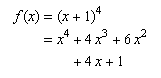
Note that because indentalignlast defaults to indentalign,
in the above example indentalign could have been used in place of
indentalignlast. Also, the specifying linebreakstyle='before'
is not needed because that is the default value.
mi |
identifier |
mn |
number |
mo |
operator, fence, or separator |
mtext |
text |
mspace |
space |
ms |
string literal |
Additionally, the mglyph element
may be used within Token elements to represent non-standard symbols as images.
mrow
and
a |
group any number of sub-expressions horizontally |
mfrac |
form a fraction from two sub-expressions |
msqrt |
form a square root (radical without an index) |
mroot |
form a radical with specified index |
mstyle |
style change |
merror |
enclose a syntax error message from a preprocessor |
mpadded |
adjust space around content |
mphantom |
make content invisible but preserve its size |
mfenced |
surround content with a pair of fences |
menclose |
enclose content with a stretching symbol such as a long division sign |
msub |
attach a subscript to a base |
msup |
attach a superscript to a base |
msubsup |
attach a subscript-superscript pair to a base |
munder |
attach an underscript to a base |
mover |
attach an overscript to a base |
munderover |
attach an underscript-overscript pair to a base |
mmultiscripts |
attach prescripts and tensor indices to a base |
mtable |
table or matrix |
mtr |
row in a table or matrix |
mtd |
one entry in a table or matrix |
maligngroup and
malignmark |
alignment markers |
mstack |
columns of aligned characters |
mlongdiv |
similar to msgroup, with the addition of a divisor and result |
msgroup |
a group of rows in an mstack that are shifted by similar amounts |
msrow |
a row in an mstack |
mscarries |
row in an mstack whose contents represent carries or borrows |
mscarry |
one entry in an mscarries |
msline |
horizontal line inside of mstack |
maction |
bind actions to a sub-expression |
In addition to the attributes listed in 2.1.6 Attributes Shared by all MathML Elements,
all MathML presentation elements accept the following classes of attribute.
In MathML 3, these were restricted to be set only on mstyle elements,
but to better align with [MathML-Core] which removes special treatment of mstyle,
they are now allowed on any presentation element.
Presentation elements also accept all the Global Attributes specified by [MathML-Core].
These attributes include the following attributes that are primarily intended for visual media.
They are not expected to affect the intended semantics of displayed
expressions. The first two are for use in highlighting or drawing attention
to the affected subexpressions. For example, a red "x" is not assumed
to be semantically different than a black "x", in contrast to
variables with different mathvariant values (see 3.2.2 Mathematics style attributes common to token elements).
The remaining two override some default rules for layout of expressions.
See 3.1.6 Displaystyle and Scriptlevel for more information
| Name | values | default |
| mathcolor | color | inherited |
Specifies the foreground color to use when drawing the components of this element,
such as the content for token elements or any lines, surds, or other decorations.
It also establishes the default mathcolor used for child elements
when used on a layout element.
|
||
| mathbackground | color | "transparent" | transparent |
| Specifies the background color to be used to fill in the bounding box of the element and its children. The default, "transparent", lets the background color, if any, used in the current rendering context to show through. | ||
| scriptlevel | ( "+" | "-" )? unsigned-integer | inherited |
Changes the displaystyle in effect for the children.
See 3.1.6 Displaystyle and Scriptlevel.
|
||
| displaystyle | "true" | "false" | inherited |
Changes the displaystyle in effect for the children.
See 3.1.6 Displaystyle and Scriptlevel.
Comparisons are ASCII case-insensitive, where all matching strings are allowed as values. |
||
These attributes can also be set on any MathML Presentation element.
| Name | values | default |
| scriptsizemultiplier | number | 0.71 |
Specifies the multiplier to be used to adjust font size due
to changes in scriptlevel.
See 3.1.6 Displaystyle and Scriptlevel.
|
||
| scriptminsize | length | 8pt |
Specifies the minimum font size allowed due to changes in scriptlevel.
Note that this does not limit the font size due to changes to mathsize.
See 3.1.6 Displaystyle and Scriptlevel.
|
||
| infixlinebreakstyle | "before" | "after" | "duplicate" | before |
|
Specifies the default linebreakstyle to use for infix operators;
see 3.2.6.2.2 Linebreaking attributes.
Comparisons are ASCII case-insensitive, where all matching strings are allowed as values. |
||
| decimalcharacter | character | . |
Specifies the character used to determine the alignment point within
mstack
when the "decimalpoint" value is used to specify the alignment.
The default, ".", is the decimal separator used to separate the integral
and decimal fractional parts of floating point numbers in many countries.
(See 3.6 Elementary Math and 3.5.4 Alignment Markers
<maligngroup/>, <malignmark/>).
|
||
If scriptlevel is changed incrementally by an
element that also sets certain other
attributes, the overall effect of the changes may depend on the order
in which they are processed. In such cases, the attributes in the
following list should be processed in the following order, regardless
of the order in which they occur in the XML-format attribute list of
the start tag:
scriptsizemultiplier, scriptminsize,
scriptlevel, mathsize.
Since MathML expressions are often embedded in a textual data format such as HTML, the MathML renderer should inherit the foreground color used in the context in which the MathML appears. Note, however, that MathML (in contrast to [MathML-Core]) doesn't specify the mechanism by which style information is inherited from the rendering environment. See 3.2.2 Mathematics style attributes common to token elements for more details.
Note that the suggested MathML visual rendering rules do not define the
precise extent of the region whose background is affected by the
mathbackground attribute,
except that, when the content does not have
negative dimensions and its drawing region should not overlap with other
drawing due to surrounding negative spacing, should lie
behind all the drawing done to render the content, and should not lie behind any of
the drawing done to render surrounding expressions. The effect of overlap
of drawing regions caused by negative spacing on the extent of the
region affected by the mathbackground attribute is not
defined by these rules.
Token elements in presentation markup are broadly intended to represent the smallest units of mathematical notation which carry meaning. Tokens are roughly analogous to words in text. However, because of the precise, symbolic nature of mathematical notation, the various categories and properties of token elements figure prominently in MathML markup. By contrast, in textual data, individual words rarely need to be marked up or styled specially.
Token elements represent
identifiers (mi),
numbers (mn),
operators (mo),
text (mtext),
strings (ms)
and spacing (mspace).
The mglyph element
may be used within token elements
to represent non-standard symbols by images.
Preceding detailed discussion of the individual elements,
the next two subsections discuss the allowable content of
token elements and the attributes common to them.
Character data in MathML markup is only allowed to occur as part of
the content of token elements. Whitespace between elements is ignored.
With the exception of the empty mspace element,
token elements can contain any sequence of zero or more Unicode characters,
or mglyph elements.
The mglyph element is used
to represent non-standard characters or symbols by images.
Characters can be either represented directly as Unicode character data, or indirectly via numeric or character entity references. Unicode contains a number of look-alike characters. See [MathML-Notes] for a discussion of which characters are appropriate to use in which circumstance.
Token elements (other than mspace) should
be rendered as their content, if any (i.e. in the visual case, as a
closely-spaced horizontal row of standard glyphs for the characters
or images for the mglyphs in their content).
An mspace element is rendered as a blank space of a width determined by its attributes.
Rendering algorithms should also take into account the
mathematics style attributes as described below, and modify surrounding
spacing by rules or attributes specific to each type of token
element. The directional characteristics of the content must
also be respected (see 3.1.5.2 Bidirectional Layout in Token Elements).
Note: mglyph is not in MathML-Core
mglyph is not supported in [MathML-Core].
In a Web Platform Context it is recommended that the HTML img
element is used. This is allowed in token elements when MathML is embedded in (X)HTML.
For existing MathML using mglyph a JavaScript polyfill
is provided for Web documents that implements mglyph using img.
The mglyph element provides a mechanism
for displaying images to represent non-standard symbols.
It may be used within the content of the token elements
mi, mn, mo, mtext or ms
where existing Unicode characters are not adequate.
Unicode defines a large number of characters used in mathematics and, in most cases, glyphs representing these characters are widely available in a variety of fonts. Although these characters should meet almost all users needs, MathML recognizes that mathematics is not static and that new characters and symbols are added when convenient. Characters that become well accepted will likely be eventually incorporated by the Unicode Consortium or other standards bodies, but that is often a lengthy process.
Note that the glyph's src attribute uniquely identifies the mglyph;
two mglyphs with the same values for src should
be considered identical by applications that must determine whether
two characters/glyphs are identical.
The mglyph element accepts the attributes listed in
3.1.9 Attributes common to presentation elements, but note that mathcolor has no effect.
The background color, mathbackground, should show through
if the specified image has transparency.
mglyph also accepts the additional attributes listed here.
| Name | values | default |
| src | URI | required |
| Specifies the location of the image resource; it may be a URI relative to the base-URI of the source of the MathML, if any. | ||
| width | length | from image |
Specifies the desired width of the glyph; see height.
|
||
| height | length | from image |
Specifies the desired height of the glyph.
If only one of width and height is given,
the image should be scaled to preserve the aspect ratio;
if neither are given, the image should be displayed at its natural size.
|
||
| valign | length | 0ex |
| Specifies the baseline alignment point of the image with respect to the current baseline. A positive value shifts the bottom of the image above the current baseline while a negative value lowers it. A value of 0 (the default) means that the baseline of the image is at the bottom of the image. | ||
| alt | string | required |
| Provides an alternate name for the glyph. If the specified image can't be found or displayed, the renderer may use this name in a warning message or some unknown glyph notation. The name might also be used by an audio renderer or symbol processing system and should be chosen to be descriptive. | ||
The following example illustrates how a researcher might use
the mglyph construct with a set of images to work
with braid group notation.
<mrow>
  <mi><mglyph src="my-braid-23" alt="2 3 braid"/></mi>
  <mo>+</mo>
  <mi><mglyph src="my-braid-132" alt="1 3 2 braid"/></mi>
  <mo>=</mo>
  <mi><mglyph src="my-braid-13" alt="1 3 braid"/></mi>
</mrow>
This might render as:
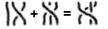
In addition to the attributes defined for all presentation elements
( 3.1.9 Attributes common to presentation elements), MathML includes two mathematics style attributes
as well as a directionality attribute
valid on all presentation token elements,
as well as the math and mstyle elements;
dir is also valid on mrow elements.
The attributes are:
| Name | values | default |
| mathvariant | "normal" | "bold" | "italic" | "bold-italic" | "double-struck" | "bold-fraktur" | "script" | "bold-script" | "fraktur" | "sans-serif" | "bold-sans-serif" | "sans-serif-italic" | "sans-serif-bold-italic" | "monospace" | "initial" | "tailed" | "looped" | "stretched" | normal (except on <mi>) |
|
Specifies the logical class of the token. Note that this class
is more than styling, it typically conveys semantic intent; see the discussion below.
Comparisons are ASCII case-insensitive, where all matching strings are allowed as values. |
||
| mathsize | "small" | "normal" | "big" | length | inherited |
Specifies the size to display the token content.
The values small and big choose a size
smaller or larger than the current font size, but leave the exact proportions
unspecified; normal is allowed for completeness, but since
it is equivalent to 100% or 1em, it has no effect.
Comparisons are ASCII case-insensitive, where all matching strings are allowed as values. |
||
| dir | "ltr" | "rtl" | inherited |
specifies the initial directionality for text within the token:
ltr (Left To Right) or rtl (Right To Left).
This attribute should only be needed in rare cases involving weak or neutral characters;
see 3.1.5.1 Overall Directionality of Mathematics Formulas for further discussion.
It has no effect on mspace.
Comparisons are ASCII case-insensitive, where all matching strings are allowed as values. |
||
The mathvariant attribute defines logical classes of token
elements. Each class provides a collection of typographically-related
symbolic tokens. Each token has a specific meaning within a given
mathematical expression and, therefore, needs to be visually
distinguished and protected from inadvertent document-wide style
changes which might change its meaning. Each token is identified
by the combination of the mathvariant attribute value
and the character data in the token element.
When MathML rendering takes place in an environment where CSS is
available, the mathematics style attributes can be viewed as
predefined selectors for CSS style rules.
See 7.5 Using CSS with MathML for discussion of the
interaction of MathML and CSS.
Also, see [MathMLforCSS] for discussion of rendering MathML by CSS
and a sample CSS style sheet.
When CSS is not available, it is up to the internal style mechanism of the rendering
application
to visually distinguish the different logical classes.
Most MathML renderers will probably want to rely on some degree on additional,
internal style processing algorithms.
In particular, the mathvariant attribute does not follow the CSS inheritance model;
the default value is normal (non-slanted)
for all tokens except for mi with single-character content.
See 3.2.4 Identifier <mi> for details.
Renderers have complete freedom in
mapping mathematics style attributes to specific rendering properties.
However, in practice, the mathematics style attribute names and values
suggest obvious typographical properties, and renderers should attempt
to respect these natural interpretations as far as possible. For
example, it is reasonable to render a token with the
mathvariant attribute set to sans-serif in
Helvetica or Arial. However, rendering the token in a Times Roman
font could be seriously misleading and should be avoided.
In principle, any mathvariant value may be used with any
character data to define a specific symbolic token. In practice,
only certain combinations of character data and mathvariant
values will be visually distinguished by a given renderer. For example,
there is no clear-cut rendering for a "fraktur alpha" or a "bold italic
Kanji" character, and the mathvariant values "initial",
"tailed", "looped", and "stretched" are intended for Arabic
characters.
Certain combinations of character data and mathvariant
values are equivalent to assigned Unicode code points that encode
mathematical alphanumeric symbols. These Unicode code points are
the ones in the
Arabic Mathematical Alphabetic Symbols block U+1EE00 to U+1EEFF,
Mathematical Alphanumeric Symbols block U+1D400 to U+1D7FF,
listed in the Unicode standard, and the ones in the
Letterlike
Symbols range U+2100 to U+214F that represent "holes" in the
alphabets in the SMP, listed in 8.2 Mathematical Alphanumeric Symbols.
These characters are described in detail in section 2.2 of
UTR #25.
The description of each such character in the Unicode standard
provides an unstyled character to which it would be equivalent
except for a font change that corresponds to a mathvariant
value.
A token element that uses the unstyled character in combination
with the corresponding mathvariant value is equivalent to a
token element that uses the mathematical alphanumeric symbol character
without the mathvariant attribute.
Note that mathvariant value of
script may correspond to either Roundhand
or
Chancery
styles, depending on the font in use. See [Entities]
Table of Script Characters. The specific style may be forced by using the mathematical alphanumeric character followed by a variation selector character.
Variation selector U+FE00 may be used to force Chancery/Calligraphic style and variation selector U+FE01 may be used to force Roundhand/Script style.
The appearance
of a mathematical alphanumeric symbol character should not be altered
by surrounding mathvariant or other style declarations.
Renderers should support those combinations of character data and
mathvariant values that correspond to Unicode characters,
and that they can visually distinguish using available font characters.
Renderers may ignore or support those combinations of character data
and mathvariant values that do not correspond to an assigned
Unicode code point, and authors should recognize that support for
mathematical symbols that do not correspond to assigned Unicode code
points may vary widely from one renderer to another.
Since MathML expressions are often embedded in a textual data
format such as HTML, the surrounding text and the MathML must share
rendering attributes such as font size, so that the renderings will be
compatible in style. For this reason, most attribute values affecting
text rendering are inherited from the rendering environment, as shown
in the default
column in the table above. (In
cases where the surrounding text and the MathML are being rendered by
separate software, e.g. a browser and a plug-in, it is also important
for the rendering environment to provide the MathML renderer with
additional information, such as the baseline position of surrounding
text, which is not specified by any MathML attributes.)
Note, however, that MathML doesn't specify the mechanism by which
style information is inherited from the rendering environment.
If the requested mathsize of the current font is not available, the
renderer should approximate it in the manner likely to lead to the
most intelligible, highest quality rendering.
Note that many MathML elements automatically change the font size
in some of their children; see the discussion in 3.1.6 Displaystyle and Scriptlevel.
MathML can be combined with other formats as described in
7.4 Combining MathML and Other Formats.
The recommendation is to embed other formats in MathML by extending the MathML
schema to allow additional elements to be children of the mtext element or
other leaf elements as appropriate to the role they serve in the expression
(see 3.2.4 Identifier <mi>, 3.2.5 Number <mn>, and 3.2.6 Operator, Fence, Separator or Accent
<mo>).
The directionality, font size, and other font attributes should inherit from
those that would be used for characters of the containing leaf element
(see 3.2.2 Mathematics style attributes common to token elements).
Here is an example of embedding SVG inside of mtext in an HTML context:
<mtable>
 <mtr>
  <mtd>
   <mtext><input type="text" placeholder="what shape is this?"/></mtext>
  </mtd>
 </mtr>
 <mtr>
  <mtd>
   <mtext>
    <svg xmlns="http://www.w3.org/2000/svg" width="4cm" height="4cm" viewBox="0 0 400 400">
     <rect x="1" y="1" width="398" height="398" style="fill:none; stroke:blue"/>
     <path d="M 100 100 L 300 100 L 200 300 z" style="fill:red; stroke:blue; stroke-width:3"/>
    </svg>
   </mtext>
  </mtd>
 </mtr>
</mtable>
Another important example that is already allowed in the MathML-Core
schema, as it does not involve any elements outside the MathML namespace,
is to embed the math element.
 <mrow>
   <mo>{</mo>
   <mtable>
     <mtr>
<mtd><mn>1</mn></mtd>
<mtd><mtext>if <math><mi>n</mi></math> is prime</mtext></mtd>
     </mtr>
     <mtr>
<mtd><mn>0</mn></mtd>
<mtd><mtext>otherwise</mtext></mtd>
     </mtr>
   </mtable>
</mrow>Like svg, math is a phrasing element in HTML and allowed in token elements when embedded in HTML and other embeddings
based on MathML-Core.
An mi element represents a symbolic name or
arbitrary text that should be rendered as an identifier. Identifiers
can include variables, function names, and symbolic constants.
A typical graphical renderer would render an mi element
as its content (see 3.2.1
Token Element Content Characters, <mglyph/>),
with no extra spacing around it (except spacing associated with
neighboring elements).
Not all mathematical identifiers
are represented by
mi elements — for example, subscripted or primed
variables should be represented using msub or
msup respectively. Conversely, arbitrary text
playing the role of a term
(such as an ellipsis in a summed series)
should be represented using an mi element.
It should be stressed that mi is a
presentation element, and as such, it only indicates that its content
should be rendered as an identifier. In the majority of cases, the
contents of an mi will actually represent a
mathematical identifier such as a variable or function name. However,
as the preceding paragraph indicates, the correspondence between
notations that should render as identifiers and notations that are
actually intended to represent mathematical identifiers is not
perfect. For an element whose semantics is guaranteed to be that of an
identifier, see the description of ci in
4. Content Markup.
mi elements accept the attributes listed in
3.2.2 Mathematics style attributes common to token elements, but in one case with a different default value:
| Name | values | default |
| mathvariant | "normal" | "bold" | "italic" | "bold-italic" | "double-struck" | "bold-fraktur" | "script" | "bold-script" | "fraktur" | "sans-serif" | "bold-sans-serif" | "sans-serif-italic" | "sans-serif-bold-italic" | "monospace" | "initial" | "tailed" | "looped" | "stretched" | (depends on content; described below) |
Specifies the logical class of the token.
The default is normal (non-slanted) unless the content
is a single character, in which case it would be italic.
Comparisons are ASCII case-insensitive, where all matching strings are allowed as values. |
||
Note that for purposes of determining equivalences of Math
Alphanumeric Symbol
characters (see 8.2 Mathematical Alphanumeric Symbols)
the value of the mathvariant attribute should be resolved first,
including the special defaulting behavior described above.
<mi>x</mi><mi>D</mi><mi>sin</mi><mi mathvariant='script'>L</mi><mi></mi>An mi element with no content is allowed;
<mi></mi> might, for example, be used by an
expression editor
to represent a location in a MathML expression
which requires a term
(according to conventional syntax for
mathematics) but does not yet contain one.
Identifiers include function names such as
sin
. Expressions such as sin x
should be written using the character U+2061
(entity af or ApplyFunction) as shown below;
see also the discussion of invisible operators in 3.2.6 Operator, Fence, Separator or Accent
<mo>.
<mrow>
<mi> sin </mi>
<mo> ⁡<!--ApplyFunction--> </mo>
<mi> x </mi>
</mrow>Miscellaneous text that should be treated as a term
can also be
represented by an mi element, as in:
<mrow>
  <mn> 1 </mn>
  <mo> + </mo>
  <mi> … </mi>
  <mo> + </mo>
  <mi> n </mi>
</mrow>
When an mi is used in such exceptional
situations, explicitly setting the mathvariant attribute
may give better results than the default behavior of some
renderers.
The names of symbolic constants should be represented as
mi elements:
<mi> π </mi>
<mi> ⅈ </mi>
<mi> ⅇ </mi>
An mn element represents a numeric
literal
or other data that should be rendered as a numeric
literal. Generally speaking, a numeric literal is a sequence of digits,
perhaps including a decimal point, representing an unsigned integer or real
number.
A typical graphical renderer would render an mn element as
its content (see 3.2.1
Token Element Content Characters, <mglyph/>), with no extra spacing around them
(except spacing from neighboring elements such as mo).
mn elements are typically rendered in an unslanted font.
The mathematical concept of a number
can be quite
subtle and involved, depending on the context. As a consequence, not all
mathematical numbers should be represented using mn; examples of mathematical numbers that should be
represented differently are shown below, and include
complex numbers, ratios of numbers shown as fractions, and names of numeric
constants.
Conversely, since mn is a presentation
element, there are a few situations where it may be desirable to include
arbitrary text in the content of an mn that
should merely render as a numeric literal, even though that content
may not be unambiguously interpretable as a number according to any
particular standard encoding of numbers as character sequences. As a
general rule, however, the mn element should be
reserved for situations where its content is actually intended to
represent a numeric quantity in some fashion. For an element whose
semantics are guaranteed to be that of a particular kind of
mathematical number, see the description of cn in
4. Content Markup.
mn elements accept the attributes listed in 3.2.2 Mathematics style attributes common to token elements.
<mn> 2 </mn><mn> 0.123 </mn><mn> 1,000,000 </mn><mn> 2.1e10 </mn><mn> 0xFFEF </mn><mn> MCMLXIX </mn><mn> twenty-one </mn>Many mathematical numbers should be represented using presentation
elements other than mn alone; this includes
complex numbers, negative numbers, ratios of numbers shown as fractions, and
names of numeric constants.
<mrow>
<mn> 2 </mn>
<mo> + </mo>
<mrow>
<mn> 3 </mn>
<mo> ⁢<!--InvisibleTimes--> </mo>
<mi> ⅈ </mi>
</mrow>
</mrow><mfrac> <mn> 1 </mn> <mn> 2 </mn> </mfrac><mrow><mo>-</mo><mn>2</mn></mrow><mi> π </mi><mi> ⅇ </mi>An mo element represents an operator or
anything that should be rendered as an operator. In general, the
notational conventions for mathematical operators are quite
complicated, and therefore MathML provides a relatively sophisticated
mechanism for specifying the rendering behavior of an
mo element. As a consequence, in MathML the list
of things that should render as an operator
includes a number of
notations that are not mathematical operators in the ordinary
sense. Besides ordinary operators with infix, prefix, or postfix
forms, these include fence characters such as braces, parentheses, and
absolute value
bars; separators
such as comma and semicolon; and
mathematical accents such as a bar or tilde over a symbol.
We will use the term "operator" in this chapter to refer to operators in this broad
sense.
Typical graphical renderers show all mo
elements as the content (see 3.2.1
Token Element Content Characters, <mglyph/>),
with additional spacing around the element determined by its attributes and
further described below.
Renderers without access to complete fonts for the MathML character
set may choose to render an mo element as
not precisely the characters in its content in some cases. For example,
<mo> ≤ </mo> might be rendered as
<= to a terminal. However, as a general rule,
renderers should attempt to render the content of an
mo element as literally as possible.
That is,
<mo> ≤ </mo> and
<mo> <= </mo> should render differently.
The first one should render as a single character
representing a less-than-or-equal-to sign, and the second one as the
two-character sequence <=.
A key feature of the mo element is that its
default attribute values are set on a case-by-case basis from an
operator dictionary
as explained below. In particular, default
value for stretch, symmetric and
accent can usually be found in the operator dictionary
and therefore need not be specified on each mo
element.
Note that some mathematical operators are represented not by mo elements alone, but by mo
elements embellished
with (for example) surrounding
superscripts; this is further described below. Conversely, as presentation
elements, mo elements can contain arbitrary text,
even when that text has no standard interpretation as an operator; for an
example, see the discussion Mixing text and mathematics
in
3.2.7 Text <mtext>. See also 4. Content Markup for
definitions of MathML content elements that are guaranteed to have the
semantics of specific mathematical operators.
Note also that linebreaking, as discussed in
3.1.7 Linebreaking of Expressions, usually takes place at operators
(either before or after, depending on local conventions).
Thus, mo accepts attributes to encode the desirability
of breaking at a particular operator, as well as attributes
describing the treatment of the operator and indentation in case
a linebreak is made at that operator.
mo elements accept
the attributes listed in 3.2.2 Mathematics style attributes common to token elements
and the additional attributes listed here.
Since the display of operators is so critical in mathematics,
the mo element accepts a large number of attributes;
these are described in the next three subsections.
Most attributes get their default values from an enclosing
mstyle element, math element,
from the containing document,
or from
3.2.6.6.1 The operator dictionary.
When a value that is listed as inherited
is not explicitly given on an
mo, mstyle element, math element, or found in the operator
dictionary for a given mo element, the default value shown in
parentheses is used.
| Name | values | default |
| form | "prefix" | "infix" | "postfix" | set by position of operator in an mrow |
Specifies the role of the operator in the enclosing expression.
This role and the operator content affect the lookup of the operator in the operator
dictionary
which affects the spacing and other default properties;
see 3.2.6.6.2 Default value of the form attribute.
Comparisons are ASCII case-insensitive, where all matching strings are allowed as values. |
||
| lspace | length | set by dictionary (thickmathspace) |
| Specifies the leading space appearing before the operator; see 3.2.6.6.4 Spacing around an operator. (Note that before is on the right in a RTL context; see 3.1.5 Directionality.) | ||
| rspace | length | set by dictionary (thickmathspace) |
| Specifies the trailing space appearing after the operator; see 3.2.6.6.4 Spacing around an operator. (Note that after is on the left in a RTL context; see 3.1.5 Directionality.) | ||
| stretchy | boolean | set by dictionary (false) |
| Specifies whether the operator should stretch to the size of adjacent material; see 3.2.6.7 Stretching of operators, fences and accents. | ||
| symmetric | boolean | set by dictionary (false) |
| Specifies whether the operator should be kept symmetric around the math axis when stretchy. Note this property only applies to vertically stretched symbols. See 3.2.6.7 Stretching of operators, fences and accents. | ||
| maxsize | length | set by dictionary (unbounded) |
| Specifies the maximum size of the operator when stretchy; see 3.2.6.7 Stretching of operators, fences and accents. If not given, the maximum size is unbounded. Unitless or percentage values indicate a multiple of the reference size, being the size of the unstretched glyph. MathML 4 deprecates "infinity" as possible value as it is the same as not providing a value. | ||
| minsize | length | set by dictionary (100%) |
| Specifies the minimum size of the operator when stretchy; see 3.2.6.7 Stretching of operators, fences and accents. Unitless or percentage values indicate a multiple of the reference size, being the size of the unstretched glyph. | ||
| largeop | boolean | set by dictionary (false) |
Specifies whether the operator is considered a ‘large’ operator,
that is, whether it should be drawn larger than normal when
displaystyle=true
(similar to using TeX's \displaystyle).
Examples of large operators include U+222B and U+220F
(entities int and prod).
See 3.1.6 Displaystyle and Scriptlevel for more discussion.
|
||
| movablelimits | boolean | set by dictionary (false) |
Specifies whether under- and overscripts attached to
this operator ‘move’ to the more compact sub- and superscript positions
when displaystyle is false.
Examples of operators that typically have movablelimits=true
are U+2211 and U+220F
(entitites sum, prod),
as well as lim.
See 3.1.6 Displaystyle and Scriptlevel for more discussion.
|
||
| accent | boolean | set by dictionary (false) |
Specifies whether this operator should be treated as an accent (diacritical mark)
when used as an underscript or overscript;
see munder,
mover
and munderover.
Note: for compatibility with MathML Core, use accent=true on
the enclosing mover and munderover in place of this attribute.
|
||
The following attributes affect when a linebreak does or does not occur, and the appearance of the linebreak when it does occur.
| Name | values | default |
| linebreak | "auto" | "newline" | "nobreak" | "goodbreak" | "badbreak" | auto |
Specifies the desirability of a linebreak occurring at this operator:
the default auto indicates the renderer should use its default
linebreaking algorithm to determine whether to break;
newline is used to force a linebreak;
for automatic linebreaking, nobreak forbids a break;
goodbreak suggests a good position;
badbreak suggests a poor position.
Comparisons are ASCII case-insensitive, where all matching strings are allowed as values. |
||
| lineleading | length | inherited (100%) |
| Specifies the amount of vertical space to use after a linebreak. For tall lines, it is often clearer to use more leading at linebreaks. Rendering agents are free to choose an appropriate default. | ||
| linebreakstyle | "before" | "after" | "duplicate" | "infixlinebreakstyle" | set by dictionary (before) |
Specifies whether a linebreak occurs ‘before’ or ‘after’ the operator
when a linebreak occurs on this operator; or whether the operator is duplicated.
before causes the operator to appear at the beginning of the new line
(but possibly indented);
after causes it to appear at the end of the line before the break.
duplicate places the operator at both positions.
infixlinebreakstyle uses the value that has been specified for
infix operators; this value (one of before,
after or duplicate) can be specified by
the application or bound by mstyle
(before corresponds to the most common style of linebreaking).
Comparisons are ASCII case-insensitive, where all matching strings are allowed as values. |
||
| linebreakmultchar | string | inherited (⁢) |
Specifies the character used to make an ⁢ operator visible at a linebreak.
For example, linebreakmultchar="·" would make the
multiplication visible as a center dot.
|
||
linebreak values on adjacent mo and mspace elements do
not interact; linebreak=nobreak on an mo does
not, in itself, inhibit a break on a preceding or following (possibly nested)
mo or mspace element and does not interact with the linebreakstyle
attribute value of the preceding or following mo element.
It does prevent breaks from occurring on either side of the mo element in all other situations.
The following attributes affect indentation of the lines making up a formula.
Primarily these attributes control the positioning of new lines following a linebreak,
whether automatic or manual. However, indentalignfirst and indentshiftfirst
also control the positioning of a single line formula without any linebreaks.
When these attributes appear on mo or mspace they apply if a linebreak occurs
at that element.
When they appear on mstyle or math elements, they determine
defaults for the style to be used for any linebreaks occurring within.
Note that except for cases where heavily marked-up manual linebreaking is desired,
many of these attributes are most useful when bound on an
mstyle or math element.
Note that since the rendering context, such as the available width and current font, is not always available to the author of the MathML, a renderer may ignore the values of these attributes if they result in a line in which the remaining width is too small to usefully display the expression or if they result in a line in which the remaining width exceeds the available linewrapping width.
| Name | values | default |
| indentalign | "left" | "center" | "right" | "auto" | "id" | inherited (auto) |
Specifies the positioning of lines when linebreaking takes place within an mrow;
see below for discussion of the attribute values.
Comparisons are ASCII case-insensitive, where all matching strings are allowed as values. |
||
| indentshift | length | inherited (0) |
Specifies an additional indentation offset relative to the position determined
by indentalign.
When the value is a percentage value,
the value is relative to the
horizontal space that a MathML renderer has available, this is the current target
width as used for
linebreaking as specified in 3.1.7 Linebreaking of Expressions.
Note: numbers without units were allowed in MathML 3 and treated similarly to percentage values,
but unitless numbers are deprecated in MathML 4.
|
||
| indenttarget | idref | inherited (none) |
Specifies the id of another element
whose horizontal position determines the position of indented lines
when indentalign=id.
Note that the identified element may be outside of the current
math element, allowing for inter-expression alignment,
or may be within invisible content such as mphantom;
it must appear before being referenced, however.
This may lead to an id being unavailable to a given renderer
or in a position that does not allow for alignment.
In such cases, the indentalign should revert to auto.
|
||
| indentalignfirst | "left" | "center" | "right" | "auto" | "id" | "indentalign" | inherited (indentalign) |
Specifies the indentation style to use for the first line of a formula;
the value indentalign (the default) means
to indent the same way as used for the general line.
Comparisons are ASCII case-insensitive, where all matching strings are allowed as values. |
||
| indentshiftfirst | length | "indentshift" | inherited (indentshift) |
Specifies the offset to use for the first line of a formula;
the value indentshift (the default) means
to use the same offset as used for the general line. It is ASCII case-insensitive.
Percentage values and numbers without unit are interpreted as described for indentshift.
|
||
| indentalignlast | "left" | "center" | "right" | "auto" | "id" | "indentalign" | inherited (indentalign) |
Specifies the indentation style to use for the last line when a linebreak
occurs within a given mrow;
the value indentalign (the default) means
to indent the same way as used for the general line.
When there are exactly two lines, the value of this attribute should
be used for the second line in preference to indentalign.
Comparisons are ASCII case-insensitive, where all matching strings are allowed as values. |
||
| indentshiftlast | length | "indentshift" | inherited (indentshift) |
Specifies the offset to use for the last line when a linebreak
occurs within a given mrow;
the value indentshift (the default) means
to indent the same way as used for the general line. It is ASCII case-insensitive.
When there are exactly two lines, the value of this attribute should
be used for the second line in preference to indentshift.
Percentage values and numbers without unit are interpreted as described for indentshift.
|
||
The legal values of indentalign are:
| Value | Meaning |
| left | Align the left side of the next line to the left side of the line wrapping width |
| center | Align the center of the next line to the center of the line wrapping width |
| right | Align the right side of the next line to the right side of the line wrapping width |
| auto | (default) indent using the renderer's default indenting style; this may be a fixed amount or one that varies with the depth of the element in the mrow nesting or some other similar method. |
| id | Align the left side of the next line to the left side of the element
referenced by the idref
(given by indenttarget);
if no such element exists, use auto as the indentalign value |
<mo>+</mo><mo><</mo><mo>≤</mo><mo><=</mo><mo>++</mo><mo>∑</mo><mo>.NOT.</mo><mo>and</mo><mo>⁢<!--InvisibleTimes--></mo>Note that the mo elements in these examples
don't need explicit stretchy or symmetric attributes,
since these can be found using the
operator dictionary as described below. Some of these examples could also
be encoded using the mfenced element described in
3.3.8 Expression Inside Pair of Fences
<mfenced>.
(a+b)
<mrow>
  <mo> ( </mo>
  <mrow>
    <mi> a </mi>
    <mo> + </mo>
    <mi> b </mi>
  </mrow>
  <mo> ) </mo>
</mrow>
[0,1)
<mrow>
  <mo> [ </mo>
  <mrow>
    <mn> 0 </mn>
    <mo> , </mo>
    <mn> 1 </mn>
  </mrow>
  <mo> ) </mo>
</mrow>f(x,y)
<mrow>
<mi> f </mi>
<mo> ⁡<!--ApplyFunction--> </mo>
<mrow>
<mo> ( </mo>
<mrow>
<mi> x </mi>
<mo> , </mo>
<mi> y </mi>
</mrow>
<mo> ) </mo>
</mrow>
</mrow>Certain operators that are invisible
in traditional
mathematical notation should be represented using specific characters (or entity
references) within mo elements, rather than simply
by nothing. The characters used for these invisible
operators
are:
| Character | Entity name | Short name |
| U+2061 | ApplyFunction |
af |
| U+2062 | InvisibleTimes |
it |
| U+2063 | InvisibleComma |
ic |
| U+2064 |
The MathML representations of the examples in the above table are:
<mrow>
<mi> f </mi>
<mo> ⁡<!--ApplyFunction--> </mo>
<mrow>
<mo> ( </mo>
<mi> x </mi>
<mo> ) </mo>
</mrow>
</mrow><mrow>
<mi> sin </mi>
<mo> ⁡<!--ApplyFunction--> </mo>
<mi> x </mi>
</mrow><mrow>
<mi> x </mi>
<mo> ⁢<!--InvisibleTimes--> </mo>
<mi> y </mi>
</mrow><msub>
<mi> m </mi>
<mrow>
<mn> 1 </mn>
<mo> ⁣<!--InvisibleComma--> </mo>
<mn> 2 </mn>
</mrow>
</msub><mrow>
<mn> 2 </mn>
<mo> ⁤ </mo>
<mfrac>
<mn> 3 </mn>
<mn> 4 </mn>
</mfrac>
</mrow>Typical visual rendering behaviors for mo
elements are more complex than for the other MathML token elements, so
the rules for rendering them are described in this separate
subsection.
Note that, like all rendering rules in MathML, these rules are suggestions rather than requirements. The description below is given to make the intended effect of the various rendering attributes as clear as possible. Detailed layout rules for browser implementations for operators are given in MathML Core.
Many mathematical symbols, such as an integral sign, a plus sign,
or a parenthesis, have a well-established, predictable, traditional
notational usage. Typically, this usage amounts to certain default
attribute values for mo elements with specific
contents and a specific form attribute. Since these
defaults vary from symbol to symbol, MathML anticipates that renderers
will have an operator dictionary
of default attributes for
mo elements (see B. Operator Dictionary) indexed by each
mo element's content and form
attribute. If an mo element is not listed in the
dictionary, the default values shown in parentheses in the table of
attributes for mo should be used, since these
values are typically acceptable for a generic operator.
Some operators are overloaded
, in the sense that they can occur
in more than one form (prefix, infix, or postfix), with possibly
different rendering properties for each form. For example, +
can be
either a prefix or an infix operator. Typically, a visual renderer
would add space around both sides of an infix operator, while only in
front of a prefix operator. The form attribute allows
specification of which form to use, in case more than one form is
possible according to the operator dictionary and the default value
described below is not suitable.
The form attribute does not usually have to be
specified explicitly, since there are effective heuristic rules for
inferring the value of the form attribute from the
context. If it is not specified, and there is more than one possible
form in the dictionary for an mo element with
given content, the renderer should choose which form to use as follows
(but see the exception for embellished operators, described later):
-
If the operator is the first argument in an
mrowwith more than one argument (ignoring all space-like arguments (see 3.2.8 Space<mspace/>) in the determination of both the length and the first argument), the prefix form is used; -
if it is the last argument in an
mrowwith more than one argument (ignoring all space-like arguments), the postfix form is used; -
if it is the only element in an implicit or explicit
mrowand if it is in a script position of one of the elements listed in 3.4 Script and Limit Schemata, the postfix form is used; -
in all other cases, including when the operator is not part of an
mrow, the infix form is used.
Note that the mrow discussed above may be inferred;
see 3.1.3.1 Inferred <mrow>s.
Opening fences should have form="prefix",
and closing fences should have form="postfix";
separators are usually infix
, but not always,
depending on their surroundings. As with ordinary operators,
these values do not usually need to be specified explicitly.
If the operator does not occur in the dictionary with the specified
form, the renderer should use one of the forms that is available
there, in the order of preference: infix, postfix, prefix; if no forms
are available for the given mo element content, the
renderer should use the defaults given in parentheses in the table of
attributes for mo.
There is one exception to the above rules for choosing an mo element's default form
attribute. An mo element that is
embellished
by one or more nested subscripts, superscripts,
surrounding text or whitespace, or style changes behaves differently. It is
the embellished operator as a whole (this is defined precisely, below)
whose position in an mrow is examined by the above
rules and whose surrounding spacing is affected by its form, not the mo element at its core; however, the attributes
influencing this surrounding spacing are taken from the mo element at the core (or from that element's
dictionary entry).
For example, the
in
should be considered an infix operator as a whole, due to its position
in the middle of an mrow, but its rendering
attributes should be taken from the mo element
representing the
,
or when those are not specified explicitly,
from the operator dictionary entry for <mo form="infix"> +
</mo>.
The precise definition of an embellished operator
is:
-
an
moelement; -
or one of the elements
msub,msup,msubsup,munder,mover,munderover,mmultiscripts,mfrac, orsemantics( 6.5 The<semantics>element), whose first argument exists and is an embellished operator; -
or one of the elements
mstyle,mphantom, ormpadded, such that anmrowcontaining the same arguments would be an embellished operator; -
or an
mactionelement whose selected sub-expression exists and is an embellished operator; -
or an
mrowwhose arguments consist (in any order) of one embellished operator and zero or more space-like elements.
Note that this definition permits nested embellishment only when there are no intervening enclosing elements not in the above list.
The above rules for choosing operator forms and defining
embellished operators are chosen so that in all ordinary cases it will
not be necessary for the author to specify a form
attribute.
The amount of horizontal space added around an operator (or embellished operator),
when it occurs in an mrow, can be directly
specified by the lspace and rspace
attributes. Note that lspace and rspace should
be interpreted as leading and trailing space, in the case of RTL direction.
By convention, operators that tend to bind tightly to their
arguments have smaller values for spacing than operators that tend to bind
less tightly. This convention should be followed in the operator dictionary
included with a MathML renderer.
Some renderers may choose to use no space around most operators appearing within subscripts or superscripts, as is done in TeX.
Non-graphical renderers should treat spacing attributes, and other rendering attributes described here, in analogous ways for their rendering medium. For example, more space might translate into a longer pause in an audio rendering.
Four attributes govern whether and how an operator (perhaps embellished)
stretches so that it matches the size of other elements: stretchy, symmetric, maxsize, and minsize. If an
operator has the attribute stretchy=true, then it (that is, each character in its content)
obeys the stretching rules listed below, given the constraints imposed by
the fonts and font rendering system. In practice, typical renderers will
only be able to stretch a small set of characters, and quite possibly will
only be able to generate a discrete set of character sizes.
There is no provision in MathML for specifying in which direction
(horizontal or vertical) to stretch a specific character or operator;
rather, when stretchy=true it
should be stretched in each direction for which stretching is possible
and reasonable for that character.
It is up to the renderer to know in which directions it is reasonable to
stretch a character, if it can stretch the character.
Most characters can be stretched in at most one direction
by typical renderers, but some renderers may be able to stretch certain
characters, such as diagonal arrows, in both directions independently.
The minsize and maxsize
attributes limit the amount of stretching (in either direction). These two
attributes are given as multipliers of the operator's normal size in the
direction or directions of stretching, or as absolute sizes using units.
For example, if a character has maxsize=300%, then it
can grow to be no more than three times its normal (unstretched) size.
The symmetric attribute governs whether the
height and
depth above and below the axis of the
character are forced to be equal
(by forcing both height and depth to become the maximum of the two).
An example of a situation where one might set
symmetric=false
arises with parentheses around a matrix not aligned on the axis, which
frequently occurs when multiplying non-square matrices. In this case, one
wants the parentheses to stretch to cover the matrix, whereas stretching
the parentheses symmetrically would cause them to protrude beyond one edge
of the matrix. The symmetric attribute only applies
to characters that stretch vertically (otherwise it is ignored).
If a stretchy mo element is embellished (as defined
earlier in this section), the mo element at its core is
stretched to a size based on the context of the embellished operator
as a whole, i.e. to the same size as if the embellishments were not
present. For example, the parentheses in the following example (which
would typically be set to be stretchy by the operator dictionary) will be
stretched to the same size as each other, and the same size they would
have if they were not underlined and overlined, and furthermore will
cover the same vertical interval:
<mrow>
<munder>
<mo> ( </mo>
<mo> _ </mo>
</munder>
<mfrac>
<mi> a </mi>
<mi> b </mi>
</mfrac>
<mover>
<mo> ) </mo>
<mo> ‾ </mo>
</mover>
</mrow>Note that this means that the stretching rules given below must
refer to the context of the embellished operator as a whole, not just
to the mo element itself.
This shows one way to set the maximum size of a parenthesis so that
it does not grow, even though its default value is
stretchy=true.
<mrow>
<mo maxsize="100%">(</mo>
<mfrac>
<msup><mi>a</mi><mn>2</mn></msup>
<msup><mi>b</mi><mn>2</mn></msup>
</mfrac>
<mo maxsize="100%">)</mo>
</mrow>The above should render as
 as opposed to the default rendering
 .
.
Note that each parenthesis is sized independently; if only one of
them had maxsize=100%, they would render with different
sizes.
The general rules governing stretchy operators are:
-
If a stretchy operator is a direct sub-expression of an
mrowelement, or is the sole direct sub-expression of anmtdelement in some row of a table, then it should stretch to cover the height and depth (above and below the axis) of the non-stretchy direct sub-expressions in themrowelement or table row, unless stretching is constrained byminsizeormaxsizeattributes. -
In the case of an embellished stretchy operator, the preceding rule applies to the stretchy operator at its core.
-
The preceding rules also apply in situations where the
mrowelement is inferred. -
The rules for symmetric stretching only apply if
symmetric=trueand if the stretching occurs in anmrowor in anmtrwhoserowalignvalue is eitherbaselineoraxis.
The following algorithm specifies the height and depth of vertically stretched characters:
-
Let
maxheightandmaxdepthbe the maximum height and depth of the non-stretchy siblings within the samemrowormtr. Let axis be the height of the math axis above the baseline.Note that even if a
minsizeormaxsizevalue is set on a stretchy operator, it is not used in the initial calculation of the maximum height and depth of anmrow. -
If
symmetric=true, then the computed height and depth of the stretchy operator are:height=max(maxheight-axis, maxdepth+axis) + axis depth =max(maxheight-axis, maxdepth+axis) - axisOtherwise the height and depth are:
height= maxheight depth = maxdepth -
If the total size = height+depth is less than minsize or greater than maxsize, increase or decrease both height and depth proportionately so that the effective size meets the constraint.
By default, most vertical arrows, along with most opening and closing fences are defined in the operator dictionary to stretch by default.
In the case of a stretchy operator in a table cell (i.e. within an
mtd element), the above rules assume each cell of
the table row containing the stretchy operator covers exactly one row.
(Equivalently, the value of the rowspan attribute is
assumed to be 1 for all the table cells in the table row, including
the cell containing the operator.) When this is not the case, the
operator should only be stretched vertically to cover those table
cells that are entirely within the set of table rows that the
operator's cell covers. Table cells that extend into rows not covered
by the stretchy operator's table cell should be ignored. See
3.5.3.2 Attributes for details about the rowspan attribute.
-
If a stretchy operator, or an embellished stretchy operator, is a direct sub-expression of an
munder,mover, ormunderoverelement, or if it is the sole direct sub-expression of anmtdelement in some column of a table (seemtable), then it, or themoelement at its core, should stretch to cover the width of the other direct sub-expressions in the given element (or in the same table column), given the constraints mentioned above. -
In the case of an embellished stretchy operator, the preceding rule applies to the stretchy operator at its core.
By default, most horizontal arrows and some accents stretch horizontally.
In the case of a stretchy operator in a table cell (i.e. within an
mtd element), the above rules assume each cell of
the table column containing the stretchy operator covers exactly one
column. (Equivalently, the value of the columnspan
attribute is assumed to be 1 for all the table cells in the table row,
including the cell containing the operator.) When this is not the
case, the operator should only be stretched horizontally to cover
those table cells that are entirely within the set of table columns
that the operator's cell covers. Table cells that extend into columns
not covered by the stretchy operator's table cell should be
ignored. See 3.5.3.2 Attributes for details about the rowspan attribute.
The rules for horizontal stretching include mtd
elements to allow arrows to stretch for use in commutative diagrams
laid out using mtable. The rules for the horizontal
stretchiness include scripts to make examples such as the following
work:
<mrow>
<mi> x </mi>
<munder>
<mo> → </mo>
<mtext> maps to </mtext>
</munder>
<mi> y </mi>
</mrow>If a stretchy operator is not required to stretch (i.e. if it is
not in one of the locations mentioned above, or if there are no other
expressions whose size it should stretch to match), then it has the
standard (unstretched) size determined by the font and current
mathsize.
If a stretchy operator is required to stretch, but all other expressions
in the containing element (as described above) are also stretchy,
all elements that can stretch should grow to the maximum of the normal
unstretched sizes of all elements in the containing object, if they can
grow that large. If the value of minsize or maxsize prevents
that, then the specified (min or max) size is
used.
For example, in an mrow containing nothing but
vertically stretchy operators, each of the operators should stretch to
the maximum of all of their normal unstretched sizes, provided no
other attributes are set that override this behavior. Of course,
limitations in fonts or font rendering may result in the final,
stretched sizes being only approximately the same.
An mtext element is used to represent
arbitrary text that should be rendered as itself. In general, the
mtext element is intended to denote commentary
text.
Note that text with a clearly defined notational role might be more appropriately marked up using mi or mo.
An mtext element can also contain
renderable whitespace
, i.e. invisible characters that are
intended to alter the positioning of surrounding elements. In non-graphical
media, such characters are intended to have an analogous effect, such as
introducing positive or negative time delays or affecting rhythm in an
audio renderer. However, see 2.1.7 Collapsing Whitespace in Input.
The basic definition of mtext
allows text content. However, as shown in 3.2.3 Embedding HTML in MathML,
mtext is often used to contain inline
markup from host languages, or math
elements, depending on the specific host language being used for
MathML.
mtext elements accept the attributes listed in
3.2.2 Mathematics style attributes common to token elements.
See also the warnings about the legal grouping of space-like elements
in 3.2.8 Space <mspace/>, and about the use of
such elements for tweaking
in [MathML-Notes].
<mrow>
<mtext> Theorem 1: </mtext>
<mtext>  <!--ThinSpace--> </mtext>
<mtext>  <!--ThickSpace--> <!--ThickSpace--> </mtext>
<mtext> /* a comment */ </mtext>
</mrow>An mspace empty element represents a blank
space of any desired size, as set by its attributes. It can also be
used to make linebreaking suggestions to a visual renderer.
Note that the default values for attributes have been chosen so that
they typically will have no effect on rendering. Thus, the mspace element is generally used with one
or more attribute values explicitly specified.
Note the warning about the legal grouping of space-like
elements
given below, and the warning about the use of such
elements for tweaking
in [MathML-Notes].
See also the other elements that can render as
whitespace, namely mtext, mphantom, and
maligngroup.
In addition to the attributes listed below,
mspace elements accept the attributes described in 3.2.2 Mathematics style attributes common to token elements,
but note that mathvariant and mathcolor have no effect and that
mathsize only affects the interpretation of units in sizing
attributes (see 2.1.5.2 Length Valued Attributes).
mspace also accepts the indentation attributes described in 3.2.6.2.3 Indentation attributes.
| Name | values | default |
| width | length | 0em |
| Specifies the desired width of the space. | ||
| height | length | 0ex |
| Specifies the desired height (above the baseline) of the space. | ||
| depth | length | 0ex |
| Specifies the desired depth (below the baseline) of the space. | ||
Linebreaking was originally specified on mspace in MathML2,
but much greater control over linebreaking and indentation was add to mo
in MathML 3. Linebreaking on mspace is deprecated in MathML 4.
<mspace height="3ex" depth="2ex"/>A number of MathML presentation elements are space-like
in the
sense that they typically render as whitespace, and do not affect the
mathematical meaning of the expressions in which they appear. As a
consequence, these elements often function in somewhat exceptional
ways in other MathML expressions. For example, space-like elements are
handled specially in the suggested rendering rules for
mo given in 3.2.6 Operator, Fence, Separator or Accent
<mo>.
The following MathML elements are defined to be space-like
:
-
an
mtextelement that is empty or all of whose characters are Unicode spacing characters; -
an
mspace,maligngroup, ormalignmarkelement; -
an
mstyle,mphantom, ormpaddedelement, all of whose direct sub-expressions are space-like; -
a
semanticselement whose first argument exists and is space-like; -
an
mactionelement whose selected sub-expression exists and is space-like; -
an
mrowall of whose direct sub-expressions are space-like.
Note that an mphantom is not
automatically defined to be space-like, unless its content is
space-like. This is because operator spacing is affected by whether
adjacent elements are space-like. Since the
mphantom element is primarily intended as an aid
in aligning expressions, operators adjacent to an
mphantom should behave as if they were adjacent
to the contents of the mphantom,
rather than to an equivalently sized area of whitespace.
Authors who insert space-like elements or
mphantom elements into an existing MathML
expression should note that such elements are counted as
arguments, in elements that require a specific number of arguments,
or that interpret different argument positions differently.
Therefore, space-like elements inserted into such a MathML element
should be grouped with a neighboring argument of that element by
introducing an mrow for that purpose. For example,
to allow for vertical alignment on the right edge of the base of a
superscript, the expression
<msup>
<mi> x </mi>
<malignmark edge="right"/>
<mn> 2 </mn>
</msup>is illegal, because msup must have exactly 2 arguments;
the correct expression would be:
<msup>
<mrow>
<mi> x </mi>
<malignmark edge="right"/>
</mrow>
<mn> 2 </mn>
</msup>See also the warning about tweaking
in
[MathML-Notes].
The ms element is used to represent
string literals
in expressions meant to be interpreted by
computer algebra systems or other systems containing programming
languages
. By default, string literals are displayed surrounded by
double quotes, with no extra spacing added around the string.
As explained in 3.2.7 Text <mtext>, ordinary text
embedded in a mathematical expression should be marked up with mtext,
or in some cases mo or mi, but never with ms.
Note that the string literals encoded by ms are made up of characters, mglyphs rather than ASCII strings
. For
example, <ms>&</ms> represents a string
literal containing a single character, &, and
<ms>&amp;</ms> represents a string literal
containing 5 characters, the first one of which is
&.
The content of ms elements should be rendered with visible
escaping
of certain characters in the content,
including at least the left and right quoting
characters, and preferably whitespace other than individual
space characters. The intent is for the viewer to see that the
expression is a string literal, and to see exactly which characters
form its content. For example, <ms>double quote is
"</ms> might be rendered as "double quote is \"".
Like all token elements, ms does trim and
collapse whitespace in its content according to the rules of
2.1.7 Collapsing Whitespace in Input, so whitespace intended to remain in
the content should be encoded as described in that section.
ms elements accept the attributes listed in
3.2.2 Mathematics style attributes common to token elements, and additionally:
| Name | values | default |
| lquote | string | U+0022 (entity quot) |
| Specifies the opening quote to enclose the content (not necessarily ‘left quote’ in RTL context). | ||
| rquote | string | U+0022 (entity quot) |
| Specifies the closing quote to enclose the content (not necessarily ‘right quote’ in RTL context). | ||
Besides tokens there are several families of MathML presentation
elements. One family of elements deals with various
scripting
notations, such as subscript and
superscript. Another family is concerned with matrices and tables. The
remainder of the elements, discussed in this section, describe other basic
notations such as fractions and radicals, or deal with general functions
such as setting style properties and error handling.
An mrow or a
element is used to group together any
number of sub-expressions, usually consisting of one or more mo elements acting as operators
on one
or more other expressions that are their operands
.
Several elements automatically treat their arguments as if they were
contained in an mrow element. See the discussion of
inferred mrows in 3.1.3 Required Arguments.
See also mfenced ( 3.3.8 Expression Inside Pair of Fences
<mfenced>),
which can effectively form an mrow containing its arguments separated by commas.
mrow elements are typically rendered visually
as a horizontal row of their arguments, left to right in the order in
which the arguments occur within a context with LTR directionality,
or right to left within a context with RTL directionality.
The dir attribute can be used to specify
the directionality for a specific mrow, otherwise it inherits the
directionality from the context. For aural agents, the arguments would be
rendered audibly as a sequence of renderings of
the arguments. The description in 3.2.6 Operator, Fence, Separator or Accent
<mo> of suggested rendering
rules for mo elements assumes that all horizontal
spacing between operators and their operands is added by the rendering
of mo elements (or, more generally, embellished
operators), not by the rendering of the mrows
they are contained in.
MathML provides support for both automatic and manual
linebreaking of expressions (that is, to break excessively long
expressions into several lines). All such linebreaks take place
within mrows, whether they are explicitly marked up
in the document, or inferred (see 3.1.3.1 Inferred <mrow>s),
although the control of linebreaking is effected through attributes
on other elements (see 3.1.7 Linebreaking of Expressions).
In MathML 4, mrow and
a have identical behavior, however
a has been added for compatibility with MathML
Core. MathML Core does not support the href
attribute on elements other than a.
The mrow and a
elements accept the attributes specified on the
corresponding
element in HTML in addition to those listed in 3.1.9 Attributes common to presentation elements.
Sub-expressions should be grouped by the document author in the same way
as they are grouped in the mathematical interpretation of the expression;
that is, according to the underlying syntax tree
of the
expression. Specifically, operators and their mathematical arguments should
occur in a single mrow; more than one operator
should occur directly in one mrow only when they
can be considered (in a syntactic sense) to act together on the interleaved
arguments, e.g. for a single parenthesized term and its parentheses, for
chains of relational operators, or for sequences of terms separated by
+ and -. A precise rule is given below.
Proper grouping has several purposes: it improves display by possibly affecting spacing; it allows for more intelligent linebreaking and indentation; and it simplifies possible semantic interpretation of presentation elements by computer algebra systems, and audio renderers.
Although improper grouping will sometimes result in suboptimal
renderings, and will often make interpretation other than pure visual
rendering difficult or impossible, any grouping of expressions using
mrow is allowed in MathML syntax; that is,
renderers should not assume the rules for proper grouping will be
followed.
MathML renderers are required to treat an mrow
element containing exactly one argument as equivalent in all ways to
the single argument occurring alone, provided there are no attributes
on the mrow element. If there are
attributes on the mrow element, no
requirement of equivalence is imposed. This equivalence condition is
intended to simplify the implementation of MathML-generating software
such as template-based authoring tools. It directly affects the
definitions of embellished operator and space-like element and the
rules for determining the default value of the form
attribute of an mo element;
see 3.2.6 Operator, Fence, Separator or Accent
<mo> and 3.2.8 Space <mspace/>. See also the discussion of equivalence of MathML
expressions in D.1 MathML Conformance.
A precise rule for when and how to nest sub-expressions using
mrow is especially desirable when generating
MathML automatically by conversion from other formats for displayed
mathematics, such as TeX, which don't always specify how sub-expressions
nest. When a precise rule for grouping is desired, the following rule
should be used:
Two adjacent operators, possibly embellished, possibly separated by operands (i.e. anything
other than operators), should occur in the same
mrow only when the leading operator has an infix or
prefix form (perhaps inferred), the following operator has an infix or
postfix form, and the operators have the same priority in the
operator dictionary ( B. Operator Dictionary).
In all other cases, nested mrows should be used.
When forming a nested mrow (during generation
of MathML) that includes just one of two successive operators with
the forms mentioned above (which means that either operator could in
principle act on the intervening operand or operands), it is necessary
to decide which operator acts on those operands directly (or would do
so, if they were present). Ideally, this should be determined from the
original expression; for example, in conversion from an
operator-precedence-based format, it would be the operator with the
higher precedence.
Note that the above rule has no effect on whether any MathML expression is valid, only on the recommended way of generating MathML from other formats for displayed mathematics or directly from written notation.
(Some of the terminology used in stating the above rule is defined
in 3.2.6 Operator, Fence, Separator or Accent
<mo>.)
As an example, 2x+y-z should be written as:
<mrow>
<mrow>
<mn> 2 </mn>
<mo> ⁢<!--InvisibleTimes--> </mo>
<mi> x </mi>
</mrow>
<mo> + </mo>
<mi> y </mi>
<mo> - </mo>
<mi> z </mi>
</mrow>The proper encoding of (x, y) furnishes a less obvious
example of nesting mrows:
<mrow>
<mo> ( </mo>
<mrow>
<mi> x </mi>
<mo> , </mo>
<mi> y </mi>
</mrow>
<mo> ) </mo>
</mrow>In this case, a nested mrow is required inside
the parentheses, since parentheses and commas, thought of as fence and
separator operators
, do not act together on their arguments.
Hyperref links that are compatible with MathML Core may be specified by using the
<a> element rather than
<mrow>:
<a href="https://openmath.org/cd/transc1.html#arccsch">
<mi>arccsch</mi>
<mrow>
<mo>(</mo>
<mi>z</mi>
<mo>)</mo>
</mrow>
</a>The mfrac element is used for fractions. It can
also be used to mark up fraction-like objects such as binomial coefficients
and Legendre symbols. The syntax for mfrac is
<mfrac> numerator denominator </mfrac>The mfrac element sets displaystyle to false, or if it
was already false increments scriptlevel by 1,
within numerator and denominator.
(See 3.1.6 Displaystyle and Scriptlevel.)
mfrac elements accept the attributes listed below
in addition to those listed in 3.1.9 Attributes common to presentation elements.
The fraction line, if any, should be drawn using the color specified by mathcolor.
| Name | values | default |
| linethickness | length | "thin" | "medium" | "thick" | medium |
Specifies the thickness of the horizontal fraction bar, or rule. The default value is medium;
thin is thinner, but visible;
thick is thicker.
The exact thickness of these is left up to the rendering agent.
However, if OpenType Math fonts are available then the renderer should set medium to
the value MATH.MathConstants.fractionRuleThickness
(the default in MathML-Core).
Comparisons are ASCII case-insensitive, where all matching strings are allowed as values. Note: MathML Core only allows <length-percentage> values.
|
||
| numalign | "left" | "center" | "right" | center |
|
Specifies the alignment of the numerator over the fraction.
Comparisons are ASCII case-insensitive, where all matching strings are allowed as values. |
||
| denomalign | "left" | "center" | "right" | center |
|
Specifies the alignment of the denominator under the fraction.
Comparisons are ASCII case-insensitive, where all matching strings are allowed as values. |
||
| bevelled | boolean | false |
| Specifies whether the fraction should be displayed in a bevelled style (the numerator slightly raised, the denominator slightly lowered and both separated by a slash), rather than "build up" vertically. See below for an example. | ||
Thicker lines (e.g. linethickness="thick") might be used with nested fractions;
a value of "0" renders without the bar such as for binomial coefficients.
In a RTL directionality context, the numerator leads (on the right),
the denominator follows (on the left) and the diagonal line slants upwards going from
right to left (see 3.1.5.1 Overall Directionality of Mathematics Formulas for clarification).
Although this format is an established convention, it is not universally
followed; for situations where a forward slash is desired in a RTL context,
alternative markup, such as an mo within an mrow should be used.
Here is an example which makes use of different values of linethickness:
<mfrac linethickness="3px">
<mrow>
<mo> ( </mo>
<mfrac linethickness="0">
<mi> a </mi>
<mi> b </mi>
</mfrac>
<mo> ) </mo>
<mfrac>
<mi> a </mi>
<mi> b </mi>
</mfrac>
</mrow>
<mfrac>
<mi> c </mi>
<mi> d </mi>
</mfrac>
</mfrac>This example illustrates bevelled fractions:
<mfrac>
<mn> 1 </mn>
<mrow>
<msup>
<mi> x </mi>
<mn> 3 </mn>
</msup>
<mo> + </mo>
<mfrac>
<mi> x </mi>
<mn> 3 </mn>
</mfrac>
</mrow>
</mfrac>
<mo> = </mo>
<mfrac bevelled="true">
<mn> 1 </mn>
<mrow>
<msup>
<mi> x </mi>
<mn> 3 </mn>
</msup>
<mo> + </mo>
<mfrac>
<mi> x </mi>
<mn> 3 </mn>
</mfrac>
</mrow>
</mfrac>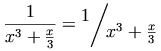
A more generic example is:
<mfrac>
<mrow>
<mn> 1 </mn>
<mo> + </mo>
<msqrt>
<mn> 5 </mn>
</msqrt>
</mrow>
<mn> 2 </mn>
</mfrac>These elements construct radicals. The msqrt element is
used for square roots, while the mroot element is used
to draw radicals with indices, e.g. a cube root. The syntax for these
elements is:
<msqrt> base </msqrt>
<mroot> base index </mroot>The mroot element requires exactly 2 arguments.
However, msqrt accepts a single argument, possibly
being an inferred mrow of multiple children; see 3.1.3 Required Arguments.
The mroot element increments scriptlevel by 2,
and sets displaystyle to false, within
index, but leaves both attributes unchanged within base.
The msqrt element leaves both
attributes unchanged within its argument.
(See 3.1.6 Displaystyle and Scriptlevel.)
Note that in a RTL directionality, the surd begins
on the right, rather than the left, along with the index in the case
of mroot.
msqrt and mroot elements accept the attributes listed in
3.1.9 Attributes common to presentation elements. The surd and overbar should be drawn using the
color specified by mathcolor.
Square roots and cube roots
<mrow>
<mrow>
<msqrt>
<mi>x</mi>
</msqrt>
<mroot>
<mi>x</mi>
<mn>3</mn>
</mroot>
<mrow>
<mo>=</mo>
<msup>
<mi>x</mi>
<mrow>
<mrow>
<mn>1</mn>
<mo>/</mo>
<mn>2</mn>
</mrow>
<mo>+</mo>
<mrow>
<mn>1</mn>
<mo>/</mo>
<mn>3</mn>
</mrow>
</mrow>
</msup>
</mrow>The mstyle element is used to make style
changes that affect the rendering of its
contents.
As a presentation element, it accepts
the attributes described in 3.1.9 Attributes common to presentation elements.
Additionally, it
can be given any attribute
accepted by any other presentation element, except for the
attributes described below.
The mstyle element accepts a single argument,
possibly being an inferred mrow of multiple children;
see 3.1.3 Required Arguments.
Loosely speaking, the effect of the mstyle element
is to change the default value of an attribute for the elements it
contains. Style changes work in one of several ways, depending on
the way in which default values are specified for an attribute.
The cases are:
-
Some attributes, such as
displaystyleorscriptlevel(explained below), are inherited from the surrounding context when they are not explicitly set. Specifying such an attribute on anmstyleelement sets the value that will be inherited by its child elements. Unless a child element overrides this inherited value, it will pass it on to its children, and they will pass it to their children, and so on. But if a child element does override it, either by an explicit attribute setting or automatically (as is common forscriptlevel), the new (overriding) value will be passed on to that element's children, and then to their children, etc, unless it is again overridden. -
Other attributes, such as
linethicknessonmfrac, have default values that are not normally inherited. That is, if thelinethicknessattribute is not set on themfracelement, it will normally use the default value ofmedium, even if it was contained in a largermfracelement that set this attribute to a different value. For attributes like this, specifying a value with anmstyleelement has the effect of changing the default value for all elements within its scope. The net effect is that setting the attribute value withmstylepropagates the change to all the elements it contains directly or indirectly, except for the individual elements on which the value is overridden. Unlike in the case of inherited attributes, elements that explicitly override this attribute have no effect on this attribute's value in their children. Note that setting these attributes are not supported in [MathML-Core] -
Another group of attributes, such as
stretchyandform, are computed from operator dictionary information, position in the enclosingmrow, and other similar data. For these attributes, a value specified by an enclosingmstyleoverrides the value that would normally be computed. Note that setting these attributes are not supported in [MathML-Core]
Note that attribute values inherited from an
mstyle in any manner affect a descendant element
in the mstyle's content only if that attribute is
not given a value by the descendant element. On any element for
which the attribute is set explicitly, the value specified overrides the inherited
value. The only exception to this
rule is when the attribute value
is documented as
specifying an incremental change to the value inherited from that
element's context or rendering environment.
Note also that the difference between inherited and non-inherited
attributes set by mstyle, explained above, only
matters when the attribute is set on some element within the
mstyle's contents that has descendants also
setting it. Thus it never matters for attributes, such as
mathsize, which can only be set on token elements (or on
mstyle itself).
Several MathML elements have the same attribute names as other elements. For those elements, the following rules apply:
- when the attributes
height,depthorwidthare specified on anmstyleelement, they apply only tomspaceelements, and not to the corresponding attributes ofmglyph,mpadded, ormtable; - when the attributes
rowalignorcolumnalignare specified on anmstyleelement, they apply only to themtableelement, and not themtrandmtdelements; - when the
lspaceattribute is set withmstyle, it applies only to themoelement and not tompadded. To be consistent, thevoffsetattribute of thempaddedelement cannot be set onmstyle; - when the
alignattribute is set withmstyle, it applies only to themunder,mover, andmunderoverelements, and not to themtableandmstackelements.
Attributes such as src which do not have default values be cannot be set on mstyle.
As a presentation element, mstyle directly accepts
the mathcolor and mathbackground attributes.
Thus, the mathbackground specifies the color to fill the bounding
box of the mstyle element itself; it does not
specify the default background color.
In a continued fraction, the nested fractions should not shrink. Instead, they should remain the same size.
This can be accomplished by resetting displaystyle and
scriptlevel for the children of each mfrac
using mstyle as shown below:
<mrow>
<mi>π</mi>
<mo>=</mo>
<mfrac>
<mstyle displaystyle="true" scriptlevel="0"> <mn>4</mn> </mstyle>
<mstyle displaystyle="true" scriptlevel="0">
<mn>1</mn>
<mo>+</mo>
<mfrac>
<mstyle displaystyle="true" scriptlevel="0">
<msup> <mn>1</mn> <mn>2</mn> </msup>
</mstyle>
<mstyle displaystyle="true" scriptlevel="0">
<mn>2</mn>
<mo>+</mo>
<mfrac>
<mstyle displaystyle="true" scriptlevel="0">
<msup> <mn>3</mn> <mn>2</mn> </msup>
</mstyle>
<mstyle displaystyle="true" scriptlevel="0">
<mn>2</mn>
<mo>+</mo>
<mfrac>
<mstyle displaystyle="true" scriptlevel="0">
<msup> <mn>5</mn> <mn>2</mn> </msup>
</mstyle>
<mstyle displaystyle="true" scriptlevel="0">
<mn>2</mn>
<mo>+</mo>
<mfrac>
<mstyle displaystyle="true" scriptlevel="0">
<msup> <mn>7</mn> <mn>2</mn> </msup>
</mstyle>
<mstyle displaystyle="true" scriptlevel="0">
<mn>2</mn>
<mo>+</mo>
<mo>⋱</mo>
</mstyle>
</mfrac>
</mstyle>
</mfrac>
</mstyle>
</mfrac>
</mstyle>
</mfrac>
</mstyle>
</mfrac>
</mrow>The merror element displays its contents as an
error message
. This might be done, for example, by displaying the
contents in red, flashing the contents, or changing the background
color. The contents can be any expression or expression sequence.
merror accepts
a single argument possibly being an inferred mrow of multiple children;
see 3.1.3 Required Arguments.
The intent of this element is to provide a standard way for programs that generate MathML from other input to report syntax errors in their input. Since it is anticipated that preprocessors that parse input syntaxes designed for easy hand entry will be developed to generate MathML, it is important that they have the ability to indicate that a syntax error occurred at a certain point. See D.2 Handling of Errors.
The suggested use of merror for reporting
syntax errors is for a preprocessor to replace the erroneous part of
its input with an merror element containing a
description of the error, while processing the surrounding expressions
normally as far as possible. By this means, the error message will be
rendered where the erroneous input would have appeared, had it been
correct; this makes it easier for an author to determine from the
rendered output what portion of the input was in error.
No specific error message format is suggested here, but as with
error messages from any program, the format should be designed to make
as clear as possible (to a human viewer of the rendered error message)
what was wrong with the input and how it can be fixed. If the
erroneous input contains correctly formatted subsections, it may be
useful for these to be preprocessed normally and included in the error
message (within the contents of the merror
element), taking advantage of the ability of
merror to contain arbitrary MathML expressions
rather than only text.
merror elements accept the attributes listed in
3.1.9 Attributes common to presentation elements.
If a MathML syntax-checking preprocessor received the input
<mfraction>
<mrow> <mn> 1 </mn> <mo> + </mo> <msqrt> <mn> 5 </mn> </msqrt> </mrow>
<mn> 2 </mn>
</mfraction>which contains the non-MathML element mfraction
(presumably in place of the MathML element mfrac),
it might generate the error message
<merror>
<mtext> Unrecognized element: mfraction; arguments were: </mtext>
<mrow> <mn> 1 </mn> <mo> + </mo> <msqrt> <mn> 5 </mn> </msqrt> </mrow>
<mtext> and </mtext>
<mn> 2 </mn>
</merror>Note that the preprocessor's input is not, in this case, valid MathML, but the error message it outputs is valid MathML.
An mpadded element renders the same as its child content,
but with the size of the child's bounding box and the relative positioning
point of its content modified according to
mpadded's attributes. It
does not rescale (stretch or shrink) its content. The name of the
element reflects the typical use of mpadded to add padding,
or extra space, around its content. However, mpadded can be
used to make more general adjustments of size and positioning, and some
combinations, e.g. negative padding, can cause the content of
mpadded to overlap the rendering of neighboring content. See
[MathML-Notes] for warnings about several
potential pitfalls of this effect.
The mpadded element accepts
a single argument which may be an inferred mrow of multiple children;
see 3.1.3 Required Arguments.
It is suggested that audio renderers add (or shorten) time delays
based on the attributes representing horizontal space
(width and lspace).
mpadded elements accept the attributes listed
below in addition to those specified in 3.1.9 Attributes common to presentation elements.
| Name | values | default |
| height | length | same as content |
Sets or increments the height of the mpadded element.
See below for discussion.
|
||
| depth | length | same as content |
Sets or increments the depth of the mpadded element.
See below for discussion.
|
||
| width | length | same as content |
Sets or increments the width of the mpadded element.
See below for discussion.
|
||
| lspace | length | 0em |
| Sets the horizontal position of the child content. See below for discussion. | ||
| voffset | length | 0em |
| Sets the vertical position of the child content. See below for discussion. | ||
Note: mpadded lengths in MathML 3
While [MathML-Core] supports the above attributes, it only allows the value to be a valid
<length-percentage>.
As described in length MathML 4 extends this syntax to allow
namedspace.
MathML 3 also allowed additional extensions:
- A leading "+" or "-" denoted a relative increment or decrement from the default value. This is not supported. However the same effects may be obtained by using absolute lengths, or CSS.
- MathML 3 also specified the pseudo-units
height,depthandwidth. These are not supported in MathML 4.
These attributes specify the size of the bounding box of the mpadded
element relative to the size of the bounding box of its child content, and specify
the position of the child content of the mpadded element relative to the
natural positioning of the mpadded element. The typographical
layout parameters determined by these attributes are described in the next subsection.
Depending on the form of the attribute value, a dimension may be set to a new value,
or specified relative to the child content's corresponding dimension. Values may
be given as
multiples or percentages of any of the
dimensions of the normal rendering of the child content using so-called pseudo-units,
or they can be set directly using standard units, see 2.1.5.2 Length Valued Attributes.
The corresponding
dimension is set to the following length value.
specifying a
length that would produce a net negative value for these attributes
has the same effect as
setting the attribute to zero. In other words, the effective
bounding box of an mpadded element always has non-negative
dimensions. However, negative values are allowed for the relative positioning
attributes lspace and voffset.
The content of an mpadded element defines a fragment of mathematical
notation, such as a character, fraction, or expression, that can be regarded as
a single typographical element with a natural positioning point relative to its
natural bounding box.
The size of the bounding box of an mpadded element is
defined as the size of the bounding box of its content, except as
modified by the mpadded element's
height, depth, and
width attributes. The natural positioning point of the
child content of the mpadded element is located to coincide
with the natural positioning point of the mpadded element,
except as modified by the lspace and voffset
attributes. Thus, the size attributes of mpadded can be used
to expand or shrink the apparent bounding box of its content, and the
position attributes of mpadded can be used to move the
content relative to the bounding box (and hence also neighboring elements).
Note that MathML doesn't define the precise relationship between "ink",
bounding boxes and positioning points, which are implementation
specific. Thus, absolute values for mpadded attributes may not be
portable between implementations.
The height attribute specifies the vertical extent of the
bounding box of the mpadded element above its baseline.
Increasing the height increases the space between the baseline
of the mpadded element and the content above it, and introduces
padding above the rendering of the child content. Decreasing the
height reduces the space between the baseline of the
mpadded element and the content above it, and removes
space above the rendering of the child content. Decreasing the
height may cause content above the mpadded
element to overlap the rendering of the child content, and should
generally be avoided.
The depth attribute specifies the vertical extent of the
bounding box of the mpadded element below its baseline.
Increasing the depth increases the space between the baseline
of the mpadded element and the content below it, and introduces
padding below the rendering of the child content. Decreasing the
depth reduces the space between the baseline of the mpadded
element and the content below it, and removes space below the rendering
of the child content. Decreasing the depth may cause content
below the mpadded element to overlap the rendering of the child
content, and should generally be avoided.
The width attribute specifies the horizontal distance
between the positioning point of the mpadded element and the
positioning point of the following content.
Increasing the width increases the space between the
positioning point of the mpadded element and the content
that follows it, and introduces padding after the rendering of the
child content. Decreasing the width reduces the space
between the positioning point of the mpadded element and
the content that follows it, and removes space after the rendering
of the child content. Setting the width to zero causes
following content to be positioned at the positioning point of the
mpadded element. Decreasing the width should
generally be avoided, as it may cause overprinting of the following
content.
The lspace attribute ("leading" space;
see 3.1.5.1 Overall Directionality of Mathematics Formulas) specifies the horizontal
location of the positioning point of the child content with respect to
the positioning point of the mpadded element. By default they
coincide, and therefore absolute values for lspace have the same effect
as relative values.
Positive values for the lspace attribute increase the space
between the preceding content and the child content, and introduce padding
before the rendering of the child content. Negative values for the
lspace attributes reduce the space between the preceding
content and the child content, and may cause overprinting of the
preceding content, and should generally be avoided. Note that the
lspace attribute does not affect the width of
the mpadded element, and so the lspace attribute
will also affect the space between the child content and following
content, and may cause overprinting of the following content, unless
the width is adjusted accordingly.
The voffset attribute specifies the vertical location
of the positioning point of the child content with respect to the
positioning point of the mpadded element. Positive values
for the voffset attribute raise the rendering of the child
content above the baseline. Negative values for the voffset
attribute lower the rendering of the child content below the baseline.
In either case, the voffset attribute may cause overprinting
of neighboring content, which should generally be avoided. Note that
the voffset attribute does not affect the height
or depth of the mpadded element, and so the voffset
attribute will also affect the space between the child content and neighboring
content, and may cause overprinting of the neighboring content, unless the
height or depth is adjusted accordingly.
MathML renderers should ensure that, except for the effects of the
attributes, the relative spacing between the contents of the
mpadded element and surrounding MathML elements would
not be modified by replacing an mpadded element with an
mrow element with the same content, even if linebreaking
occurs within the mpadded element. MathML does not define
how non-default attribute values of an mpadded element interact
with the linebreaking algorithm.
The effects of the size and position attributes are illustrated
below. The following diagram illustrates the use of lspace
and voffset to shift the position of child content without
modifying the mpadded bounding box.
In the examples below, the natural size of y is assumed to be 1ex high,
depth 0.45ex and width 0.47em.
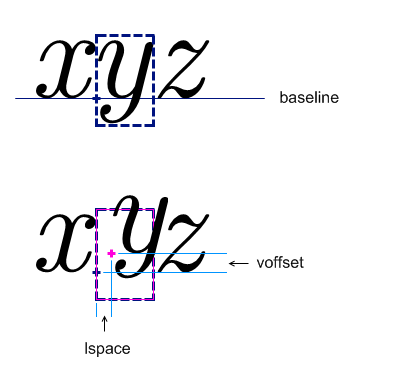
The corresponding MathML is:
<mrow>
<mi>x</mi>
<mpadded lspace="0.2em" voffset="0.3ex">
<mi>y</mi>
</mpadded>
<mi>z</mi>
</mrow>The next diagram illustrates the use of
width, height and depth
to modifying the mpadded bounding box without changing the relative position
of the child content.
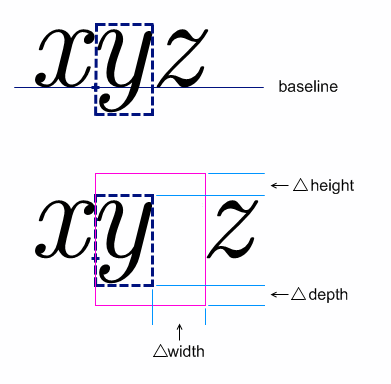
The corresponding MathML is:
<mrow>
<mi>x</mi>
<mpadded width="0.9em" height="1.3ex" depth=".75ex">
<mi>y</mi>
</mpadded>
<mi>z</mi>
</mrow>The final diagram illustrates the generic use of mpadded to modify both
the bounding box and relative position of child content.
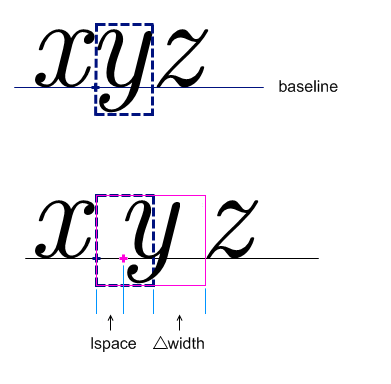
The corresponding MathML is:
<mrow>
<mi>x</mi>
<mpadded lspace="0.3em" width="1.07em">
<mi>y</mi>
</mpadded>
<mi>z</mi>
</mrow>The mphantom element renders invisibly, but
with the same size and other dimensions, including baseline position,
that its contents would have if they were rendered
normally. mphantom can be used to align parts of
an expression by invisibly duplicating sub-expressions.
The mphantom element accepts
a single argument possibly being an inferred mrow of multiple children;
see 3.1.3 Required Arguments.
Note that it is possible to wrap both an
mphantom and an mpadded
element around one MathML expression, as in
<mphantom><mpadded attribute-settings>
... </mpadded></mphantom>, to change its size and make it
invisible at the same time.
MathML renderers should ensure that the relative spacing between
the contents of an mphantom element and the
surrounding MathML elements is the same as it would be if the
mphantom element were replaced by an
mrow element with the same content. This holds
even if linebreaking occurs within the mphantom
element.
For the above reason, mphantom is
not considered space-like ( 3.2.8 Space <mspace/>) unless its
content is space-like, since the suggested rendering rules for
operators are affected by whether nearby elements are space-like. Even
so, the warning about the legal grouping of space-like elements may
apply to uses of mphantom.
mphantom elements accept the attributes listed in
3.1.9 Attributes common to presentation elements (the mathcolor has no effect).
There is one situation where the preceding rules for rendering an
mphantom may not give the desired effect. When an
mphantom is wrapped around a subsequence of the
arguments of an mrow, the default determination
of the form attribute for an mo
element within the subsequence can change. (See the default value of
the form attribute described in 3.2.6 Operator, Fence, Separator or Accent
<mo>.) It may be
necessary to add an explicit form attribute to such an
mo in these cases. This is illustrated in the
following example.
In this example, mphantom is used to ensure
alignment of corresponding parts of the numerator and denominator of a
fraction:
<mfrac>
<mrow>
<mi> x </mi>
<mo> + </mo>
<mi> y </mi>
<mo> + </mo>
<mi> z </mi>
</mrow>
<mrow>
<mi> x </mi>
<mphantom>
<mo form="infix"> +
     </mo>
<mi> y </mi>
</mphantom>
<mo> + </mo>
<mi> z </mi>
</mrow>
</mfrac>This would render as something like

rather than as

The explicit attribute setting form="infix" on the
mo element inside the mphantom sets the
form attribute to what it would have been in the absence of the
surrounding mphantom. This is necessary since
otherwise, the + sign would be interpreted as a prefix
operator, which might have slightly different spacing.
Alternatively, this problem could be avoided without any explicit
attribute settings, by wrapping each of the arguments
<mo>+</mo> and <mi>y</mi> in its
own mphantom element, i.e.
<mfrac>
  <mrow>
    <mi> x </mi>
    <mo> + </mo>
    <mi> y </mi>
    <mo> + </mo>
    <mi> z </mi>
  </mrow>
  <mrow>
    <mi> x </mi>
    <mphantom>
      <mo> + </mo>
    </mphantom>
    <mphantom>
      <mi> y </mi>
    </mphantom>
    <mo> + </mo>
    <mi> z </mi>
  </mrow>
</mfrac>
The mfenced element provides a convenient form
in which to express common constructs involving fences (i.e. braces,
brackets, and parentheses), possibly including separators (such as
comma) between the arguments.
For example, <mfenced> <mi>x</mi> </mfenced>
renders as (x)
and is equivalent to
<mrow> <mo> ( </mo> <mi>x</mi> <mo> ) </mo> </mrow>and <mfenced> <mi>x</mi> <mi>y</mi> </mfenced>
renders as (x, y)
and is equivalent to
<mrow>
  <mo> ( </mo>
  <mrow> <mi>x</mi> <mo>,</mo> <mi>y</mi> </mrow>
  <mo> ) </mo>
</mrow>
Individual fences or separators are represented using
mo elements, as described in 3.2.6 Operator, Fence, Separator or Accent
<mo>. Thus, any mfenced
element is completely equivalent to an expanded form described below.
A renderer that supports this recommendation is required to
render either of these forms in exactly the same way. Note that
while mfenced might be more convenient
for authors or authoring software, only the expanded form
using mrow is supported in
[MathML-Core].
In general, an mfenced element can contain
zero or more arguments, and will enclose them between fences in an
mrow; if there is more than one argument, it will
insert separators between adjacent arguments, using an additional
nested mrow around the arguments and separators
for proper grouping ( 3.3.1 Horizontally Group Sub-Expressions
<mrow>,
<a>). The general expanded form is
shown below. The fences and separators will be parentheses and comma
by default, but can be changed using attributes, as shown in the
following table.
mfenced elements accept the attributes listed
below in addition to those specified in 3.1.9 Attributes common to presentation elements.
The delimiters and separators should be drawn using the color specified by mathcolor.
| Name | values | default |
| open | string | ( |
Specifies the opening delimiter.
Since it is used as the content of an mo element, any whitespace
will be trimmed and collapsed as described in 2.1.7 Collapsing Whitespace in Input.
|
||
| close | string | ) |
Specifies the closing delimiter.
Since it is used as the content of an mo element, any whitespace
will be trimmed and collapsed as described in 2.1.7 Collapsing Whitespace in Input.
|
||
| separators | string | , |
Specifies a sequence of zero or more separator characters, optionally separated by
whitespace.
Each pair of arguments is displayed separated by the corresponding separator
(none appears after the last argument).
If there are too many separators, the excess are ignored;
if there are too few, the last separator is repeated.
Any whitespace within separators is ignored.
|
||
A generic mfenced element, with all attributes
explicit, looks as follows:
<mfenced open="opening-fence"
         close="closing-fence"
         separators="sep#1 sep#2 ... sep#(n-1)" >
  arg#1
  ...
  arg#n
</mfenced>
In an RTL directionality context, since the initial text
direction is RTL, characters in the open and close
attributes that have a mirroring counterpart will be rendered in that
mirrored form. In particular, the default values will render correctly
as a parenthesized sequence in both LTR and RTL contexts.
The general mfenced element shown above is
equivalent to the following expanded form:
<mrow>
  <mo fence="true"> opening-fence </mo>
  <mrow>
    arg#1
    <mo separator="true"> sep#1 </mo>
    ...
    <mo separator="true"> sep#(n-1) </mo>
    arg#n
  </mrow>
  <mo fence="true"> closing-fence </mo>
</mrow>
Each argument except the last is followed by a separator. The inner
mrow is added for proper grouping, as described in
3.3.1 Horizontally Group Sub-Expressions
<mrow>,
<a>.
When there is only one argument, the above form has no separators;
since <mrow> arg#1 </mrow> is equivalent to
arg#1 (as described in 3.3.1 Horizontally Group Sub-Expressions
<mrow>,
<a>), this case is also equivalent to:
<mrow>
  <mo fence="true"> opening-fence </mo>
    arg#1
  <mo fence="true"> closing-fence </mo>
</mrow>
If there are too many separator characters, the extra ones are
ignored. If separator characters are given, but there are too few, the
last one is repeated as necessary. Thus, the default value of
separators="," is equivalent to
separators=",,", separators=",,,", etc. If
there are no separator characters provided but some are needed, for
example if separators=" " or "" and there is more than
one argument, then no separator elements are inserted at all — that
is, the elements <mo separator="true"> sep#i
</mo> are left out entirely. Note that this is different
from inserting separators consisting of mo
elements with empty content.
Finally, for the case with no arguments, i.e.
<mfenced open="opening-fence"
 close="closing-fence"
 separators="anything" >
</mfenced>
the equivalent expanded form is defined to include just
the fences within an mrow:
<mrow>
  <mo fence="true"> opening-fence </mo>
  <mo fence="true"> closing-fence </mo>
</mrow>
Note that not all fenced expressions
can be encoded by an
mfenced element. Such exceptional expressions
include those with an embellished
separator or fence or one
enclosed in an mstyle element, a missing or extra
separator or fence, or a separator with multiple content
characters. In these cases, it is necessary to encode the expression
using an appropriately modified version of an expanded form. As
discussed above, it is always permissible to use the expanded form
directly, even when it is not necessary. In particular, authors cannot
be guaranteed that MathML preprocessors won't replace occurrences of
mfenced with equivalent expanded forms.
Note that the equivalent expanded forms shown above include
attributes on the mo elements that identify them as fences or
separators. Since the most common choices of fences and separators
already occur in the operator dictionary with those attributes,
authors would not normally need to specify those attributes explicitly
when using the expanded form directly. Also, the rules for the default
form attribute ( 3.2.6 Operator, Fence, Separator or Accent
<mo>) cause the
opening and closing fences to be effectively given the values
form="prefix" and
form="postfix" respectively, and the
separators to be given the value
form="infix".
Note that it would be incorrect to use mfenced
with a separator of, for instance, +
, as an abbreviation for an
expression using +
as an ordinary operator, e.g.
<mrow>
  <mi>x</mi> <mo>+</mo> <mi>y</mi> <mo>+</mo> <mi>z</mi>
</mrow>
This is because the + signs would be treated as separators,
not infix operators. That is, it would render as if they were marked up as
<mo separator="true">+</mo>, which might therefore
render inappropriately.
<mfenced>
  <mrow>
    <mi> a </mi>
    <mo> + </mo>
    <mi> b </mi>
  </mrow>
</mfenced>
Note that the above mrow is necessary so that
the mfenced has just one argument. Without it, this
would render incorrectly as (a, +,
b)
.
<mfenced open="[">
  <mn> 0 </mn>
  <mn> 1 </mn>
</mfenced><mrow>
<mi> f </mi>
<mo> ⁡<!--ApplyFunction--> </mo>
<mfenced>
<mi> x </mi>
<mi> y </mi>
</mfenced>
</mrow>The menclose element renders its content
inside the enclosing notation specified by its notation attribute.
menclose accepts
a single argument possibly being an inferred mrow of multiple children;
see 3.1.3 Required Arguments.
menclose elements accept the attributes listed
below in addition to those specified in 3.1.9 Attributes common to presentation elements.
The notations should be drawn using the color specified by mathcolor.
The values allowed for notation are open-ended.
Conforming renderers may ignore any value they do not handle, although
renderers are encouraged to render as many of the values listed below as
possible.
| Name | values | default |
| notation | (actuarial | phasorangle | box | roundedbox | circle |
left | right | top | bottom |
updiagonalstrike | downdiagonalstrike | verticalstrike | horizontalstrike | northeastarrow
| madruwb | text ) +
|
do nothing |
Specifies a space separated list of notations to be used to enclose the children.
See below for a description of each type of notation.
MathML 4 deprecates the use of longdiv and radical.
These notations duplicate functionality provided by mlongdiv and msqrt respectively;
those elements should be used instead.
The default has been changed so that if no notation is given,
or if it is an empty string,
then menclose should not draw.
Comparisons are ASCII case-insensitive, where all matching strings are allowed as values. |
||
Any number of values can be given for
notation separated by whitespace; all of those given and
understood by a MathML renderer should be rendered.
Each should be rendered as if the others were not present; they should not nest one
inside of the other. For example,
notation="circle box" should
result in circle and a box around the contents of menclose; the circle and box may overlap. This is shown in the first example below.
Of the predefined notations, only phasorangle is
affected by the directionality (see 3.1.5.1 Overall Directionality of Mathematics Formulas):
When notation is specified as
actuarial, the contents are drawn enclosed by an
actuarial symbol. A similar result can be achieved
with the value top right.
The values box,
roundedbox, and circle should
enclose the contents as indicated by the values. The amount of
distance between the box, roundedbox, or circle, and the contents are
not specified by MathML, and left to the renderer. In practice,
paddings on each side of 0.4em in the horizontal direction and .5ex in
the vertical direction seem to work well.
The values left,
right, top and
bottom should result in lines drawn on those sides of
the contents. The values northeastarrow,
updiagonalstrike,
downdiagonalstrike, verticalstrike
and horizontalstrike should result in the indicated
strikeout lines being superimposed over the content of the
menclose, e.g. a strikeout that extends from the lower left
corner to the upper right corner of the menclose element for
updiagonalstrike, etc.
The value northeastarrow is a recommended value to implement because it can be
used to implement TeX's \cancelto command. If a renderer implements other arrows for
menclose, it is recommended that the arrow names are chosen from the following full set of
names for consistency and standardization among renderers:
-
uparrow -
rightarrow -
downarrow -
leftarrow -
northwestarrow -
southwestarrow -
southeastarrow -
northeastarrow -
updownarrow -
leftrightarrow -
northwestsoutheastarrow -
northeastsouthwestarrow
The value madruwb should generate an enclosure
representing an Arabic factorial (‘madruwb’ is the transliteration
of the Arabic مضروب for factorial).
This is shown in the third example below.
The baseline of an menclose element is the baseline of its child (which might be an implied mrow).
An example of using multiple attributes is
<menclose notation='circle box'>
  <mi> x </mi><mo> + </mo><mi> y </mi>
</menclose>![[Image of a circle and box around x plus y]](https://www.w3.org/TR/mathml4/image/circlebox.png)
An example of using menclose for actuarial
notation is
<msub>
<mi>a</mi>
<mrow>
<menclose notation='actuarial'>
<mi>n</mi>
</menclose>
<mo>⁣<!--InvisibleComma--></mo>
<mi>i</mi>
</mrow>
</msub>![[image of actuarial notation for a angle n at i]](https://www.w3.org/TR/mathml4/image/actuarial.png)
An example of phasorangle, which is used in circuit analysis, is:
<mi>C</mi>
<mrow>
  <menclose notation='phasorangle'>
    <mrow>
      <mo>−</mo>
      <mfrac>
        <mi>π</mi>
        <mn>2</mn>
      </mfrac>
    </mrow>
  </menclose>
</mrow>![[image of phasorangle notation for the angle negative pi over 2]](https://www.w3.org/TR/mathml4/image/phasorangle.png)
An example of madruwb is:
<menclose notation="madruwb">
  <mn>12</mn>
</menclose>![[Image of 12 factorial in Arabic style]](https://www.w3.org/TR/mathml4/image/madruwb12.png)
The elements described in this section position one or more scripts around a base. Attaching various kinds of scripts and embellishments to symbols is a very common notational device in mathematics. For purely visual layout, a single general-purpose element could suffice for positioning scripts and embellishments in any of the traditional script locations around a given base. However, in order to capture the abstract structure of common notation better, MathML provides several more specialized scripting elements.
In addition to sub-/superscript elements, MathML has overscript
and underscript elements that place scripts above and below the base. These
elements can be used to place limits on large operators, or for placing
accents and lines above or below the base. The rules for rendering accents
differ from those for overscripts and underscripts, and this difference can
be controlled with the accent and accentunder attributes, as described in the appropriate
sections below.
Rendering of scripts is affected by the scriptlevel and displaystyle
attributes, which are part of the environment inherited by the rendering
process of every MathML expression, and are described in 3.1.6 Displaystyle and Scriptlevel.
MathML also provides an element for attachment of tensor indices. Tensor indices are distinct from ordinary subscripts and superscripts in that they must align in vertical columns. Also, all the upper scripts should be baseline-aligned and all the lower scripts should be baseline-aligned. Tensor indices can also occur in prescript positions. Note that ordinary scripts follow the base (on the right in LTR context, but on the left in RTL context); prescripts precede the base (on the left (right) in LTR (RTL) context).
Because presentation elements should be used to describe the abstract
notational structure of expressions, it is important that the base
expression in all scripting
elements (i.e. the first
argument expression) should be the entire expression that is being
scripted, not just the trailing character. For example,
should be written as:
<msup>
  <mrow>
    <mo> ( </mo>
    <mrow>
      <mi> x </mi>
      <mo> + </mo>
      <mi> y </mi>
    </mrow>
    <mo> ) </mo>
  </mrow>
  <mn> 2 </mn>
</msup>
The msub element attaches a subscript to a base using the syntax
<msub> base subscript </msub>It increments scriptlevel by 1, and sets displaystyle to
false, within subscript, but leaves both attributes
unchanged within base. (See 3.1.6 Displaystyle and Scriptlevel.)
msub elements accept the attributes listed
below in addition to those specified in 3.1.9 Attributes common to presentation elements.
| Name | values | default |
| subscriptshift | length | automatic |
| Specifies the minimum amount to shift the baseline of subscript down; the default is for the rendering agent to use its own positioning rules. | ||
The msup element attaches a superscript to a base using the syntax
<msup> base superscript </msup>It increments scriptlevel by 1, and sets displaystyle to false, within
superscript, but leaves both attributes unchanged within
base. (See 3.1.6 Displaystyle and Scriptlevel.)
msup elements accept the attributes listed
below in addition to those specified in 3.1.9 Attributes common to presentation elements.
| Name | values | default |
| superscriptshift | length | automatic |
| Specifies the minimum amount to shift the baseline of superscript up; the default is for the rendering agent to use its own positioning rules. | ||
The msubsup element is used to attach both a subscript and
superscript to a base expression.
<msubsup> base subscript superscript </msubsup>It increments scriptlevel by 1, and sets displaystyle to
false, within subscript and superscript,
but leaves both attributes unchanged within base.
(See 3.1.6 Displaystyle and Scriptlevel.)
Note that both scripts are positioned tight against the base as shown here
versus the staggered positioning of nested scripts as shown here
;
the latter can be achieved by nesting an msub inside an msup.
msubsup elements accept the attributes listed
below in addition to those specified in 3.1.9 Attributes common to presentation elements.
| Name | values | default |
| subscriptshift | length | automatic |
| Specifies the minimum amount to shift the baseline of subscript down; the default is for the rendering agent to use its own positioning rules. | ||
| superscriptshift | length | automatic |
| Specifies the minimum amount to shift the baseline of superscript up; the default is for the rendering agent to use its own positioning rules. | ||
The msubsup is most commonly used for adding
sub-/superscript pairs to identifiers as illustrated above. However,
another important use is placing limits on certain large operators
whose limits are traditionally displayed in the script positions even
when rendered in display style. The most common of these is the
integral. For example,

would be represented as
<mrow>
<msubsup>
<mo> ∫ </mo>
<mn> 0 </mn>
<mn> 1 </mn>
</msubsup>
<mrow>
<msup>
<mi> ⅇ </mi>
<mi> x </mi>
</msup>
<mo> ⁢<!--InvisibleTimes--> </mo>
<mrow>
<mo> ⅆ </mo>
<mi> x </mi>
</mrow>
</mrow>
</mrow>The munder element attaches an accent or limit placed under a base using the syntax
<munder> base underscript </munder>It always sets displaystyle to false within the underscript,
but increments scriptlevel by 1 only when accentunder is false.
Within base, it always leaves both attributes unchanged.
(See 3.1.6 Displaystyle and Scriptlevel.)
If base is an operator with movablelimits=true
(or an embellished operator whose mo element core has movablelimits=true),
and displaystyle=false,
then underscript is drawn in a subscript position.
In this case, the accentunder attribute is ignored.
This is often used for limits on symbols such as U+2211 (entity sum).
munder elements accept the attributes listed
below in addition to those specified in 3.1.9 Attributes common to presentation elements.
| Name | values | default |
| accentunder | boolean | automatic |
Specifies whether underscript is drawn as an accentor as a limit. An accent is drawn the same size as the base (without incrementing scriptlevel)
and is drawn closer to the base.
|
||
| align | "left" | "right" | "center" | center |
|
Specifies whether the script is aligned left, center, or right under/over the base.
As specified in 3.2.6.7.3 Horizontal Stretching Rules,
the core of underscripts that are embellished operators should stretch to cover the
base,
but the alignment is based on the entire underscript.
Comparisons are ASCII case-insensitive, where all matching strings are allowed as values. |
||
The default value of accentunder is false, unless
underscript is an mo element or an
embellished operator (see 3.2.6 Operator, Fence, Separator or Accent
<mo>). If
underscript is an mo element, the
value of its accent attribute is used as the default
value of accentunder. If underscript is an
embellished operator, the accent attribute of the
mo element at its core is used as the default
value. As with all attributes, an explicitly given value overrides
the default.
[MathML-Core] does not support the accent attribute on 3.2.6 Operator, Fence, Separator or Accent
<mo>.
For compatibility with MathML Core, the accentunder should be set on