This specification defines a core subset of Mathematical Markup
Language, or MathML, that is suitable for browser implementation.
MathML is a markup language for describing mathematical notation
and capturing both its structure and content. The goal of MathML is to
enable mathematics to be served, received, and processed on the World
Wide Web, just as HTML has enabled this functionality for text.
Status of This Document
This section describes the status of this
document at the time of its publication. A list of current W3C
publications and the latest revision of this technical report can be found
in the
W3C standards and drafts index at
https://www.w3.org/TR/.
Publication as a Candidate Recommendation does not
imply endorsement by W3C and its Members. A Candidate Recommendation Snapshot has received
wide review, is intended to
gather
implementation experience,
and has commitments from Working Group members to
royalty-free licensing
for implementations.
This Candidate Recommendation is not expected to advance to Proposed
Recommendation any earlier than 30 September 2025.
This document was produced by a group
operating under the
W3C Patent
Policy.
W3C maintains a
public list of any patent disclosures
made in connection with the deliverables of
the group; that page also includes
instructions for disclosing a patent. An individual who has actual
knowledge of a patent which the individual believes contains
Essential Claim(s)
must disclose the information in accordance with
section 6 of the W3C Patent Policy.
The [MATHML3] specification has several shortcomings that make it
hard to implement consistently across web rendering engines or to
extend with user-defined constructions, e.g.:
It is a huge and standalone specification.
It does not contain any detailed rendering rules.
It is not driven by browser-implementation.
It lacks automated testing.
This MathML Core specification intends to address these issues by
being as accurate as possible on the visual rendering of mathematical
formulas using additional rules from the TeXBook’s Appendix G
[TEXBOOK] and from the Open Font Format [OPEN-FONT-FORMAT],
[OPEN-TYPE-MATH-ILLUMINATED]. It also relies on modern browser
implementations and web technologies [HTML] [SVG] [CSS2] [DOM],
clarifying interactions
with them when needed or introducing new low-level primitives to
improve the web platform layering.
Parts of MathML3 that do not fit well in this framework or are less
fundamental have been omitted. Instead, they are described in a
separate and larger [MATHML4] specification. The details of which
math feature will be included in future versions of MathML Core or
implemented as polyfills is still open. This question and other
potential improvements are tracked on GitHub.
By increasing the level of implementation details, focusing on a
workable subset, following a browser-driven design and relying on
automated web platform tests, this specification is expected to
greatly improve MathML interoperability. Moreover, effort on MathML
layering will enable users to implement the rest of the MathML 4
specification, or more generally to extend MathML Core, using
modern web technologies such as
shadow trees,
custom elements or
APIs from [HOUDINI].
The term MathML element refers to any element in the
MathML namespace.
The MathML elements defined in this specification are called the
MathML Core elements and are listed below.
Any MathML element that is not listed below is called an
Unknown MathML element .
MathML specifies a single top-level or root
math element, which encapsulates each
instance of MathML markup within a document. All other MathML content
must be contained in a <math> element.
The <math>
element accepts the attributes described
in 2.1.3 Global Attributes as well as the
following attributes:
The
display
attribute, if present,
must be an
ASCII case-insensitive
match
to block or inline.
The user agent stylesheet
described in A. User Agent Stylesheet
contains rules for this attribute that affect the
default values for the display
(block math or inline math)
and math-style
(normal or compact) properties.
If the display
attribute is absent or has an invalid value, the User Agent
stylesheet treats it the same as inline.
This specification does not define any observable behavior that is
specific to the alttext attribute.
Note
The alttext attribute may be used as
alternative text by some legacy systems that do not
implement math layout.
If the <math> element does not have its computed
display property equal to
block math or inline math
then it is laid out according to the CSS specification where
the corresponding value is described.
Otherwise the layout algorithm of the
mrow element is used to produce a
math content box. That math content box is used as the content for the layout of
the element, as described by CSS for display: block
(if the computed value is block math) or
display: inline
(if the computed value is inline math).
Additionally, if the computed
display property is equal to
block math then that math content box is rendered
horizontally centered within the content box.
Note
TEX's display mode $$...$$
and inline mode $...$ correspond to
display="block" and display="inline"
respectively.
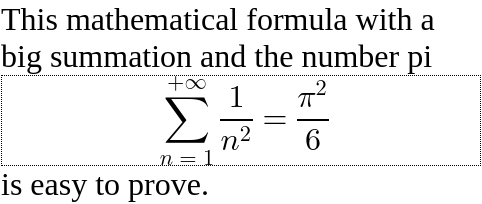
In the following example, a math formula
is rendered in display mode on a new line and taking full width,
with the math content centered within the container:
<divstyle="width: 15em;">
This mathematical formula with a big summation and the number pi
<mathdisplay="block"style="border: 1px dotted black;"><mrow><munderover><mo>∑</mo><mrow><mi>n</mi><mo>=</mo><mn>1</mn></mrow><mrow><mo>+</mo><mn>∞</mn></mrow></munderover><mfrac><mn>1</mn><msup><mi>n</mi><mn>2</mn></msup></mfrac></mrow><mo>=</mo><mfrac><msup><mi>π</mi><mn>2</mn></msup><mn>6</mn></mfrac></math>
is easy to prove.
</div>
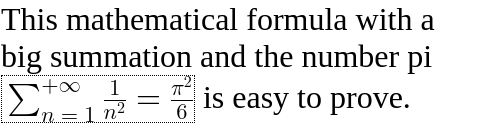
As a comparison, the same formula would look as follows in
inline mode. The formula is embedded in the paragraph of text
without forced line breaking.
The baselines specified by the layout algorithm of the
mrow are used for vertical
alignment. Note that
the middle of sum and equal symbols or fractions are all aligned,
but not with the alphabetical baseline of the surrounding
text.
Because good mathematical rendering requires use of mathematical
fonts, the
user agent stylesheet
should set the
font-family
to the
math
value on the <math> element instead of inheriting
it. Additionally, several CSS properties that can be set on
a parent container such as
font-style, font-weight,
direction or text-indent etc
are not expected to apply to the math formula and so the
user agent stylesheet
has rules to reset them by default.
The
id ,
class ,
style ,
data-* ,
autofocus and
nonce and
tabindex
attributes have the same syntax and semantics as defined for
id,
class,
style,
data-*,
autofocus,
nonce and
tabindex
attributes on HTML elements.
The
dir
attribute, if present,
must be an
ASCII case-insensitive match
to ltr or rtl.
In that case, the user agent is expected to treat the attribute as a
presentational hint setting the element's
direction
property to the corresponding value.
More precisely, an
ASCII case-insensitive match
to rtl is mapped to rtl while
an ASCII case-insensitive match to ltr is mapped to ltr.
Note
The dir attribute is used to set the directionality of math
formulas, which is often rtl in Arabic speaking world.
However, languages written from right to left often embed math
written from left to right and so the
user agent stylesheet resets
the
direction
property accordingly on the math
elements.
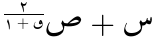
In the following example, the dir attribute
is used to render "𞸎 plus 𞸑 raised to the power of
(٢ over, 𞸟 plus ١)" from right-to-left.
The
mathcolor
and
mathbackground
attributes, if present, must
have a value that is a
<color>.
In that case, the user agent is expected to treat these attributes as a
presentational hint setting the element's
color and
background-color
properties to the corresponding values.
The mathcolor attribute describes the foreground fill
color of MathML text, bars etc
while the mathbackground
attribute describes the background color of an element.
The
mathsize
attribute, if present, must
have a value that is a valid <length-percentage>.
In that case, the user agent is expected to treat the attribute as a
presentational hint setting the element's
font-size
property to the corresponding value.
The mathsize property indicates the desired height
of glyphs in math formulas but also scales other parts (spacing, shifts,
line thickness of bars etc) accordingly.
Note
The above attributes are implemented for compatibility with full MathML. Authors whose only target is MathML Core are encouraged to use CSS for styling.
The
displaystyle
attribute, if present, must have a value that is a boolean.
In that case, the user agent is expected to treat the attribute as a
presentational hint setting the element's
math-style
property to the corresponding value.
More precisely, an
ASCII case-insensitive match
to true is mapped to normal while
an ASCII case-insensitive match to false is mapped to compact.
This attribute indicates whether formulas should try to minimize
the logical height (value is false) or not
(value is true) e.g. by changing the size of content or
the layout of scripts.
The
scriptlevel
attribute, if present, must have value
+<U>, -<U> or <U>
where <U> is an
unsigned-integer.
In that case
the user agent is expected to treat the scriptlevel
attribute as a
presentational hint setting the element's
math-depth
property to the corresponding value.
More precisely,
+<U>, -<U> and
<U>
are respectively mapped to
add(<U>)add(<-U>)
and <U>.
displaystyle and scriptlevel values
are automatically adjusted within MathML elements.
To fully implement these attributes, additional CSS properties must be
specified in the user agent stylesheet
as described in A. User Agent Stylesheet.
In particular, for all MathML elements a default
font-size: math is specified to ensure that
scriptlevel changes are taken into account.
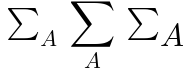
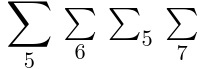
In this example, an munder
element is used to attach a
script "A" to a base "∑". By default, the summation
symbol is rendered with the font-size inherited from its
parent and the A as a scaled down subscript.
If displaystyle is true, the summation symbol is drawn
bigger and the "A" becomes an underscript.
If scriptlevel is reset to 0 on the "A", then it will
use the same font-size as the top-level math root.
TEX's \displaystyle, \textstyle,
\scriptstyle, and \scriptscriptstyle correspond
to displaystyle and scriptlevel as
true and 0,
false and 0,
false and 1,
and false and 2, respectively.
The attributes
intent and arg
are reserved as valid attributes.
This specification does not define any observable behavior that is
specific to the intent and arg attributes.
Note
These attributes are described in [MATHML4] and
future versions of this specification may or may not
define them. Authors should be aware that they are currently
in development and subject to change.
MathML can be mixed with HTML and SVG as described in the relevant
specifications [HTML] [SVG].
When evaluating the SVG requiredExtensions
attribute, user agents must claim support for the language extension
identified by the
MathML namespace.
In this example, inline MathML and SVG elements are used inside
an HTML document. SVG elements <switch> and
<foreignObject> (with
proper <requiredExtensions>) are used to
embed a MathML formula with a text fallback, inside a diagram.
HTML input element is used within the
mtext
to include an interactive input field inside a mathematical
formula. See also 3.7 Semantics and Presentation
for an example of SVG and HTML inside an annotation-xml
element.
<svgstyle="font-size: 20px"width="400px"height="220px"viewBox="0 0 200 110"><gtransform="translate(10,80)"><pathd="M 0 0 L 150 0 A 75 75 0 0 0 0 0
M 30 0 L 30 -60 M 30 -10 L 40 -10 L 40 0"fill="none"stroke="black"></path><texttransform="translate(10,20)">1</text><switchtransform="translate(35,-40)"><foreignObjectwidth="200"height="50"requiredExtensions="http://www.w3.org/1998/Math/MathML"><math><msqrt><mn>2</mn><mi>r</mi><mo>−</mo><mn>1</mn></msqrt></math></foreignObject><text>\sqrt{2r - 1}</text></switch></g></svg><p>
Fill the blank:
<math><msqrt><mn>2</mn><mtext><inputonchange="..."size="2"type="text"></mtext><mo>−</mo><mn>1</mn></msqrt><mo>=</mo><mn>3</mn></math></p>
User agents must support various CSS features mentioned in this
specification, including new ones described in
4. CSS Extensions for Math Layout.
They must follow the computation rule for
display: contents.
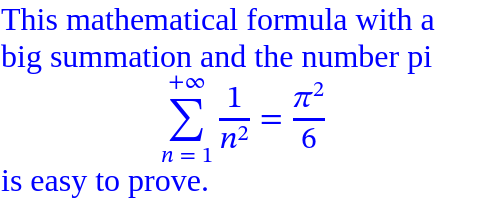
In this example, the MathML formula inherits the CSS color of its
parent and uses the font-family specified via the
style attribute.
<divstyle="width: 15em; color: blue">
This mathematical formula with a big summation and the number pi
<mathdisplay="block"style="font-family: STIX Two Math"><mrow><munderover><mo>∑</mo><mrow><mi>n</mi><mo>=</mo><mn>1</mn></mrow><mrow><mo>+</mo><mn>∞</mn></mrow></munderover><mfrac><mn>1</mn><msup><mi>n</mi><mn>2</mn></msup></mfrac></mrow><mo>=</mo><mfrac><msup><mi>π</mi><mn>2</mn></msup><mn>6</mn></mfrac></math>
is easy to prove.
</div>
All documents containing MathML Core elements must include
CSS rules described in A. User Agent Stylesheet
as part of user-agent level style sheet defaults.
In particular, this adds !important rules to force
writing mode
to horizontal-lr on all MathML elements.
The float
property does
not create floating of elements whose parent's computed
display value is
block math or inline math,
and does not take them out-of-flow.
The ::first-line and
::first-letter
pseudo-elements do not apply to elements whose computed
display value is
block math or inline math, and such
elements do not contribute a first formatted line or first letter
to their ancestors.
The following CSS features are not supported and must be ignored:
Line breaking inside math formulas:
white-space
is treated as nowrap on all MathML elements.
Alignment properties:
align-content, justify-content,
align-self, justify-self have
no effects on MathML elements.
Note
These features might be handled in future versions of this document.
For now, authors are discouraged from setting a different value for
these properties as that might lead to backward incompatibility
issues.
User agents supporting
Web application APIs
must ensure that they keep the visual rendering of MathML
synchronized with the [DOM] tree, in particular perform necessary
updates when MathML attributes are modified dynamically.
All the nodes representing MathML elements in the DOM
must implement, and expose to scripts, the following
MathMLElement interface.
Because math fonts generally contain very tall glyphs such as big
integrals, using typographic metrics is important to avoid
excessive line spacing of text. As a consequence,
user agents must take into account the USE_TYPO_METRICS flag from
the OS/2 table [OPEN-FONT-FORMAT] when performing text layout.
MathML provides the ability for authors to allow for
interactivity in supporting interactive user agents
using the same concepts, approach and guidance to
Focus
as described in HTML, with modifications or
clarifications regarding application
for MathML as described in this section.
When an element is focused, all applicable CSS
focus-related pseudo-classes as defined in
Selectors Level 3
apply, as defined in that specification.
The contents of embedded math elements
(including HTML elements inside token elements)
contribute to the sequential focus order of the containing owner HTML
document (combined sequential focus order).
for examples of other
writing modes that are sometimes used for math layout.
Boxes used for MathML elements rely on several parameters in order to perform layout
in a way that is compatible with CSS but also to take into account
very accurate positions and spacing within math formulas:
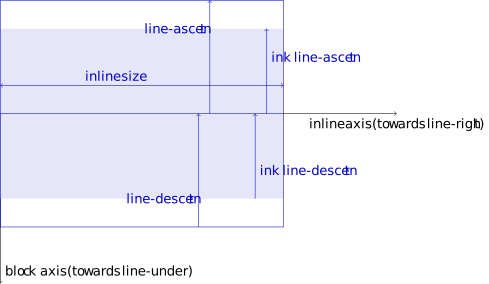
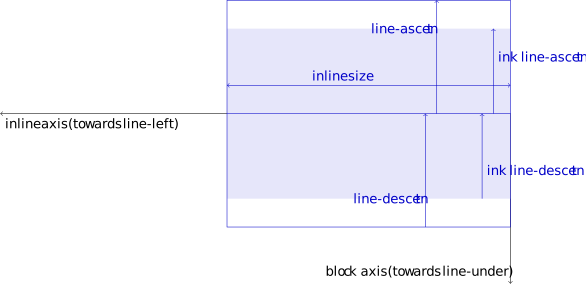
The alphabetic baseline
which typically aligns with the bottom of uppercase Latin
glyphs. The algebraic distance from the
alphabetic baseline to the line-over edge of the box is called the
line-ascent . The algebraic distance from the
line-under edge to the alphabetic baseline of the box
is called the line-descent .
The mathematical baseline , also called
math axis , which typically aligns with the fraction
bar, middle of fences and binary operators. It is shifted away from the alphabetic baseline by AxisHeight towards the line-over.
The ink-over baseline , indicating the line-over
theorical limit of the math content drawn, excluding any
extra space.
If not specified, it is aligned with the line-over edge.
The algebraic distance from the alphabetic baseline to
the ink-over baseline is called the
ink line-ascent .
The ink-under baseline , indicating the line-under
theorical limit of the math content drawn, excluding any
extra space.
If not specified, it is aligned with the line-under edge.
The algebraic distance from the ink-under baseline
to the alphabetic baseline is called the
ink line-descent .
Note
For math layout, it is very important to rely on the ink extent
when positioning text. This is not the case for more complex
notations (e.g. square root).
Although ink-ascent and ink-descent are defined for
all MathML elements they are really only used for the token
elements. In other cases, they just match normal ascent and
descent.
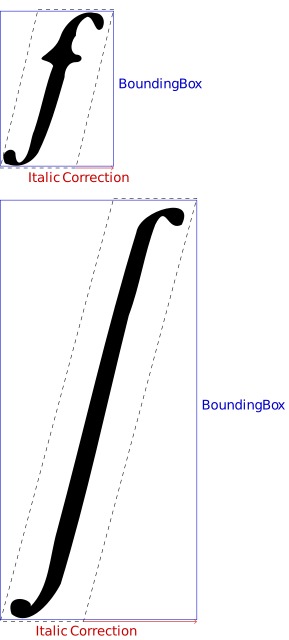
An optional italic correction
which provides a measure of how much the text of a box is
slanted along the inline axis.
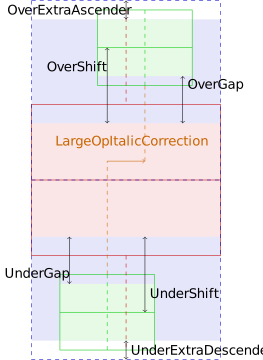
See Figure 2 .
Figure 2 Examples of italic correction for italic f and large integral
If it is requested during calculation of
min-content inline size and
max-content inline size or during layout
then 0 is used as a fallback value.
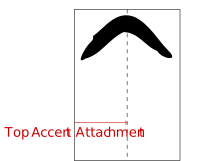
An optional top accent attachment
which provides a reference offset on the
inline axis of a box that should be used when
positioning that box as an accent.
See Figure 3 .
Figure 3 Example of top accent attachment for a circumflex accent
If it is requested during calculation of
min-content inline size
(respectively max-content inline size) then half the
min-content inline size (respectively max-content inline size) is used as a
fallback value.
If it is requested during layout then half the
inline size of the box is used as a fallback value.
Given a MathML box, the following offsets are defined:
The inline offset of a child box
is the offset between the
inline-start edge of
the parent box and the
inline-start edge
of the child box.
The block offset of a child box
is the offset between the block-start edge of
the parent box and the
block-start edge
of the child box.
The line-left offset of a child box
is the offset between the line-left edge of
the parent box and the
line-left edge
of the child box.
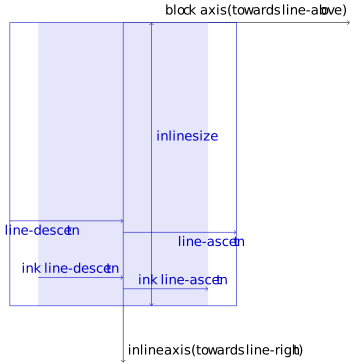
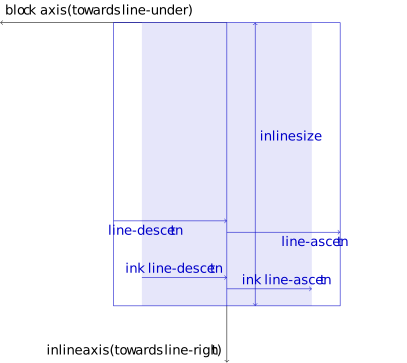
Figure 4 Box model for writing mode horizontal-tb and rtl that may be used in e.g. Arabic math.Figure 5 Box model for writing mode vertical-lr and ltr that may be used in e.g. Mongolian math.Figure 6 Box model for writing mode vertical-rl and ltr that may be used in e.g. Japanese math.
Note
The position of child boxes and graphical items inside a MathML
box are expressed using the inline offset
and block offset.
For convenience, the layout algorithms may describe offsets using
flow-relative directions, line-relative directions or
the alphabetic baseline.
It is always possible to pass from one description to the other
because position of child boxes is always performed after the
metrics of the box and of its child boxes are calculated.
Here are examples of offsets obtained from line-relative
metrics:
Each MathML element has an associated math content box , which is
calculated as described in this chapter's layout algorithms using the following
structure:
The box metrics and offsets of the
padding box
are obtained from the
content box
by taking into account the corresponding
padding
properties as described in CSS.
The box metrics and offsets of the
border box
are obtained from the
padding box
by taking into account the corresponding
border-width
property as described in CSS.
The box metrics and offsets of the
margin box
are obtained from the
border box
by taking into account the corresponding
margin
properties as described in CSS.
During box layout, optional
inline stretch size constraint and
block stretch size constraint parameters may be used on
embellished operators. The former indicates
a target size that a core operator stretched along
the inline axis should cover.
The latter indicates an ink line-ascent and ink line-descent
that a core operator stretched along the block axis
should cover.
Unless specified otherwise, these parameters are ignored during
box layout and child boxes are laid out without
any stretch size constraint.
Define what inline percentages resolve against
Define what block percentages resolve against
An anonymous box is a box without any associated
element in the DOM tree and which is generated for layout purpose
only. The properties of anonymous boxes are inherited from the
enclosing non-anonymous box while non-inherited properties have
their initial value.
An anonymous <mrow> box is
an anonymous box with display equal to
block math and which is laid out as
described in section 3.3.1.2 Layout of <mrow>.
If a MathML element
generates an anonymous <mrow> box then it wraps
its children in an anonymous <mrow> box. I.e.,
its subtree in the visual formatting model is made of an
anonymous <mrow> box
which itself contains the boxes associated to the children of this
MathML element.
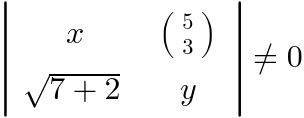
In the following example, the math and
mrow elements are laid out as described in section
3.3.1.2 Layout of <mrow>. In particular, the
<math> element adds proper spacing around its
<mo>≠</mo> child and the
<mrow> element stretches its
<mo>|</mo> children vertically.
The mtd element has
display: table-cell and the
msqrt element displays a radical symbol around its
children. However, they also place their children in a way that
is similar to what is described in section
3.3.1.2 Layout of <mrow>: the
<msqrt> element adds proper spacing around its
<mo>+</mo> child while the
<mtd> element stretches its
<mo> children vertically.
In order to make this possible,
each of these two elements
generates an anonymous <mrow> box.
MathML elements can overlap due to various spacing rules. They
can as well contain extra graphical items
(bars, radical symbol, etc).
A MathML element with computed style
display: block math
or display: inline math generates a new stacking
context. The painting order
of in-flow children of such a MathML element
is exactly the same as block elements. The extra graphical
items are painted after text and background (right after
step 7.2.4 for display: inline math and right after
step 7.2 for display: block math).
Token elements in presentation markup are broadly intended to
represent the smallest units of mathematical notation which carry
meaning. Tokens are roughly analogous to words in text. However,
because of the precise, symbolic nature of mathematical notation, the
various categories and properties of token elements figure
prominently in MathML markup. By contrast, in textual data,
individual words rarely need to be marked up or styled specially.
Note
In practice, most MathML token elements just contain simple text
for variables, numbers, operators etc and don't need sophisticated
layout. However, it can contain text with line breaks or
arbitrary HTML5 phrasing elements.
The
mtext
element is used to represent arbitrary text
that should be rendered as itself. In general, the
<mtext> element is intended to denote
commentary text.
If the element does not have its computed
display property equal to
block math or inline math
then it is laid out according to the CSS specification where
the corresponding value is described.
Otherwise, the layout below is performed.
If the <mtext> element contains only text
content without
forced line break
or
soft wrap opportunity
then, the anonymous child node generated for that text is
laid out as defined in the relevant CSS specification and:
If the text content is made of a single glyph and this glyph
has an entry in the
MathItalicsCorrectionInfo table then the specified
value is used as the italic correction.
If the text content is made of a single glyph and this glyph
has an entry in the MathTopAccentAttachment table
then the specified value is used as the top accent attachment of
the <mtext> element.
The
mi
element represents a symbolic name or
arbitrary text
that should be rendered as an identifier. Identifiers can include
variables, function names, and symbolic constants.
The <mi> element accepts the attributes described
in 2.1.3 Global Attributes as well as the following attribute:
The layout algorithm is the same as the mtext element. The
user agent stylesheet
must contain the following property in order to implement automatic
italic via the text-transform value introduced in 4.2 The math-auto transform:
mi {
  text-transform: math-auto;
}
The
mathvariant
attribute,
if present, must be an
ASCII case-insensitive
match of normal.
In that case, the user agent is expected to treat the attribute as a
presentational hint setting the element's
text-transform
property to none. Otherwise it has no effects.
Note
In [MathML3], the mathvariant attribute was used
to define logical classes of token elements, each class providing
a collection of typographically-related symbolic tokens with
specific meaning within a given mathematical expression.
In MathML Core, this attribute is only used to cancel automatic
italic of the mi element. For other use cases, the proper
Mathematical Alphanumeric Symbols [UNICODE] should be used
instead. See also section C. Mathematical Alphanumeric Symbols.
In the following example, mi is used to render
variables and function names. Note that per
4.2 The math-auto transform the default
style text-transform: math-auto has
no effect on the first <mi> ("cos" is made of three characters),
makes the second <mi> render as math italic ("c" is made of a single
character U+0063 Latin Small Letter C which is
mapped to
U+1D450 Mathematical Italic Small C per the
italic table), has no effect
on the third <mi> (overridden by
mathvariant="normal", setting
text-transform to none) or on the fourth
<mi> (no mapping defined for U+221E Infinity
in the italic table).
The
mn
element represents a "numeric literal" or
other data that should be rendered as a numeric literal. Generally
speaking, a numeric literal is a sequence of digits, perhaps including a
decimal point, representing an unsigned integer or real number.
The <mn> element accepts the attributes described
in 2.1.3 Global Attributes. Its layout algorithm is
the same as the
mtext element.
In the following example, mn is used to
write a decimal number.
<math><mn>3.141592653589793</mn></math>
The
mo
element represents an
operator or anything that should be rendered as an operator.
In general, the notational conventions for mathematical operators
are quite complicated, and therefore MathML provides a relatively
sophisticated mechanism for specifying the rendering behavior of an
<mo> element.
As a consequence, in MathML the
list of things that should "render as an operator" includes a
number of notations that are not mathematical operators in the
ordinary sense. Besides ordinary operators with infix, prefix, or
postfix forms, these include fence characters such as braces,
parentheses, and "absolute value" bars; separators such as comma
and semicolon; and mathematical accents such as a bar or tilde over
a symbol. This chapter uses the term "operator" to refer to
operators in this broad sense.
The <mo> element accepts the attributes described
in 2.1.3 Global Attributes as well as the following
attributes:
In the following example, the mo element
is used for the binary operator +. Default spacing is symmetric
around that operator. A tighter spacing is used if you rely
on the form attribute to force it to be
treated as a prefix operator.
Spacing can also be specified explicitly using the
lspace and
rspace attributes.
Another use case is for big operators such as summation.
When displaystyle is true, such an operator is drawn
larger but one can change that with the largeop attribute.
When displaystyle is false, underscripts are actually
rendered as subscripts but one can change that with the
movablelimits attribute.
Operators are also used for stretchy symbols such as fences,
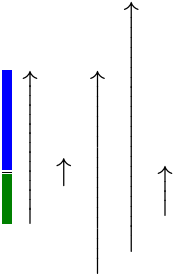
accents, arrows etc. In the following example, the vertical arrow
stretches to the height of the mspace element.
One can override default stretch behavior with the
stretchy attribute e.g. to force an unstretched arrow.
The symmetric attribute allows to indicate whether
the operator
should stretch symmetrically above and below the math axis
(fraction bar).
Finally the minsize and maxsize attributes add
additional constraints over the stretch size.
Note that the default properties of operators are
dictionary-based, as explained in
3.2.4.2 Dictionary-based attributes. For example a binary
operator typically has default symmetric spacing around it while a
fence is generally stretchy by default.
The form
property of an embellished operator is either
infix, prefix or
postfix.
The corresponding form attribute on the
mo element, if present, must be an
ASCII case-insensitive
match to one of these values.
The algorithm for determining the form of an embellished operator is as follows:
Or, if the embellished operator is an in-flow child of a
scripted element, other than the first in-flow
child, then it has form postfix.
Otherwise, the embellished operator has form
infix.
The
stretchy ,
symmetric ,
largeop ,
movablelimits
properties of an embellished operator are
either false or true. In the latter
case, it
is said that the embellished operatorhas the
property.
The corresponding stretchy , symmetric , largeop , movablelimits attributes on the
mo element, if present, must be a
boolean.
The algorithm for determining the properties of
an embellished operator is as follows:
If the corresponding
stretchy,
symmetric,
largeop,
movablelimits,
lspace,
rspace,
maxsize or
minsize
attribute is present and valid
on the core operator, then the
ASCII lowercased value
of this property is used.
Font-relative lengths for
lspace, rspace,
minsize and maxsize rely on the
font style of the core operator, not the one of the
embellished operator.
If the <mo> element does not have its computed
display property equal to
block math or inline math
then it is laid out according to the CSS specification where
the corresponding value is described.
Otherwise, the layout below is performed.
The text of the operator must only be painted if the
visibility of
the <mo> element is visible.
In that case, it must be painted with the
color
of the <mo> element.
Operators are laid out as follows:
If the content of the <mo> element is not
made
of a single character c then fall back to the
layout algorithm of 3.2.1.1 Layout of <mtext>.
The painting of the operator is performed by the
algorithm
to shape a stretchy glyph
stretched to inline dimensionTinline and
at position determined by the previous box metrics.
Otherwise, the stretch axis of the operator is
block. The following steps are performed:
Otherwise set them to
Uascent and
Udescent respectively.
Note
The property Tascent − AxisHeight = Tdescent + AxisHeight means that
an operator stretching exactly
Tascent above the baseline
and Tdescent below the
baseline would actually stretch symmetrically above
and below the math axis.
Sascent and
Sdescent are the minimal
values, that are respectively not less than
Uascent and
Udescent, which satisfy
this property.
Let minsize and maxsize
be the minsize and maxsize properties on the
operator. Percentage values are interpreted relative
to the height of the glyph for c.
Let T =
Tascent +
Tdescent be the target size.
If minsize < 0 then set minsize
to 0.
If maxsize < minsize then
set maxsize to minsize.
With 0 ≤ minsize ≤ maxsize:
If T ≤ 0 then set
Tascent to
minsize / 2 + AxisHeight and
then set Tdescent
to minsize −
Tascent.
Otherwise, if
0 < T < minsize
then set Tascent to
max(0, (Tascent − AxisHeight) × minsize / T + AxisHeight) and
Tdescent
to minsize −
Tascent.
Otherwise, if maxsize < T
then set Tascent to
max(0, (Tascent − AxisHeight) × maxsize / T + AxisHeight) and
Tdescent
to maxsize −
Tascent.
Note
The default maxsize is value ∞ is
interpreted above as being larger than any other size,
i.e.
minsize ≤ maxsize is always true while
maxsize < minsize and
maxsize < T are always false.
Note
This step ensures that the condition minsize ≤ T ≤ maxsize holds.
Additionnally, if the target values correspond to symmetric stretching with respect to the math axis then property
Tascent − AxisHeight = Tdescent + AxisHeight is preserved.
The inline size,
ink line-ascent,
ink line-descent,
line-ascent and
line-descent
of the math content
are obtained by the algorithm to
shape a stretchy glyph
to block dimensionTascent +
Tdescent.
The inline size of the math content is the width of
the stretchy glyph. The stretchy glyph is shifted
towards the line-under by a value Δ so that its
center aligns with the center of the target:
the ink ascent of the math content is
the ascent of the stretchy glyph − Δ
and the ink descent of the math content is
the descent of the stretchy glyph + Δ.
These centers have coordinates "½(ascent − descent)"
so Δ = [(ascent of stretchy glyph − descent of stretchy glyph) − (Tascent − Tdescent)] / 2.
The painting of the operator is performed by the
algorithm to shape a stretchy glyph
stretched to block dimensionTascent +
Tdescent
and at position determined by the previous box metrics
shifted by Δ towards the line-over.
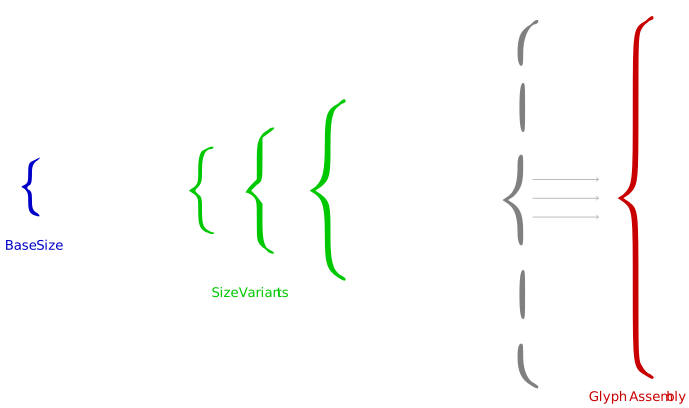
Figure 7 Base size, size variants and glyph assembly
for
the left brace
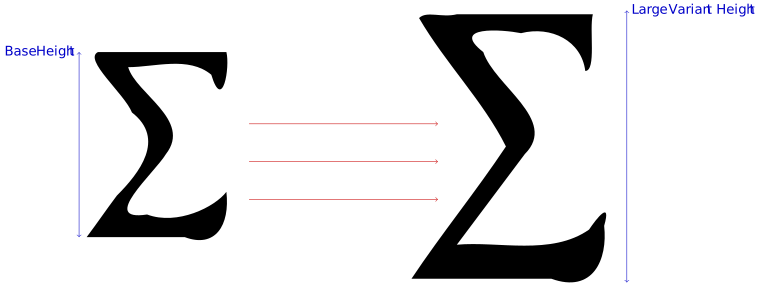
If the operator has the largeop property and
if math-style on
the <mo> element is normal,
then:
Use the
MathVariants
table to try and find a glyph of height at least
DisplayOperatorMinHeight.
If none is found, fall back to the
largest non-base glyph. If none is found, fall back to
the layout algorithm of 3.2.1.1 Layout of <mtext>.
If the algorithm to shape a stretchy glyph has been
used for one of the step above, then the italic correction
of the math content is set to the value returned by that algorithm.
The
mspace
empty element represents a blank space of any
desired size, as set by its attributes.
The <mspace> element accepts the attributes described
in 2.1.3 Global Attributes as well as the following
attributes:
The
width ,
height ,
depth , if present, must
have a value that is a valid <length-percentage>.
If the width
attribute is present, valid and not a percentage then
that attribute is used as a
presentational hint
setting the element's
width
property to the corresponding value.
If the height
attribute is absent, invalid or a percentage then the requested
line-ascent is 0.
Otherwise the requested line-ascent is the resolved
value of the height attribute, clamping
negative values to 0.
If both the height and depth attributes
are present, valid and not a percentage then they are used as a
presentational hint
setting the element's
height
property to the concatenation of the strings
"calc(", the height attribute value,
" + ", the depth attribute value,
and ")".
If only one of these attributes is
present, valid and not a percentage then it is treated as a
presentational hint
setting the element's
height
property to the corresponding value.
In the following example, mspace is used to
force spacing within the formula (a 1px blue border is
added to easily visualize the space):
If the <mspace> element does not have its
computed
display property equal to
block math or inline math
then it is laid out according to the CSS specification where
the corresponding value is described.
Otherwise,
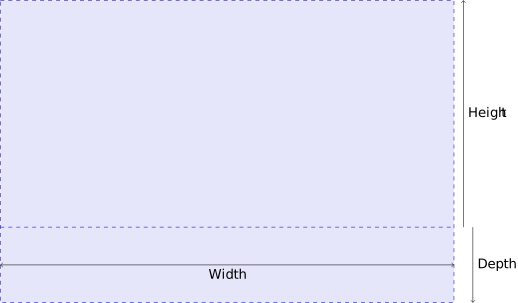
the <mspace> element is laid out as shown on
Figure 9 .
The min-content inline size,
max-content inline size and inline size of the math
content are equal to the resolved value of the
width property.
The block size of the math content is equal to the resolved
value of the height property.
The line-ascent of the math content is equal to the
requested line-ascent determined above.
The terminology height/depth comes from [MATHML3], itself inspired
from [TEXBOOK].
A number of MathML presentation elements are "space-like" in the
sense that they typically render as whitespace, and do not affect
the mathematical meaning of the expressions in which they appear.
As a consequence, these elements often function in somewhat
exceptional ways in other MathML expressions.
Note that an mphantom is not
automatically defined to be space-like, unless its content is
space-like. This is because operator spacing is affected by
whether adjacent elements are space-like.
Since the <mphantom> element is
primarily intended as an aid in aligning expressions, operators
adjacent to an <mphantom> should behave
as if they were adjacent to the contents of the
<mphantom>, rather than to an equivalently
sized area of whitespace.
ms
element is used to represent
"string literals" in expressions meant to be interpreted by computer
algebra systems or other systems containing "programming languages".
The <ms> element accepts the attributes described
in 2.1.3 Global Attributes. Its layout algorithm is
the same as the mtext element.
In the following example, ms is used to
write a literal string of characters:
In MathML3, it was possible to use the lquote and
rquote attributes to respectively specify the strings
to use as opening and closing quotes. These are no longer supported
and the quotes must instead be specified as part of the text of the
<ms> element. One can add CSS rules to legacy
documents in order to preserve visual rendering. For example,
in left-to-right direction:
Besides tokens there are several families of MathML presentation
elements. One family of elements deals with various "scripting"
notations, such as subscript and superscript. Another family is
concerned with matrices and tables. The remainder of the elements,
discussed in this section, describe other basic notations such as
fractions and radicals, or deal with general functions such as
setting style properties and error handling.
The
mrow
element is used to group together any number of sub-expressions, usually
consisting of one or more <mo> elements acting as
"operators" on one or more other expressions that are their "operands".
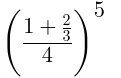
In the following example, mrow is used to
group a sum "1 + 2/3" as a fraction numerator (first child
of mfrac) and to construct a fenced expression
(first child of msup) that is raised to the power of 5.
Note that mrow alone does not add visual fences
around its grouped content, one has to explicitly specify them
using the mo element.
Within the mrow elements, one can see that
vertical alignment of children (according to the
alphabetic baseline or the mathematical baseline)
is properly performed, fences are vertically stretched and
spacing around the binary + operator automatically calculated.
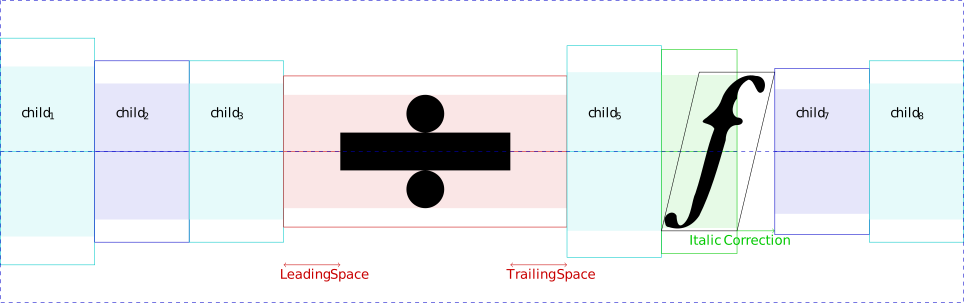
The <mrow> element accepts the attributes described
in 2.1.3 Global Attributes. An <mrow>
element with in-flow children
child1, child2, …, childN
is laid out as shown on Figure 10 . The child boxes
are put in a row one after the other with all their
alphabetic baselines
aligned.
Because the box model ensures alignment of alphabetic baselines,
fraction bars or symmetric stretchy operators
will also be aligned along the math axis in the typical case when
AxisHeight is the same for all in-flow children.
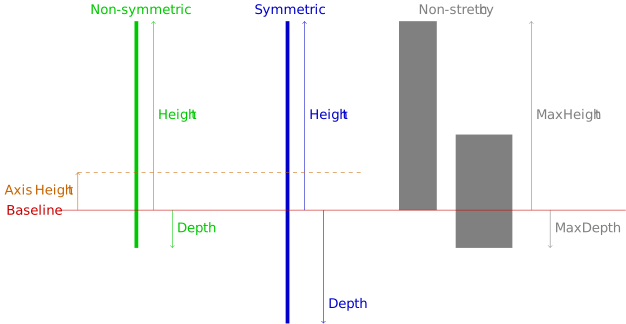
Figure 11 Symmetric and non-symmetric stretching of
operators along the block axis
The algorithm for stretching operators along the block axis
consists in the following steps:
Perform layout without any stretch size constraint on
all the items of LNotToStretch.
If LToStretch is empty then stop.
If LNotToStretch is empty, perform
layout with block stretch size constraint(0, 0) for
all the items of LToStretch.
Calculate the unconstrained target sizes
Uascent
and Udescent as respectively the maximum
ink ascent and maximum ink descent of the margin boxes of
in-flow children that
have been laid out in the previous step.
If the box is not an anonymous <mrow> box
and the associated element does not have its computed
display property equal to
block math or inline math
then it is laid out according to the CSS specification where
the corresponding value is described.
Otherwise, the layout below is performed.
Large operators may have nonzero italic correction but that one
is used when attaching scripts.
More generally, all embellished operators
are treated as non-slanted since the spacing around them is
calculated as specified by lspace and
rspace.
If the child is slanted then
set previous-italic-correction to
its italic correction. Otherwise set it to 0.
If the child is an embellished operator
and add-space is true then
increment inline-offset by
its rspace property.
The italic correction of the math content is set to the italic
correction of the last in-flow child, which is
the final value of previous-italic-correction.
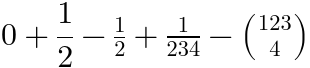
The
mfrac
element is used for fractions. It can also be used to mark up
fraction-like objects such as binomial coefficients and Legendre symbols.
If the <mfrac> element does not have its computed
display property equal to block math
or inline math
then it is laid out according to the CSS specification where
the corresponding value is described.
Otherwise, the layout below is performed.
The <mfrac> element accepts the attributes described
in 2.1.3 Global Attributes as well as the
following attribute:
The
linethickness
attribute indicates the fraction line thickness
to use for the fraction bar.
If present, it must
have a value that is a valid <length-percentage>.
If the attribute is absent or has an invalid value,
FractionRuleThickness is used as the default
value. A percentage is interpreted relative to that default value.
A negative value is interpreted as 0.
The following example contains four fractions
with different linethickness values. The bars are always
aligned with the middle of plus and minus signs.
The numerator and denominator are horizontally centered.
The fractions that are not in displaystyle
use smaller gaps and font-size.
The <mfrac> element sets
displaystyle to false,
or if it was already false increments
scriptlevel by 1, within its children.
It sets math-shift to
compact within its second child.
To avoid visual confusion between the fraction bar and another
adjacent items (e.g. minus sign or another fraction's bar),
a default 1-pixel space is added around the element.
The user agent stylesheet
must contain the following rules:
If the <mfrac> element
has less or more than two in-flow children, its layout algorithm
is the same as the mrow element.
Otherwise, the first in-flow child is called
numerator , the second in-flow child is called
denominator and the layout algorithm is explained below.
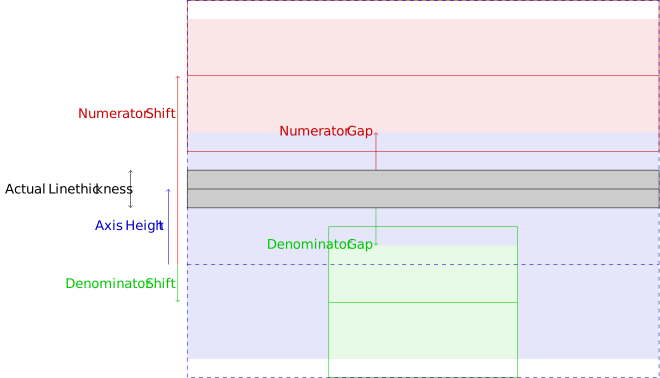
If the fraction line thickness is nonzero, the
<mfrac>
element is laid out as shown on Figure 12 .
The fraction bar must only be painted if the
visibility of
the <mfrac> element is visible.
In that case, the fraction bar must be painted with the
color
of the <mfrac> element.
The math content box is placed within the
content box so that their block-start edges
are aligned and the middles of these edges are at the same
position.
The math content box is placed within the
content box so that their block-start edges
are aligned and the middles of these edges are at the same
position.
The radical elements construct an expression with a
root symbol √ with a line over the content.
The msqrt element is
used for square roots, while the mroot element is
used to draw radicals with indices, e.g. a cube root.
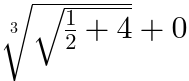
The following example contains a square root
written with msqrt and a cube root written
with mroot.
Note that msqrt has several children and the
square root applies to all of them.
mroot has exactly two children: it is a
root of index the second child (the number 3), applied to the
first child (the square root).
Also note these elements only change the font-size within the
mroot index, but it is scaled down more than
within the numerator and denumerator of the fraction.
The <msqrt> and <mroot>
elements sets math-shift to
compact.
The <mroot> element
increments scriptlevel by 2, and sets displaystyle to "false" in all
but its first child.
The user agent stylesheet
must contain the following rule in order to implement that behavior:
If the <msqrt> or <mroot>
element do not have their computed
display property equal to block math
or inline math
then they are laid out according to the CSS specification where
the corresponding value is described.
Otherwise, the layout below is performed.
If the <mroot> has less or more than two
in-flow children,
its layout algorithm
is the same as the mrow element.
Otherwise, the first in-flow child is called
mroot base and
the second in-flow child is called
mroot index
and its layout algorithm is explained below.
Note
In practice, an <mroot> element has two children
that are in-flow. Hence the CSS rules basically perform
scriptlevel and displaystyle changes for the index.
The radical symbol must only be painted if the
visibility of
the <msqrt> or <mroot>
element is visible.
In that case, the radical symbol must be painted with the
color
of that element.
The radical glyph is the glyph obtained for the
character U+221A SQUARE ROOT.
The radical target size for the stretchy radical glyph is
the sum of RadicalRuleThickness,
radical gap and the ink height of the base.
The box metrics of the radical glyph
and painting of the surd are given by the algorithm to
shape a stretchy glyph to block dimension the
target size for the radical glyph.
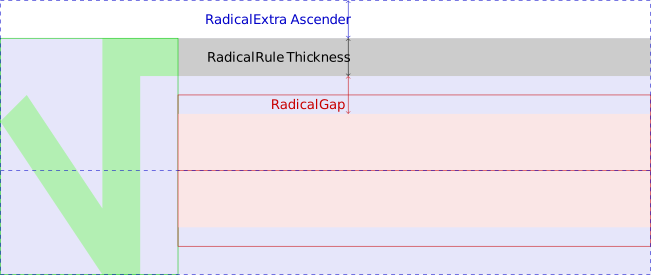
The <msqrt> element is laid out as shown on
Figure 14 .
The <mroot> element is laid out as shown on
Figure 15 .
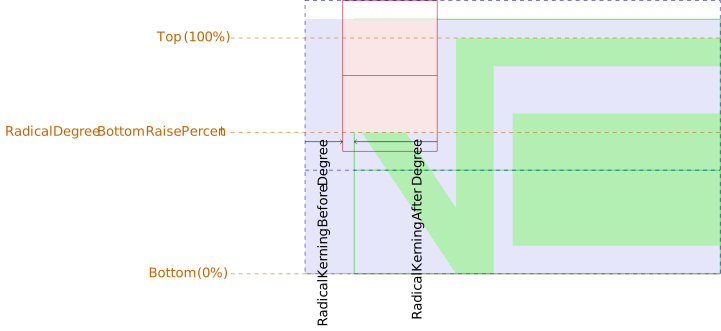
The mroot index is first ignored and the mroot base
and
radical glyph are laid out as
shown on figure Figure 14
using the same algorithm as in
3.3.3.2 Square root
in order to produce a margin box B (represented in green).
In general, the kerning before the root index is positive while
the kerning after it is negative, which means that the root
element will have some inline-start space and that the root index
will overlap the surd.
Historically, the
mstyle
element was introduced to make
style changes that affect the rendering of its contents.
The <mstyle> element accepts the attributes described in
2.1.3 Global Attributes. Its layout algorithm is the
same as the mrow element.
Note
<mstyle> is implemented for compatibility with full MathML. Authors whose only target is MathML Core are encouraged to use CSS for styling.
In the following example,
mstyle is used to set the scriptlevel
and displaystyle.
Observe this is respectively affecting the
font-size and placement of subscripts of their
descendants. In MathML Core, one could just have used
mrow elements instead.
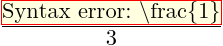
The
merror
element displays its contents as an
”error message”. The intent of this element is to provide a standard way
for programs that generate MathML from other input to report syntax errors
in their input.
In the following example,
merror is used to indicate a parsing error
for some LaTeX-like input:
The <merror> element accepts the attributes described in
2.1.3 Global Attributes. Its layout algorithm is the
same as the mrow element.
The user agent stylesheet
must contain the following rule in order to visually highlight the error
message:
The
mpadded
element renders the same as its in-flow child content, but with the
size and relative positioning point of its
content modified according to <mpadded>’s attributes.
The <mpadded> element accepts the attributes described
in 2.1.3 Global Attributes as well as the following
attributes:
The
width ,
height ,
depth ,
lspace
and
voffset
if present, must
have a value that is a valid <length-percentage>.
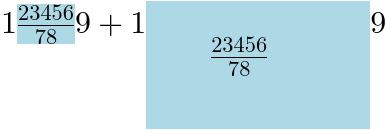
In the following example, mpadded is used to
tweak spacing around a fraction
(a blue background is used to visualize it).
Without attributes, it behaves like an mrow but
the attributes allow to specify the size of the box
(width, height, depth) and position of the fraction within that
box (lspace and voffset).
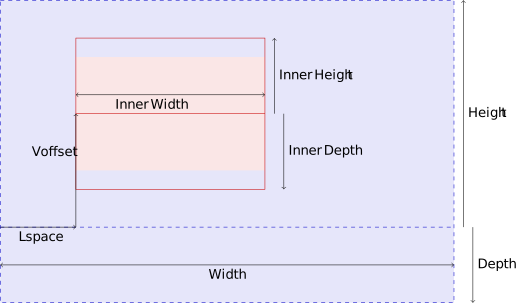
The requested <mpadded>
parameters are determined as follows:
The requested width
is the resolved value of the
width property.
If the width
attribute is present, valid and not a percentage then
that attribute is used as a
presentational hint
setting the element's
width
property to the corresponding value.
If the height
attribute is absent, invalid or a percentage then the requested
height is the inner line-ascent.
Otherwise the requested height is the resolved
value of the height attribute, clamping
negative values to 0.
If the depth
attribute is absent, invalid or a percentage then the requested
depth is the inner line-ascent.
Otherwise the requested depth is the resolved
value of the depth attribute, clamping
negative values to 0.
If the lspace
attribute is absent, invalid or a percentage then the requested
lspace is 0. Otherwise the requested lspace is the resolved
value of the lspace attribute, clamping
negative values to 0.
If the voffset
attribute is absent, invalid or a percentage then the requested
voffset is 0. Otherwise the requested voffset is the resolved
value of the voffset attribute.
Note
Negative voffset values are not clamped to
0.
If the <mpadded> element does not have its
computed
display property equal to block math
or inline math
then it is laid out according to the CSS specification where
the corresponding value is described.
Otherwise, it is laid out as shown on
Figure 16 .
Historically, the
mphantom
element was introduced to render
its content invisibly, but with the same metrics size and other dimensions,
including alphabetic baseline position that its contents would have if they were
rendered normally.
In the following example,
mphantom is used to ensure alignment of
corresponding parts of the numerator and denominator of a
fraction:
The <mphantom> element accepts the attributes described
in 2.1.3 Global Attributes. Its layout algorithm is
the same as the mrow element.
The user agent stylesheet
must contain the following rule in order to hide the content:
mphantom {
  visibility: hidden;
}
Note
<mphantom> is implemented for compatibility with full MathML. Authors whose only target is MathML Core are encouraged to use CSS for styling.
The elements described in this section position one or more scripts
around a base. Attaching various kinds of scripts and embellishments
to symbols is a very common notational device in mathematics. For
purely visual layout, a single general-purpose element could suffice
for positioning scripts and embellishments in any of the traditional
script locations around a given base. However, in order to capture
the abstract structure of common notation better, MathML provides
several more specialized scripting elements.
In addition to sub-/superscript elements, MathML has overscript and
underscript elements that place scripts above and below the base.
These elements can be used to place limits on large operators, or for
placing accents and lines above or below the base.
The msub ,
msup and
msubsup elements are used to attach
subscript and superscript to a MathML expression.
They accept the attributes described in
2.1.3 Global Attributes.
The following example shows basic use of subscripts and
superscripts. The font-size is automatically scaled down
within the scripts.
If the
<msub>,
<msup> or
<msubsup> elements do not have their
computed
display property equal to block math
or inline math
then they are laid out according to the CSS specification where
the corresponding value is described.
Otherwise, the layout below is performed.
If the <msub> element
has less or more than two in-flow children, its layout algorithm
is the same as the mrow element.
Otherwise, the first in-flow child is called the
msub base , the second in-flow child is called the
msub subscript and the layout algorithm is explained
in 3.4.1.2 Base with subscript.
If the <msup> element
has less or more than two in-flow children, its layout algorithm
is the same as the mrow element.
Otherwise, the first in-flow child is called the
msup base , the second in-flow child is called the
msup superscript and the layout algorithm is explained
in 3.4.1.3 Base with superscript.
If the <msubsup> element
has less or more than three in-flow children, its layout algorithm
is the same as the mrow element.
Otherwise, the first in-flow child is called the
msubsup base , the second in-flow child
is called the msubsup subscript ,
its third in-flow child is called
the msubsup superscript and the layout algorithm is explained
in 3.4.1.4 Base with subscript and superscript.
If there is an
inline stretch size constraint
or a block stretch size constraint
then the msub base is also laid out with the same stretch size
constraint and otherwise it is laid out without any stretch
size constraint. The scripts are always laid out without
any stretch size constraint.
If there is an
inline stretch size constraint
or a block stretch size constraint
then the msup base is also laid out with the same stretch size
constraint and otherwise it is laid out without any stretch
size constraint. The scripts are always laid out without
any stretch size constraint.
If there is an
inline stretch size constraint
or a block stretch size constraint
then the msubsup base is also laid out with the same stretch size
constraint and otherwise it is laid out without any stretch
size constraint. The scripts are always laid out without
any stretch size constraint.
If there is an
inline stretch size constraint
or a block stretch size constraint
then the msubsup base is also laid out with the same stretch size
constraint and otherwise it is laid out without any stretch
size constraint. The scripts are always laid out without
any stretch size constraint.
Similarly, the <mover> element
(respectively <munder> element) accepts the
attribute described in 2.1.3 Global Attributes
as well as the accent
attribute (respectively the
accentunder attribute).
accent ,
accentunder
attributes, if present, must have values that are booleans.
If these attributes are absent or invalid, they are treated as
equal to false.
User agents must implement them as described in
3.4.4 Displaystyle, scriptlevel and math-shift in scripts.
The following example shows basic use of under- and overscripts.
The font-size is automatically scaled down within the scripts,
unless they are meant to be accents.
If the
<munder>,
<mover> or
<munderover> elements do not have their
computed
display property equal to block math
or inline math
then they are laid out according to the CSS specification where
the corresponding value is described.
Otherwise, the layout below is performed.
If the <munder> element
has less or more than two in-flow children, its layout algorithm
is the same as the mrow element.
Otherwise, the first in-flow child is called the
munder base and the second in-flow child is called the
munder underscript .
If the <mover> element
has less or more than two in-flow children, its layout algorithm
is the same as the mrow element.
Otherwise, the first in-flow child is called the
mover base and the second in-flow child is called the
mover overscript .
If the <munderover> element
has less or more than three in-flow children, its layout algorithm
is the same as the mrow element.
Otherwise, the first in-flow child is called the
munderover base , the second in-flow child
is called the munderover underscript
and its third in-flow child is called
the munderover overscript .
Split the list of in-flow children that have not been
laid out yet into a first list
LToStretch containing
embellished operators with
a stretchy property and inline stretch axis;
and a second list LNotToStretch.
Perform layout without any stretch size constraint on
all the items of LNotToStretch.
If LToStretch is empty then stop.
If LNotToStretch is empty, perform
layout with inline stretch size constraint 0 for
all the items of LToStretch.
Calculate the target size T to
the maximum inline size of the
margin boxes of child boxes that have been laid out in the
previous step.
The math content box is placed within the
content box so that their block-start edges
are aligned and the middles of these edges are at the same
position.
For accent overscripts and bases with line-ascents that are at
most
AccentBaseHeight, the rule from
[OPEN-FONT-FORMAT] [TEXBOOK] is actually to align the
alphabetic baselines of the overscripts and of the bases. This assumes that
accent glyphs are designed in such a way that their ink bottoms
are
more or less AccentBaseHeight above their alphabetic baselines. Hence,
the previous rule will guarantee that all the overscript bottoms
are aligned while still avoiding collision with the bases.
However, MathML can have arbitrary accent overscripts, so
a more general and simpler rule is provided above: Ensure
that the bottom of overscript is at least
AccentBaseHeight above the alphabetic baseline of the base.
The line-ascent of the math content is the maximum between:
The math content box is placed within the
content box so that their block-start edges
are aligned and the middles of these edges are at the same
position.
The math content box is placed within the
content box so that their block-start edges
are aligned and the middles of these edges are at the same
position.
Note
When the underscript (respectively overscript) is an empty
box, the base and overscript (respectively underscript) are laid
out similarly to
3.4.2.4 Base with overscript
(respectively 3.4.2.3 Base with underscript)
but the position of the empty underscript (respectively
overscript) may add extra space.
In order to keep the algorithm simple, no attempt is made to
handle empty scripts in a special way.
Presubscripts and tensor notations are represented by
the mmultiscripts element.
The mprescripts element is
used as a separator between the postscripts and prescripts.
These two elements accept the attributes described in
2.1.3 Global Attributes.
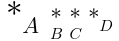
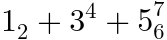
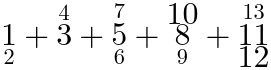
The following example shows basic use of prescripts
and postscripts, involving a mprescripts.
Empty mrow elements are used at positions where
no scripts are rendered.
The font-size is automatically scaled down within the scripts.
If the
<mmultiscripts> or
<mprescripts>
elements do not have their
computed
display property equal to block math
or inline math
then they are laid out according to the CSS specification where
the corresponding value is described.
Otherwise, the layout below is performed.
The
<mprescripts>
element is laid out as an mrow
element.
A valid <mmultiscripts> element contains the
following in-flow children:
A first in-flow child, called the
mmultiscripts base , that is not an
mprescripts element.
Followed by an even number of in-flow children called
mmultiscripts postscripts , none of them being a
mprescripts element.
These scripts form a (possibly empty) list
subscript, superscript, subscript, superscript,
subscript, superscript, etc.
Each consecutive couple of children subscript, superscript
is called a
subscript/superscript pair .
Optionally followed by
an mprescripts element and
an even number of in-flow children called
mmultiscripts prescripts , none of them being a
mprescripts element.
These scripts form a (possibly empty) list of
subscript/superscript pair.
If an <mmultiscripts> element is not valid then
it is laid out the same as the
mrow element.
Otherwise the layout algorithm is performed as in
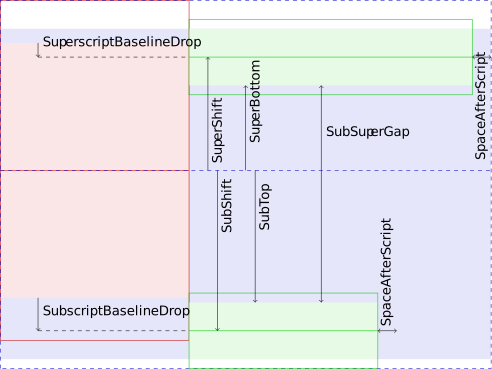
"https://www.w3.org/TR/mathml-