Abstract
The Gamepad specification defines a low-level interface that represents gamepad devices.
Status of This Document
This section describes the status of this document at the time of its publication. A list of current W3C publications and the latest revision of this technical report can be found in the W3C standards and drafts index.
This is a work in progress.
This document was published by the Web Applications Working Group as a Working Draft using the Recommendation track.
Publication as a Working Draft does not imply endorsement by W3C and its Members.
This is a draft document and may be updated, replaced, or obsoleted by other documents at any time. It is inappropriate to cite this document as other than a work in progress.
This document was produced by a group operating under the W3C Patent Policy. W3C maintains a public list of any patent disclosures made in connection with the deliverables of the group; that page also includes instructions for disclosing a patent. An individual who has actual knowledge of a patent that the individual believes contains Essential Claim(s) must disclose the information in accordance with section 6 of the W3C Patent Policy.
This document is governed by the 03 November 2023 W3C Process Document.
Table of Contents
- Abstract
- Status of This Document
- 1. Introduction
- 2. Scope
- 3. Model
- 4.
GamepadInterface - 5.
GamepadButtonInterface - 6.
GamepadTouchInterface - 7.
GamepadMappingTypeEnum - 8.
GamepadHapticActuatorInterface - 9.
GamepadHapticsResultEnum - 10.
GamepadHapticEffectTypeEnum - 11.
GamepadEffectParametersDictionary - 12.
Extensions to the
NavigatorInterface - 13.
GamepadEventInterface - 14. Remapping
- 15. Usage Examples
- 16. The gamepadconnected event
- 17. The gamepaddisconnected event
- 18. Other events
- 19.
Extensions to the
WindowEventHandlersInterface Mixin - 20. Integration with Permissions Policy
- 21. Conformance
- A. Acknowledgements
- B. References
This section is non-normative.
Some user agents have connected gamepad devices. These devices are desirable and suited to input for gaming applications, and for "10 foot" user interfaces (presentations, media viewers).
Currently, the only way for a gamepad to be used as input would be to emulate mouse or keyboard events, however this would lose information and require additional software outside of the user agent to accomplish emulation.
Meanwhile, native applications are capable of accessing these devices via system APIs.
The Gamepad API provides a solution to this problem by specifying interfaces that allow web applications to directly act on gamepad data.
Interfacing with external devices designed to control games has the potential to become large and intractable if approached in full generality. In this specification we explicitly choose to narrow scope to provide a useful subset of functionality that can be widely implemented and broadly useful.
Specifically, we choose to only support the functionality required to support gamepads. Support for gamepads requires two input types: buttons and axes. Both buttons and axes are reported as analog values, buttons ranging from [0 .. 1], and axes ranging from [-1 .. 1].
While the primary goal is support for gamepad devices, supporting these two types of analog inputs allows support for other similar devices common to current gaming systems including joysticks, driving wheels, pedals, and accelerometers. As such, the name "gamepad" is exemplary rather than trying to be a generic name for the entire set of devices addressed by this specification.
We specifically exclude support for more complex devices that may also be used in some gaming contexts, including those that that do motion sensing, depth sensing, video analysis, gesture recognition, and so on.
A gamepad is a collection of input controls and output controls. An input control has a collection of input values that may update over time. Input controls include the buttons, triggers, joysticks, thumbsticks, and touch surfaces of the gamepad. An output control is a feature that changes the behavior of the gamepad to provide feedback to the user interacting with the gamepad. Output controls include the haptic actuators of the gamepad. A gamepad is available if the user agent can read the current state of its input controls. A gamepad that is not available is unavailable . The input controls and output controls for a gamepad cannot change while the gamepad is available.
The user agent is responsible for:
- Enumerating available gamepads,
- Detecting when gamepads become available or unavailable,
- Detecting when input controls have updated input values,
- Reading the current state of input values, and
- Commanding the gamepad to use its output controls.
A gamepad has a gamepad identifier string , a human-readable string that identifies the brand or style of gamepad. The content is decided by the user agent.
A gamepad may have an input control layout that describes the position, orientation and type of each input control on the gamepad. The user agent is responsible for recognizing when a gamepad corresponds with a standard layout , meaning the gamepad has an input control layout that enables it to be used interchangeably with other gamepads that correspond with the same standard layout. The user agent SHOULD consider a layout to correspond with a standard layout if its input controls have approximately the same relative positions and orientations as input controls described in the standard layout.
The user agent typically cannot directly inspect the input control layout for a gamepad and MAY use heuristics to decide the layout. The user agent SHOULD consider the device identifiers when deciding whether a gamepad corresponds with a standard layout. If the system assigns a label to each input control and the labels imply a particular layout then the user agent SHOULD consider the gamepad to have that layout. When there is a standard model and an accessible model with the same input controls, the user agent SHOULD consider the accessible model to have the same input control layout as the standard model.
Note
An accessible gamepad model is a gamepad where the manufacturer's intent is to provide a swap-in replacement for a gamepad with a standard layout. For example, Xbox Adaptive Controller and PlayStation Access Controller are accessible gamepad models. Xbox Wireless Controller and DualSense are the corresponding standard models.
Each input control has one or more associated input values, which are numerical values that represent the current state of the control. Input values can update at any time. The user agent is responsible for detecting when input values have updated and SHOULD try to minimize the delay between the update and when the updated values are read.
Reading an input value returns its logical value , an unscaled numerical representation of the current state. An input value also has a logical minimum and logical maximum which define the minimum and maximum in-bounds logical values.
An input value may have an associated HID usage identifier , a 32-bit value that identifies the type of data represented by the input value. A HID usage does not precisely describe the input control layout, but by convention many gamepads with similar layouts use similar usages. The user agent SHOULD rely on conventions around HID usage identifiers when deciding the input control layout.
A gamepad may have axis inputs. An axis is an input value that represents the current displacement of the control from a reference position.
A gamepad has an axis list which is a list containing all the axis inputs for the gamepad in some order determined by the user agent.
An input control may be designed to automatically return an axis to a center position when the user stops interacting with the input control. If so, the axis has a preferred axis state . An axis with a preferred axis state may also have an additional input value, the center position value , which is the logical value when the axis is centered.
A gamepad may have button inputs. A button is an input control that can be pressed to activate. A gamepad has a button list which is a list containing all the button inputs for the gamepad in some order determined by the user agent.
An input control may be designed to automatically return a button to an unpressed state when the user stops interacting with the input control. If so, the button has a preferred button state .
A button may have a digital switch to indicate when the
button is activated. If so, the button has an additional
input value, the digital button value , that is true
when the button is activated and false otherwise.
A button may have an analog sensor enabling the button to report the degree to which the button is activated. If so, the button has:
- An analog button value , a logical value that represents the degree of activation,
- A logical minimum, the logical value representing no activation, and
- A logical maximum, the logical value representing full activation.
A button may be capable of detecting touch. If so, the button
has an additional input value, the button touch value ,
that is true when the button is touched and false otherwise.
A gamepad may have touch surfaces. A touch surface is an input control that provides 2D position data representing points of contact. A gamepad has a touch surface list which is a list containing the touch surfaces for the gamepad. The list is ordered such that touch surfaces closer to the left side of the gamepad appear closer to the start of the list.
A touch surface has an active touch point list input value, a list of zero or more touch points representing the points of contact currently detected by the sensor. A touch point represents a single point of contact at a single point in time. A touch point has a touch x coordinate and a touch y coordinate representing the position in the touch surface's coordinate system. If a touch surface is on the top, bottom, front, or back side of the gamepad then the touch x coordinate is measured along the left-right axis, otherwise it is measured along the top-bottom axis. The touch y coordinate is measured along the perpendicular axis.
If a touch surface is on the left or right side of a gamepad then neither of its dimensions will align with the horizontal axis.
A touch surface may have surface dimension input values. The surface width and surface height input values are the dimensions of the touch surface in the same units as the touch x coordinate and touch y coordinate. A touch surface has both dimension values or neither value.
A touch point may be a new contact point or a continuation of an
earlier contact. A touch point is part of an existing active
touch point if the user agent identifies that it is a
continuation of a touch point represented by an earlier
GamepadTouch. The active touch point id for a touch point that is part of an existing active touch point is the
touchId of the earlier GamepadTouch.
A gamepad may have haptic actuators. A haptic actuator is an output control capable of moving the gamepad in a way that can be felt by the user. A haptic actuator can be used to generate a haptic effect that provides feedback to the user. Vibrations from multiple actuators are combined to generate more complex effects. The user agent is responsible for commanding haptic actuators to play and stop haptic effects on available gamepads.
A gamepad may have a vibration actuator which is a haptic actuator capable of playing a haptic effect to vibrate the whole gamepad.
A haptic actuator has a list of supported effect
types containing one or more GamepadHapticEffectType
values, which cannot change while the gamepad is available.
This interface defines an individual gamepad device.
[Exposed=Window]
interface Gamepad {
  readonly attribute DOMString id;
  readonly attribute long index;
  readonly attribute boolean connected;
  readonly attribute DOMHighResTimeStamp timestamp;
  readonly attribute GamepadMappingType mapping;
  readonly attribute FrozenArray<double> axes;
  readonly attribute FrozenArray<GamepadButton> buttons;
  readonly attribute FrozenArray<GamepadTouch> touches;
  [SameObject] readonly attribute GamepadHapticActuator vibrationActuator;
};
The algorithms used to communicate with the system typically complete asynchronously, queuing work on the gamepad task source .
Instances of Gamepad are created with the internal slots described
in the following table:
| Internal slot | Initial value | Description (non-normative) |
|---|---|---|
| [[connected]] |
false
|
A flag indicating that the device is connected to the system |
| [[timestamp]] | undefined |
The last time data for this Gamepad was updated
|
| [[axes]] | An empty sequence |
A sequence of double values representing the current state
of axes exposed by this device
|
| [[buttons]] | An empty sequence |
A sequence of GamepadButton objects representing the
current state of buttons exposed by this device
|
| [[exposed]] |
false
|
A flag indicating that the Gamepad object has been exposed to
script
|
| [[axisMapping]] | An empty ordered map |
Mapping from unmapped axis index to an index in the
axes array
|
| [[axisMinimums]] | An empty list | A list containing the minimum logical value for each axis |
| [[axisMaximums]] | An empty list | A list containing the maximum logical value for each axis |
| [[buttonMapping]] | An empty ordered map |
Mapping from unmapped button index to an index in the
buttons array
|
| [[buttonMinimums]] | An empty list | A list containing the minimum logical value for each button. |
| [[buttonMaximums]] | An empty list | A list containing the maximum logical value for each button |
| [[touches]] | An empty list | Holds the list of user-generated touches, if any. If the gamepad does not support touch surfaces, then the list will remain empty. |
| [[nextTouchId]] | 0 |
touchId value to use for the next incoming touch.
|
| [[vibrationActuator]] | undefined |
A GamepadHapticActuator object capable of generating a haptic
effect that vibrates the entire gamepad
|
-
idattribute -
An identification string for the gamepad. This string identifies the brand or style of connected gamepad device.
The exact format of the
idstring is left unspecified. It is RECOMMENDED that the user agent select a string that identifies the product without uniquely identifying the device. For example, a USB gamepad may be identified by itsidVendorandidProductvalues. Unique identifiers like serial numbers or Bluetooth device addresses MUST NOT be included in theidstring. -
indexattribute -
The index of the gamepad in the
Navigator. When multiple gamepads are connected to a user agent, indices MUST be assigned on a first-come, first-serve basis, starting at zero. If a gamepad is disconnected, previously assigned indices MUST NOT be reassigned to gamepads that continue to be connected. However, if a gamepad is disconnected, and subsequently the same or a different gamepad is then connected, the lowest previously used index MUST be reused. -
connectedattribute -
Indicates whether the physical device represented by this object is still connected to the system. When a gamepad becomes unavailable, whether by being physically disconnected, powered off or otherwise unusable, the
connectedattribute MUST be set tofalse.The
connectedgetter steps are:- Return this.
[[connected]].
- Return this.
-
timestampattribute -
The
timestampallows the author to determine the last time theaxesorbuttonsattribute for this gamepad was updated. The value MUST be set to the current high resolution time each time the system receives new button or axis input values from the device. If no data has been received from the hardware,timestampMUST be the current high resolution time at the time when theGamepadwas first made available to script.Warning
User agents SHOULD set a minimum resolution of the
timestampattribute to 5 microseconds, following [HR-TIME]'s clock resolution recommendation.The
timestampgetter steps are:- Return this.
[[timestamp]].
- Return this.
-
mappingattribute -
The mapping in use for this device. If the user agent has knowledge of the layout of the device, then it SHOULD indicate that a mapping is in use by setting
mappingto the correspondingGamepadMappingTypevalue.To select a mapping for a gamepad device, run the following steps:
- If the button and axis layout of the gamepad device corresponds
with the Standard Gamepad layout, then return
"
standard". - Return "
".
- If the button and axis layout of the gamepad device corresponds
with the Standard Gamepad layout, then return
"
-
axesattribute -
Array of values for all axes of the gamepad. All axis values MUST be linearly normalized to the range [-1 .. 1]. If the controller is perpendicular to the ground with the directional stick pointing up, -1 SHOULD correspond to "forward" or "left", and 1 SHOULD correspond to "backward" or "right". Axes that are drawn from a 2D input device SHOULD appear next to each other in the axes array, X then Y. It is RECOMMENDED that axes appear in decreasing order of importance, such that element 0 and 1 typically represent the X and Y axis of a directional stick. The same object MUST be returned until the user agent needs to return different values (or values in a different order).
The
axesgetter steps are: -
buttonsattribute -
Array of button states for all buttons of the gamepad. It is RECOMMENDED that buttons appear in decreasing importance such that the primary button, secondary button, tertiary button, and so on appear as elements 0, 1, 2, ... in the buttons array. The same object MUST be returned until the user agent needs to return different values (or values in a different order).
The
buttonsgetter steps are:- Return this.
[[buttons]].
- Return this.
-
touchesattribute -
A list of
GamepadTouchobjects generated from all touch surfaces.The
touchesgetter steps are:- Return this.
[[touches]].
- Return this.
-
vibrationActuatorattribute -
A
GamepadHapticActuatorobject that represents the device's primary vibration actuator.The
vibrationActuatorgetter steps are:- Return this.
[[vibrationActuator]].
- Return this.
When the system receives new button or axis input values , run the following steps:
- Let gamepad be the
Gamepadobject representing the device that received new button or axis input values. - Queue a global task on the gamepad task source with gamepad's relevant global object to update gamepad state for gamepad.
To update gamepad state for gamepad, run the following steps:
- Let now be the current high resolution time given gamepad's relevant global object.
- Set gamepad.
[[timestamp]]to now. - Run the steps to map and normalize axes for gamepad.
- Run the steps to map and normalize buttons for gamepad.
- Run the steps to record touches for gamepad.
- Let navigator be gamepad's relevant global object's
Navigatorobject. - If navigator.
[[hasGamepadGesture]]isfalseand gamepad contains a gamepad user gesture:- Set navigator.
[[hasGamepadGesture]]totrue. - For each connectedGamepad of
navigator.
[[gamepads]]:- If connectedGamepad is not equal to
null:- Set connectedGamepad.
[[exposed]]totrue. - Set connectedGamepad.
[[timestamp]]to now. - Let document be gamepad's relevant global object's associated
Document; otherwisenull. - If document is not
nulland is fully active, then queue a global task on the gamepad task source to fire an event namedgamepadconnectedat gamepad's relevant global object usingGamepadEventwith itsgamepadattribute initialized to connectedGamepad.
- Set connectedGamepad.
- If connectedGamepad is not equal to
- Set navigator.
To map and normalize axes for gamepad, run the following steps:
- Let axisValues be a list of
unsigned longvalues representing the most recent logical axis input values for each axis input of the device represented by gamepad. - Let maxRawAxisIndex be the size of axisValues − 1.
- For each rawAxisIndex of the range from 0 to
maxRawAxisIndex:
- Let mappedIndex be
gamepad.
[[axisMapping]][rawAxisIndex]. - Let logicalValue be axisValues[rawAxisIndex].
- Let logicalMinimum be
gamepad.
[[axisMinimums]][rawAxisIndex]. - Let logicalMaximum be
gamepad.
[[axisMaximums]][rawAxisIndex]. - Let normalizedValue be 2 (logicalValue − logicalMinimum) / (logicalMaximum − logicalMinimum) − 1.
- Set gamepad.
[[axes]][axisIndex] to be normalizedValue.
- Let mappedIndex be
gamepad.
To map and normalize buttons for gamepad, run the following steps:
- Let buttonValues be a list of
unsigned longvalues representing the most recent logical button input values for each button input of the device represented by gamepad. - Let maxRawButtonIndex be the size of buttonValues − 1.
- For each rawButtonIndex of the range from 0
to maxRawButtonIndex:
- Let mappedIndex be
gamepad.
[[buttonMapping]][rawButtonIndex]. - Let logicalValue be buttonValues[rawButtonIndex].
- Let logicalMinimum be
gamepad.
[[buttonMinimums]][rawButtonIndex]. - Let logicalMaximum be
gamepad.
[[buttonMaximums]][rawButtonIndex]. - Let normalizedValue be (logicalValue − logicalMinimum) / (logicalMaximum − logicalMinimum).
- Let button be
gamepad.
[[buttons]][mappedIndex]. - Set button.
[[value]]to normalizedValue. -
If the button has a digital switch to indicate a pure pressed or released state, set button.
[[pressed]]totrueif the button is pressed orfalseif it is not pressed.Otherwise, set button.
[[pressed]]totrueif the value is above the button press threshold orfalseif it is not above the threshold. -
If the button is capable of detecting touch, set button.
[[touched]]totrueif the button is currently being touched.Otherwise, set button.
[[touched]]to button.[[pressed]].
- Let mappedIndex be
gamepad.
To record touches for gamepad, run the following steps:
- Assert:
Gamepad.[[touches]]is empty. - Repeat the following steps for each touch surface on gamepad in
touch surface enumeration order:
- Let surfaceId be the current surface enumeration index.
- If the touch surface exposes maximum surface dimensions in
device units, then set touch.
surfaceDimensionsto aDOMRectReadOnlywithwidthandheightinitialized to the maximum X and Y dimensions on the touch surface in device units. - Repeat the following steps for each active touch point
reported by the gamepad for the current touch surface.
- Let touch be a newly created
GamepadTouchobject. - Set touch.
surfaceIdto be surfaceId. - If the touch data is part of an existing active touch
point tracked by the user agent:
- Set touch.
touchIdto thetouchIdof the active touch point. - Otherwise, set touch.
touchIdto gamepad.[[nextTouchId]]and increment gamepad.[[nextTouchId]].Note: Touch ids are relative to the Gamepad
If the Gamepad has multiple touch surfaces the touch id will be unique across surfaces.
- Set touch.
- Set touch.
positionto a newDOMPointReadOnlywithxinitialized to device X coordinate relative to the device touch surface and normalized to [-1 .. 1] where -1 is the leftmost coordinate and 1 is the rightmost coordinate andyinitialized to the device touch surface and normalized to [-1 .. 1] where -1 is the topmost coordinate and 1 is the bottommost coordinate.Note: Possible implementation (if surfaceDimensions are available)
x = (2.0 * touchData.x / surfaceDimensions.width) -
                      1
y = (2.0 * touchData.y / surfaceDimensions.height) - 1 - Append touch to
gamepad.
[[touches]].
- Let touch be a newly created
A new Gamepad representing a connected gamepad device is
constructed by performing the following steps:
- Let gamepad be a newly created
Gamepadinstance:- Initialize gamepad's
idattribute to an identification string for the gamepad. - Initialize gamepad's
indexattribute to the result of selecting an unused gamepad index for gamepad. - Initialize gamepad's
mappingattribute to the result of selecting a mapping for the gamepad device. - Set gamepad.
[[connected]]totrue. - Set gamepad.
[[timestamp]]to the current high resolution time given gamepad's relevant global object. - Set gamepad.
[[axes]]to the result of initializing axes for gamepad. - Set gamepad.
[[buttons]]to the result of initializing buttons for gamepad. - Set gamepad.
[[vibrationActuator]]to the result of constructing a GamepadHapticActuator for gamepad.
- Initialize gamepad's
- Return gamepad.
To select an unused gamepad index for gamepad, run the following steps:
- Let navigator be gamepad's relevant global object's
Navigatorobject. - Let maxGamepadIndex be the size of
navigator.
[[gamepads]]− 1. - For each gamepadIndex of the range from 0 to
maxGamepadIndex:
- If navigator.
[[gamepads]][gamepadIndex] isnull, then return gamepadIndex.
- If navigator.
- Append
nullto navigator.[[gamepads]]. - Return the size of
navigator.
[[gamepads]]− 1.
To initialize axes for gamepad, run the following steps:
- Let inputCount be the number of axis inputs exposed by the device represented by gamepad.
- Set gamepad.
[[axisMinimums]]to a list ofunsigned longvalues with size equal to inputCount containing minimum logical values for each of the axis inputs. - Set gamepad.
[[axisMaximums]]to a list ofunsigned longvalues with size equal to inputCount containing maximum logical values for each of the axis inputs. - Let unmappedInputList be an empty list.
- Let mappedIndexList be an empty list.
- Let axesSize be 0.
- For each rawInputIndex of the range from 0 to
inputCount − 1:
- If the gamepad axis at index rawInputIndex represents a Standard Gamepad axis:
- Let canonicalIndex be the canonical index for the axis.
- If mappedIndexList contains canonicalIndex,
then append rawInputIndex to unmappedInputList.
Otherwise:
- Set
gamepad.
[[axisMapping]][rawInputIndex] to canonicalIndex. - Append canonicalIndex to mappedIndexList.
- If canonicalIndex + 1 is greater than axesSize, then set axesSize to canonicalIndex + 1.
- Set
gamepad.
Otherwise, append rawInputIndex to unmappedInputList.
- If the gamepad axis at index rawInputIndex represents a Standard Gamepad axis:
- Let axisIndex be 0.
- For each rawInputIndex of unmappedInputList:
- While mappedIndexList contains axisIndex:
- Increment axisIndex.
- Set gamepad.
[[axisMapping]][rawInputIndex] to axisIndex. - Append axisIndex to mappedIndexList.
- If axisIndex + 1 is greater than axesSize, then set axesSize to axisIndex + 1.
- While mappedIndexList contains axisIndex:
- Let axes be an empty list.
- For each axisIndex of the range from 0 to axesSize − 1, append 0 to axes.
- Return axes.
To initialize buttons for gamepad, run the following steps:
- Let inputCount be the number of button inputs exposed by the device represented by gamepad.
- Set gamepad.
[[buttonMinimums]]to be a list ofunsigned longvalues with size equal to inputCount containing minimum logical values for each of the button inputs. - Set gamepad.
[[buttonMaximums]]to be a list ofunsigned longvalues with size equal to inputCount containing maximum logical values for each of the button inputs. - Let unmappedInputList be an empty list.
- Let mappedIndexList be an empty list.
- Let buttonsSize be 0.
- For each rawInputIndex of the range from 0 to
inputCount − 1:
- If the gamepad button at index rawInputIndex represents a Standard Gamepad button:
- Let canonicalIndex be the canonical index for the button.
- If mappedIndexList contains canonicalIndex,
then append rawInputIndex to unmappedInputList.
Otherwise:
- Set
gamepad.
[[buttonMapping]][rawInputIndex] to canonicalIndex. - Append canonicalIndex to mappedIndexList.
- If canonicalIndex + 1 is greater than buttonsSize, then set buttonsSize to canonicalIndex + 1.
- Set
gamepad.
Otherwise, append rawInputIndex to unmappedInputList.
- Increment rawInputIndex.
- If the gamepad button at index rawInputIndex represents a Standard Gamepad button:
- Let buttonIndex be 0.
- For each rawInputIndex of unmappedInputList:
- While mappedIndexList contains buttonIndex:
- Increment buttonIndex.
- Set gamepad.
[[buttonMapping]][rawInputIndex] to buttonIndex. - Append buttonIndex to mappedIndexList.
- If buttonIndex + 1 is greater than buttonsSize, then set buttonsSize to buttonIndex + 1.
- While mappedIndexList contains buttonIndex:
- Let buttons be an empty list.
- For each buttonIndex of the range from 0 to
buttonsSize − 1, append a new
GamepadButtonto buttons. - Return buttons.
This interface defines the state of an individual button on a gamepad device.
[Exposed=Window]
interface GamepadButton {
  readonly attribute boolean pressed;
  readonly attribute boolean touched;
  readonly attribute double value;
};
Instances of GamepadButton are created with the internal slots
described in the following table:
| Internal slot | Initial value | Description (non-normative) |
|---|---|---|
| [[pressed]] |
false
|
A flag indicating that the button is pressed |
| [[touched]] |
false
|
A flag indicating that the button is touched |
| [[value]] | 0.0 |
A double representing the button value scaled to the range [0
.. 1]
|
-
pressedattribute -
The pressed state of the button. This property MUST be
trueif the button is currently pressed, andfalseif it is not pressed. For buttons which do not have a digital switch to indicate a pure pressed or released state, the user agent MUST choose a button press threshold to indicate the button as pressed when its value is above a certain amount. If the platform API gives a recommended value, the user agent SHOULD use that. In other cases, the user agent SHOULD choose some other reasonable value.The
pressedgetter steps are:- Return this.
[[pressed]].
- Return this.
-
touchedattribute -
The touched state of the button. If the button is capable of detecting touch, this property MUST be
trueif the button is currently being touched, andfalseotherwise. If the button is not capable of detecting touch and is capable of reporting an analog value, this property MUST betrueif the value property is greater than 0, andfalseif the value is 0. If the button is not capable of detecting touch and can only report a digital value, this property MUST mirror thepressedattribute.The
touchedgetter steps are:- Return this.
[[touched]].
- Return this.
-
valueattribute -
For buttons that have an analog sensor, this property MUST represent the amount which the button has been pressed. All button values MUST be linearly normalized to the range [0 .. 1]. 0 MUST mean fully unpressed, and 1 MUST mean fully pressed. For buttons without an analog sensor, only the values 0 and 1 for fully unpressed and fully pressed respectively, MUST be provided.
The
valuegetter steps are:
This interface defines a touch on a gamepad's touch surface that
supports such input. The object consists of a touch
touchId that uniquely identifies the touch point from
the time the input medium (e.g. finger, stylus, etc) makes contact with
the touch device, up to the time the input medium is no longer making
contact with the touch device.
dictionary GamepadTouch {
  unsigned long touchId;
  octet surfaceId;
  DOMPointReadOnly position;
  DOMRectReadOnly? surfaceDimensions;
};-
touchIdattribute - Unique id of the touch. Range is [0 .. 4294967295].
-
surfaceIdattribute - Unique id of the surface that generated the touch.
-
positionattribute -
A
DOMPointReadOnlywhich holds thex,ycoordinates of the touch. The z and w value are currently unused. The range of each coordinate is normalized to [-1 .. 1]. Along the x-axis, -1 references the leftmost coordinate and 1 references the rightmost coordinate. Along the y-axis, -1 references the topmost coordinate and 1 references the bottommost coordinate. -
surfaceDimensionsattribute -
A
DOMRectReadOnlyinitialized with thewidthandheightof the touch surface in integer units. If not available thennull.
This enum defines the set of known mappings for a Gamepad.
enum GamepadMappingType {
"standard",
"xr-standard",
};-
"" - The empty string indicates that no mapping is in use for this gamepad.
-
"
standard" - The Gamepad's controls have been mapped to the Standard Gamepad layout.
-
"
xr-standard" -
The Gamepad's controls have been mapped to the "xr-standard" gamepad mapping. This mapping is reserved for use by the
WebXR Gamepads Module - Level 1.
Gamepadobjects returned bygetGamepads()MUST NOT report amappingof "xr-standard".
A GamepadHapticActuator corresponds to a configuration of motors or
other actuators that can apply a force for the purposes of haptic
feedback.
[Exposed=Window]
interface GamepadHapticActuator {
  [SameObject] readonly attribute FrozenArray<GamepadHapticEffectType> effects;
  Promise<GamepadHapticsResult> playEffect(
      GamepadHapticEffectType type,
      optional GamepadEffectParameters params = {}
  );
  Promise<GamepadHapticsResult> reset();
};
Instances of GamepadHapticActuator are created with the internal
slots described in the following table:
| Internal slot | Initial value | Description |
|---|---|---|
| [[effects]] |
An empty list of GamepadHapticEffectType.
|
Represents the effects supported by the actuator. |
| [[playingEffectPromise]] |
null
|
The Promise to play some effect, or null if no effect is
playing.
|
-
effectsattribute -
Array of
GamepadHapticEffectTypevalues representing all the types of haptic effects that the actuator supports. This property lists theGamepadHapticEffectTypevalues that the actuator supports, unless the user agent does not support playing effects of that type.The
effectsgetter steps are:- Return this.
[[effects]].
- Return this.
-
playEffect()method -
The
playEffect()method steps, called withGamepadHapticEffectTypetype andGamepadEffectParametersparams, are:- If params does not describe a valid effect of type type, return a promise rejected with a
TypeError. - Let document be the current settings object's
relevant global object's associated
Document. - If document is
nullor document is not fully active or document's visibility state is"hidden", return a promise rejected with an "InvalidStateError"DOMException. - If this.
[[playingEffectPromise]]is notnull:- Let effectPromise be
this.
[[playingEffectPromise]]. - Set
this.
[[playingEffectPromise]]tonull. - Queue a global task on the gamepad task source with
the relevant global object of this to resolve
effectPromise with "
preempted".
- Let effectPromise be
this.
- If this
GamepadHapticActuatorcannot play effects with type type, return a promise rejected with reasonNotSupportedError. - Let
[[playingEffectPromise]]be a new promise. - Let playEffectTimestamp be the current high resolution time given the document's relevant global object.
- Do the following steps in parallel:
- Issue a haptic effect to the actuator with type, params, and the playEffectTimestamp.
- When the effect completes, if
this.
[[playingEffectPromise]]is notnull, queue a global task on the gamepad task source with the relevant global object of this to run the following steps:- If
this.
[[playingEffectPromise]]isnull, abort these steps. - Resolve
this.
[[playingEffectPromise]]with "complete". - Set
this.
[[playingEffectPromise]]tonull.
- If
this.
- Return
[[playingEffectPromise]].
- If params does not describe a valid effect of type type, return a promise rejected with a
-
reset()method -
The
reset()method steps are:- Let document be the current settings object's
relevant global object's associated
Document. - If document is
nullor document is not fully active or document's visibility state is"hidden", return a promise rejected with an "InvalidStateError"DOMException. - Let resetResultPromise be a new promise.
- If this.
[[playingEffectPromise]]is notnull, do the following steps in parallel:- Let effectPromise be
this.
[[playingEffectPromise]]. - Stop haptic effects on this's gamepad's actuator.
- If the effect has been successfully stopped, do:
- If effectPromise and
this.
[[playingEffectPromise]]are still the same, set this.[[playingEffectPromise]]tonull. - Queue a global task on the gamepad task source
with the relevant global object of this to
resolve effectPromise with
"
preempted".
- If effectPromise and
this.
- Resolve resetResultPromise with
"
complete"
- Let effectPromise be
this.
- Return resetResultPromise.
- Let document be the current settings object's
relevant global object's associated
A GamepadHapticActuator can play effects with type
type if type can be
found in the [[effects]] list.
To check if an effect with GamepadHapticEffectType
type and GamepadEffectParameters
params describes a valid effect ,
run the following steps:
- Given the value of
GamepadHapticEffectTypetype, switch on:-
"
dual-rumble" -
If params does not describe a valid dual-rumble effect,
return
false. -
"
trigger-rumble" -
If params does not describe a valid trigger-rumble effect,
return
false.
-
"
- Return
true
To issue a haptic effect on an actuator, the user agent
MUST send a command to the device to render an effect of
type and try to make it use the provided
params. The user agent SHOULD use the
provided playEffectTimestamp for more precise
playback timing when params.startDelay is
not 0.0. The user agent MAY modify the effect to increase
compatibility. For example, an effect intended for a rumble motor may
be transformed into a waveform-based effect for a device that supports
waveform haptics but lacks rumble motors.
To stop haptic effects on an actuator, the user agent MUST send a command to the device to abort any effects currently being played. If a haptic effect was interrupted, the actuator SHOULD return to a motionless state as quickly as possible.
When the document's visibility state becomes
"hidden", run these steps for each GamepadHapticActuator
actuator:
- If actuator.
[[playingEffectPromise]]isnull, abort these steps. - Queue a global task on the gamepad task source with the
relevant global object of actuator to run the following steps:
- If
actuator.
[[playingEffectPromise]]isnull, abort these steps. - Resolve
actuator.
[[playingEffectPromise]]with "preempted". - Set
actuator.
[[playingEffectPromise]]tonull.
- If
actuator.
- Stop haptic effects on actuator.
A new
gamepadHapticActuator representing a
Gamepad's primary vibration actuator is constructed by performing
the following steps:
- Let gamepadHapticActuator be a newly
created
GamepadHapticActuatorinstance. - Let
supportedEffectsListbe an empty list. - For each enum value type of
GamepadHapticEffectType, if the user agent can send a command to initiate effects of that type on that actuator, append type tosupportedEffectsList. - Set gamepadHapticActuator.
[[effects]]tosupportedEffectsList.
enum GamepadHapticsResult {
  "complete",
  "preempted"
};-
complete -
The haptic effected completed playing.
-
preempted -
The current effect was stopped or replaced (i.e., "preempted") by another effect.
The effect type defines how the effect parameters are interpreted by the actuator.
enum GamepadHapticEffectType {
  "dual-rumble",
  "trigger-rumble"
};-
"
dual-rumble" effect type -
"
dual-rumble" describes a haptic configuration with an eccentric rotating mass (ERM) vibration motor in each handle of a standard gamepad. In this configuration, either motor is capable of vibrating the whole gamepad. The vibration effects created by each motor are unequal so that the effects of each can be combined to create more complex haptic effects.A "
dual-rumble" effect is a fixed-duration, constant-intensity vibration effect intended for an actuator of this type. "dual-rumble" effects are defined bystartDelay,duration,strongMagnitude, andweakMagnitude, none of which are required because they default to 0.strongMagnitudeandweakMagnitudeset the intensity levels for the low-frequency and high-frequency vibrations, normalized to the range [0 .. 1], defaulting to 0.Given
GamepadEffectParametersparams, a valid dual-rumble effect must have a validduration, a validstartDelay, and both thestrongMagnitudeand theweakMagnitudemust be in the range [0 .. 1]. -
"
trigger-rumble" effect type -
"
trigger-rumble" describes a haptics configuration with a vibration motor in each of the bottom front buttons of a Standard Gamepad (buttons with canonical indices 6 and 7) in addition to the two handle motors used for "dual-rumble". These buttons most commonly take the form of spring-loaded triggers. In this configuration, either motor is capable of providing localized haptic feedback on the button's surface.A "
trigger-rumble" effect is a fixed-duration, constant-intensity vibration effect intended for an actuator of this type. "trigger-rumble" effects are defined bystartDelay,duration,strongMagnitude,weakMagnitude,leftTrigger, andrightTrigger, none of which are required because they default to 0.startDelay,duration,strongMagnitude,weakMagnitudeshare the same definition with "dual-rumble".leftTriggerandrightTrigger, respectively, set the intensity levels for the left and right bottom front buttons vibrations, normalized to the range [0 .. 1], defaulting to 0.Given
GamepadEffectParametersparams, a valid trigger-rumble effect must have a validduration, a validstartDelay, and thestrongMagnitude,weakMagnitude,leftTrigger, andrightTriggermust be in the range [0 .. 1].
A GamepadEffectParameters dictionary contains keys for parameters
used by haptic effects. The meaning of each key is defined by the
haptic effect, and some keys may be unused.
To mitigate unwanted long-running effects, the user agent MAY limit the total effect duration for a valid effect to some maximum duration. It is RECOMMENDED that the user agent use a maximum of 5 seconds.
dictionary GamepadEffectParameters {
    unsigned long long duration = 0;
    unsigned long long startDelay = 0;
    double strongMagnitude = 0.0;
    double weakMagnitude = 0.0;
    double leftTrigger = 0.0;
    double rightTrigger = 0.0;
};-
durationmember -
durationsets the duration of the vibration effect in milliseconds. -
startDelaymember -
startDelaysets the duration of the delay afterplayEffect()is called until vibration is started, in milliseconds. During the delay interval, the actuator SHOULD NOT vibrate. -
strongMagnitudemember -
The vibration magnitude for the low frequency rumble in a
"
dual-rumble" or "trigger-rumble" effect. -
weakMagnitudemember -
The vibration magnitude for the high frequency rumble in a
"
dual-rumble" or "trigger-rumble" effect. -
leftTriggermember -
The vibration magnitude for the bottom left front button (canonical index 6) rumble in a "
trigger-rumble" effect. -
rightTriggermember -
The vibration magnitude for the bottom right front button
(canonical index 7) rumble in a
"
trigger-rumble" effect.
[Exposed=Window]
partial interface Navigator {
  sequence<Gamepad?> getGamepads();
};
Instances of Navigator are created with the internal slots
described in the following table:
| Internal slot | Initial value | Description (non-normative) |
|---|---|---|
| [[hasGamepadGesture]] |
false
|
A flag indicating that a gamepad user gesture has been observed |
| [[gamepads]] |
A empty sequence of Gamepad? objects
|
Each Gamepad present at the index specified by its
index attribute, or null for unassigned indices.
|
Note
The gamepad state returned from getGamepads() does not
reflect disconnection or connection until after the
gamepaddisconnected or gamepadconnected events have fired.
Note
To mitigate fingerprinting, getGamepads() returns an
empty list before a gamepad user gesture has been seen.
[FINGERPRINTING-GUIDANCE]
The getGamepads() method steps are:
- Let doc be the current global object's
associated
Document. - If doc is
nullor doc is not fully active, then return an empty list. - If doc is not allowed to use the
"gamepad"permission, then throw a "SecurityError"DOMExceptionand abort these steps. - If this.
[[hasGamepadGesture]]isfalse, then return an empty list. - Let now be the current high resolution time given the current global object.
- Let gamepads be an empty list.
- For each gamepad of
this.
[[gamepads]]:- If gamepad is not
nulland gamepad.[[exposed]]isfalse:- Set gamepad.
[[exposed]]totrue. - Set gamepad.
[[timestamp]]to now.
- Set gamepad.
- Append gamepad to gamepads.
- If gamepad is not
- Return gamepads.
A gamepad contains a
gamepad user gesture if the current input state indicates that
the user is currently interacting with the gamepad. The user agent MUST provide an algorithm to check if the input state
contains a gamepad user gesture. For buttons that support a neutral
default value and have reported a pressed value of
false at least once, a pressed value of true
SHOULD be considered interaction. If a button does not support a
neutral default value (for example, a toggle switch), then a
pressed value of true SHOULD NOT be considered
interaction. If a button has never reported a
pressed value of false then it SHOULD NOT be
considered interaction. Axis movements SHOULD be considered
interaction if the axis supports a neutral default value, the current
displacement from neutral is greater than a threshold chosen by the
user agent, and the axis has reported a value below the threshold
at least once. If an axis does not support a neutral default value
(for example, an axis for a joystick that does not self-center), or
an axis has never reported a value below the axis gesture threshold,
then the axis SHOULD NOT be considered when checking for interaction.
The axis gesture threshold SHOULD be large enough that random jitter
is not considered interaction.
[Exposed=Window]
interface GamepadEvent: Event {
   constructor (DOMString type, GamepadEventInit eventInitDict);
  [SameObject] readonly attribute Gamepad gamepad;
};-
gamepadattribute -
The
gamepadattribute provides access to the associated gamepad data for this event.
dictionary GamepadEventInit : EventInit {
  required Gamepad gamepad;
};-
gamepadmember -
The
Gamepadassociated with this event.
Each device manufacturer creates many different products and each has unique styles and layouts of buttons and axes. It is intended that the user agent support as many of these as possible.
Additionally there are de facto standard layouts that have been made popular by game consoles. When the user agent recognizes the attached device, it is RECOMMENDED that it be remapped to a canonical ordering when possible. Devices that are not recognized should still be exposed in their raw form.
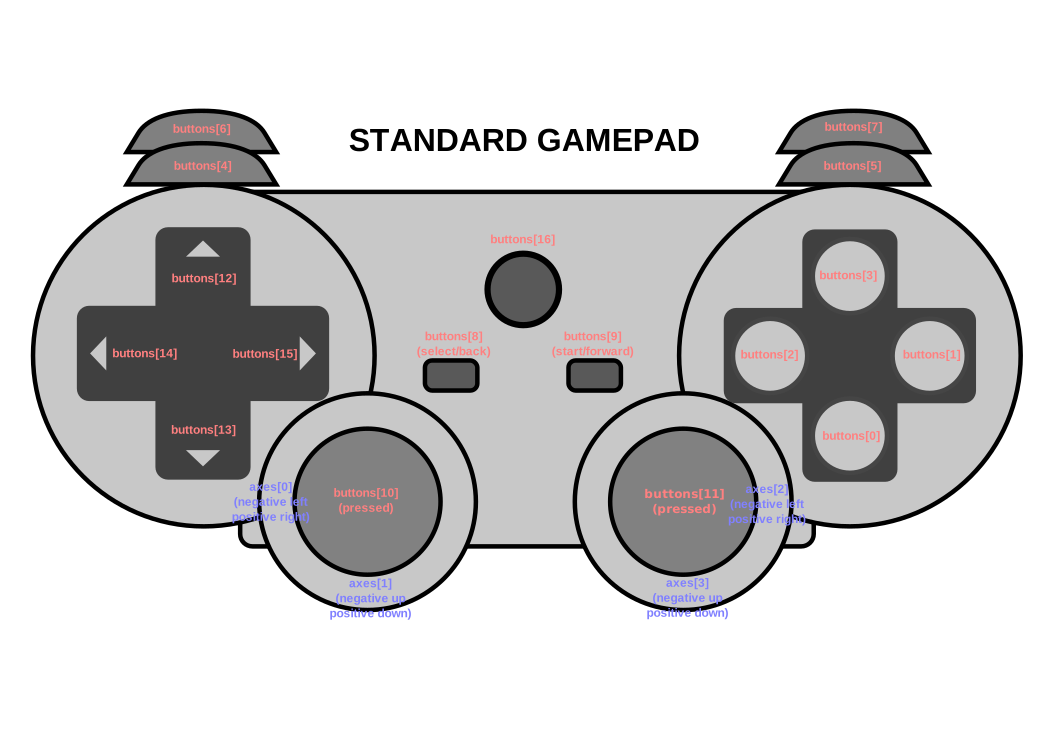
There is currently one canonical layout, the Standard
Gamepad . When remapping, the indices in axes and
buttons should correspond as closely as possible to the
physical locations in the diagram below. Additionally,
mapping SHOULD be set to "standard".
The Standard Gamepad buttons are laid out in a left cluster of four buttons, a right cluster of four buttons, a center cluster of three buttons, and a pair of front facing buttons on the left and right side of the gamepad. The four axes of the "Standard Gamepad" are associated with a pair of analog sticks, one on the left and one on the right. The following table describes the buttons/axes and their physical locations.
An axis input represents a Standard Gamepad axis if it reports the input value for a thumbstick axis, the thumbstick is located in approximately the same location as the corresponding Standard Gamepad thumbstick, and the orientation of the axis (up-down or left-right) matches the orientation of the Standard Gamepad axis. If there are multiple axes that represent the same Standard Gamepad axis, then the user agent SHOULD select one to be the Standard Gamepad axis and assign a different index to the other axis.
A button input represents a Standard Gamepad button if it reports the input value for a button or trigger, and the button or trigger is located in approximately the same location as the corresponding Standard Gamepad button.
If an axis or button input represents a Standard Gamepad axis or button, then its canonical index is the index of the corresponding Standard Gamepad axis or button.
| Type | Index | Location |
|---|---|---|
| Button | 0 | Bottom button in right cluster |
| 1 | Right button in right cluster | |
| 2 | Left button in right cluster | |
| 3 | Top button in right cluster | |
| 4 | Top left front button | |
| 5 | Top right front button | |
| 6 | Bottom left front button | |
| 7 | Bottom right front button | |
| 8 | Left button in center cluster | |
| 9 | Right button in center cluster | |
| 10 | Left stick pressed button | |
| 11 | Right stick pressed button | |
| 12 | Top button in left cluster | |
| 13 | Bottom button in left cluster | |
| 14 | Left button in left cluster | |
| 15 | Right button in left cluster | |
| 16 | Center button in center cluster | |
| axes | 0 | Horizontal axis for left stick (negative left/positive right) |
| 1 | Vertical axis for left stick (negative up/positive down) | |
| 2 | Horizontal axis for right stick (negative left/positive right) | |
| 3 | Vertical axis for right stick (negative up/positive down) |
Inspecting the capabilities of Gamepad objects can be used as a
means of active fingerprinting. The user agent MAY alter the
device information exposed through the API to reduce the
fingerprinting surface. As an example, an implementation can require
that a Gamepad object have exactly the number of buttons and axes
defined in the Standard Gamepad layout even if more or fewer
inputs are present on the connected device.
[FINGERPRINTING-GUIDANCE]
This section is non-normative.
The example below demonstrates typical access to gamepads. Note the
relationship with the
requestAnimationFrame() method.
function runAnimation() {
    window.requestAnimationFrame(runAnimation);
    for (const pad of navigator.getGamepads()) {
      // todo; simple demo of displaying pad.axes and pad.buttons
      console.log(pad);
    }
}
window.requestAnimationFrame(runAnimation);: Coordination with
requestAnimationFrame()
Interactive applications will typically be using the
requestAnimationFrame() method to drive
animation, and will want coordinate animation with user gamepad
input. As such, the gamepad data should be polled as closely as
possible to immediately before the animation callbacks are executed,
and with frequency matching that of the animation. That is, if the
animation callbacks are running at 60Hz, the gamepad inputs should
also be sampled at that rate.
When a gamepad becomes available on the system, run the following steps:
- Let document be the current global object's
associated
Document; otherwisenull. - If document is not
nulland is not allowed to use the"gamepad"permission, then abort these steps. - Queue a global task on the gamepad task source with the
current global object to perform the following steps:
- Let gamepad be a new
Gamepadrepresenting the gamepad. - Let navigator be gamepad's relevant global object's
Navigatorobject. - Set
navigator.
[[gamepads]][gamepad.index] to gamepad. - If navigator.
[[hasGamepadGesture]]istrue:- Set gamepad.
[[exposed]]totrue. - If document is not
nulland is fully active, then fire an event namedgamepadconnectedat gamepad's relevant global object usingGamepadEventwith itsgamepadattribute initialized to gamepad.
- Set gamepad.
- Let gamepad be a new
User agents implementing this specification must provide a new DOM
event, named gamepadconnected. The corresponding event MUST be of
type GamepadEvent and MUST fire on the Window object.
A user agent MUST dispatch this event type to indicate the user has
connected a gamepad. If a gamepad was already connected when the page
was loaded, the gamepadconnected event SHOULD be dispatched when
the user presses a button or moves an axis.
When a gamepad becomes unavailable on the system, run the following steps:
- Let gamepad be the
Gamepadrepresenting the unavailable device. - Queue a global task on the gamepad task source with
gamepad's relevant global object to perform the following steps:
- Set gamepad.
[[connected]]tofalse. - Let document be gamepad's relevant global object's associated
Document; otherwisenull. - If gamepad.
[[exposed]]istrueand document is notnulland is fully active, then fire an event namedgamepaddisconnectedat gamepad's relevant global object usingGamepadEventwith itsgamepadattribute initialized to gamepad. - Let navigator be gamepad's relevant global object's
Navigatorobject. - Set
navigator.
[[gamepads]][gamepad.index] tonull. - While navigator.
[[gamepads]]is not empty and the last item of navigator.[[gamepads]]isnull, remove the last item of navigator.[[gamepads]].
- Set gamepad.
User agents implementing this specification must provide a new DOM
event, named gamepaddisconnected. The corresponding event MUST be
of type GamepadEvent and MUST fire on the Window object.
When a gamepad is disconnected from the user agent, if the user agent has previously dispatched a gamepadconnected event for that
gamepad to a Window, a gamepaddisconnected event MUST be
dispatched to that same Window.
More discussion needed, on whether to include or exclude axis and
button changed events, and whether to roll them more together
("gamepadchanged"?), separate somewhat ("gamepadaxischanged"?), or
separate by individual axis and button.
This specification extends the WindowEventHandlers interface mixin
from HTML to add event handler IDL attributes to facilitate the
event handler registration.
partial interface mixin WindowEventHandlers {
  attribute EventHandler  ongamepadconnected ;
  attribute EventHandler  ongamepaddisconnected ;
};
This specification defines a policy-controlled feature identified by the string "gamepad" . Its default allowlist is *.
As well as sections marked as non-normative, all authoring guidelines, diagrams, examples, and notes in this specification are non-normative. Everything else in this specification is normative.
The key words MAY, MUST, MUST NOT, RECOMMENDED, SHOULD, and SHOULD NOT in this document are to be interpreted as described in BCP 14 [RFC2119] [RFC8174] when, and only when, they appear in all capitals, as shown here.
This section is non-normative.
The following people contributed to the development of this document.
- Anssi Kostiainen
- Arthur Barstow
- autokagami
- Bradley Needham
- Brandon Jones
- Chris Wilson
- Christopher Van Wiemeersch
- ddorwin
- fernando-80
- fernando-sony
- Gabriel Brito
- James
- Johanna
- Kagami Sascha Rosylight
- Kelvin Yong
- kri
- Marcos Cáceres
- Michael Blix
- Mike Taylor
- Philip Jägenstedt
- Philippe Le Hegaret
- Scott Graham
- Sid Vishnoi
- stephen
- Ted Mielczarek
- Vincent Scheib
- Xiaoqian Wu
- Yves Lafon
- [dom]
- DOM Standard. Anne van Kesteren. WHATWG. Living Standard. URL: https://dom.spec.whatwg.org/
- [FINGERPRINTING-GUIDANCE]
- Mitigating Browser Fingerprinting in Web Specifications. Nick Doty; Tom Ritter. W3C. 21 March 2025. W3C Working Group Note. URL: https://www.w3.org/TR/fingerprinting-guidance/
- [geometry-1]
- Geometry Interfaces Module Level 1. Simon Pieters; Chris Harrelson. W3C. 4 December 2018. W3C Candidate Recommendation. URL: https://www.w3.org/TR/geometry-1/
- [HR-TIME]
- High Resolution Time. Yoav Weiss. W3C. 7 November 2024. W3C Working Draft. URL: https://www.w3.org/TR/hr-time-3/
- [html]
- HTML Standard. Anne van Kesteren; Domenic Denicola; Dominic Farolino; Ian Hickson; Philip Jägenstedt; Simon Pieters. WHATWG. Living Standard. URL: https://html.spec.whatwg.org/multipage/
- [infra]
- Infra Standard. Anne van Kesteren; Domenic Denicola. WHATWG. Living Standard. URL: https://infra.spec.whatwg.org/
- [permissions-policy]
- Permissions Policy. Ian Clelland. W3C. 6 May 2025. W3C Working Draft. URL: https://www.w3.org/TR/permissions-policy-1/
- [RFC2119]
- Key words for use in RFCs to Indicate Requirement Levels. S. Bradner. IETF. March 1997. Best Current Practice. URL: https://www.rfc-editor.org/rfc/rfc2119
- [RFC8174]
- Ambiguity of Uppercase vs Lowercase in RFC 2119 Key Words. B. Leiba. IETF. May 2017. Best Current Practice. URL: https://www.rfc-editor.org/rfc/rfc8174
- [WEBIDL]
- Web IDL Standard. Edgar Chen; Timothy Gu. WHATWG. Living Standard. URL: https://webidl.spec.whatwg.org/
- [webxr-gamepads-module-1]
- WebXR Gamepads Module - Level 1. Brandon Jones; Manish Goregaokar; Rik Cabanier. W3C. 9 April 2024. W3C Working Draft. URL: https://www.w3.org/TR/webxr-gamepads-module-1/