1. Introduction
This section is not normative
A filter effect is a graphical operation that is applied to an element as it is drawn into the document. It is an image-based effect, in that it takes zero or more images as input, a number of parameters specific to the effect, and then produces an image as output. The output image is either rendered into the document instead of the original element, used as an input image to another filter effect, or provided as a CSS image value.
A simple example of a filter effect is a “flood”. It takes no image inputs but has a parameter defining a color. The effect produces an output image that is completely filled with the given color. A slightly more complex example is an “inversion” which takes a single image input (typically an image of the element as it would normally be rendered into its parent) and adjusts each pixel such that they have the opposite color values.
Filter effects are exposed with two levels of complexity:
-
A small set of canned filter functions that are given by name. While not particularly powerful, these are convenient and easily understood and provide a simple approach to achieving common effects, such as blurring. The canned filters can also be animated by [CSS3-ANIMATIONS].
-
A graph of individual filter effects described in markup that define an overall effect. The graph is agnostic to its input in that the effect can be applied to any content. While such graphs are the combination of effects that may be simple in isolation, the graph as a whole can produce complex effects. An example is given below.
In this example, an image is filtered with the <grayscale()> filter function.
 #image   {
     filter  :   grayscale  (  100  %  );
 }
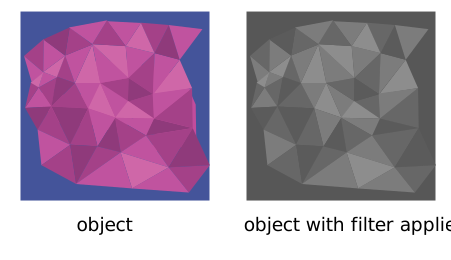
An image without filter (left) and the same filter with a 100% grayscale filter (right).
The following shows an example of graph of individual filter effects.

Initial example for a filtered object.
The filter effect used in the example above is repeated here with reference numbers in the left column before each of the six filter primitives:
| 1 4 6 |
 <  filter   id  =  "MyFilter"   filterUnits  =  "userSpaceOnUse"   x  =  "0"   y  =  "0"   width  =  "200"   height  =  "120"  >
   <  desc  > Produces a 3D lighting effect. </  desc  >
   <  feGaussianBlur   in  =  "SourceAlpha"   stdDeviation  =  "4"   result  =  "blur"  />
   <  feOffset   in  =  "blur"   dx  =  "4"   dy  =  "4"   result  =  "offsetBlur"  />
   <  feSpecularLighting   in  =  "blur"   surfaceScale  =  "5"   specularConstant  =  ".75"
                       specularExponent  =  "20"   lighting-color  =  "#bbbbbb"
                       result  =  "specOut"  >
     <  fePointLight   x  =  "-5000"   y  =  "-10000"   z  =  "20000"  />
   </  feSpecularLighting  >
   <  feComposite   in  =  "specOut"   in2  =  "SourceAlpha"   operator  =  "in"   result  =  "specOut"  />
   <  feComposite   in  =  "SourceGraphic"   in2  =  "specOut"   operator  =  "arithmetic"
                k1  =  "0"   k2  =  "1"   k3  =  "1"   k4  =  "0"   result  =  "litPaint"  />
   <  feMerge  >
     <  feMergeNode   in  =  "offsetBlur"  />
     <  feMergeNode   in  =  "litPaint"  />
   </  feMerge  >
 </  filter  >
|
The following pictures show the intermediate image results from each of the six filter elements:
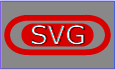
Source graphic
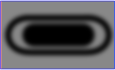
After filter primitive 1
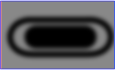
After filter primitive 2
After filter primitive 3
After filter primitive 4

After filter primitive 5

After filter primitive 6
-
Filter primitive feGaussianBlur takes input SourceAlpha, which is the alpha channel of the source graphic. The result is stored in a temporary buffer named "blur". Note that "blur" is used as input to both filter primitives 2 and 3.
-
Filter primitive feOffset takes buffer "blur", shifts the result in a positive direction in both x and y, and creates a new buffer named "offsetBlur". The effect is that of a drop shadow.
-
Filter primitive feSpecularLighting, uses buffer "blur" as a model of a surface elevation and generates a lighting effect from a single point source. The result is stored in buffer "specOut".
-
Filter primitive feComposite masks out the result of filter primitive 3 by the original source graphics alpha channel so that the intermediate result is no bigger than the original source graphic.
-
Filter primitive feComposite composites the result of the specular lighting with the original source graphic.
-
Filter primitive feMerge composites two layers together. The lower layer consists of the drop shadow result from filter primitive 2. The upper layer consists of the specular lighting result from filter primitive 5.
2. Module interactions
This specification defines a set of CSS properties that affect the visual rendering of elements to which those properties are applied; these effects are applied after elements have been sized and positioned according to the Visual formatting model from [CSS21]. Some values of these properties result in the creation of a containing block, and/or the creation of a stacking context.
The compositing model follows the SVG compositing model [SVG11]: first any filter effect is applied, then any clipping, masking and opacity [CSS3COLOR]. These effects all apply after any other CSS effects such as border [CSS3BG].
Some property and element definitions in this specification require an SVG 1.1 implementation [SVG11]. UAs without support for SVG must not implement the color-interpolation-filters, flood-color, flood-opacity and lighting-color properties as well as the filter element, the feMergeNode element, the transfer function elements and the filter primitive elements.
3. Values
This specification follows the CSS property definition conventions from [CSS21]. Value types not defined in these specifications are defined in CSS Values and Units Module Level 3 [CSS3VAL].
In addition to the property-specific values listed in their definitions, all properties defined in this specification also accept the inherit keyword as their property value. For readability it has not been repeated explicitly.
4. Terminology
When used in this specification, terms have the meanings assigned in this section.
- filter primitive ,
filter-primitive -
The set of elements that control the output of a filter element, particularly: feSpotLight, feBlend, feColorMatrix, feComponentTransfer, feComposite, feConvolveMatrix, feDiffuseLighting, feDisplacementMap, feDropShadow, feFlood, feGaussianBlur, feImage, feMerge, feMorphology, feOffset, feSpecularLighting, feTile, feTurbulence.
- pass through filter
-
The pass through filter output is equal to the primary input of the filter primitive.
5. Graphic filters: the filter property
The description of the filter property is as follows:
| Name: | filter |
|---|---|
| Value: | none | <filter-value-list> |
| Initial: | none |
| Applies to: | All elements. In SVG, it applies to container elements without the defs element, all graphics elements and the use element. |
| Inherited: | no |
| Percentages: | n/a |
| Computed value: | as specified |
| Canonical order: | per grammar |
| Media: | visual |
| Animatable: | See prose in Animation of Filters. |
<filter-value-list> = [ <filter-function> | <url> ]+
- <url>
-
A filter reference to a filter element. For example url(commonfilters.svg#filter). If the filter references a non-existent object or the referenced object is not a filter element, then the whole filter chain is ignored. No filter is applied to the object.
- <filter-function>
-
See Filter Functions.
- none
-
No filter effect gets applied.
A value other than none for the filter property results in the creation of a containing block for absolute and fixed positioned descendants unless the element it applies to is a document root element in the current browsing context. The list of functions are applied in the order provided.
The first filter function or filter reference in the list takes the element (SourceGraphic) as the input image. Subsequent operations take the output from the previous filter function or filter reference as the input image. filter element reference functions can specify an alternate input, but still uses the previous output as its SourceGraphic.
color-interpolation-filters has no affect for Filter Functions. Filter Functions must operate in the sRGB color space.
A computed value of other than none results in the creation of a stacking context [CSS21] the same way that CSS opacity does. All the elements descendants are rendered together as a group with the filter effect applied to the group as a whole.
The filter property has no effect on the geometry of the target element’s CSS boxes, even though filter can cause painting outside of an element’s border box.
Conceptually, any parts of the drawing are effected by filter operations. This includes any content, background, borders, text decoration, outline and visible scrolling mechanism of the element to which the filter is applied, and those of its descendants. The filter operations are applied in the element’s local coordinate system.
The compositing model follows the SVG compositing model [SVG11]: first any filter effect is applied, then any clipping, masking and opacity. As per SVG, the application of filter has no effect on hit-testing.
The filter property is a presentation attribute for SVG elements.
How does filter behave on fixed background images? <https://github.com/w3c/csswg-drafts/issues/238>
6. Filter Functions
6.1. Supported Filter Functions
 <filter-function>  = <blur()> | <brightness()> | <contrast()> | <drop-shadow()> |
<grayscale()> | <hue-rotate()> | <invert()> | <opacity()> | <sepia()> | <saturate()>
Unless defined otherwise, omitted values default to the initial value for interpolation.
Note: For some filter functions the default value for omitted values differes from their initial value for interpolation. For the convenience of content creators, the default value for omitted values for <grayscale()>, <sepia()> and <invert()> is 1 (apply the effect to 100%) while the initial value for interpolation is 0 (no effect).
-
blur() = blur( <length>? )
-
Applies a Gaussian blur to the input image. The passed parameter defines the value of the standard deviation to the Gaussian function. The parameter is specified a CSS length, but does not accept percentage values. The markup equivalent of this function is given below.
Negative values are not allowed.
Default value when omitted is 0px.
The initial value for interpolation is 0px.
Note: Standard deviation is different to box-shadow s blur radius.
-
brightness() = brightness( <number-percentage>? )
-
Applies a linear multiplier to input image, making it appear more or less bright. A value of 0% will create an image that is completely black. A value of 100% leaves the input unchanged. Other values are linear multipliers on the effect. Values of amount over 100% are allowed, providing brighter results. The markup equivalent of this function is given below.
Negative values are not allowed.
Default value when omitted is 1.
The initial value for interpolation is 1.
-
contrast() = contrast( <number-percentage>? )
-
Adjusts the contrast of the input. A value of 0% will create an image that is completely gray. A value of 100% leaves the input unchanged. Values of amount over 100% are allowed, providing results with more contrast. The markup equivalent of this function is given below.
Negative values are not allowed.
Default value when omitted is 1.
The initial value for interpolation is 1.
-
drop-shadow() = drop-shadow( <color>? && <length>{2,3} )
-
Applies a drop shadow effect to the input image. A drop shadow is effectively a blurred, offset version of the input image’s alpha mask drawn in a particular color, composited below the image. Values are interpreted as for box-shadow [CSS3BG] but with the optional 3rd <length> value being the standard deviation instead of blur radius. The markup equivalent of this function is given below.
The default value for omitted values is missing length values set to 0 and the missing used color is taken from the color property.
The initial value for interpolation is all length values set to 0 and the used color set to transparent.
Note: Spread values or multiple shadows are not accepted for this level of the specification.
Note: Standard deviation is different to box-shadow s blur radius.
-
grayscale() = grayscale( <number-percentage>? )
-
Converts the input image to grayscale. The passed parameter defines the proportion of the conversion. A value of 100% is completely grayscale. A value of 0% leaves the input unchanged. Values between 0% and 100% are linear multipliers on the effect. Values of amount over 100% are allowed but UAs must clamp the values to 1. The markup equivalent of this function is given below.
Negative values are not allowed.
Default value when omitted is 1.
The initial value for interpolation is 0.
-
hue-rotate() = hue-rotate( [ <angle> | <zero> ]? )
-
Applies a hue rotation on the input image. The passed parameter defines the number of degrees around the color circle the input samples will be adjusted. A value of 0deg leaves the input unchanged. Implementations must not normalize this value in order to allow animations beyond 360deg. The markup equivalent of this function is given below.
The unit identifier may be omitted if the <angle> is zero.
Default value when omitted is 0deg.
The initial value for interpolation is 0deg.
-
invert() = invert( <number-percentage>? )
-
Inverts the samples in the input image. The passed parameter defines the proportion of the conversion. A value of 100% is completely inverted. A value of 0% leaves the input unchanged. Values between 0% and 100% are linear multipliers on the effect. Values of amount over 100% are allowed but UAs must clamp the values to 1. The markup equivalent of this function is given below.
Negative values are not allowed.
Default value when omitted is 1.
The initial value for interpolation is 0.
-
opacity() = opacity( <number-percentage>? )
-
Applies transparency to the samples in the input image. The passed parameter defines the proportion of the conversion. A value of 0% is completely transparent. A value of 100% leaves the input unchanged. Values between 0% and 100% are linear multipliers on the effect. This is equivalent to multiplying the input image samples by amount. Values of amount over 100% are allowed but UAs must clamp the values to 1. The markup equivalent of this function is given below.
Negative values are not allowed.
Default value when omitted is 1.
The initial value for interpolation is 1.
Note: The opacity filter function is not meant to be a shorthand of the opacity property. Furthermore, it allows setting the transparency of intermediate filter primitive results before passing to the next filter primitive. If the opacity filter function is set as last filter primitive, the value of the opacity property is multiplied on top of the value of the filter function, which may result in a more transparent content.
-
saturate() = saturate( <number-percentage>? )
-
Saturates the input image. The passed parameter defines the proportion of the conversion. A value of 0% is completely un-saturated. A value of 100% leaves the input unchanged. Other values are linear multipliers on the effect. Values of amount over 100% are allowed, providing super-saturated results. The markup equivalent of this function is given below.
Negative values are not allowed.
Default value when omitted is 1.
The initial value for interpolation is 1.
-
sepia() = sepia( <number-percentage>? )
-
Converts the input image to sepia. The passed parameter defines the proportion of the conversion. A value of 100% is completely sepia. A value of 0% leaves the input unchanged. Values between 0% and 100% are linear multipliers on the effect. Values of amount over 100% are allowed but UAs must clamp the values to 1. The markup equivalent of this function is given below.
Negative values are not allowed.
Default value when omitted is 1.
The initial value for interpolation is 0.
6.2. Computed Values of Filter Functions
The values in a <filter-function> are computed as specified, with these exceptions:
-
Omitted values are included and compute to their defaults.
-
<drop-shadow()> starts with the computed value of <color> followed by the computed value of the <length> values.
6.3. Serialization of Filter Functions
To serialize the <filter-function>, serialize as per their individual grammars, in the order the grammars are written in, avoiding <calc()> expressions where possible, serialize filter arguments as specified, avoiding <calc()> transformations, joining space-separated tokens with a single space, and following each serialized comma with a single space.
6.4. Interpolation of Filter Functions
For interpolation of values in <filter-function>s, the steps corresponding to the first matching condition in the following list must be run:
- <blur()>
-
Interpolate values as length by computed value.
- <brightness()>
- <contrast()>
- <grayscale()>
- <invert()>
- <opacity()>
- <saturate()>
- <sepia()>
-
Convert percentage values to numbers with 0% being relative to 0 and 100% relative to 1. Interpolate values as number by computed value .
- <hue-rotate()>
-
Interpolate values as number by computed value.
- <drop-shadow()>
-
Interpolate values as shadow list as repeatable list.
7. SVG Filter Sources: the filter element
The description of the filter element follows:
<number-optional-number> = <number> <number>?
Attribute definitions:
-
filterUnits= "userSpaceOnUse|objectBoundingBox" -
See filter region.
-
primitiveUnits= "userSpaceOnUse|objectBoundingBox" -
Specifies the coordinate system for the various length values within the filter primitives and for the attributes that define the filter primitive subregion.
If primitiveUnits is equal to userSpaceOnUse, any length values within the filter definitions represent values in the current local coordinate system in place at the time when the filter element is referenced (i.e., the user coordinate system for the element referencing the filter element via a filter property).
If primitiveUnits is equal to objectBoundingBox, then any length values within the filter definitions represent fractions or percentages of the bounding box on the referencing element (see object bounding box units). Note that if only one number was specified in a <number-optional-number> value this number is expanded out before the primitiveUnits computation takes place.
The initial value for primitiveUnits is userSpaceOnUse.
Animatable: yes.
-
x= "<length-percentage>" -
See filter region.
-
y= "<length-percentage>" -
See filter region.
-
width= "<length-percentage>" -
See filter region.
-
height= "<length-percentage>" -
See filter region.
-
filterRes= "<number-optional-number>" -
The filterRes attribute was removed from the specification. See SVG 1.1 specification for the defintion [SVG11].
Properties inherit into the filter element from its ancestors; properties do not inherit from the element referencing the filter element.
filter elements are never rendered directly; their only usage is as something that can be referenced using the filter property. The display property does not apply to the filter element; thus, filter elements are not directly rendered even if the display property is set to a value other than none, and filter elements are available for referencing even when the display property on the filter element or any of its ancestors is set to none.
8. Filter Region
A filter element can define a filter region on the canvas to which a given filter effect applies and can provide a resolution for any intermediate continuous tone images used to process any raster-based filter primitives. The filter element has the following attributes which work together to define the filter region:
- filterUnits
-
Defines the coordinate system for attributes x, y, width, height.
If filterUnits is equal to userSpaceOnUse, x, y, width, height represent values in the current user coordinate system in place at the time when the filter element is referenced (i.e., the user coordinate system for the element referencing the filter element via a filter property).
If filterUnits is equal to objectBoundingBox, then x, y, width, height represent fractions or percentages of the bounding box on the referencing element (see object bounding box units).
The initial value for filterUnits is objectBoundingBox.
Animatable: yes.
- x, y, width, height
-
These attributes define a rectangular region on the canvas to which this filter applies.
The coordinate system for these attributes depends on the value for attribute filterUnits.
The bounds of this rectangle act as a hard clipping region for each filter primitive included with a given filter element; thus, if the effect of a given filter primitive would extend beyond the bounds of the rectangle (this sometimes happens when using a feGaussianBlur filter primitive with a very large stdDeviation), parts of the effect will get clipped.
The initial value for x and y is -10%.
The initial value for width and height is 120%.
ng of the element which referenced the filter.
Animatable: yes.
Note: Both of the two possible value for filterUnits (i.e., objectBoundingBox and userSpaceOnUse) result in a filter region whose coordinate system has its X-axis and Y-axis each parallel to the X-axis and Y-axis, respectively, of the local coordinate system for the element to which the filter will be applied.
Note: Sometimes implementers can achieve faster performance when the filter region can be mapped directly to device pixels; thus, for best performance on display devices, it is suggested that authors define their region such that the user agent can align the filter region pixel-for-pixel with the background. In particular, for best filter effects performance, avoid rotating or skewing the user coordinate system.
Note: It is often necessary to provide padding space because the filter effect might impact bits slightly outside the tight-fitting bounding box on a given object. For these purposes, it is possible to provide negative percentage values for x, y and percentages values greater than 100% for width, height. This, for example, is why the defaults for the filter region are x="-10%" y="-10%" width="120%" height="120%".
9. Filter primitives
9.1. Overview
This section describes the various filter primitives that can be assembled to achieve a particular filter effect.
Unless otherwise stated, all image filters operate on premultiplied RGBA samples. Some filters like feColorMatrix and feComponentTransfer work more naturally on non-premultiplied data. For the time of the filter operation, all color values must temporarily be transformed to the required color multiplication of the current filter.
Note: All input images are assumed to be in premultiplied RGBA. User agents may optimize performance by using non-premultiplied data buffering.
All raster effect filtering operations take 1 to N input RGBA images, additional attributes as parameters, and produce a single output RGBA image.
The RGBA result from each filter primitive will be clamped into the allowable ranges for colors and opacity values. Thus, for example, the result from a given filter primitive will have any negative color values or opacity values adjusted up to color/opacity of zero.
The color space in which a particular filter primitive performs its operations is determined by the value of the property color-interpolation-filters on the given filter primitive. A different property, color-interpolation determines the color space for other color operations. Because these two properties have different initial values (color-interpolation-filters has an initial value of linearRGB whereas color-interpolation has an initial value of sRGB), in some cases to achieve certain results (e.g., when coordinating gradient interpolation with a filtering operation) it will be necessary to explicitly set color-interpolation to linearRGB or color-interpolation-filters to sRGB on particular elements. Note that the examples below do not explicitly set either color-interpolation or color-interpolation-filters, so the initial values for these properties apply to the examples.
Sometimes filter primitives result in undefined pixels. For example, filter primitive feOffset can shift an image down and to the right, leaving undefined pixels at the top and left. In these cases, the undefined pixels are set to transparent black.
To provide high quality rendering, all filter primitives should operate in a device dependent coordinate space, the operating coordinate space , taking device pixel density, user space transformations and zooming into account. To provide a platform independent alignment, attribute and property values are often relative to a coordinate system described by the primitiveUnits attribute. User agents must scale these relative attributes and properties to the operating coordinate space.
Note: On high resolution devices, attribute and property values that are relative to the primitiveUnits usually need to be scaled up. User agents may reduce the resolution of filter primitives on limited platform resources.
Note: Some attribute or property values from the filter primitives feConvolveMatrix and light sources can not be mapped from the coordinate space defined by the primitiveUnits attribute to the operating coordinate space.
9.2. Common filter primitive attributes
The following filter primitive attributes are available for all filter primitives:
Attribute definitions:
-
x= "<length-percentage>" -
The minimum x coordinate for the subregion which restricts calculation and rendering of the given filter primitive. See filter primitive subregion.
The initial value for x is 0%.
Animatable: yes.
-
y= "<length-percentage>" -
The minimum y coordinate for the subregion which restricts calculation and rendering of the given filter primitive. See filter primitive subregion.
The initial value for y is 0%.
Animatable: yes.
-
width= "<length-percentage>" -
The width of the subregion which restricts calculation and rendering of the given filter primitive. See filter primitive subregion.
A negative or zero value disables the effect of the given filter primitive (i.e., the result is a transparent black image).
The initial value for width is 100%.
Animatable: yes.
-
height= "<length-percentage>" -
The height of the subregion which restricts calculation and rendering of the given filter primitive. See filter primitive subregion.
A negative or zero value must disable the effect of the given filter primitive (i.e., the result is a transparent black image).
The initial value for height is 100%.
Animatable: yes.
-
result= " <filter-primitive-reference> " -
<filter-primitive-reference> is an <custom-ident> [CSS3VAL] and an assigned name for this filter primitive. If supplied, then graphics that result from processing this filter primitive can be referenced by an in attribute on a subsequent filter primitive within the same filter element. If no value is provided, the output will only be available for re-use as the implicit input into the next filter primitive if that filter primitive provides no value for its in attribute.
Most filter primitives take other filter primitives as input. The following attribute is representative for all input attributes to reference other filter primitives:
Attribute definitions:
-
in= "SourceGraphic | SourceAlpha | BackgroundImage | BackgroundAlpha | FillPaint | StrokePaint | <filter-primitive-reference>" -
Identifies input for the given filter primitive. The value can be either one of six keywords or can be a string which matches a previous result attribute value within the same filter element. If no value is provided and this is the first filter primitive, then this filter primitive will use SourceGraphic as its input. If no value is provided and this is a subsequent filter primitive, then this filter primitive will use the result from the previous filter primitive as its input.
If the value for result appears multiple times within a given filter element, then a reference to that result will use the closest preceding filter primitive with the given value for attribute result.
Forward references to results are not allowed, and will be treated as if no result was specified.
References to non-existent results will be treated as if no result was specified.
Definitions for the six keywords:
-
SourceGraphic -
This keyword represents the graphics elements that were the original input into the filter element. For raster effects filter primitives, the graphics elements will be rasterized into an initially clear RGBA raster in image space. Pixels left untouched by the original graphic will be left clear. The image is specified to be rendered in linear RGBA pixels. The alpha channel of this image captures any anti-aliasing specified by SVG. (Since the raster is linear, the alpha channel of this image will represent the exact percent coverage of each pixel.)
-
SourceAlpha -
This keyword represents the graphics elements that were the original input into the filter element. SourceAlpha has all of the same rules as SourceGraphic except that only the alpha channel is used. The input image is an RGBA image consisting of implicitly black color values for the RGB channels, but whose alpha channel is the same as SourceGraphic.
Note: If this option is used, then some implementations might need to rasterize the graphics elements in order to extract the alpha channel.
-
BackgroundImage -
This keyword represents the back drop defined by the current isolation group behind the filter region at the time that the filter element was invoked. See isolation property [COMPOSITING-1].
-
BackgroundAlpha -
Same as BackgroundImage except only the alpha channel is used. See SourceAlpha and the isolation property [COMPOSITING-1].
-
FillPaint -
This keyword represents the value of the fill property on the target element for the filter effect. The FillPaint image has conceptually infinite extent. Frequently this image is opaque everywhere, but it might not be if the "paint" itself has alpha, as in the case of a gradient or pattern which itself includes transparent or semi-transparent parts. If fill references a paint server, then the coordinate space of the paint server is the coordinate space defined for the filtered object. E.g if the paint server requires to use the objectBoundingBox of the object, the object bounding box of the filtered object defines the reference size of the paint server. If the paint server requires to use the userSpaceOnUse, the nearest viewport in the local coordinate system of the filtered object defines the reference size of the paint server.
-
StrokePaint -
This keyword represents the value of the stroke property on the target element for the filter effect. The StrokePaint image has conceptually infinite extent. See FillPaint above for more details.
-
9.3. Filter primitive tree
Filter primitives with no or one filter primitive input can be linked together to a filter chain. E.g. the filter primitive representation of a <filter-value-list> with two or more <filter-function>s is an example of a filter chain. Every filter primitive takes the result of the previous filter primitive as input.
A simple example of a filter element with its filter primitive children.
 <  filter   id  =  "filter"  >
   <  feColorMatrix   type  =  "hueRotate"   values  =  "45"  />
   <  feOffset   dx  =  "10"   dy  =  "10"  />
   <  feGaussianBlur   stdDeviation  =  "3"  />
 </  filter  >
feColorMatrix, feOffset and feGaussianBlur create a filter chain.
feColorMatrix takes SourceGraphic as input. The result is the input of feOffset with its result being the input of feGaussianBlur.
Some filter primitives may have more than one filter primitive inputs. With the use of the in and result attributes it is possible to combine multiple filter primitives to a complex filter structure. Due to the non-forward reference restriction of filter primitives, every filter structure can be represented as a tree, the filter primitive tree . The root filter primitive of the filter primitive tree is the most subsequential primitive of filter elements filter primitive children.
A filter chain is one possible filter structure that can also be represented in a filter primitive tree. Therefore, filter chains are referred to as filter primitive trees onwards as well.
A filter element may have one or more filter primitive trees. The filter primitive tree whose subsequent filter primitive is the last filter primitive child of the filter elements is the primary filter primitive tree .
Only the primary filter primitive tree contributes to the filter process. Implementations may chose to ignore all other possible filter primitive trees.
If a filter element has no filter primitive tree then the element the filter applies to does not get rendered.
An example of multiple filter primitive trees:
 <  filter   id  =  "filter"  >
   <  --   The   first   filter   primitive   tree .  Ignored   for   filter   process .  --  >
   <  feColorMatrix   type  =  "hueRotate"   values  =  "45"  />
   <  feOffset   dx  =  "10"   dy  =  "10"  />
   <  feGaussianBlur   stdDeviation  =  "3"  />
   <  --   The   primary   filter   primitive   tree .  --  >
   <  feFlood   flood-color  =  "green"   result  =  "flood"  />
   <  feComposite   operator  =  "in"   in  =  "SourceAlpha"   in2  =  "flood"  />
 </  filter  >
The above filter has 2 filter primitive trees with the filter primitives:
-
feColorMatrix, feOffset and feGaussianBlur (with feGaussianBlur being the root filter primitive of the tree) as well as
-
feFlood and feComposite (with feComposite as the root filter primitive of the tree).
Both filter primitive trees are not connected. Only the 2nd, the primary filter primitive tree contributes to the filter process. The first tree can get ignored by implementations.
9.4. Filter primitive subregion
All filter primitives have attributes x, y, width and height which together identify a filter primitive subregion which restricts calculation and rendering of the given filter primitive. The x, y, width and height attributes are defined according to the same rules as other filter primitives coordinate and length attributes and thus represent values in the coordinate system established by attribute primitiveUnits on the filter element.
x, y, width and height default to the union (i.e., tightest fitting bounding box) of the subregions defined for all referenced nodes. If there are no referenced nodes (e.g., for feImage or feTurbulence), or one or more of the referenced nodes is a standard input (one of SourceGraphic, SourceAlpha, BackgroundImage, BackgroundAlpha, FillPaint or StrokePaint), or for feTile (which is special because its principal function is to replicate the referenced node in X and Y and thereby produce a usually larger result), the default subregion is 0%, 0%, 100%, 100%, where as a special-case the percentages are relative to the dimensions of the filter region, thus making the default filter primitive subregion equal to the filter region.
If the filter primitive subregion has a negative or zero width or height, the effect of the filter primitive is disabled.
The filter region acts as a hard clip clipping rectangle on the filter primitive’s input image(s).
The filter primitive subregion acts as a hard clip clipping rectangle on the filter primitive result.
All intermediate offscreens are defined to not exceed the intersection of the filter primitive subregion with the filter region. The filter region and any of the filter primitive subregions are to be set up such that all offscreens are made big enough to accommodate any pixels which even partly intersect with either the filter region or the filter primitive subregions.
feTile references a previous filter primitive and then stitches the tiles together based on the filter primitive subregion of the referenced filter primitive in order to fill its own filter primitive subregion.
 <  svg   width  =  "400"   height  =  "400"   xmlns  =  "http://www.w3.org/2000/svg"  >
   <  defs  >
     <  filter   id  =  "flood"   x  =  "0"   y  =  "0"   width  =  "100%"   height  =  "100%"   primitiveUnits  =  "objectBoundingBox"  >
        <  feFlood   x  =  "25%"   y  =  "25%"   width  =  "50%"   height  =  "50%"
           flood-color  =  "green"   flood-opacity  =  "0.75"  />
     </  filter  >
     <  filter   id  =  "blend"   primitiveUnits  =  "objectBoundingBox"  >
        <  feBlend   x  =  "25%"   y  =  "25%"   width  =  "50%"   height  =  "50%"
           in2  =  "SourceGraphic"   mode  =  "multiply"  />
     </  filter  >
     <  filter   id  =  "merge"   primitiveUnits  =  "objectBoundingBox"  >
        <  feMerge   x  =  "25%"   y  =  "25%"   width  =  "50%"   height  =  "50%"  >
         <  feMergeNode   in  =  "SourceGraphic"  />
         <  feMergeNode   in  =  "FillPaint"  />
        </  feMerge  >
     </  filter  >
   </  defs  >
   <  g   fill  =  "none"   stroke  =  "blue"   stroke-width  =  "4"  >
      <  rect   width  =  "200"   height  =  "200"  />
      <  line   x2  =  "200"   y2  =  "200"  />
      <  line   x1  =  "200"   y2  =  "200"  />
   </  g  >
   <  circle   fill  =  "green"   filter  =  "url(#flood)"   cx  =  "100"   cy  =  "100"   r  =  "90"  />
   <  g   transform  =  "translate(200 0)"  >
     <  g   fill  =  "none"   stroke  =  "blue"   stroke-width  =  "4"  >
        <  rect   width  =  "200"   height  =  "200"  />
        <  line   x2  =  "200"   y2  =  "200"  />
        <  line   x1  =  "200"   y2  =  "200"  />
     </  g  >
     <  circle   fill  =  "green"   filter  =  "url(#blend)"   cx  =  "100"   cy  =  "100"   r  =  "90"  />
   </  g  >
   <  g   transform  =  "translate(0 200)"  >
     <  g   fill  =  "none"   stroke  =  "blue"   stroke-width  =  "4"  >
        <  rect   width  =  "200"   height  =  "200"  />
        <  line   x2  =  "200"   y2  =  "200"  />
        <  line   x1  =  "200"   y2  =  "200"  />
     </  g  >
     <  circle   fill  =  "green"   fill-opacity  =  "0.5"   filter  =  "url(#merge)"   cx  =  "100"   cy  =  "100"   r  =  "90"  />
   </  g  >
 </  svg  >
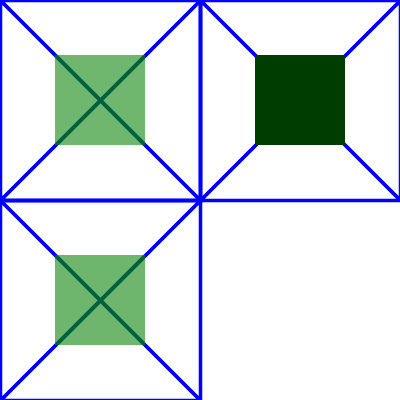
Example for subregions
In the example above there are three rectangles that each have a cross and a circle in them. The circle element in each one has a different filter applied, but with the same filter primitive subregion. The filter output should be limited to the filter primitive subregion so you should never see the circles themselves, just the rectangles that make up the filter primitive subregion.
-
The upper left rectangle shows an feFlood with flood-opacity: 75% so the cross should be visible through the green rect in the middle.
-
The lower left rectangle shows an feMerge that merges SourceGraphic with FillPaint. Since the circle has
fill-opacity="0.5"it will also be transparent so that the cross is visible through the green rect in the middle. -
The upper right rectangle shows an feBlend that has
mode="multiply". Since the circle in this case isn’t transparent the result is totally opaque. The rect should be dark green and the cross should not be visible through it.
9.5. Filter primitive feBlend
This filter blends two objects together using commonly used imaging software blending modes. It performs a pixel-wise combination of two input images. (See [COMPOSITING-1].)
Attribute definitions:
-
mode= "<blend-mode>" -
One of the blend modes defined by “Compositing and Blending Level 1” [COMPOSITING-1] with the input in representing the source
Csand the second input in2 representing the backdropCb. The output of this filter primitiveCmis the result of blendingCswithCb.The initial value for mode is normal.
Animatable: yes.
-
no-composite= "no-composite" -
If the no-composite attribute is present, the specified blend mode must not apply alpha compositing. See Blending [COMPOSITING-1] for the "mixing" formula without compositing. Otherwise, implementations must combine the blend mode specified by mode with the Source Over composite operator. See Blending [COMPOSITING-1] for the "mixing" formula with compositing.
Note: This attribute is an addition to the feBlend element defintion in SVG 1.1. no-composite, when specified, is meant to avoid "double-compositing" effects when blending an input source with the backdrop of the filtered object (E.g. using the BackgroundImage filter primitive). For the majority of use cases authors will not need to specify the no-composite attribute.
Animatable: no.
-
in2= "(see in attribute)" -
The second input image to the blending operation.
Animatable: yes.
The normal blend mode with alpha compositing is equivalent to operator="over" on the feComposite filter primitive, matches the blending method used by feMerge and matches the simple alpha compositing technique used in SVG for all compositing outside of filter effects.
 <  svg   width  =  "5cm"   height  =  "5cm"   viewBox  =  "0 0 500 500"
      xmlns  =  "http://www.w3.org/2000/svg"  >
   <  title  > Example feBlend - Examples of feBlend modes </  title  >
   <  desc  > Five text strings blended into a gradient,
        with one text string for each of the five feBlend modes. </  desc  >
   <  defs  >
     <  linearGradient   id  =  "MyGradient"   gradientUnits  =  "userSpaceOnUse"
             x1  =  "100"   y1  =  "0"   x2  =  "300"   y2  =  "0"  >
       <  stop   offset  =  "0"   stop-color  =  "#000000"   />
       <  stop   offset  =  ".33"   stop-color  =  "#ffffff"   />
       <  stop   offset  =  ".67"   stop-color  =  "#ff0000"   />
       <  stop   offset  =  "1"   stop-color  =  "#808080"   />
     </  linearGradient  >
     <  filter   id  =  "Normal"  >
       <  feBlend   mode  =  "normal"   in2  =  "BackgroundImage"   in  =  "SourceGraphic"  />
     </  filter  >
     <  filter   id  =  "Multiply"  >
       <  feBlend   mode  =  "multiply"   in2  =  "BackgroundImage"   in  =  "SourceGraphic"  />
     </  filter  >
     <  filter   id  =  "Screen"  >
       <  feBlend   mode  =  "screen"   in2  =  "BackgroundImage"   in  =  "SourceGraphic"  />
     </  filter  >
     <  filter   id  =  "Darken"  >
       <  feBlend   mode  =  "darken"   in2  =  "BackgroundImage"   in  =  "SourceGraphic"  />
     </  filter  >
     <  filter   id  =  "Lighten"  >
       <  feBlend   mode  =  "lighten"   in2  =  "BackgroundImage"   in  =  "SourceGraphic"  />
     </  filter  >
   </  defs  >
   <  rect   fill  =  "none"   stroke  =  "blue"
         x  =  "1"   y  =  "1"   width  =  "498"   height  =  "498"  />
   <  g   isolation  =  "isolate"   >
     <  rect   x  =  "100"   y  =  "20"   width  =  "300"   height  =  "460"   fill  =  "url(#MyGradient)"   />
     <  g   font-family  =  "Verdana"   font-size  =  "75"   fill  =  "#888888"   fill-opacity  =  ".6"   >
       <  text   x  =  "50"   y  =  "90"   filter  =  "url(#Normal)"   > Normal </  text  >
       <  text   x  =  "50"   y  =  "180"   filter  =  "url(#Multiply)"   > Multiply </  text  >
       <  text   x  =  "50"   y  =  "270"   filter  =  "url(#Screen)"   > Screen </  text  >
       <  text   x  =  "50"   y  =  "360"   filter  =  "url(#Darken)"   > Darken </  text  >
       <  text   x  =  "50"   y  =  "450"   filter  =  "url(#Lighten)"   > Lighten </  text  >
     </  g  >
   </  g  >
 </  svg  >
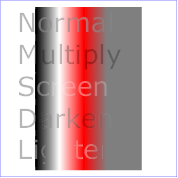
Example of feBlend
9.6. Filter primitive feColorMatrix
This filter applies a matrix transformation:
on the RGBA color and alpha values of every pixel on the input graphics to produce a result with a new set of RGBA color and alpha values.
The calculations are performed on non-premultiplied color values.
Attribute definitions:
-
type= "matrix|saturate|hueRotate|luminanceToAlpha" -
Indicates the type of matrix operation. The keyword matrix indicates that a full 5x4 matrix of values will be provided. The other keywords represent convenience shortcuts to allow commonly used color operations to be performed without specifying a complete matrix.
The initial value for type is matrix.
Animatable: yes.
-
values= "list of <number>s" -
The contents of values depends on the value of attribute type:
-
For
type="matrix", values is a list of 20 matrix values (a00 a01 a02 a03 a04 a10 a11 ... a34), separated by whitespace and/or a comma. For example, the identity matrix could be expressed as:type="matrix" values="1 0 0 0 0 0 1 0 0 0 0 0 1 0 0 0 0 0 1 0"
-
For
type="saturate", values is a single real number value. A saturate operation is equivalent to the following matrix operation:Note: A value of 0 produces a fully desaturated (grayscale) filter result, while a value of 1 passes the filter input image through unchanged. Values outside the 0..1 range under- or oversaturates the filter input image respectively.
Note: The precision of the luminance coefficients increased in comparison to previous specification texts [Cmam].
-
For
type="hueRotate", values is a single one real number value (degrees). A hueRotate operation is equivalent to the following matrix operation:where the terms a00, a01, etc. are calculated as follows:
Thus, the upper left term of the hue matrix turns out to be:
-
For
type="luminanceToAlpha", values is not applicable. A luminanceToAlpha operation is equivalent to the following matrix operation:
The initial value for values
- if
type="matrix" -
defaults to the identity matrix
- if
type="saturate" -
defaults to the value 1
- if
type="hueRotate" -
defaults to the value 0 which results in the identity matrix.
If the number of entries in the values list does not match the required number of entries by the type, the filter primitive acts as a pass through filter.
Animatable: yes.
-
 <  svg   width  =  "8cm"   height  =  "5cm"   viewBox  =  "0 0 800 500"
      xmlns  =  "http://www.w3.org/2000/svg"  >
   <  title  > Example feColorMatrix - Examples of feColorMatrix operations </  title  >
   <  desc  > Five text strings showing the effects of feColorMatrix:
        an unfiltered text string acting as a reference,
        use of the feColorMatrix matrix option to convert to grayscale,
        use of the feColorMatrix saturate option,
        use of the feColorMatrix hueRotate option,
        and use of the feColorMatrix luminanceToAlpha option. </  desc  >
   <  defs  >
     <  linearGradient   id  =  "MyGradient"   gradientUnits  =  "userSpaceOnUse"
             x1  =  "100"   y1  =  "0"   x2  =  "500"   y2  =  "0"  >
       <  stop   offset  =  "0"   stop-color  =  "#ff00ff"   />
       <  stop   offset  =  ".33"   stop-color  =  "#88ff88"   />
       <  stop   offset  =  ".67"   stop-color  =  "#2020ff"   />
       <  stop   offset  =  "1"   stop-color  =  "#d00000"   />
     </  linearGradient  >
     <  filter   id  =  "Matrix"   filterUnits  =  "objectBoundingBox"
             x  =  "0%"   y  =  "0%"   width  =  "100%"   height  =  "100%"  >
       <  feColorMatrix   type  =  "matrix"   in  =  "SourceGraphic"
            values  =  ".33 .33 .33 0 0
                    .33 .33 .33 0 0
                    .33 .33 .33 0 0
                    .33 .33 .33 0 0"  />
     </  filter  >
     <  filter   id  =  "Saturate40"   filterUnits  =  "objectBoundingBox"
             x  =  "0%"   y  =  "0%"   width  =  "100%"   height  =  "100%"  >
       <  feColorMatrix   type  =  "saturate"   in  =  "SourceGraphic"   values  =  "0.4"  />
     </  filter  >
     <  filter   id  =  "HueRotate90"   filterUnits  =  "objectBoundingBox"
             x  =  "0%"   y  =  "0%"   width  =  "100%"   height  =  "100%"  >
       <  feColorMatrix   type  =  "hueRotate"   in  =  "SourceGraphic"   values  =  "90"  />
     </  filter  >
     <  filter   id  =  "LuminanceToAlpha"   filterUnits  =  "objectBoundingBox"
             x  =  "0%"   y  =  "0%"   width  =  "100%"   height  =  "100%"  >
       <  feColorMatrix   type  =  "luminanceToAlpha"   in  =  "SourceGraphic"   result  =  "a"  />
       <  feComposite   in  =  "SourceGraphic"   in2  =  "a"   operator  =  "in"   />
     </  filter  >
   </  defs  >
   <  rect   fill  =  "none"   stroke  =  "blue"
         x  =  "1"   y  =  "1"   width  =  "798"   height  =  "498"  />
   <  g   font-family  =  "Verdana"   font-size  =  "75"
             font-weight  =  "bold"   fill  =  "url(#MyGradient)"   >
     <  rect   x  =  "100"   y  =  "0"   width  =  "500"   height  =  "20"   />
     <  text   x  =  "100"   y  =  "90"  > Unfiltered </  text  >
     <  text   x  =  "100"   y  =  "190"   filter  =  "url(#Matrix)"   > Matrix </  text  >
     <  text   x  =  "100"   y  =  "290"   filter  =  "url(#Saturate40)"   > Saturate </  text  >
     <  text   x  =  "100"   y  =  "390"   filter  =  "url(#HueRotate90)"   > HueRotate </  text  >
     <  text   x  =  "100"   y  =  "490"   filter  =  "url(#LuminanceToAlpha)"   > Luminance </  text  >
   </  g  >
 </  svg  >
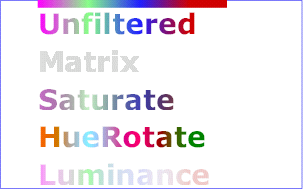
Example of feColorMatrix
9.7. Filter primitive feComponentTransfer
This filter primitive performs component-wise remapping of data as follows:
R' = feFuncR( R )G' = feFuncG( G )
B' = feFuncB( B )
A' = feFuncA( A )
for every pixel. It allows operations like brightness adjustment, contrast adjustment, color balance or thresholding.
The calculations are performed on non-premultiplied color values.
The child elements of a feComponentTransfer element specify the transfer functions for the four channels:
-
feFuncR - transfer function for the red component of the input graphic
-
feFuncG - transfer function for the green component of the input graphic
-
feFuncB - transfer function for the blue component of the input graphic
-
feFuncA - transfer function for the alpha component of the input graphic
The set of feFuncR, feFuncG, feFuncB, feFuncA elements are also called transfer function element s.
The following rules apply to the processing of the feComponentTransfer element:
-
If more than one transfer function element of the same kind is specified, the last occurrence is to be used.
-
If any of the transfer function elements are unspecified, the feComponentTransfer must be processed as if those transfer function elements were specified with their type attributes set to identity.
9.7.1. Transfer function feFuncR
| Name: | feFuncR
|
|---|---|
| Categories: | transfer function element |
| Content model: | Any number of descriptive elements, animate, script, set elements, in any order. |
| Attributes: | |
| DOM Interfaces: | SVGFEFuncRElement |
The attributes below are the transfer function element attributes , which apply to the transfer function elements.
Attribute definitions:
-
type= "identity | table | discrete | linear | gamma" -
Indicates the type of component transfer function. The type of function determines the applicability of the other attributes.
In the following, C is the initial component (e.g., feFuncR), C' is the remapped component; both in the closed interval [0,1].
-
For
identity:C' = C
-
For
table, the function is defined by linear interpolation between values given in the attribute tableValues. The table has n+1 values (i.e., v0 to vn) specifying the start and end values for n evenly sized interpolation regions. Interpolations use the following formula:For a value
C < 1findksuch that:k/n <= C < (k+1)/nThe result
C'is given by:C' = vk + (C - k/n)*n * (vk+1 - vk)If
C = 1then:C' = vn. -
For
discrete, the function is defined by the step function given in the attribute tableValues, which provides a list of n values (i.e., v0 to vn-1) in order to identify a step function consisting of n steps. The step function is defined by the following formula:For a value
C < 1findksuch that:k/n <= C < (k+1)/nThe result
C'is given by:C' = vkIf
C = 1then:C' = vn-1. -
For
linear, the function is defined by the following linear equation: -
For
gamma, the function is defined by the following exponential function:
The initial value for type is identity.
Animatable: yes.
-
-
tableValues= "(list of <number>s)" -
When
type="table", the list of <number> s v0,v1,...vn, separated by white space and/or a comma, which define the lookup table. An empty list results in an identity transfer function.If the attribute is not specified, then the effect is as if an empty list were provided.
Animatable: yes.
-
slope= "<number>" -
When
type="linear", the slope of the linear function.The initial value for slope is 1.
Animatable: yes.
-
intercept= "<number>" -
When
type="linear", the intercept of the linear function.The initial value for intercept is 0.
Animatable: yes.
-
amplitude= "<number>" -
When
type="gamma", the amplitude of the gamma function.The initial value for amplitude is 1.
Animatable: yes.
-
exponent= "<number>" -
When
type="gamma", the exponent of the gamma function.The initial value for exponent is 1.
Animatable: yes.
-
offset= "<number>" -
When
type="gamma", the offset of the gamma function.The initial value for offset is 0.
Animatable: yes.
 <  svg   width  =  "8cm"   height  =  "4cm"   viewBox  =  "0 0 800 400"
      xmlns  =  "http://www.w3.org/2000/svg"  >
   <  title  > Example feComponentTransfer - Examples of feComponentTransfer operations </  title  >
   <  desc  > Four text strings showing the effects of feComponentTransfer:
        an identity function acting as a reference,
        use of the feComponentTransfer table option,
        use of the feComponentTransfer linear option,
        and use of the feComponentTransfer gamma option. </  desc  >
   <  defs  >
     <  linearGradient   id  =  "MyGradient"   gradientUnits  =  "userSpaceOnUse"
             x1  =  "100"   y1  =  "0"   x2  =  "600"   y2  =  "0"  >
       <  stop   offset  =  "0"   stop-color  =  "#ff0000"   />
       <  stop   offset  =  ".33"   stop-color  =  "#00ff00"   />
       <  stop   offset  =  ".67"   stop-color  =  "#0000ff"   />
       <  stop   offset  =  "1"   stop-color  =  "#000000"   />
     </  linearGradient  >
     <  filter   id  =  "Identity"   filterUnits  =  "objectBoundingBox"
             x  =  "0%"   y  =  "0%"   width  =  "100%"   height  =  "100%"  >
       <  feComponentTransfer  >
         <  feFuncR   type  =  "identity"  />
         <  feFuncG   type  =  "identity"  />
         <  feFuncB   type  =  "identity"  />
         <  feFuncA   type  =  "identity"  />
       </  feComponentTransfer  >
     </  filter  >
     <  filter   id  =  "Table"   filterUnits  =  "objectBoundingBox"
             x  =  "0%"   y  =  "0%"   width  =  "100%"   height  =  "100%"  >
       <  feComponentTransfer  >
         <  feFuncR   type  =  "table"   tableValues  =  "0 0 1 1"  />
         <  feFuncG   type  =  "table"   tableValues  =  "1 1 0 0"  />
         <  feFuncB   type  =  "table"   tableValues  =  "0 1 1 0"  />
       </  feComponentTransfer  >
     </  filter  >
     <  filter   id  =  "Linear"   filterUnits  =  "objectBoundingBox"
             x  =  "0%"   y  =  "0%"   width  =  "100%"   height  =  "100%"  >
       <  feComponentTransfer  >
         <  feFuncR   type  =  "linear"   slope  =  ".5"   intercept  =  ".25"  />
         <  feFuncG   type  =  "linear"   slope  =  ".5"   intercept  =  "0"  />
         <  feFuncB   type  =  "linear"   slope  =  ".5"   intercept  =  ".5"  />
       </  feComponentTransfer  >
     </  filter  >
     <  filter   id  =  "Gamma"   filterUnits  =  "objectBoundingBox"
             x  =  "0%"   y  =  "0%"   width  =  "100%"   height  =  "100%"  >
       <  feComponentTransfer  >
         <  feFuncR   type  =  "gamma"   amplitude  =  "2"   exponent  =  "5"   offset  =  "0"  />
         <  feFuncG   type  =  "gamma"   amplitude  =  "2"   exponent  =  "3"   offset  =  "0"  />
         <  feFuncB   type  =  "gamma"   amplitude  =  "2"   exponent  =  "1"   offset  =  "0"  />
       </  feComponentTransfer  >
     </  filter  >
   </  defs  >
   <  rect   fill  =  "none"   stroke  =  "blue"
         x  =  "1"   y  =  "1"   width  =  "798"   height  =  "398"  />
   <  g   font-family  =  "Verdana"   font-size  =  "75"
             font-weight  =  "bold"   fill  =  "url(#MyGradient)"   >
     <  rect   x  =  "100"   y  =  "0"   width  =  "600"   height  =  "20"   />
     <  text   x  =  "100"   y  =  "90"  > Identity </  text  >
     <  text   x  =  "100"   y  =  "190"   filter  =  "url(#Table)"   > TableLookup </  text  >
     <  text   x  =  "100"   y  =  "290"   filter  =  "url(#Linear)"   > LinearFunc </  text  >
     <  text   x  =  "100"   y  =  "390"   filter  =  "url(#Gamma)"   > GammaFunc </  text  >
   </  g  >
 </  svg  >

Example for feComponentTransfer
9.7.2. Transfer function feFuncG
| Name: | feFuncG
|
|---|---|
| Categories: | transfer function element |
| Content model: | Any number of descriptive elements, animate, script, set elements, in any order. |
| Attributes: | |
| DOM Interfaces: | SVGFEFuncGElement |
See feFuncR for the definitions of the attribute values.
9.7.3. Transfer function feFuncB
| Name: | feFuncB
|
|---|---|
| Categories: | transfer function element |
| Content model: | Any number of descriptive elements, animate, script, set elements, in any order. |
| Attributes: | |
| DOM Interfaces: | SVGFEFuncBElement |
See feFuncR for the definitions of the attribute values.
9.7.4. Transfer function feFuncA
| Name: | feFuncA
|
|---|---|
| Categories: | transfer function element |
| Content model: | Any number of descriptive elements, animate, script, set elements, in any order. |
| Attributes: | |
| DOM Interfaces: | SVGFEFuncAElement |
See feFuncR for the definitions of the attribute values.
9.8. Filter primitive feComposite
This filter performs the combination of the two input images pixel-wise in image space using one of the Porter-Duff [PORTERDUFF] compositing operations: over, in, atop, out, xor, lighter [COMPOSITING-1]. Additionally, a component-wise arithmetic operation (with the result clamped between [0..1]) can be applied.
The arithmetic operation is useful for combining the output from the feDiffuseLighting and feSpecularLighting filters with texture data. It is also useful for implementing dissolve. If the arithmetic operation is chosen, each result pixel is computed using the following formula:
result = k1*i1*i2 + k2*i1 + k3*i2 + k4
where:
-
i1andi2indicate the corresponding pixel channel values of the input image, which map to in and in2 respectively -
k1, k2, k3andk4indicate the values of the attributes with the same name
For this filter primitive, the extent of the resulting image might grow as described in the section that describes the filter primitive subregion.
Attribute definitions:
-
operator= "over|in|out|atop|xor|lighter|arithmetic" -
The compositing operation that is to be performed. All of the operator types except arithmetic match the corresponding operation as described in [COMPOSITING-1] with in representing the source and in2 representing the destination. The arithmetic operator is described above.
The initial value for operator is over.
Animatable: yes.
-
k1= "<number>" -
Only applicable if
operator="arithmetic".The initial value for k1 is 0.
Animatable: yes.
-
k2= "<number>" -
Only applicable if
operator="arithmetic".The initial value for k2 is 0.
Animatable: yes.
-
k3= "<number>" -
Only applicable if
operator="arithmetic".The initial value for k3 is 0.
Animatable: yes.
-
k4= "<number>" -
Only applicable if
operator="arithmetic".The initial value for k4 is 0.
Animatable: yes.
-
in2= "(see in attribute)" -
The second input image to the compositing operation.
Animatable: yes.
Note: Compositing and Blending [COMPOSITING-1] defines more compositing keywords. The functionality of the additional keywords can be archived by switching the input filter primitives in and in2.
 <  svg   width  =  "330"   height  =  "195"   viewBox  =  "0 0 1100 650"
      xmlns  =  "http://www.w3.org/2000/svg"   xmlns:xlink  =  "http://www.w3.org/1999/xlink"  >
   <  title  > Example feComposite - Examples of feComposite operations </  title  >
   <  desc  > Four rows of six pairs of overlapping triangles depicting
        the six different feComposite operators under different
        opacity values and different clearing of the background. </  desc  >
   <  defs  >
     <  desc  > Define two sets of six filters for each of the six compositing operators.
          The first set wipes out the background image by flooding with opaque white.
          The second set does not wipe out the background, with the result
          that the background sometimes shines through and is other cases
          is blended into itself (i.e., "double-counting"). </  desc  >
     <  filter   id  =  "overFlood"   filterUnits  =  "objectBoundingBox"   x  =  "-5%"   y  =  "-5%"   width  =  "110%"   height  =  "110%"  >
       <  feFlood   flood-color  =  "#ffffff"   flood-opacity  =  "1"   result  =  "flood"  />
       <  feComposite   in  =  "SourceGraphic"   in2  =  "BackgroundImage"   operator  =  "over"   result  =  "comp"  />
       <  feMerge  >   <  feMergeNode   in  =  "flood"  />   <  feMergeNode   in  =  "comp"  />   </  feMerge  >
     </  filter  >
     <  filter   id  =  "inFlood"   filterUnits  =  "objectBoundingBox"   x  =  "-5%"   y  =  "-5%"   width  =  "110%"   height  =  "110%"  >
       <  feFlood   flood-color  =  "#ffffff"   flood-opacity  =  "1"   result  =  "flood"  />
       <  feComposite   in  =  "SourceGraphic"   in2  =  "BackgroundImage"   operator  =  "in"   result  =  "comp"  />
       <  feMerge  >   <  feMergeNode   in  =  "flood"  />   <  feMergeNode   in  =  "comp"  />   </  feMerge  >
     </  filter  >
     <  filter   id  =  "outFlood"   filterUnits  =  "objectBoundingBox"   x  =  "-5%"   y  =  "-5%"   width  =  "110%"   height  =  "110%"  >
       <  feFlood   flood-color  =  "#ffffff"   flood-opacity  =  "1"   result  =  "flood"  />
       <  feComposite   in  =  "SourceGraphic"   in2  =  "BackgroundImage"   operator  =  "out"   result  =  "comp"  />
       <  feMerge  >   <  feMergeNode   in  =  "flood"  />   <  feMergeNode   in  =  "comp"  />   </  feMerge  >
     </  filter  >
     <  filter   id  =  "atopFlood"   filterUnits  =  "objectBoundingBox"   x  =  "-5%"   y  =  "-5%"   width  =  "110%"   height  =  "110%"  >
       <  feFlood   flood-color  =  "#ffffff"   flood-opacity  =  "1"   result  =  "flood"  />
       <  feComposite   in  =  "SourceGraphic"   in2  =  "BackgroundImage"   operator  =  "atop"   result  =  "comp"  />
       <  feMerge  >   <  feMergeNode   in  =  "flood"  />   <  feMergeNode   in  =  "comp"  />   </  feMerge  >
     </  filter  >
     <  filter   id  =  "xorFlood"   filterUnits  =  "objectBoundingBox"   x  =  "-5%"   y  =  "-5%"   width  =  "110%"   height  =  "110%"  >
       <  feFlood   flood-color  =  "#ffffff"   flood-opacity  =  "1"   result  =  "flood"  />
       <  feComposite   in  =  "SourceGraphic"   in2  =  "BackgroundImage"   operator  =  "xor"   result  =  "comp"  />
       <  feMerge  >   <  feMergeNode   in  =  "flood"  />   <  feMergeNode   in  =  "comp"  />   </  feMerge  >
     </  filter  >
     <  filter   id  =  "arithmeticFlood"   filterUnits  =  "objectBoundingBox"
             x  =  "-5%"   y  =  "-5%"   width  =  "110%"   height  =  "110%"  >
       <  feFlood   flood-color  =  "#ffffff"   flood-opacity  =  "1"   result  =  "flood"  />
       <  feComposite   in  =  "SourceGraphic"   in2  =  "BackgroundImage"   result  =  "comp"
                    operator  =  "arithmetic"   k1  =  ".5"   k2  =  ".5"   k3  =  ".5"   k4  =  ".5"  />
       <  feMerge  >   <  feMergeNode   in  =  "flood"  />   <  feMergeNode   in  =  "comp"  />   </  feMerge  >
     </  filter  >
     <  filter   id  =  "overNoFlood"   filterUnits  =  "objectBoundingBox"   x  =  "-5%"   y  =  "-5%"   width  =  "110%"   height  =  "110%"  >
       <  feComposite   in  =  "SourceGraphic"   in2  =  "BackgroundImage"   operator  =  "over"   result  =  "comp"  />
     </  filter  >
     <  filter   id  =  "inNoFlood"   filterUnits  =  "objectBoundingBox"   x  =  "-5%"   y  =  "-5%"   width  =  "110%"   height  =  "110%"  >
       <  feComposite   in  =  "SourceGraphic"   in2  =  "BackgroundImage"   operator  =  "in"   result  =  "comp"  />
     </  filter  >
     <  filter   id  =  "outNoFlood"   filterUnits  =  "objectBoundingBox"   x  =  "-5%"   y  =  "-5%"   width  =  "110%"   height  =  "110%"  >
       <  feComposite   in  =  "SourceGraphic"   in2  =  "BackgroundImage"   operator  =  "out"   result  =  "comp"  />
     </  filter  >
     <  filter   id  =  "atopNoFlood"   filterUnits  =  "objectBoundingBox"   x  =  "-5%"   y  =  "-5%"   width  =  "110%"   height  =  "110%"  >
       <  feComposite   in  =  "SourceGraphic"   in2  =  "BackgroundImage"   operator  =  "atop"   result  =  "comp"  />
     </  filter  >
     <  filter   id  =  "xorNoFlood"   filterUnits  =  "objectBoundingBox"   x  =  "-5%"   y  =  "-5%"   width  =  "110%"   height  =  "110%"  >
       <  feComposite   in  =  "SourceGraphic"   in2  =  "BackgroundImage"   operator  =  "xor"   result  =  "comp"  />
     </  filter  >
     <  filter   id  =  "arithmeticNoFlood"   filterUnits  =  "objectBoundingBox"
             x  =  "-5%"   y  =  "-5%"   width  =  "110%"   height  =  "110%"  >
       <  feComposite   in  =  "SourceGraphic"   in2  =  "BackgroundImage"   result  =  "comp"
                    operator  =  "arithmetic"   k1  =  ".5"   k2  =  ".5"   k3  =  ".5"   k4  =  ".5"  />
     </  filter  >
     <  path   id  =  "Blue100"   d  =  "M 0 0 L 100 0 L 100 100 z"   fill  =  "#00ffff"   />
     <  path   id  =  "Red100"   d  =  "M 0 0 L 0 100 L 100 0 z"   fill  =  "#ff00ff"   />
     <  path   id  =  "Blue50"   d  =  "M 0 125 L 100 125 L 100 225 z"   fill  =  "#00ffff"   fill-opacity  =  ".5"   />
     <  path   id  =  "Red50"   d  =  "M 0 125 L 0 225 L 100 125 z"   fill  =  "#ff00ff"   fill-opacity  =  ".5"   />
     <  g   id  =  "TwoBlueTriangles"  >
       <  use   xlink:href  =  "#Blue100"  />
       <  use   xlink:href  =  "#Blue50"  />
     </  g  >
     <  g   id  =  "BlueTriangles"  >
       <  use   transform  =  "translate(275,25)"   xlink:href  =  "#TwoBlueTriangles"  />
       <  use   transform  =  "translate(400,25)"   xlink:href  =  "#TwoBlueTriangles"  />
       <  use   transform  =  "translate(525,25)"   xlink:href  =  "#TwoBlueTriangles"  />
       <  use   transform  =  "translate(650,25)"   xlink:href  =  "#TwoBlueTriangles"  />
       <  use   transform  =  "translate(775,25)"   xlink:href  =  "#TwoBlueTriangles"  />
       <  use   transform  =  "translate(900,25)"   xlink:href  =  "#TwoBlueTriangles"  />
     </  g  >
   </  defs  >
   <  rect   fill  =  "none"   stroke  =  "blue"   x  =  "1"   y  =  "1"   width  =  "1098"   height  =  "648"  />
   <  g   font-family  =  "Verdana"   font-size  =  "40"   shape-rendering  =  "crispEdges"  >
     <  desc  > Render the examples using the filters that draw on top of
          an opaque white surface, thus obliterating the background. </  desc  >
     <  g   isolation  =  "isolate"  >
       <  text   x  =  "15"   y  =  "75"  > opacity 1.0 </  text  >
       <  text   x  =  "15"   y  =  "115"   font-size  =  "27"  > (with feFlood) </  text  >
       <  text   x  =  "15"   y  =  "200"  > opacity 0.5 </  text  >
       <  text   x  =  "15"   y  =  "240"   font-size  =  "27"  > (with feFlood) </  text  >
       <  use   xlink:href  =  "#BlueTriangles"  />
       <  g   transform  =  "translate(275,25)"  >
         <  use   xlink:href  =  "#Red100"   filter  =  "url(#overFlood)"   />
         <  use   xlink:href  =  "#Red50"   filter  =  "url(#overFlood)"   />
         <  text   x  =  "5"   y  =  "275"  > over </  text  >
       </  g  >
       <  g   transform  =  "translate(400,25)"  >
         <  use   xlink:href  =  "#Red100"   filter  =  "url(#inFlood)"   />
         <  use   xlink:href  =  "#Red50"   filter  =  "url(#inFlood)"   />
         <  text   x  =  "35"   y  =  "275"  > in </  text  >
       </  g  >
       <  g   transform  =  "translate(525,25)"  >
         <  use   xlink:href  =  "#Red100"   filter  =  "url(#outFlood)"   />
         <  use   xlink:href  =  "#Red50"   filter  =  "url(#outFlood)"   />
         <  text   x  =  "15"   y  =  "275"  > out </  text  >
       </  g  >
       <  g   transform  =  "translate(650,25)"  >
         <  use   xlink:href  =  "#Red100"   filter  =  "url(#atopFlood)"   />
         <  use   xlink:href  =  "#Red50"   filter  =  "url(#atopFlood)"   />
         <  text   x  =  "10"   y  =  "275"  > atop </  text  >
       </  g  >
       <  g   transform  =  "translate(775,25)"  >
         <  use   xlink:href  =  "#Red100"   filter  =  "url(#xorFlood)"   />
         <  use   xlink:href  =  "#Red50"   filter  =  "url(#xorFlood)"   />
         <  text   x  =  "15"   y  =  "275"  > xor </  text  >
       </  g  >
       <  g   transform  =  "translate(900,25)"  >
         <  use   xlink:href  =  "#Red100"   filter  =  "url(#arithmeticFlood)"   />
         <  use   xlink:href  =  "#Red50"   filter  =  "url(#arithmeticFlood)"   />
         <  text   x  =  "-25"   y  =  "275"  > arithmetic </  text  >
       </  g  >
     </  g  >
     <  g   transform  =  "translate(0,325)"   isolation  =  "isolate"  >
     <  desc  > Render the examples using the filters that do not obliterate
          the background, thus sometimes causing the background to continue
          to appear in some cases, and in other cases the background
          image blends into itself ("double-counting"). </  desc  >
       <  text   x  =  "15"   y  =  "75"  > opacity 1.0 </  text  >
       <  text   x  =  "15"   y  =  "115"   font-size  =  "27"  > (without feFlood) </  text  >
       <  text   x  =  "15"   y  =  "200"  > opacity 0.5 </  text  >
       <  text   x  =  "15"   y  =  "240"   font-size  =  "27"  > (without feFlood) </  text  >
       <  use   xlink:href  =  "#BlueTriangles"  />
       <  g   transform  =  "translate(275,25)"  >
         <  use   xlink:href  =  "#Red100"   filter  =  "url(#overNoFlood)"   />
         <  use   xlink:href  =  "#Red50"   filter  =  "url(#overNoFlood)"   />
         <  text   x  =  "5"   y  =  "275"  > over </  text  >
       </  g  >
       <  g   transform  =  "translate(400,25)"  >
         <  use   xlink:href  =  "#Red100"   filter  =  "url(#inNoFlood)"   />
         <  use   xlink:href  =  "#Red50"   filter  =  "url(#inNoFlood)"   />
         <  text   x  =  "35"   y  =  "275"  > in </  text  >
       </  g  >
       <  g   transform  =  "translate(525,25)"  >
         <  use   xlink:href  =  "#Red100"   filter  =  "url(#outNoFlood)"   />
         <  use   xlink:href  =  "#Red50"   filter  =  "url(#outNoFlood)"   />
         <  text   x  =  "15"   y  =  "275"  > out </  text  >
       </  g  >
       <  g   transform  =  "translate(650,25)"  >
         <  use   xlink:href  =  "#Red100"   filter  =  "url(#atopNoFlood)"   />
         <  use   xlink:href  =  "#Red50"   filter  =  "url(#atopNoFlood)"   />
         <  text   x  =  "10"   y  =  "275"  > atop </  text  >
       </  g  >
       <  g   transform  =  "translate(775,25)"  >
         <  use   xlink:href  =  "#Red100"   filter  =  "url(#xorNoFlood)"   />
         <  use   xlink:href  =  "#Red50"   filter  =  "url(#xorNoFlood)"   />
         <  text   x  =  "15"   y  =  "275"  > xor </  text  >
       </  g  >
       <  g   transform  =  "translate(900,25)"  >
         <  use   xlink:href  =  "#Red100"   filter  =  "url(#arithmeticNoFlood)"   />
         <  use   xlink:href  =  "#Red50"   filter  =  "url(#arithmeticNoFlood)"   />
         <  text   x  =  "-25"   y  =  "275"  > arithmetic </  text  >
       </  g  >
     </  g  >
   </  g  >
 </  svg  >
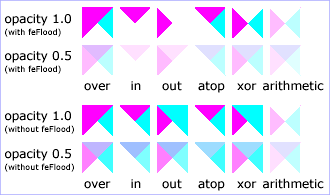
Example of feComposite
9.9. Filter primitive feConvolveMatrix
feConvolveMatrix applies a matrix convolution filter effect. A convolution combines pixels in the input image with neighboring pixels to produce a resulting image. A wide variety of imaging operations can be achieved through convolutions, including blurring, edge detection, sharpening, embossing and beveling.
A matrix convolution is based on an n-by-m matrix (the convolution kernel) which describes how a given pixel value in the input image is combined with its neighboring pixel values to produce a resulting pixel value. Each result pixel is determined by applying the kernel matrix to the corresponding source pixel and its neighboring pixels. The basic convolution formula which is applied to each color value for a given pixel is:
where "orderX" and "orderY" represent the X and Y values for the order attribute, "targetX" represents the value of the targetX attribute, "targetY" represents the value of the targetY attribute, "kernelMatrix" represents the value of the kernelMatrix attribute, "divisor" represents the value of the divisor attribute, and "bias" represents the value of the bias attribute.
In the above formulas the values in the kernel matrix are applied such that the kernel matrix is rotated 180 degrees relative to the source and destination images in order to match convolution theory as described in many computer graphics textbooks.
To illustrate, suppose you have a input image which is 5 pixels by 5 pixels, whose color values for one of the color channels are as follows:
and you define a 3-by-3 convolution kernel as follows:
Let’s focus on the color value at the second row and second column of the image (source pixel value is 120). Assuming the simplest case (where the input image’s pixel grid aligns perfectly with the kernel’s pixel grid) and assuming default values for attributes divisor, targetX and targetY, then resulting color value will be:
Because they operate on pixels, matrix convolutions are inherently resolution-dependent. To make feConvolveMatrix produce resolution-independent results, an explicit value should be provided for the attribute kernelUnitLength.
kernelUnitLength, in combination with the other attributes, defines an implicit pixel grid in the filter effects coordinate system (i.e., the coordinate system established by the primitiveUnits attribute). The input image will be temporarily rescaled to match its pixels with kernelUnitLength. The convolution happens on the resampled image. After applying the convolution, the image is resampled back to the original resolution.
When the image must be resampled to match the coordinate system defined by kernelUnitLength prior to convolution, or resampled to match the device coordinate system after convolution, it is recommended that high quality viewers make use of appropriate interpolation techniques, for example bilinear or bicubic. Depending on the speed of the available interpolents, this choice may be affected by the image-rendering property setting. Note that implementations might choose approaches that minimize or eliminate resampling when not necessary to produce proper results, such as when the document is zoomed out such that kernelUnitLength is considerably smaller than a device pixel.
Attribute definitions:
-
order= "<number-optional-number>" -
Indicates the number of cells in each dimension for kernelMatrix. The values provided must be <integer> s greater than zero. Values that are not integers will be truncated, i.e. rounded to the closest integer value towards zero. The first number, <orderX>, indicates the number of columns in the matrix. The second number, <orderY>, indicates the number of rows in the matrix. If <orderY> is not provided, it defaults to <orderX>.
It is recommended that only small values (e.g., 3) be used; higher values may result in very high CPU overhead and usually do not produce results that justify the impact on performance.
The initial value for order is 3.
Animatable: yes.
-
kernelMatrix= "<list of numbers>" -
The list of <number> s that make up the kernel matrix for the convolution. Values are separated by space characters and/or a comma. The number of entries in the list must equal <orderX> times <orderY>.
If the result of
orderX * orderYis not equal to the the number of entries in the value list, the filter primitive acts as a pass through filter.How to behave on invalid number of entries in the value list? <https://github.com/w3c/csswg-drafts/issues/237>
Animatable: yes.
-
divisor= "<number>" -
After applying the kernelMatrix to the input image to yield a number, that number is divided by divisor to yield the final destination color value. A divisor that is the sum of all the matrix values tends to have an evening effect on the overall color intensity of the result. If the specified divisor is 0 then the default value will be used instead.
The initial value is the sum of all values in kernelMatrix, with the exception that if the sum is zero, then the divisor is set to 1.
Animatable: yes.
-
bias= "<number>" -
After applying the kernelMatrix to the input image to yield a number and applying the divisor, the bias attribute is added to each component. One application of bias is when it is desirable to have .5 gray value be the zero response of the filter. The bias property shifts the range of the filter. This allows representation of values that would otherwise be clamped to 0 or 1.
The initial value for bias is 0.
Animatable: yes.
-
targetX= "<integer>" -
Determines the positioning in X of the convolution matrix relative to a given target pixel in the input image. The leftmost column of the matrix is column number zero. The value must be such that: 0 <= targetX < orderX. By default, the convolution matrix is centered in X over each pixel of the input image (i.e., targetX = floor ( orderX / 2 )).
Animatable: yes.
-
targetY= "<integer>" -
Determines the positioning in Y of the convolution matrix relative to a given target pixel in the input image. The topmost row of the matrix is row number zero. The value must be such that: 0 <= targetY < orderY. By default, the convolution matrix is centered in Y over each pixel of the input image (i.e., targetY = floor ( orderY / 2 )).
Animatable: yes.
-
edgeMode= "duplicate | wrap | none" -
Determines how to extend the input image as necessary with color values so that the matrix operations can be applied when the kernel is positioned at or near the edge of the input image.
duplicate indicates that the input image is extended along each of its borders as necessary by duplicating the color values at the given edge of the input image.
Original N-by-M image, where m=M-1 and n=N-1:
Extended by two pixels using duplicate: