Introduction
Audio on the web has been fairly primitive up to this point and until
very recently has had to be delivered through plugins such as Flash and
QuickTime. The introduction of the audio element in HTML5
is very important, allowing for basic streaming audio playback. But, it
is not powerful enough to handle more complex audio applications. For
sophisticated web-based games or interactive applications, another
solution is required. It is a goal of this specification to include the
capabilities found in modern game audio engines as well as some of the
mixing, processing, and filtering tasks that are found in modern
desktop audio production applications.
The APIs have been designed with a wide variety of use cases [webaudio-usecases] in mind. Ideally, it should be able to support any use case which could reasonably be implemented with an optimized C++ engine controlled via script and run in a browser. That said, modern desktop audio software can have very advanced capabilities, some of which would be difficult or impossible to build with this system. Apple’s Logic Audio is one such application which has support for external MIDI controllers, arbitrary plugin audio effects and synthesizers, highly optimized direct-to-disk audio file reading/writing, tightly integrated time-stretching, and so on. Nevertheless, the proposed system will be quite capable of supporting a large range of reasonably complex games and interactive applications, including musical ones. And it can be a very good complement to the more advanced graphics features offered by WebGL. The API has been designed so that more advanced capabilities can be added at a later time.
Features
The API supports these primary features:
-
Modular routing for simple or complex mixing/effect architectures.
-
High dynamic range, using 32-bit floats for internal processing.
-
Sample-accurate scheduled sound playback with low latency for musical applications requiring a very high degree of rhythmic precision such as drum machines and sequencers. This also includes the possibility of dynamic creation of effects.
-
Automation of audio parameters for envelopes, fade-ins / fade-outs, granular effects, filter sweeps, LFOs etc.
-
Flexible handling of channels in an audio stream, allowing them to be split and merged.
-
Processing of audio sources from an
audioorvideomedia element. -
Processing live audio input using a
MediaStreamfromgetUserMedia(). -
Integration with WebRTC
-
Processing audio received from a remote peer using a
MediaStreamTrackAudioSourceNodeand [webrtc]. -
Sending a generated or processed audio stream to a remote peer using a
MediaStreamAudioDestinationNodeand [webrtc].
-
-
Audio stream synthesis and processing directly using scripts.
-
Spatialized audio supporting a wide range of 3D games and immersive environments:
-
Panning models: equalpower, HRTF, pass-through
-
Distance Attenuation
-
Sound Cones
-
Obstruction / Occlusion
-
Source / Listener based
-
-
A convolution engine for a wide range of linear effects, especially very high-quality room effects. Here are some examples of possible effects:
-
Small / large room
-
Cathedral
-
Concert hall
-
Cave
-
Tunnel
-
Hallway
-
Forest
-
Amphitheater
-
Sound of a distant room through a doorway
-
Extreme filters
-
Strange backwards effects
-
Extreme comb filter effects
-
-
Dynamics compression for overall control and sweetening of the mix
-
Efficient real-time time-domain and frequency-domain analysis / music visualizer support.
-
Efficient biquad filters for lowpass, highpass, and other common filters.
-
A Waveshaping effect for distortion and other non-linear effects
-
Oscillators
Modular Routing
Modular routing allows arbitrary connections between different AudioNode objects. Each node can have inputs and/or outputs .
A source node has no inputs and a single output.
A destination node has one input and no outputs. Other nodes such as
filters can be placed between the source and destination nodes. The
developer doesn’t have to worry about low-level stream format
details when two objects are connected together; the right thing just happens.
For example, if a mono audio stream is connected to a
stereo input it should just mix to left and right channels appropriately.
In the simplest case, a single source can be routed directly to the output.
All routing occurs within an AudioContext containing a single AudioDestinationNode:
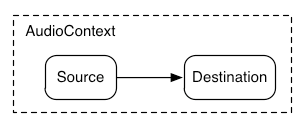
Illustrating this simple routing, here’s a simple example playing a single sound:
 const  context  =   new  AudioContext ();
 function  playSound ()   {
   const  source  =  context . createBufferSource ();
  source . buffer  =  dogBarkingBuffer ;
  source . connect ( context . destination );
  source . start (  0  );
 }
Here’s a more complex example with three sources and a convolution reverb send with a dynamics compressor at the final output stage:
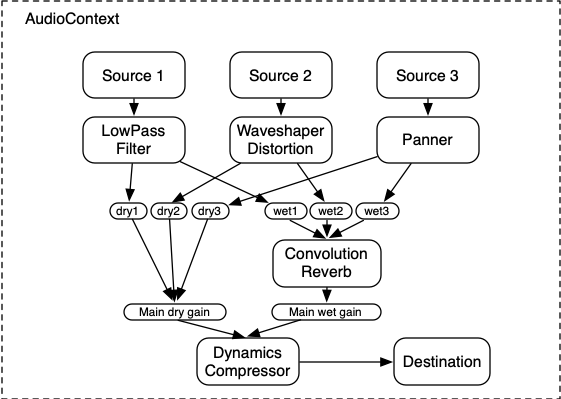
let context ; let compressor ; let reverb ; let source1 , source2 , source3 ; let lowpassFilter ; let waveShaper ; let panner ; let dry1 , dry2 , dry3 ; let wet1 , wet2 , wet3 ; let mainDry ; let mainWet ; function setupRoutingGraph () { context = new AudioContext (); // Create the effects nodes. lowpassFilter = context . createBiquadFilter (); waveShaper = context . createWaveShaper (); panner = context . createPanner (); compressor = context . createDynamicsCompressor (); reverb = context . createConvolver (); // Create main wet and dry. mainDry = context . createGain (); mainWet = context . createGain (); // Connect final compressor to final destination. compressor . connect ( context . destination ); // Connect main dry and wet to compressor. mainDry . connect ( compressor ); mainWet . connect ( compressor ); // Connect reverb to main wet. reverb . connect ( mainWet ); // Create a few sources. source1 = context . createBufferSource (); source2 = context . createBufferSource (); source3 = context . createOscillator (); source1 . buffer = manTalkingBuffer ; source2 . buffer = footstepsBuffer ; source3 . frequency . value = 440 ; // Connect source1 dry1 = context . createGain (); wet1 = context . createGain (); source1 . connect ( lowpassFilter ); lowpassFilter . connect ( dry1 ); lowpassFilter . connect ( wet1 ); dry1 . connect ( mainDry ); wet1 . connect ( reverb ); // Connect source2 dry2 = context . createGain (); wet2 = context . createGain (); source2 . connect ( waveShaper ); waveShaper . connect ( dry2 ); waveShaper . connect ( wet2 ); dry2 . connect ( mainDry ); wet2 . connect ( reverb ); // Connect source3 dry3 = context . createGain (); wet3 = context . createGain (); source3 . connect ( panner ); panner . connect ( dry3 ); panner . connect ( wet3 ); dry3 . connect ( mainDry ); wet3 . connect ( reverb ); // Start the sources now. source1 . start ( 0 ); source2 . start ( 0 ); source3 . start ( 0 ); }
Modular routing also permits the output of AudioNodes to be routed to an AudioParam parameter that controls the behavior
of a different AudioNode. In this scenario, the
output of a node can act as a modulation signal rather than an
input signal.
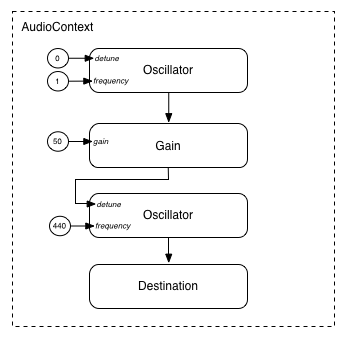
function setupRoutingGraph () { const context = new AudioContext (); // Create the low frequency oscillator that supplies the modulation signal const lfo = context . createOscillator (); lfo . frequency . value = 1.0 ; // Create the high frequency oscillator to be modulated const hfo = context . createOscillator (); hfo . frequency . value = 440.0 ; // Create a gain node whose gain determines the amplitude of the modulation signal const modulationGain = context . createGain (); modulationGain . gain . value = 50 ; // Configure the graph and start the oscillators lfo . connect ( modulationGain ); modulationGain . connect ( hfo . detune ); hfo . connect ( context . destination ); hfo . start ( 0 ); lfo . start ( 0 ); }
API Overview
The interfaces defined are:
-
An AudioContext interface, which contains an audio signal graph representing connections between
AudioNodes. -
An
AudioNodeinterface, which represents audio sources, audio outputs, and intermediate processing modules.AudioNodes can be dynamically connected together in a modular fashion.AudioNodes exist in the context of anAudioContext. -
An
AnalyserNodeinterface, anAudioNodefor use with music visualizers, or other visualization applications. -
An
AudioBufferinterface, for working with memory-resident audio assets. These can represent one-shot sounds, or longer audio clips. -
An
AudioBufferSourceNodeinterface, anAudioNodewhich generates audio from an AudioBuffer. -
An
AudioDestinationNodeinterface, anAudioNodesubclass representing the final destination for all rendered audio. -
An
AudioParaminterface, for controlling an individual aspect of anAudioNode's functioning, such as volume. -
An
AudioListenerinterface, which works with aPannerNodefor spatialization. -
An
AudioWorkletinterface representing a factory for creating custom nodes that can process audio directly using scripts. -
An
AudioWorkletGlobalScopeinterface, the context in which AudioWorkletProcessor processing scripts run. -
An
AudioWorkletNodeinterface, anAudioNoderepresenting a node processed in an AudioWorkletProcessor. -
An
AudioWorkletProcessorinterface, representing a single node instance inside an audio worker. -
A
BiquadFilterNodeinterface, anAudioNodefor common low-order filters such as:-
Low Pass
-
High Pass
-
Band Pass
-
Low Shelf
-
High Shelf
-
Peaking
-
Notch
-
Allpass
-
-
A
ChannelMergerNodeinterface, anAudioNodefor combining channels from multiple audio streams into a single audio stream. -
A
ChannelSplitterNodeinterface, anAudioNodefor accessing the individual channels of an audio stream in the routing graph. -
A
ConstantSourceNodeinterface, anAudioNodefor generating a nominally constant output value with anAudioParamto allow automation of the value. -
A
ConvolverNodeinterface, anAudioNodefor applying a real-time linear effect (such as the sound of a concert hall). -
A
DelayNodeinterface, anAudioNodewhich applies a dynamically adjustable variable delay. -
A
DynamicsCompressorNodeinterface, anAudioNodefor dynamics compression. -
A
GainNodeinterface, anAudioNodefor explicit gain control. -
An
IIRFilterNodeinterface, anAudioNodefor a general IIR filter. -
A
MediaElementAudioSourceNodeinterface, anAudioNodewhich is the audio source from anaudio,video, or other media element. -
A
MediaStreamAudioSourceNodeinterface, anAudioNodewhich is the audio source from aMediaStreamsuch as live audio input, or from a remote peer. -
A
MediaStreamTrackAudioSourceNodeinterface, anAudioNodewhich is the audio source from aMediaStreamTrack. -
A
MediaStreamAudioDestinationNodeinterface, anAudioNodewhich is the audio destination to aMediaStreamsent to a remote peer. -
A
PannerNodeinterface, anAudioNodefor spatializing / positioning audio in 3D space. -
A
PeriodicWaveinterface for specifying custom periodic waveforms for use by theOscillatorNode. -
An
OscillatorNodeinterface, anAudioNodefor generating a periodic waveform. -
A
StereoPannerNodeinterface, anAudioNodefor equal-power positioning of audio input in a stereo stream. -
A
WaveShaperNodeinterface, anAudioNodewhich applies a non-linear waveshaping effect for distortion and other more subtle warming effects.
There are also several features that have been deprecated from the Web Audio API but not yet removed, pending implementation experience of their replacements:
-
A
ScriptProcessorNodeinterface, anAudioNodefor generating or processing audio directly using scripts. -
An
AudioProcessingEventinterface, which is an event type used withScriptProcessorNodeobjects.
1. The Audio API
1.1. The BaseAudioContext Interface
Firefox53+SafariNoneChromeYes
Opera22+EdgeYes
Edge (Legacy)18IENone
Firefox for Android53+iOS SafariNoneChrome for AndroidYesAndroid WebViewYesSamsung InternetYesOpera Mobile22+
This interface represents a set of AudioNode objects and their connections. It allows for arbitrary routing of
signals to an AudioDestinationNode. Nodes are
created from the context and are then connected together.
BaseAudioContext is not instantiated directly,
but is instead extended by the concrete interfaces AudioContext (for real-time rendering) and OfflineAudioContext (for offline rendering).
BaseAudioContext are created with an internal slot [[pending promises]] that is an
initially empty ordered list of promises.
 enum    AudioContextState   {
   "suspended" ,
   "running" ,
   "closed"
};
| Enumeration description | |
|---|---|
" suspended "
| This context is currently suspended (context time is not proceeding, audio hardware may be powered down/released). |
" running "
| Audio is being processed. |
" closed "
| This context has been released, and can no longer be used to process audio. All system audio resources have been released. |
callback DecodeErrorCallback = undefined ( DOMExceptionerror); callback DecodeSuccessCallback = undefined ( AudioBufferdecodedData); [ Exposed = Window ] interfaceBaseAudioContext: EventTarget { readonly attribute AudioDestinationNode destination ; readonly attribute float sampleRate ; readonly attribute double currentTime ; readonly attribute AudioListener listener ; readonly attribute AudioContextState state ; [ SameObject , SecureContext ] readonly attribute AudioWorklet audioWorklet ; attribute EventHandler onstatechange ; AnalyserNode createAnalyser (); BiquadFilterNode createBiquadFilter (); AudioBuffer createBuffer ( unsigned longnumberOfChannels, unsigned longlength, floatsampleRate); AudioBufferSourceNode createBufferSource (); ChannelMergerNode createChannelMerger ( optional unsigned long numberOfInputs = 6); ChannelSplitterNode createChannelSplitter ( optional unsigned long numberOfOutputs = 6); ConstantSourceNode createConstantSource (); ConvolverNode createConvolver (); DelayNode createDelay ( optional double maxDelayTime = 1.0); DynamicsCompressorNode createDynamicsCompressor (); GainNode createGain (); IIRFilterNode createIIRFilter ( sequence < double >feedforward, sequence < double >feedback); OscillatorNode createOscillator (); PannerNode createPanner (); PeriodicWave createPeriodicWave ( sequence < float >real, sequence < float >imag, optional PeriodicWaveConstraintsconstraints= {}); ScriptProcessorNode createScriptProcessor ( optional unsigned long bufferSize = 0, optional unsigned long numberOfInputChannels = 2, optional unsigned long numberOfOutputChannels = 2); StereoPannerNode createStereoPanner (); WaveShaperNode createWaveShaper (); Promise < AudioBuffer > decodeAudioData ( ArrayBufferaudioData, optional DecodeSuccessCallback ?successCallback, optional DecodeErrorCallback ?errorCallback); };
1.1.1. Attributes
-
Firefox76+SafariNoneChrome66+
OperaYesEdge79+
Edge (Legacy)NoneIENone
Firefox for Android79+iOS SafariNoneChrome for Android66+Android WebView66+Samsung Internet9.0+Opera MobileYes
audioWorklet, of type AudioWorklet, readonly -
Allows access to the
Workletobject that can import a script containingAudioWorkletProcessorclass definitions via the algorithms defined by [HTML] andAudioWorklet. -
Firefox53+SafariNoneChromeNone
Opera22+EdgeNone
Edge (Legacy)18IENone
Firefox for Android53+iOS SafariNoneChrome for Android33+Android WebViewYesSamsung Internet2.0+Opera Mobile22+
currentTime, of type double, readonly -
This is the time in seconds of the sample frame immediately following the last sample-frame in the block of audio most recently processed by the context’s rendering graph. If the context’s rendering graph has not yet processed a block of audio, then
currentTimehas a value of zero.In the time coordinate system of
currentTime, the value of zero corresponds to the first sample-frame in the first block processed by the graph. Elapsed time in this system corresponds to elapsed time in the audio stream generated by theBaseAudioContext, which may not be synchronized with other clocks in the system. (For anOfflineAudioContext, since the stream is not being actively played by any device, there is not even an approximation to real time.)All scheduled times in the Web Audio API are relative to the value of
currentTime.When the
BaseAudioContextis in the "running" state, the value of this attribute is monotonically increasing and is updated by the rendering thread in uniform increments, corresponding to one render quantum. Thus, for a running context,currentTimeincreases steadily as the system processes audio blocks, and always represents the time of the start of the next audio block to be processed. It is also the earliest possible time when any change scheduled in the current state might take effect.currentTimeMUST be read atomically on the control thread before being returned. -
Firefox53+SafariNoneChromeNone
Opera22+EdgeNone
Edge (Legacy)18IENone
Firefox for Android53+iOS SafariNoneChrome for Android33+Android WebViewYesSamsung Internet2.0+Opera Mobile22+
destination, of type AudioDestinationNode, readonly -
An
AudioDestinationNodewith a single input representing the final destination for all audio. Usually this will represent the actual audio hardware. AllAudioNodes actively rendering audio will directly or indirectly connect todestination. -
Firefox53+SafariNoneChromeNone
Opera22+EdgeNone
Edge (Legacy)18IENone
Firefox for Android53+iOS SafariNoneChrome for Android33+Android WebViewYesSamsung Internet2.0+Opera Mobile22+
listener, of type AudioListener, readonly -
An
AudioListenerwhich is used for 3D spatialization. -
BaseAudioContext/onstatechange
Firefox53+SafariNoneChrome43+
OperaYesEdge79+
Edge (Legacy)NoneIENone
Firefox for Android53+iOS SafariNoneChrome for AndroidYesAndroid WebViewYesSamsung InternetYesOpera MobileYes
onstatechange, of type EventHandler -
A property used to set the
EventHandlerfor an event that is dispatched toBaseAudioContextwhen the state of the AudioContext has changed (i.e. when the corresponding promise would have resolved). An event of typeEventwill be dispatched to the event handler, which can query the AudioContext’s state directly. A newly-created AudioContext will always begin in thesuspendedstate, and a state change event will be fired whenever the state changes to a different state. This event is fired before theoncompleteevent is fired. -
Firefox53+SafariNoneChromeNone
Opera22+EdgeNone
Edge (Legacy)18IENone
Firefox for Android53+iOS SafariNoneChrome for Android33+Android WebViewYesSamsung Internet2.0+Opera Mobile22+
sampleRate, of type float, readonly -
The sample rate (in sample-frames per second) at which the
BaseAudioContexthandles audio. It is assumed that allAudioNodes in the context run at this rate. In making this assumption, sample-rate converters or "varispeed" processors are not supported in real-time processing. The Nyquist frequency is half this sample-rate value. -
Firefox53+SafariNoneChrome43+
OperaYesEdge79+
Edge (Legacy)NoneIENone
Firefox for Android53+iOS SafariNoneChrome for AndroidYesAndroid WebViewYesSamsung InternetYesOpera MobileYes
state, of type AudioContextState, readonly -
Describes the current state of the
AudioContext. Its value is identical to control thread state.
1.1.2. Methods
-
BaseAudioContext/createAnalyser
Firefox53+SafariNoneChromeNone
Opera22+EdgeNone
Edge (Legacy)18IENone
Firefox for Android53+iOS SafariNoneChrome for Android33+Android WebViewYesSamsung Internet2.0+Opera Mobile22+
createAnalyser() -
Factory method for an
AnalyserNode.No parameters.
Return type:
AnalyserNode -
BaseAudioContext/createBiquadFilter
Firefox53+SafariNoneChromeNone
Opera22+EdgeNone
Edge (Legacy)18IENone
Firefox for Android53+iOS SafariNoneChrome for Android33+Android WebViewYesSamsung Internet2.0+Opera Mobile22+
createBiquadFilter() -
Factory method for a
BiquadFilterNoderepresenting a second order filter which can be configured as one of several common filter types.No parameters.
Return type:
BiquadFilterNode -
Firefox53+SafariNoneChromeNone
Opera22+EdgeNone
Edge (Legacy)18IENone
Firefox for Android53+iOS SafariNoneChrome for Android33+Android WebViewYesSamsung Internet2.0+Opera Mobile22+
createBuffer(numberOfChannels, length, sampleRate) -
Creates an AudioBuffer of the given size. The audio data in the buffer will be zero-initialized (silent). A
NotSupportedErrorexception MUST be thrown if any of the arguments is negative, zero, or outside its nominal range.Arguments for the BaseAudioContext.createBuffer() method. Parameter Type Nullable Optional Description numberOfChannelsunsigned long ✘ ✘ Determines how many channels the buffer will have. An implementation MUST support at least 32 channels. lengthunsigned long ✘ ✘ Determines the size of the buffer in sample-frames. This MUST be at least 1. sampleRatefloat ✘ ✘ Describes the sample-rate of the linear PCM audio data in the buffer in sample-frames per second. An implementation MUST support sample rates in at least the range 8000 to 96000. Return type:
AudioBuffer -
BaseAudioContext/createBufferSource
Firefox53+SafariNoneChromeNone
Opera22+EdgeNone
Edge (Legacy)18IENone
Firefox for Android53+iOS SafariNoneChrome for Android33+Android WebViewYesSamsung Internet2.0+Opera Mobile22+
createBufferSource() -
Factory method for a
AudioBufferSourceNode.No parameters.
Return type:
AudioBufferSourceNode -
BaseAudioContext/createChannelMerger
Firefox53+SafariNoneChromeNone
Opera22+EdgeNone
Edge (Legacy)18IENone
Firefox for Android53+iOS SafariNoneChrome for Android33+Android WebViewYesSamsung Internet2.0+Opera Mobile22+
createChannelMerger(numberOfInputs) -
Factory method for a
ChannelMergerNoderepresenting a channel merger. AnIndexSizeErrorexception MUST be thrown ifnumberOfInputsis less than 1 or is greater than the number of supported channels.Arguments for the BaseAudioContext.createChannelMerger(numberOfInputs) method. Parameter Type Nullable Optional Description numberOfInputsunsigned long ✘ ✔ Determines the number of inputs. Values of up to 32 MUST be supported. If not specified, then 6will be used.Return type:
ChannelMergerNode -
BaseAudioContext/createChannelSplitter
Firefox53+SafariNoneChromeNone
Opera22+EdgeNone
Edge (Legacy)18IENone
Firefox for Android53+iOS SafariNoneChrome for Android33+Android WebViewYesSamsung Internet2.0+Opera Mobile22+
createChannelSplitter(numberOfOutputs) -
Factory method for a
ChannelSplitterNoderepresenting a channel splitter. AnIndexSizeErrorexception MUST be thrown ifnumberOfOutputsis less than 1 or is greater than the number of supported channels.Arguments for the BaseAudioContext.createChannelSplitter(numberOfOutputs) method. Parameter Type Nullable Optional Description numberOfOutputsunsigned long ✘ ✔ The number of outputs. Values of up to 32 MUST be supported. If not specified, then 6will be used.Return type:
ChannelSplitterNode -
BaseAudioContext/createConstantSource
Firefox53+SafariNoneChrome56+
Opera43+Edge79+
Edge (Legacy)NoneIENone
Firefox for Android53+iOS SafariNoneChrome for Android56+Android WebView56+Samsung Internet6.0+Opera Mobile43+
createConstantSource() -
Factory method for a
ConstantSourceNode.No parameters.
Return type:
ConstantSourceNode -
BaseAudioContext/createConvolver
Firefox53+SafariNoneChromeNone
Opera22+EdgeNone
Edge (Legacy)18IENone
Firefox for Android53+iOS SafariNoneChrome for Android33+Android WebViewYesSamsung Internet2.0+Opera Mobile22+
createConvolver() -
Factory method for a
ConvolverNode.No parameters.
Return type:
ConvolverNode -
Firefox53+SafariNoneChromeNone
Opera22+EdgeNone
Edge (Legacy)18IENone
Firefox for Android53+iOS SafariNoneChrome for Android33+Android WebViewYesSamsung Internet2.0+Opera Mobile22+
createDelay(maxDelayTime) -
Factory method for a
DelayNode. The initial default delay time will be 0 seconds.Arguments for the BaseAudioContext.createDelay(maxDelayTime) method. Parameter Type Nullable Optional Description maxDelayTimedouble ✘ ✔ Specifies the maximum delay time in seconds allowed for the delay line. If specified, this value MUST be greater than zero and less than three minutes or a NotSupportedErrorexception MUST be thrown. If not specified, then1will be used.Return type:
DelayNode -
BaseAudioContext/createDynamicsCompressor
Firefox53+SafariNoneChromeNone
Opera22+EdgeNone
Edge (Legacy)18IENone
Firefox for Android53+iOS SafariNoneChrome for Android33+Android WebViewYesSamsung Internet2.0+Opera Mobile22+
createDynamicsCompressor() -
Factory method for a
DynamicsCompressorNode.No parameters.
Return type:
DynamicsCompressorNode -
Firefox53+SafariNoneChromeNone
Opera22+EdgeNone
Edge (Legacy)18IENone
Firefox for Android53+iOS SafariNoneChrome for Android33+Android WebViewYesSamsung Internet2.0+Opera Mobile22+
createGain() -
Factory method for
GainNode.No parameters.
Return type:
GainNode -
BaseAudioContext/createIIRFilter
Firefox53+SafariNoneChrome49+
OperaYesEdge79+
Edge (Legacy)18IENone
Firefox for Android53+iOS SafariNoneChrome for Android49+Android WebView49+Samsung Internet5.0+Opera MobileYes
createIIRFilter(feedforward, feedback) -
Arguments for the BaseAudioContext.createIIRFilter() method. Parameter Type Nullable Optional Description feedforwardsequence<double> ✘ ✘ An array of the feedforward (numerator) coefficients for the transfer function of the IIR filter. The maximum length of this array is 20. If all of the values are zero, an InvalidStateErrorMUST be thrown. ANotSupportedErrorMUST be thrown if the array length is 0 or greater than 20.feedbacksequence<double> ✘ ✘ An array of the feedback (denominator) coefficients for the transfer function of the IIR filter. The maximum length of this array is 20. If the first element of the array is 0, an InvalidStateErrorMUST be thrown. ANotSupportedErrorMUST be thrown if the array length is 0 or greater than 20.Return type:
IIRFilterNode -
BaseAudioContext/createOscillator
Firefox53+SafariNoneChromeNone
Opera22+EdgeNone
Edge (Legacy)18IENone
Firefox for Android53+iOS SafariNoneChrome for Android33+Android WebViewYesSamsung Internet2.0+Opera Mobile22+
createOscillator() -
Factory method for an
OscillatorNode.No parameters.
Return type:
OscillatorNode -
Firefox53+SafariNoneChromeNone
Opera22+EdgeNone
Edge (Legacy)18IENone
Firefox for Android53+iOS SafariNoneChrome for Android33+Android WebViewYesSamsung Internet2.0+Opera Mobile22+
createPanner() -
Factory method for a
PannerNode.No parameters.
Return type:
PannerNode -
BaseAudioContext/createPeriodicWave
Firefox53+SafariNoneChrome59+
Opera22+Edge79+
Edge (Legacy)18IENone
Firefox for Android53+iOS SafariNoneChrome for Android59+Android WebView59+Samsung Internet7.0+Opera Mobile22+
createPeriodicWave(real, imag, constraints) -
Factory method to create a
PeriodicWave.When calling this method, execute these steps:
-
If
realandimagare not of the same length, anIndexSizeErrorMUST be thrown. -
Let o be a new object of type
PeriodicWaveOptions. -
Respectively set the
realandimagparameters passed to this factory method to the attributes of the same name on o. -
Set the
disableNormalizationattribute on o to the value of thedisableNormalizationattribute of theconstraintsattribute passed to the factory method. -
Construct a new
PeriodicWavep, passing theBaseAudioContextthis factory method has been called on as a first argument, and o. -
Return p.
Arguments for the BaseAudioContext.createPeriodicWave() method. Parameter Type Nullable Optional Description realsequence<float> ✘ ✘ A sequence of cosine parameters. See its realconstructor argument for a more detailed description.imagsequence<float> ✘ ✘ A sequence of sine parameters. See its imagconstructor argument for a more detailed description.constraintsPeriodicWaveConstraints ✘ ✔ If not given, the waveform is normalized. Otherwise, the waveform is normalized according the value given by constraints.Return type:
PeriodicWave -
-
BaseAudioContext/createScriptProcessor
Firefox53+SafariNoneChromeNone
Opera22+EdgeNone
Edge (Legacy)18IENone
Firefox for Android53+iOS SafariNoneChrome for Android33+Android WebViewYesSamsung Internet2.0+Opera Mobile22+
createScriptProcessor(bufferSize, numberOfInputChannels, numberOfOutputChannels) -
Factory method for a
ScriptProcessorNode. This method is DEPRECATED, as it is intended to be replaced byAudioWorkletNode. Creates aScriptProcessorNodefor direct audio processing using scripts. AnIndexSizeErrorexception MUST be thrown ifbufferSizeornumberOfInputChannelsornumberOfOutputChannelsare outside the valid range.It is invalid for both
numberOfInputChannelsandnumberOfOutputChannelsto be zero. In this case anIndexSizeErrorMUST be thrown.Arguments for the BaseAudioContext.createScriptProcessor(bufferSize, numberOfInputChannels, numberOfOutputChannels) method. Parameter Type Nullable Optional Description bufferSizeunsigned long ✘ ✔ The bufferSizeparameter determines the buffer size in units of sample-frames. If it’s not passed in, or if the value is 0, then the implementation will choose the best buffer size for the given environment, which will be constant power of 2 throughout the lifetime of the node. Otherwise if the author explicitly specifies the bufferSize, it MUST be one of the following values: 256, 512, 1024, 2048, 4096, 8192, 16384. This value controls how frequently theonaudioprocessevent is dispatched and how many sample-frames need to be processed each call. Lower values forbufferSizewill result in a lower (better) latency. Higher values will be necessary to avoid audio breakup and glitches. It is recommended for authors to not specify this buffer size and allow the implementation to pick a good buffer size to balance between latency and audio quality. If the value of this parameter is not one of the allowed power-of-2 values listed above, anIndexSizeErrorMUST be thrown.numberOfInputChannelsunsigned long ✘ ✔ This parameter determines the number of channels for this node’s input. The default value is 2. Values of up to 32 must be supported. A NotSupportedErrormust be thrown if the number of channels is not supported.numberOfOutputChannelsunsigned long ✘ ✔ This parameter determines the number of channels for this node’s output. The default value is 2. Values of up to 32 must be supported. A NotSupportedErrormust be thrown if the number of channels is not supported.Return type:
ScriptProcessorNode -
BaseAudioContext/createStereoPanner
Firefox53+SafariNoneChrome42+
OperaNoneEdge79+
Edge (Legacy)18IENone
Firefox for Android53+iOS SafariNoneChrome for AndroidYesAndroid WebViewYesSamsung InternetYesOpera MobileNone
createStereoPanner() -
Factory method for a
StereoPannerNode.No parameters.
Return type:
StereoPannerNode -
BaseAudioContext/createWaveShaper
Firefox53+SafariNoneChromeNone
Opera22+EdgeNone
Edge (Legacy)18IENone
Firefox for Android53+iOS SafariNoneChrome for Android33+Android WebViewYesSamsung Internet2.0+Opera Mobile22+
createWaveShaper() -
Factory method for a
WaveShaperNoderepresenting a non-linear distortion.No parameters.
Return type:
WaveShaperNode -
BaseAudioContext/decodeAudioData
Firefox53+SafariNoneChromeNone
Opera22+EdgeNone
Edge (Legacy)18IENone
Firefox for Android53+iOS SafariNoneChrome for Android33+Android WebViewYesSamsung Internet2.0+Opera Mobile22+
decodeAudioData(audioData, successCallback, errorCallback) -
Asynchronously decodes the audio file data contained in the
ArrayBuffer. TheArrayBuffercan, for example, be loaded from anXMLHttpRequest’sresponseattribute after setting theresponseTypeto"arraybuffer". Audio file data can be in any of the formats supported by theaudioelement. The buffer passed todecodeAudioData()has its content-type determined by sniffing, as described in [mimesniff].Although the primary method of interfacing with this function is via its promise return value, the callback parameters are provided for legacy reasons.
When
decodeAudioDatais called, the following steps MUST be performed on the control thread:-
If this's relevant global object's associated Document is not fully active then return a promise rejected with "
InvalidStateError"DOMException. -
Let promise be a new Promise.
-
If the operation
IsDetachedBuffer(described in [ECMASCRIPT]) onaudioDataisfalse, execute the following steps:-
Append promise to
[[pending promises]]. -
Detach the
audioDataArrayBuffer. This operation is described in [ECMASCRIPT]. If this operations throws, jump to the step 3. -
Queue a decoding operation to be performed on another thread.
-
-
Else, execute the following error steps:
-
Let error be a
DataCloneError. -
Reject promise with error, and remove it from
[[pending promises]]. -
Queue a task to invoke
errorCallbackwith error.
-
-
Return promise.
When queuing a decoding operation to be performed on another thread, the following steps MUST happen on a thread that is not the control thread nor the rendering thread, called the
decoding thread.Note: Multiple
decoding threads can run in parallel to service multiple calls todecodeAudioData.-
Let can decode be a boolean flag, initially set to true.
-
Attempt to determine the MIME type of
audioData, using MIME Sniffing §6.2 Matching an audio or video type pattern. If the audio or video type pattern matching algorithm returnsundefined, set can decode to false. -
If can decode is true, attempt to decode the encoded
audioDatainto linear PCM. In case of failure, set can decode to false. -
If can decode is false, queue a task to execute the following step, on the control thread’s event loop:
-
Let error be a
DOMExceptionwhose name isEncodingError.-
Reject promise with error, and remove it from
[[pending promises]].
-
-
If
errorCallbackis not missing, invokeerrorCallbackwith error.
-
-
Otherwise:
-
Take the result, representing the decoded linear PCM audio data, and resample it to the sample-rate of the
AudioContextif it is different from the sample-rate ofaudioData. -
Queue a task on the control thread’s event loop to execute the following steps:
-
Let buffer be an
AudioBuffercontaining the final result (after possibly performing sample-rate conversion). -
Resolve promise with buffer.
-
If
successCallbackis not missing, invokesuccessCallbackwith buffer.
-
-
Arguments for the BaseAudioContext.decodeAudioData() method. Parameter Type Nullable Optional Description audioDataArrayBuffer ✘ ✘ An ArrayBuffer containing compressed audio data. successCallbackDecodeSuccessCallback? ✔ ✔ A callback function which will be invoked when the decoding is finished. The single argument to this callback is an AudioBuffer representing the decoded PCM audio data. errorCallbackDecodeErrorCallback? ✔ ✔ A callback function which will be invoked if there is an error decoding the audio file. -
1.1.3. Callback DecodeSuccessCallback() Parameters
decodedData, of typeAudioBuffer-
The AudioBuffer containing the decoded audio data.
1.1.4. Callback DecodeErrorCallback() Parameters
error, of typeDOMException-
The error that occurred while decoding.
1.1.5. Lifetime
Once created, an AudioContext will continue to play
sound until it has no more sound to play, or the page goes away.
1.1.6. Lack of Introspection or Serialization Primitives
The Web Audio API takes a fire-and-forget approach to
audio source scheduling. That is, source nodes are created
for each note during the lifetime of the AudioContext, and
never explicitly removed from the graph. This is incompatible with
a serialization API, since there is no stable set of nodes that
could be serialized.
Moreover, having an introspection API would allow content script to be able to observe garbage collections.
1.1.7. System Resources Associated with BaseAudioContext Subclasses
The subclasses AudioContext and OfflineAudioContext should be considered expensive objects. Creating these objects may
involve creating a high-priority thread, or using a low-latency
system audio stream, both having an impact on energy consumption.
It is usually not necessary to create more than one AudioContext in a document.
Constructing or resuming a BaseAudioContext subclass
involves acquiring system resources for
that context. For AudioContext, this also requires creation
of a system audio stream. These operations return when the context
begins generating output from its associated audio graph.
Additionally, a user-agent can have an implementation-defined
maximum number of AudioContexts, after which any attempt to
create a new AudioContext will fail, throwing NotSupportedError.
suspend and close allow authors to release system resources , including threads,
processes and audio streams. Suspending a BaseAudioContext permits implementations to release some of its resources, and
allows it to continue to operate later by invoking resume. Closing an AudioContext permits implementations to release all of its
resources, after which it cannot be used or resumed again.
Note: For example, this can involve waiting for the audio callbacks to fire regularly, or to wait for the hardware to be ready for processing.
1.2. The AudioContext Interface
Firefox25+SafariNoneChrome35+
Opera22+Edge79+
Edge (Legacy)12+IENone
Firefox for Android26+iOS SafariNoneChrome for Android35+Android WebViewYesSamsung Internet3.0+Opera Mobile22+
This interface represents an audio graph whose AudioDestinationNode is routed to a real-time
output device that produces a signal directed at the user. In most
use cases, only a single AudioContext is used per
document.
 enum    AudioContextLatencyCategory   {
     "balanced" ,
     "interactive" ,
     "playback"
};
| Enumeration description | |
|---|---|
" balanced "
| Balance audio output latency and power consumption. |
" interactive "
| Provide the lowest audio output latency possible without glitching. This is the default. |
" playback "
| Prioritize sustained playback without interruption over audio output latency. Lowest power consumption. |
[ Exposed = Window ] interfaceAudioContext: BaseAudioContext { constructor ( optional AudioContextOptions contextOptions = {}); readonly attribute double baseLatency ; readonly attribute double outputLatency ; AudioTimestamp getOutputTimestamp (); Promise < undefined > resume (); Promise < undefined > suspend (); Promise < undefined > close (); MediaElementAudioSourceNode createMediaElementSource ( HTMLMediaElementmediaElement); MediaStreamAudioSourceNode createMediaStreamSource ( MediaStreammediaStream); MediaStreamTrackAudioSourceNode createMediaStreamTrackSource ( MediaStreamTrackmediaStreamTrack); MediaStreamAudioDestinationNode createMediaStreamDestination (); };
An AudioContext is said to be allowed to start if the user agent
allows the context state to transition from "suspended" to
"running". A user agent may delay this initial transition,
to allow it only when the AudioContext's relevant global object has sticky activation.
AudioContext has an internal slot:
-
[[suspended by user]] -
A boolean flag representing whether the context is suspended by user code. The initial value is
false.
1.2.1. Constructors
-
Firefox25+SafariNoneChrome35+
Opera22+Edge79+
Edge (Legacy)12+IENone
Firefox for Android26+iOS SafariNoneChrome for Android35+Android WebView37+Samsung Internet3.0+Opera Mobile22+
AudioContext(contextOptions) -
If the current settings object’s responsible document is NOT fully active, throw an
InvalidStateErrorand abort these steps.When creating an
AudioContext, execute these steps:-
Set a control thread state to
suspendedon theAudioContext. -
Set a rendering thread state to
suspendedon theAudioContext. -
Let
[[pending resume promises]]be a slot on thisAudioContext, that is an initially empty ordered list of promises. -
If
contextOptionsis given, apply the options:-
Set the internal latency of this
AudioContextaccording tocontextOptions., as described inlatencyHintlatencyHint. -
If
contextOptions.is specified, set thesampleRatesampleRateof thisAudioContextto this value. Otherwise, use the sample rate of the default output device. If the selected sample rate differs from the sample rate of the output device, thisAudioContextMUST resample the audio output to match the sample rate of the output device.Note: If resampling is required, the latency of the AudioContext may be affected, possibly by a large amount.
-
-
If the context is allowed to start, send a control message to start processing.
-
Return this
AudioContextobject.
Sending a control message to start processing means executing the following steps:
-
Attempt to acquire system resources. In case of failure, abort the following steps.
-
Set the rendering thread state to
runningon theAudioContext. -
Queue a task on the control thread event loop, to execute these steps:
-
Set the
stateattribute of theAudioContextto "running". -
Queue a task to fire a simple event named
statechangeat theAudioContext.
-
Note: It is unfortunately not possible to programatically notify authors that the creation of the
AudioContextfailed. User-Agents are encouraged to log an informative message if they have access to a logging mechanism, such as a developer tools console.Arguments for the AudioContext.constructor(contextOptions) method. Parameter Type Nullable Optional Description contextOptionsAudioContextOptions ✘ ✔ User-specified options controlling how the AudioContextshould be constructed. -
1.2.2. Attributes
-
Firefox70+SafariNoneChrome58+
Opera45+Edge79+
Edge (Legacy)NoneIENone
Firefox for AndroidNoneiOS SafariNoneChrome for Android58+Android WebView58+Samsung Internet7.0+Opera Mobile43+
baseLatency, of type double, readonly -
This represents the number of seconds of processing latency incurred by the
AudioContextpassing the audio from theAudioDestinationNodeto the audio subsystem. It does not include any additional latency that might be caused by any other processing between the output of theAudioDestinationNodeand the audio hardware and specifically does not include any latency incurred the audio graph itself.For example, if the audio context is running at 44.1 kHz and the
AudioDestinationNodeimplements double buffering internally and can process and output audio each render quantum, then the processing latency is \((2\cdot128)/44100 = 5.805 \mathrm{ ms}\), approximately. -
In only one current engine.
Firefox70+SafariNoneChromeNone
OperaNoneEdgeNone
Edge (Legacy)NoneIENone
Firefox for AndroidNoneiOS SafariNoneChrome for AndroidNoneAndroid WebViewNoneSamsung InternetNoneOpera MobileNone
outputLatency, of type double, readonly -
The estimation in seconds of audio output latency, i.e., the interval between the time the UA requests the host system to play a buffer and the time at which the first sample in the buffer is actually processed by the audio output device. For devices such as speakers or headphones that produce an acoustic signal, this latter time refers to the time when a sample’s sound is produced.
The
outputLatencyattribute value depends on the platform and the connected hardware audio output device. TheoutputLatencyattribute value does not change for the context’s lifetime as long as the connected audio output device remains the same. If the audio output device is changed theoutputLatencyattribute value will be updated accordingly.
1.2.3. Methods
-
In all current engines.
Firefox40+SafariYesChrome42+
OperaYesEdge79+
Edge (Legacy)14+IENone
Firefox for Android40+iOS SafariYesChrome for Android43+Android WebView43+Samsung Internet4.0+Opera MobileYes
close() -
Closes the
AudioContext, releasing the system resources being used. This will not automatically release allAudioContext-created objects, but will suspend the progression of theAudioContext'scurrentTime, and stop processing audio data.When close is called, execute these steps:
-
If this's relevant global object's associated Document is not fully active then return a promise rejected with "
InvalidStateError"DOMException. -
Let promise be a new Promise.
-
If the control thread state flag on the
AudioContextisclosedreject the promise withInvalidStateError, abort these steps, returning promise. -
Set the control thread state flag on the
AudioContexttoclosed. -
Queue a control message to close the
AudioContext. -
Return promise.
Running a control message to close an
AudioContextmeans running these steps on the rendering thread:-
Attempt to release system resources.
-
Set the rendering thread state to
suspended.This will stop rendering.
-
If this control message is being run in a reaction to the document being unloaded, abort this algorithm.
There is no need to notify the control thread in this case.
-
Queue a task on the control thread’s event loop, to execute these steps:
-
Resolve promise.
-
If the
stateattribute of theAudioContextis not already "closed":-
Set the
stateattribute of theAudioContextto "closed". -
Queue a task to fire a simple event named
statechangeat theAudioContext.
-
-
When an
AudioContextis closed, anyMediaStreams andHTMLMediaElements that were connected to anAudioContextwill have their output ignored. That is, these will no longer cause any output to speakers or other output devices. For more flexibility in behavior, consider usingHTMLMediaElement.captureStream().Note: When an
AudioContexthas been closed, implementation can choose to aggressively release more resources than when suspending.No parameters.
-
-
AudioContext/createMediaElementSource
In all current engines.
Firefox25+Safari6+Chrome14+
Opera15+Edge79+
Edge (Legacy)12+IENone
Firefox for Android26+iOS SafariYesChrome for Android18+Android WebViewYesSamsung Internet1.0+Opera Mobile14+
createMediaElementSource(mediaElement) -
Creates a
MediaElementAudioSourceNodegiven anHTMLMediaElement. As a consequence of calling this method, audio playback from theHTMLMediaElementwill be re-routed into the processing graph of theAudioContext.Arguments for the AudioContext.createMediaElementSource() method. Parameter Type Nullable Optional Description mediaElementHTMLMediaElement ✘ ✘ The media element that will be re-routed. Return type:
MediaElementAudioSourceNode -
AudioContext/createMediaStreamDestination
In all current engines.
Firefox25+Safari6+Chrome14+
Opera15+Edge79+
Edge (Legacy)NoneIENone
Firefox for Android26+iOS SafariYesChrome for Android18+Android WebViewYesSamsung Internet1.0+Opera Mobile14+
createMediaStreamDestination() -
Creates a
MediaStreamAudioDestinationNodeNo parameters.
Return type:
MediaStreamAudioDestinationNode -
AudioContext/createMediaStreamSource
In all current engines.
Firefox25+Safari6+Chrome14+
Opera15+Edge79+
Edge (Legacy)12+IENone
Firefox for Android26+iOS SafariYesChrome for Android18+Android WebViewYesSamsung Internet1.0+Opera Mobile14+
createMediaStreamSource(mediaStream) -
Creates a
MediaStreamAudioSourceNode.Arguments for the AudioContext.createMediaStreamSource() method. Parameter Type Nullable Optional Description mediaStreamMediaStream ✘ ✘ The media stream that will act as source. Return type:
MediaStreamAudioSourceNode -
AudioContext/createMediaStreamTrackSource
In only one current engine.
Firefox68+SafariNoneChromeNone
OperaNoneEdgeNone
Edge (Legacy)NoneIENone
Firefox for Android68+iOS SafariNoneChrome for AndroidNoneAndroid WebViewNoneSamsung InternetNoneOpera MobileNone
createMediaStreamTrackSource(mediaStreamTrack) -
Creates a
MediaStreamTrackAudioSourceNode.Arguments for the AudioContext.createMediaStreamTrackSource() method. Parameter Type Nullable Optional Description mediaStreamTrackMediaStreamTrack ✘ ✘ The MediaStreamTrackthat will act as source. The value of itskindattribute must be equal to"audio", or anInvalidStateErrorexception MUST be thrown.Return type:
MediaStreamTrackAudioSourceNode -
AudioContext/getOutputTimestamp
Firefox70+SafariNoneChrome57+
Opera44+Edge79+
Edge (Legacy)NoneIENone
Firefox for AndroidNoneiOS SafariNoneChrome for Android57+Android WebView57+Samsung Internet7.0+Opera Mobile43+
getOutputTimestamp() -
Returns a new
AudioTimestampinstance containing two related audio stream position values for the context: thecontextTimemember contains the time of the sample frame which is currently being rendered by the audio output device (i.e., output audio stream position), in the same units and origin as context’scurrentTime; theperformanceTimemember contains the time estimating the moment when the sample frame corresponding to the storedcontextTimevalue was rendered by the audio output device, in the same units and origin asperformance.now()(described in [hr-time-2]).If the context’s rendering graph has not yet processed a block of audio, then
getOutputTimestampcall returns anAudioTimestampinstance with both members containing zero.After the context’s rendering graph has started processing of blocks of audio, its
currentTimeattribute value always exceeds thecontextTimevalue obtained fromgetOutputTimestampmethod call.The value returned from
getOutputTimestampmethod can be used to get performance time estimation for the slightly later context’s time value:function outputPerformanceTime ( contextTime ) { const timestamp = context . getOutputTimestamp (); const elapsedTime = contextTime - timestamp . contextTime ; return timestamp . performanceTime + elapsedTime * 1000 ; }In the above example the accuracy of the estimation depends on how close the argument value is to the current output audio stream position: the closer the given
contextTimeis totimestamp.contextTime, the better the accuracy of the obtained estimation.Note: The difference between the values of the context’s
currentTimeand thecontextTimeobtained fromgetOutputTimestampmethod call cannot be considered as a reliable output latency estimation becausecurrentTimemay be incremented at non-uniform time intervals, sooutputLatencyattribute should be used instead.No parameters.
Return type:
AudioTimestamp -
In all current engines.
Firefox40+SafariYesChrome41+
OperaYesEdge79+
Edge (Legacy)14+IENone
Firefox for AndroidYesiOS SafariYesChrome for Android41+Android WebViewYesSamsung Internet4.0+Opera MobileYes
resume() -
Resumes the progression of the
AudioContext'scurrentTimewhen it has been suspended.When resume is called, execute these steps:
-
If this's relevant global object's associated Document is not fully active then return a promise rejected with "
InvalidStateError"DOMException. -
Let promise be a new Promise.
-
If the control thread state on the
AudioContextisclosedreject the promise withInvalidStateError, abort these steps, returning promise. -
Set
[[suspended by user]]tofalse. -
If the context is not allowed to start, append promise to
[[pending promises]]and[[pending resume promises]]and abort these steps, returning promise. -
Set the control thread state on the
AudioContexttorunning. -
Queue a control message to resume the
AudioContext. -
Return promise.
Running a control message to resume an
AudioContextmeans running these steps on the rendering thread:-
Attempt to acquire system resources.
-
Set the rendering thread state on the
AudioContexttorunning. -
Start rendering the audio graph.
-
In case of failure, queue a task on the control thread to execute the following, and abort these steps:
-
Reject all promises from
[[pending resume promises]]in order, then clear[[pending resume promises]]. -
Additionally, remove those promises from
[[pending promises]].
-
-
Queue a task on the control thread’s event loop, to execute these steps:
-
Resolve all promises from
[[pending resume promises]]in order. -
Clear
[[pending resume promises]]. Additionally, remove those promises from[[pending promises]]. -
Resolve promise.
-
If the
stateattribute of theAudioContextis not already "running":-
Set the
stateattribute of theAudioContextto "running". -
Queue a task to fire a simple event named
statechangeat theAudioContext.
-
-
No parameters.
-
-
In all current engines.
Firefox40+SafariYesChrome43+
OperaYesEdge79+
Edge (Legacy)14+IENone
Firefox for Android40+iOS SafariYesChrome for Android43+Android WebView43+Samsung Internet4.0+Opera MobileYes
suspend() -
Suspends the progression of
AudioContext'scurrentTime, allows any current context processing blocks that are already processed to be played to the destination, and then allows the system to release its claim on audio hardware. This is generally useful when the application knows it will not need theAudioContextfor some time, and wishes to temporarily release system resource associated with theAudioContext. The promise resolves when the frame buffer is empty (has been handed off to the hardware), or immediately (with no other effect) if the context is alreadysuspended. The promise is rejected if the context has been closed.When suspend is called, execute these steps:
-
If this's relevant global object's associated Document is not fully active then return a promise rejected with "
InvalidStateError"DOMException. -
Let promise be a new Promise.
-
If the control thread state on the
AudioContextisclosedreject the promise withInvalidStateError, abort these steps, returning promise. -
Append promise to
[[pending promises]]. -
Set
[[suspended by user]]totrue. -
Set the control thread state on the
AudioContexttosuspended. -
Queue a control message to suspend the
AudioContext. -
Return promise.
Running a control message to suspend an
AudioContextmeans running these steps on the rendering thread:-
Attempt to release system resources.
-
Set the rendering thread state on the
AudioContexttosuspended. -
Queue a task on the control thread’s event loop, to execute these steps:
-
Resolve promise.
-
If the
stateattribute of theAudioContextis not already "suspended":-
Set the
stateattribute of theAudioContextto "suspended". -
Queue a task to fire a simple event named
statechangeat theAudioContext.
-
-
While an
AudioContextis suspended,MediaStreams will have their output ignored; that is, data will be lost by the real time nature of media streams.HTMLMediaElements will similarly have their output ignored until the system is resumed.AudioWorkletNodes andScriptProcessorNodes will cease to have their processing handlers invoked while suspended, but will resume when the context is resumed. For the purpose ofAnalyserNodewindow functions, the data is considered as a continuous stream - i.e. theresume()/suspend()does not cause silence to appear in theAnalyserNode's stream of data. In particular, callingAnalyserNodefunctions repeatedly when aAudioContextis suspended MUST return the same data.No parameters.
-
1.2.4. AudioContextOptions
Firefox61+Safari?Chrome60+
Opera?Edge79+
Edge (Legacy)NoneIENone
Firefox for Android61+iOS Safari?Chrome for Android60+Android WebView60+Samsung Internet8.0+Opera Mobile?
The AudioContextOptions dictionary is used to
specify user-specified options for an AudioContext.
 dictionary    AudioContextOptions   {
  ( AudioContextLatencyCategory   or   double )  latencyHint  = "interactive";
   float   sampleRate ;
};
1.2.4.1. Dictionary AudioContextOptions Members
-
AudioContextOptions/latencyHint
Firefox61+Safari?Chrome60+
Opera?Edge79+
Edge (Legacy)NoneIENone
Firefox for Android61+iOS Safari?Chrome for Android60+Android WebView60+Samsung Internet8.0+Opera Mobile?
latencyHint, of type(AudioContextLatencyCategory or double), defaulting to"interactive" -
Identify the type of playback, which affects tradeoffs between audio output latency and power consumption.
The preferred value of the
latencyHintis a value fromAudioContextLatencyCategory. However, a double can also be specified for the number of seconds of latency for finer control to balance latency and power consumption. It is at the browser’s discretion to interpret the number appropriately. The actual latency used is given by AudioContext’sbaseLatencyattribute. -
AudioContextOptions/sampleRate
Firefox61+Safari?Chrome74+
OperaNoneEdge79+
Edge (Legacy)NoneIENone
Firefox for Android61+iOS Safari?Chrome for Android74+Android WebView74+Samsung Internet11.0+Opera Mobile?
sampleRate, of type float -
Set the
sampleRateto this value for theAudioContextthat will be created. The supported values are the same as the sample rates for anAudioBuffer. ANotSupportedErrorexception MUST be thrown if the specified sample rate is not supported.If
sampleRateis not specified, the preferred sample rate of the output device for thisAudioContextis used.
1.2.5. AudioTimestamp
 dictionary    AudioTimestamp   {
   double   contextTime ;
   DOMHighResTimeStamp   performanceTime ;
};
1.2.5.1. Dictionary AudioTimestamp Members
-
contextTime, of type double -
Represents a point in the time coordinate system of BaseAudioContext’s
currentTime. -
performanceTime, of type DOMHighResTimeStamp -
Represents a point in the time coordinate system of a
Performanceinterface implementation (described in [hr-time-2]).
1.3. The OfflineAudioContext Interface
In all current engines.
Firefox25+Safari6+Chrome14+
Opera15+Edge79+
Edge (Legacy)12+IENone
Firefox for Android26+iOS Safari?Chrome for Android18+Android WebViewYesSamsung Internet1.0+Opera Mobile14+
OfflineAudioContext is a particular type of BaseAudioContext for rendering/mixing-down
(potentially) faster than real-time. It does not render to the audio
hardware, but instead renders as quickly as possible, fulfilling the
returned promise with the rendered result as an AudioBuffer.
[ Exposed = Window ] interfaceOfflineAudioContext: BaseAudioContext { constructor ( OfflineAudioContextOptions contextOptions ); constructor ( unsigned long numberOfChannels , unsigned long length , float sampleRate ); Promise < AudioBuffer > startRendering (); Promise < undefined > resume (); Promise < undefined > suspend ( doublesuspendTime); readonly attribute unsigned long length ; attribute EventHandler oncomplete ; };
1.3.1. Constructors
-
OfflineAudioContext/OfflineAudioContext
Firefox53+Safari?Chrome55+
Opera42+Edge79+
Edge (Legacy)NoneIENone
Firefox for Android53+iOS Safari?Chrome for Android55+Android WebView55+Samsung Internet6.0+Opera Mobile42+
OfflineAudioContext(contextOptions) -
Arguments for the OfflineAudioContext.constructor(contextOptions) method. Parameter Type Nullable Optional Description contextOptionsThe initial parameters needed to construct this context. -
OfflineAudioContext(numberOfChannels, length, sampleRate) -
The
OfflineAudioContextcan be constructed with the same arguments as AudioContext.createBuffer. ANotSupportedErrorexception MUST be thrown if any of the arguments is negative, zero, or outside its nominal range.The OfflineAudioContext is constructed as if
 new  OfflineAudioContext ({
    numberOfChannels :  numberOfChannels ,
    length :  length ,
    sampleRate :  sampleRate
 })
were called instead.
Arguments for the OfflineAudioContext.constructor(numberOfChannels, length, sampleRate) method. Parameter Type Nullable Optional Description numberOfChannelsunsigned long ✘ ✘ Determines how many channels the buffer will have. See createBuffer()for the supported number of channels.lengthunsigned long ✘ ✘ Determines the size of the buffer in sample-frames. sampleRatefloat ✘ ✘ Describes the sample-rate of the linear PCM audio data in the buffer in sample-frames per second. See createBuffer()for valid sample rates.
1.3.2. Attributes
-
FirefoxYesSafariNoneChrome51+
Opera38+Edge79+
Edge (Legacy)14+IENone
Firefox for AndroidYesiOS SafariNoneChrome for Android51+Android WebView51+Samsung Internet5.0+Opera Mobile41+
length, of type unsigned long, readonly -
The size of the buffer in sample-frames. This is the same as the value of the
lengthparameter for the constructor. -
OfflineAudioContext/oncomplete
In all current engines.
Firefox25+Safari6+Chrome14+
Opera15+Edge79+
Edge (Legacy)12+IENone
Firefox for Android26+iOS Safari?Chrome for Android18+Android WebViewYesSamsung Internet1.0+Opera Mobile14+
oncomplete, of type EventHandler -
An EventHandler of type OfflineAudioCompletionEvent. It is the last event fired on an
OfflineAudioContext.
1.3.3. Methods
-
OfflineAudioContext/startRendering
In all current engines.
Firefox25+Safari6+Chrome14+
Opera15+Edge79+
Edge (Legacy)12+IENone
Firefox for Android26+iOS Safari?Chrome for Android18+Android WebViewYesSamsung Internet1.0+Opera Mobile14+
startRendering() -
Given the current connections and scheduled changes, starts rendering audio.
Although the primary method of getting the rendered audio data is via its promise return value, the instance will also fire an event named
completefor legacy reasons.Let
[[rendering started]]be an internal slot of thisOfflineAudioContext. Initialize this slot to false.When
startRenderingis called, the following steps MUST be performed on the control thread:- If this's relevant global object's associated Document is not fully active then return a promise rejected with "
InvalidStateError"DOMException. - If the
[[rendering started]]slot on theOfflineAudioContextis true, return a rejected promise withInvalidStateError, and abort these steps. - Set the
[[rendering started]]slot of theOfflineAudioContextto true. - Let promise be a new promise.
- Create a new
AudioBuffer, with a number of channels, length and sample rate equal respectively to thenumberOfChannels,lengthandsampleRatevalues passed to this instance’s constructor in thecontextOptionsparameter. Assign this buffer to an internal slot[[rendered buffer]]in theOfflineAudioContext. - If an exception was thrown during the preceding
AudioBufferconstructor call, reject promise with this exception. - Otherwise, in the case that the buffer was successfully constructed, begin offline rendering.
- Append promise to
[[pending promises]]. - Return promise.
To begin offline rendering , the following steps MUST happen on a rendering thread that is created for the occasion.
- Given the current connections and scheduled changes, start
rendering
lengthsample-frames of audio into[[rendered buffer]] - For every render quantum, check and
suspendrendering if necessary. - If a suspended context is resumed, continue to render the buffer.
-
Once the rendering is complete, queue a task on the control thread’s event loop to perform the following
steps:
- Resolve the promise created by
startRendering()with[[rendered buffer]]. - Queue a task to fire an event named
completeat this instance, using an instance ofOfflineAudioCompletionEventwhoserenderedBufferproperty is set to[[rendered buffer]].
- Resolve the promise created by
No parameters.
- If this's relevant global object's associated Document is not fully active then return a promise rejected with "
-
In only one current engine.
FirefoxNoneSafariNoneChrome49+
Opera36+Edge79+
Edge (Legacy)18IENone
Firefox for AndroidNoneiOS SafariNoneChrome for Android49+Android WebView49+Samsung Internet5.0+Opera Mobile36+
resume() -
Resumes the progression of the
OfflineAudioContext'scurrentTimewhen it has been suspended.When resume is called, execute these steps:
-
If this's relevant global object's associated Document is not fully active then return a promise rejected with "
InvalidStateError"DOMException. -
Let promise be a new Promise.
-
Abort these steps and reject promise with
InvalidStateErrorwhen any of following conditions is true:-
The control thread state on the
OfflineAudioContextisclosed. -
The
[[rendering started]]slot on theOfflineAudioContextis false.
-
-
Set the control thread state flag on the
OfflineAudioContexttorunning. -
Queue a control message to resume the
OfflineAudioContext. -
Return promise.
Running a control message to resume an
OfflineAudioContextmeans running these steps on the rendering thread:-
Set the rendering thread state on the
OfflineAudioContexttorunning. -
Start rendering the audio graph.
-
In case of failure, queue a task on the control thread to reject promise and abort these steps:
-
Queue a task on the control thread’s event loop, to execute these steps:
-
Resolve promise.
-
If the
stateattribute of theOfflineAudioContextis not already "running":-
Set the
stateattribute of theOfflineAudioContextto "running". -
Queue a task to fire a simple event named
statechangeat theOfflineAudioContext.
-
-
No parameters.
-
-
In only one current engine.
FirefoxNoneSafariNoneChrome49+
Opera36+Edge79+
Edge (Legacy)18IENone
Firefox for AndroidNoneiOS SafariNoneChrome for Android49+Android WebView49+Samsung Internet5.0+Opera Mobile36+
suspend(suspendTime) -
Schedules a suspension of the time progression in the audio context at the specified time and returns a promise. This is generally useful when manipulating the audio graph synchronously on
OfflineAudioContext.Note that the maximum precision of suspension is the size of the render quantum and the specified suspension time will be rounded up to the nearest render quantum boundary. For this reason, it is not allowed to schedule multiple suspends at the same quantized frame. Also, scheduling should be done while the context is not running to ensure precise suspension.
Arguments for the OfflineAudioContext.suspend() method. Parameter Type Nullable Optional Description suspendTimedouble ✘ ✘ Schedules a suspension of the rendering at the specified time, which is quantized and rounded up to the render quantum size. If the quantized frame number - is negative or
- is less than or equal to the current time or
- is greater than or equal to the total render duration or
- is scheduled by another suspend for the same time,
InvalidStateError.
1.3.4. OfflineAudioContextOptions
This specifies the options to use in constructing an OfflineAudioContext.
 dictionary    OfflineAudioContextOptions   {
   unsigned   long   numberOfChannels  = 1;
   required   unsigned   long   length ;
   required   float   sampleRate ;
};
1.3.4.1. Dictionary OfflineAudioContextOptions Members
-
length, of type unsigned long -
The length of the rendered
AudioBufferin sample-frames. -
numberOfChannels, of type unsigned long, defaulting to1 -
The number of channels for this
OfflineAudioContext. -
sampleRate, of type float -
The sample rate for this
OfflineAudioContext.
1.3.5. The OfflineAudioCompletionEvent Interface
In all current engines.
Firefox25+Safari6+Chrome14+
Opera15+Edge79+
Edge (Legacy)12+IENone
Firefox for Android26+iOS SafariYesChrome for Android18+Android WebViewYesSamsung Internet1.0+Opera Mobile14+
OfflineAudioContext/complete_event
In all current engines.
Firefox25+Safari6+Chrome14+
Opera15+Edge79+
Edge (Legacy)12+IENone
Firefox for Android26+iOS Safari?Chrome for Android18+Android WebViewYesSamsung Internet1.0+Opera Mobile14+
This is an Event object which is dispatched to OfflineAudioContext for legacy reasons.
[ Exposed = Window ] interfaceOfflineAudioCompletionEvent: Event {constructor( DOMStringtype, OfflineAudioCompletionEventIniteventInitDict); readonly attribute AudioBuffer renderedBuffer ; };
1.3.5.1. Attributes
-
OfflineAudioCompletionEvent/renderedBuffer
In all current engines.
Firefox25+Safari6+Chrome14+
Opera15+Edge79+
Edge (Legacy)12+IENone
Firefox for Android26+iOS SafariYesChrome for Android18+Android WebViewYesSamsung Internet1.0+Opera Mobile14+
renderedBuffer, of type AudioBuffer, readonly -
An
AudioBuffercontaining the rendered audio data.
1.3.5.2. OfflineAudioCompletionEventInit
 dictionary    OfflineAudioCompletionEventInit   :  EventInit  {
   required   AudioBuffer   renderedBuffer ;
};
1.3.5.2.1. Dictionary OfflineAudioCompletionEventInit Members
-
renderedBuffer, of type AudioBuffer -
Value to be assigned to the
renderedBufferattribute of the event.
1.4. The AudioBuffer Interface
Firefox53+SafariNoneChrome55+
Opera42+Edge79+
Edge (Legacy)NoneIENone
Firefox for Android53+iOS SafariNoneChrome for Android55+Android WebView55+Samsung Internet6.0+Opera Mobile42+
This interface represents a memory-resident audio asset. It can contain one or
more channels with each channel appearing to be 32-bit floating-point linear PCM values with a nominal range of \([-1,1]\) but the
values are not limited to this range. Typically, it would be expected
that the length of the
PCM data would be fairly short (usually somewhat less than a minute).
For longer sounds, such as music soundtracks, streaming should be
used with the audio element and MediaElementAudioSourceNode.
An AudioBuffer may be used by one or more AudioContexts, and can be shared between an OfflineAudioContext and an AudioContext.
AudioBuffer has four internal slots:
-
[[number of channels]] -
The number of audio channels for this
AudioBuffer, which is an unsigned long. -
[[length]] -
The length of each channel of this
AudioBuffer, which is an unsigned long. -
[[sample rate]] -
The sample-rate, in Hz, of this
AudioBuffer, a float. -
[[internal data]] -
A data block holding the audio sample data.
In all current engines.
Firefox25+Safari6+Chrome14+
Opera15+Edge79+
Edge (Legacy)12+IENone
Firefox for Android26+iOS Safari6+Chrome for Android18+Android WebViewYesSamsung Internet1.0+Opera Mobile14+
[ Exposed = Window ] interfaceAudioBuffer{ constructor ( AudioBufferOptionsoptions); readonly attribute float sampleRate ; readonly attribute unsigned long length ; readonly attribute double duration ; readonly attribute unsigned long numberOfChannels ; Float32Array getChannelData ( unsigned longchannel); undefined copyFromChannel ( Float32Arraydestination, unsigned longchannelNumber, optional unsigned longbufferOffset= 0); undefined copyToChannel ( Float32Arraysource, unsigned longchannelNumber, optional unsigned longbufferOffset= 0); };
1.4.1. Constructors
-
AudioBuffer(options) -
-
If any of the values in
optionslie outside its nominal range, throw aNotSupportedErrorexception and abort the following steps. -
Let b be a new
AudioBufferobject. -
Respectively assign the values of the attributes
numberOfChannels,length,sampleRateof theAudioBufferOptionspassed in the constructor to the internal slots[[number of channels]],[[length]],[[sample rate]]. -
Set the internal slot
[[internal data]]of thisAudioBufferto the result of callingCreateByteDataBlock(.[[length]]*[[number of channels]])Note: This initializes the underlying storage to zero.
-
Return b.
Arguments for the AudioBuffer.constructor() method. Parameter Type Nullable Optional Description optionsAudioBufferOptions ✘ ✘ An AudioBufferOptionsthat determine the properties for thisAudioBuffer. -
1.4.2. Attributes
-
In all current engines.
Firefox25+Safari6+Chrome14+
Opera15+Edge79+
Edge (Legacy)12+IENone
Firefox for Android26+iOS Safari6+Chrome for Android18+Android WebViewYesSamsung Internet1.0+Opera Mobile14+
duration, of type double, readonly -
Duration of the PCM audio data in seconds.
This is computed from the
[[sample rate]]and the[[length]]of theAudioBufferby performing a division between the[[length]]and the[[sample rate]]. -
In all current engines.
Firefox25+Safari6+Chrome14+
Opera15+Edge79+
Edge (Legacy)12+IENone
Firefox for Android26+iOS Safari6+Chrome for Android18+Android WebViewYesSamsung Internet1.0+Opera Mobile14+
length, of type unsigned long, readonly -
Length of the PCM audio data in sample-frames. This MUST return the value of
[[length]]. -
In all current engines.
Firefox25+Safari6+Chrome14+
Opera15+Edge79+
Edge (Legacy)12+IENone
Firefox for Android26+iOS Safari6+Chrome for Android18+Android WebViewYesSamsung Internet1.0+Opera Mobile14+
numberOfChannels, of type unsigned long, readonly -
The number of discrete audio channels. This MUST return the value of
[[number of channels]]. -
In all current engines.
Firefox25+Safari6+Chrome14+
Opera15+Edge79+
Edge (Legacy)12+IENone
Firefox for Android26+iOS Safari6+Chrome for Android18+Android WebViewYesSamsung Internet1.0+Opera Mobile14+
sampleRate, of type float, readonly -
The sample-rate for the PCM audio data in samples per second. This MUST return the value of
[[sample rate]].
1.4.3. Methods
-
Firefox25+SafariNoneChrome43+
Opera30+Edge79+
Edge (Legacy)13+IENone
Firefox for Android26+iOS SafariNoneChrome for Android43+Android WebView43+Samsung Internet4.0+Opera Mobile30+
copyFromChannel(destination, channelNumber, bufferOffset) -
The
copyFromChannel()method copies the samples from the specified channel of theAudioBufferto thedestinationarray.Let
bufferbe theAudioBufferwith \(N_b\) frames, let \(N_f\) be the number of elements in thedestinationarray, and \(k\) be the value ofbufferOffset. Then the number of frames copied frombuffertodestinationis \(\max(0, \min(N_b - k, N_f))\). If this is less than \(N_f\), then the remaining elements ofdestinationare not modified.Arguments for the AudioBuffer.copyFromChannel() method. Parameter Type Nullable Optional Description destinationFloat32Array ✘ ✘ The array the channel data will be copied to. channelNumberunsigned long ✘ ✘ The index of the channel to copy the data from. If channelNumberis greater or equal than the number of channels of theAudioBuffer, anIndexSizeErrorMUST be thrown.bufferOffsetunsigned long ✘ ✔ An optional offset, defaulting to 0. Data from the AudioBufferstarting at this offset is copied to thedestination. -
Firefox25+SafariNoneChrome43+
Opera30+Edge79+
Edge (Legacy)13+IENone
Firefox for Android26+iOS SafariNoneChrome for Android43+Android WebView43+Samsung Internet4.0+Opera Mobile30+
copyToChannel(source, channelNumber, bufferOffset) -
The
copyToChannel()method copies the samples to the specified channel of theAudioBufferfrom thesourcearray.A
UnknownErrormay be thrown ifsourcecannot be copied to the buffer.Let
bufferbe theAudioBufferwith \(N_b\) frames, let \(N_f\) be the number of elements in thesourcearray, and \(k\) be the value ofbufferOffset. Then the number of frames copied fromsourceto thebufferis \(\max(0, \min(N_b - k, N_f))\). If this is less than \(N_f\), then the remaining elements ofbufferare not modified.Arguments for the AudioBuffer.copyToChannel() method. Parameter Type Nullable Optional Description sourceFloat32Array ✘ ✘ The array the channel data will be copied from. channelNumberunsigned long ✘ ✘ The index of the channel to copy the data to. If channelNumberis greater or equal than the number of channels of theAudioBuffer, anIndexSizeErrorMUST be thrown.bufferOffsetunsigned long ✘ ✔ An optional offset, defaulting to 0. Data from the sourceis copied to theAudioBufferstarting at this offset. -
In all current engines.
Firefox25+Safari6+Chrome14+
Opera15+Edge79+
Edge (Legacy)12+IENone
Firefox for Android26+iOS Safari6+Chrome for Android18+Android WebViewYesSamsung Internet1.0+Opera Mobile14+
getChannelData(channel) -
According to the rules described in acquire the content either get a reference to or get a copy of the bytes stored in
[[internal data]]in a newFloat32ArrayA
UnknownErrormay be thrown if the[[internal data]]or the newFloat32Arraycannot be created.Arguments for the AudioBuffer.getChannelData() method. Parameter Type Nullable Optional Description channelunsigned long ✘ ✘ This parameter is an index representing the particular channel to get data for. An index value of 0 represents the first channel. This index value MUST be less than [[number of channels]]or anIndexSizeErrorexception MUST be thrown.
Note: The methods copyToChannel() and copyFromChannel() can be used to fill part of an array by
passing in a Float32Array that’s a view onto the larger
array. When reading data from an AudioBuffer's channels, and
the data can be processed in chunks, copyFromChannel() should be preferred to calling getChannelData() and
accessing the resulting array, because it may avoid unnecessary
memory allocation and copying.
An internal operation acquire the
contents of an AudioBuffer is invoked when the
contents of an AudioBuffer are needed by some API
implementation. This operation returns immutable channel data to the
invoker.
When an acquire the content operation occurs on an AudioBuffer, run the following steps:
-
If the operation
IsDetachedBufferon any of theAudioBuffer'sArrayBuffers returntrue, abort these steps, and return a zero-length channel data buffer to the invoker. -
Detach all
ArrayBuffers for arrays previously returned bygetChannelData()on thisAudioBuffer.Note: Because
AudioBuffercan only be created viacreateBuffer()or via theAudioBufferconstructor, this cannot throw. -
Retain the underlying
[[internal data]]from thoseArrayBuffers and return references to them to the invoker. -
Attach
ArrayBuffers containing copies of the data to theAudioBuffer, to be returned by the next call togetChannelData().
The acquire the contents of an AudioBuffer operation is invoked in the following cases:
-
When
AudioBufferSourceNode.startis called, it acquires the contents of the node’sbuffer. If the operation fails, nothing is played. -
When the
bufferof anAudioBufferSourceNodeis set andAudioBufferSourceNode.starthas been previously called, the setter acquires the content of theAudioBuffer. If the operation fails, nothing is played. -
When a
ConvolverNode'sbufferis set to anAudioBufferit acquires the content of theAudioBuffer. -
When the dispatch of an
AudioProcessingEventcompletes, it acquires the contents of itsoutputBuffer.
Note: This means that copyToChannel() cannot be used to change
the content of an AudioBuffer currently in use by an AudioNode that has acquired the content of an AudioBuffer since the AudioNode will continue to use the data previously
acquired.
1.4.4. AudioBufferOptions
This specifies the options to use in constructing an AudioBuffer. The length and sampleRate members are
required.
 dictionary    AudioBufferOptions   {
   unsigned   long   numberOfChannels  = 1;
   required   unsigned   long   length ;
   required   float   sampleRate ;
};
1.4.4.1. Dictionary AudioBufferOptions Members
The allowed values for the members of this dictionary are constrained. See createBuffer().
-
length, of type unsigned long -
The length in sample frames of the buffer. See
lengthfor constraints. -
numberOfChannels, of type unsigned long, defaulting to1 -
The number of channels for the buffer. See
numberOfChannelsfor constraints. -
sampleRate, of type float -
The sample rate in Hz for the buffer. See
sampleRatefor constraints.
1.5. The AudioNode Interface
In all current engines.
Firefox25+Safari6+Chrome14+
Opera15+Edge79+
Edge (Legacy)12+IENone
Firefox for Android26+iOS SafariYesChrome for Android18+Android WebViewYesSamsung Internet1.0+Opera Mobile14+
AudioNodes are the building blocks of an AudioContext. This interface
represents audio sources, the audio destination, and intermediate
processing modules. These modules can be connected together to form processing graphs for rendering audio
to the audio hardware. Each node can have inputs and/or outputs. A source node has no inputs and a single
output. Most processing nodes such as filters will have one input and
one output. Each type of AudioNode differs in the
details of how it processes or synthesizes audio. But, in general, an AudioNode will process its inputs (if it has
any), and generate audio for its outputs (if it has any).
Each output has one or more channels. The exact number of channels
depends on the details of the specific AudioNode.
An output may connect to one or more AudioNode inputs, thus fan-out is supported. An input initially has no
connections, but may be connected from one or more AudioNode outputs, thus fan-in is supported. When the connect() method is called to connect an output of an AudioNode to an input of an AudioNode, we call that a connection to the input.
Each AudioNode input has a specific number of
channels at any given time. This number can change depending on the connection(s) made to the input. If the input has no
connections then it has one channel which is silent.
For each input, an AudioNode performs a
mixing of all connections to that input.
Please see § 4 Channel Up-Mixing and Down-Mixing for normative requirements and details.
The processing of inputs and the internal operations of an AudioNode take place continuously with respect to AudioContext time, regardless of whether the node has
connected outputs, and regardless of whether these outputs ultimately
reach an AudioContext's AudioDestinationNode.
[ Exposed = Window ]
 interface   AudioNode  :  EventTarget  {
   AudioNode   connect  ( AudioNode   destinationNode ,
                      optional   unsigned   long   output  = 0,
                      optional   unsigned   long   input  = 0);
   undefined   connect  ( AudioParam   destinationParam ,  optional   unsigned   long   output  = 0);
   undefined   disconnect  ();
   undefined   disconnect  ( unsigned   long   output );
   undefined   disconnect  ( AudioNode   destinationNode );
   undefined   disconnect  ( AudioNode   destinationNode ,  unsigned   long   output );
   undefined   disconnect  ( AudioNode   destinationNode ,
                         unsigned   long   output ,
                         unsigned   long   input );
   undefined   disconnect  ( AudioParam   destinationParam );
   undefined   disconnect  ( AudioParam   destinationParam ,  unsigned   long   output );
   readonly   attribute   BaseAudioContext   context ;
   readonly   attribute   unsigned   long   numberOfInputs ;
   readonly   attribute   unsigned   long   numberOfOutputs ;
   attribute   unsigned   long   channelCount ;
   attribute   ChannelCountMode   channelCountMode ;
   attribute   ChannelInterpretation   channelInterpretation ;
};
1.5.1. AudioNode Creation
AudioNodes can be created in two ways: by using the
constructor for this particular interface, or by using the factory method on the BaseAudioContext or AudioContext.
The BaseAudioContext passed as first argument of the
constructor of an AudioNodes is called the associated BaseAudioContext of the AudioNode to be created. Similarly, when using the factory
method, the associated BaseAudioContext of the AudioNode is the BaseAudioContext this factory method
is called on.
To create a new AudioNode of a particular type n using its factory method, called on a BaseAudioContext c, execute these steps:
-
Let node be a new object of type n.
-
Let option be a dictionary of the type associated to the interface associated to this factory method.
-
For each parameter passed to the factory method, set the dictionary member of the same name on option to the value of this parameter.
-
Call the constructor for n on node with c and option as arguments.
-
Return node
Initializing an object o that inherits from AudioNode means executing the following
steps, given the arguments context and dict passed to
the constructor of this interface.
-
Set o’s associated
BaseAudioContextto context. -
Set its value for
numberOfInputs,numberOfOutputs,channelCount,channelCountMode,channelInterpretationto the default value for this specific interface outlined in the section for eachAudioNode. -
For each member of dict passed in, execute these steps, with k the key of the member, and v its value. If any exceptions is thrown when executing these steps, abort the iteration and propagate the exception to the caller of the algorithm (constructor or factory method).
-
If k is the name of an
AudioParamon this interface, set thevalueattribute of thisAudioParamto v. -
Else if k is the name of an attribute on this interface, set the object associated with this attribute to v.
-
The associated interface for a factory method is the interface of the objects that are returned from this method. The associated option object for an interface is the option object that can be passed to the constructor for this interface.
AudioNodes are EventTargets, as described in [DOM].
This means that it is possible to dispatch events to AudioNodes the same way that other EventTargets
accept events.
 enum    ChannelCountMode   {
   "max" ,
   "clamped-max" ,
   "explicit"
};
The ChannelCountMode, in conjuction with the node’s channelCount and channelInterpretation values, is used to determine
the computedNumberOfChannels that controls how inputs to a
node are to be mixed. The computedNumberOfChannels is
determined as shown below. See § 4 Channel Up-Mixing and Down-Mixing for more information on how
mixing is to be done.
| Enumeration description | |
|---|---|
" max "
| computedNumberOfChannels is the maximum of the number of
channels of all connections to an input. In this mode channelCount is ignored.
|
" clamped-max "
| computedNumberOfChannels is determined as for "max"
and then clamped to a maximum value of the given channelCount.
|
" explicit "
| computedNumberOfChannels is the exact value as specified
by the channelCount.
|
 enum    ChannelInterpretation   {
   "speakers" ,
   "discrete"
};
| Enumeration description | |
|---|---|
" speakers "
| use up-mix equations or down-mix equations. In cases where the number of
channels do not match any of these basic speaker layouts, revert
to "discrete".
|
" discrete "
| Up-mix by filling channels until they run out then zero out remaining channels. Down-mix by filling as many channels as possible, then dropping remaining channels. |
1.5.2. AudioNode Tail-Time
An AudioNode can have a tail-time . This means that even when the AudioNode is fed silence, the output can be non-silent.
AudioNodes have a non-zero tail-time if they have internal processing state
such that input in the past affects the future output. AudioNodes
may continue to produce non-silent output for the calculated tail-time even
after the input transitions from non-silent to silent.
1.5.3. AudioNode Lifetime
AudioNode can be actively processing during a render quantum, if any of the following conditions hold.
-
An
AudioScheduledSourceNodeis actively processing if and only if it is playing for at least part of the current rendering quantum. -
A
MediaElementAudioSourceNodeis actively processing if and only if itsmediaElementis playing for at least part of the current rendering quantum. -
A
MediaStreamAudioSourceNodeor aMediaStreamTrackAudioSourceNodeare actively processing when the associatedMediaStreamTrackobject has areadyStateattribute equal to"live", amutedattribute equal to