1. Introduction
This section is not normative.
This specification defines an API enabling the creation and use of strong, attested, scoped, public key-based credentials by web applications, for the purpose of strongly authenticating users. A public key credential is created and stored by an authenticator at the behest of a WebAuthn Relying Party, subject to user consent. Subsequently, the public key credential can only be accessed by origins belonging to that Relying Party. This scoping is enforced jointly by conforming User Agents and authenticators. Additionally, privacy across Relying Parties is maintained; Relying Parties are not able to detect any properties, or even the existence, of credentials scoped to other Relying Parties.
Relying Parties employ the Web Authentication API during two distinct, but related, ceremonies involving a user. The first
is Registration, where a public key credential is created on an authenticator, and scoped to a Relying Party with the present user’s account (the account might already exist or might be created at this time). The second is Authentication, where the Relying Party is presented with an Authentication Assertion proving the presence
and consent of the user who registered the public key credential. Functionally, the Web Authentication
API comprises a PublicKeyCredential which extends the Credential Management API [CREDENTIAL-MANAGEMENT-1], and
infrastructure which allows those credentials to be used with navigator.credentials.create() and navigator.credentials.get(). The former is used during Registration, and the
latter during Authentication.
Broadly, compliant authenticators protect public key credentials, and interact with user agents to implement the Web Authentication API. Implementing compliant authenticators is possible in software executing (a) on a general-purpose computing device, (b) on an on-device Secure Execution Environment, Trusted Platform Module (TPM), or a Secure Element (SE), or (c) off device. Authenticators being implemented on device are called platform authenticators. Authenticators being implemented off device (roaming authenticators) can be accessed over a transport such as Universal Serial Bus (USB), Bluetooth Low Energy (BLE), or Near Field Communications (NFC).
1.1. Specification Roadmap
While many W3C specifications are directed primarily to user agent developers and also to web application developers (i.e., "Web authors"), the nature of Web Authentication requires that this specification be correctly used by multiple audiences, as described below. All audiences ought to begin with §1.2 Use Cases, §12 Sample Scenarios, and §4 Terminology, and should also refer to [WebAuthnAPIGuide] for an overall tutorial.
-
Relying Party web application developers, expecially those responsible for Relying Party web application login flows, account recovery flows, user account database content, etc.
-
Web framework developers
-
The above two audiences should in particular refer to §7 WebAuthn Relying Party Operations. The introduction to §5 Web Authentication API may be helpful, though readers should realize that the §5 Web Authentication API section is targeted specifically at user agent developers, not web application developers. Additionally, if they intend to verify authenticator attestations, then §6.4 Attestation and §8 Defined Attestation Statement Formats will also be relevant. §9 WebAuthn Extensions, and §10 Defined Extensions will be of interest if they wish to make use of extensions.
-
-
User agent developers
-
OS platform developers, responsible for OS platform API design and implementation in regards to platform-specific authenticator APIs, platform WebAuthn Client instantiation, etc.
-
The above two audiences should read §5 Web Authentication API very carefully, along with §9 WebAuthn Extensions if they intend to support extensions.
-
-
Authenticator developers. These readers will want to pay particular attention to §6 WebAuthn Authenticator Model, §8 Defined Attestation Statement Formats, §9 WebAuthn Extensions, and §10 Defined Extensions.
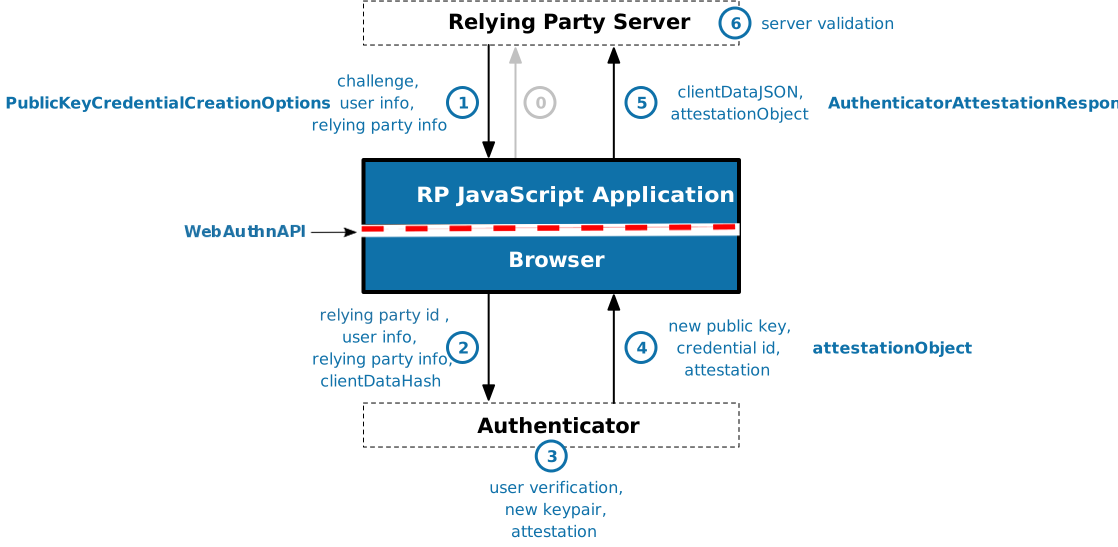
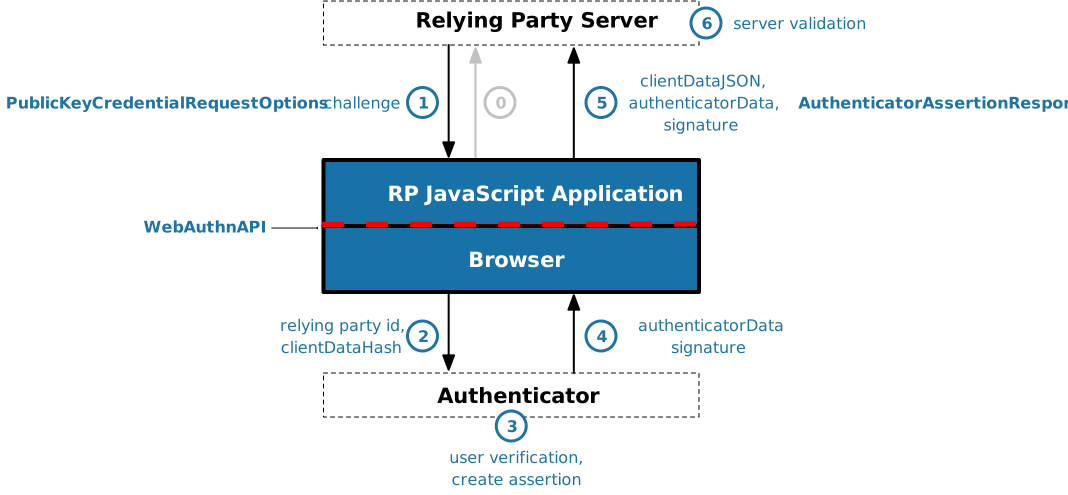
Note: Along with the Web Authentication API itself, this specification defines a request-response cryptographic protocol between a WebAuthn Relying Party server and an authenticator, where the Relying Party's request consists of a challenge and other input data supplied by the Relying Party and sent to the authenticator. The request is conveyed via the combination of HTTPS, the Relying Party web application, the WebAuthn API, and the platform-specific communications channel between the user agent and the authenticator. The authenticator replies with a digitally signed authenticator data message and other output data, which is conveyed back to the Relying Party server via the same path in reverse. Protocol details vary according to whether an authentication or registration operation is invoked by the Relying Party. See also Figure 1 and Figure 2.
It is important for Web Authentication deployments' end-to-end security that the role of each component—the Relying Party server, the client, and the authenticator— as well as §13 Security Considerations and §14 Privacy Considerations, are understood by all audiences.
1.2. Use Cases
The below use case scenarios illustrate use of two very different types of authenticators, as well as outline further scenarios. Additional scenarios, including sample code, are given later in §12 Sample Scenarios.
1.2.1. Registration
-
On a phone:
-
User navigates to example.com in a browser and signs in to an existing account using whatever method they have been using (possibly a legacy method such as a password), or creates a new account.
-
The phone prompts, "Do you want to register this device with example.com?"
-
User agrees.
-
The phone prompts the user for a previously configured authorization gesture (PIN, biometric, etc.); the user provides this.
-
Website shows message, "Registration complete."
-
1.2.2. Authentication
-
On a laptop or desktop:
-
User pairs their phone with the laptop or desktop via Bluetooth.
-
User navigates to example.com in a browser and initiates signing in.
-
User gets a message from the browser, "Please complete this action on your phone."
-
-
Next, on their phone:
-
User sees a discrete prompt or notification, "Sign in to example.com."
-
User selects this prompt / notification.
-
User is shown a list of their example.com identities, e.g., "Sign in as Alice / Sign in as Bob."
-
User picks an identity, is prompted for an authorization gesture (PIN, biometric, etc.) and provides this.
-
-
Now, back on the laptop:
-
Web page shows that the selected user is signed in, and navigates to the signed-in page.
-
1.2.3. New Device Registration
This use case scenario illustrates how a Relying Party can leverage a combination of a roaming authenticator (e.g., a USB security key fob) and a platform authenticator (e.g., a built-in fingerprint sensor) such that the user has:
-
a "primary" roaming authenticator that they use to authenticate on new-to-them client devices (e.g., laptops, desktops) or on such client devices that lack a platform authenticator, and
-
a low-friction means to strongly re-authenticate on client devices having platform authenticators.
Note: This approach of registering multiple authenticators for an account is also useful in account recovery use cases.
-
First, on a desktop computer (lacking a platform authenticator):
-
User navigates to
example.comin a browser and signs in to an existing account using whatever method they have been using (possibly a legacy method such as a password), or creates a new account. -
User navigates to account security settings and selects "Register security key".
-
Website prompts the user to plug in a USB security key fob; the user does.
-
The USB security key blinks to indicate the user should press the button on it; the user does.
-
Website shows message, "Registration complete."
Note: Since this computer lacks a platform authenticator, the website may require the user to present their USB security key from time to time or each time the user interacts with the website. This is at the website’s discretion.
-
-
Later, on their laptop (which features a platform authenticator):
-
User navigates to example.com in a browser and initiates signing in.
-
Website prompts the user to plug in their USB security key.
-
User plugs in the previously registered USB security key and presses the button.
-
Website shows that the user is signed in, and navigates to the signed-in page.
-
Website prompts, "Do you want to register this computer with example.com?"
-
User agrees.
-
Laptop prompts the user for a previously configured authorization gesture (PIN, biometric, etc.); the user provides this.
-
Website shows message, "Registration complete."
-
User signs out.
-
-
Later, again on their laptop:
-
User navigates to example.com in a browser and initiates signing in.
-
Website shows message, "Please follow your computer’s prompts to complete sign in."
-
Laptop prompts the user for an authorization gesture (PIN, biometric, etc.); the user provides this.
-
Website shows that the user is signed in, and navigates to the signed-in page.
-
1.2.4. Other Use Cases and Configurations
A variety of additional use cases and configurations are also possible, including (but not limited to):
-
A user navigates to example.com on their laptop, is guided through a flow to create and register a credential on their phone.
-
A user obtains a discrete, roaming authenticator, such as a "fob" with USB or USB+NFC/BLE connectivity options, loads example.com in their browser on a laptop or phone, and is guided though a flow to create and register a credential on the fob.
-
A Relying Party prompts the user for their authorization gesture in order to authorize a single transaction, such as a payment or other financial transaction.
1.3. Platform-Specific Implementation Guidance
This specification defines how to use Web Authentication in the general case. When using Web Authentication in connection with specific platform support (e.g. apps), it is recommended to see platform-specific documentation and guides for additional guidance and limitations.
2. Conformance
This specification defines three conformance classes. Each of these classes is specified so that conforming members of the class are secure against non-conforming or hostile members of the other classes.
2.1. User Agents
A User Agent MUST behave as described by §5 Web Authentication API in order to be considered conformant. Conforming User Agents MAY implement algorithms given in this specification in any way desired, so long as the end result is indistinguishable from the result that would be obtained by the specification’s algorithms.
A conforming User Agent MUST also be a conforming implementation of the IDL fragments of this specification, as described in the “Web IDL” specification. [WebIDL]
2.2. Authenticators
An authenticator MUST provide the operations defined by §6 WebAuthn Authenticator Model, and those operations MUST behave as described there. This is a set of functional and security requirements for an authenticator to be usable by a Conforming User Agent.
As described in §1.2 Use Cases, an authenticator may be implemented in the operating system underlying the User Agent, or in external hardware, or a combination of both.
2.2.1. Backwards Compatibility with FIDO U2F
Authenticators that only support the §8.6 FIDO U2F Attestation Statement Format have no mechanism to store a user handle, so the returned userHandle will always be null.
2.3. WebAuthn Relying Parties
A WebAuthn Relying Party MUST behave as described in §7 WebAuthn Relying Party Operations to obtain all the security benefits offered by this specification. See §13.3 Security Benefits for WebAuthn Relying Parties for further discussion of this.
2.4. All Conformance Classes
All CBOR encoding performed by the members of the above conformance classes MUST be done using the CTAP2 canonical CBOR encoding form. All decoders of the above conformance classes SHOULD reject CBOR that is not validly encoded in the CTAP2 canonical CBOR encoding form and SHOULD reject messages with duplicate map keys.
3. Dependencies
This specification relies on several other underlying specifications, listed below and in Terms defined by reference.
- Base64url encoding
-
The term Base64url Encoding refers to the base64 encoding using the URL- and filename-safe character set defined in Section 5 of [RFC4648], with all trailing '=' characters omitted (as permitted by Section 3.2) and without the inclusion of any line breaks, whitespace, or other additional characters.
- CBOR
-
A number of structures in this specification, including attestation statements and extensions, are encoded using the CTAP2 canonical CBOR encoding form of the Compact Binary Object Representation ( CBOR ) [RFC7049], as defined in [FIDO-CTAP].
- CDDL
-
This specification describes the syntax of all CBOR-encoded data using the CBOR Data Definition Language (CDDL) [CDDL].
- COSE
-
CBOR Object Signing and Encryption (COSE) [RFC8152]. The IANA COSE Algorithms registry established by this specification is also used.
- Credential Management
-
The API described in this document is an extension of the
Credentialconcept defined in [CREDENTIAL-MANAGEMENT-1]. - DOM
-
DOMExceptionand the DOMException values used in this specification are defined in [DOM4]. - ECMAScript
-
%ArrayBuffer% is defined in [ECMAScript].
- HTML
-
The concepts of relevant settings object, origin, opaque origin, and is a registrable domain suffix of or is equal to are defined in [HTML52].
- URL
- Web IDL
-
Many of the interface definitions and all of the IDL in this specification depend on [WebIDL]. This updated version of the Web IDL standard adds support for
Promises, which are now the preferred mechanism for asynchronous interaction in all new web APIs. - FIDO AppID
-
The algorithms for determining the FacetID of a calling application and determining if a caller’s FacetID is authorized for an AppID (used only in the AppID extension) are defined by [FIDO-APPID].
The key words "MUST", "MUST NOT", "REQUIRED", "SHALL", "SHALL NOT", "SHOULD", "SHOULD NOT", "RECOMMENDED", "MAY", and "OPTIONAL" in this document are to be interpreted as described in [RFC2119].
4. Terminology
- Assertion
- Attestation
-
Generally, attestation is a statement serving to bear witness, confirm, or authenticate. In the WebAuthn context, attestation is employed to attest to the provenance of an authenticator and the data it emits; including, for example: credential IDs, credential key pairs, signature counters, etc. An attestation statement is conveyed in an attestation object during registration. See also §6.4 Attestation and Figure 5. Whether or how the client conveys the attestation statement and AAGUID portions of the attestation object to the Relying Party is described by attestation conveyance.
- Attestation Certificate
-
A X.509 Certificate for the attestation key pair used by an authenticator to attest to its manufacture and capabilities. At registration time, the authenticator uses the attestation private key to sign the Relying Party-specific credential public key (and additional data) that it generates and returns via the authenticatorMakeCredential operation. Relying Parties use the attestation public key conveyed in the attestation certificate to verify the attestation signature. Note that in the case of self attestation, the authenticator has no distinct attestation key pair nor attestation certificate, see self attestation for details.
- Authentication
- Authentication Ceremony
-
The ceremony where a user, and the user’s client (containing at least one authenticator) work in concert to cryptographically prove to a Relying Party that the user controls the credential private key associated with a previously-registered public key credential (see Registration). Note that this includes a test of user presence or user verification.
- Authentication Assertion
-
The cryptographically signed
AuthenticatorAssertionResponseobject returned by an authenticator as the result of an authenticatorGetAssertion operation.This corresponds to the [CREDENTIAL-MANAGEMENT-1] specification’s single-use credentials.
- Authenticator
-
A cryptographic entity used by a WebAuthn Client to (i) generate a public key credential and register it with a Relying Party, and (ii) authenticate by potentially verifying the user, and then cryptographically signing and returning, in the form of an Authentication Assertion, a challenge and other data presented by a WebAuthn Relying Party (in concert with the WebAuthn Client).
- Authorization Gesture
-
An authorization gesture is a physical interaction performed by a user with an authenticator as part of a ceremony, such as registration or authentication. By making such an authorization gesture, a user provides consent for (i.e., authorizes) a ceremony to proceed. This MAY involve user verification if the employed authenticator is capable, or it MAY involve a simple test of user presence.
- Biometric Recognition
-
The automated recognition of individuals based on their biological and behavioral characteristics [ISOBiometricVocabulary].
- Biometric Authenticator
-
Any authenticator that implements biometric recognition.
- Bound credential
-
A public key credential source or public key credential is said to be bound to its managing authenticator. This means that only the managing authenticator can generate assertions for the public key credential sources bound to it.
- Ceremony
-
The concept of a ceremony [Ceremony] is an extension of the concept of a network protocol, with human nodes alongside computer nodes and with communication links that include user interface(s), human-to-human communication, and transfers of physical objects that carry data. What is out-of-band to a protocol is in-band to a ceremony. In this specification, Registration and Authentication are ceremonies, and an authorization gesture is often a component of those ceremonies.
- Client Platform
-
A client device and a client together make up a client platform. A single hardware device MAY be part of multiple distinct client platforms at different times by running different operating systems and/or clients.
- Client-Side
-
This refers in general to the combination of the user’s client platform, authenticators, and everything gluing it all together.
- Resident Credential
- Client-side-resident Public Key Credential Source
-
A Client-side-resident Public Key Credential Source, or Resident Credential for short, is a public key credential source whose credential private key is stored in the authenticator, client or client device. Such client-side storage requires a resident credential capable authenticator and has the property that the authenticator is able to select the credential private key given only an RP ID, possibly with user assistance (e.g., by providing the user a pick list of credentials scoped to the RP ID). By definition, the credential private key is always exclusively controlled by the authenticator. In the case of a resident credential, the authenticator might offload storage of wrapped key material to the client device, but the client device is not expected to offload the key storage to remote entities (e.g., WebAuthn Relying Party Server).
- Conforming User Agent
-
A user agent implementing, in cooperation with the underlying client device, the Web Authentication API and algorithms given in this specification, and handling communication between authenticators and Relying Parties.
- Credential ID
-
A probabilistically-unique byte sequence identifying a public key credential source and its authentication assertions.
Credential IDs are generated by authenticators in two forms:
-
At least 16 bytes that include at least 100 bits of entropy, or
-
The public key credential source, without its Credential ID, encrypted so only its managing authenticator can decrypt it. This form allows the authenticator to be nearly stateless, by having the Relying Party store any necessary state.
Note: [FIDO-UAF-AUTHNR-CMDS] includes guidance on encryption techniques under "Security Guidelines".
Relying Parties do not need to distinguish these two Credential ID forms.
-
- Credential Public Key
- User Public Key
-
The public key portion of a Relying Party-specific credential key pair , generated by an authenticator and returned to a Relying Party at registration time (see also public key credential). The private key portion of the credential key pair is known as the credential private key . Note that in the case of self attestation, the credential key pair is also used as the attestation key pair, see self attestation for details.
Note: The credential public key is referred to as the user public key in FIDO UAF [UAFProtocol], and in FIDO U2F [FIDO-U2F-Message-Formats] and some parts of this specification that relate to it.
- Human Palatability
-
An identifier that is human-palatable is intended to be rememberable and reproducible by typical human users, in contrast to identifiers that are, for example, randomly generated sequences of bits [EduPersonObjectClassSpec].
- Public Key Credential Source
-
A credential source ([CREDENTIAL-MANAGEMENT-1]) used by an authenticator to generate authentication assertions. A public key credential source consists of a struct with the following items:
- type
-
whose value is of
PublicKeyCredentialType, defaulting topublic-key. - id
- privateKey
- rpId
-
The Relying Party Identifier, for the Relying Party this public key credential source is scoped to.
- userHandle
-
The user handle associated when this public key credential source was created. This item is nullable.
- otherUI
-
OPTIONAL other information used by the authenticator to inform its UI. For example, this might include the user’s
displayName.
The authenticatorMakeCredential operation creates a public key credential source bound to a managing authenticator and returns the credential public key associated with its credential private key. The Relying Party can use this credential public key to verify the authentication assertions created by this public key credential source.
- Public Key Credential
-
Generically, a credential is data one entity presents to another in order to authenticate the former to the latter [RFC4949]. The term public key credential refers to one of: a public key credential source, the possibly-attested credential public key corresponding to a public key credential source, or an authentication assertion. Which one is generally determined by context.
Note: This is a willful violation of [RFC4949]. In English, a "credential" is both a) the thing presented to prove a statement and b) intended to be used multiple times. It’s impossible to achieve both criteria securely with a single piece of data in a public key system. [RFC4949] chooses to define a credential as the thing that can be used multiple times (the public key), while this specification gives "credential" the English term’s flexibility. This specification uses more specific terms to identify the data related to an [RFC4949] credential:
- "Authentication information" (possibly including a private key)
- "Signed value"
- [RFC4949] "credential"
At registration time, the authenticator creates an asymmetric key pair, and stores its private key portion and information from the Relying Party into a public key credential source. The public key portion is returned to the Relying Party, who then stores it in conjunction with the present user’s account. Subsequently, only that Relying Party, as identified by its RP ID, is able to employ the public key credential in authentication ceremonies, via the
get()method. The Relying Party uses its stored copy of the credential public key to verify the resultant authentication assertion. - Rate Limiting
-
The process (also known as throttling) by which an authenticator implements controls against brute force attacks by limiting the number of consecutive failed authentication attempts within a given period of time. If the limit is reached, the authenticator should impose a delay that increases exponentially with each successive attempt, or disable the current authentication modality and offer a different authentication factor if available. Rate limiting is often implemented as an aspect of user verification.
- Registration
- Registration Ceremony
-
The ceremony where a user, a Relying Party, and the user’s client (containing at least one authenticator) work in concert to create a public key credential and associate it with the user’s Relying Party account. Note that this includes employing a test of user presence or user verification.
- Relying Party
- Relying Party Identifier
- RP ID
-
A valid domain string that identifies the WebAuthn Relying Party on whose behalf a given registration or authentication ceremony is being performed. A public key credential can only be used for authentication with the same entity (as identified by RP ID) it was registered with.
By default, the RP ID for a WebAuthn operation is set to the caller’s origin's effective domain. This default MAY be overridden by the caller, as long as the caller-specified RP ID value is a registrable domain suffix of or is equal to the caller’s origin's effective domain. See also §5.1.3 Create a New Credential - PublicKeyCredential’s [[Create]](origin, options, sameOriginWithAncestors) Method and §5.1.4 Use an Existing Credential to Make an Assertion - PublicKeyCredential’s [[Get]](options) Method.
Note: An RP ID is based on a host's domain name. It does not itself include a scheme or port, as an origin does. The RP ID of a public key credential determines its scope . I.e., it determines the set of origins on which the public key credential may be exercised , as follows:
-
The RP ID must be equal to the origin's effective domain, or a registrable domain suffix of the origin's effective domain.
For example, given a Relying Party whose origin is
https://login.example.com:1337, then the following RP IDs are valid:login.example.com(default) andexample.com, but notm.login.example.comand notcom.This is done in order to match the behavior of pervasively deployed ambient credentials (e.g., cookies, [RFC6265]). Please note that this is a greater relaxation of "same-origin" restrictions than what document.domain's setter provides.
-
- Test of User Presence
-
A test of user presence is a simple form of authorization gesture and technical process where a user interacts with an authenticator by (typically) simply touching it (other modalities may also exist), yielding a Boolean result. Note that this does not constitute user verification because a user presence test, by definition, is not capable of biometric recognition, nor does it involve the presentation of a shared secret such as a password or PIN.
- User Consent
-
User consent means the user agrees with what they are being asked, i.e., it encompasses reading and understanding prompts. An authorization gesture is a ceremony component often employed to indicate user consent.
- User Handle
-
The user handle is specified by a Relying Party, as the value of
user.idA user handle is an opaque byte sequence with a maximum size of 64 bytes. User handles are not meant to be displayed to users. The user handle SHOULD NOT contain personally identifying information about the user, such as a username or e-mail address; see §14.9 User Handle Contents for details.
- User Verification
-
The technical process by which an authenticator locally authorizes the invocation of the authenticatorMakeCredential and authenticatorGetAssertion operations. User verification MAY be instigated through various authorization gesture modalities; for example, through a touch plus pin code, password entry, or biometric recognition (e.g., presenting a fingerprint) [ISOBiometricVocabulary]. The intent is to be able to distinguish individual users. Note that invocation of the authenticatorMakeCredential and authenticatorGetAssertion operations implies use of key material managed by the authenticator. Note that for security, user verification and use of credential private keys must occur within a single logical security boundary defining the authenticator.
User verification procedures MAY implement rate limiting as a protection against brute force attacks.
- User Present
- UP
-
Upon successful completion of a user presence test, the user is said to be "present".
- User Verified
- UV
-
Upon successful completion of a user verification process, the user is said to be "verified".
- Client
- WebAuthn Client
-
Also referred to herein as simply a client. See also Conforming User Agent. A WebAuthn Client is an intermediary entity typically implemented in the user agent (in whole, or in part). Conceptually, it underlies the Web Authentication API and embodies the implementation of the
[[Create]](origin, options, sameOriginWithAncestors)and[[DiscoverFromExternalSource]](origin, options, sameOriginWithAncestors)internal methods. It is responsible for both marshalling the inputs for the underlying authenticator operations, and for returning the results of the latter operations to the Web Authentication API's callers.The WebAuthn Client runs on, and is distinct from, a WebAuthn Client Device.
- Client Device
- WebAuthn Client Device
-
The hardware device on which the WebAuthn Client runs, for example a smartphone, a laptop computer or a desktop computer, and the operating system running on that hardware.
The distinction between this and the client is that one client device MAY support running multiple clients, i.e., browser implementations, which all have access to the same authenticators available on that client device; and that platform authenticators are bound to a WebAuthn Client Device rather than a WebAuthn Client. A client device and a client together make up a client platform.
- WebAuthn Relying Party
-
The entity whose web application utilizes the Web Authentication API to register and authenticate users.
Note: While the term Relying Party is also often used in other contexts (e.g., X.509 and OAuth), an entity acting as a Relying Party in one context is not necessarily a Relying Party in other contexts. In this specification, the term WebAuthn Relying Party is often shortened to be just Relying Party, and explicitly refers to a Relying Party in the WebAuthn context. Note that in any concrete instantiation a WebAuthn context may be embedded in a broader overall context, e.g., one based on OAuth.
5. Web Authentication API
This section normatively specifies the API for creating and using public key credentials. The basic idea is that the credentials belong to the user and are managed by an authenticator, with which the WebAuthn Relying Party interacts through the client platform. Relying Party scripts can (with the user’s consent) request the browser to create a new credential for future use by the Relying Party. See Figure 1, below.
Scripts can also request the user’s permission to perform authentication operations with an existing credential. See Figure 2, below.
All such operations are performed in the authenticator and are mediated by the client platform on the user’s behalf. At no point does the script get access to the credentials themselves; it only gets information about the credentials in the form of objects.
In addition to the above script interface, the authenticator MAY implement (or come with client software that implements) a user interface for management. Such an interface MAY be used, for example, to reset the authenticator to a clean state or to inspect the current state of the authenticator. In other words, such an interface is similar to the user interfaces provided by browsers for managing user state such as history, saved passwords, and cookies. Authenticator management actions such as credential deletion are considered to be the responsibility of such a user interface and are deliberately omitted from the API exposed to scripts.
The security properties of this API are provided by the client and the authenticator working together. The authenticator, which holds and manages credentials, ensures that all operations are scoped to a particular origin, and cannot be replayed against a different origin, by incorporating the origin in its responses. Specifically, as defined in §6.3 Authenticator Operations, the full origin of the requester is included, and signed over, in the attestation object produced when a new credential is created as well as in all assertions produced by WebAuthn credentials.
Additionally, to maintain user privacy and prevent malicious Relying Parties from probing for the presence of public key credentials belonging to other Relying Parties, each credential is also scoped to a Relying Party Identifier, or RP ID. This RP ID is provided by the client to the authenticator for all operations, and the authenticator ensures that credentials created by a Relying Party can only be used in operations requested by the same RP ID. Separating the origin from the RP ID in this way allows the API to be used in cases where a single Relying Party maintains multiple origins.
The client facilitates these security measures by providing the Relying Party's origin and RP ID to the authenticator for each operation. Since this is an integral part of the WebAuthn security model, user agents only expose this API to callers in secure contexts.
The Web Authentication API is defined by the union of the Web IDL fragments presented in the following sections. A combined IDL listing is given in the IDL Index.
5.1. PublicKeyCredential Interface
The PublicKeyCredential interface inherits from Credential [CREDENTIAL-MANAGEMENT-1], and contains the attributes
that are returned to the caller when a new credential is created, or a new assertion is requested.
[ SecureContext , Exposed = Window ] interface PublicKeyCredential : Credential { [ SameObject ] readonly attribute ArrayBufferrawId; [ SameObject ] readonly attribute AuthenticatorResponse response ; AuthenticationExtensionsClientOutputsgetClientExtensionResults(); };
id-
This attribute is inherited from
Credential, thoughPublicKeyCredentialoverridesCredential's getter, instead returning the base64url encoding of the data contained in the object’s[[identifier]]internal slot. rawId-
This attribute returns the
ArrayBuffercontained in the[[identifier]]internal slot. -
response, of type AuthenticatorResponse, readonly -
This attribute contains the authenticator's response to the client’s request to either create a public key credential, or generate an authentication assertion. If the
PublicKeyCredentialis created in response tocreate(), this attribute’s value will be anAuthenticatorAttestationResponse, otherwise, thePublicKeyCredentialwas created in response toget(), and this attribute’s value will be anAuthenticatorAssertionResponse. getClientExtensionResults()-
This operation returns the value of
[[clientExtensionsResults]], which is a map containing extension identifier → client extension output entries produced by the extension’s client extension processing. -
[[type]] -
The
PublicKeyCredentialinterface object's[[type]]internal slot's value is the string "public-key".Note: This is reflected via the
typeattribute getter inherited fromCredential. -
[[discovery]] -
The
PublicKeyCredentialinterface object's[[discovery]]internal slot's value is "remote". -
[[identifier]] -
This internal slot contains the credential ID, chosen by the authenticator. The credential ID is used to look up credentials for use, and is therefore expected to be globally unique with high probability across all credentials of the same type, across all authenticators.
Note: This API does not constrain the format or length of this identifier, except that it MUST be sufficient for the authenticator to uniquely select a key. For example, an authenticator without on-board storage may create identifiers containing a credential private key wrapped with a symmetric key that is burned into the authenticator.
-
[[clientExtensionsResults]] -
This internal slot contains the results of processing client extensions requested by the Relying Party upon the Relying Party's invocation of either
navigator.credentials.create()ornavigator.credentials.get().
PublicKeyCredential's interface object inherits Credential's implementation of [[CollectFromCredentialStore]](origin, options, sameOriginWithAncestors), and defines its own
implementation of [[Create]](origin, options, sameOriginWithAncestors), [[DiscoverFromExternalSource]](origin, options, sameOriginWithAncestors), and [[Store]](credential, sameOriginWithAncestors).
5.1.1. CredentialCreationOptions Dictionary Extension
To support registration via navigator.credentials.create(), this document extends
the CredentialCreationOptions dictionary as follows:
 partial   dictionary   CredentialCreationOptions  {
     PublicKeyCredentialCreationOptions         publicKey  ;
};
5.1.2. CredentialRequestOptions Dictionary Extension
To support obtaining assertions via navigator.credentials.get(), this document extends the CredentialRequestOptions dictionary as follows:
 partial   dictionary   CredentialRequestOptions  {
     PublicKeyCredentialRequestOptions         publicKey  ;
};
5.1.3. Create a New Credential - PublicKeyCredential’s [[Create]](origin, options, sameOriginWithAncestors) Method
PublicKeyCredential's interface object's implementation of the [[Create]](origin,
options, sameOriginWithAncestors) internal method [CREDENTIAL-MANAGEMENT-1] allows WebAuthn Relying Party scripts to call navigator.credentials.create() to request the creation of a new public key credential source, bound to an authenticator. This navigator.credentials.create() operation can be aborted by leveraging the AbortController;
see DOM §3.3 Using AbortController and AbortSignal objects in APIs for detailed instructions.
This internal method accepts three arguments:
-
origin -
This argument is the relevant settings object's origin, as determined by the calling
create()implementation. -
options -
This argument is a
CredentialCreationOptionsobject whoseoptions.member contains apublicKeyPublicKeyCredentialCreationOptionsobject specifying the desired attributes of the to-be-created public key credential. -
sameOriginWithAncestors -
This argument is a Boolean value which is
trueif and only if the caller’s environment settings object is same-origin with its ancestors.
Note: This algorithm is synchronous: the Promise resolution/rejection is handled by navigator.credentials.create().
Note: All BufferSource objects used in this algorithm must be snapshotted when the algorithm begins, to
avoid potential synchronization issues. The algorithm implementations should get a copy of the bytes held
by the buffer source and use that copy for relevant portions of the algorithm.
When this method is invoked, the user agent MUST execute the following algorithm:
-
If sameOriginWithAncestors is
false, return a "NotAllowedError"DOMException.Note: This "sameOriginWithAncestors" restriction aims to address the concern raised in the Origin Confusion section of [CREDENTIAL-MANAGEMENT-1], while allowing Relying Party script access to Web Authentication functionality, e.g., when running in a secure context framed document that is same-origin with its ancestors. However, in the future, this specification (in conjunction with [CREDENTIAL-MANAGEMENT-1]) may provide Relying Parties with more fine-grained control--e.g., ranging from allowing only top-level access to Web Authentication functionality, to allowing cross-origin embedded cases--by leveraging [Feature-Policy] once the latter specification becomes stably implemented in user agents.
-
Let options be the value of
options..publicKey -
If the
timeoutmember of options is present, check if its value lies within a reasonable range as defined by the client and if not, correct it to the closest value lying within that range. Set a timer lifetimeTimer to this adjusted value. If thetimeoutmember of options is not present, then set lifetimeTimer to a client-specific default.Note: A suggested reasonable range for the
timeoutmember of options is 15 seconds to 120 seconds.Note: The user agent should take cognitive guidelines into considerations regarding timeout for users with special needs.
-
Let callerOrigin be
origin. If callerOrigin is an opaque origin, return aDOMExceptionwhose name is "NotAllowedError", and terminate this algorithm. -
Let effectiveDomain be the callerOrigin’s effective domain. If effective domain is not a valid domain, then return a
DOMExceptionwhose name is "SecurityError" and terminate this algorithm.Note: An effective domain may resolve to a host, which can be represented in various manners, such as domain, ipv4 address, ipv6 address, opaque host, or empty host. Only the domain format of host is allowed here. This is for simplification and also is in recognition of various issues with using direct IP address identification in concert with PKI-based security.
-
- Is present
-
If
options.is not a registrable domain suffix of and is not equal to effectiveDomain, return arp.idDOMExceptionwhose name is "SecurityError", and terminate this algorithm. - Is not present
Note:
options.represents the caller’s RP ID. The RP ID defaults to being the caller’s origin's effective domain unless the caller has explicitly setrp.idoptions.when callingrp.idcreate(). -
Let credTypesAndPubKeyAlgs be a new list whose items are pairs of
PublicKeyCredentialTypeand aCOSEAlgorithmIdentifier. -
For each current of
options.:pubKeyCredParams -
If credTypesAndPubKeyAlgs is empty and
options.is not empty, return apubKeyCredParamsDOMExceptionwhose name is "NotSupportedError", and terminate this algorithm. -
Let clientExtensions be a new map and let authenticatorExtensions be a new map.
-
If the
extensionsmember of options is present, then for each extensionId → clientExtensionInput ofoptions.:extensions-
If extensionId is not supported by this client platform or is not a registration extension, then continue.
-
Set clientExtensions[extensionId] to clientExtensionInput.
-
If extensionId is not an authenticator extension, then continue.
-
Let authenticatorExtensionInput be the (CBOR) result of running extensionId’s client extension processing algorithm on clientExtensionInput. If the algorithm returned an error, continue.
-
Set authenticatorExtensions[extensionId] to the base64url encoding of authenticatorExtensionInput.
-
-
Let collectedClientData be a new
CollectedClientDatainstance whose fields are:type-
The string "webauthn.create".
challenge-
The base64url encoding of options.
challenge. origin-
The serialization of callerOrigin.
tokenBinding-
The status of Token Binding between the client and the callerOrigin, as well as the Token Binding ID associated with callerOrigin, if one is available.
-
Let clientDataJSON be the JSON-serialized client data constructed from collectedClientData.
-
Let clientDataHash be the hash of the serialized client data represented by clientDataJSON.
-
If the
options.is present and its aborted flag is set tosignaltrue, return aDOMExceptionwhose name is "AbortError" and terminate this algorithm. -
Let issuedRequests be a new ordered set.
-
Let authenticators represent a value which at any given instant is a set of client platform-specific handles, where each item identifies an authenticator presently available on this client platform at that instant.
Note: What qualifies an authenticator as "available" is intentionally unspecified; this is meant to represent how authenticators can be hot-plugged into (e.g., via USB) or discovered (e.g., via NFC or Bluetooth) by the client by various mechanisms, or permanently built into the client.
-
Start lifetimeTimer.
-
While lifetimeTimer has not expired, perform the following actions depending upon lifetimeTimer, and the state and response for each authenticator in authenticators:
- If lifetimeTimer expires,
-
For each authenticator in issuedRequests invoke the authenticatorCancel operation on authenticator and remove authenticator from issuedRequests.
- If the user exercises a user agent user-interface option to cancel the process,
-
For each authenticator in issuedRequests invoke the authenticatorCancel operation on authenticator and remove authenticator from issuedRequests. Return a
DOMExceptionwhose name is "NotAllowedError". - If the
options.is present and its aborted flag is set tosignaltrue, -
For each authenticator in issuedRequests invoke the authenticatorCancel operation on authenticator and remove authenticator from issuedRequests. Then return a
DOMExceptionwhose name is "AbortError" and terminate this algorithm. - If an authenticator becomes available on this client device,
-
Note: This includes the case where an authenticator was available upon lifetimeTimer initiation.
-
If
options.is present:authenticatorSelection-
If
options.is present and its value is not equal to authenticator’s authenticator attachment modality, continue.authenticatorSelection.authenticatorAttachment -
If
options.is set toauthenticatorSelection.requireResidentKeytrueand the authenticator is not capable of storing a client-side-resident public key credential source, continue. -
If
options.is set toauthenticatorSelection.userVerificationrequiredand the authenticator is not capable of performing user verification, continue.
-
-
Let userVerification be the effective user verification requirement for credential creation , a Boolean value, as follows. If
options.authenticatorSelection.userVerification- is set to
required -
Let userVerification be
true. - is set to
preferred -
If the authenticator
- is capable of user verification
-
Let userVerification be
true. - is not capable of user verification
-
Let userVerification be
false.
- is set to
discouraged -
Let userVerification be
false.
- is set to
-
Let userPresence be a Boolean value set to the inverse of userVerification.
-
Let excludeCredentialDescriptorList be a new list.
-
For each credential descriptor C in
options.:excludeCredentials-
If
C.is not empty, and authenticator is connected over a transport not mentioned intransportsC., the client MAY continue.transports -
Otherwise, Append C to excludeCredentialDescriptorList.
-
-
Invoke the authenticatorMakeCredential operation on authenticator with clientDataHash,
options.,rpoptions.,useroptions., userPresence, userVerification, credTypesAndPubKeyAlgs, excludeCredentialDescriptorList, and authenticatorExtensions as parameters.authenticatorSelection.requireResidentKey -
Append authenticator to issuedRequests.
-
- If an authenticator ceases to be available on this client device,
-
Remove authenticator from issuedRequests.
- If any authenticator returns a status indicating that the user cancelled the operation,
-
-
Remove authenticator from issuedRequests.
-
For each remaining authenticator in issuedRequests invoke the authenticatorCancel operation on authenticator and remove it from issuedRequests.
Note: Authenticators may return an indication of "the user cancelled the entire operation". How a user agent manifests this state to users is unspecified.
-
- If any authenticator returns an error status equivalent to "
InvalidStateError", -
-
Remove authenticator from issuedRequests.
-
For each remaining authenticator in issuedRequests invoke the authenticatorCancel operation on authenticator and remove it from issuedRequests.
-
Return a
DOMExceptionwhose name is "InvalidStateError" and terminate this algorithm.
Note: This error status is handled separately because the authenticator returns it only if excludeCredentialDescriptorList identifies a credential bound to the authenticator and the user has consented to the operation. Given this explicit consent, it is acceptable for this case to be distinguishable to the Relying Party.
-
- If any authenticator returns an error status not equivalent to "
InvalidStateError", -
Remove authenticator from issuedRequests.
Note: This case does not imply user consent for the operation, so details about the error are hidden from the Relying Party in order to prevent leak of potentially identifying information. See §14.5 Registration Ceremony Privacy for details.
- If any authenticator indicates success,
-
-
Remove authenticator from issuedRequests.
-
Let credentialCreationData be a struct whose items are:
attestationObjectResult-
whose value is the bytes returned from the successful authenticatorMakeCredential operation.
Note: this value is
attObj, as defined in §6.4.4 Generating an Attestation Object. clientDataJSONResult-
whose value is the bytes of clientDataJSON.
attestationConveyancePreferenceOption-
whose value is the value of options.
attestation. clientExtensionResults-
whose value is an
AuthenticationExtensionsClientOutputsobject containing extension identifier → client extension output entries. The entries are created by running each extension’s client extension processing algorithm to create the client extension outputs, for each client extension inclientDataJSON.clientExtensions
-
Let constructCredentialAlg be an algorithm that takes a global object global, and whose steps are:
-
If
credentialCreationData.attestationConveyancePreferenceOption’s value is- "none"
-
Replace potentially uniquely identifying information with non-identifying versions of the same:
-
If the AAGUID in the attested credential data is 16 zero bytes,
credentialCreationData.attestationObjectResult.fmtis "packed", and "x5c" & "ecdaaKeyId" are both absent fromcredentialCreationData.attestationObjectResult, then self attestation is being used and no further action is needed. -
Otherwise
-
Replace the AAGUID in the attested credential data with 16 zero bytes.
-
Set the value of
credentialCreationData.attestationObjectResult.fmtto "none", and set the value ofcredentialCreationData.attestationObjectResult.attStmtto be an empty CBOR map. (See §8.7 None Attestation Statement Format and §6.4.4 Generating an Attestation Object).
-
-
- "indirect"
-
The client MAY replace the AAGUID and attestation statement with a more privacy-friendly and/or more easily verifiable version of the same data (for example, by employing an Anonymization CA).
- "direct"
-
Convey the authenticator's AAGUID and attestation statement, unaltered, to the Relying Party.
-
Let attestationObject be a new
ArrayBuffer, created using global’s %ArrayBuffer%, containing the bytes ofcredentialCreationData.attestationObjectResult’s value. -
Let id be
attestationObject.authData.attestedCredentialData.credentialId. -
Let pubKeyCred be a new
PublicKeyCredentialobject associated with global whose fields are:[[identifier]]-
id
response-
A new
AuthenticatorAttestationResponseobject associated with global whose fields are:clientDataJSON-
A new
ArrayBuffer, created using global’s %ArrayBuffer%, containing the bytes ofcredentialCreationData.clientDataJSONResult. attestationObject-
attestationObject
[[clientExtensionsResults]]-
A new
ArrayBuffer, created using global’s %ArrayBuffer%, containing the bytes ofcredentialCreationData.clientExtensionResults.
-
Return pubKeyCred.
-
-
For each remaining authenticator in issuedRequests invoke the authenticatorCancel operation on authenticator and remove it from issuedRequests.
-
Return constructCredentialAlg and terminate this algorithm.
-
-
Return a
DOMExceptionwhose name is "NotAllowedError". In order to prevent information leak that could identify the user without consent, this step MUST NOT be executed before lifetimeTimer has expired. See §14.5 Registration Ceremony Privacy for details.
During the above process, the user agent SHOULD show some UI to the user to guide them in the process of selecting and authorizing an authenticator.
5.1.4. Use an Existing Credential to Make an Assertion - PublicKeyCredential’s [[Get]](options) Method
WebAuthn Relying Parties call navigator.credentials.get({publicKey:..., ...}) to
discover and use an existing public key credential, with the user’s consent. Relying Party script optionally specifies some criteria
to indicate what credential sources are acceptable to it. The client platform locates credential sources matching the specified criteria, and guides the user to pick one that the script will be allowed to use. The user may choose to
decline the entire interaction even if a credential source is present, for example to maintain privacy. If the user picks a credential source, the user agent then uses §6.3.3 The authenticatorGetAssertion Operation to sign a Relying Party-provided challenge and other collected data into an assertion, which is used as a credential.
The get() implementation [CREDENTIAL-MANAGEMENT-1] calls PublicKeyCredential. to collect any credentials that
should be available without user mediation (roughly, this specification’s authorization gesture), and if it does not find
exactly one of those, it then calls [[CollectFromCredentialStore]]()PublicKeyCredential. to have
the user select a credential source.[[DiscoverFromExternalSource]]()
Since this specification requires an authorization gesture to create any credentials, the PublicKeyCredential. internal method inherits the default behavior of [[CollectFromCredentialStore]](origin, options, sameOriginWithAncestors) Credential.[[CollectFromCredentialStore]](), of returning an empty set.
This navigator.credentials.get() operation can be aborted by leveraging the AbortController;
see DOM §3.3 Using AbortController and AbortSignal objects in APIs for detailed instructions.
5.1.4.1. PublicKeyCredential’s [[DiscoverFromExternalSource]](origin, options, sameOriginWithAncestors) Method
[[DiscoverFromExternalSource]](origin, options, sameOriginWithAncestors) This internal method accepts three arguments:
-
origin -
This argument is the relevant settings object's origin, as determined by the calling
get()implementation, i.e.,CredentialsContainer's Request aCredentialabstract operation. -
options -
This argument is a
CredentialRequestOptionsobject whoseoptions.member contains apublicKeyPublicKeyCredentialRequestOptionsobject specifying the desired attributes of the public key credential to discover. -
sameOriginWithAncestors -
This argument is a Boolean value which is
trueif and only if the caller’s environment settings object is same-origin with its ancestors.
Note: This algorithm is synchronous: the Promise resolution/rejection is handled by navigator.credentials.get().
Note: All BufferSource objects used in this algorithm must be snapshotted when the algorithm begins, to
avoid potential synchronization issues. The algorithm implementations should get a copy of the bytes held
by the buffer source and use that copy for relevant portions of the algorithm.
When this method is invoked, the user agent MUST execute the following algorithm:
-
If sameOriginWithAncestors is
false, return a "NotAllowedError"DOMException.Note: This "sameOriginWithAncestors" restriction aims to address the concern raised in the Origin Confusion section of [CREDENTIAL-MANAGEMENT-1], while allowing Relying Party script access to Web Authentication functionality, e.g., when running in a secure context framed document that is same-origin with its ancestors. However, in the future, this specification (in conjunction with [CREDENTIAL-MANAGEMENT-1]) may provide Relying Parties with more fine-grained control--e.g., ranging from allowing only top-level access to Web Authentication functionality, to allowing cross-origin embedded cases--by leveraging [Feature-Policy] once the latter specification becomes stably implemented in user agents.
-
Let options be the value of
options..publicKey -
If the
timeoutmember of options is present, check if its value lies within a reasonable range as defined by the client and if not, correct it to the closest value lying within that range. Set a timer lifetimeTimer to this adjusted value. If thetimeoutmember of options is not present, then set lifetimeTimer to a client-specific default.Note: A suggested reasonable range for the
timeoutmember of options is 15 seconds to 120 seconds.Note: The user agent should take cognitive guidelines into considerations regarding timeout for users with special needs.
-
Let callerOrigin be
origin. If callerOrigin is an opaque origin, return aDOMExceptionwhose name is "NotAllowedError", and terminate this algorithm. -
Let effectiveDomain be the callerOrigin’s effective domain. If effective domain is not a valid domain, then return a
DOMExceptionwhose name is "SecurityError" and terminate this algorithm.Note: An effective domain may resolve to a host, which can be represented in various manners, such as domain, ipv4 address, ipv6 address, opaque host, or empty host. Only the domain format of host is allowed here. This is for simplification and also is in recognition of various issues with using direct IP address identification in concert with PKI-based security.
-
If options.
rpIdis not present, then set rpId to effectiveDomain.Otherwise:
-
If options.
rpIdis not a registrable domain suffix of and is not equal to effectiveDomain, return aDOMExceptionwhose name is "SecurityError", and terminate this algorithm. -
Set rpId to options.
rpId.Note: rpId represents the caller’s RP ID. The RP ID defaults to being the caller’s origin's effective domain unless the caller has explicitly set options.
rpIdwhen callingget().
-
-
Let clientExtensions be a new map and let authenticatorExtensions be a new map.
-
If the
extensionsmember of options is present, then for each extensionId → clientExtensionInput ofoptions.:extensions-
If extensionId is not supported by this client platform or is not an authentication extension, then continue.
-
Set clientExtensions[extensionId] to clientExtensionInput.
-
If extensionId is not an authenticator extension, then continue.
-
Let authenticatorExtensionInput be the (CBOR) result of running extensionId’s client extension processing algorithm on clientExtensionInput. If the algorithm returned an error, continue.
-
Set authenticatorExtensions[extensionId] to the base64url encoding of authenticatorExtensionInput.
-
-
Let collectedClientData be a new
CollectedClientDatainstance whose fields are:type-
The string "webauthn.get".
challenge-
The base64url encoding of options.
challenge origin-
The serialization of callerOrigin.
tokenBinding-
The status of Token Binding between the client and the callerOrigin, as well as the Token Binding ID associated with callerOrigin, if one is available.
-
Let clientDataJSON be the JSON-serialized client data constructed from collectedClientData.
-
Let clientDataHash be the hash of the serialized client data represented by clientDataJSON.
-
If the
options.is present and its aborted flag is set tosignaltrue, return aDOMExceptionwhose name is "AbortError" and terminate this algorithm. -
Let issuedRequests be a new ordered set.
-
Let savedCredentialIds be a new map.
-
Let authenticators represent a value which at any given instant is a set of client platform-specific handles, where each item identifies an authenticator presently available on this client platform at that instant.
Note: What qualifies an authenticator as "available" is intentionally unspecified; this is meant to represent how authenticators can be hot-plugged into (e.g., via USB) or discovered (e.g., via NFC or Bluetooth) by the client by various mechanisms, or permanently built into the client.
-
Start lifetimeTimer.
-
While lifetimeTimer has not expired, perform the following actions depending upon lifetimeTimer, and the state and response for each authenticator in authenticators:
- If lifetimeTimer expires,
-
For each authenticator in issuedRequests invoke the authenticatorCancel operation on authenticator and remove authenticator from issuedRequests.
- If the user exercises a user agent user-interface option to cancel the process,
-
For each authenticator in issuedRequests invoke the authenticatorCancel operation on authenticator and remove authenticator from issuedRequests. Return a
DOMExceptionwhose name is "NotAllowedError". - If the
signalmember is present and the aborted flag is set totrue, -
For each authenticator in issuedRequests invoke the authenticatorCancel operation on authenticator and remove authenticator from issuedRequests. Then return a
DOMExceptionwhose name is "AbortError" and terminate this algorithm. - If issuedRequests is empty,
options.is not empty, and no authenticator will become available for any public key credentials therein,allowCredentials -
Indicate to the user that no eligible credential could be found. When the user acknowledges the dialog, return a
DOMExceptionwhose name is "NotAllowedError".Note: One way a client platform can determine that no authenticator will become available is by examining the
transportsPublicKeyCredentialDescriptoroptions., if any. For example, if allallowCredentialsPublicKeyCredentialDescriptorinternalPublicKeyCredentialDescriptortransports - If an authenticator becomes available on this client device,
-
Note: This includes the case where an authenticator was available upon lifetimeTimer initiation.
-
If
options.is set touserVerificationrequiredand the authenticator is not capable of performing user verification, continue. -
Let userVerification be the effective user verification requirement for assertion , a Boolean value, as follows. If
options.userVerification- is set to
required -
Let userVerification be
true. - is set to
preferred -
If the authenticator
- is capable of user verification
-
Let userVerification be
true. - is not capable of user verification
-
Let userVerification be
false.
- is set to
discouraged -
Let userVerification be
false.
- is set to
-
Let userPresence be a Boolean value set to the inverse of userVerification.
-
If
options.allowCredentials- is not empty
-
-
Let allowCredentialDescriptorList be a new list.
-
Execute a client platform-specific procedure to determine which, if any, public key credentials described by
options.are bound to this authenticator, by matching with rpId,allowCredentialsoptions., andallowCredentials.idoptions.. Set allowCredentialDescriptorList to this filtered list.allowCredentials.type -
Let distinctTransports be a new ordered set.
-
If allowCredentialDescriptorList has exactly one value, set
savedCredentialIds[authenticator]toallowCredentialDescriptorList[0].id’s value (see here in §6.3.3 The authenticatorGetAssertion Operation for more information). -
For each credential descriptor C in allowCredentialDescriptorList, append each value, if any, of
C.to distinctTransports.transportsNote: This will aggregate only distinct values of
transports(for this authenticator) in distinctTransports due to the properties of ordered sets. -
If distinctTransports
- is not empty
-
The client selects one transport value from distinctTransports, possibly incorporating local configuration knowledge of the appropriate transport to use with authenticator in making its selection.
Then, using transport, invoke the authenticatorGetAssertion operation on authenticator, with rpId, clientDataHash, allowCredentialDescriptorList, userPresence, userVerification, and authenticatorExtensions as parameters.
- is empty
-
Using local configuration knowledge of the appropriate transport to use with authenticator, invoke the authenticatorGetAssertion operation on authenticator with rpId, clientDataHash, allowCredentialDescriptorList, userPresence, userVerification, and authenticatorExtensions as parameters.
-
- is empty
-
Using local configuration knowledge of the appropriate transport to use with authenticator, invoke the authenticatorGetAssertion operation on authenticator with rpId, clientDataHash, userPresence, userVerification and authenticatorExtensions as parameters.
Note: In this case, the Relying Party did not supply a list of acceptable credential descriptors. Thus, the authenticator is being asked to exercise any credential it may possess that is scoped to the Relying Party, as identified by rpId.
-
Append authenticator to issuedRequests.
-
- If an authenticator ceases to be available on this client device,
-
Remove authenticator from issuedRequests.
- If any authenticator returns a status indicating that the user cancelled the operation,
-
-
Remove authenticator from issuedRequests.
-
For each remaining authenticator in issuedRequests invoke the authenticatorCancel operation on authenticator and remove it from issuedRequests.
Note: Authenticators may return an indication of "the user cancelled the entire operation". How a user agent manifests this state to users is unspecified.
-
- If any authenticator returns an error status,
-
Remove authenticator from issuedRequests.
- If any authenticator indicates success,
-
-
Remove authenticator from issuedRequests.
-
Let assertionCreationData be a struct whose items are:
credentialIdResult-
If
savedCredentialIds[authenticator]exists, set the value of credentialIdResult to be the bytes ofsavedCredentialIds[authenticator]. Otherwise, set the value of credentialIdResult to be the bytes of the credential ID returned from the successful authenticatorGetAssertion operation, as defined in §6.3.3 The authenticatorGetAssertion Operation. clientDataJSONResult-
whose value is the bytes of clientDataJSON.
authenticatorDataResult-
whose value is the bytes of the authenticator data returned by the authenticator.
signatureResult-
whose value is the bytes of the signature value returned by the authenticator.
userHandleResult-
If the authenticator returned a user handle, set the value of userHandleResult to be the bytes of the returned user handle. Otherwise, set the value of userHandleResult to null.
clientExtensionResults-
whose value is an
AuthenticationExtensionsClientOutputsobject containing extension identifier → client extension output entries. The entries are created by running each extension’s client extension processing algorithm to create the client extension outputs, for each client extension inclientDataJSON.clientExtensions
-
Let constructAssertionAlg be an algorithm that takes a global object global, and whose steps are:
-
Let pubKeyCred be a new
PublicKeyCredentialobject associated with global whose fields are:[[identifier]]-
A new
ArrayBuffer, created using global’s %ArrayBuffer%, containing the bytes ofassertionCreationData.credentialIdResult. response-
A new
AuthenticatorAssertionResponseobject associated with global whose fields are:clientDataJSON-
A new
ArrayBuffer, created using global’s %ArrayBuffer%, containing the bytes ofassertionCreationData.clientDataJSONResult. authenticatorData-
A new
ArrayBuffer, created using global’s %ArrayBuffer%, containing the bytes ofassertionCreationData.authenticatorDataResult. signature-
A new
ArrayBuffer, created using global’s %ArrayBuffer%, containing the bytes ofassertionCreationData.signatureResult. userHandle-
If
assertionCreationData.userHandleResultis null, set this field to null. Otherwise, set this field to a newArrayBuffer, created using global’s %ArrayBuffer%, containing the bytes ofassertionCreationData.userHandleResult.
[[clientExtensionsResults]]-
A new
ArrayBuffer, created using global’s %ArrayBuffer%, containing the bytes ofassertionCreationData.clientExtensionResults.
-
Return pubKeyCred.
-
-
For each remaining authenticator in issuedRequests invoke the authenticatorCancel operation on authenticator and remove it from issuedRequests.
-
Return constructAssertionAlg and terminate this algorithm.
-
-
Return a
DOMExceptionwhose name is "NotAllowedError". In order to prevent information leak that could identify the user without consent, this step MUST NOT be executed before lifetimeTimer has expired. See §14.6 Authentication Ceremony Privacy for details.
During the above process, the user agent SHOULD show some UI to the user to guide them in the process of selecting and authorizing an authenticator with which to complete the operation.
5.1.5. Store an Existing Credential - PublicKeyCredential’s [[Store]](credential, sameOriginWithAncestors) Method
5.1.6. Preventing Silent Access to an Existing Credential - PublicKeyCredential’s [[preventSilentAccess]](credential, sameOriginWithAncestors) Method
Calling the [[preventSilentAccess]](credential, sameOriginWithAncestors) method
will have no effect on authenticators that require an authorization gesture,
but setting that flag may potentially exclude authenticators that can operate without user intervention.
This internal method accepts no arguments.
5.1.7. Availability of User-Verifying Platform Authenticator - PublicKeyCredential’s isUserVerifyingPlatformAuthenticatorAvailable() Method
WebAuthn Relying Parties use this method to determine whether they can create a new credential using a user-verifying platform authenticator.
Upon invocation, the client employs a client platform-specific procedure to discover available user-verifying platform authenticators.
If any are discovered, the promise is resolved with the value of true.
Otherwise, the promise is resolved with the value of false.
Based on the result, the Relying Party can take further actions to guide the user to create a credential.
This method has no arguments and returns a Boolean value.
 partial   interface   PublicKeyCredential  {
     static   Promise < boolean >   isUserVerifyingPlatformAuthenticatorAvailable  ();
};
5.2. Authenticator Responses (interface AuthenticatorResponse )
Authenticators respond to Relying Party requests by returning an object derived from the AuthenticatorResponse interface:
[ SecureContext ,  Exposed = Window ]
 interface   AuthenticatorResponse  {
    [ SameObject ]  readonly   attribute   ArrayBuffer        clientDataJSON ;
};
-
clientDataJSON, of type ArrayBuffer, readonly -
This attribute contains a JSON serialization of the client data passed to the authenticator by the client in its call to either
create()orget().
5.2.1. Information About Public Key Credential (interface AuthenticatorAttestationResponse )
The AuthenticatorAttestationResponse interface represents the authenticator's response to a client’s request
for the creation of a new public key credential. It contains information about the new credential that can be used to
identify it for later use, and metadata that can be used by the WebAuthn Relying Party to assess the characteristics of the credential
during registration.
[ SecureContext ,  Exposed = Window ]
 interface   AuthenticatorAttestationResponse  :  AuthenticatorResponse  {
    [ SameObject ]  readonly   attribute   ArrayBuffer        attestationObject ;
};
clientDataJSON-
This attribute, inherited from
AuthenticatorResponse, contains the JSON-serialized client data (see §6.4 Attestation) passed to the authenticator by the client in order to generate this credential. The exact JSON serialization MUST be preserved, as the hash of the serialized client data has been computed over it. -
attestationObject, of type ArrayBuffer, readonly -
This attribute contains an attestation object, which is opaque to, and cryptographically protected against tampering by, the client. The attestation object contains both authenticator data and an attestation statement. The former contains the AAGUID, a unique credential ID, and the credential public key. The contents of the attestation statement are determined by the attestation statement format used by the authenticator. It also contains any additional information that the Relying Party's server requires to validate the attestation statement, as well as to decode and validate the authenticator data along with the JSON-serialized client data. For more details, see §6.4 Attestation, §6.4.4 Generating an Attestation Object, and Figure 5.
5.2.2. Web Authentication Assertion (interface AuthenticatorAssertionResponse )
The AuthenticatorAssertionResponse interface represents an authenticator's response to a client’s request for
generation of a new authentication assertion given the WebAuthn Relying Party's challenge and OPTIONAL list of credentials it is
aware of. This response contains a cryptographic signature proving possession of the credential private key, and
optionally evidence of user consent to a specific transaction.
[ SecureContext ,  Exposed = Window ]
 interface   AuthenticatorAssertionResponse  :  AuthenticatorResponse  {
    [ SameObject ]  readonly   attribute   ArrayBuffer        authenticatorData ;
    [ SameObject ]  readonly   attribute   ArrayBuffer        signature ;
    [ SameObject ]  readonly   attribute   ArrayBuffer ?      userHandle ;
};
clientDataJSON-
This attribute, inherited from
AuthenticatorResponse, contains the JSON-serialized client data (see §5.10.1 Client Data Used in WebAuthn Signatures (dictionary CollectedClientData)) passed to the authenticator by the client in order to generate this assertion. The exact JSON serialization MUST be preserved, as the hash of the serialized client data has been computed over it. -
authenticatorData, of type ArrayBuffer, readonly -
This attribute contains the authenticator data returned by the authenticator. See §6.1 Authenticator Data.
-
signature, of type ArrayBuffer, readonly -
This attribute contains the raw signature returned from the authenticator. See §6.3.3 The authenticatorGetAssertion Operation.
-
userHandle, of type ArrayBuffer, readonly, nullable -
This attribute contains the user handle returned from the authenticator, or null if the authenticator did not return a user handle. See §6.3.3 The authenticatorGetAssertion Operation.
5.3. Parameters for Credential Generation (dictionary PublicKeyCredentialParameters )
 dictionary   PublicKeyCredentialParameters  {
     required   PublicKeyCredentialType        type ;
     required   COSEAlgorithmIdentifier        alg ;
};
This dictionary is used to supply additional parameters when creating a new credential.
-
type, of type PublicKeyCredentialType -
This member specifies the type of credential to be created.
-
alg, of type COSEAlgorithmIdentifier -
This member specifies the cryptographic signature algorithm with which the newly generated credential will be used, and thus also the type of asymmetric key pair to be generated, e.g., RSA or Elliptic Curve.
Note: we use "alg" as the latter member name, rather than spelling-out "algorithm", because it will be serialized into a message to the authenticator, which may be sent over a low-bandwidth link.
5.4. Options for Credential Creation (dictionary PublicKeyCredentialCreationOptions )
 dictionary   PublicKeyCredentialCreationOptions  {
     required   PublicKeyCredentialRpEntity           rp ;
     required   PublicKeyCredentialUserEntity         user ;
     required   BufferSource                               challenge ;
     required   sequence < PublicKeyCredentialParameters >   pubKeyCredParams ;
     unsigned   long                                  timeout ;
     sequence < PublicKeyCredentialDescriptor >       excludeCredentials  = [];
     AuthenticatorSelectionCriteria                 authenticatorSelection ;
     AttestationConveyancePreference                attestation  = "none";
     AuthenticationExtensionsClientInputs           extensions ;
};
-
rp, of type PublicKeyCredentialRpEntity -
This member contains data about the Relying Party responsible for the request.
Its value’s
namemember is REQUIRED. See §5.4.1 Public Key Entity Description (dictionary PublicKeyCredentialEntity) for further details.Its value’s
idmember specifies the RP ID the credential should be scoped to. If omitted, its value will be theCredentialsContainerobject’s relevant settings object's origin's effective domain. See §5.4.2 Relying Party Parameters for Credential Generation (dictionary PublicKeyCredentialRpEntity) for further details. -
user, of type PublicKeyCredentialUserEntity -
This member contains data about the user account for which the Relying Party is requesting attestation.
Its value’s
name,displayNameandidmembers are REQUIRED. See §5.4.1 Public Key Entity Description (dictionary PublicKeyCredentialEntity) and §5.4.3 User Account Parameters for Credential Generation (dictionary PublicKeyCredentialUserEntity) for further details. -
challenge, of type BufferSource -
This member contains a challenge intended to be used for generating the newly created credential’s attestation object. See the §13.1 Cryptographic Challenges security consideration.
-
pubKeyCredParams, of type sequence<PublicKeyCredentialParameters> -
This member contains information about the desired properties of the credential to be created. The sequence is ordered from most preferred to least preferred. The client makes a best-effort to create the most preferred credential that it can.
-
timeout, of type unsigned long -
This member specifies a time, in milliseconds, that the caller is willing to wait for the call to complete. This is treated as a hint, and MAY be overridden by the client.
-
excludeCredentials, of type sequence<PublicKeyCredentialDescriptor>, defaulting toNone -
This member is intended for use by Relying Parties that wish to limit the creation of multiple credentials for the same account on a single authenticator. The client is requested to return an error if the new credential would be created on an authenticator that also contains one of the credentials enumerated in this parameter.
-
authenticatorSelection, of type AuthenticatorSelectionCriteria -
This member is intended for use by Relying Parties that wish to select the appropriate authenticators to participate in the
create()operation. -
attestation, of type AttestationConveyancePreference, defaulting to"none" -
This member is intended for use by Relying Parties that wish to express their preference for attestation conveyance. The default is
none. -
extensions, of type AuthenticationExtensionsClientInputs -
This member contains additional parameters requesting additional processing by the client and authenticator. For example, the caller may request that only authenticators with certain capabilities be used to create the credential, or that particular information be returned in the attestation object. Some extensions are defined in §9 WebAuthn Extensions; consult the IANA "WebAuthn Extension Identifier" registry established by [WebAuthn-Registries] for an up-to-date list of registered WebAuthn Extensions.
5.4.1. Public Key Entity Description (dictionary PublicKeyCredentialEntity )
The PublicKeyCredentialEntity dictionary describes a user account, or a WebAuthn Relying Party, which a public key credential is
associated with or scoped to, respectively.
 dictionary   PublicKeyCredentialEntity  {
     required   DOMString      name ;
     USVString               icon ;
};
-
name, of type DOMString -
A human-palatable name for the entity. Its function depends on what the
PublicKeyCredentialEntityrepresents:-
When inherited by
PublicKeyCredentialRpEntityit is a human-palatable identifier for the Relying Party, intended only for display. For example, "ACME Corporation", "Wonderful Widgets, Inc." or "ОАО Примертех".-
Relying Parties SHOULD perform enforcement, as prescribed in Section 2.3 of [RFC8266] for the Nickname Profile of the PRECIS FreeformClass [RFC8264], when setting
name's value, or displaying the value to the user. -
Clients SHOULD perform enforcement, as prescribed in Section 2.3 of [RFC8266] for the Nickname Profile of the PRECIS FreeformClass [RFC8264], on
name's value prior to displaying the value to the user or including the value as a parameter of the authenticatorMakeCredential operation.
-
-
When inherited by
PublicKeyCredentialUserEntity, it is a human-palatable identifier for a user account. It is intended only for display, i.e., aiding the user in determining the difference between user accounts with similardisplayNames. For example, "alexm", "alex.p.mueller@example.com" or "+14255551234".-
The Relying Party MAY let the user choose this value. The Relying Party SHOULD perform enforcement, as prescribed in Section 3.4.3 of [RFC8265] for the UsernameCasePreserved Profile of the PRECIS IdentifierClass [RFC8264], when setting
name's value, or displaying the value to the user. -
Clients SHOULD perform enforcement, as prescribed in Section 3.4.3 of [RFC8265] for the UsernameCasePreserved Profile of the PRECIS IdentifierClass [RFC8264], on
name's value prior to displaying the value to the user or including the value as a parameter of the authenticatorMakeCredential operation.
-
When clients, client platforms, or authenticators display a
name's value, they should always use UI elements to provide a clear boundary around the displayed value, and not allow overflow into other elements [css-overflow-3].Authenticators MUST accept and store a 64-byte minimum length for a
namemember’s value. Authenticators MAY truncate anamemember’s value to a length equal to or greater than 64 bytes. -
-
icon, of type USVString -
A serialized URL which resolves to an image associated with the entity. For example, this could be a user’s avatar or a Relying Party's logo. This URL MUST be an a priori authenticated URL. Authenticators MUST accept and store a 128-byte minimum length for an icon member’s value. Authenticators MAY ignore an icon member’s value if its length is greater than 128 bytes. The URL’s scheme MAY be "data" to avoid fetches of the URL, at the cost of needing more storage.
5.4.2. Relying Party Parameters for Credential Generation (dictionary PublicKeyCredentialRpEntity )
The PublicKeyCredentialRpEntity dictionary is used to supply additional Relying Party attributes when creating a new credential.
 dictionary   PublicKeyCredentialRpEntity  :  PublicKeyCredentialEntity  {
     DOMString        id ;
};
-
id, of type DOMString -
A unique identifier for the Relying Party entity, which sets the RP ID.
5.4.3. User Account Parameters for Credential Generation (dictionary PublicKeyCredentialUserEntity )
The PublicKeyCredentialUserEntity dictionary is used to supply additional user account attributes when creating a new
credential.
 dictionary   PublicKeyCredentialUserEntity  :  PublicKeyCredentialEntity  {
     required   BufferSource     id ;
     required   DOMString        displayName ;
};
-
id, of type BufferSource -
The user handle of the user account entity. To ensure secure operation, authentication and authorization decisions MUST be made on the basis of this
idmember, not thedisplayNamenornamemembers. See Section 6.1 of [RFC8266]. -
displayName, of type DOMString -
A human-palatable name for the user account, intended only for display. For example, "Alex P. Müller" or "田中 倫". The Relying Party SHOULD let the user choose this, and SHOULD NOT restrict the choice more than necessary.
-
Relying Parties SHOULD perform enforcement, as prescribed in Section 2.3 of [RFC8266] for the Nickname Profile of the PRECIS FreeformClass [RFC8264], when setting
displayName's value, or displaying the value to the user. -
Clients SHOULD perform enforcement, as prescribed in Section 2.3 of [RFC8266] for the Nickname Profile of the PRECIS FreeformClass [RFC8264], on
displayName's value prior to displaying the value to the user or including the value as a parameter of the authenticatorMakeCredential operation.
When clients, client platforms, or authenticators display a
displayName's value, they should always use UI elements to provide a clear boundary around the displayed value, and not allow overflow into other elements [css-overflow-3].Authenticators MUST accept and store a 64-byte minimum length for a
displayNamemember’s value. Authenticators MAY truncate adisplayNamemember’s value to a length equal to or greater than 64 bytes. -
5.4.4. Authenticator Selection Criteria (dictionary AuthenticatorSelectionCriteria )
WebAuthn Relying Parties may use the AuthenticatorSelectionCriteria dictionary to specify their requirements regarding authenticator
attributes.
 dictionary   AuthenticatorSelectionCriteria  {
     AuthenticatorAttachment        authenticatorAttachment ;
     boolean                        requireResidentKey  =  false ;
     UserVerificationRequirement    userVerification  = "preferred";
};
-
authenticatorAttachment, of type AuthenticatorAttachment -
If this member is present, eligible authenticators are filtered to only authenticators attached with the specified §5.4.5 Authenticator Attachment Enumeration (enum AuthenticatorAttachment).
-
requireResidentKey, of type boolean, defaulting tofalse -
This member describes the Relying Party's requirements regarding resident credentials. If the parameter is set to
true, the authenticator MUST create a client-side-resident public key credential source when creating a public key credential. -
userVerification, of type UserVerificationRequirement, defaulting to"preferred" -
This member describes the Relying Party's requirements regarding user verification for the
create()operation. Eligible authenticators are filtered to only those capable of satisfying this requirement.
5.4.5. Authenticator Attachment Enumeration (enum AuthenticatorAttachment )
 enum   AuthenticatorAttachment  {
     "platform" ,
     "cross-platform"
};
This enumeration’s values describe authenticators' attachment modalities. Relying Parties use this for two purposes:
-
to express a preferred authenticator attachment modality when calling
navigator.credentials.create()to create a credential, and -
to inform the client of the Relying Party's best belief about how to locate the managing authenticators of the credentials listed in
allowCredentialswhen callingnavigator.credentials.get().
-
platform -
This value indicates platform attachment.
-
cross-platform -
This value indicates cross-platform attachment.
Note: An authenticator attachment modality selection option is available only in the [[Create]](origin, options,
sameOriginWithAncestors) operation. The Relying Party may use it to, for example, ensure the user has a roaming credential for
authenticating on another client device; or to specifically register a platform credential for easier reauthentication using a
particular client device. The [[DiscoverFromExternalSource]](origin, options, sameOriginWithAncestors) operation has no authenticator attachment modality selection option, so the Relying Party SHOULD accept any of the user’s registered credentials. The client and user will then use whichever is available and convenient at the time.
5.4.6. Attestation Conveyance Preference Enumeration (enum AttestationConveyancePreference )
WebAuthn Relying Parties may use AttestationConveyancePreference to specify their preference regarding attestation conveyance during credential generation.
 enum   AttestationConveyancePreference  {
     "none" ,
     "indirect" ,
     "direct"
};
-
none -
This value indicates that the Relying Party is not interested in authenticator attestation. For example, in order to potentially avoid having to obtain user consent to relay identifying information to the Relying Party, or to save a roundtrip to an Attestation CA.
This is the default value.
-
indirect -
This value indicates that the Relying Party prefers an attestation conveyance yielding verifiable attestation statements, but allows the client to decide how to obtain such attestation statements. The client MAY replace the authenticator-generated attestation statements with attestation statements generated by an Anonymization CA, in order to protect the user’s privacy, or to assist Relying Parties with attestation verification in a heterogeneous ecosystem.
Note: There is no guarantee that the Relying Party will obtain a verifiable attestation statement in this case. For example, in the case that the authenticator employs self attestation.
-
direct -
This value indicates that the Relying Party wants to receive the attestation statement as generated by the authenticator.
5.5. Options for Assertion Generation (dictionary PublicKeyCredentialRequestOptions )
The PublicKeyCredentialRequestOptions dictionary supplies get() with the data it needs to generate
an assertion. Its challenge member MUST be present, while its other members are OPTIONAL.
 dictionary   PublicKeyCredentialRequestOptions  {
     required   BufferSource                  challenge ;
     unsigned   long                          timeout ;
     USVString                              rpId ;
     sequence < PublicKeyCredentialDescriptor >  allowCredentials  = [];
     UserVerificationRequirement            userVerification  = "preferred";
     AuthenticationExtensionsClientInputs   extensions ;
};
-
challenge, of type BufferSource -
This member represents a challenge that the selected authenticator signs, along with other data, when producing an authentication assertion. See the §13.1 Cryptographic Challenges security consideration.
-
timeout, of type unsigned long -
This OPTIONAL member specifies a time, in milliseconds, that the caller is willing to wait for the call to complete. The value is treated as a hint, and MAY be overridden by the client.
-
rpId, of type USVString -
This OPTIONAL member specifies the relying party identifier claimed by the caller. If omitted, its value will be the
CredentialsContainerobject’s relevant settings object's origin's effective domain. -
allowCredentials, of type sequence<PublicKeyCredentialDescriptor>, defaulting toNone -
This OPTIONAL member contains a list of
PublicKeyCredentialDescriptorobjects representing public key credentials acceptable to the caller, in descending order of the caller’s preference (the first item in the list is the most preferred credential, and so on down the list). -
userVerification, of type UserVerificationRequirement, defaulting to"preferred" -
This OPTIONAL member describes the Relying Party's requirements regarding user verification for the
get()operation. Eligible authenticators are filtered to only those capable of satisfying this requirement. -
extensions, of type AuthenticationExtensionsClientInputs -
This OPTIONAL member contains additional parameters requesting additional processing by the client and authenticator. For example, if transaction confirmation is sought from the user, then the prompt string might be included as an extension.
5.6. Abort Operations with AbortSignal
Developers are encouraged to leverage the AbortController to manage the [[Create]](origin, options, sameOriginWithAncestors) and [[DiscoverFromExternalSource]](origin, options, sameOriginWithAncestors) operations.
See DOM §3.3 Using AbortController and AbortSignal objects in APIs section for detailed instructions.
Note: DOM §3.3 Using AbortController and AbortSignal objects in APIs section specifies that web platform APIs integrating with the AbortController must reject the promise immediately once the aborted flag is set.
Given the complex inheritance and parallelization structure of the [[Create]](origin, options, sameOriginWithAncestors) and [[DiscoverFromExternalSource]](origin, options, sameOriginWithAncestors) methods, the algorithms for the two APIs fulfills this
requirement by checking the aborted flag in three places. In the case of [[Create]](origin, options, sameOriginWithAncestors), the aborted flag is checked first in Credential Management 1 §2.5.4 Create a Credential immediately before calling [[Create]](origin, options, sameOriginWithAncestors),
then in §5.1.3 Create a New Credential - PublicKeyCredential’s [[Create]](origin, options, sameOriginWithAncestors) Method right before authenticator sessions start, and finally
during authenticator sessions. The same goes for [[DiscoverFromExternalSource]](origin, options, sameOriginWithAncestors).
The visibility and focus state of the Window object determines whether the [[Create]](origin, options, sameOriginWithAncestors) and [[DiscoverFromExternalSource]](origin, options, sameOriginWithAncestors) operations
should continue. When the Window object associated with the [Document loses focus, [[Create]](origin, options, sameOriginWithAncestors) and [[DiscoverFromExternalSource]](origin, options, sameOriginWithAncestors) operations
SHOULD be aborted.
The WHATWG HTML WG is discussing whether to provide a hook when a browsing context gains or loses focuses. If a hook is provided, developers should use it to determine the focus state. See WHATWG HTML WG Issue #2711 for more details.
5.7. Authentication Extensions Client Inputs (typedef AuthenticationExtensionsClientInputs)
 dictionary    AuthenticationExtensionsClientInputs   {
};
This is a dictionary containing the client extension input values for zero or more WebAuthn extensions, as defined in §9 WebAuthn Extensions.
5.8. Authentication Extensions Client Outputs (typedef AuthenticationExtensionsClientOutputs)
 dictionary    AuthenticationExtensionsClientOutputs   {
};
This is a dictionary containing the client extension output values for zero or more WebAuthn extensions, as defined in §9 WebAuthn Extensions.
5.9. Authentication Extensions Authenticator Inputs (typedef AuthenticationExtensionsAuthenticatorInputs)
typedef record < DOMString , DOMString > AuthenticationExtensionsAuthenticatorInputs ;
This is a dictionary containing the authenticator extension input values for zero or more WebAuthn extensions, as defined in §9 WebAuthn Extensions.
5.10. Supporting Data Structures
The public key credential type uses certain data structures that are specified in supporting specifications. These are as follows.
5.10.1. Client Data Used in WebAuthn Signatures (dictionary CollectedClientData )
The client data represents the contextual bindings of both the WebAuthn Relying Party and the client. It is a key-value mapping whose keys are strings. Values can be any type that has a valid encoding in JSON. Its structure is defined by the following Web IDL.
Note: The CollectedClientData may be extended in the future. Therefore it’s critical when parsing to be tolerant of unknown keys and of any reordering of the keys.
dictionary CollectedClientData { required DOMString type ; required DOMString challenge ; required DOMString origin ; TokenBinding tokenBinding ; }; dictionaryTokenBinding{ required TokenBindingStatus status ; DOMString id ; }; enumTokenBindingStatus{ "present" , "supported" };
-
type, of type DOMString -
This member contains the string "webauthn.create" when creating new credentials, and "webauthn.get" when getting an assertion from an existing credential. The purpose of this member is to prevent certain types of signature confusion attacks (where an attacker substitutes one legitimate signature for another).
-
challenge, of type DOMString -
This member contains the base64url encoding of the challenge provided by the Relying Party. See the §13.1 Cryptographic Challenges security consideration.
-
origin, of type DOMString -
This member contains the fully qualified origin of the requester, as provided to the authenticator by the client, in the syntax defined by [RFC6454].
-
tokenBinding, of type TokenBinding -
This OPTIONAL member contains information about the state of the Token Binding protocol [TokenBinding] used when communicating with the Relying Party. Its absence indicates that the client doesn’t support token binding.
-
status, of type TokenBindingStatus -
This member is one of the following:
-
supported -
Indicates the client supports token binding, but it was not negotiated when communicating with the Relying Party.
-
present -
Indicates token binding was used when communicating with the Relying Party. In this case, the
idmember MUST be present.
-
-
id, of type DOMString -
This member MUST be present if
statusispresent, and MUST be a base64url encoding of the Token Binding ID that was used when communicating with the Relying Party.
Note: Obtaining a Token Binding ID is a client platform-specific operation.
-
The CollectedClientData structure is used by the client to compute the following quantities:
- JSON-serialized client data
-
This is the result of JSON-serializing to bytes a
CollectedClientDatadictionary. - Hash of the serialized client data
-
This is the hash (computed using SHA-256) of the JSON-serialized client data, as constructed by the client.
5.10.2. Credential Type Enumeration (enum PublicKeyCredentialType )
 enum   PublicKeyCredentialType  {
     "public-key"
};
This enumeration defines the valid credential types. It is an extension point; values can be added to it in the future, as more credential types are defined. The values of this enumeration are used for versioning the Authentication Assertion and attestation structures according to the type of the authenticator.
Currently one credential type is defined, namely " public-key ".
5.10.3. Credential Descriptor (dictionary PublicKeyCredentialDescriptor )
 dictionary   PublicKeyCredentialDescriptor  {
     required   PublicKeyCredentialType        type ;
     required   BufferSource                   id ;
     sequence < AuthenticatorTransport >       transports ;
};
This dictionary contains the attributes that are specified by a caller when referring to a public key credential as an input
parameter to the create() or get() methods. It mirrors the fields of the PublicKeyCredential object returned by the latter methods.
-
type, of type PublicKeyCredentialType -
This member contains the type of the public key credential the caller is referring to.
-
id, of type BufferSource -
This member contains the credential ID of the public key credential the caller is referring to.
-
transports, of type sequence<AuthenticatorTransport> -
This OPTIONAL member contains a hint as to how the client might communicate with the managing authenticator of the public key credential the caller is referring to.
5.10.4. Authenticator Transport Enumeration (enum AuthenticatorTransport )
 enum   AuthenticatorTransport  {
     "usb" ,
     "