Abstract
This specification defines the WebDriver API, a platform and language-neutral interface that allows programs or scripts to introspect into, and control the behaviour of, a web browser. The WebDriver API is primarily intended to allow developers to write tests that automate a browser from a separate controlling process, but may also be implemented in such a way as to allow in-browser scripts to control a — possibly separate — browser.
The WebDriver API is defined by a set of interfaces to discover and manipulate DOM elements on a page, and to control the behaviour of the containing browser.
This specification also includes a non-normative reference serialisation (to JSON) of the interface's invocations and responses that may be useful for browser vendors.
Status of This Document
This section describes the status of this document at the time of its publication. Other documents may supersede this document. A list of current W3C publications and the latest revision of this technical report can be found in the W3C technical reports index at http://www.w3.org/TR/.
If you wish to make comments regarding this document, please email feedback to public-browser-tools-testing@w3.org. All feedback is welcome, and the editors will read and consider all feedback.
This specification is still under active development and may not be stable. Any implementors who are not actively participating in the preparation of this specification may find unexpected changes occurring. It is suggested that any implementors join the WG for this specification. Despite not being stable, it should be noted that this specification is strongly based on an existing Open Source project — Selenium WebDriver — and the existing implementations of the API defined within that project.
This document was published by the Browser Testing and Tools Working Group as a Working Draft. This document is intended to become a W3C Recommendation. If you wish to make comments regarding this document, please send them to public-browser-tools-testing@w3.org (subscribe, archives). All feedback is welcome.
Publication as a Working Draft does not imply endorsement by the W3C Membership. This is a draft document and may be updated, replaced or obsoleted by other documents at any time. It is inappropriate to cite this document as other than work in progress.
This document was produced by a group operating under the 5 February 2004 W3C Patent Policy. W3C maintains a public list of any patent disclosures made in connection with the deliverables of the group; that page also includes instructions for disclosing a patent. An individual who has actual knowledge of a patent which the individual believes contains Essential Claim(s) must disclose the information in accordance with section 6 of the W3C Patent Policy.
Table of Contents
- 1. Introduction
- 2. Commands and Responses
- 3. Browser Capabilities
- 4. Sessions
- 5. Navigation
- 6. Controlling Windows
- 7. Where Commands Are Handled
- 8. Running Without Window Focus
- 9. Elements
- 10. Reading Element State
- 11. Executing Javascript
- 12. Cookies
- 13.
Timeouts
- 14. User Input
- 15. Modal Dialogs
- 16. Screenshots
- 17. Handling non-HTML Content
- 18. Extending the Protocol
- A. Command Summary
- B. Capabilities
- C. Command Format
- D. Thread Safety
- E. Logging
- F. Mapping to HTTP and JSON
- G. Acknowledgements
- H. References
1. Introduction
The WebDriver API aims to provide a synchronous API that can be used for a variety of use cases, though it is primarily designed to support automated testing of web apps.
1.1 Intended Audience
This specification is intended for implementors of the WebDriver API. It is not intended as light bed time reading.
1.2 Relationship of WebDriver API and Existing Specifications
Where possible and appropriate, the WebDriver API references existing specifications. For example, the list of boolean attributes for elements is drawn from the HTML5 specification. When references are made, this specification will link to the relevant sections.
1.3 Naming the Two Sides of the API
The WebDriver API can be thought of as a client/server process. However, implementation details can mean that this terminology becomes confusing. For this reason, the two sides of the API are called the "local" and the "remote" ends.
- Local
- The user-facing API. Command objects are sent and Response objects are consumed by the local end of the WebDriver API. It can be thought of as being "local" to the user of the API.
- Remote
- The implementation of the user-facing API. Command objects are consumed and Response objects are sent by the remote end of the WebDriver API. The implementation of the remote end may be on a machine remote from the user of the local end.
There is no requirement that the local and remote ends be in different processes. The IDL given in this specification and summarized in Appendix XXXX should be used as the basis for any conforming local end implementation.
1.4 Conformance Requirements
All diagrams, examples, and notes in this specification are non-normative, as are all sections explicitly marked non-normative. Everything else in this specification is normative.
The key words "must", "must not", "required", "should", "should not", "recommended", "may", and "optional" in the normative parts of this document are to be interpreted as described in [RFC2119]. The key word "OPTIONALLY" in the normative parts of this document is to be interpreted with the same normative meaning as "may" and "optional".
Conformance requirements phrased as algorithms or specific steps may be implemented in any manner, so long as the end result is equivalent.
The IDL fragments in this specification must be interpreted as required for conforming IDL fragments, as described in the Web IDL specification [WEBIDL].
1.4.1 Conformance Classes
This specification describes the conformance criteria for both local (relevant to creating bindings for languages) and remote end implementations (relevant to browser vendors and server implementors). A final conformance class — intermediate node — is also specified. These represent those nodes situated between the local and remote ends.
2. Commands and Responses
The communication between the remote and local ends is performed via Command and Response objects. How these are encoded and transmitted between the remote and local ends is left undefined.
Although the encoding and transport mechanism is left undefined in this specification, implementors of the remote end must provide an implementation suitable for acting as the server-side of the JSON and HTTP protocol defined in appendix XXXX. This may take the form of a standalone executable that translates the JSON over HTTP protocol to the encoding and transport mechanism used by the remote end.
2.1 Command
interface  Command  {
  attribute string name;
  attribute dictionary parameters;
  attribute string sessionId;
};
A command represents a call to a remote end to the session identified by the sessionId attribute. By default, the sessionId is null. The name of the command to execute is held in the name , and this must be handled case-sensitively. It defaults to the null value. The parameters attribute is a map of named parameters to objects representing the value of the parameter. The default value is an empty array and this field must not be null.
2.2 Response
A response represents the value returned from the remote end of the WebDriver API.
interface Response {
    readonly attribute string  sessionId;
    readonly attribute integer status;
    readonly attribute object  value;
};
2.2.1 Attributes
sessionIdof typestring, readonly- A reference to the session to which this command is associated. The default value is the null value.
statusof typeinteger, readonly- The status code representing the success or failure of the method. Anything other than 0 indicates a failure of some kind. The default value is 0.
valueof typeobject, readonly- The return value of the method call. It's type is determined by the
Commandthat has been executed. In the specification, each command definition will make clear what the expected return type is. The default value is the null value.
There is no requirement that implementations of Command and Response exhibit any behaviour: they may be simple data structures. Reading of values must be idempotent, and writing any particular value must not cause any other values on the Command or Response to change.
2.3 Processing Additional Fields on Commands and Responses
Any Command or Response may contain additional fields than those listed above. The content of fields must be maintained, unaltered by any intermediate processing nodes. There is no requirement to maintain the ordering of fields.
Note
This requirement exists to allow for extension of the protocol, and to allow implementors to decorate Commands and Responses with additional information, perhaps giving context to a series of messages or providing security information.
2.4 Error Codes
The WebDriver API indicates the success or failure of a command invocation via a status code on the
Response object. The following values are used and have the following meanings.
| Status Code | Summary | Detail |
|---|---|---|
| 0 | Success | The command executed successfully. |
| 7 | NoSuchElement | An element could not be located on the page using the given search parameters. |
| 8 | NoSuchFrame | A request to switch to a frame could not be satisfied because the frame could not be found. |
| 9 | UnknownCommand | A command could not be executed because the remote end is not aware of it. |
| 10 | StaleElementReference | An element command failed because the referenced element is no longer attached to the DOM. |
| 11 | ElementNotVisible | An element command could not be completed because the element is not visible on the page. |
| 12 | InvalidElementState | An element command could not be completed because the element is in an invalid state (e.g. attempting to click a disabled element). |
| 13 | UnknownError | An unknown error occurred in the remote end while processing the command. |
| 15 | ElementIsNotSelectable | An attempt was made to select an element that cannot be selected. |
| 17 | JavaScriptError | An error occurred while executing user supplied JavaScript. |
| 19 | XPathLookupError | An error occurred while searching for an element by XPath. |
| 21 | Timeout | An operation did not complete before its timeout expired. |
| 23 | NoSuchWindow | A request to switch to a different window could not be satisfied because the window could not be found. |
| 24 | InvalidCookieDomain | An illegal attempt was made to set a cookie under a different domain than the current page. |
| 25 | UnableToSetCookie | A request to set a cookie's value could not be satisfied. |
| 26 | UnexpectedAlertOpen | A modal dialog was open, blocking this operation. |
| 27 | NoAlertOpenError | An attempt was made to operate on a modal dialog when one was not open. |
| 28 | ScriptTimeout | A script did not complete before its timeout expired. |
| 29 | InvalidElementCoordinates | The coordinates provided to an interactions operation are invalid. |
| 30 | IMENotAvailable | IME was not available. |
| 31 | IMEEngineActivationFailed | An IME engine could not be started. |
| 32 | InvalidSelector | Argument was an invalid selector (e.g. XPath/CSS). |
| 33 | SessionNotCreated | A new session could not be created. |
| 34 | MoveTargetOutOfBounds | The target for mouse interaction is not in the viewport and cannot be brought into the viewport. |
Error codes less than 34 that are not listed in this table are obsolete and reserved. They must not be used.
2.5 Handling of Error Codes at the Local End
Error codes are returned from the remote end to the local end. The local end should convert these into a form appropriate for the implementation language. For example, in C the error codes might be returned "as is", whereas in Java various exceptions could be thrown.
Local implementations written in languages that support exceptions should make use of an exception hierarchy rooted on a WebDriverException (or similarly named base exception class). Where references to WebDriverException are made in this specification, we are referring to this local end conversion of error codes to local end exceptions.
Note
The reason for this is to allow users of the local end to easily handle the all expected failure modes of a local WebDriver implementation by catching the WebDriverException.
Note
It is strongly recommended that the WebDriverException contain as much diagnostic information as possible, including version numbers and details about the remote end. This is because experience suggests that when reporting errors from tests using WebDriver, users will simply cut-and-paste a stack trace of an exception. Adding this information to the exception makes the task of debugging problems considerably easier.
3. Browser Capabilities
Different browsers support different levels of various specifications. For example, some support SVG or the CSS Selector API, but only browsers that implement HTML5 will support LocalStorage. The WebDriver API provides a mechanism to query the supported capabilities of a browser. Each broad area of functionality within the WebDriver API has an associated capability string. Whether a particular capability must or may be supported — as well as fallback mechanisms for handling those cases where a capability is not supported — is discussed where the capability string is defined.
3.1 Capabilities
interface Capabilities {
    readonly attribute dictionary capabilities;
    boolean has (string capabilityName);
    (string or boolean or number)?    get (string capabilityName);
};
3.1.1 Attributes
capabilitiesof typedictionary, readonly- The underlying collection of capabilities, represented as a dictionary mapping strings to values which may be
of type
boolean,numericalorstring. The default value is an empty dictionary.
3.1.2 Methods
get- Get the value of the key matching capabilityName in the underlying
capabilitiesornullif no value is defined.Parameter Type Nullable Optional Description capabilityName string✘ ✘ Return type:
stringbooleannumber has- Queries the underlying
capabilitiesto see whether the value is set. This must return true if the capabilities contain a key with the givencapabilityNameand the value of that key is defined. If the value is a boolean, this function must return that boolean value. If the value isnull, an empty string or a 0 then this method must return false.Parameter Type Nullable Optional Description capabilityName string✘ ✘ Return type:
boolean
A Capabilities instance must be immutable. If a mutable Capabilities instance is required, then the MutableCapabilities must be used instead.
Note
The "has" method is designed to provide a quick boolean check on whether or not a particular capability is set and can be used in an "if" statement in many languages. The "get" method returns the exact value. In the case of boolean values, this will be the same result as if "truthy" values are used (that is: get('falseValue') and get('unsetValue') are both false).
3.2 MutableCapabilities
interface MutableCapabilities : Capabilities {
    void set (string capabilityName, (string or boolean or number)? value);
};
3.2.1 Methods
set- Set the value of the given
capabilityNameto the givenvalue. If the value is not a boolean, numerical type, a string or the null value aWebDriverExceptionshould be thrown.Parameter Type Nullable Optional Description capabilityName string✘ ✘ value stringbooleannumber✔ ✘ Return type:
void
In the case where the local and remote end are in the same process, it should be acceptable to use other types with the set method. If this is allowed, the value must be serialized to one of the acceptable types (boolean, numerical type, a string or the null value) before being sent out of process (such as transmitting from the local to the remote end). If this serialization is not possible, a WebDriverException must be thrown.
Note
As an example, perhaps the browser being automated supports user profiles. This may be modelled in code as a "Profile" object, leading to code such as:
		profile = Profile("some/user/directory")
		capabilities = MutableCapabilities()
		capabilities.set('profile', profile)
		driver = RemoteDriver(capabilities)
In this example, the profile represents a directory on the local disk. One way to serialize this would be to zip the contents of this profile and then encode it using base64 to allow it to be passed as a string.
4. Sessions
Non-normative summary: A session is equivalent to a single instantiation of a particular browser, including all
child windows. The WebDriver API gives each session an opaque string that can be used to differentiate one
session from another, allowing multiple browsers to be controlled on the same machine if needed, and allowing
sessions to be routed via a multiplexer. This ID is sent with every Command and returned with every
Response and is stored on the sessionId field.
4.1 Creating a Session
The process for successfully creating a session must be.
- The local end creates a new Capabilities or MutableCapabilities instance describing the desired capabilities for the session. The Capabilities object must be defined but may be empty.
- The local end must create a new Command with the "name" being "newSession" and the "parameters" containing an entry named "desiredCapabilities" with the value set to the Capabilities instance from the previous step. An optional "requiredCapabilities" entry may also be created and populated with a Capabilities instance. The "sessionId" fields should be left empty.
- The Command is transmitted to the remote end.
- The remote end must examine the "requiredCapabilities" parameter if specified, should examine the "desiredCapabilities" parameter, and must create a new session matching as many of the Capabilities as
possible.
How the new session is created depends on the implementation of this specification.
- If any of the "requiredCapabilities" cannot be fulfilled by the new session, the remote end must quit the session and return the
SessionNotCreatederror code. The sessionId of the Response object must be left as the default value unless the Command had the sessionId set, in which case that value must be used. The error message should list all unmet required capabilities though only the first unmet required capability must be given. - If a capability is listed in both the requiredCapabilities and desiredCapabilities, the value in the requiredCapabilities must be used.
- If any of the "requiredCapabilities" cannot be fulfilled by the new session, the remote end must quit the session and return the
- The session must be assigned a sessionId which must be unique for each session (a UUID is recommended). Generating the sessionId
may occur before the session is created. If the Command object had the "sessionId" field set, this may be
discarded in favour of the freshly generated sessionId. Because of this, it is
recommended that sessionId generation be done on the remote end. If the sessionId has already been used, a Response must be sent with the status
code set to
SessionNotCreatedand the value being an explanation that the sessionId has previously been used. - The remote end must create a new Response object, with the following fields must be set to:
- "sessionId": the
sessionIdassociated with this session. - "value": a Capabilities instance. The keys of this Capabilities instance must be the strings given in each of the supported capabilities as defined in the relevant sections of this specification. Supported functionality must be included in this Capabilities instance, while unsupported functionality may be omitted.
- "status": the
SUCCESSerror code.
- "sessionId": the
- The Response is returned to the local end.
There is no requirement for the local end to validate that some or all of the fields sent on the Capabilities associated with the Command match those returned in the Response.
As stated, when returning the value of the Response, the remote end must include the capability names and values of all supported capabilities from this specification. They may also include any additional capability names and values of supported capabilities implemented independently of this specification. Local ends may choose to ignore this additional information. Nodes intermediate between the local and remote ends may interpret the capabilities being returned.
If the browserName is given as a desired capability and omitted from the required capabilities, and the returned browserName value does not match the requested one, local ends should issue a warning to the user. How this warning is issued is undefined, but one implementation could be a log message. In this particular case, local ends may chose to change the Response's status code to SessionNotCreated, and modify the value to explain the cause, including the value originally returned as the browserName capability.
4.1.1 Capability Names
The following keys should be used in the Capabilities instances.
- browserName
- The name of the desired browser as a string.
- browserVersion
- The version number of the browser, given as a string.
- platformName
- The OS that the browser is running on, matching any of the platform names given below.
- platformVersion
- The version of the OS that the browser is running on as a string.
4.1.1.1 Platform Names
The following platform names are defined and must be used, case sensitively, for the "platformName" unless the actual platform being used is not given in this list:
- ANDROID
- IOS
- LINUX
- MAC
- UNIX
- WINDOWS
In addition "ANY" may be used to indicate the underlying OS is either unknown or does not matter.
Implementors may add additional platform names. Until these are standardized, these must follow the conventions outlined in extending the protocol section with the exception that the vendor prefix may omit the leading "-" character.
Note
For example, Mozilla's Firefox OS could be described as either "-moz-firefoxos" or "moz-firefoxos". The latter makes it easier for local ends to specify an enum of supported platforms and is therefore recommended in this case.
4.1.2 Error Handling
The following status codes must be returned by the "newSession" command. Please consult the table in the "commands" section for numerical values:
- Success
- The session was successfully created. The "value" field of the Response must contain a Capabilities object describing the session.
- Timeout
- The new session could not be created within the time allowed for command execution on the remote end. This time may be infinite (in which case this status won't be seen). The "value" field of the Response should contain a string explaining that a timeout has occurred, but it may be left as the null value or filled with the empty string.
- UnknownError
- An unhandled error of some sort has occurred. The "value" field of the Response should contain a more detailed description of the error as a string.
4.1.3 Remote End Matching of Capabilities
This section is non-normative.
The suggested order for comparing keys in the Capabilities instance when creating a session is:
- browserName
- browserVersion
- platform
- platformVersion
For all comparisons, if the key is missing (as determined by a call to Capability.has() returning "false"), that particular criteria shall not factor into the comparison.
5. Navigation
Almost all usages of the WebDriver API begin by navigating to a particular URL. This section not only describes the commands used for navigation, but also describes when commands must be processed.
All WebDriver implementations must support navigating between different HTTP domains and between HTTPS and HTTP domains if the underlying browser supports this.
5.1 Page Load Strategies
- conservative
- The remote end must wait until all frames and iframes in the window currently be used to process commands that contain an HTML document are at document.readyState equals 'complete' and there are no outstanding HTTP requests, other than those caused by XMLHttpRequests. If a frame or iframe does not contain an HTML document, the remote end should wait until all HTTP traffic to that frame is complete.
- normal
- The remote end must wait until the "
document.readyState" of the frame currently handling commands equals "complete", or there are no more outstanding network requests other than XMLHttpRequests. - eager
- The remote end must wait until the "
document.readyState" of frame currently handling equals "interactive" or "complete", or there are no more outstanding network requests. - none
- The remote end does not do any checks to see if a page load is currently active.
All WebDriver implementations must support the normal and eager modes and should support the conservative and none modes. If no page loading strategy is chosen, then normal must be the default.
In addition, implementors may add additional page loading strategies.
5.2 Navigation Commands
Note
Conformance tests for this section can be found in the webdriver-test module under the "navigation" folder.
| Command Name | get |
| Parameters | "url" {string} The URL to be navigated to. |
| Return Value | None |
| Errors | TimedOutException if the page load takes too long as specified by the timeouts. |
The "get" command is used to cause the browser to navigate to a new location, and is named after the HTTP verb. From a user's point of view, this is as if they have entered the "url" into the URL bar. When the command returns is based on the page load strategy that the user has selected with the following exceptions when the strategy is not "none":
- HTTP redirects must be automatically followed without responding to the command.
- When a page contains a META tag with the "http-equiv" attribute set to "refresh", a response must be returned if the timeout is greater than 1 second and the other criteria for determining whether a page is loaded are met. When the refresh period is 1 second or less and the page loading strategy is "normal" or "conservative" implementations must wait for the refresh to complete before responding.
- If any modal dialog box, such as those opened by on
window.onbeforeunloadorwindow.alert, is opened at any point in the page load, a response must be sent. - If a 401 response is seen by the browser, a response must be sent. That is, if BASIC, DIGEST, NTLM or similar authentication is required, the page load is assumed to be complete. This does not include FORM-based authentication.
5.2.1 Invalid SSL Certificates
| Capability Name | Type |
| secureSsl | boolean |
WebDriver implementations must support users accessing sites served via HTTPS. Access to those sites using self-signed or invalid certificates, and where the certificate does not match the serving domain must be the same as if the HTTPS was configured properly.
Note
The reason for this is that implementations of this spec are often used for testing. It's a sorry fact that many QA engineers and testers are asked to verify that apps work on sites that have insecure HTTPS configurations
The exception to requirement is if the Capabilities used to initialize has the WebDriver session had the capability secureSsl set to true. In this case, implementations may choose to make accessing a site with bad HTTPS configurations cause a WebDriverException to be thrown. Remote end implementations must return a UnkownError status in this case. TODO: specify a proper error code for this? If this is the case, the Capabilities describing the session must also set the secureSsl capability to "true".
5.3 Detecting When to Handle Commands
Commands must only be processed when the page loading strategy being used indicates that page loading is complete.
If a remote end receives a new Command for a session while still waiting to finish an existing Command for that session it may choose to queue the command for execution as soon as possible, it may throw a WebDriverException or it may leave the remote end in an inconsistent state. Because of this, local ends should not attempt to send a new Command to a session until the previous Command has returned.
6. Controlling Windows
6.1 Defining "window" and "frame"
Within this specification, a window equates to anything that would be referred to as "window.top" in javascript. Put another way, within this spec browser tabs are counted as separate windows.
TODO: define "frame"
6.2 Window Handles
Each window has a "window handle" associated with it. This is an opaque string which must uniquely identify the window within the session and must not be "current". This may be a UUID. The "getWindowHandle" command can be used to obtain the window handle for the window that commands are currently acting upon:
| Command Name | getWindowHandle |
| Parameters | "sessionId" {string} The key that identifies which session this request is for. |
| Return Value | {string} The opaque string which uniquely identifies this window within the session. |
6.3 Iterating Over Windows
| Command Name | getWindowHandles |
| Parameters | "sessionId" {string} The key that identifies which session this request is for. |
| Return Value | {Array.<string>} An array containing a window handle for every open window in this session. |
This array of returned strings must contain a handle for every window associated with the browser session and no others. For each returned window handle the javascript expression "window.top.closed" must evaluate to false at the time the command is being executed.
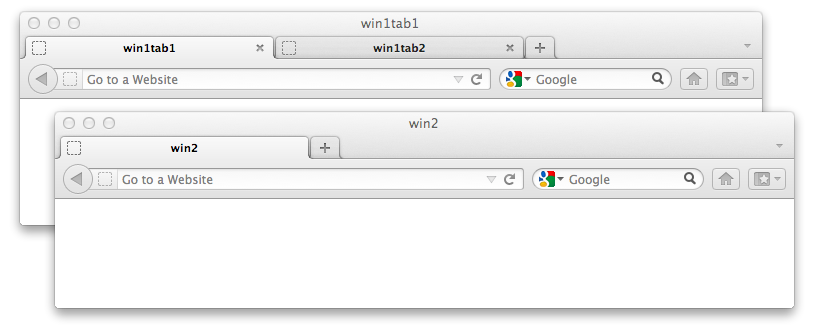
The ordering of the array elements is not defined, but may be determined by iterating over each top level browser window and returning the tabs within that window before iterating over the tabs of the next top level browser window. For example, in the diagram below, the window handles should be returned as the handles for: win1tab1, win1tab2, win2.
Note
This implies that the correct way to determine whether or not a particular interaction with the browser opens a new window is done by obtaining the set of window handles before the interaction is performed and comparing with the set after the action is performed.
6.4 Closing Windows
| Command Name | close |
| Parameters | "sessionId" {string} The key that identifies which session this request is for. |
| Return Value | None |
The close command closes the window that commands are currently being sent to. If this means that a call to get the list of window handles returns an empty list, then this close command must be the equivalent of calling "quit". In all other cases, control must be returned to the calling process once the window has been closed or an alert is displayed by the closing window.
Once the window has closed, future commands must return a status code of NoSuchWindow until a new window is selected for receiving commands.
6.5 Resizing and Positioning Windows
| Command Name | setWindowSize |
| Parameters | "sessionId" {string} The key that identifies which session this request is for. "windowHandle" {string} The handle referring to the window to resize. "width" {number} The new window width in pixels. "height" {number} The new window height in pixels. |
| Return Value | None |
| Errors | UnsupportedOperation if the window could not be resized. |
| Command Name | getWindowSize |
| Parameters | "sessionId" {string} The key that identifies which session this request is for. "windowHandle" {string} The handle referring to the window to resize. |
| Return Value | An object with two keys: "width" {number} The width of the specified window in pixels. "height" {number} The height of the specified window in pixels. |
| Command Name | maximizeWindow |
| Parameters | "sessionId" {string} The key that identifies which session this request is for. "windowHandle" {string} The handle referring to the window to resize. |
| Return Value | None |
| Errors | UnsupportedOperation if the window could not be resized. |
| Command Name | fullscreenWindow |
| Parameters | "sessionId" {string} The key that identifies which session this request is for. "windowHandle" {string} The handle referring to the window to resize. |
| Return Value | None |
| Errors | UnsupportedOperation if the window could not be resized. |
Each of these commands accept the window handles returned by "getWindowHandles" and "getWindowHandle". In addition, the window handle may be "current", in which case the window that commands are currently being handled by must be acted upon.
The "width" and "height" values refer to the "window.outerheight" and "window.outerwidth" properties. For those browsers that do not support these properties, these represent the height and width of the whole browser window including window chrome and window resizing borders/handles.
After setWindowSize, the browser window must not be in the maximised state.
After maximizeWindow, the browser window must be left as if the maximise button had been pressed; it is not sufficient to leave the window "restored", but with the full screen dimensions.
After fullscreenWindow, the browser window must be in full-screen mode. For those operating systems that support the concept, this must be equivalent to if the user requested the window be full screen. If the OS does not support the concept of full-screen, then this command is a synonym for "maximizeWindow".
If a request is made to resize a window to a size which cannot be performed (e.g. the browser has a minimum, or fixed window size, or the operating system does not support resizing windows at all as is the case in many phone OSs), an UnsupportedOperation status code must be returned.
6.6 Scaling the Content of Windows
TODO
7. Where Commands Are Handled
Web applications can be composed of multiple windows and/or frames. For a normal user, the context in which an operation is performed is obvious: it's the window or frame that currently has OS focus and which has just received user input. The WebDriver API does not follow this convention. There is an expectation that many browsers using the WebDriver API may be used at the same time on the same machine. This section describes how WebDriver tracks which window or frame is currently the context in which commands are being executed.
7.1 Default Content
WebDriver's default content is the equivalent of window.top.
When a WebDriver instance is started and a single browser window is opened, the default content of that window is automatically selected for receiving further commands. If more than one window is opened when the session starts, then the user must first select which window to act upon using the switchToWindow command. Until the user selects a window, all commands must return a status code of NoSuchWindow.
7.2 Switching Windows
| Command Name | switchToWindow |
| Parameters | "sessionId" {string} The key that identifies which session this request is for. "name" {string} The identifier used for a window. |
| Return Value | None |
| Errors | NoSuchWindow if no matching window can be found |
The "switchToWindow" command is used to select which window should currently be accepting commands. In order to determine which window should be used for accepting commands, the "switchToWindow" command must iterate over all windows. For each window, the following must be compared --- in this order --- with the "name" parameter:
- A window handle, obtained from "getWindowHandles" or "getWindowHandle".
- The window name, as defined when the window was opened (the value of "window.name")
- The "id" attribute of the window.
If no windows match, then a "NoSuchWindow" status code must be returned, otherwise the "default content" of the first window to match will be selected for accepting commands.
7.3 Switching Frames
| Command Name | switchToFrame |
| Parameters | "sessionId" {string} The key that identifies which session this request is for. "id" {?(string|number|!WebElement=)} The identifier used for a window. |
| Return Value | None |
| Errors | NoSuchFrame if no matching frame can be found |
The "switchToFrame" command is used to select which frame within a window should be used for handling future commands. All frame switching is taken from the current context from which commands are currently being handled. The "id" parameter can be one of a string, number of an element. WebDriver implementations must determine which frame to select using the following algorithm:
- If the "id" is a number the current context is set to the equivalent of the JS expression "window.frames[n]" where "n" is the number and "window" is the DOM window represented by the current context.
- If the "id" is null, the current context is set to the default context.
- If the "id" is a string:
- If the JS expression "window.frames[id]" evaluated in the current context returns a window, where "id" is the value of the the "id" parameter, the current context is set to that.
- Otherwise for each value of "window.frames" (referred to as
win):- If
winhas a "name" property or attribute equal to the "id" parameter, this becomes the current context. - If
winhas an "id" property or attribute equal to the "id" parameter, this becomes the current context.
- If
- If the "id" represents a
WebElement, and the corresponding DOM element represents a FRAME or an IFRAME, and the WebElement is part of the current context, the "window" property of that DOM element becomes the current context.
In all cases if no match is made a "NoSuchFrame" status code must be returned.
Frame switching must succeed even if doing so would cross a security origin, or javascript executing in window.top's context would otherwise not be able to access the frame being switched to.
8. Running Without Window Focus
All browsers must comply with the focus section of the [HTML5] spec. In particular, the requirement that the element within a top-level browsing context be independent of whether or not the top-level browsing context itself has system focus must be followed.
Note
This requirement is put in place to allow efficient machine utilization when using the WebDriver API to control several browsers independently on the same desktop
9. Elements
One of the key abstractions of the WebDriver API is the
WebElement interface. Each instance of this interface represents an
Element as defined in the
[DOM4] specification. Because the WebDriver API is designed to allow users to interact with apps as if
they were actual users, the capabilities offered by the
WebElement interface are somewhat different from those offered by the DOM Element interface.
Each WebElement instance must have an ID, which is distinct from the value of the DOM Element's "id" property. The ID for every WebElement representing the same underlying DOM Element must be the same. The IDs used to refer to different underlying DOM Elements must be unique within the session over the entire duration of the session.
Note
This requirement around WebElement IDs allows for efficient equality checks when the WebDriver API is being used out of process.
interface WebElement {
    readonly attribute DOMString id;
};
9.1 Attributes
idof typeDOMString, readonly- The WebDriver ID of this particular element. This should be a UUID.
This section of the specification covers finding elements. Later sections deal with querying and interacting with
these located elements. The primary interface used by the WebDriver API for locating elements is the
SearchContext.
9.2 Lists of WebElements
The primary grouping of WebElement instances is an array of WebElement instances
A reference to an WebElement is obtained via a SearchContext. The key interfaces are:
interface SeachContext {
    WebElement[] findElements (Locator locator);
    WebElement   findElement (Locator locator);
};
Methods
findElementParameter Type Nullable Optional Description locator Locator✘ ✘ Return type:
WebElementfindElementsParameter Type Nullable Optional Description locator Locator✘ ✘ Return type:
WebElement[]
9.3 Element Location Strategies
All element location strategies must return elements in the order in which they appear in the current document.
9.3.1 CSS Selectors
| Capability Name | Type |
|---|---|
| cssSelectors | boolean |
Strategy name: css selector
If a browser supports the
CSS Selectors API ([SELECTORS-API]) it must support locating elements by
CSS Selector. If the browser does not support the browser CSS Selector spec it may choose to implement locating
by this mechanism. If the browser can support locating elements by CSS Selector, it must set the "cssSelector" capability to boolean true when responding to the "newSession" command. Elements must be returned in the same order as if "querySelectorAll" had been called with the Locators value. Compound selectors are allowed.
9.3.2 ECMAScript
Finding elements by ecmascript is covered in the ecmascript part of this spec.
9.3.3 Element ID
Strategy name: id
This strategy must be supported by all WebDriver implementations.
The HTML5 specification ([HTML5]) states that element
IDs must be unique within their home subtree. Sadly, this uniqueness
requirement is not always met. Consequently, this strategy is equally
valid for finding a single element or groups of elements. In the case of
finding a single WebElement, this must be functionally identical to a call
to "document.getElementById()"
from the Web DOM Core specification ([DOM4]). When finding multiple
elements, this is equivalent to an CSS query of "#value" where "value" is the ID being searched for with all "'" characters being properly escaped..
9.3.4 Link Text
Strategy name: link text
This strategy must be supported by all WebDriver implementations.
This strategy must return all "a" elements with visible text exactly and case sensitively equal to the term being searched for.
Note
This is equivalent to:
		  elements = driver.find_elements(by = By.TAG_NAME, value = "a")
		  result = []
		  for element in elements:
		    text = element.get_text()
		    if text == search_term:
		      result.append(element)
Where "search_term" is the link text being searched for, and "result" contains the list of elements to return.
9.3.5 Partial Link Text
Strategy name: partial link text
This strategy must be supported by all WebDriver implementations.
This strategy is very similar to link text, but rather than matching the entire string, only a subset needs to match. That is, this must return all "a" elements with visible text that partially or completely and case sensitively matches the term being searched for.
Note
This is equivalent to:
		  elements = driver.find_elements(by = By.TAG_NAME, value = "a")
		  result = []
		  for element in elements:
		    text = element.get_text()
		    if text.find(seach_term) != -1:
		      result.append(element)
Where "search_term" is the link text being searched for, and "result" contains the list of elements to return.
9.3.6 XPath
Strategy name: xpath
All WebDriver implementations must support finding elements by XPath 1.0 [XPATH] with the edits from section 3.3 of the [HTML5] specification made. If no native support is present in the browser, a pure JS implementation may be used. When called, the returned values must be equivalent of calling "evaluate" function from the DOM Level 3 XPath spec [DOM-LEVEL-3-XPATH] with the result type set to "ORDERED_NODE_SNAPSHOT_TYPE (7).
9.4 The Shadow DOM
TODO: describe how WebDriver remote ends interact with the shadow DOM.
10. Reading Element State
10.1 Determining Visibility
The following steps must be used to determine if an element is visible to a user. This specification refers to this as the element being "shown".
- The element must have a height and width greater than 0px.
- The element must not be visible if that element, or any of its ancestors, is hidden or has a CSS display property that is none.
- The element must not be visible if there is a CSS3 Transform property that moves the element out of the viewport and can not be scrolled to.
- OPTIONs and OPTGROUP elements are treated as special cases, they are considered shown if and only if the enclosing select element is visible.
- MAP elements are shown if and only if the image it uses is visible. Areas within a map are shown if the enclosing MAP is visible.
- Any INPUT elements of "type=hidden" are not visible
- Any NOSCRIPT elements must not be visible if Javascript is enabled.
- The element must not be visible if any ancestor in the element's transitive closure of offsetParents has a fixed size, and has the CSS style of "overflow:hidden", and the element's location is not within the fixed size of the parent.
Note
Essentially, this attempts to model whether or not a user of the browser could possibly find a way to view the WebElement without resizing the browser window.
| Command Name | isDisplayed |
| Parameters | "id" {string} The ID of the WebElement on which to operate. |
| Return Value | {boolean} Whether the element is shown. |
| Errors | StaleElementReference if the element referenced is no longer attached to the DOM. |
10.2 Determining Whether a WebElement Is Selected
The remote end must determine whether a WebElement is selected using the following algorithm:
- If the item is not "
selectable", the WebElement is not selected. A selectable element is either an OPTION element or an INPUT element of type "checkbox" or "radio". - If the DOM node represented by the WebElement is an OPTION element, the "selectedness" of the element, as defined in [HTML5] determines whether the element is selected.
- Otherwise, the value of the DOM node's "checked" property determines whether the element is selected. This must reflect the element's "checkedness" as defined in [HTML5].
| Command Name | isSelected |
| Parameters | "id" {string} The ID of the WebElement on which to operate. |
| Return Value | {boolean} Whether the element is selected, according to the above algorithm. |
| Errors | StaleElementReference if the element referenced is no longer attached to the DOM. |
10.3 Reading Attributes and Properties
Although the [HTML5] spec is very clear about the difference between the properties and attributes of a DOM element, users are frequently confused between the two. Because of this, the WebDriver API offers a single command ("getElementAttribute") which covers the case of returning either of the value of a DOM element's property or attribute. If a user wishes to refer specifically to an attribute or a property, they should evaluate Javascript in order to be unambiguous. In this section, the "attribute" with name name shall refer to the result of calling the Javascript "getAttribute" function on the element, with the following exceptions:
- If, in the current rendering mode, the content attribute
namereflects a boolean IDL attribute, as per the HTML specification, the value must be the string 'true' if that IDL attribute's value is true or the null value if the IDL attribute's value is false. - If the element is an OPTION element and
nameis "value" and there is no "value" attribute, then the text content of the OPTION element must be returned, in accordance with [HTML401] spec, specifically the section on pre-selected options. The text content must be the result of calling the "getElementText" command on the OPTION element. - If the element is selectable, and
nameis "selected", or the element is an INPUT element of type "checkbox" or "radio" andnameis "checked", return the string 'true' if the element is selected, and the null value otherwise. - If
nameis "style", the value returned must be serialized as defined in the [CSSOM-VIEW] spec. Notably, css property names must be cased the same as specified in in section 6.5.1 of the [CSSOM-VIEW] spec.- Consequently, it should be equivalent to obtaining the "cssText" property, with the additional constraint that the same value must be returned after a round trip through "executeScript". That is, the following pseudo-code must be true (where "driver" is a WebDriver instance, and "element" is a WebElement):
var style = element.getAttribute('style'); driver.executeScript('arguments[0].style = arguments[1]', element, style); var recovered = element.getAttribute('style'); assertEquals(style, recovered); - Color property values must be standardized to rgba format, matching the regular expression:
rgba\(\d+,\s*\d+,\s*\d+\s*(,\s*(1|0(\.\d+)?))).
- Consequently, it should be equivalent to obtaining the "cssText" property, with the additional constraint that the same value must be returned after a round trip through "executeScript". That is, the following pseudo-code must be true (where "driver" is a WebDriver instance, and "element" is a WebElement):
- If the value is expected to be a URL (see the below table), return the property named
name, i.e. a fully resolved URL: TODO: This doesn't feel like an exhaustive listTag name "name" value A href IMG src - If
nameis in the below table, and the above stages have not yielded a defined, non-null value, the value of the aliased attribute in the table below should be returned:Original property name Aliased property name class className readonly readOnly
Note
These aliases provide the commonly used names for element properties.
| Command Name | getElementAttribute |
| Parameters | "sessionId" {string} The key that identifies which session this request is for. "id" {string} The ID of the WebElement on which to operate. "name" {string} The name of the property of attribute to return. |
| Return Value | {string|null} The value returned by the above algorithm, coerced to a nullable string, or null if no value is defined. |
| Errors | StaleElementReference If the element is no longer attached to the DOM. |
10.4 Rendering Text
All WebDriver implementations must support getting the visible text of a WebElement, with excess whitespace compressed.
The following definitions are used in this section:
- Whitespace
- Any text that matches the ECMAScript regular expression class
\s. - Whitespace excluding non-breaking spaces
- Any text that matches the ECMAScript regular expression
[^\S\xa0] - Block level element
- A block-level element is one which is not a table cell, and whose effective CSS display style is not in the set ['inline', 'inline-block', 'inline-table', 'none', 'table-cell', 'table-column', 'table-column-group']
- Horizontal whitespace characters
- Horizontal whitespace characters are defined by the ECMAScript regular expression
[\x20\t\u2028\u2029].
The expected return value is roughly what a text-only browser would display. The algorithm for determining this text is as follows:
Let lines equal an empty array. Then:
- For each
childof node, at time of execution, in order:- Get whitespace, text-transform, and then, if
childis:- a node which is not visible, do nothing
- a [DOM4] text node let
textequal thenodeValueproperty ofchild. Then:- Remove any zero-width spaces (\u200b), form feeds (\f) or vertical tab feeds (\v) from
text. - Canonicalize any recognized single newline sequence in
textto a single newline (greedily matching(\r\n|\r|\n)to a single \n) - If the parent's effective CSS whitespace style is 'normal' or 'nowrap' replace each newline (\n) in
textwith a single space character (\x20). If the parent's effective CSS whitespace style is 'pre' or 'pre-wrap' replace each horizontal whitespace character with a non-breaking space character (\xa0). Otherwise replace each sequence of horizontal whitespace characters except non-breaking spaces (\xa0) with a single space character - Apply the parent's effective CSS text-transform style as per the CSS 2.1 specification ([CSS21])
- If
last(lines)ends with a space character andtextstarts with a space character, trim the first character oftext. - Append
texttolast(lines)in-place
- Remove any zero-width spaces (\u200b), form feeds (\f) or vertical tab feeds (\v) from
- an element which is visible. If the element is a:
- BR element: Push '' to
linesand continue - Block-level element and if
last(lines)is not '', push '' tolines.
childset to the current element - BR element: Push '' to
- If element is a TD element, or the effective CSS display style is 'table-cell', and last(lines) is not '', and
last(lines)does not end with whitespace append a single space character tolast(lines)[Note: Most innerText implementations append a \t here] - If element is a block-level element: push '' to
lines
- Get whitespace, text-transform, and then, if
- The string must then have the white space normalised as defined in the [XPATH] normalize-space function which is then returned.
11. Executing Javascript
Note
Open questions: What happens if a user's JS triggers a modal dialog? Blocking seems like a reasonable idea, but there is an assumption that WebDriver is not threadsafe. What happens to unhandled JS errors? Caused by a user's JS? Caused by JS on a page? How does a user of the API obtain the list of errors? Is that list cleared upon read?
If a browser supports JavaScript and JavaScript is enabled, it must set the "javascriptEnabled" capability to true, and it must support the execution of arbitrary JavaScript.
| Capability Name | Type |
| javascriptEnabled | boolean |
11.1 Javascript Command Parameters
The Argument type is defined as being {(number|boolean|DOMString|WebElement|dictionary|Array.>Argument>)?}
interface JavascriptCommandParameters {
    readonly attribute DOMString  script;
    readonly attribute Argument[] args;
};
When executing Javascript, it must be possible to reference the args parameter using the function's arguments object. The arguments must be in the same order as defined in args. Each WebDriver implementation must preprocess the values in args using the following algorithm:
For each index, index in args, if args[index] is...
- a number, boolean, DOMString, or
null, then letargs[index] = args[index]. - an array, then recursively apply this algorithm to
args[index]and assign the result toargs[index]. - a dictionary, then recursively apply this algorithm to each value in
args[index]and assign the result toargs[index]. - a WebElement, then:
- If the element's ID does not represent a DOMElement, or it represents a DOMElement that is no longer attached to the document's tree, then the WebDriver implementation must immediately abort the command and return a
StaleElementReferenceerror. - Otherwise, let
args[index]be the underlying DOMElement.
- If the element's ID does not represent a DOMElement, or it represents a DOMElement that is no longer attached to the document's tree, then the WebDriver implementation must immediately abort the command and return a
- Otherwise WebDriver implementations may throw an UnknownError indicating the index of the unhandled parameter (TODO: Should a more specific error be thrown?) but should attempt to convert the value into a dictionary.
11.2 Synchronous Javascript Execution
| Command Name | executeScript |
| Parameters | "sessionId" {string} The key that identifies which session this request is for. "script" {string} The script to execute. "args" {Array.<Argument>} The script arguments. |
| Return Value | {Argument} The value returned by the script, or null. |
| Errors |
JavascriptError if the executing script threw an exception. StaleElementReference if a WebElement referenced is no longer attached to the DOM. UnknownError if an argument or the return value is of an unhandled type. |
When executing JavaScript, the WebDriver implementations must use the following algorithm:
- Let
windowbe the Window object for WebDriver's current command context. - Let
scriptbe the DOMString from the command'sscriptparameter. - Let
fnbe the Function object created by executingnew Function(script); - Let
argsbe the JavaScript array created by the pre-processing algorithm defined above. - Invoke
fn.apply(window, args); - If step #5 threw, then:
- Let
errorbe the thrown value. - Set the command's response status to JavascriptError.
- Set the command's response value to a dictionary,
dict. - If
erroris an Error, then set a "message" entry indictwhose value is the DOMString defined byerror.message. - Otherwise, set a "message" entry in
dictwhose value is the DOMString representation oferror.
- Let
- Otherwise:
- Let
resultbe the value returned by the function in step #5. - Set the command's response status to Success.
- Let
valuebe the result of the following algorithm:- If
resultis:undefinedornull, returnnull.- a number, boolean, or DOMString, return
result. - a DOMElement, then return the corresponding WebElement for that DOMElement.
- an array or NodeList, then return the result of recursively applying this algorithm to
result. - an object, then return the dictionary created by recursively applying this algorithm to each property in
result.
- If
- Set the command's response value to
value.
- Let
- Return the command response.
11.3 Asynchronous Javascript Execution
| Command Name | executeAsyncScript |
| Parameters | "sessionId" {string} The key that identifies which session this request is for. "script" {string} The script to execute. "args" {Array.<Argument>} The script arguments. |
| Return Value | {Argument} The value returned by the script, or null. |
| Errors |
JavascriptError if the executing script threw an exception. StaleElementReference if a WebElement referenced is no longer attached to the DOM. Timeout if the callback is not called within the time specified by the "script" timeout. UnknownError if an argument or the return value is of an unhandled type. |
When executing asynchronous JavaScript, the WebDriver implementation must use the following algorithm:
- Let
timeoutbe the value of the last "script" timeout command, or 0 if no such commands have been received. - Let
windowbe the Window object for WebDriver's current command context. - Let
scriptbe the DOMString from the command'sscriptparameter. - Let
fnbe the Function object created by executingnew Function(script); - Let
argsbe the JavaScript array created by the pre-processing algorithm defined above. - Let
callbackbe a Function object pushed to the end ofargs. - Register a one-shot timer on
windowset to firetimeoutmilliseconds in the future. - Invoke
fn.apply(window, args); - If step #8 threw, then:
- Let
errorbe the thrown value. - Set the command's response status to JavascriptError.
- Set the command's response value to a dictionary,
dict. - If
erroris an Error, then set a "message" entry indictwhose value is the DOMString defined byerror.message. - Otherwise, set a "message" entry in
dictwhose value is the DOMString representation oferror.
- Let
- Otherwise, the WebDriver implementation must wait for one of the following to occur:
- if the timer from step #7 fires, the WebDriver implementation must immediately set the command response status to Timeout and return.
- if the
windowfires anunloadevent, the WebDriver implementation must immediately set the command response status to JavascriptError and return with the error message set to "Javascript execution context no longer exists.". - if the
callbackfunction is invoked, then:- Let
resultbe the first argument passed tocallback. - Set the command's response status to Success.
- Let
valuebe the result of the following algorithm:- If
resultis:undefinedornull, returnnull.- a number, boolean, or DOMString, return
result. - a DOMElement, then return the corresponding WebElement for that DOMElement.
- an array or NodeList, then return the result of recursively applying this algorithm to
result. WebDriver implementations should limit the recursion depth. - an object, then return the dictionary created by recursively applying this algorithm to each property in
result.
- If
- Set the command's response value to
value.
- Let
- Return the command response.
11.4 Reporting Errors
12. Cookies
This section describes the interaction with
cookies
as described in Web DOM Core Specification ([DOM-LEVEL-2-CORE]). When retrieving
and setting a cookie it must be in the format of a Cookie.
Retrieving all cookies from the page:
| Command Name | getCookies |
| Parameters | "sessionId" {string} The key that identifies which session this request is for. |
| Return Value | Array.<string> A list of ordinary cookies that are currently visible on the page. |
Remote ends must return all cookies that are available in document.cookie via Javascript. In addition, remote ends should return any HTTP-Only cookies that are associated with the current page.
Setting a cookie:
| Command Name | addCookie |
| Parameters | "sessionId" {string} The key that identifies which session this request is for. "cookie" {object} A Cookie defining the cookie to be added
|
| Return Value | Array.<object> A list of cookies in the Cookie format. |
| Throws | InvalidCookieDomain - If the cookie's domain is not visible from the current page. UnableToSetCookie - If attempting to set a cookie on a page that does not support cookies (e.g. pages with mime-type text/plain). |
12.1 Cookie
When returning Cookie objects, the server should only omit an optional field if it is incapable of providing the information
interface Cookie {
    attribute string  name;
    attribute string  value;
    attribute string  path;
    attribute string  domain;
    attribute number  expiry;
    attribute boolean httpOnly;
};
12.1.1 Attributes
domainof typestring- The domain the cookie is visible too. This should be set or must be the null value if unknown.
expiryof typenumber- When the cookie expires, specified in seconds since midnight, January 1, 1970 UTC. This should be set or must be -1 if unknown.
httpOnlyof typeboolean- True if this represents an HTTP-Only cookie, false otherwise.
nameof typestring- The name of the cookie. This must be set.
pathof typestring- The cookie path. This should be set or must be the null value if unknown.
valueof typestring- The cookie value. This must be set.
13. Timeouts
This section describes how timeouts and implicit waits are handled within WebDriver
The "timeouts" command is used to set the value of a timeout that a command can execute for.
| Command Name | timeouts |
| Parameters | "sessionId" {string} The key that identifies which session this request is for. "type" {string} The type of operation to set the timeout for. Valid values are: "implicit", "page load", "script" "ms" - {number} The amount of time, in milliseconds, that time-limited commands are permitted to run. |
| Return Value | None |
| Errors | None |
- implicit - Set the amount of time the driver should wait when searching for elements. When searching for a single element, the driver should poll the page until an element is found or the timeout expires, whichever occurs first. When searching for multiple elements, the driver should poll the page until at least one element is found or the timeout expires, at which point it should return an empty list.
If this command is never sent, the driver must default to an implicit wait of 0ms. - page load -TODO(David, Simon) fill me in
- script - Set the amount of time the driver should wait when scripts are loading on to the page.
14. User Input
The WebDriver API offers two ways of interacting with elements, either with a set of low-level "do as I say" commands, or a high-level "do as I mean" set of commands. The former are offered to allow precise emulation of user input. The latter are offered as a convenience to cover the common case, and can conceivably be implemented on top of the lower level primitive operations.
14.1 Interactable elements
Some input actions require the element to be interactable. The following conditions must be met for the element to be considered interactable:
- The element must be visible, as defined in section 10.1.
- The element must not be disabled. "Disabled" is defined as:
- If the current document is being processed as an HTML 4 document, the element must be considered disabled if it does not support the disabled attribute (according to the [HTML401] spec), or if the disabled attribute is set in the case where that attribute is present.
- If the currently loaded document is an HTML 5 document, the element is disabled as defined in the [HTML5] spec.
14.2 Low Level Commands
The low level commands provide a mechanism for precisely stating how a user can interact with the browser.
User input should be emulated natively, with the input events being indistinguishable from those generated by a real user interacting with the browser. It is therefore recommended that input events should not be generated at the DOM level using the "createEvent" API from [DOM4] or similar. Instead, emulated input events should originate from the browser's own event queue. This is the order of preference for methods to emulate user input:
- Injection into the browser's event queue.
- Sending OS-specific input messages to the browser's window. This has the disadvantage that the browser being automated may not be properly isolated from a user accidentally modifying input device state.
- Use of Javascript to inject events at the DOM level.
- Use of the accessibility API. The disadvantage of this method is that the browser's window must be focused. As a result, multiple tests cannot run in parallel.
TODO: Describe the commands for basic control of keyboard and mouse.
14.2.1 Mouse
TODO: Ensure that this section mentions that mouse state must be maintained if the page is not related and may be maintained if the browser navigates to a new page.
TODO: Handle the case where the browser is on a mouse-less device (eg. mobile phone)
14.2.2 Keyboard
14.2.2.1 IME
14.2.3 Touch
TODO: Define capability to capture the concept that a browser supports touch events
14.3 High Level Commands
These higher level commands should be built on top of the low level commands, and implement a user friendly way of interacting with a page in a way that models common user expectations.
14.3.1 Clicking
partial interface WebElement {
    void click ();
};
14.3.1.1 Methods
click- Click in the middle of the
WebElementinstance. The middle of the element is defined as the middle of the box returned by calling getBoundingClientRect on the underlying DOM Element, according to the [CSSOM-VIEW] spec. If the element is outside the viewport (according to the [CSS21] spec), the implementation should bring the element into view first. The implementation may invoke scrollIntoView on the underlying DOM Element. The element must be visible, as defined in section 10.1. See the note below for when the element is obscured by another element. Exceptions:- Links (A elements): Clicking happens in the middle of the first visible bounding client rectangle. This is to overcome overflowing links where the middle of the bounding client rectangle does not actually fall on a clickable part of the link.
- SELECT elements without the "multiple" attribute set. Clicking on the select element should open the drop down menu. The next click, on any element, must close this menu.
- Clicking directly on an OPTION element (without clicking on the parent SELECT element previously) must open a selection menu, as if the SELECT option was clicked first, then click on the OPTION before finally closing the SELECT element's menu. The the SELECT menu must be closed once the action is complete.
The possible errors for this command:
- StaleElementReference if the given element is no longer attached to the DOM.
- ElementNotVisible if the element is hidden and thus cannot be interacted with.
- MoveTargetOutOfBounds if the element cannot be scrolled into view.
This command must use either the mouse or touch mechanisms for emulating the user input. In the case where the browser being automated supports only mouse input or both mouse and touch input, the low-level mouse mechanisms must be used. If the browser only supports touch input, the low level touch inputs must be used.
No parameters.
Return type:
void
Note
As the goal is to emulate users as closely as possible, the
implementation should not allow clicking on elements that are obscured by
other elements. If the implementation forbids clicking on obscured elements,
an ElementNotVisible exception must be thrown and this should have an
explantory message explaining the reason. The implementation should try to
scroll the element into view, but in case it is fully obscured, it should
not be clickable.
14.3.2 Typing keys
A requirement for key-based interaction with an element is that it is interactable. Typing into an element is permitted if one of the following conditions is met:
- The element is focusable as defined in the editing section of the [HTML5] spec.
- The element is allowed to be the
activeElement. In addition to focusable elements, this allows typing to theBODYelement. - In an HTML5 document, the element is editable as a result of having its
contentEditableattribute set or the containing document is indesignMode. - The underlying browser implementation would allow keyboard input to directed to the element (eg. an HTML 4 document with a DIV marked as being contentEditable)
Prior to any keyboard interaction, an attempt to shift focus to the element must be attempted if the element does not currently have the focus. This is the case if one of the following holds:
- The element is not
document.activeElement - The owner document of the element to be interacted with is not the focused document.
In case focusing is needed, the implementation must follow the focusing steps as described in the focus management section of the [HTML5] spec. The focus must not leave the element at the end of the interaction, other than as a result of the interaction itself (i.e. when the tab key is sent).
partial interface WebElement {
    void clear ();
    void sendKeys (string[] keysToSend);
};
14.3.2.1 Methods
clear- Clears the value of the element.
No parameters.
Return type:
void sendKeys- Sends a sequence of keyboard events representing the keys in the keysToSend parameter.
Caret positioning: If focusing was needed, after following the focusing steps, the caret must be positioned at the end of the text currently in the element. At the end of the interaction, the caret must be positioned at the end of the typed text sequence, unless the keys sent position it otherwise (e.g. using the LEFT key).
There are four different types of keys that are emulated:
- Character literals - lower-case symbols.
- Uppercase letters and symbols requiring the SHIFT key for typing.
- Modifier keys
- Special keys
Parameter Type Nullable Optional Description keysToSend string[]✘ ✘ Return type:
void
When emulating user input, the implementation must generate
the same sequence of events that would have been produced if a real user was
sitting in front of the keyboard and typing the sequence of characters. In
cases where there is more than one way to type this sequence, the
implementation must choose one of the valid ways. For example, typing AB may be achieved by:
- Holding down the Shift key
- Pressing the letter 'a'
- Pressing the letter 'b'
- Releasing the Shift key
Alternatively, it can be achieved by:
- Holding down the Shift key
- Pressing the letter 'a'
- Releasing the Shift key
- Holding down the Shift key
- Pressing the letter 'b'
- Releasing the Shift key
Or by simply turning on the CAPS LOCK first.
The implementation may use the following algorithm to generate the events. If the implementation is using a different algorithm, it must adhere to the requirements listed below.
For each key, key in keysToSend, do
- If key is a lower-case symbol:
- If the Shift key is not pressed:
- Generate a sequence of key-down, key-press and key-up events with key as the character to emulate
- else (The Shift key is pressed)
- let uppercaseKey be the upper-case character matching key
- Generate a sequence of key-down, key-press and key-up events with uppercaseKey as the character to emulate
- If the Shift key is not pressed:
- Else if key is an upper-case symbol:
- If the Shift key is not pressed:
- Generate a key-down event of the Shift key.
- Generate a sequence of key-down, key-press and key-up events with key as the character to emulate
- Generate a key-up event of the Shift key.
- else (The Shift key is pressed)
- Generate a sequence of key-down, key-press and key-up events with key as the character to emulate
- If the Shift key is not pressed:
- Else if key represents a modifier key:
- let modifier be the modifier key represented by key
- If modifier is currently held down:
- Generate a key-up event of modifier
- Else:
- Generate a key-down event of modifier
- Maintain this key state and use it to modify the input until it is pressed again.
- Else if key represents the NULL key:
- Generate key-up events of all modifier keys currently held down.
- All modifier keys are now assumed to be released.
- Else if key represents a special key:
- Translate key to the special key it represents
- Generate a sequence of key-down, key-press and key-up events for the special key.
Once keyboard input is complete, an implicit NULL key is sent unless the final character is the NULL key.
Any implementation must comply with these requirements:
- For uppercase letters and symbols that require the Shift key to be
pressed, there are two options:
- A single Shift key-down event is generated before the entire sequence of uppercase letters.
- Before each such letter or symbol, a Shift key-down event is generated. After each letter or symbol, a Shift key-up event is generated.
- A user-specified Shift press implies capitalization of all following characters.
- If a user-specified Shift press precedes uppercase letters and symbols, a second Shift key-down event must not be generated. In that case, a Shift key-up event must not be generated implicitly by the implementation.
- The NULL key releases all currently held down modifier keys.
- The state of all modifier keys must be reset at the end of each
sendKeyscall and the appropriate key-up events generated
Character types
The keysToSend parameter contains a mix of printable characters and pressable keys that aren't text. Pressable keys that aren't text are stored in the Unicode PUA (Private Use Area) code points, 0xE000-0xF8FF. The following table describes the mapping between PUA and key:
| Key | Code | Type |
|---|---|---|
| NULL | \uE000 | NULL |
| CANCEL | \uE001 | Special key |
| HELP | \uE002 | Special key |
| BACK_SPACE | \uE003 | Special key |
| TAB | \uE004 | Special key |
| CLEAR | \uE005 | Special key |
| RETURN | \uE006 | Special key |
| ENTER | \uE007 | Special key |
| SHIFT | \uE008 | Modifier |
| LEFT_SHIFT | \uE008 | Modifier |
| CONTROL | \uE009 | Modifier |
| LEFT_CONTROL | \uE009 | Modifier |
| ALT | \uE00A | Modifier |
| LEFT_ALT | \uE00A | Modifier |
| PAUSE | \uE00B | Special key |
| ESCAPE | \uE00C | Special key |
| SPACE | \uE00D | Special key |
| PAGE_UP | \uE00E | Special key |
| PAGE_DOWN | \uE00F | Special key |
| END | \uE010 | Special key |
| HOME | \uE011 | Special key |
| LEFT | \uE012 | Special key |
| ARROW_LEFT | \uE012 | Special key |
| UP | \uE013 | Special key |
| ARROW_UP | \uE013 | Special key |
| RIGHT | \uE014 | Special key |
| ARROW_RIGHT | \uE014 | Special key |
| DOWN | \uE015 | Special key |
| ARROW_DOWN | \uE015 | Special key |
| INSERT | \uE016 | Special key |
| DELETE | \uE017 | Special key |
| SEMICOLON | \uE018 | Special key |
| EQUALS | \uE019 | Special key |
| NUMPAD0 | \uE01A | Special key |
| NUMPAD1 | \uE01B | Special key |
| NUMPAD2 | \uE01C | Special key |
| NUMPAD3 | \uE01D | Special key |
| NUMPAD4 | \uE01E | Special key |
| NUMPAD5 | \uE01F | Special key |
| NUMPAD6 | \uE020 | Special key |
| NUMPAD7 | \uE021 | Special key |
| NUMPAD8 | \uE022 | Special key |
| NUMPAD9 | \uE023 | Special key |
| MULTIPLY | \uE024 | Special key |
| ADD | \uE025 | Special key |
| SEPARATOR | \uE026 | Special key |
| SUBTRACT | \uE027 | Special key |
| DECIMAL | \uE028 | Special key |
| DIVIDE | \uE029 | Special key |
| F1 | \uE031 | Special key |
| F2 | \uE032 | Special key |
| F3 | \uE033 | Special key |
| F4 | \uE034 | Special key |
| F5 | \uE035 | Special key |
| F6 | \uE036 | Special key |
| F7 | \uE037 | Special key |
| F8 | \uE038 | Special key |
| F9 | \uE039 | Special key |
| F10 | \uE03A | Special key |
| F11 | \uE03B | Special key |
| F12 | \uE03C | Special key |
| META | \uE03D | Special key |
| COMMAND | \uE03D | Special key |
| ZENKAKU_HANKAKU | \uE040 | Special key |
The keys considered upper-case symbols are either defined by the current keyboard locale or are derived from the US 104 keys Windows keyboard layout, which are:
- A - Z
- !$^*()+{}:?|~@#%_\" & < >
When the user input is emulated natively (see note below), the implementation should use the current keyboard locale to determine which symbols are upper case. In all other cases, the implementation must use the US 104 key Windows keyboard layout to determine those symbols.
The state of the physical keyboard must not affect emulated user input.
Internationalized input
Non-latin symbols: TBD
Complex scripts using Input Method Editor (IME): TBD
15. Modal Dialogs
This entire section should be considered non-normative
The remote end must fail fast if any command is received while a modal dialog is open, unless that command handles the dialog.
15.1 window.alert, prompt and confirm
15.2 Modal Windows
16. Screenshots
Screenshots are a powerful mechanism for providing information to users of WebDriver, particularly once a particular WebDriver instance has been disposed of. In different circumstances, users want different types of screenshot. Note that the WebDriver spec does not provide a mechanism for taking a screenshot of the entire screen.
In all cases, screenshots must be returned as lossless PNG images encoded using Base64. Local ends must provide the user with access to the PNG images without requiring the user to decode the Base64. This access must be via at least one of a binary blob or a file.
All commands within this section are implemented using the "TakesScreenshot" interface:
interface TakesScreenshot {
    string takeScreenshot ();
};
16.1 Methods
takeScreenshot- Take a screenshot as determined by the CommandName and return a lossless PNG encoded using Base64.
No parameters.
Return type:
string
16.2 Current Window
| Capability Name | Type |
| takesScreenshot | boolean |
| Command Name | takesScreenshot |
| Parameters | "sessionId" {string} The key that identifies which session this request is for. |
| Return Value | {string} A Base64 encoded, lossless PNG of the current window. |
| Errors | WebDriverException if the screenshot cannot be taken. |
If this capability is supported, local end must add the TakesScreenshot interface to the WebDriver interface.
This command will take a screenshot of the current window. Implementations of the remote end should capture the entire DOM, even if this would require a user to scroll the browser window. That is, the returned PNG should have the same width and height as returned by a call to getSize of the BODY element and must contain all visible content on the page, and this should be done without resizing the browser window. If the remote end is unable to capture the entire DOM, then the part of the DOM currently displayed in UI of the browser must be captured without additional chrome such as scrollbars and browser chrome.
Note
One way to think of capturing the entire DOM is that the user has an infinitely large monitor and has resized the window to allow all content to be visible. One of those monitors would be very cool.
Nested frames must be sized as if the user has resized the window to the dimensions of the PNG being returned. This often means that not all potentially visible content within the nested frames is captured.
Remote ends must not attempt to track changes in window size as the screenshot is being taken. In particular this means that in the case of a page that makes use of "infinite scrolling" (where an AJAX call is used to populate additional content as the user scrolls down) or in some other way resizes content as the window size is changed only the content that was originally contained in the DOM when the command is executed will be captured.
16.3 Element
| Capability Name | Type |
| takesElementScreenshot | boolean |
| Command Name | takesElementScreenshot |
| Parameters | "sessionId" {string} The key that identifies which session this request is for. "id" {string} The ID of the WebElement on which to operate.
|
| Return Value | {string} A Base64 encoded, lossless PNG of the area contained within the WebElement's clientBoundingRect. |
| Errors | WebDriverException if the screenshot cannot be taken. |
If this capability is supported, local end must add the TakesScreenshot interface to the WebElement interface.
Remote ends should take a screenshot of the area bounded by the clientBoundingRect of the DOM element represented by the WebElement, returning it as a Base64 encoded, lossless PNG. Local ends must make the PNG available directly to the user as at least one of a binary blob or a file. If the remote end cannot capture the entire clientBoundingRect, they must scroll as much of the element into the current browser viewport as possible and capture the maximum visible area without additional browser chrome.
If the WebElement represents a FRAME or IFRAME element, this is equivalent of taking a screenshot of the frame's BODY element.
17. Handling non-HTML Content
There is no requirement that WebDriver implementations handle non-HTML content. The remainder of this section is non-normative.
17.1 SVG
TODO: describe how the SVG DOM maps to WebElement implementations.
17.2 Working with Accessibility APIs
Many accessibility APIs represent the UI as a series of nested nodes. It is possible to map these nodes to WebElement instances. In order to function properly, it is likely that additional element locating strategies will be required.
Note
This is one way in which it might be possible to test mobile applications that marry a native wrapper around a series of HTML views.
18. Extending the Protocol
18.1 Vendor-specific Extensions
The WebDriver protocol is designed to allow extension to meet vendor-specific needs, such as interacting with the chrome of a browser. Vendor-specific extensions are implemented by appending a prefix to the command name. This should be of the form:
'-' + vendor prefix + '-' + command name
For example: "-o-open-bookmark" or "-moz-install-extension".
It is guaranteed that no command name in this or future versions of the WebDriver specification will be prefixed with a leading dash.
18.2 Extending the JSON/HTTP Protocol
This section is non-normative.
The wire protocol (see Appendix XXX) makes use of URLs to distinguish command names. When extending the protocol by adding new URLs, vendors should use their vendor prefix without additional characters to prevent any potential clashes with other implementations. This leads to URLs of the form: http://host:port/session/somekey/moz/extension.
A. Command Summary
This is an exhaustive list of the commands listed in this specification.
B. Capabilities
This section is non-normative.
Capabilities are used by WebDriver implementations to enumerate the parts of this specification that they support. They are also used when establishing a new session to descrive the required or desired capabilities. This appendix collects the capabilities mentioned in this spec into one place.
C. Command Format
This is essentially the content at the start of the json wire protocol
D. Thread Safety
There is no requirement for local or remote implementations to be thread safe. Local ends should support serialized access from multiple threads.
E. Logging
F. Mapping to HTTP and JSON
G. Acknowledgements
Many thanks to Robin Berjon for making our lives so much easier with his cool tool. Thanks to Jason Leyba, Malcolm Rowe and Ross Patterson for proof reading and suggesting areas for improvement. Thanks to Jason Leyba, Eran Messeri and Daniel Wagner-Hall for contributing sections to this document.