Recognitions
Twilio positioned as a Leader in the 2026 Gartner® Magic Quadrant™ for CPaaS1
Verify API at a glance
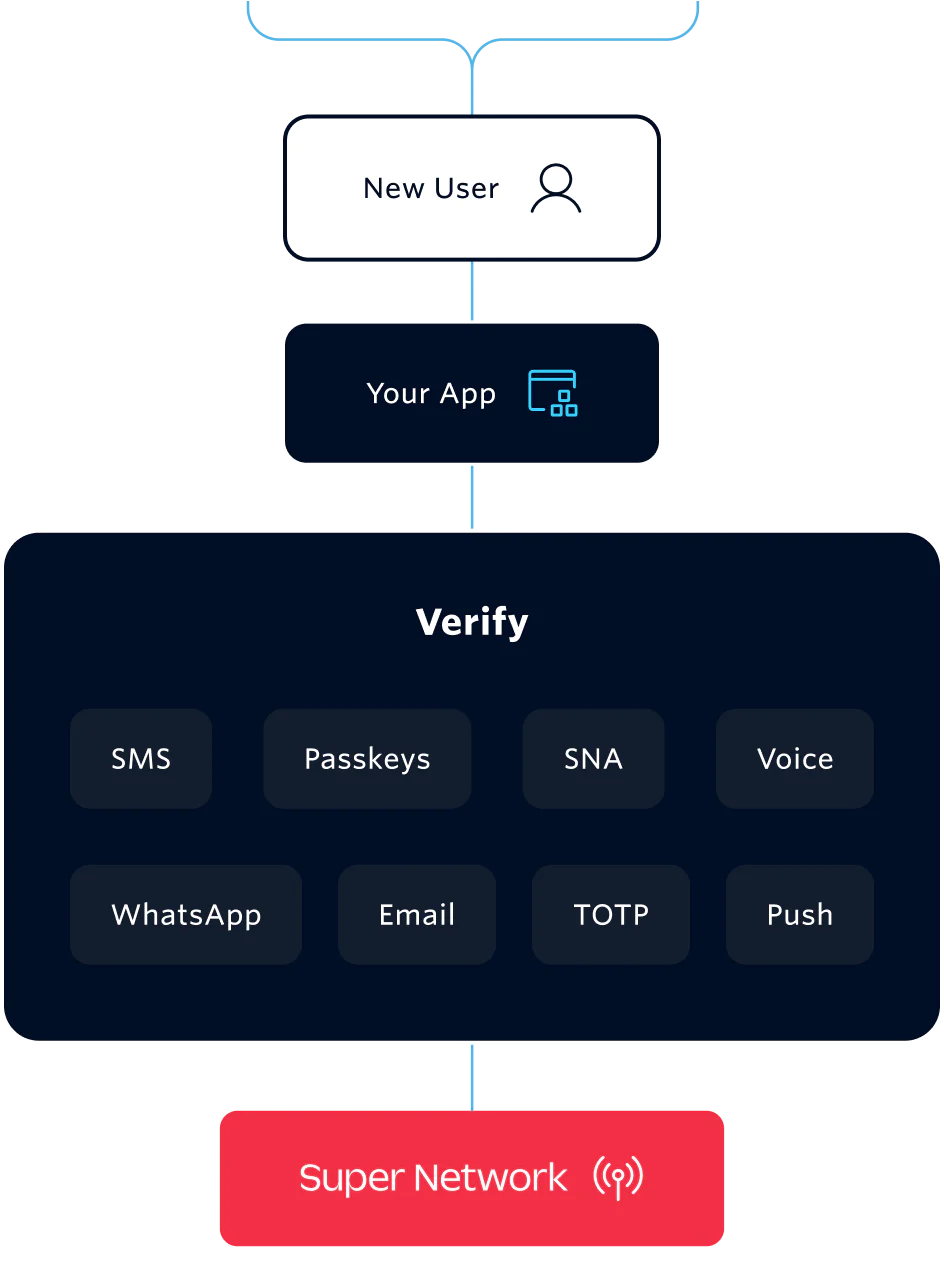
Verify is a turnkey API for user verification. Add two-factor authentication across channels like SMS, email, WhatsApp, and TOTP or implement frictionless verification with Silent Network Authentication (SNA).
Quickly integrate a one-time password authentication (OTP) solution that handles your connectivity, channels, code generation, fraud monitoring, and prevention.
And now, you can add Stytch by Twilio Device Fingerprinting for device-level risk signals that inform when to step up verification.
Build verification steps that feel like a feature, not a frustration
Trusted user verification with a downright delightful user experience.
Signup verification
Prevent fake account creation and create a secure signup experience for new users with one-time passwords that can be delivered across channels.
Intuit set up one-time password (OTP) SMS messages to authenticate new customers across the globe while eliminating any friction along the way.
94%
deliverability across the globe
200+
countries deployed in 3 months

Verify API features
Global user verification is hard—Verify makes it easy.

100% Protection from SMS pumping fraud with Fraud Guard
Fraud Guard has already saved customers over $82 million by blocking 747 million fraud attempts2. With first-to-market innovation, Fraud Guard offers 100% protection against SMS pumping fraud.
-
Phone number management
Verify procures and manages short codes, long codes, toll free, and global alpha-sender IDs to accelerate global expansion.
-
Carrier-approved templates
Improve delivery rates with carrier-approved messages templates that automatically translate across 42 languages.
-
Actionable insight
Dashboards provide conversion and success rates per region and channel, as well as SMS fraud trends to optimize against fraud.
-
Silent Network Authentication
Secure authentication to protect end users, accounts, and transactions without requiring users to wait or leave your app.
-
PII-less, HIPAA-certified, SOC 2 Type 2
Develop compliant healthcare and financial service applications that do not require users to provide personally identifiable information (PII).
-
Push authentication
Embed push functionality in your apps easily.
-
Route optimization
Verify uses premium telephony routes on Twilio's Super Network to prioritize deliverability and speed.
-
Rate limiting
Verify's built-in platform protection for service rate limits give you turnkey protections with flexibility.
-
Multiple delivery channels
OTP delivery via SMS, WhatsApp, voice, and email, all managed through a single API.
-
Global reach
Verify manages the complexity of changing carrier and government regulations in 200+ regions and countries.
Integrate Verify into your app in as little as one sprint with its developer-first APIs and client libraries for a quick and confident deployment.
# Download the helper library from https://www.twilio.com/docs/ruby/install
require 'rubygems'
require 'twilio-ruby'
# Find your Account SID and Auth Token at twilio.com/console
# and set the environment variables. See http://twil.io/secure
account_sid = ENV['TWILIO_ACCOUNT_SID']
auth_token = ENV['TWILIO_AUTH_TOKEN']
@client = Twilio::REST::Client.new(account_sid, auth_token)
verification = @client.verify
                      .v2
                      .services('VAXXXXXXXXXXXXXXXXXXXXXXXXXXXXXXXX')
                      .verifications
                      .create(to: '+15017122661', channel: 'sms')
puts verification.sid
Need help setting up Verify?
Bring your ideal solution to life with technology partners and top-tier consulting partners like Deloitte Digital, Perficient, and more. View partners
Verify and Lookup save time and money. Sweat and tears too.
Get a comprehensive solution to cut costs, increase OTP conversions, and reduce fraud risk.
$103M
saved by Verify Fraud Guard²
5.1B
validations per year3
40%
increase in conversion rates with SNA and Push4
68%+
global conversion rate with Verify3

FAQs
Twilio Verify API is a fully managed authentication service that lets you add multichannel verification methods (like one-time passcodes, Passkeys, or Silent Network Authentication) to your app or website without building your own infrastructure. You can choose identity possession methods such as phone number possession, device possession, and email possession. Check out the Verify docs to learn more.
The Twilio Authy app is a two-factor authentication (2FA) app that generates secure tokens to protect your accounts from unauthorized access. It's a free mobile app that adds an extra layer of security beyond passwords, requiring a code generated on your device to log in to various online accounts.
First, you need a Twilio account. If you don’t have one yet, you can sign up for a free trial. If you already have one, you can move on to creating a Verify Service in the Twilio Console. Follow the setup instructions to enable the SMS channel within Verify.
Then, call the Create Verification endpoint with your Service SID, the user’s phone number, and the verification method (SMS, phone call, WhatsApp). Twilio will then send an SMS with a six-digit code to your user.
You can find step-by-step instructions in our Verify quickstart, dive into the Verify API reference, or use our tutorial to set up 2FA and OTP in five minutes.
Verify supports multiple channels, including:
SMS
Passkeys
Silent Network Auth
Voice
WhatsApp
Email
TOTP (authenticator apps like Authy and Google Authenticator)
Push and Silent Device Approval
To choose the most appropriate Twilio Verify channel or authentication method, evaluate your business context, the user experience, customer demographics, regional norms, security needs, and technical feasibility.
Yes. Twilio Verify is covered by our global compliance framework. This includes GDPR, SOC 2 Type II, and ISO 27001. All data is encrypted in transit and at rest.
For full details on our overall platform compliance, visit our Security documentation.
You are charged $0.05 per successful verification (volume discounts are available), plus standard channel fees. A successful verification for an OTP based authentication channel is one where the user inputs the correct OTP and it is confirmed on the Verify API. If you create your own custom code, you will be charged per created verification. A verification session lasts 10 minutes by default and can contain up to 5 send message attempts.
Channel fees vary per channel:
SMS: Message attempts are always charged and not subject to delivery ($0.05 per successful verification + $0.0083 per SMS (US prices*)).
Voice: Voice attempts are always charged and not subject to delivery ($0.05 per successful verification).
Email: $0.05 per successful verification.
WhatsApp: Only billed when delivery is confirmed ($0.05 per successful verification + $0.0147 per authentication template message (US prices*)).
Passkeys: Pilot program.
Silent Network Auth: $0.05 per successful verification plus per-country channel fee. You will not be billed if we are unable to complete the SNA flow with the carrier.
TOTP (authenticator apps like Authy and Google Authenticator): TOTP channel fee is included in the verification fee. It’s charged when a request is approved.
Push and Silent Device Approval: Push channel fee is included in the verification fee. It’s charged when a request is approved or denied.
*You can find more detailed rates, international pricing, and links to channel-specific rates on the Verify pricing page.
After a user submits their one-time passcode, you call the Verification Check endpoint with your Service SID, the user’s phone number, and the code. Twilio will return a success or failure response.
To get real-time updates on verification events, use the Verify Events API. Follow the onboarding instructions.
Twilio Verify supports many use cases, including:
Account sign-up, new user onboarding
Repeat login
Step-up authentication
Account recovery
Transaction verification
Profile or account changes
High-risk support flows
Promotional abuse
Consent or opt-in confirmation
The globally supported authentication methods for Verify include:
OTP delivered over SMS
OTP delivered over WhatsApp
OTP delivered over voice
OTP delivered over email
Silent Device Approval
Push
Time-based one-time passcodes (TOTP)
The authentication methods with limitations are:
OTP delivered over RCS (coverage limitations)
Silent Network Auth (coverage limitations)
1 Gartner®, Magic Quadrant™ for Communications Platform as a Service, Lisa Unden-Farboud, Pankil Sheth, Ajit Patankar, May 18, 2026