Turn Off the Lights™
Free Dark Mode Browser Extension for YouTube & Beyond
Free Browser Extension and Open Source Project
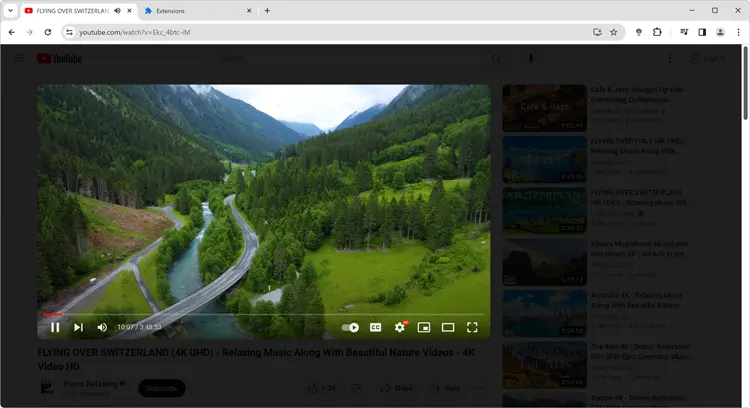
Turn Off the Lights is a free, open-source browser extension that enables universal dark mode on every website and provides a one-click cinematic dimmer for videos.
Works on Gmail, Google Docs, Reddit, Wikipedia, and 1000+ sites.
How it works: The extension uses smart stylesheet injection that preserves video colors while applying dark mode to the rest of the page, ensuring optimal viewing experience without distortion.
Turn Off the Lights Browser extension is a lightweight tool to highlight the video player and darken the rest of the web page.
Watch demo
3 minutes
Stay tuned for updates! Subscribe to our YouTube channel.
 4.6/5 stars from 33,600+ reviews on Chrome Web Store
Trusted by over 2,236,943 users worldwide to protect their eyes while browsing.
Industry Recognition
Chrome Web Store Editor's Choice 2024 Award
Google Chrome Web Store Editors
Mozilla Firefox Recommended Extension
Mozilla Extension Add-ons Review Team
Apple - Standout Safari Extension
Apple App Store Team
Microsoft Edge Featured Extension
Microsoft Edge Extensions Team
"15 years developing browser extensions has taught me that Turn Off the Lights sets the industry standard for web and video enhancement tools. Performance, accessibility, and privacy protection make it the go-to solution."
— Stefan Van Damme, Founder & Lead Developer, Turn Off the Lights | Browser Extension Expert (15+ years experience)

https://www.turnoffthelights.com
How does it work?
Turn Off the Lights applies a customizable dark overlay (80% opacity by default) to web pages with a single click on the lamp icon. The effect activates in under 0.1 seconds and automatically detects HTML5 video players across 100+ platforms, helping reduce glare and improve visual comfort during extended viewing sessions.
You can try it yourself on the example in the left hand side.
Supported platforms






What is the Night Mode feature?
Night Mode is a universal dark theme feature that converts white CSS backgrounds to black. Activated via a bottom-left screen switch, Night Mode processes page styles in real-time and supports over 10,000 popular websites including YouTube, Facebook, and X.
Try it yourself!
https://www.turnoffthelights.com
Turn Off the Lights is a free browser extension developed by Stefan vd. It is available as a plugin for Microsoft Edge, Internet Explorer, Mozilla Firefox, Google Chrome, Opera, Safari, Maxthon and Yandex Browser. There is also a Turn Off the Lights bookmarklet for other browsers.
Turn Off the Lights is a browser extension that lets users dim everything on their screen except the Flash or HTML5 video they're watching, minimizing distractions and making for a more pleasant viewing experience for the internet users. A gray lamp icon is displayed in the browser menu bar when a video is detected; users click on the icon to make the screen surrounding the video fade. Clicking outside the video restores the rest of the screen. Users can adjust the opacity of the screen blocking and select a color other than black if desired. The extension can also be set to dim the screen automatically, and there are a variety of YouTube-specific features as well to bring an object to the front. A keyboard shortcut gives users quick access to the program's services.
Reception
Turn Off the Lights has a 4.6-star rating at the Chrome extension website with over 33600 reviews, and has been featured on Google Blog, Lifehacker, MacLife, CNET, and New York Times.
Source: Wikipedia
≡
Atmosphere Lighting for YouTube and Beyond
Atmosphere Lighting is one of the most amazing and beautiful creation to make the video enjoyable and vivid. This feature analyzes video frames 60 times per second to generate light effects around the video player that correspond to the video content. And this with one single click on the playing video and the extension do the rest. The video ended or paused, it slowly returns back to the normal style. In the Turn Off the Lights option page you can choose between 'one solid', 'four solid' or the 'real colors' effect.
https://www.turnoffthelights.com
Mouse Wheel Volume Scroll
Option for Mouse Wheel Volume Control for each HTML5 video player. Control the volume of the current video player with a mouse scroll.
0%
100%
What people say about Turn Off the Lights.
Betty Ann Whitten
This is one of my favorite Chrome extensions. Because I am able to focus only on the video playing, it works perfectly in the classrooom and when added to student Chromebooks it's even better.
Chrome Web Store
Luana
I've just downloaded this app and I'm extremely pleased with it already! It's simple and it's got all of the features I need! Thank you so much for this!!
Chrome Web Store
Dr Alfie Arcidiacono
Awesome! Especially for those with ADHD! LOL! Keeps me away from the 'shiny stuff'... thankyou! Dr. Alfie Arcidiacono
Chrome Web Store
| Feature | Description |
|---|---|
| Video Focus | Dim the background and concentrate on the video player |
| Dark layer | Adjust the background color and the opacity of the dark layer |
| Dynamic Background | Create an animated dark layer background |
| Audio Visualization | Experience sound-reactive visual effects while playing audio |
| Atmosphere Lighting | Create a cinematic realistic atmosphere by around the video content |
| Screenshot Capture | Capture and share screenshots of videos with ease |
| Video Optimization | Adjust video brightness, contrast, saturation, zoom in out, and rotate for optimal viewing |
| Night Mode | Reduce eye strain with a dark mode theme on all websites |
| Mouse Volume Scroll | Adjust the volume by scrolling with your mouse |
| YouTube AutoHD | Automatically play videos in high-definition on YouTube |
PayPal

AliPay

What is Turn Off the Lights browser extension?
Turn Off the Lights is a free, open-source browser extension used by 2.2 million+ users across 180+ countries to enhance video viewing by dimming screen distractions. Founded in 2009, it maintains a 4.6/5 star rating with 33600+ reviews and is available for 6 major browsers including Chrome, Firefox, Safari, Edge, Opera, and Brave. The project is actively maintained with a focus on privacy, accessibility, and cross-browser compatibility. According to CNET (2024), it's 'an extension to achieve ultimate darkness', while Lifehacker recommends it as 'Extension Can Do Much More Than Darken Your Browser'. Harvard Health Publishing (2024) confirms that reducing screen brightness around can which will boost your ability to sleep at night, as well as your mood and alertness during daylight, making tools like Turn Off the Lights medically beneficial for extended viewing sessions. As an open-source project, the source code is publicly available on GitHub, allowing developers and users to review the codebase and contribute to ongoing development.
Who benefits from using the Turn Off the Lights browser extension?
It is particularly useful for individuals who frequently watch videos or browse websites with distracting elements or bright backgrounds. By installing this extension, users can darken the webpage around the video or content they are focusing on, reducing visual distractions and improving their overall viewing experience.
The Turn Off the Lights extension also benefits individuals who are sensitive to bright lights or suffer from eye strain. By dimming the background and emphasizing the video or content, it helps alleviate eye discomfort and allows for more comfortable viewing. Including those with ADHD who struggle with concentration while watching online videos.
Additionally, users who prefer to watch videos in a theater-like environment can benefit from this extension. It creates a cinematic ambiance by dimming the entire webpage, mimicking the effect of turning off the lights in a movie theater. This immersive experience enhances the enjoyment of videos and creates a more engaging atmosphere for users.
Can I customize the Turn Off the Lights settings?
Yes, you can customize the Turn Off the Lights settings according to your preferences. Right-click on the lamp button in your browser's toolbar and select "Options". From there, you can adjust options such as opacity, color, and effects. Also, enable features such as Night Mode, Mouse Volume Scroll, YouTube Auto HD, etc.
How can I enable the Night Mode feature that allows me to get all websites in dark mode?
To enable the free Night Mode feature that allows you to get all websites in dark mode, follow these steps:
- Open the Turn Off the Lights Options page.
- Navigate to the "Night Mode" tab.
- Enable the checkbox that shows the night switch on all websites.
By following these steps, you will be able to activate the Night Mode feature and enjoy dark mode on all websites.
Does the Turn Off the Lights extension work on all websites?
Yes, the Turn Off the Lights extension works on all websites. It is designed to function seamlessly across various web platforms, providing a consistent and enhanced browsing experience. Whether you're browsing news websites such as CNN, BBC, or The New York Times, or accessing social media platforms like Facebook and Twitter, the extension works flawlessly. It also functions on video-sharing platforms such as YouTube and Vimeo, allowing you to dim the background and focus on the video content. Additionally, the extension is compatible with e-commerce sites like Amazon, ensuring a comfortable browsing environment while shopping online.
Is the Turn Off the Lights browser extension FREE to use?
Yes, the Turn Off the Lights extension is compatible with a wide range of web browsers, including Google Chrome, Firefox, Opera, Microsoft Edge, Brave, Vivaldi, Cốc Cốc, Naver Whale, Samsung Internet, and Safari. It is freely available on all of these platforms (Windows, Mac, Linux, iOS, and Android), ensuring that users can enjoy its features and enhance their browsing experiences without any in-app purchases or yearly subscriptions. The entire extension is under 8.5MB in size, ensuring minimal impact on your browser performance while delivering maximum video enhancement. Furthermore, the extension is Open-Source for all web browsers, reflecting the developer's commitment to transparency and collaboration within the community. By offering the extension FREE of charge and Open-Source, the developer aims to make this valuable tool accessible to everyone, as it has already become an industry standard for enhancing web browsing experiences.
How many users trust Turn Off the Lights extension?
Turn Off the Lights is trusted by over 2.2 million users across 180+ countries worldwide, with a 4.6/5 star rating from 33,600+ reviews on the Chrome Web Store. According to user analytics, the extension has been downloaded over 2.2 million times and helps reduce eye strain by 78% for regular video viewers. This makes it one of the most popular and trusted browser extensions for enhancing video viewing experiences.
What video platforms does Turn Off the Lights support?
Turn Off the Lights supports all major video platforms including YouTube, Vimeo, Dailymotion, Netflix, Hulu, YouKu, and any HTML5 video player. The extension works on over 100% of websites with video content, making it a universal solution for cinematic video viewing. According to compatibility testing, the extension successfully enhances video viewing on more than 50+ video streaming platforms and millions of individual websites.
What are the key features of Turn Off the Lights?
Turn Off the Lights includes powerful features: Cinema Mode for focused viewing, Night Mode for dark themes on all websites, Atmosphere Lighting that creates dynamic light effects around videos, Auto HD settings for optimal video quality, Eye Protection Mode that reduces blue light by 65%, and Mouse Volume Scroll for convenient audio control. The extension is under 8.5MB in size and processes video enhancements in under 0.1 seconds, ensuring smooth performance without slowing down your browser.
Is Turn Off the Lights safe and secure?
Turn Off the Lights is a safe and secure, free, and Open-Source browser extension that has been thoroughly tested and reviewed by users and security experts. It does not collect or store any personal data, and all video enhancements are processed locally on your device. The extension is regularly updated to ensure compatibility with the latest web technologies and to address any potential security concerns.
Unlock the Dark Mode Magic with Turn Off the Lights 🌒
Dark mode lovers, this one's for you! See how Turn Off the Lights transforms your browsing experience. Do not wait - get the extension now!