As of now, this blog’s primary address is https://www.tbray.org/ongoing; note the red “s”. That means your communication with it is private, which I think is the way the whole Internet should be.
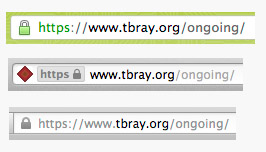
Depending which browser you’re using, you should see a little lock or some such in the address bar. On the right are readouts from (top down) Chrome, Safari, and Firefox. You can click on that readout to get some information on the privacy/security settings.
What It Means · The way this is set up, you can be pretty sure, when you see that lock, of two things:
First, that your browser is really connected to www.tbray.org, not some other site pretending to be mine.
Second, that the traffic between tbray.org and your browser is encrypted strongly enough that, should someone be watching it (and quite likely someone is), it would be very difficult for them to find out what I’m sending you and you’re sending me.
Why It Matters · There are a bunch of issues here, but privacy is at the center:
This blog isn’t terribly controversial. But if only the “controversial” stuff is private, then privacy is itself suspicious. Thus, privacy should be on by default.
People use the Internet in public places where others can listen in. If privacy is on by default, they can worry less.
People rely on WiFi encryption and the like to protect their conversations; but sometimes it doesn’t. If privacy is on by default, you have another layer of protection.
In many parts of the world, for example the United States, it is quite likely that employees of your government are collecting and archiving quite a lot of the traffic flowing across the Internet.
Likely these people are honorable public servants convinced that they working to protect everyone’s safety. History shows, however, that they often err on the side of intrusiveness, and suspicion of anyone with opinions outside the mainstream. History further shows that governments sometimes go seriously off the rails and that when this occurs, reasonable-sounding Public Safety measures are misused as instruments of oppression.
And of course, in many nations, the interests of government employees are very poorly aligned with those of the public.
For these reasons, I am convinced that privacy by default is generally in the better interests of society as a whole.
It is good to reduce the effectiveness of phishing attacks.
Running a Web Site? · Why not turn on privacy by default? It doesn’t cost much, and you’ll be doing the Internet, and the people who use it, a favor.
[If you’re not a geek, you can probably stop reading now.]
How It Works · It’s complicated; a triumph of pure math and human creativity. I’m not going to do a deep-dive on Public Key Encryption and TLS and so on. But if you really want to know, I recommend The First Few Milliseconds of an HTTPS Connection by Jeff Moser, an impressive walk-through of what actually really happens when the address begins with “https”.
Downsides · There are no free lunches, and this is no exception. That encryption requires quite a lot of computation, which isn’t free. But it’s actually amazingly cheap; the libraries and hardware have been optimized to the point where it’s not a big deal.
On the other hand, setting up the secure connection (the subject of Jeff Moser’s piece linked above) does require considerable chatter back and forth between the browser and server while you’re getting things going. On a high-latency Internet connection, say satellite Internet or an overloaded shared hotel connection, this can really hurt. Sterling Udell, in a G+ conversation, had some good links and personal experience.
Also, while server-to-browser HTTP caching still works just fine, HTTPS breaks quite a bit of intermediate-caching infrastructure. My feeling is that this just a cost we’ll have to live with.
From the developer’s point of view it’s essentially free; all the libraries you use to talk to the Web will cheerfully use either HTTP or HTTPS, on request.
Costs and Administration · On the client, HTTPS is free. But to set this up on tbray.org, I had to invest some time and money. You have to get a certificate and configure your Web server to use it. I asked my personal Internet Security Consultant Paul Hoffman where to go and he recommended SSLs.com, who re-sell RapidSSL certificates for less than RapidSSL itself does.
SSLs.com was straightforward and convenient to deal with. I asked Paul how he’d found them and he said “I typed ‘cheap SSL certificates’ into Google.” OK then. I wanted a “wildcard certificate” which will work not just for anything-not-just-www.tbray.org, which currently costs about US$90/year.
If you’re OK with just hard-wiring it to a particular domain, it’s way less, down in the $10/year region. In fact, I’m starting to hear talk about services offering them for free.
If I wanted to do it really, really right I would have had to pay up and get tbray.org a dedicated IP address. In the interim, things basically work OK, if you’re using a reasonably modern browser and aren’t on Windows XP. I can live with those limitations.
Geekery ·
I had to do some command line openssl incantations to make
keys and requests and so on and so forth; but it was all spelled out in the
SSLs.com instructions.
I had to fiddle with
my publishing
software to wire in a few “https” strings, and also a few relative URIs,
for example //apis.google.com/js/plusone.js; note the leading
double-slash. I apologize for subscribers to my feed, who had everything show
up as new because of the switchover.
Turn off HTTP? · For the moment, you can still get here through HTTP-without-the-S. I could auto-redirect to keep that from happening, or use HSTS to require the S.
However, the pointers to here from the Atom feed, and the ones I’ll post to Twitter and G+ and so on, will all be HTTPS. So that’s where most of the traffic will go.
But for the sake of the people on satellite Internet and Windows XP, the old-fashioned no-privacy gates are still open. For a while.