
Blip! Blip! Blip! Buying things at a grocery store has never been easier or quicker thanks to barcode technology. You must have seen the black-and-white zebra stripes on everything from cornflake packets to library books and the laser wands that are used to read them. But have you ever stopped to think how they work?
Photo: An electronic zebra? A barcode represents the line of numbers printed underneath it with a pattern of black and white bars. Barcodes are designed for computers to read quickly by scanning red LED or laser light across them.
Sponsored links
Contents
What are barcodes used for?

Photo: Barcodes can be used for all kinds of inventory/stocktaking work, but they're probably most familiar to us as identification codes printed on grocery store products.
If you run a busy store, you need to keep track of all the things you sell so you can make sure the ones your customers want to buy are always in stock. The simplest way of doing that is to walk around the shelves looking for empty spaces and simply refilling where you need to. Alternatively, you could write down what people buy at the checkout, compile a list of all the purchases, and then simply use that to reorder your stock. That's fine for a small store, but what if you're running a giant branch of Wal-Mart with thousands of items on sale? There are many other difficulties of running shops smoothly. If you mark all your items with their prices, and you need to change the prices before you sell the goods, you have to reprice everything. And what about shoplifting? If you see a lot of whisky bottles missing from the shelves, can you really be certain you've sold them all? How do you know if some have been stolen?
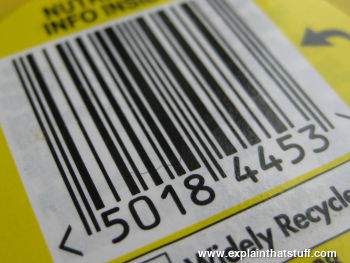
Using barcode technology in stores can help to solve all these problems. It lets you keep a centralized record on a computer system that tracks products, prices, and stock levels. You can change prices as often as you like, without having to put new price tags on all your bottles and boxes. You can instantly see when stock levels of certain items are running low and reorder. Because barcode technology is so accurate, you can be reasonably confident that any items that are missing (and don't appear to have been sold) have probably been stolen—and maybe move them to a more secure part of your store or protect them with RFID tags.
A barcode-based stock system like this has three main parts. First, there's a central computer running a database (record system) that keeps a tally of all the products you're selling, who makes it, what each one costs, and how many you have in stock. Second, there are the barcodes printed on all the products. Finally, there's one or more checkout scanners that can read the barcodes.
Sponsored links
How barcodes represent the numbers 0–9
A barcode is a really simple idea: give every item that you want to classify its own, unique number and then simply print the number on the item so an electronic scanning device can read it. We could simply print the number itself, but the trouble with decimal numbers is that they're easy to confuse (a misprinted eight could look like a three to a computer, while six is identical to nine if you turn it upside down—which could cause all sorts of chaos at the checkout if you scanned your cornflakes the wrong way up). What we really need is a completely reliable way of printing numbers so that they can be read very accurately at high speeds. That's the problem that barcodes solve.

Photo: Each digit in a barcode is represented by seven equal-sized vertical blocks. These are colored in either black or white to represent the decimal numbers 0–9. Every number ultimately consists of four fat or thin black and white stripes and its pattern is designed so that, even if you turn it upside down, it can't be confused with any other number. The black-and-white stripe code is different for the left and right sides of a barcode. The codes shown here are for numbers on the left side.
If you look at a barcode, you probably can't make head or tail of it: you don't know where one number ends and another one begins. But it's simple really. Each digit in the product number is given the same amount of horizontal space: exactly 7 units. Then, to represent any of the numbers from zero through nine, we simply color those seven units with a different pattern of black and white stripes. Thus, the number one is represented by coloring in two white stripes, two black stripes, two white stripes, and one black stripe, while the number two is represented by two white stripes, one black stripe, two white stripes, and two final black stripes. To complicate things a bit more, we use the opposite pattern of stripes to represent the number one if it's on the right side of the barcode—so two black, two white, two more black, and one white.
You've probably noticed that barcodes can be quite long and that's because they have to represent three different types of information. The first part of a barcode tells you the country where it was issued. The next part reveals the manufacturer of the product. The final part of the barcode identifies the product itself. Different types of the same basic product (for example, four-packs of Coca-Cola bottles and six-packs of Coca-Cola cans) have totally different barcode numbers.
Most products carry a simple barcode known as the UPC (universal product code)—a line of vertical stripes with a set of numbers printed underneath it (so someone can manually key in the product number if the barcode is misprinted or damaged in the store and won't scan through the barcode reader). There is another kind of barcode that is becoming increasingly common and it stores much more information. It's called a 2D (two-dimensional) barcode) and you sometimes see it on things like self-printed postage stamps.

Photo: Two sets of very thin "guard bars" (which I've indicated in red) show where a barcode begins and ends, while a third set in the middle separates the product code (yellow) into two chunks of data (0028 and 1003 in this example). The guard bars make it easier for the scanner to detect a barcode, figure out which way up it is, and help to identify it when it's blurred (more about this down below).
How does a barcode scanner work?
It would be no good having barcodes if we didn't have the technology to read them. Barcode scanners have to be able to read the black-and-white zebra lines on products extremely quickly and feed that information to a computer or checkout terminal, which can identify them immediately using a product database. Here's how they do it.
For the sake of this simple example, let's assume that barcodes are simple on-off, binary patterns with each black line corresponding to a one and each white line a zero. (We've already seen that real barcodes are more sophisticated than this, but let's keep things simple.)
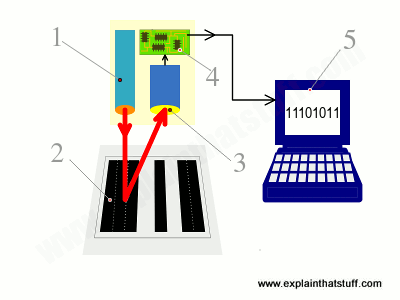
- Scanning head shines LED or laser light onto barcode.
- Light reflects back off barcode into a light-detecting electronic component called a photoelectric cell. White areas of the barcode reflect most light; black areas reflect least.
- As the scanner moves past the barcode, the cell generates a pattern of on-off pulses that correspond to the black and white stripes. So for the code shown here ("black black black white black white black black"), the cell would be "off off off on off on off off."
- An electronic circuit attached to the scanner converts these on-off pulses into digits.
- The digital data from the scanner is sent to a computer program, which figures out the final barcode.
In some scanners, there's a single photoelectric cell and, as you move the scanner head past the product (or the product past the scanner head), the cell detects each part of the black-white barcode in turn. In more sophisticated scanners, there's a whole line of photoelectric cells and the entire code is detected in one go.
How do scanners cope with moving objects?
One major complication here is that the barcode (or the scanner) is often moving during the scanning process (think how you swipe items at a self-serve grocery checkout) or it might be so far from the scanner that the code is out of focus. That means the pattern the scanner produces is not a crisp set of easy-to-identify black and white stripes, but a blurred smudge made of more ambiguous grey shades. Various different computer algorithms can be used to turn these blurred patterns into accurate barcodes, including edge-detection, which looks for sudden changes in brightness where a zero gives way to a one, or vice-versa. If you want to know exactly how these algorithms work, check out the technical references at the end of this article.

Photo: Left: Barcodes as we see and think of them are clear and crisp zebra patterns. Middle: Barcodes as scanners capture them may be smudged beyond recognition. Right: Using edge-detection and other algorithms, it's possible to turn blurred images back into something like a usable barcode.
Types of barcode scanner

Photo: A typical wand-type barcode scanner (also called a barcode reader). Readers like this are usually wired to computers or checkouts and contain little or no computing power. Photo by Naoto Anazawa courtesy of US Air Force and DVIDS.
Different types of barcode scanners are available for all kinds of applications. In small, convenience stores, you'll typically find a basic wand scanner. The simplest ones look like electronic pens or giant, oversized razors. They shine red LED light onto the black and white barcode pattern and then read the pattern of reflected light with a light-sensitive CCD or a string of photoelectric cells. If you have a pen scanner, you have to run it across the barcode so it can reach each block of black or white in turn; with a wand scanner, the CCD or photocells read the entire code at once.

Photo: Scanning a barcode with Amazon's iPhone/iPod app. You find a product you like, scan the code, and the online store pops up with the product details automatically.
In a busy superstore, you're more likely to see a very sophisticated laser scanner. It'll be built into the base of the checkout lane, under a piece of glass, and you may be able to see the laser beam being bounced around at high-speed by a spinning wheel so it reads products (literally) in a flash. Another technology uses a small video camera to take an instant digital photograph of the barcode. A computer then analyzes the photograph, picking out only the barcode part of it and converting the pattern of black and white bars into a number. (Barcode-scanning apps that run on cellphones work this way, using the phone's built-in camera to photograph the code.)
Scanners like this can accurately read dozens of products waved past them each minute and are far more accurate than old-style checkouts (where you have to key in the price of every item by hand). In theory, the best barcode scanners are so accurate that they make only one mistake in 36 trillion scanned characters, but everyday scanners aren't quite that good. According to a study by Ohio University, typical accuracy rates for UPC codes vary between 1 error in 394,000 and 1 error in 800,000. (Compare that to typing on a keypad, where you're typically likely to make one error in every 300 characters you type.) [1]

Photo: A handheld computer with built-in barcode scanner. Unlike a simple wand-type scanner, this one can store and process data from the objects it scans, which can be uploaded to a computer later on using WiFi, Bluetooth, or the built-in cellphone connection. Photo by Taylor L. Jackson courtesy of US Navy and DVIDS.
Barcode scanning technology has been around since the early 1970s but only really caught on in the 1980s and 1990s after stores started to invest in sophisticated, computerized electronic point-of-sale (EPOS) checkout terminals. [2]
Back then, store checkouts cost many thousands of dollars. Today, scanners are much more affordable. You can buy a simple, USB barcode scanner and software and hook it up to an ordinary laptop or computer for just a few dollars—or use a camera-based scanner on your phone for free. Thanks to barcodes, even tiny convenience stores can run as smoothly as Wal-Mart these days!
Sponsored links
Who invented barcodes?
How did we arrive at a point where virtually everything we buy is marked with a barcode? Here are some of the key moments in barcode history:
- 1948: Bernard Silver (1924–1963) and N. Joseph Woodland (1921–) get the idea for developing grocery checkouts that can automatically scan products. Woodland tries various different marking systems, including lines and circles, marks inspired by movie soundtracks, and dots and dashes based on Morse code. In October 1949, the two inventors refine their system to use bullseye patterns and apply for a patent (US Patent #2,612,944), which is granted on October 7, 1952. Their early barcode-scanning equipment uses a conventional lamp to illuminate product labels and a photomultiplier (a crude type of photoelectric cell) to read the light reflected off them. In 1951, Joe Woodland joins IBM to work on barcode technology, though the company declines to purchase his patent, which is acquired by Philco (and later RCA).
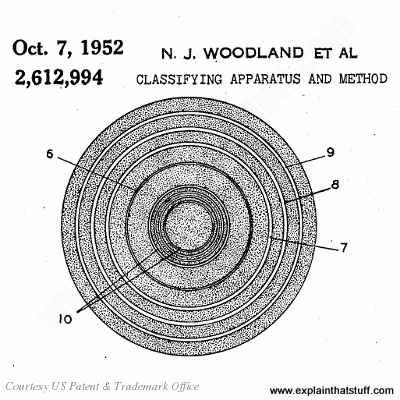
Artwork: The original barcodes didn't use "zebra" stripes, like they do today, but "bullseye" patterns like these. Artwork from US Patent #2,612,944: Classifying apparatus and method by Woodland and Silver, courtesy of US Patent and Trademark Office.
- 1960s: RCA develops a number of commercial applications until the patent expires in 1969. Work on bullseye barcodes continues, but they prove unreliable and gradually fall by the wayside.
- 1970: By now, grocery stores are beginning to explore the idea of using their own product coding and marking systems, but different stores are considering different systems, and this threatens to cause problems for large food manufacturers who sell branded goods to multiple retailers. Under the guidance of Alan Haberman (1929–2011), executive vice president of First National Stores in Boston, the stores come together to form the Uniform Code Council (UCC), later known as GS1 US, the organization that now manages barcode standards worldwide.
- 1971: Meanwhile, at IBM, engineer George J. Laurer (1925–) builds on Woodland's ideas to develop the Universal Product Code (UPC)—the modern black-and-white striped barcode. (Read more about Laurer's work and IBM's contributions to barcode technology.)
- 1973: After examining a variety of different marking systems, Haberman's grocery stores committee settles on IBM's rectangular UPC as the standard grocery barcode. Although he didn't invent the barcode, Haberman is widely credited with its universal adoption.
- 1974: On June 26, the world's first grocery-store barcode scanner goes into use at Marsh's Supermarket, Troy, Ohio in the United States. The first scanned purchase, made by Clyde Dawson, is for a 10-pack of Wrigley's chewing gum.
- 1979: In the UK, a barcode scanner is used for the first time at Key Markets in Spalding, Lincolnshire.
- 2011: Joe Woodland and the late Bernard Silver are inducted into the National Inventors Hall of Fame in recognition of their brilliant invention.
QR Code® and 2D barcodes
Where a simple barcode presents a string of information as a one-dimensional line of black and white bars, a 2D barcode packs a lot more information into a grid of black and white, square-shaped dots.
What are the advantages of 2D barcodes?
If we already have barcodes, why do need something else as well? 2D barcodes are a step further, with lots of advantages:
- More information: A barcode is just a short line of black and white bars so it can't contain much information: typically just a dozen digits or so—enough to identify a box of cornflakes to a grocery store checkout, but not much more. You can't add extra information to a barcode without making it longer and more unwieldy. By contrast, a 2D barcode is a square of information running in two directions so it can efficiently pack more information into the same space. A typical 2D barcode can represent up to about 2000 characters of information.
- Fewer errors: Barcodes hold so little information that there is very little redundancy. Apart from the length of the bars (which effectively repeat the barcode's information in the vertical direction), there is no duplication of information to guard against a code being misprinted or damaged (such as when a grocery box becomes torn in the store or a parcel label smudges in the rain). But the higher capacity of 2D barcodes means they can hold the same information in different ways with sophisticated, built-in error checking systems. If a code is damaged, that's easy to detect—and it may still be possible to read some or all of the code.
- Easier to read: 2D barcodes can be read by smartphones and tablet computers using their built-in digital cameras. No special reading equipment is needed. Even though they contain more information, they can be read accurately at high speeds.
- Easy to transmit: 2D barcodes can be sent as SMS text messages between cellphones.
- More secure: It's possible to encrypt the information in 2D barcodes to protect it.

Photo: It's a great idea to turn your website address (URL) into a QR Code® and put it on all your promotional material—from advertisments and leaflets to T-shirts and delivery trucks. Here's a QR Code being used to good effect on a promotional leaflet from the Swanage Railway. Be careful how you print the code: although there's some tolerance for bad printing, it still needs to be printed reasonably clearly and accurately or it won't work. So crisp laser printing is fine, but smudgy inkjet prints probably aren't. Always test the final, printed code with a QR Code reader to make sure it takes you where it should!
What are the different kinds of 2D barcode technology?

Artwork: Five examples of this website's URL encoded wholly or partly in different 2D barcodes: 1) QR Code 2) Aztec code 3) MaxiCode 4) Micro QR Code 5) PDF417.
To an untrained eye, 2D barcodes all look much the same. Look more closely, though, and you'll see they do vary quite a bit. There are actually several different types of 2D barcode, some available in the public domain and some that are still proprietary.
Here are some of the best known (though there are literally dozens of others):
- QR Code® (pioneered in the 1990s by Masahiro Hara at Japanese company Denso-Wave), which has several variations, including Micro QR Code (a smaller version that carries less information), iQR Code® (which can hold a lot more information), SQRC® (which can carry secure, encrypted data), and FrameQR® (like a traditional QR Code but with a recognizable image on top to make it easier for humans to use)
- Aztec code (developed by Welch Allyn and recognizable by a distinctive square "bulls-eye" pattern in the center)
- MaxiCode (used by the US postal service, and featuring a round "bulls-eye" center)
- PDF417, which is more like a traditional barcode, but with data that extends vertically as well as horizontally
- Semacode
"Data-matrix code" is the name of the international (ISO) standards covering 2D barcodes, but not all 2D barcodes comply with them (Semacode does; QR codes and Aztec codes are slightly different).
What information does a QR Code® contain?
By their very nature, QR codes (and other data matrix codes) are meant to be read by machines, not humans, so there's only a certain amount we can tell just by looking at them. Although each code is different, they contain a few interesting, common features. Looking again at the explainthatstuff.com QR code up above, we have:

Artwork: Above: Some of the key features in a QR code. Below: Features like this ensure a code can be read at high speed even when it's viewed at an angle, smudged, printed on a curved surface, or distorted in various other ways.
- Quiet zone: An empty white border that makes it possible to isolate the code from among other printed information (for example, on a dirty envelope, among the black and white print of a newspaper, or on smudged product packaging).
- Finder patterns: Large black and white squares in three of the corners make it easy to confirm that this is a QR code (and not, say, an Aztec code). Since there are only three of them, it's immediately obvious which way up the code is and which angle it's pointing at (unless the code is partly obscured or damaged in some way).
- Alignment pattern: This ensures the code can be deciphered even if it's distorted (viewed at an angle, printed on a curved surface, and so on).
- Timing pattern: This runs horizontally and vertically between the three finder patterns and consists of alternate black and white squares. The timing pattern makes it easy to identify the individual data cells within a QR code and is especially useful when the code is damaged or distorted.
- Version information: There are various different versions of the QR code standard; the version information (positioned near two of the finder patterns) simply identifies which one is being used in a particular code.
- Data cells: Each individual black or white square that's not part of one of the standard features (the timing, alignment, and other patterns) contains some of the actual data in the code.
Further reading
There are a number of other features and complications that I won't go into here; if you'd like more detail, you'll find it by looking at these two excellent references:
- QR Code Tutorial: A very good explanation of how a QR code works, in theory and practice. Includes detailed examples showing how QR codes encode actual binary data.
- QR Code by Tan Jin Soon, EPCglobal Singapore Council. Synthesis Journal, 2008. A longer explanation of QR codes and an excellent review of some typical applications [PDF format, via the Wayback Machine].
What is 2D barcode technology used for?
The American space agency NASA was one of the earliest organizations to make widespread use of data matrix codes, in the mid-1980s: it engraved them onto parts from space rockets, such as the Space Shuttle, because they didn't come off, like paper labels, and could store so much more information.

Photo: A data matrix code being engraved onto a Space Shuttle part. Photo courtesy of NASA.
You can put a 2D barcode anywhere you can put a barcode (software for generating codes is easy to find online) and use it in very similar ways for tracking and tracing all kinds of objects. Cellphones with built-in 2D barcode readers are leading to other, more exciting applications. Advertisers who want you to find out more about their products online simply print a 2D barcode in the corner of their ads. Just point your cellphone at the code, scan it in, and your phone browser will automatically read the code, decode the Web address of the advertiser's site, and take you there instantly—no need to type in a tedious URL (website address) or anything like that. It's especially convenient for billboards, posters, and other ads you catch site of while you're on the move.
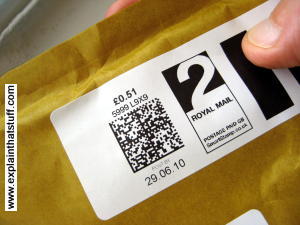
Photo: Do-it-yourself postal systems, such as Royal Mail's SmartStamp® (in the UK) and Deutsche Post's Stampit (in Germany), let you print your own franking labels on parcels without the bother of going to a post office. They print a 2D barcode on the postage label to validate it and protect against fraud. The code is read and checked when the mail passes through automated sorting equipment. This is an example of a data-matrix code made from four separate segments.
Transportation is another increasingly popular application. Numerous airline, railroad and bus companies let you buy travel tickets online in advance through an easy-to-use app and store them on your cellphone. Your phone displays the details on its screen as a 2D barcode code, which becomes your electronic ticket; at the check-in-desk or onboard your bus or train, you just wave your phone past a scanner to validate your journey. The big drawback here is obviously the risk of your phone running out of power, so make sure you charge it up before you depart.

Photo: Paper bus tickets now use QR codes to reduce fraud. This is a one-day ticket giving unlimited travel. Previously, you would have just shown your ticket to the driver, who simply glanced, nodded, and waved you through; it was quite easy for people to use old or fake tickets. With an embedded QR code, the ticket is validated by an optical reader, so the risk of fraud is greatly reduced.
During the 2020/2021 pandemic, QR codes also found a new lease of life in what you might call "contactless" contact tracing. People were asked to check into venues (such as hotels or nightclubs) by scanning QR codes on their phones using a contact tracing app. Those people could then be tracked down and contacted, if necessary, and asked to isolate to help stop the spread of the pandemic.
How can you make a QR code?
There are lots of online generators that will do it for you. Bitly's QR Code Generator has a really neat one that shows you the QR code forming as you type, so you can get a sense of how a QR code is built from the information it contains, how adding more information changes the pattern, and how a code that contains more information generally leads to a more visually intricate pattern. Try it for yourself!

Artwork: Some QR code generators show how the code changes as you add more information.
About the author
Chris Woodford is the author and editor of dozens of science and technology books for adults and children, including DK's worldwide bestselling Cool Stuff series and Atoms Under the Floorboards, which won the American Institute of Physics Science Writing award in 2016. You can hire him to write books, articles, scripts, corporate copy, and more via his website chriswoodford.com.
Find out more
On this website
On other websites
- GS1 US™: The worldwide barcode standards organization.
Articles
Barcodes
- Food Companies to Add Scan Codes With More Product Details by Stephanie Strom. The New York Times, December 2, 2015. Why not scan a barcode to find out what your processed food really contains?
- 40 Years on, the Barcode Has Turned Everything Into Information by Marcus Wohlsen. Wired, June 26, 2014. Celebrates the enduring legacy of Woodland and Haberman.
- Who Made That Universal Product Code? by Pagan Kennedy. The New York Times, January 4, 2013. How George Laurer triumphed with the rectangular, striped barcode.
- Barcode inventor Norman Joseph Woodland dies by AP. The Guardian, December 14, 2012.
- Alan Haberman, Who Ushered In the Bar Code, Dies at 81 by Margalit Fox. New York Times, June 15, 2011.
- PR2 Robot Can Scan And Bag Your Groceries by Evan Ackerman, IEEE Spectrum, May 11, 2011. There's more to being a barcode swiper than you might think!
- The rise of the barcode by Finlo Rohrer BBC News, 7 October 2009. Celebrating 30 years of barcodes in the UK.
- Barcode replacement shown off by Jonathan Fildes. BBC News, 27 July 2009. Researchers at Massachusetts Institute of Technology (MIT) unveil "bokodes," which can store thousands of times more data than barcodes in less space.
- Game Changer in Retailing, Bar Code Is 35 by Gerry C. Shih, The New York Times, June 25, 2009. Exploring George Laurer's pioneering work.
- No Hidden Sixes in the UPC Barcode by Robert Harris. Virtual Salt, 9 March 2005. A debunking of the conspiracy theory that "666" (the "mark of the beast") is concealed inside UPC barcodes.
- In praise of the barcode by Mark Ward. BBC News, 16 February 2002. A brief history of barcodes and their impact on grocery retailing.
QR code and other 2D barcodes
- Heinz QR porn code too saucy for ketchup customer: BBC News, June 19, 2015. A QR code accidentally sends customers to the wrong website, illustrating the dangers of printed codes that get out of date.
- Somerset cemeteries approved for interactive QR code graves: BBC News, February 19, 2015. An imaginative scheme prints QR codes onto gravestones so they can be linked to detailed online obituaries.
- Fujitsu Forges Li-Fi-like QR Code Replacement by John Boyd. IEEE Spectrum, December 3, 2014. Are QR Codes already obsolete? Fujitsu thinks codes embedded in reflected LED light offer a better long-term solution.
- Small Company Figures Out QR Codes, and Sells Beer by Melinda F. Emerson. The New York Times, November 16, 2012. How 50 Back beer used QR Codes on marketing literature to help drive sales of its beer.
- How charities can use QR codes by Lindsay Butler. The Guardian, May 30, 2012. Are QR codes a way to improve charity donations?
- Where's the Reception? Scan This by Courtney Rubin. The New York Times, February 10, 2012. Wedding invitations can add extra up-to-date details using simple QR Codes.
Technical articles
These go into more detail about the algorithms used to recognize blurred, moving, or otherwise distorted barcodes.
- Blur estimation for barcode recognition in out-of-focus images by Duy Khuong Nguyen, The Duy Bui, and Thanh Ha Le, PReMI'11: Proceedings of the 4th International Conference on Pattern Recognition and Machine Intelligence, June 2011, pp.116–121.
- Robust 1-D Barcode Recognition on Camera Phones and Mobile Product Information Display by Steffen Wachenfeld et al in Mobile Multimedia Processing: Fundamentals, Methods, and Applications by Xiaoyi Jiang, Matthew Y. Ma, Chang Wen Chen (eds). Springer, 2010, p.53–69.
- Bar code waveform recognition using peak locations by E. Joseph and T. Pavlidis, IEEE Transactions on Pattern Analysis and Machine Intelligence, Volume 16, Issue 6, Jun 1994.
Books
- Barcodes for Mobile Devices by Keng T. Tan, Hiroko Kato, Douglas Chai. Cambridge University Press, 2010. Although the emphasis here is on 2D barcodes, the first part of the book covers conventional (1D) barcodes as well.
- Barcodes: Technology and Implementation by A.S. Bhaskar Raj. Tata McGraw-Hill Education, 2001. Introduces barcodes and their applications (with some coverage of their use in India).
- Revolution at the Checkout Counter by Stephen Allen Brown. Harvard University Press, 1997. A history of how the world came to standardize on the barcode as its single, universal product symbol.
Patents
There's much more technical detail about how data-matrix codes and readers work in the following patents:
- US Patent 4,263,504: High-density matrix code by Jacob Thomas, NCR Corporation. April 21, 1981. Describes an early two-dimensional data matrix code using dot patterns.
- US Patent 4,939,354: Dynamically variable machine readable binary code and method for reading and producing thereof by Dennis G. Priddy et al, Datacode International Inc. July 3, 1990. A detailed description of a 2D barcode system.
- US Patent US 2010/0133341 A1: Method for identifying a machine-readable code applied to a postal item and method for providing the postal item with the machine-readable code by Bernd Meyer et al, Deutsche Post AG. June 3, 2010. Describes a system for identifying data-matrix codes on postal envelopes.
Photos
- QR Codes in the wild: A Flickr photo album where people share pictures of codes they've spotted cropping up in all kinds of everyday places.
References
- ↑ 1 in 300 and 1 in 36 trillion are quoted by Purchase Order Management Best Practices: Process, Technology, and Change Management by Ehap H. Sabri et al, J. Ross, 2007, p.114. The Ohio University study is quoted in RFID sourcebook by Sandip Lahiri, IBM Press, 2006, p126, who compares RFID accuracy with various barcode types.
- ↑ IBM offers a good (if IBM-centric) account of the history in The UPC and Retail and point-of-sale systems.