AUGUST 2026
3
update
s
Aug 13
Cosmos Week 33 Release Notes
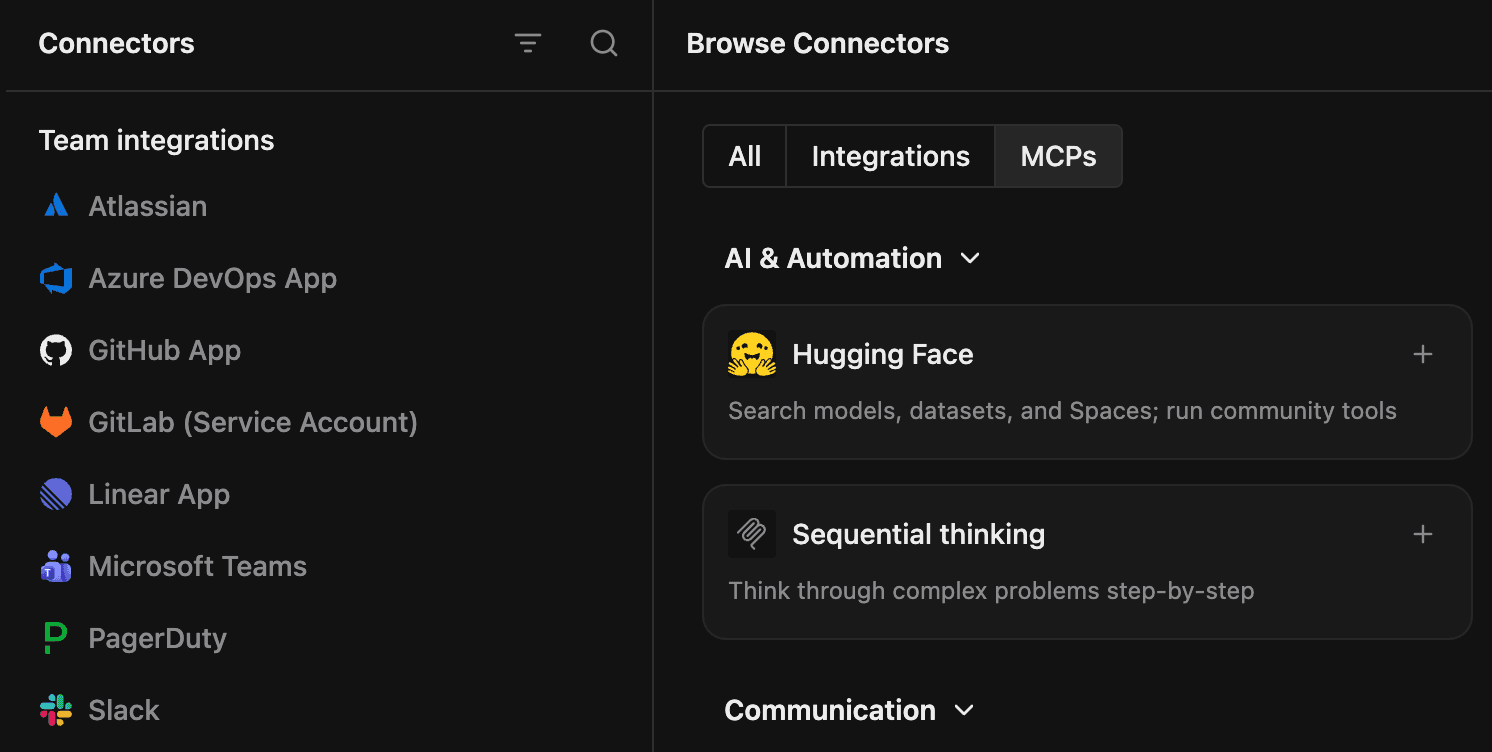
All your connections in one place
Integrations and MCP servers have all moved to a new experience in Settings > Connectors. Easily see what you have connected in the left pane and browse all available integrations and MCP servers on the right. Add a custom MCP server that is not listed in the marketplace by clicking Add Connector. You can also quickly see which MCP servers have connection errors or need your attention in the sidebar.
New features
- Restore earlier versions of files, link directly to Markdown headings, download binary files, and see recognizable names on comments.
- Personal profiles and Experts can now use icons, emojis, or uploaded avatars.
Improvements
- The integration catalog is now easier to browse and uses recognizable provider branding.
- Experts can now inspect reactions on Slack messages.
- Repository updates and environment rebuilds are safer, recover better from temporary failures, and provide clearer progress and error messages.
- Archived workers resume when contacted, worker activity is reported more accurately, and long reports are easier to view and copy.
- Cost Analytics now applies Cosmos filters consistently, supports better tag filtering, and calculates cost per session correctly.
- Expert lists now load faster.
- Command K finds results faster by searching synchronized local data first.
- File changes begin streaming sooner, and outdated clients can no longer recreate deleted files.
Bug fixes
- Chat history, queued messages, connection banners, startup progress, and switching between sessions now recover more reliably.
- MCP connections now recover more reliably during OAuth refreshes, reconnections, and startup.
- Sessions no longer crash on malformed messages or get stuck while switching conversations.
- Pinned folders and sessions keep their context, refresh after agent changes, and show unread activity correctly.
- The installed web app now leaves room for the iOS home indicator.
- Avatars no longer flicker repeatedly when an image is unavailable.
Aug 10
VSCode Extension 0.893.1 Release Notes
Reliability & Performance
- Interrupted chat responses now surface a retriable failure quickly instead of appearing to stall.
- Reopening very large workspaces no longer briefly freezes the editor.
Bug Fixes
- Fixed Context Usage double-counting MCP tool definitions.
Aug 5
Cosmos Week 32 Release Notes
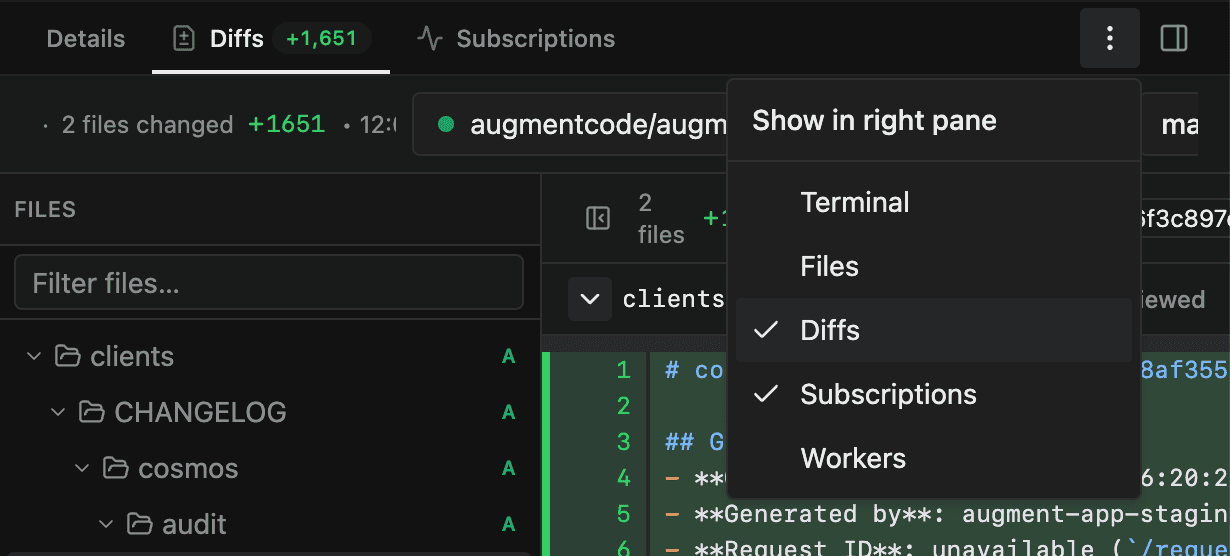
Configure your session tabs
You can now choose which session tabs appear in the main pane and side pane. Move Terminal, Files, Diffs, or Subscriptions by dragging a tab or using the pane's overflow menu; your layout is saved and applied to new sessions. Work between your agent, terminal, and code exactly how you want.
New features
- You can now connect ClickUp and Snowflake, with clearer workflows for GitLab, Linear, Asana, Jira, and Confluence.
- Automations now have dedicated overview and history pages, along with a clearer setup experience for triggers.
- Cost Analytics now supports CSV exports, flexible filters, secondary breakdowns, and more accurate totals.
- You can restore earlier versions of files, and agents can list, add, and reply to file comments.
- Daemon pools and Expert sessions can now use isolated workspaces.
Improvements
- Environment setup is clearer, rebuilds restore repositories safely, and stale updates offer better recovery options.
- MCP connection status, OAuth recovery, JSON imports, and connection testing are now clearer and more reliable.
- Transcripts, queued messages, drafts, status updates, reconnects, repository-clone warnings, and startup progress are now more reliable.
- Expert lists load faster, worker status and reports are more accurate, and Cosmos Advisor is available across eligible Spaces.
- Uploaded avatars and clearer errors make agent actions in Slack easier to understand.
- Folders keep their context, the sidebar refreshes in real time, and settings, integration pages, and mobile layouts are easier to use.
Bug fixes
- Secret values remain write-only, duplicate names are rejected, and saved values are no longer exposed in the browser.
- The Can use role now works when enabled, and pinned sessions can be unpinned from folders.
- Comment authors, notification ordering, binary downloads, HTML previews, and file-sharing controls now behave consistently.
- Fixed GitLab form submission, Linear reconnection, Asana setup, and guidance for Jira and Confluence tools.
JULY 2026
7
update
s
Jul 30
Cosmos Week 31 Release Notes
New features
- File comments: agents can now read and add comments on shared files.
- Cost Analytics: export CSV reports.
Improvements
- Integrations: settings pages have clearer navigation, GitLab tokens submit with Enter, and Linear warns when reconnection is required.
- Sessions: active worker counts appear on tabs, draft changes persist locally, and shared sessions accept standard user roles.
- Agent tools: Slack actions now return clearer errors when they cannot be completed.
- Guidance: Experts, Environments, and Automations now link directly to relevant documentation.
Bug fixes
- Cost Analytics: corrected Cosmos totals and token sorting.
- Changes: restored views recover when a saved source no longer exists, and workspace badges align correctly.
- Files: HTML previews no longer show a duplicate scrollbar.
- Experts: system controls no longer overlap.
- Automations: removed inaccurate run counters.
Jul 30
Auggie CLI 0.34.0 Release Notes
New Features
- Billing JSON Output: Included billing information in CLI JSON output.
- Sensitive Path Protection: Added approval requirements for saving files to sensitive paths.
- Daemon Environments: `auggie cloud environment get` now supports daemon targets.
Improvements
- Hosted Artifacts Consent: Gated hosted-artifacts feature descriptions on explicit user consent.
- Expert Triggers: Preserved trigger actors when applying expert configurations.
Bug Fixes
- Credential Resolution: Restored interactive credential resolution for MCP servers.
- Daemon Lifecycle: Preserved daemon execution lifecycle during automatic updates.
Jul 23
Cosmos Week 30 Release Notes
New features
- Session forking: branch a new session from a completed turn to explore a different direction without losing the original conversation.
- Cost Analytics: Enterprise organizations can explore billed costs with charts, detailed breakdowns, custom date ranges, filters, search, sorting, pagination, and direct session links.
- Session tags: view and edit custom tags in session details to use in your analytics dashboards.
- MCP catalog: connect more developer tools and Google Workspace services, including Gmail, Drive, Calendar, Sheets, Docs, and Slides.
Improvements
- File links: share durable links to exact retained file versions directly from the file-sharing dialog.
- File comments: comments stay attached to the intended text after edits and open more reliably from notifications.
- Cost Analytics: reports now support larger datasets, clearer tag labels, compact values, data-freshness guidance, and safer access controls.
- Environments: refreshes restore full Git history, and terminal and deletion workflows provide clearer feedback.
- Integrations: GitLab onboarding, Atlassian setup, OAuth feedback, and Microsoft Teams connection management are clearer and easier to complete.
Bug fixes
- Sessions: fixed creation failures with custom models or Unicode prompts, duplicate artifacts, delayed status updates, and unclear duplication errors.
- Files: stopped or disconnected daemon sessions now cancel stale operations and show appropriate recovery guidance.
- MCP servers: sharing no longer moves servers to the Default Space, and server identity and private-visibility guidance are clearer.
- Team management: users are routed to the supported management page for their billing model and Cosmos access.
Jul 22
Auggie CLI 0.33.0 Release Notes
New Features
- Cloud Triggers: Added `auggie cloud trigger enable/disable` commands to manage persistent workflow triggers.
- Worker Sessions: `auggie session get` now displays a session's child worker sessions.
Improvements
- MCP Reliability: Hardened MCP servers with OAuth callback WAF unblocking, empty-token rejection, and proactive usability probing at startup.
- MCP Error Visibility: Improved stdio error visibility and added automatic secret scrubbing for MCP server logs.
- MCP Refresh: Added support for the `tools/list_changed` notification to dynamically refresh the agent's cached tool list.
- MCP Provenance: The TUI now displays the provenance (origin) of MCP servers to clarify which plugin or organization provided them.
- Knowledgebase Terminology: Renamed "skills" to "prompt modules" across the knowledgebase and CLI for better alignment with Cosmos.
- VFS Links: Simplified `auggie cloud vfs get-url` paths and improved fallback handling for the `AUGMENT_VFS_DIR` environment variable.
- Daemon Diagnostics: Added guidance on clearing stale daemon pool IDs and improved multi-repo workspace examples in help text.
- Windows PTY: The Windows daemon now prefers the latest version of PowerShell for its PTY sessions.
Bug Fixes
- MCP Stability: Fixed an issue where transient connectivity probes could incorrectly mark a connected MCP server as failed.
- MCP Cleanup: Fixed a bug where removed MCP servers could reappear after a global host rebuild.
- VFS Pathing: Fixed VFS path resolution to avoid double-encoding slashes in file URLs.
Jul 16
Cosmos Week 29 Release Notes
New features
- Comments on files: comment on Virtual File System files with @mentions, emoji reactions, notifications, deep links, and click-to-open threads.
- Pinned experts: pin your most-used experts for quick access, scoped per Space, always discoverable from a dedicated tab.
- Automations initial instructions: set initial instructions on an Automation so launched sessions start with the right context.
- Jira & Confluence: connect personal Jira and Confluence accounts under Linked Accounts.
- GitLab: bulk-connect webhooks with progress, per-group coverage, and paginated repository selection.
- Tunnels: filter sessions for active tunnels on the Sessions page.
- Session composer: surface available integrations and MCP tools at the composer footer, and view environment details from the in-session chip.
Improvements
- Send or queue messages while an agent is still starting.
- Customize your recent session and pinned sessions with filters and display settings.
- You can now restore a deleted file from the Virtual File System.
- Raised the per-file size limit for the Virtual File System from 1 MB to 4 MiB.
- Secret values are hidden by default and can be revealed only when explicitly allowed.
Bug fixes
- Stopped message loss when refocusing the session tab.
- Fixed the command palette (Cmd+K) not opening in the composer and scoped its entity search to the selected Space.
- Fixed the environment picker showing "Inaccessible environment" for Space members.
- Blocked attachments for text-only models and rendered attached-file previews as chiclets.
Jul 15
Auggie CLI 0.32.0 Release Notes
Improvements
- Error Visibility: Improved visibility for API errors lacking detailed descriptions.
- MCP Reliability: Improved MCP reliability by automatically restarting wedged servers.
- MCP Monitoring: Enhanced MCP server health monitoring and added a guard for empty credentials.
- Event Logging: Added originating webhook information to the cloud session event log.
Bug Fixes
- Chat Summaries: Fixed an issue where stale thinking signatures remained in chat summaries.
- macOS Initialization: Fixed a macOS permission issue affecting terminal initialization at install time.
- MCP Diagnostics: Fixed a bug where MCP servers would stay in a "Connecting..." state in the diagnostics view.
- MCP Content: Fixed an issue where non-text/image MCP content was not correctly surfaced to the agent.
Jul 6
Cosmos Week 28 Release Notes
MCP
- New connectors: added out-of-the-box Salesforce and Datadog MCP servers to the catalog.
- Live attach: add an MCP server to a running session without restarting the VM.
- Composer @-mentions: attach MCP servers by @-mention directly in the chat composer.
- Reliability: clearer connection status and friendly names for failed servers, plus fewer spurious OAuth "Reconnect" prompts.
Sessions
- Tunnels: open a port to a cloud environment to access running services, like your development server, from anywhere.
- Usage & cost: see per-turn and per-session usage and cost, with accumulated cost badges, in the session details.
- Session details: session creator, originating webhook, and linked environment now shown.
- Attachments: upload SVG files as chat attachments.
Admin, Configuration, and Settings
- Experts: view expert version history and roll back to previous version.
- Spaces: MCP servers and secrets can be assigned to multiple spaces.
- Settings: moved all personal and organization settings into a single settings navigation.
Application
- Sidebar: display settings (filters, sort, density), pinned-folder controls, empty-folder tidy-up, and "Archive all sessions" for folders.
- Mark unread: mark sessions — including active ones — as unread.