
Tuesday, February 17, 2026
Improvements to local administrative access controls on Windows devices
We are updating the administrative privileges setting for Windows device management to give administrators more control over how local administrative access is handled on Windows 10 and Windows 11 devices, managed by Google Endpoint Management.
This update simplifies settings and provides greater flexibility for organizations that need to preserve local admin access while managing specific users via Google Workspace. Previously, managing local administrative access used a "Replace" behavior, which removed any existing members from the local administrators group before adding the newly requested ones.
Getting started
- Admins: Visit the Help Center to learn more about managing Windows device privileges.
- End users: There is no end user setting for this feature.
Rollout pace
- Rapid Release and Scheduled Release domains: Available now
Availability
- Business Plus
- Enterprise Standard and Plus
- Enterprise Essentials and Enterprise Essentials Plus
- Frontline Starter, Standard, and Plus
- Cloud Identity Premium
- Education Standard and Plus
- Endpoint Education add-on
Resources
- Google Workspace Admin Help: Set account permissions on Windows 10 or 11 devices
Wednesday, September 10, 2025
Available in closed beta: enhancing security outcomes with the Shared Signals Framework
What’s changing
The Shared Signals Framework (SSF) is a community supported initiative of the OpenID Foundation, focused on developing and maintaining a standardized protocol for cross-system communication between security platforms to share security insights and events. To support the SSF initiative, Google Workspace is implementing a SSF Receiver to ingest Continuous Access Evaluation Profile (CAEP) signals. This feature is available in closed beta for Google Workspace customers and interested partners. Eligible customers and security platform providers can use this form to express interest in the closed beta.
Who’s impacted
Admins
Why it matters
Our closed beta of the Shared Signals Framework (SSF) offers an example use case: session revocation. When Google Workspace gets a signal to revoke a session, the user's session is automatically invalidated, which cuts down the time a potentially compromised user has system access. This highlights SSF's strength: enhancing security by improving cross-system communication and speeding up responses to security events.
Getting started
- Admins: If you are a security platform interested in transmitting CAEP signals to Google Workspace, or a Google Workspace customer interested in testing the Shared Signals integration in your domain, please express your interest by filling out this form.
- Please note: While we are in a Closed Beta development phase, we intend to gradually onboard both security platforms and customers. Submission of the form does not guarantee acceptance to the Closed Beta. We will reach out to those who’ve submitted the form if there is availability.
- End users: There is no end user setting for this feature.
Availability
Available for Google Workspace:
- Enterprise Plus
Tuesday, August 26, 2025
Context-Aware Access policies can now be applied to all internal and third-party apps using OpenID Connect
What’s changing
Admins can now apply Context-Aware Access (CAA) policies to apps which use OpenID Connect (OIDC), which are a subset of OAuth apps that are authenticated using Google sign-in. Admins can use a single setting to apply CAA policies to all OIDC apps by default. We are not providing per app access control for individual apps at this moment. The new OIDC setting can also be applied in monitor mode for admins to gauge potential end user impact before applying in active mode.
CAA creates granular access control security policies for apps based on attributes, such as user identity, location, device security status, and IP address, and they can be applied to users on personal and managed devices. Expanding CAA to encompass OIDC apps means admins can ensure their users are able to access or are blocked from accessing these apps according to the broader security parameters of their organizations.

Admins can configure CAA policies for OIDC apps in the Admin console under Security > Context-Aware Access > General settings
Getting started
- Admins: CAA for OIDC apps can be configured at the OU level. Visit the Help Center to learn more about context-aware access, creating context-aware access levels, and assigning access levels to third-party apps.
- End users: If enabled by your admin, you can access certain apps when authenticating using your Google sign-in. Or you may see a message letting you know that you cannot use Google sign-in to authenticate with certain apps or you may see remediation messages which will provide some options on how to unblock apps.
Rollout pace
- Rapid Release and Scheduled Release domains: Extended rollout (potentially longer than 15 days for feature visibility) starting on August 26, 2025.
Availability
Available for Google Workspace:
- Frontline Standard and Plus
- Enterprise Standard and Plus
- Education Standard and Plus
- Enterprise Essentials Plus
- Also available for Cloud Identity Premium
Resources
- Google Workspace Admin Help: Context-Aware Access overview
- Google Workspace Admin Help: Create Context-Aware access levels
- Google Workspace Admin Help: Assign Context-Aware access levels to apps
- Google Workspace Admin Help: Context-Aware Access log events
- Google Workspace Admin Help: Allow users to unblock apps with remediation messages in Context Aware Access
Monday, August 11, 2025
Deploy Context-Aware Access levels in “Warn” mode
What’s changing
Admins can now select “Warn” as an action when deploying context-aware access (CAA) levels. When applied, end users will see a warning message if they do not meet their admin defined conditions for accessing Google Workspace applications. They can click “See details” to see more information about why they received the warning – for example, they may be notified that their operating system is outdated and requires an update. The warning provides a useful reminder for the user to take action otherwise access could be blocked in the future.
It’s important to note that “Warn” mode will not block users from accessing a particular app or service and they will have the option to proceed despite the warning. “Warn” mode helps educate users if they’re trying to access apps in a less secure situation and how to remediate this risk, while reducing the workload required by admins to socialize best practices.

Example of a warning notification
Example of what a user might see when they click “See details”
Additional details
- Warning messages will be shown to users once every 48 hours if their device and session continues to not meet access levels to ensure minimizing end user friction.
- "Access Warning Sent” and “Access Warning Viewed by User” events can be reviewed in the CAA audit logs and in the security investigation tool for select Google Workspace customers.
Getting started
- Admins:
- “Warn mode” can be assigned to existing CAA levels and new access levels in the Admin console. CAA levels can be applied at the OU and Group levels. Visit the Help Center to learn more about assigning Context-Aware access levels to apps.
- You can also manage end user remediation messages to help users to unblock apps with remediation messages in Context Aware Access.
- End users: Depending on your admin configuration, you may see warning messages when trying to access apps under certain conditions.

Admin app access level assignment flow
Rollout pace
- Rapid Release and Scheduled Release domains: Gradual rollout (up to 15 days for feature visibility) starting on August 5, 2025.
Availability
Available for Google Workspace:
- Frontline Standard and Frontline Plus
- Enterprise Standard and Enterprise Plus
- Education Standard and Education Plus
- Enterprise Essentials Plus
- Cloud Identity Premium
Resources
- Google Workspace Admin Help: Protect your business with Context-Aware Access
- Google Workspace Admin Help: Context-Aware Access overview
- Google Workspace Admin Help: Create Context-Aware access levels
- Google Workspace Admin Help: Assign Context-Aware access levels to apps
- Google Workspace Admin Help: Context-Aware Access log events
Thursday, March 9, 2023
Managed Android devices must upgrade to Android Device Policy during March 2023
What’s changing
All devices with the Google Apps Device Policy will lose access during March 2023 if they have not already upgraded. Existing Google Apps Device Policy app users must switch to Android Device Policy before then to continue syncing work data. Note that, per our last update, the new user registration flow on the legacy Google Apps Device Policy will be blocked and users may see errors during the registration process as of January 2022. Admins can act directly from the alert in the Admin console to identify users who need to upgrade.
.png)
Getting started
- Admins: Admins can find devices which may need to act in the Admin console. Visit our Help Center to learn more about the differences between Android Device Policy and Google Apps Device Policy. Different devices may need to take different steps to upgrade:
- Advanced management devices:
- Find advanced management devices by going to Admin console > Mobile devices and filtering for Type: Android and Management level: Advanced.
- Determine which of these devices are currently managed by the Google Apps Device Policy app and support the Android Device Policy app (i.e. devices with Android 6+ and support for a work profile)
- Send these instructions to your users to help them migrate to Android Device Policy.
- Basic management devices:
- Find basic management devices by going to Admin console > Mobile devices and filtering for Type: Android and Management level: Basic.
- Instruct users of these devices to upgrade the Android OS to version 6.0 Marshmallow or later.
- End users: Affected users can visit our Help Center to learn how to transition devices from Google Apps Device Policy to Android Device Policy.
Rollout pace
- Devices on the old agent will lose access during March 2023.
- Android Device Policy is available now and all users should upgrade to avoid disruption.
Availability
Resources
Friday, August 12, 2022
Google Workspace Updates Weekly Recap - August 12, 2022
New updates
Unless otherwise indicated, the features below are fully launched or in the process of rolling out (rollouts should take no more than 15 business days to complete), launching to both Rapid and Scheduled Release at the same time (if not, each stage of rollout should take no more than 15 business days to complete), and available to all Google Workspace and G Suite customers.
Delegate access to a shared inbox using a group address
You can now give an entire Google Group access to your Gmail account through mail delegation. With this feature, delegated users can read, send, and delete messages on the account owner's behalf. We hope this will enable teams to more effectively process incoming requests and tasks via a single shared email address. | Available to Business Starter, Business Standard, Business Plus, Enterprise Standard, Enterprise Plus, Education Fundamentals, Education Plus, Frontline, Nonprofits, and legacy G Suite Basic and Business customers only. | Learn more.
Granular controls for app allowlisting in the Google Workspace Marketplace
Admins can now choose which Google Workspace Marketplace apps are available to be installed by users in a particular department (OU) or group by managing Marketplace apps on their allowlist. Previously, admins could only manage the allowlist for an entire domain. Additionally, the Marketplace apps access settings, Allow all apps, Allow selected apps, and Block all apps, can now be set for your entire organization or for an OU or group. This new functionality provides a solution when only a subset of domain users need permissions to install certain Marketplace apps. Examples include Chat apps required for your Engineering organization and IT security group or Classroom add-ons required for high-school teachers. | Available to Business Starter, Business Standard, Business Plus, Enterprise Essentials, Enterprise Standard, Enterprise Plus, Education Fundamentals, Education Plus, Frontline, Nonprofits, and legacy G Suite Basic and Business customers only. | Learn more.
Seamlessly delete subsets of Sites
Site editors can now delete a page with subpages and delete pages that were copied into another site during a partial site copy. | Roll out to Rapid Release began August 8, 2022; launch to Scheduled Release planned for August 29, 2022. | Learn more.
Previous announcements
The announcements below were published on the Workspace Updates blog earlier this week. Please refer to the original blog posts for complete details.
Office Building support for Working Locations
We’ve added the ability to select a specific office building as your working location. | Available to Google Workspace Business Standard, Business Plus, Enterprise Standard, Enterprise Plus, Education Fundamentals, Education Plus, Nonprofits, and legacy G Suite Business customers only. | Learn more.
Improving data privacy with Client-side encryption for Google Meet
We’ve added Workspace Client-side encryption to Google Meet, giving customers increased control over their data. | Available to Google Workspace Enterprise Plus, Education Standard, and Education Plus customers hosting client-side encrypted calls only. | Learn more.
Stronger protection for sensitive Google Workspace account actions
There are now stronger safeguards for sensitive actions taken in your Google Workspace account. These apply to actions that, when done by hijackers, can have far reaching consequences for the account owner or the organization it belongs to. | Learn more.
The Google Meet and Google Duo app icons are changing, additional information for Google Workspace users
As part of the announcement that we are upgrading the Duo experience to include all Google Meet features, users will now begin to see their app name and icon update to Google Meet. | Learn more.
Better location context for events and RSVPs in Calendar
We’ve made it even easier to use RSVPs in Google Calendar and let others know how you’re planning to join a meeting. | Available to Google Workspace Business Standard, Business Plus, Enterprise Standard, Enterprise Plus, Education Fundamentals, Education Plus, Education Standard, Teaching & Learning Upgrade, Nonprofits, and legacy G Suite Business customers only. | Learn more.
Improved notifications when editing Microsoft Office files in Docs, Sheets, and Slides
We’ve rolled out a series of improvements to the notifications you see when editing a Microsoft Office-formatted file with Office editing mode. | Learn more.
Unified experience for Gmail logs in BigQuery, configure your existing Gmail logs to route to Workspace logs
Google Meet call control for USB peripheral devices
We've introduced additional call control for Google Meet which will allow you to toggle between mute and unmute using headsets, speaker microphones, and other USB peripheral devices. | Learn more.
Control visibility of admin alerts with admin role privileges
There is a new control that allows super admins to create a custom rule which ensures only admins with the DLP privilege can see DLP alerts. | Learn more.
Tuesday, August 9, 2022
Stronger protection for sensitive Google Workspace account actions
What’s changing
We’re introducing stronger safeguards for sensitive actions taken in your Google Workspace account. These apply to actions that, when done by hijackers, can have far reaching consequences for the account owner or the organization it belongs to.
Google will evaluate the session attempting the action, and if it’s deemed risky, it will be challenged with a “Verify it’s You” prompt. Through a second and trusted factor, such as a 2-step verification code, users can confirm the validity of the action. For example, if a malicious actor gains access to your account and attempts to change the name on your account, the action will be blocked until the true account owner can verify that this was intentional.
Note that this feature only supports users that use Google as their identity provider and actions taken within Google products. SAML users are not supported at this time. See below for more information.
Who’s impacted
Admins and end users
Why it matters
This added layer of security helps to intercept bad actors who have gained access to a user's account, further protecting their data and your organization's sensitive information. Additionally, these challenge attempts will be logged as an audit event allowing for further admin investigation.
Additional details
In the Admin console under Users > “UserName” > Security, admins can toggle login challenges OFF for ten minutes if a user gets stuck behind a "verify it's you prompt". We strongly recommend only using this option if contact with the user is credibly established, such as via a video call.
Getting started
- Admins: Visit the Help Center to learn more about Admin log events, verifying a users identity, and temporarily turning off the login challenges.
- End users: There is no end user setting for this feature, you'll see "Verify you" challenges if an account action is deemed risky.
Rollout pace
- Rapid Release and Scheduled Release domains: Available now.
Availability
- Available to all Google Workspace customers, as well as legacy G Suite Basic and Business customers
Resources
Monday, July 25, 2022
Migrate unmanaged accounts to your domain using new “UserInvitation” API functionality
What’s changing
We’re introducing new API functionality which allows you to automate the process of finding conflicting accounts and inviting them to join your organization.
Who’s impacted
Admins, end users, and developers
Why you’d use it
When employees create a Google account using one of your organization’s domains to access Google services, this is known as an unmanaged account. Unmanaged accounts are not ideal for managing users and keeping their work data secure.
Additionally, should an admin try to create a managed account with the same name, this conflict will prevent a managed account from being created. Using the UserInvitation API functionality, you can send a request to convert their personal account to a Google Workspace account.
While the same action can be manually performed with the Transfer Tool, the API allows unmanaged accounts to be identified and remediated programmatically, using logic that best suits your needs.
Getting started
- Admins and Developers:
- Use this developer documentation to learn more about the “UserInvitation” API functionality and creating and managing user invitations.
- Visit the Help Center to learn more about the unmanaged accounts and the Transfer Tool.
- End users:
- If you accept the request from your admin to transfer their account, your admin will be granted access to their data and the ability to manage your account.
- If you don’t accept the invitation, you will have to rename your account. Your administrator can create a new, managed account for you.
Rollout pace
- Rapid Release and Scheduled Release domains: Gradual rollout (up to 15 days for feature visibility) starting on July 25, 2022
Availability
- Available to Google Workspace Business Starter, Business Standard, Business Plus, Enterprise Standard, Enterprise Plus, Cloud Identity Premium and Cloud Identity Free customers
- Not available to Google Workspace Essentials,, Enterprise Essentials, Education Standard, Education Fundamentals, Education Plus, Frontline, and Nonprofits, as well as legacy G Suite Basic and Business customers
Resources
Friday, June 10, 2022
Google Workspace Updates Weekly Recap - June 10, 2022
New updates
Unless otherwise indicated, the features below are fully launched or in the process of rolling out (rollouts should take no more than 15 business days to complete), launching to both Rapid and Scheduled Release at the same time (if not, each stage of rollout should take no more than 15 business days to complete), and available to all legacy Google Workspace and G Suite customers.
Find and insert GIFs faster on Google Chat on iOS Devices
You can now easily browse, select and insert GIFs while using the Chat iOS mobile app. When enabled by your admin, select the “GIF” icon in the Google Chat compose bar. We hope this makes it easier for you to express yourself when interacting with your colleagues. | Learn more.
Set a custom duration for "Do Not Disturb" in Google Chat on web and iOS devices
You can now set the duration of your "Do Not Disturb" status to a specific date and time. We hope this feature gives you the flexibility to mute notifications the way it best suits you. This feature is now available on web, Android and iOS devices. | Learn more.
Previous announcements
The announcements below were published on the Workspace Updates blog earlier this week. Please refer to the original blog posts for complete details.
New admin controls for access to discoverable spaces in Google Chat
We’ve added the ability for Admins to set the default for newly created spaces and enable sharing scoped to specific audiences. | Available to Google Workspace Business Plus, Enterprise Standard, Enterprise Plus, Education Plus, and Education Standard customers only. | Learn more.
Context-Aware Access remediator provides more context for access denials
Admins using Context-Aware Access can now provide more information to end users when their access is blocked using the user remediation feature. | Available to Google Workspace Enterprise Plus, Education Plus, and Cloud Identity Premium customers only. | Learn more.
Mark your important tasks with a star in Google Tasks
You can now mark important tasks with a star in Google Tasks. Additionally, you’ll be able to view or sort your starred items across various tasks lists in the new starred view. | Learn more.
Monday, June 6, 2022
Context-Aware Access remediator provides more context for access denials
What’s changing
Admins using Context-Aware Access can now provide more information to end users when their access is blocked using the user remediation feature. This feature will help end users quickly understand what steps they need to take to re-access Google Workspace.
Who’s impacted
Admins and end users
Why it’s important
Context-Aware Access allows admins to assign granular access control policies to apps based on attributes such as user identity, location, device security status, IP address, etc. When a user or device does not meet the requirements, they will be unable to access the respective apps.
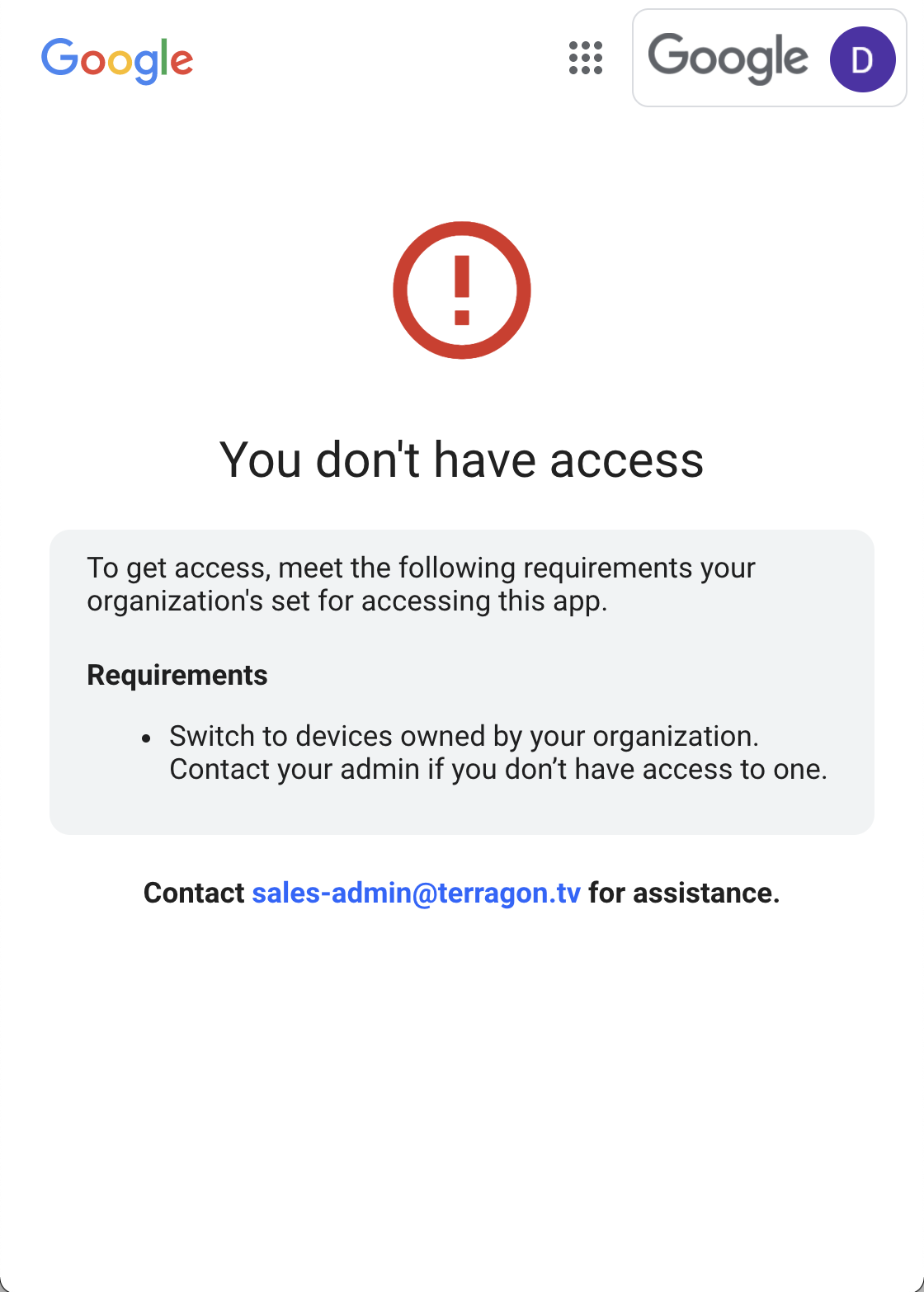
Currently, the only course of action for end users is to contact their admin for further support, which causes unnecessary delay, churn, and support calls. End user remediation will enable admins to provide their users with details about why their access has been denied and what steps need to be taken to restore access.
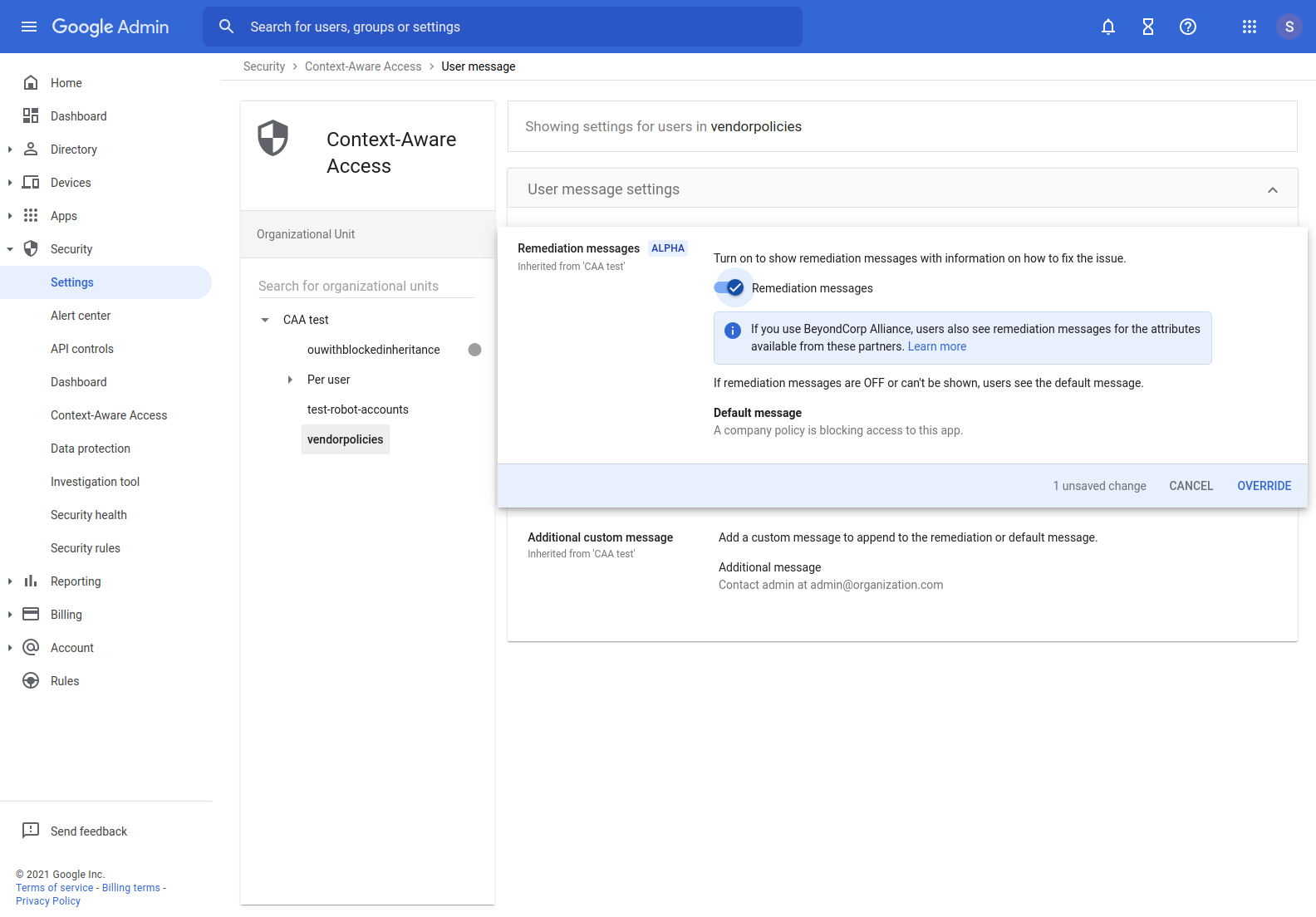
Further, once an admin enables remediation, they’ll see a message in the Admin console noting whether remediation is enabled. Each remediation action corresponds to an attribute which is causing access to be denied. Visit the Help Center for a list of the possible remediation actions that may be shown to end users.
Getting Started
- Admins: Admins can apply the new remediation messaging within the Context-aware Access section of the admin UI by navigating to Security > Context-Aware Access > User Message. Visit the Help Center to learn more about allowing users to unblock apps with remediation messages in Context Aware Access.

- End Users: End users will see the following message if they try to access a Google Workspace app when access is not allowed.
Rollout pace
- Rapid Release and Scheduled Release domains: Gradual rollout (up to 15 days for feature visibility) starting on June 6, 2022
Availability
- Available to Google Workspace Enterprise Plus, Education Plus, and Cloud Identity Premium customers
- Not available to Google Workspace Essentials, Business Starter, Business Standard, Business Plus, Enterprise Essentials, Enterprise Standard, Education Fundamentals, Frontline, and Nonprofits, as well as legacy G Suite Basic and Business customers
Resources
Monday, May 23, 2022
Send group membership information in outbound SAML responses
Quick launch summary
We’re adding the ability for admins to configure and send group membership information as part of SAML responses.
Currently, you are able to configure SSO to send user attributes in the SAML response when a user logs in to an app using SAML SSO. With this launch, admins can configure SSO to send group membership information to the application. Apps can then use these attributes to assess user authorization and to implement other business logic.
Getting started
- Admins: Visit the Help Center to learn more about group membership mapping and how to set up SSO via SAML for Apteligent.
- End users: No end user impact.


Rollout pace
- Rapid Release and Scheduled Release domains: Gradual rollout (up to 15 days for feature visibility) starting on May 23, 2022
Availability
- Available to all Google Workspace customers, as well as legacy G Suite Basic and Business customers and Cloud Identity customers
Resources
Friday, May 13, 2022
Google Workspace Updates Weekly Recap - May 13, 2022
New updates
Unless otherwise indicated, the features below are fully launched or in the process of rolling out (rollouts should take no more than 15 business days to complete), launching to both Rapid and Scheduled Release at the same time (if not, each stage of rollout should take no more than 15 business days to complete), and available to all legacy Google Workspace and G Suite customers.
New idle status in Google Chat
In Google Chat on web and Chat in Gmail, you'll see an orange clock badge for users that were recently active in Chat, but aren't currently active. We hope this makes it easier to determine the best time to connect with your colleagues. Visit the Help Center to learn more about availability statuses in Google Chat.

Changes to the default Host Management controls in Google Meet for users with personal accounts
The default setting for Host Management controls is changing for users with personal Google accounts. Previously, Host Management controls were ON by default — going forward, this setting will be OFF by default for new meetings. There are no changes to the behavior for Google Workspace customers or Google Workspace Individual users.
Previous announcements
The announcements below were published on the Workspace Updates blog earlier this week. Please refer to the original blog posts for complete details.
Improved user interface for sharing your working location in Google Calendar
This update improves the working location feature by offering the same functionality for easily entering and updating location information in a more compact format that uses screen space more efficiently. | Learn more here and here.
Available to Google Workspace Business Standard, Business Plus, Enterprise Standard, Enterprise Plus, Education Plus, and Nonprofits, as well as G Suite Business customers.
Easily search for Google Meet content in Google Drive
In Google Drive, you can now use app:”Google Meet” to easily find and organize Meet content such as Meet recordings, meeting transcripts, and more. | Learn more.
Import existing custom themes to new Google Sites
You can now import a custom theme from one new Google Site to another. | Learn more.
Create Spaces and Add Members with the Google Chat API, available in Developer Preview
Require email verification to book appointments in Google Calendar
When using appointment scheduling in Google Calendar, you can now opt to have users verify their email before booking an appointment. When enabled, the user must be signed into a Google account or validate their email address using a PIN code to complete the booking. | Learn more.
Available to Google Workspace Business Standard, Business Plus, Enterprise Standard, Enterprise Plus, Education Fundamentals, Education Standard, Education Plus, the Teaching and Learning Upgrade, and Nonprofits customers.
New delegated VirusTotal privilege in the Alert Center
In 2021, we announced an integration between the Alert Center and VirusTotal. At that time, any admin who had the Alert Center privilege could access all VirusTotal reports. Now, we’ve added the ability for admins to control who can view VirusTotal reports. | Learn more.
Available for Google Workspace Business Plus, Enterprise Standard, Enterprise Plus, Education Standard and Education Plus.
Set up SSO profiles for multiple third-party identity providers with the Multi-IdP SSO beta launch
You can further customize authentication by setting up single sign-on (SSO) profiles for multiple identity providers and then configuring authentication for each group or OU. This feature is available beginning today as an open beta, which means you can use it without enrolling in a specific beta program. | Learn more.
Thursday, May 12, 2022
Set up SSO profiles for multiple third-party identity providers with the Multi-IdP SSO beta launch
What’s changing
For over a decade, we have given admins the ability to configure authentication through a third-party identity provider . In 2021, we expanded this capability by making it possible to choose between third-party identity provider or Google authentication for specific groups or organizational units (OUs).
Now, you can further customize authentication by setting up single sign-on (SSO) profiles for multiple identity providers and then configuring authentication for each group or OU. This feature is available beginning today as an open beta, which means you can use it without enrolling in a specific beta program.
.png)
You can now set up SSO profiles for multiple third-party identity providers
Who’s impacted
Admins
Why you’d use it
Currently, you can configure SSO with a third-party identity provider to apply to your entire domain and then require a subset of your users, such as vendors or contractors, to authenticate with Google instead. However, if you have more than one identity provider, you might require greater customization of authentication options. For example, your company might be migrating from one provider to another, or it might have acquired another company that uses a different provider.
The Multi-IdP SSO beta lets you set up SSO profiles for each of your third-party identity providers, giving you the flexibility to specify the authentication method for various users in your organization as needed.
Getting started
- Admins: In the Admin console, navigate to Security > Settings > Set up single sign-on (SSO) with a third party IdP > Manage SSO Profile assignments. Visit the Help Center to learn more about setting up SSO for your organization.
.png)
Go to the Security settings to set up SSO profiles for third-party identity providers
- End users: There is no end user setting for this feature.
Rollout pace
- This feature is available now for all users.
Availability
- Available to Google Workspace Business Starter, Business Standard, Business Plus, Enterprise Essentials, Enterprise Standard, Enterprise Plus, Education Fundamentals, Education Plus, Frontline, and Nonprofits, as well as legacy G Suite Basic and Business customers
- Available to all Cloud Identity customers
- Not available to Google Workspace Essentials customers
- Not available to users with personal Google Accounts
Resources
Friday, January 7, 2022
Google Workspace Updates Weekly Recap - January 7, 2022
New updates
Unless otherwise indicated, the features below are fully launched or in the process of rolling out (rollouts should take no more than 15 business days to complete), launching to both Rapid and Scheduled Release at the same time (if not, each stage of rollout should take no more than 15 business days to complete), and available to all Google Workspace and G Suite customers.
Update
[2024]: We have completely rolled back this feature on web and there are no plans to relaunch this feature at this time. We will provide an update if and when one becomes available.
[February 2, 2022]: We have temporarily paused the rollout for this feature. We apologize for the delay and we will share an update once rollout resumes.
PPTX file limit increase in Google Slides
You can now import PPTX files up to 300MB into Google Slides using Office Editing mode — previously, 100MB was the maximum. Once imported, you can save back your edits to the underlying PPTX file. | Available to all Google Workspace customers and users with personal Google accounts. | Learn more.
Previous announcements
The announcements below were published on the Workspace Updates blog earlier this week. Please refer to the original blog posts for complete details.
Use a new enterprise certificate condition to set context-aware access rules for company-managed devices
When configuring context-aware access rules, you can now use a new signal to determine whether a device is company-owned. | Available to Google Workspace Enterprise Standard, Enterprise Plus, Education Standard, Education Plus, and Cloud Identity Premium customers. | Learn more.
Friday, January 7, 2022
Use a new enterprise certificate condition to set context-aware access rules for company-managed devices
Quick launch summary
When configuring context-aware access rules, you can now use a new signal to determine whether a device is company-owned. By using new enterprise certificates as an alternative context-aware signal to determine if a device is a company-managed asset, you can set more specific context-aware policies that are appropriate based on the trustworthiness of the device.
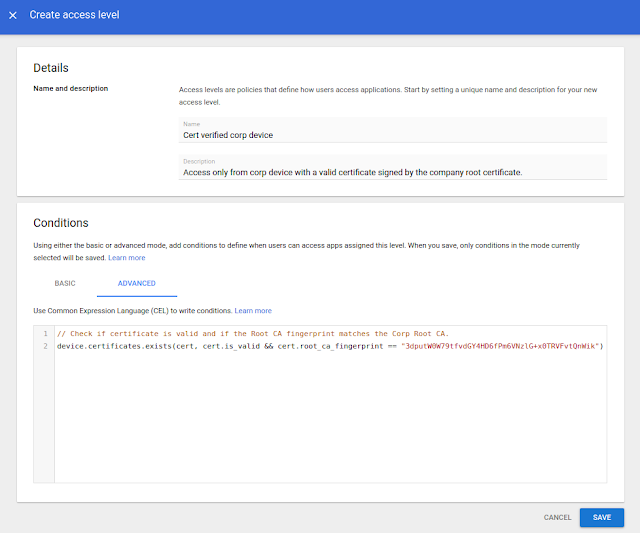
The Admin console screen to configure context-aware access rules using enterprise certificate condition
Getting started
- Admins: The feature is available by default, but needs to be configured before use. Use our Help Center to learn more about configuring enterprise certificates and configuring context-aware access rules.
- End users: No end user impact.
Rollout pace
- This feature is now available for all eligible users.
Availability
- Available to Google Workspace Enterprise Standard, Enterprise Plus, Education Standard, Education Plus, and Cloud Identity Premium customers
- Not available to Google Workspace Essentials, Business Starter, Business Standard, Business Plus, Enterprise Essentials, Education Fundamentals, Frontline, and Nonprofits, as well as legacy G Suite Basic and Business, and Cloud Identity Free customers
Resources
Thursday, December 16, 2021
Making dynamic groups more powerful with custom user attributes and OrgUnit queries
What’s changing
Google Groups are a convenient way for Workspaces users to collaborate and a powerful tool for admins to apply consistent security and access policies to sets of users or devices. Dynamic groups further enhance this functionality by allowing group membership to be automatically updated based on parameters such as location, department, or job title.
Today we are further extending the functionality of dynamic groups in two important ways:
- First, dynamic groups can now be defined by querying custom user attributes. This functionality is available as an open beta (no sign up required).
- Second, dynamic groups can also be defined based on users’ membership in Organizational Units (OUs). This feature is now generally available.
Who’s impacted
Admins only
Why you’d use it
Dynamic groups can be used for email distribution lists, access control, group based policy, and more. Compared to regular Google Groups they have the added benefit that memberships are automatically kept up-to-date. Automating membership management increases security, reduces errors, and alleviates user frustration while minimizing the burden on admins.
These new features expand the utility of dynamic groups for organizations that take advantage of custom user attributes and organizational units. They can further tailor dynamic groups to meet the specific needs of their organization. For example these organizations could now:
- Create a dynamic group for all users of a subsidiary (an organizational unit) based in a particular city or state.
- Create a dynamic group with all users with a custom attribute of a “job_skill” or “speciality”.
Getting started
- Admins: To take advantage of this new dynamic group functionality, you will need to have already defined custom user fields or organizational units.
- Once this is in place you can test membership queries and then create / update dynamic groups to take advantage of them.
- To query a customer attribute “EmployeeNumber” (based on this sample schema):
user.custom_schemas.employmentData.EmployeeNumber == '123456789' -
To query all direct members of an organizational unit:
user.org_unit_id==orgUnitId('03ph8a2z1enx4lx') -
To query all direct and indirect members of an organizational unit:
user.org_units.exists(org_unit, org_unit.org_unit_id==orgUnitId('03ph8a2z1khexns')) - End users: Not available to end users.
Rollout pace
- Custom user attribute queries are available now for all users in open beta (no sign up required)
- Organizational unit based dynamic group queries are now generally available for all users.
Availability
- Available to Google Workspace Enterprise Standard, Enterprise Plus, and Education Plus customers
- Not available to Google Workspace Essentials, Business Starter, Business Standard, Business Plus, Enterprise Essentials, Education Fundamentals, Frontline, and Nonprofits, as well as G Suite Basic and Business customers
Resources
Thursday, December 9, 2021
Set user language programmatically with the Directory API
Quick launch summary
With this launch, you can use Google Workspace Admin SDK Directory API to customize a per user language preference via the user create/update flow.
Previously, the AdminSDK only allowed one customer level language setting that applied to all users, which could then be changed individually via the Admin console, or by the user. We hope this will make it easier to set up and manage your users at scale.
Getting started
- Admins and developers: No action required. This function is available by default. Use our API documentation to learn more about using the Directory API to update the ULS.
- End users: No end user impact.
Rollout pace
- Rapid Release and Scheduled Release domains: Full rollout (1–3 days for feature visibility) starting on December 9, 2021.
Availability
- Available to all Google Workspace customers, as well as G Suite Basic and Business customers
Resources
Friday, November 19, 2021
Assign SSO profile to organizational units or groups with the SAML Partial SSO feature, now generally available
What’s changing
Earlier this year, we announced a beta for assigning SSO profiles to organizational units or groups. This feature is now generally available and allows admins to specify groups or organizational units (OUs) to authenticate a subset of your users using Google.
Who’s impacted
Admins
Why it’s important
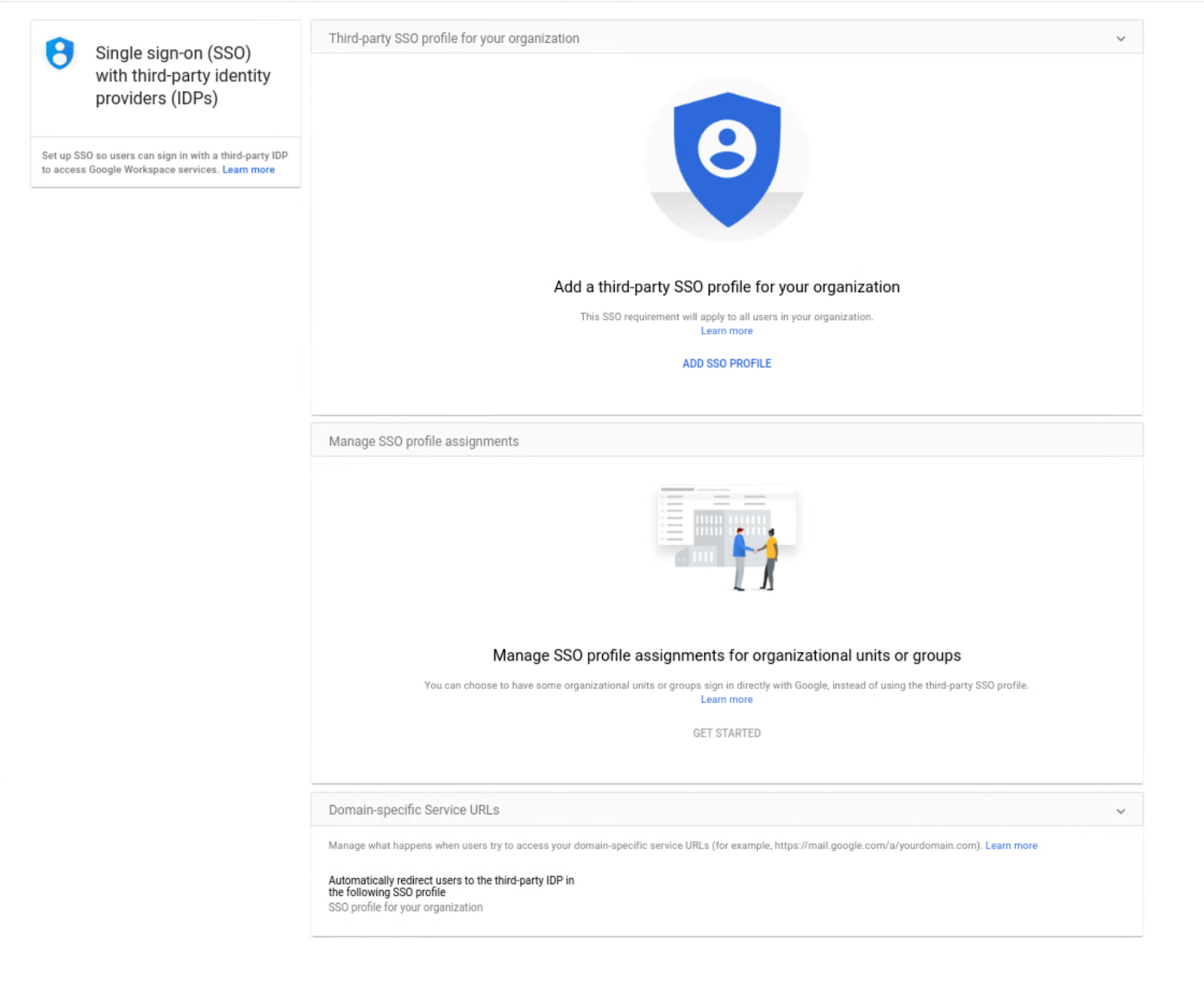
Currently, when you configure SSO with a third-party identity provider, the setting applies to your entire domain. However, there are some instances where you may want a subset of your users, such as vendors or contractors, to authenticate with Google instead. The Partial SSO feature gives you the flexibility to specify the authentication method for various users in your organization as needed.
Getting started
- Admins: In the Admin console, navigate to Security > Settings > Set up single sign-on (SSO) with a third party IdP > Manage SSO Profile assignments. Visit the Help Center to learn more about assigning SSO profiles to organizational units or groups.
- End users: No action required.
Rollout pace
- Rapid Release and Scheduled Release domains: Full rollout (1–3 days for feature visibility) starting on November 19, 2021
Availability
- Available to Google Workspace Business Starter, Business Standard, Business Plus, Enterprise Essentials, Enterprise Standard, Enterprise Plus, Education Fundamentals, Education Plus, Frontline, and Nonprofits, as well as G Suite Basic and Business customers
- Available to all Cloud Identity customers
- Not available to Google Workspace Essentials customers
Resources
Monday, October 18, 2021
Control session length for Google Cloud Console and gcloud CLI now generally available
Quick Summary
In 2019, we announced a beta that allows Google Workspace, Google Cloud Platform (GCP), and Cloud Identity admins to set a fixed session duration for specific apps and services. This is now generally available. After the session expires, users will need to re-enter their login credentials to continue to access:
- GCP Cloud Console
- gcloud command-line tool
- Any other application that requires Cloud admin scopes
Giving admins more control over how often users need to re-authenticate makes it more difficult for the wrong people to obtain that data if they gain unauthorized access to a device.
Getting started
- Admins: This feature will be OFF by default and can be enabled at the OU level. You can find session length controls at Admin console > Security > Google Cloud session control. Visit the Help Center to learn more about how to set session length for Google Cloud services.
- End users: If a session ends, users will simply need to log in to their account again using the familiar Google login flow.
Rollout pace
- Rapid Release and Scheduled Release domains: Gradual rollout (up to 15 days for feature visibility) starting on October 18, 2021
Availability
- Available to all Google Workspace customers, as well as G Suite Basic and Business customers, and Google Cloud Identity Free and Premium customers
Thursday, July 29, 2021
Assign SSO profile to organizational units or groups with the new SAML Partial SSO beta
What’s changing
Currently, you can configure to authenticate your users using a third-party identity provider — this configuration applies to all users within your domain. Now, you have the option to specify groups or organizational units (OUs) to authenticate a subset of your users using Google. This feature is available beginning today as an open beta, which means you can use it without enrolling in a specific beta program.
Who’s impacted
Admins
Why you’d use it
Currently, when you configure SSO with a third-party identity provider, the setting applies to your entire domain. However, there are some instances where you may want a subset of your users, such as vendors or contractors, to authenticate with Google instead. The Partial SSO beta gives you the flexibility to specify the authentication method for various users in your organization as needed.
Getting started
- Admins: In the Admin console, navigate to Security > Settings > Set up single sign-on (SSO) with a third party iDP > Manage SSO Profile assignments. Visit the Help Center to learn more about assigning SSO profiles to organizational units or groups.

Rollout pace
- Rapid and Scheduled Release: Full rollout (1-3 days for feature availability) beginning on July 29, 2021
Availability
- Available to all Google Workspace and Cloud Identity customers