
Friday, May 15, 2026
Whiteboarding add-ons now available for Android-based Google Meet hardware
Third-party whiteboarding add-ons for Google Meet will be available for room hardware based on Android. As all-in-one devices with touchscreens become certified for Meet, users will be able to whiteboard on them to share ideas, brainstorm, and work on projects together in real-time meetings, wherever they are.
The following third-party whiteboard software will be available on these devices:
- Figma
- Lucidspark
- Miro
Participants who join Meet calls on the web or via the mobile app will be able to view and interact in whiteboard sessions by installing the corresponding add-on. Add-ons can be found in the Workspace Marketplace along with pricing and terms from each third-party vendor.

Add-ons for Google Meet are available from the Workspace Marketplace
Getting started
- Admins: To use whiteboarding with room hardware, admins must first install the Figma, Lucidspark, or Miro add-on from the Google Workspace Marketplace. These add-ons can be installed for OUs with room devices or your entire domain. Visit the Help Center to learn more about installing Marketplace apps for your organization.
- End users: If their admin allows it, users can install the Figma, Lucidspark, and Miro add-ons from the Google Workspace Marketplace. Visit the Help Center to learn how to use add-ons with Google Meet.
Rollout pace
- Rapid Release and Scheduled Release domains: Available now
Availability
- Available to all Google Workspace customers with Google Meet hardware devices
Resources
- Google Meet Hardware Help: Use add-ons with Google Meet on Desk 27 and Board 65
- Google Meet Help: Use add-ons with Google Meet
- Google Workspace Admin Help: Install Marketplace apps for your organization
Thursday, May 14, 2026
Deploying ServiceNow Now Assist Virtual Agent from the Google Workspace Marketplace
Google Workspace customers can now deploy the Now Assist Virtual Agent for Google Chat integration directly from the Google Workspace Marketplace. This update simplifies the deployment process for Workspace and ServiceNow administrators, allowing them to provide employees with centralized access to support and automated workflows within their primary communication tool more easily.
The Now Assist Virtual Agent allows users to perform routine ServiceNow tasks and requests without leaving Google Chat. Individuals can get answers from knowledge base articles, create support tickets, check the status of existing requests, and order new items. This integration reduces the need to switch between applications, helping users maintain focus and resolve issues more efficiently.
With Now Assist, users have a contextual conversational experience that can initiate AI Agents to further automate complex workflows and requests.


Getting started
- Admins: ServiceNow admins need to install the Google Chat plugin 3.0 and link their Google Chat with ServiceNow. Workspace admins can then deploy the Now Assist Virtual Agent on their users’ behalf. Visit the Help Center to learn more about installing Marketplace apps for your organization.
- End users: End users need a ServiceNow account to use this app. They can search for the Now Assist Virtual Agent in Google Chat under Apps > Find apps or visit the Google Workspace Marketplace to install the Now Assist Virtual Agent.
Rollout pace
- Rapid Release and Scheduled Release domains: Available now
Availability
- Available to all Google Workspace customers, Workspace Individual Subscribers, and users with personal Google accounts. To utilize this feature, customers must have both ServiceNow and Google Chat. Note that Now Assist capabilities require an additional license from ServiceNow.
Resources
- ServiceNow Help Center: Activate Now Assist in Virtual Agent for Google Chat
- ServiceNow Help Center: Conversational Integration with Google ChatGoogle
- Workspace Updates Blog: Effortlessly work with ServiceNow data across Google Chat and Sheets
Monday, October 6, 2025
Get more insight into how Chat apps are used within your organization
What’s changing
Google Workspace admins can now get better insights into how Chat apps are being used within their organization via enhanced logging and display of log information. Specifically, we are enhancing Chat event logs to add Chat app related events. Using these logs, admins can gain insights such as:
- Which Chat apps have been added to what Spaces
- What apps have been added in a specific space
- What apps have been removed, and who removed them
- What are the most popular chat apps within your organization
 |
An example of a data visualization on Chap app usage created via Looker based on BigQuery export data
Getting started
- Admins:
- Logs will be collected by default. Admins can see the logging information:
- Via BigQuery log export and subsequent queries / data visualizations
- Via the Reports API
- Coming soon, the logs will also be available in the Security Investigation Tool (SIT)
- Use our Help Center to learn more about allowing users to install Chat apps, or using Chat log events.
- End users:
- No end user impact.
Rollout pace
- This feature is available now.
Availability
Audit logs are available via:
- The Reports API to all Google Workspace customers \
- BigQuery to Frontline Standard and Frontline Plus; Enterprise Standard and Enterprise Plus; Education Standard and Education Plus; Enterprise Essentials Plus.
- (Coming soon) The Security Investigation Tool (SIT) to Frontline Standard and Frontline Plus; Enterprise Standard and Enterprise Plus; Education Standard and Education Plus; Enterprise Essentials Plus; Cloud Identity Premium.
Resources
Wednesday, October 1, 2025
Quickly find and use Google Chat apps and Workspace actions with the redesigned integrations menu
What’s changing
We're making it quicker and easier to find and use your favorite apps and actions in Google Chat with a redesigned integrations menu that lets you search for apps and execute commands with fewer clicks. The menu is accessible through the "+" button next to the compose bar or by typing "/". For example, you can now simply type "/poll" to start a Poll using the Poll app, or press the “+” button and see options to create a calendar invite, upload a Drive file, send a Meet link, or more.

Getting started
- Admins: Chat apps can be managed at the domain, OU, or group level. Use our Help Center to learn more about how to manage Chat apps within your organization.
- End users: This feature will be on by default. See our Help Center to learn more about how to use apps in Google Chat.
Rollout pace
- Rapid Release and Scheduled Release domains: Gradual rollout (up to 15 days for feature visibility) starting on September 29, 2025.
Availability
- Available to all Google Workspace customers, Workspace Individual Subscribers, and users with personal Google accounts
Resources
Tuesday, September 16, 2025
Automatically install Chat apps to your conversations
What’s changing
Chat apps will now automatically be added as needed to future conversations after being installed by a user. Previously, a user had to manually install a Chat app into every space, group chat, and direct message.
For example, the first time a user tries to start a poll with the Poll app, they will be prompted to install the Poll app. After that, when they try to create a Poll in any space, the app will automatically be installed, and users can start voting right away.
Note that users can only install Chat apps as allowed by their admin. Admins can also choose to install apps for their organization, making apps available by default for some or all users without the need for users to install apps themselves.

Getting started
- Developers:
- Developers do not have to make any changes to their Chat app in order to support automatic installs.
- Admins:
- Admins can choose to admin-install Chat apps for their users, so that the Chat app will automatically be available for end users.
- If admins allow users to install all, or a specific list of Chat apps, from the Workspace Marketplace, end users can browse the Marketplace to discover and find Chat apps to install and automatically be added to conversations.
- To prevent Chat apps from automatically being added to conversations, admins can either prevent users from installing the specific Chat app or restrict who can install apps in specific spaces.
- Visit the Help Center to learn more about Getting started as a Marketplace app admin.
- End users:
- Install Chat apps from the Workspace Marketplace.
- Visit the Help Center to learn more about using apps in Google Chat.
Rollout pace
- Rapid Release and Scheduled Release domains: Available now.
Availability
- Chat apps are available to all Google Workspace customers, Workspace Individual Subscribers, and users with personal Google accounts.
- Developing Chat apps is available to all Google Workspace customers.
Resources
Thursday, July 10, 2025
Introducing Lucidchart and Lucidspark apps in Google Chat
What’s changing
Lucidchart, an app that helps users collaborate on diagrams, such as flowcharts, wireframes, entity relationship diagrams, and more, and Lucidspark, a virtual whiteboard tool, are two third-party add-ons already available across Workspace apps, such as Docs and Meet. Today, we’re excited to announce support for both of these apps in Google Chat.
Lucidchart and Lucidspark’s integrations with Google Chat will enable users to:
- Get an immediate preview of Lucidspark and Lucidchart links shared in Chat conversations.
- Type “/lucidsearch” in Chat to find and share Lucid documents instantly.
- Keep teams aligned by bringing visual context into conversations.
 |
| Searching for Lucid documents in Chat spaces |
Additional details
Getting started
- Admins:
- If you have already admin-installed the Lucidchart and Lucidspark add-ons, then no action is needed.
- To enable the Lucid for Google Chat app for all users in a domain, or to add these apps to the allowlist for users to be able to install them, admins can admin-install or allowlist Lucidchart and Lucidspark from the Google Workspace Marketplace.
- Visit the Help Center to learn more about managing the Marketplace app allowlist for your organization.
- End users:
- Every user that already has the Lucidchart and Lucidspark add-ons will automatically get the Chat app.
- If you do not have the Lucidchart and Lucidspark add-ons yet, you can install them from the Workspace Marketplace and they will automatically appear in Chat.
Rollout pace
- Rapid Release and Scheduled Release domains: Full rollout (1–3 days for feature visibility) starting on July 10, 2025
Availability
- Available to all Google Workspace customers, Workspace Individual Subscribers, and users with personal Google accounts
Resources
- Google Workspace Admin Help: Install Marketplace apps for your organization
- Google Workspace Marketplace: Lucidchart and Lucidspark
Monday, June 2, 2025
Integrate Jira with Gmail to create, update, and track work items directly in your inbox
What’s changing
In 2023, Atlassian introduced Jira and Confluence smart chips, which brings together popular tools used for project management and content collaboration. Since then users have been able to easily access Jira issues and Confluence pages within Google Docs, Sheets and Slides, and now we’re excited to announce a new integration with Gmail that's now included as part of the Jira and Confluence app.
Users can now create new Jira issues, view up-to-date information about existing issues, and take action all directly from Gmail.
Whether you're tracking projects, managing tasks, or collaborating across teams, this integration expansion across multiple Workspace apps keeps everything connected – without disrupting your workflow.

Getting started
- Admins: Admins need to install or allowlist this specific add-on for that application to ensure end users have access. Visit the Help Center to learn how to install Marketplace apps in your domain and manage Google Workspace Marketplace apps.
- End users: If enabled by your admin, install the add-on by going to the Atlassian Marketplace listing.
Rollout pace
- Rapid Release and Scheduled Release domains: Available now.
Availability
- Available to all Google Workspace customers, Workspace Individual Subscribers, and users with personal Google accounts
Resources
Friday, December 6, 2024
Google Workspace Updates Weekly Recap - December 6, 2024
3 New updates
Unless otherwise indicated, the features below are available to all Google Workspace customers, and are fully launched or in the process of rolling out. Rollouts should take no more than 15 business days to complete if launching to both Rapid and Scheduled Release at the same time. If not, each stage of rollout should take no more than 15 business days to complete.
Adding improved accessibility tagging to PDFs exported from Google Docs
To improve the ability for users with screen readers and other assistive technology to read and navigate PDFs, we’re adding more structural and accessibility tagging in PDFs exported from Google Docs. Specifically, we’ve improved tagging for paragraphs, headings, hyperlinks, image alt text, and lists. | Rolling out now to Rapid Release and Scheduled Release domains, with expected completion by mid January 2025. | Available to all Google Workspace customers, Workspace Individual Subscribers, and users with personal Google accounts. | Visit the Help Center to learn more about using Google Docs with a screen reader.
Improving out of office notifications in Google Chat group messages and spaces
Today, if you navigate to a 1:1 direct message with someone who is out of office, you will see a banner that shows the person is out of office and the date they are returning. We’re excited to announce that this banner will now extend to group direct messages and spaces. If a group direct message or space has more than 6 users, out of office status will only be shown if the user is @ mentioned. | Rollout to Rapid Release and Scheduled Release domains is complete. | Available to all Google Workspace customers, Workspace Individual Subscribers, and users with personal Google accounts. | Visit the Help Center to learn more about mentioning someone else in a Chat message.

Easily discover Google Workspace Marketplace apps in Google Docs
We’re making it easier for users to discover and install relevant add-ons and apps available in the Google Workspace Marketplace. Starting this week, when you add a link into a Google Doc that is supported by select Marketplace apps, you will be prompted to install the relevant add-on. Once installed, you can replace the link with a third-party smart chip and preview relevant app information upon hovering over the chip. | Rollout to Rapid Release domains is complete; launch to Scheduled Release domains planned for December 10, 2024. | Available to Google Workspace customers, Google Workspace Individual subscribers, and users with personal Google accounts. | Visit the Help Center to learn more about inserting third-party smart chips from other applications.
Previous announcements
The announcements below were published on the Workspace Updates blog earlier this week. Please refer to the original blog posts for complete details.
Now generally available: Policy visualization across Google Docs, Sheets, Slides, Vids and Drive
Earlier this year, we introduced a beta for policy visualization across Google Docs, Sheets, Slides, and Drive. This is now generally available, and as a result, users who are interacting with policy-protected content, such as those with data loss prevention (DLP) rules or trust rules, will now be informed about what actions are prevented by those policies. | Learn more about policy visualization.
New beta that supports running Google Drive on Arm-compatible Windows PCs now available
We're excited to announce beta support for Drive for desktop on Windows 11 devices powered by Snapdragon processors. Compiled natively for ARM64, this release enables users to easily sync and store files online from Windows PCs powered by Snapdragon. | Learn more about the beta for running Google Drive on Arm-compatible Windows PCs.
Now generally available: configure third-party apps by select API scopes
Earlier this year, we launched the ability to configure third-party apps by select API scopes to open beta. This feature is now generally available. | Learn more about configuring third-party apps by select API scopes.
Available in beta: Convert your client-side encrypted spreadsheets after a Vault or Takeout export
After a Vault or Data export (Takeout), admins can now convert their exported client-side encrypted spreadsheets to Excel files. | Learn more about CSE spreadsheets.
Adding granular control options for who can respond to Google Forms
Form creators can limit response access to specific users, groups, or target audiences—similar to how file owners can restrict the sharing of Google Docs, Sheets, Slides or Sites in Drive. | Learn more about controls on Form responses.
Assign Calendar resources to organizational units
Admins can now assign Calendar resources, such as rooms, projectors, or company cars, to specific organizational units. Upon doing so, the resource will be governed by the policies and settings of the assigned organizational unit (OU), including data location policies. | Learn more about assigning Calendar resources.
Request an eSignature on PDF files
You can now request electronic signatures on PDF files stored in Google Drive. | Learn more about eSignature on PDF files.
Tackle repetitive tasks, extract deeper insights, and more with the latest premade Gems in the Gemini app
We’re introducing several new Gems which you can leverage across a variety of areas, including common use cases for teams across sales, customer service, marketing, human resources, and more. | Learn more about premade Gems in the Gemini app.
HIPAA and additional ISO certifications for the Gemini app on web and mobile
We’re pleased to announce the attainment of HIPAA, ISO 27701, 27017, 27018, 9001, and 42001 certifications for the Gemini app on web and mobile.| Learn more about certifications for the Gemini app on web and mobile.
Completed rollouts
Wednesday, October 9, 2024
Easily find and connect to featured partner apps from the Google Workspace Marketplace
Update
[October 18, 2024] We have updated the rollout information for this feature. See the Rollout section below for more details.
What’s changing

Getting started
- Admins: Visit the Help Center to learn more about controlling user access to Marketplace apps and installing Google Workspace Marketplace apps.
- End users: Use this link to browse our featured partner apps in the Google Workspace Marketplace and this Help Center article about browsing the Google Workspace Marketplace. Depending on your Admin configuration, you may or may not be able to install apps yourself or apps may be installed for you by your admin.
Rollout pace
- Rapid Release and Scheduled Release domains: Extended rollout (potentially longer than 15 days for feature visibility) starting on October 8, 2024, with expected completion by November 15, 2024
Availability
- Available for all Google Workspace customers
Resources
Thursday, September 12, 2024
Improving the Google Workspace Marketplace app publishing experience with Drafts
What’s changing
Developers can create apps for the Google Workspace Marketplace that automate tasks, integrate Google Workspace with third-party products, and enhance communication and collaboration.
To improve upon the publishing experience, we’re excited to announce that developers can now make changes to their app listing, save them as a draft, and send the draft version to review. This will allow developers to preview changes and share drafts with specific users to help with validation before publishing a listing.

Who’s impacted
Developers
Why you’d use it
This update allows developers to test and preview their Google Workspace Marketplace app listing prior to publishing, which enables feedback collection and ultimately makes updating an app listing much easier.
Additional details
While changes are under review in the draft state, the original app listing remains available on the Google Workspace Marketplace.
Getting started
- Admins: There is no admin control for this feature. Visit the Help Center to learn more about Google Workspace Marketplace and getting started as a Marketplace app admin.
- Developers: Visit the developer resources to update your app listing with drafts, learn how to develop apps and add-ons for Google Workspace, and how to make your apps and add-ons available in the Marketplace.
Rollout pace
- Rapid Release and Scheduled Release domains: Extended rollout (potentially longer than 15 days for feature visibility) starting on September 12, 2024
Availability
- Available to all Google Workspace customers, Workspace Individual Subscribers, and users with personal Google accounts
Resources
Friday, September 6, 2024
Google Workspace Updates Weekly Recap - September 6, 2024
1 New update
Unless otherwise indicated, the features below are available to all Google Workspace customers, and are fully launched or in the process of rolling out. Rollouts should take no more than 15 business days to complete if launching to both Rapid and Scheduled Release at the same time. If not, each stage of rollout should take no more than 15 business days to complete.
Improved user experience for Google Meet on Android devices
If you’re joining a Google Meet call from Android phone, tablets or large screen devices, you’ll now see a more streamlined, space-efficient experience with edge-to-edge video. We’ve expanded the video feed to encompass spaces where there were previously margins around the video feed. This helps provide a richer, more immersive viewing experience. You’ll also notice a sleeker user interface for meeting controls, and clearer indicators for information such as the meeting title. | Rollout to Rapid Release and Scheduled Release domains is complete. | Available now for all Google Workspace customers, Workspace Individual Subscribers, and users with personal Google accounts. | Visit the Help Center to learn more about joining a meeting.


Previous announcements
The announcements below were published on the Workspace Updates blog earlier this week. Please refer to the original blog posts for complete details.
Gemini (gemini.google.com) now shows related content links in its responses
You can now access additional information on topics directly in Gemini’s (gemini.google.com) responses to your prompts. Specifically, you’ll see links to related content in responses to fact-seeking prompts — you can click the arrow chips to dive deeper into the topic. If you have a Gemini for Workspace license and Google Workspace extensions in Gemini are enabled, Gemini will also now include inline links to relevant emails referenced in responses where the Gmail extension is used. | Learn more about related content links shown in Gemini.
View your most relevant Google Drive folders and files on a single page
You will now see a combined, unified view for file and folder suggestions on the Drive homepage that leverages machine learning to help you find and organize your most relevant content faster and intuitively. | Learn more about the view in Drive.
Empowering Google Workspace customers to take control of their emissions with Electricity Maps
To help our customers continue to understand and measure the carbon intensity of their cloud computing, we have partnered with Electricity Maps to provide hourly emissions data within the Carbon Footprint report. | Learn more about Electricity Maps.
Monday, August 26, 2024
Automate your workflows on Google Chat with IFTTT and UKG Flow integrations
What’s changing
The IFTTT integration enables users to automate Chat with 1,000+ of today's most popular apps. For example, Chat users can now set up workflows, like sending an onboarding email to a customer that’s added as a new member to a space, or sending a message to a space when a new file is added to a Google Drive, Dropbox, or Box folder. Using the integration, Chat users can also stay up-to-date on all of their communities by having new Discord, X, and Facebook mentions or tags automatically posted to a space.

Using the UKG Flow app, users and employees can perform common UKG actions, such as those included in the Timekeeping & Scheduling functionalities of UKG Pro WFM.

With these integrations, users can accomplish more in their workday by completing common tasks using daily productivity apps, without ever leaving Chat.
Getting started
- Admins: UKG Flow requires admins to install the app on their users’ behalf. Visit the Help Center to learn more about installing Marketplace apps for your organization.
- End users:
- Get started with the IFTTT’s Chat integration here.
- Once UKG Flow is installed by your admin, you can use it freely in Google Chat.
Rollout pace
- These integrations are available now.
Availability
- Available to all Google Workspace customers, Workspace Individual Subscribers, and users with personal Google accounts
Resources
Wednesday, February 21, 2024
What’s changing
In 2023, we introduced the ability for admins to install Google Chat apps to direct messages on behalf of users within their domain from the Google Workspace Marketplace. Now, end users can also discover and install Google Chat apps from the Google Workspace Marketplace.

Additionally, users can now open the Google Workspace Marketplace directly from within Chat. This will include an enhanced browsing experience with curated app categories such as “Intelligent apps”. Lastly, developers can start publishing Chat apps on the Google Workspace Marketplace, allowing users to more easily discover, install and use the apps.
Who’s impacted
Admins, end users and developers
Additional details
Chat app users can now leave reviews and flag any inappropriate Chat apps directly from the Marketplace app listing.

Getting started
- Admins: Installation and usage of Chat apps for end users will be ON by default. Visit the Help Center to learn more about controlling user access to Marketplace apps and allowing users to install Chat apps.
- End users: Visit the Help Center to learn more about using apps in Google Chat.
- Developers: Visit the Help center to learn more about building Google Chat apps, publishing into the Workspace Marketplace and getting Chat apps featured.
Rollout pace
- Rapid Release and Scheduled Release domains: Available now
Availability
- Available to all Google Workspace customers, Google Workspace Individual subscribers, and users with personal Google accounts
Resources
- Google Workspace Admin Help: Install Marketplace apps in your domain
- Google Workspace Admin Help: Allow users to install Chat apps
- Google Workspace Admin Help: Control user access to Marketplace app
- Google Help: Get started with apps in Google Chat
- Google Help: Chat apps available from Google
- Google Help: Use apps in Google Chat
Friday, December 1, 2023
Google Workspace Updates Weekly Recap - December 1, 2023
3 New updates
Unless otherwise indicated, the features below are available to all Google Workspace customers, and are fully launched or in the process of rolling out. Rollouts should take no more than 15 business days to complete if launching to both Rapid and Scheduled Release at the same time. If not, each stage of rollout should take no more than 15 business days to complete.
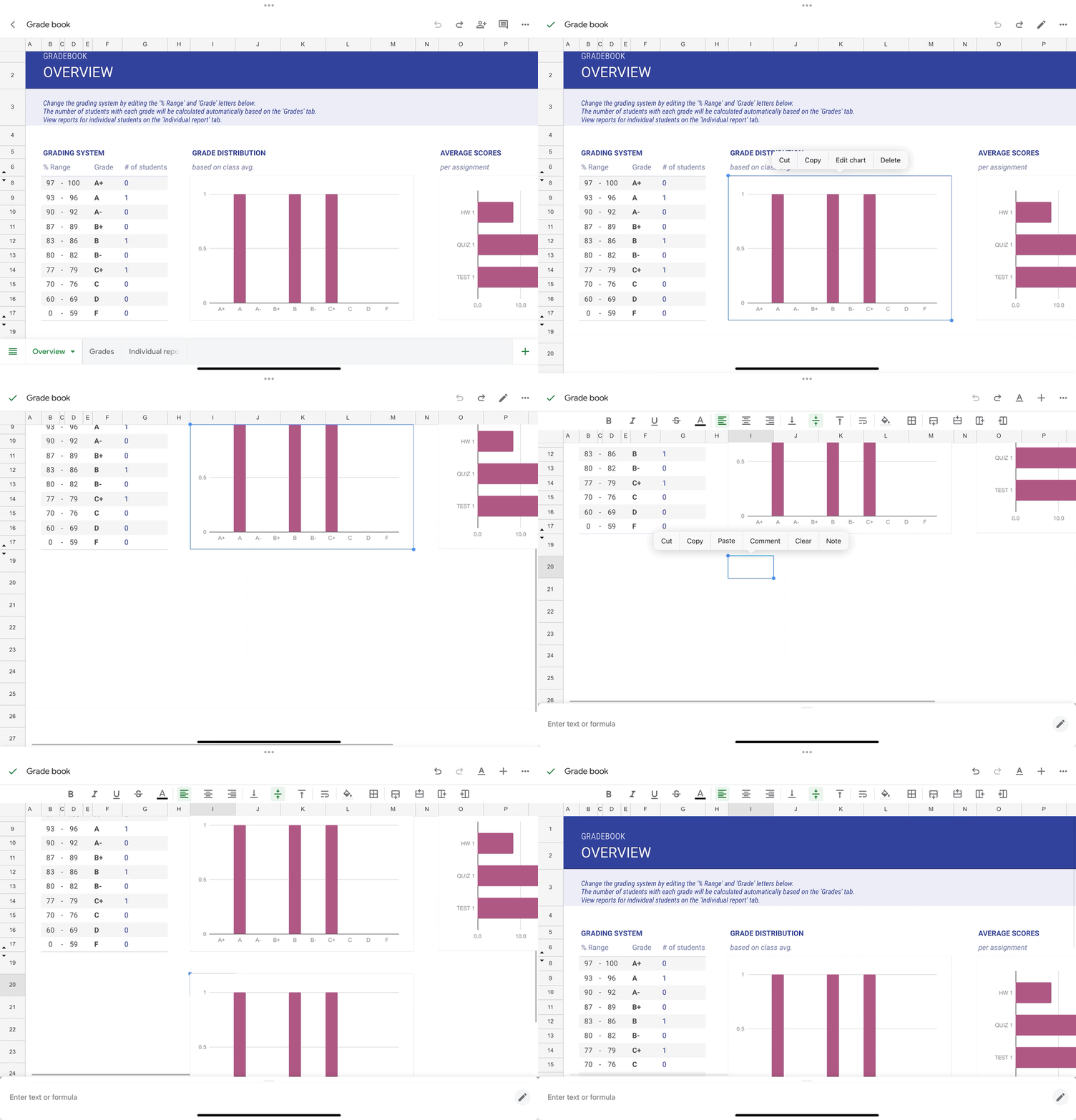
New ways to use the Google Sheets app on iOS devices
You can now copy charts from the Google Sheets app on all iOS devices and paste them externally as images or within the same spreadsheet as a duplicate chart. In addition, you can modify text formatting using the contextual toolbar in Sheets when a keyboard is attached to iOS tablets. | Rolling out to Rapid Release and Scheduled Release domains now. | Available to all Google Workspace customers and users with personal Google Accounts. | Learn more about adding & editing a chart or graph and editing & formatting a spreadsheet.
Adding ‘Admin managed apps’ category to Google Workspace Marketplace
We’re excited to announce a new featured app category in the Marketplace: Admin managed. These Enterprise apps can be installed only by a Google Workspace administrator for their organization. | Available now to all Google Workspace customers. | Learn more about Featured app categories.
Bulk select in Gmail on Android and iOS devices
We’re introducing a feature that enables you to bulk select a batch of messages in the email threadlist with one tap using the Gmail app on Android and iOS devices. After clicking the select all icon, a batch of messages will be selected, enabling you to easily perform email actions such as deleting multiple messages or marking them as “read”. | This feature is available now on Android devices and is rolling out now to Rapid Release and Scheduled Release domains on iOS devices. | Available to all Google Workspace customers and users with personal Google Accounts.

Previous announcements
The announcements below were published on the Workspace Updates blog earlier this week. Please refer to the original blog posts for complete details.
Create shareable video presentations in Google Slides
We’re introducing slides recordings, a new Google Slides feature that lets you easily record yourself presenting, and then share the presentation with others to view when it works for them. | Available to Google Workspace Business Standard, Business Plus, Enterprise Starter, Enterprise Essentials, Enterprise Essentials Plus, Enterprise Standard, Enterprise Plus and Education Plus only. | Learn more about slides recordings.
The next evolution of automated data entry in Google Sheets
Expanding message bubbles in Google Chat to iOS devices
In September, we introduced message bubbles in Google Chat on web and Android, enabling users to more easily differentiate incoming versus outgoing messages in the Chat message stream. This week, we’re excited to announce the expansion of message bubbles to iOS devices. | Learn more about message bubbles.
Updates to the Google Drive scanner on Android & iOS devices
We’re introducing additional enhancements to the Drive scanner on Android devices, which now powers the Google Pixel camera and includes improvements to the scanner experience when capturing content. We’re also expanding the Google Drive scanner and title suggestion feature to iOS devices. | Learn more about Drive scanner.
Introducing a new homepage view in Google Drive
We’ve added a new streamlined homepage for Drive called Home that makes it easier and faster for you to find files that matter most. | Learn more about Drive home.
Introducing a new mobile experience for Google Chat
Google Vault now supports Google Calendar
Google Vault now supports Calendar, which means customers can take new actions around Calendar data. | Available to Google Workspace Business Plus, Enterprise Essentials, Enterprise Essentials Plus, Enterprise Standard, Enterprise Plus, Education Standard, Education Plus customers or customers with the Vault add-on license only. | Learn more about Vault supporting Calendar.
More insights to help admins troubleshoot Google Meet hardware issues
In 2022, we introduced several improvements for managing Google Meet hardware devices. These improvements included surfacing additional information about device issues, such as a description of the issue, when the issue was detected, and more. Now, we’re taking these improvements one step further by providing admins with even more data points. | Learn more about Google Meet hardware issues.
Monitor insider risk of Google Workspace data with Chronicle
Admins can now more seamlessly integrate their Google Workspace data with Chronicle (Google’s cloud-native Security Operations platform), to quickly detect, investigate and take action on risky activity and threats. | Available to Google Workspace Enterprise Standard and Enterprise Plus customers only. | Learn more about Chronicle.
Google Classroom now supports roster import from SIS partners
Educators can now easily import students from their student information system (SIS) to Google Classroom using OneRoster. This integration saves educators time and helps make class setup much quicker. | Available to Education Plus and the Teaching and Learning Upgrade only. | Learn more about roster import.
Completed rollouts
Rapid Release Domains:
- Take Google Meet on-the-go with ease (iOS)
- 1:1 video calling in the Google Meet mobile app is now available (iOS)
- Streamlining the user experience in Google Chat to help you find what you need much faster
- Improved search query suggestions in Google Chat web
- Raise your hand with gesture detection in Google Meet
Scheduled Release Domains:
Rapid and Scheduled Release Domains:
- Google Meet Series One Desk 27 and Acer Chromebase for meeting devices will automatically adjust your lighting
- Introducing a new homepage in the Google Drive app (Android & iOS)
- More languages available for Google Meet captions
- View full screen tasks lists on Google Calendar
- Enhancing Google Drive usability on large screen Android devices
- Expanding Google Drive log events to additional Google Workspace editions
- Updates for managing iOS devices: user enrollment is now supported; purchase and distribute apps using the Apple Volume Purchase program
- The next evolution of automated data entry in Google Sheets
- Updates to the Google Drive scanner on Android & iOS devices
- Monitor insider risk of Google Workspace data with Chronicle
Wednesday, October 4, 2023
Allow users to install and run any internal app from Marketplace
What’s changing
We’re introducing a new admin setting to control whether users can install and run any internal app from the Google Workspace Marketplace along with their allowlisted third-party apps. This added admin feature gives more controls to customize users’ access to trusted internal apps based on their company policies, security requirements and user needs.
Currently, admins can leverage Marketplace apps access settings to choose to allow users to access all internal and third-party apps or specific allowlisted internal and third party apps published in the Marketplace. Many organizations build internal apps and add-ons specifically for for their organization, and this added admin control saves admins time by allowing them to distribute all internally-built apps with a single click, rather than managing and allowlisting each one.
Who’s impacted
Admins, end users and developers
Why it matters
This requested feature enables admins to have added control over app access settings.
Additional details
With this new setting, admins can allow any internal app, but still limit the installation of third-party apps. Internal apps are apps that are privately-published in your organization.
Getting started
- Admins:
- This setting will be OFF by default and can be enabled by going to the Admin console > Menu > Apps > Google Workspace Marketplace apps > Settings. Visit the Help Center to learn more about managing Marketplace apps on your allowlist.
- For organizations using API controls to restrict app access to the user data, consider checking the Trust internal apps setting to allow API access for all internal apps.


- End users: If enabled by their admin, you can install any internal app from the Marketplace by going to workspace.google.com/marketplace/mydomainapps.
Rollout pace
- Rapid Release and Scheduled Release domains: Extended rollout (potentially longer than 15 days for feature visibility) starting on October 4, 2023
Availability
- Available to all Google Workspace customers
Resources
Wednesday, August 30, 2023
Independent Security Verification badge in the Google Workspace Marketplace
What’s changing
Beginning today, you’ll see a new independent security verification badge for select apps in the Google Workspace Marketplace. This badge indicates that the app was validated by an independent security assessor to meet the integration and security requirements, as outlined in Tier 3 of the Cloud Application Security Assessment.
.png)
In the Marketplace, you can already see app information like information about app access to user data, who the developer is and their privacy policies, and more. Surfacing this additional app security information helps admins make an even more informed decision before installing or allowlisting apps for their users.
Getting started
- Admins: Visit the Help Center to learn more about installing Google Workspace Marketplace apps and distributing a Marketplace app to users.
- Developers: Use our developer documentation to learn more about how to get your app featured in the Google Workspace Marketplace.
Rollout pace
- Rapid and Scheduled Release domains: Available now.
Availability
- Available to all Google Workspace customers, as well as users with personal Google accounts.
Resources
Wednesday, March 29, 2023
Admins can install Chat apps for use in direct messages
What’s changing
Google Chat apps integrate with productivity tools, enable you to collaborate with others, and can also help automate your work. Previously, to start using an app in Chat, users had to individually install apps as described here.
Starting this week, admins can install Chat apps for direct messages on behalf of users within their domain from the Workspace Marketplace. Users will automatically see when an app has been enabled, eliminating the need to manually install the app themselves.

Who’s impacted
Admins
Why you’d use it
This feature enables admins to provide their users with instant access to the Chat integrations they need for their workflow within an organization.
Getting started
- Admins:
- Visit the Help Center to learn more about installing Marketplace apps in your domain and allowing users to install Chat apps.
- When a Chat app is installed for an end-user, they will be automatically notified.
- End users cannot uninstall the apps installed by admins, but they can turn notifications OFF.
- See the list of Chat apps available from Google and consider performing an admin install from the Marketplace (using your administrator account).
- End users:
- End users will continue to be able to install chat apps from Chat. Installation from the Workspace Marketplace isn't available for end users at this time.
- When a Chat app is installed by your admin, you will be automatically notified.
Rollout pace
- Rapid Release and Scheduled Release domains: Extended rollout (potentially longer than 15 days for feature visibility) starting on March 29, 2023
Availability
- Available to Google Workspace Essentials, Business Starter, Business Standard, Business Plus, Enterprise Essentials, Enterprise Standard, Enterprise Plus, Education Fundamentals, Education Plus, Education Standard, the Teaching and Learning Upgrade, Frontline, and legacy G Suite Basic and Business customers
- Not available to Nonprofits
- Not available to users with personal Google Accounts